

A portable monitor can make a hotel desk or client-site workspace much more practical, but a travel screen needs to balance usable workspace against the weight and setup effort it adds to a bag. My leading picks are the Dell Pro 14 Plus P1425 for its lighter 14-inch 16:10 format, the KYY 15.6-inch for a large screen at a stated 1.7 pounds, and the Lenovo L15 for travelers who value an adjustable stand over the lightest carry. They solve different problems: Dell prioritizes portability and vertical workspace, KYY emphasizes screen size and a compact kit, and Lenovo offers a more desk-like stand but carries a stated weight of 4.7 pounds.

Get the latest gadgets delivered free with Prime
- Fast, free delivery on millions of items
- Prime Video, Amazon Music and more included
- Member-only deals all year
The main decision is whether you want a larger 15.6-inch view or a smaller screen that is easier to carry. I also weigh connection flexibility, brightness information, stand usability, and whether the listed details expose a practical snag, such as a source device needing USB-C video output. These picks are judged for business travel rather than gaming or permanent desk use; none should be chosen without checking that your laptop can supply video and power through the connection you plan to use.
Complete the kit



Key Takeaways
- The Dell Pro 14 Plus is the lightest listed option at 0.65 kg and its 16:10 screen gives documents more vertical room than the 16:9 models.
- The KYY combines a 15.6-inch screen with a stated 1.7-pound weight and built-in speakers, though it has no built-in battery.
- The Lenovo L15 is the stand-focused choice: it offers height adjustment and flicker-free technology, but its listed 4.7-pound weight is a serious travel tradeoff.
- The cocopar is a practical pick for connection and placement options, with HDMI, USB-C, VESA mounting, and a 2-year warranty; its cover raises its stated weight to 2.4 pounds.
- The MNN keeps the setup simple with two full-feature USB-C ports, HDMI, and a cover stand, but its listed details do not give a weight or brightness figure.
| Dell Pro 14 Plus P1425 Portable Monitor |  | Best Overall for Lightweight Business Travel | Screen size: 14 inches | Resolution: 1920 × 1200 | Aspect ratio: 16:10 | VIEW ON AMAZON | See Our Full Breakdown |
| KYY Portable Monitor 15.6″ 1080p Computer Screen Extender with Cover | 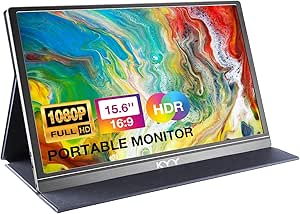 | Best Large Screen for a Compact Travel Kit | Screen size: 15.6 inches | Resolution: 1920 × 1080 | Panel: IPS | VIEW ON AMAZON | See Our Full Breakdown |
| Lenovo L15 15.6-Inch Full HD Portable Monitor |  | Best for an Adjustable, Desk-Like Setup | Screen size: 15.6 inches | Resolution: 1920 × 1080 | Panel: IPS | VIEW ON AMAZON | See Our Full Breakdown |
| cocopar 15.6-Inch Portable Monitor, 1080p FHD, 60Hz, IPS, USB-C and HDMI, with Cover Stand |  | Best for Flexible Mounting and Connection Options | Screen size: 15.6 inches | Resolution: 1920 × 1080 | Brightness: 280 cd/m² | VIEW ON AMAZON | See Our Full Breakdown |
| MNN 15.6″ FHD 60Hz Portable Monitor with USB‑C, HDMI, IPS and HDR |  | Best Simple USB-C and HDMI Setup | Screen size: 15.6 inches | Resolution: 1920 × 1080 | Refresh rate: 60 Hz | VIEW ON AMAZON | See Our Full Breakdown |
| portable monitor for business travel | Screen size | Resolution | Weight | Brightness |
|---|---|---|---|---|
| Dell Pro 14 Plus P1425 Portabl | 14 inches | 1920 × 1200 | 0.65 kg | 400 cd/m² |
| KYY Portable Monitor 15.6" 108 | 15.6 inches | 1920 × 1080 | 1.7 lb | — |
| Lenovo L15 15.6-Inch Full HD P | 15.6 inches | 1920 × 1080 | 4.7 pounds | 250 nits |
| cocopar 15.6-Inch Portable Mon | 15.6 inches | 1920 × 1080 | 1.5 lb without cover; 2.4 lb with cover | 280 cd/m² |
| MNN 15.6" FHD 60Hz Portable Mo | 15.6 inches | 1920 × 1080 | — | — |
More Details on Our Top Picks
Dell Pro 14 Plus P1425 Portable Monitor
The Dell Pro 14 Plus P1425 takes my top spot because it pairs the lineup’s lightest stated weight, 0.65 kg, with a 14-inch display that still gives office documents useful room. Its 1920 × 1200 resolution uses a 16:10 aspect ratio, so spreadsheets, email threads, and long documents can show more vertical content than the 16:9 screens on the MNN, KYY, Lenovo, and cocopar. That makes the smaller panel feel like a considered work format rather than simply a reduced version of a 15.6-inch screen.
For travel setup, the 10–90-degree tilting stand, VESA compatibility, and included protective sleeve with cable storage address several everyday annoyances. A sleeve that stores cables can make packing less fiddly, while a wide tilt range helps adapt to desks where laptop height or chair position cannot be changed. Its listed 400 cd/m² brightness is also the strongest specified figure in this group, although glossy reflections can still be a problem near windows or bright overhead lighting.
Compared with the KYY and cocopar, Dell gives up screen size and their bundled cover-stand approach in exchange for lower stated weight, extra vertical resolution, and a more adjustable built-in support. Its 144 Hz refresh rate is listed, but I would not rank it highly for business travel on that feature alone; office tasks are better served by the compact format and useful stand. The key uncertainty is connectivity: the supplied details list HDMI and USB-C but do not spell out every cable or power arrangement. I would check your laptop’s ports and the monitor’s connection requirements before a trip.
Pros:- Listed weight of 0.65 kg is the lowest in this lineup.
- 16:10, 1920 × 1200 screen offers more vertical workspace than the 16:9 alternatives.
- Tilt stand ranges from 10 to 90 degrees, with VESA mounting as another placement option.
- 400 cd/m² listed brightness and sleeve with cable storage suit mobile work.
Cons:- The 14-inch display is smaller than the 15.6-inch panels on the other four picks.
- Glossy finish can reflect room lights and windows.
- Supplied details do not fully explain cable and power requirements.
Best for: Frequent business travelers who prioritize a lighter bag, work with documents, and want a tilt-adjustable stand and protective cable-storage sleeve.
Not ideal for: Anyone who wants the largest possible second screen, prefers a matte panel for bright rooms, or needs fully detailed connection and power guidance before buying.
- Screen size:14 inches
- Resolution:1920 × 1200
- Aspect ratio:16:10
- Brightness:400 cd/m²
- Weight:0.65 kg
- Refresh rate:144 Hz
- Connectivity:HDMI, USB Type-C
- Stand and mounting:10–90-degree tilt; VESA-compatible
Our verdict“I would choose the Dell for frequent travel when a lighter carry and document-friendly 16:10 screen matter more than maximum display size.”
KYY Portable Monitor 15.6″ 1080p Computer Screen Extender with Cover
The KYY 15.6-inch is the pick I would look at when a 14-inch screen feels cramped but a heavier, more elaborate travel setup does not appeal. It is listed at 1.7 pounds and 0.3 inch thick, giving it a useful balance of full-size workspace and packability. That stated weight is much easier to reconcile with travel than the Lenovo L15’s listed 4.7 pounds, though the Dell remains the lighter choice if every bit of bag weight matters.
KYY adds a PU leather smart cover that doubles as a stand, plus two USB-C ports, Mini-HDMI, a 3.5 mm audio jack, and built-in stereo speakers. HDMI broadens connection options when a laptop lacks USB-C video, while the speakers can be handy for a quick call or presentation when carrying separate audio gear is inconvenient. Its 15.6-inch Full HD IPS display and wide viewing angle suit side-by-side work, but the supplied specifications do not state brightness, so I would not make it my first choice for a sunny room or a bright client space.
Against the MNN, KYY has more connection detail, a stated weight, and built-in speakers; MNN instead lists HDR and two full-feature USB-C ports. Compared with cocopar, KYY is lighter on its stated figures and includes speakers, while cocopar provides a listed color gamut, brightness figure, VESA mounting, and longer warranty. KYY’s most important limitation is power: it has no built-in battery, and USB-C video requires a compatible source. I would verify laptop compatibility and plan for a suitable power connection rather than assuming one cable will work with every device.
Pros:- 15.6-inch Full HD IPS panel offers more workspace than Dell’s 14-inch display.
- Listed at 1.7 pounds and 0.3 inch thick for relatively easy packing.
- Includes USB-C, Mini-HDMI, and a 3.5 mm audio jack.
- Cover doubles as a stand, and built-in stereo speakers avoid separate audio gear.
Cons:- No built-in battery; the monitor needs power from a suitable connected source or supply.
- USB-C video depends on Thunderbolt 3 or compatible USB-C video output.
- Brightness is not listed in the supplied specifications.
Best for: Travelers who want a full 15.6-inch workspace, a stated sub-two-pound monitor, a cover stand, and built-in speakers.
Not ideal for: People who need an independent battery-powered screen, a stated brightness figure for bright environments, or a connection that works through any USB-C port.
- Screen size:15.6 inches
- Resolution:1920 × 1080
- Panel:IPS
- Weight:1.7 lb
- Thickness:0.3 inch
- Ports:2 USB-C, Mini-HDMI, 3.5 mm audio
- Audio:2 built-in stereo speakers
- Cover:PU leather smart cover that serves as a stand
Our verdict“I would pick KYY when screen size and a lightweight cover-stand kit matter more than battery independence or documented brightness.”
Lenovo L15 15.6-Inch Full HD Portable Monitor
The Lenovo L15 is the most appealing option here when screen positioning matters more than getting the lightest kit through an airport. Its 15.6-inch Full HD IPS panel matches the size and resolution of MNN, KYY, and cocopar, but its height-adjustable stand sets it apart from the cover-based supports on those three. On a temporary desk, being able to raise the monitor can help create a more comfortable two-screen layout without stacking books or improvising a stand.
Lenovo also lists flicker-free technology, two USB-C ports, and a 178-degree viewing angle. Those details favor a straightforward office-style setup, especially if the display will sit on a desk for long stretches rather than be moved between rooms. The important travel drawback is the listed 4.7-pound weight, heavier than the stated Dell, KYY, and cocopar figures. I would not treat “portable” as meaning effortless to carry: that weight can make a real difference if the monitor joins a laptop, charger, and work documents in a commuter bag.
The 250-nit brightness is another limitation compared with Dell’s listed 400 cd/m² and cocopar’s 280 cd/m². The figures are not a full guarantee of how screens look in every room, but they give travelers a reason to favor the Lenovo for indoor desks rather than bright spaces. Unlike KYY, this model’s description focuses on height adjustment rather than a slim cover-stand package; unlike Dell, it offers a larger 16:9 screen but less vertical resolution. I would pick Lenovo only if stand ergonomics outweigh its carry weight and modest brightness specification.
Pros:- Height-adjustable stand is more adaptable than the cover stands supplied with MNN, KYY, and cocopar.
- 15.6-inch Full HD IPS screen provides a familiar, roomy 16:9 workspace.
- Two USB-C ports and 178-degree viewing angle support flexible desk placement.
- Flicker-free technology is specified for extended viewing.
Cons:- Listed 4.7-pound weight is the highest stated weight in this comparison.
- 250-nit brightness may be limiting in bright environments.
- USB-C connection requirements are not detailed beyond the two-port listing.
Best for: Travelers who work for extended periods at hotel or office desks and value height adjustment and flicker-free technology over low carry weight.
Not ideal for: Frequent flyers, light packers, and anyone who often works in bright rooms or needs a monitor that is easy to carry alongside other gear.
- Screen size:15.6 inches
- Resolution:1920 × 1080
- Panel:IPS
- Brightness:250 nits
- Weight:4.7 pounds
- Refresh rate:60 Hz
- Connectivity:Two USB-C ports
- Stand:Height-adjustable
Our verdict“I would choose the Lenovo for adjustable positioning at a destination desk, but skip it if reducing travel-bag weight is the priority.”
cocopar 15.6-Inch Portable Monitor, 1080p FHD, 60Hz, IPS, USB-C and HDMI, with Cover Stand
The cocopar 15.6-inch earns its place through useful setup flexibility rather than being the smallest or lightest option. It includes HDMI, two USB-C ports, a 3.5 mm audio connection, and VESA mounting, so it can work with the supplied cover stand or a compatible mount. That is a meaningful distinction from the MNN and KYY, whose supplied details focus on covers, and the Lenovo, whose advantage is an adjustable built-in stand rather than VESA placement.
For a travel screen, its stated weight depends on what you pack: 1.5 pounds without the cover and 2.4 pounds with it. The cover is the convenient all-in-one route, but that added weight makes the bare monitor’s figure a poor guide to the full travel kit. The 1920 × 1080 IPS panel lists a 280 cd/m² brightness and 85% color gamut, giving more display information than MNN or KYY provide. That brightness is below Dell’s listed 400 cd/m², so I would prefer Dell for brighter spaces and cocopar for a standard indoor work setting where its 15.6-inch size is more valuable.
The monitor supports landscape or vertical use and has a listed 2-year warranty, both useful for different office tasks and longer ownership planning. USB-C video still depends on DisplayPort Alt Mode or Thunderbolt, so the port shape alone does not settle compatibility. Compared with KYY, cocopar adds VESA mounting and a stated brightness but does not list built-in speakers; compared with MNN, it gives explicit weight and warranty figures but has a heavier packaged weight than KYY. It is a sensible choice for travelers who want several ways to position the display, not for someone who wants the simplest or lightest bag.
Pros:- HDMI, two USB-C ports, and 3.5 mm audio offer useful connection choices.
- VESA compatibility and landscape or vertical use provide flexible placement.
- Includes a cover stand and lists 85% color gamut and 280 cd/m² brightness.
- Listed 2-year warranty is longer than Lenovo’s stated 1-year warranty.
Cons:- Weight is 2.4 pounds with the cover, rather than the 1.5-pound bare-monitor figure.
- 280 cd/m² brightness is lower than Dell’s listed 400 cd/m².
- USB-C video requires DisplayPort Alt Mode or Thunderbolt support from the source.
Best for: Business travelers who want HDMI and USB-C connections, VESA mounting options, portrait use, and a stated warranty.
Not ideal for: People focused on the lowest fully packed weight, bright-room use, or a USB-C monitor that works without checking video-output compatibility.
- Screen size:15.6 inches
- Resolution:1920 × 1080
- Brightness:280 cd/m²
- Weight:1.5 lb without cover; 2.4 lb with cover
- Ports:2 USB-C, HDMI, 3.5 mm audio
- Color gamut:85%
- Mounting:VESA-compatible; landscape or vertical use
- Warranty:2 years
Our verdict“I would pick cocopar when VESA placement and connection flexibility matter more than carrying the lightest complete setup.”
MNN 15.6″ FHD 60Hz Portable Monitor with USB‑C, HDMI, IPS and HDR
The MNN 15.6-inch is a straightforward choice for travelers who want a familiar Full HD screen, a protective cover, and both USB-C and HDMI. Its two full-feature USB-C ports support video over a single cable when the source has USB-C DisplayPort Alt Mode or Thunderbolt 3, while HDMI gives another connection path. For someone moving between a compatible laptop and other devices, that combination is more practical than relying on one port type alone.
The 15.6-inch IPS glossy panel has a 178-degree viewing angle, and the PU-leather cover doubles as an adjustable stand. HDR support is listed for richer highlights and color, but business travelers should put more weight on everyday readability and setup than HDR claims. The important unknowns are substantial: the supplied information gives no monitor weight or brightness figure, so I cannot rank it ahead of KYY or cocopar on carry burden, or ahead of Dell for bright-room use. The glossy surface may also reflect windows and overhead lighting.
Compared with KYY, MNN also offers dual USB-C and HDMI and a cover stand, but KYY specifies its weight and includes speakers. Compared with cocopar, MNN lists HDR but lacks cocopar’s stated VESA support, brightness, and warranty details. MNN’s listed drawback is that it has no built-in speakers, and USB-C video depends on the host device. I see it as a sensible option when the port combination and cover are the main requirements, rather than a leading pick for weight-sensitive travel or conference-room audio.
Pros:- Two full-feature USB-C ports support video and power over a compatible cable setup.
- HDMI provides an alternate connection route.
- 15.6-inch Full HD IPS display has a 178-degree viewing angle.
- PU-leather cover protects the panel and doubles as a stand.
Cons:- Weight and brightness are not provided in the supplied specifications.
- Glossy panel may reflect lights and windows.
- No built-in speakers; USB-C video requires a compatible source device.
Best for: Travelers who want a 15.6-inch IPS screen, a cover stand, and both HDMI and full-feature USB-C connections.
Not ideal for: Buyers who need a verified low travel weight, built-in speakers, a stated brightness level, or a matte display for reflective rooms.
- Screen size:15.6 inches
- Resolution:1920 × 1080
- Refresh rate:60 Hz
- Panel:IPS glossy
- Viewing angle:178 degrees
- Ports:2 USB-C (DP Alt-Mode), HDMI
- HDR:Supported
- Cover:PU leather cover that doubles as a stand
Our verdict“I would choose MNN for its clear HDMI-and-USB-C mix and protective stand cover, but not before checking its weight and host-device compatibility.”

How We Picked
I ranked these monitors for work away from a fixed desk, not for maximum gaming performance or permanent installation. A business traveler needs a screen that is manageable to pack, straightforward to connect, and stable enough to use on unfamiliar tables. I gave particular weight to stated weight, screen dimensions and aspect ratio, built-in stand design, and the range of ports, since those factors shape daily travel use more than a feature label alone.
I also looked for details that help prevent buying the wrong monitor. USB-C does not automatically carry video: several options require the laptop’s USB-C port to support DisplayPort Alt Mode or Thunderbolt. HDMI offers another route on models that include it, although the exact cable and power needs still matter. Brightness figures are included where provided, but the lineup does not supply comparable brightness information for every product. I treat unlisted specifications as unknown rather than assuming they match a rival.
The ranking favors clear business-travel advantages and makes tradeoffs visible. Dell takes the lead because its listed 0.65 kg weight and 16:10 display make a strong combination for mobile work. KYY follows for travelers wanting a larger screen without the Lenovo’s stated weight. The remaining positions reflect distinct priorities: Lenovo for an adjustable stand, cocopar for mounting and warranty flexibility, and MNN for a straightforward USB-C-and-HDMI setup when its missing weight details are acceptable. I do not treat general-purpose HDR or gaming language as a substitute for travel practicality.
| portable monitor for business travel | Panel |
|---|---|
| Dell Pro 14 Plus P1425 Portabl | — |
| KYY Portable Monitor 15.6" 108 | IPS |
| Lenovo L15 15.6-Inch Full HD P | IPS |
| cocopar 15.6-Inch Portable Mon | — |
| MNN 15.6" FHD 60Hz Portable Mo | IPS glossy |
Factors to Consider When Choosing Portable Monitor For Business Travel
I would narrow a business-travel monitor by the work setup you actually carry: how often it leaves your desk, which laptop ports you can use, and whether a compact panel or large workspace matters more.Decide how much screen you need to carry
A 15.6-inch screen gives a generous second workspace for a spreadsheet, video call, or reference document. MNN, Lenovo, KYY, and cocopar all use that size and Full HD resolution, but their travel burden differs: KYY lists 1.7 pounds, cocopar lists 1.5 pounds without its cover and 2.4 pounds with it, while Lenovo lists 4.7 pounds. Dell is smaller at 14 inches, yet its 16:10 resolution offers extra vertical space and its listed 0.65 kg weight is notably lower than the other stated figures. I would compare a monitor with its stand or cover attached, not just the bare panel.
If the display will stay in a hotel room for several days, screen size and setup comfort may be worth extra weight. If it moves through airports or daily commutes, the Dell’s lighter specification is more compelling. MNN does not list weight, so I would seek that information before choosing it for a strict carry limit.
Check the laptop connection before buying
USB-C is a connector shape, not a promise of video support. MNN, KYY, and cocopar explicitly require compatible video output through DisplayPort Alt Mode or Thunderbolt. A laptop may have USB-C for charging or data only. Check the manufacturer’s port specifications and plan a test connection before leaving for a trip. HDMI can make a useful alternative on MNN, KYY, Dell, and cocopar, but the exact cable and power arrangement can differ.
The Lenovo lists two USB-C ports, while the supplied details do not provide the same compatibility explanation as some rivals. I would not assume every USB-C cable carries both video and power. If your laptop has limited ports, think about whether the monitor connection will block a charger or other work accessories, and pack any required adapter rather than relying on a meeting-room spare.
Match the stand to the desks you use
Cover stands keep a kit simple: MNN, KYY, and cocopar include a protective cover that also supports the display. Their convenience comes with a tradeoff: a cover may offer fewer adjustments than a dedicated stand, and cocopar’s listed weight rises from 1.5 to 2.4 pounds when its cover is included. Lenovo’s height-adjustable stand makes the most sense if you spend long work sessions at a destination desk. Dell offers a 10–90-degree tilt range and VESA compatibility, while cocopar also supports VESA mounting.
For short sessions or presentations, a cover stand can be enough. For a full workday, the ability to raise or reposition the display may matter more than a few minutes saved during packing. I would also check the dimensions of your laptop stand and desk: a second screen that cannot sit at a comfortable angle will not improve a cramped workspace.
Use brightness details as a guide, not a guarantee
Brightness is listed as 400 cd/m² for Dell, 280 cd/m² for cocopar, and 250 nits for Lenovo. Those figures help separate the known specifications, but they do not remove reflections or guarantee easy viewing beside a sunny window. MNN and KYY do not list brightness in the supplied details, so I would avoid treating them as equal to a model with a stated figure. MNN and KYY also list glossy or unspecified screen finishes rather than a confirmed matte panel, and Dell’s finish is described as glossy.
For dim hotel rooms and ordinary office lighting, screen placement may matter as much as the published figure. If you often work in bright spaces, prefer a well-lit display, position it away from windows, and consider glare as part of the decision. A glossy panel can make reflections distracting even when its other display specifications look attractive.
Prioritize work features over headline extras
For email, reports, and spreadsheets, resolution, aspect ratio, stand stability, and dependable connection usually matter more than HDR or a high refresh-rate figure. Dell’s 1920 × 1200 16:10 panel gives more vertical room for documents, while the 15.6-inch Full HD models offer a larger physical workspace. MNN and KYY list HDR, and Dell lists 144 Hz, but those specifications should not replace checking whether a screen is comfortable to read and easy to connect during a work trip.
Audio may also affect what you pack. KYY lists built-in stereo speakers; MNN explicitly has none. The supplied details do not establish speakers for every other model, so I would plan to use laptop audio or headphones unless a product specification confirms otherwise. For presentations, check room audio and screen sharing separately rather than treating a portable monitor as a complete meeting setup.
Frequently Asked Questions
Will any USB-C port on my laptop connect to these monitors?
No. USB-C describes the connector, but the laptop must also support video output for a USB-C video connection. MNN, KYY, and cocopar specify DisplayPort Alt Mode or Thunderbolt compatibility. Check your laptop’s specifications before ordering, and look for HDMI as an alternate connection where your computer supports it. I would test the full cable setup before relying on it for a client meeting.
Which option is easiest to carry on frequent business trips?
The Dell is the clearest choice by listed weight at 0.65 kg, and its 14-inch 16:10 screen keeps useful document space in a smaller format. KYY is the more portable-looking 15.6-inch alternative at a stated 1.7 pounds. For cocopar, use the covered weight of 2.4 pounds if you plan to travel with its included stand. MNN does not list a weight, and Lenovo’s 4.7-pound figure makes it a poor fit for strict packing limits.
Is a 15.6-inch portable monitor better for office work than a 14-inch one?
It depends on what you display and how much you travel. A 15.6-inch panel can make side-by-side windows easier to read, while Dell’s 14-inch display uses 1920 × 1200 resolution and a 16:10 shape for more vertical document space. If screen area is your main need, choose among the 15.6-inch options; if bag weight and document layout matter more, Dell deserves a close look.
Do these portable monitors have their own batteries?
The supplied descriptions do not list a built-in battery for these models. KYY explicitly says it has no built-in battery and must receive power from a connected source. I would check the product’s current power requirements and your laptop’s output before travel rather than assuming a USB-C connection will power every screen in every setup. Pack an appropriate charger or power source if required.
Which monitor makes the most sense for a hotel desk used all day?
For extended desk sessions, I would compare Lenovo’s height-adjustable stand with Dell’s broad tilt range. Lenovo’s stand offers a desk-like adjustment approach, but its listed weight is 4.7 pounds and brightness is 250 nits. Dell is much lighter by its listed figure and includes a tilt stand, while its smaller 16:10 panel may be better for document work. KYY, MNN, and cocopar keep the setup simple with cover stands, but they offer less stand detail in the supplied descriptions.
Conclusion
My recommendation depends on where the monitor will spend its time. For frequent flyers and commuters, I would choose the Dell Pro 14 Plus P1425: its stated 0.65 kg weight, 16:10 document space, adjustable tilt, and cable-storage sleeve make it the most travel-oriented overall package. If a 15.6-inch screen is a must, the KYY is my pick for a large display with a stated 1.7-pound weight and built-in speakers, provided you can supply power and your laptop supports video output.
Choose the Lenovo L15 for a destination desk where height adjustment matters more than carry weight. Choose cocopar if you want VESA mounting, portrait use, clearly listed connection options, and a longer stated warranty, while accounting for the heavier covered setup. The MNN makes sense when its two USB-C ports, HDMI, and protective cover fit your existing kit, but I would check its weight and plan for external audio. For any of these, I would verify laptop compatibility before buying and pack the cables and power accessories the monitor actually requires.
Halloween Picks
halloween
As an affiliate, we earn on qualifying purchases.