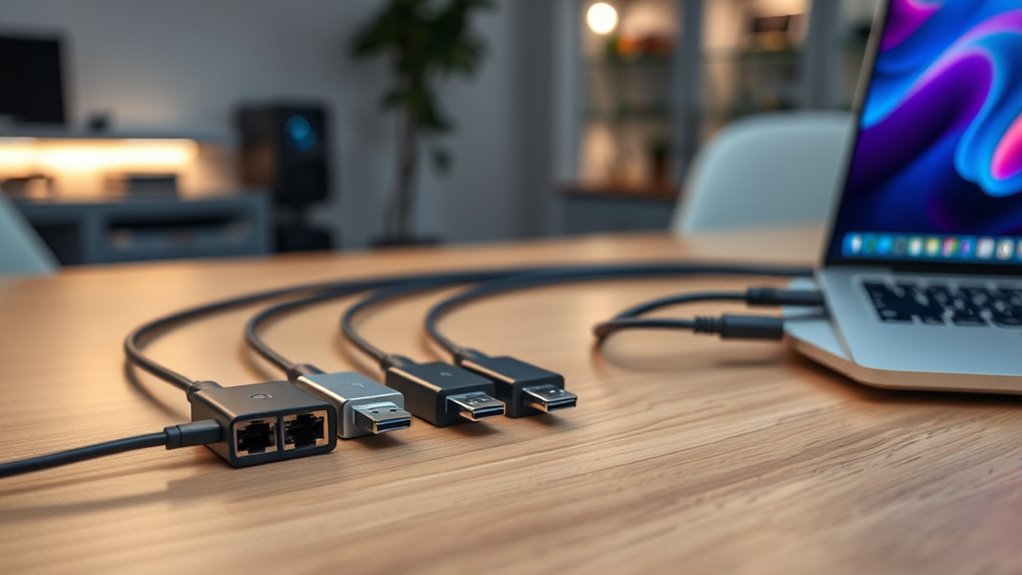

When searching for the best USBC Ethernet adapters, the main considerations are speed, portability, and compatibility. The best overall pick is the Anker USB-C Hub with Ethernet, which balances performance and features. The standout options include the UGREEN Revodok 6-in-1 for multiport versatility and the TP-Link 2.5G Adapter for faster network speeds. The main tradeoffs involve balancing maximum speed, compactness, and additional features like multiple ports or hubs. Continue reading for a detailed breakdown of each option and what makes them stand out or fall short.

Get the latest gadgets delivered free with Prime
- Fast, free delivery on millions of items
- Prime Video, Amazon Music and more included
- Member-only deals all year
Complete the kit



Key Takeaways
- The top picks excel in combining speed, portability, and multi-functionality, with the Anker and UGREEN models standing out for versatility.
- Most adapters support Gigabit Ethernet, but the 2.5G options like UGREEN and TP-Link offer faster network speeds for demanding users.
- Compact, driver-free designs are favored for plug-and-play ease, but may sacrifice some port variety and expandability.
- Build quality and material (like aluminum enclosures) matter for durability and heat dissipation, especially for frequent travelers.
- Price often correlates with additional features; high-end options provide faster speeds and more ports but are not always necessary for casual use.
| Acer USB to Ethernet Adapter, USB-C Hub with 1Gbps Ethernet and 3 USB 3.0 Ports |  | Best Overall USB-C Ethernet Adapter with Versatile Connectivity | Hardware Interface: USB 3.0, USB Type C | Additional Features: 1Gbps LAN, 2-way Connections (USB-A/USB-C), 5Gbps USB-A Data Transfer, Plug and Play | Compatible Devices: MacBook Pro/Air, iPad Pro, Dell XPS, HP Spectre, Lenovo ThinkPad, Surface Pro/Go, Chromebook, Pixelbook, Samsung Galaxy Tab S9/S8 | VIEW ON AMAZON | See Our Full Breakdown |
| Anker USB-C Hub with Ethernet, 6-in-1 Multiport USB C to Ethernet Adapter |  | Best for External Display and Multiport Expansion | Hardware Interface: Ethernet, HDMI, USB, USB Type C | Additional Features: Fast Data Transfer, HDMI™️ Compatible | Devices Supported: Laptops, Tablets | VIEW ON AMAZON | See Our Full Breakdown |
| Anker USB C to Ethernet Adapter, Portable 1 Gbps Network Hub |  | Best Compact Ethernet Adapter for On-the-Go Use | Compatible Devices: Tablet, Laptop | Connector Type: RJ45, USB Type C | Number of Ports: 1 | VIEW ON AMAZON | See Our Full Breakdown |
| UGREEN Revodok 6-in-1 USB-C Hub with 4K HDMI and Gigabit Ethernet |  | Best Versatile Hub for Multi-Device Connectivity | Hardware Interface: Ethernet, HDMI, USB, USB Type C | Additional Features: Fast Data Transfer, Heat Resistant, Portable | Compatible Devices: Laptops, MacBook Neo, M1/M2/M3/M4/M5 | VIEW ON AMAZON | See Our Full Breakdown |
| BENFEI USB 3.0 to Ethernet Adapter, USB C to RJ45 Gigabit LAN (1000Mbps) Network Adapter |  | Best Budget Gigabit Ethernet Adapter for Broad Compatibility | Interface: Ethernet, USB | Data Transfer Rate: 1000 Mbps | Compatibility: Windows 11/10/8.1/8/7, Mac OS X 10.6-10.12, Linux, Android, Chrome OS | VIEW ON AMAZON | See Our Full Breakdown |
| USB A/C to Ethernet Adapter, 3x USB 3.0 Ports, Gigabit Ethernet for Laptop |  | Best Versatile Hub for Multi-Device Connectivity | Hardware Interface: Ethernet, USB 3.0 | Additional Features: Fast Data Transfer, Lightweight, Plug and Play | Total USB Ports: 3 | VIEW ON AMAZON | See Our Full Breakdown |
| UGREEN USB C to Ethernet Adapter 2.5G, Aluminum Ethernet Adapter for Laptop | 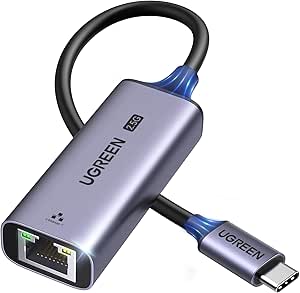 | Best High-Speed Ethernet Upgrade for USB-C Devices | Interface: USB 3.0 Type C | Data Transfer Rate: 2.5 Gbps | Compatible Devices: Desktop, Laptop, Smartphone, Tablet | VIEW ON AMAZON | See Our Full Breakdown |
| Acer 6-in-1 USB-C Hub with Ethernet, 4K@60Hz HDMI Multiport Adapter |  | Best for Multi-Device Connectivity and High-Resolution Output | Hardware Interface: Ethernet, HDMI, USB 3.0, USB Type C | Additional Features: Fast Charging, Fast Data Transfer, Portable | Total USB Ports: 3 | VIEW ON AMAZON | See Our Full Breakdown |
| TP-Link USB C to Ethernet Adapter, 2.5G Aluminum Plug and Play |  | Best Simple High-Speed Ethernet for USB-C Devices | Connection Speed: 2.5 Gbps | Compatibility: USB-C, Thunderbolt 3/4 | Material: Aluminum | VIEW ON AMAZON | See Our Full Breakdown |
| UGREEN USB C to Ethernet Adapter, Plug and Play 1Gbps Aluminum Adapter |  | Best Reliable 1Gbps Ethernet Adapter for Everyday Use | Hardware Interface: USB 3.0 Type C | Data Link Protocol: Ethernet, Gigabit Ethernet | Data Transfer Rate: 1 Gbps | VIEW ON AMAZON | See Our Full Breakdown |
| BENFEI USB-C to Ethernet Adapter, Gigabit Ethernet LAN Network Adapter for USB Type-C Devices | 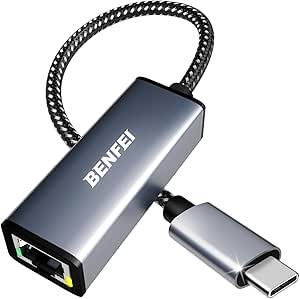 | Best Compact and Durable USB-C Ethernet Adapter | Interface: USB Type-C | Data Transfer Rate: 1 Gbps | Compatibility: Laptops, tablets, smartphones (excluding Nintendo Switch) | VIEW ON AMAZON | See Our Full Breakdown |
| TP-Link USB C to Ethernet Adapter (UE300C), Compact, Plug & Play |  | Best Budget-Friendly and Broad Compatibility Adapter | Connectivity: USB-C to RJ45 Ethernet | Speed: Up to 1 Gbps | Compatibility: Windows, macOS, Chrome OS, Linux (Ubuntu), Thunderbolt 3/4 | VIEW ON AMAZON | See Our Full Breakdown |
| uni USB C to Ethernet Adapter 1Gbps, Driver-Free RJ45 to USB-C for Laptop |  | Best Premium and Durable Ethernet Adapter | Interface: Ethernet | Speed: 1Gbps | Compatibility: USB-C devices including MacBook Pro/Air, iPhone 15/16 Pro/Max, Dell XPS, Galaxy S8-S24 | VIEW ON AMAZON | See Our Full Breakdown |
| usbc ethernet adapter | Data Transfer Rate |
|---|---|
| Acer USB to Ethernet Adapter | 5 Gbps |
| Anker USB-C Hub with Ethernet | 5 Gbps |
| Anker USB C to Ethernet Adapte | — |
| UGREEN Revodok 6-in-1 USB-C Hu | 5 Gbps |
| BENFEI USB 3.0 to Ethernet Ada | 1000 Mbps |
| USB A/C to Ethernet Adapter | 5 Gbps |
| UGREEN USB C to Ethernet Adapt | 2.5 Gbps |
| Acer 6-in-1 USB-C Hub with Eth | 5 Gbps |
| TP-Link USB C to Ethernet Adap | — |
| UGREEN USB C to Ethernet Adapt | 1 Gbps |
| BENFEI USB-C to Ethernet Adapt | 1 Gbps |
| TP-Link USB C to Ethernet Adap | — |
| uni USB C to Ethernet Adapter | — |
More Details on Our Top Picks
Acer USB to Ethernet Adapter, USB-C Hub with 1Gbps Ethernet and 3 USB 3.0 Ports
This Acer USB-C hub stands out for offering a reliable 1Gbps Ethernet connection combined with three USB 3.0 ports, making it a strong choice for users who need both wired internet and multiple device connections in one compact package. Compared to the Anker USB-C Hub, which adds HDMI and power delivery but at a slightly higher cost, this model emphasizes durability and broad compatibility. Its aluminum build ensures durability, while the plug-and-play setup simplifies use across different operating systems. The main tradeoff is the absence of HDMI or additional USB-C data ports, limiting display options and data transfer flexibility. The shared USB 3.0 bandwidth of 5Gbps might also constrain simultaneous device speeds when all ports are active.
Pros:- Provides a dependable 1Gbps Ethernet connection for stable internet.
- Includes three USB 3.0 ports for versatile device connections.
- Aluminum enclosure offers durability and a sleek look.
- Supports a wide range of devices and operating systems.
Cons:- No HDMI port or additional USB-C data port, limiting display options.
- Shared USB 3.0 bandwidth may reduce performance when multiple ports are used simultaneously.
- Older systems might need driver installation for full USB 3.0 functionality.
Best for: Professionals and students seeking a durable, all-in-one hub for reliable wired internet and multiple devices on the go.
Not ideal for: Power users needing 4K video output or high-bandwidth data transfer for demanding peripherals.
- Hardware Interface:USB 3.0, USB Type C
- Additional Features:1Gbps LAN, 2-way Connections (USB-A/USB-C), 5Gbps USB-A Data Transfer, Plug and Play
- Compatible Devices:MacBook Pro/Air, iPad Pro, Dell XPS, HP Spectre, Lenovo ThinkPad, Surface Pro/Go, Chromebook, Pixelbook, Samsung Galaxy Tab S9/S8
- Total USB Ports:3
- Data Transfer Rate:5 Gbps
- Minimum Operating System:Android 14.0, Mac OS 14 Sonoma, Windows 11
Our verdict“This adapter is ideal for those who prioritize reliable wired internet and multiple USB devices in a compact, sturdy package.”
Anker USB-C Hub with Ethernet, 6-in-1 Multiport USB C to Ethernet Adapter
The Anker USB-C Hub excels for users who need to connect an external display alongside wired internet, thanks to its 4K HDMI output and multiple ports. Compared with the UGREEN Revodok that also offers a 4K HDMI port, Anker’s model is better suited for users who prioritize a more robust build and wider OS compatibility, including Windows and Mac. Its six-in-one expansion includes Ethernet, HDMI, and two USB-A ports, enabling a versatile setup for home or office. The main tradeoff is the HDMI port’s limited 4K@30Hz resolution, which might not satisfy those requiring HDR or high-refresh-rate displays. Additionally, the absence of a dedicated power delivery port limits charging options for connected devices.
Pros:- Supports 4K resolution at 30Hz for high-quality video output.
- Expands a single USB-C port into multiple useful ports including Ethernet and HDMI.
- Compact, aluminum design suitable for travel.
- Broad OS compatibility including Windows, Mac OS, and Linux.
Cons:- HDMI output limited to 4K@30Hz, not HDR or higher refresh rates.
- Lacks a dedicated power delivery port for charging connected devices.
- Limited to 3 USB ports, which may restrict peripheral connections.
Best for: Remote workers and multimedia enthusiasts needing a multiport hub with reliable wired internet and 4K display support.
Not ideal for: Gamers or high-end content creators requiring 4K@60Hz or HDR support, as the HDMI port is limited to 30Hz.
- Hardware Interface:Ethernet, HDMI, USB, USB Type C
- Additional Features:Fast Data Transfer, HDMI™️ Compatible
- Devices Supported:Laptops, Tablets
- Total USB Ports:3
- Data Transfer Rate:5 Gbps
- Minimum Operating System:Windows 7, Linux, Mac OS X 10.6 Snow Leopard, Windows 10, Windows 8, Windows Vista, Windows XP
Our verdict“This hub suits users who need external display support and multiple connectivity options in a portable package, but not for high-refresh-rate video or charging needs.”
Anker USB C to Ethernet Adapter, Portable 1 Gbps Network Hub
This Anker USB-C to Ethernet Adapter is an excellent choice for users who need a straightforward, reliable gigabit Ethernet connection in a minimal form factor. Its compact size and braided nylon cable make it ideal for portable use with high-end devices like MacBook Pro or iPad Pro. Compared with the BENFEI USB 3.0 to Ethernet Adapter, which offers broader OS compatibility, this model is more refined and better suited for users who prioritize portability and a premium build. The main tradeoff is that it offers only a single Ethernet port without any additional connectivity options, which might not meet the needs of those requiring multiple peripherals.
Pros:- Provides stable gigabit Ethernet up to 1 Gbps for reliable wired connections.
- Small, lightweight, and easy to carry on the go.
- Premium aluminum exterior and braided cable enhance durability.
- Compatible with a wide range of high-end devices.
Cons:- Limited to a single Ethernet port, lacking additional ports.
- Requires a USB-C port—no support for USB-A only devices.
- No extra features like pass-through charging or additional data ports.
Best for: Travelers and professionals who need a sleek, reliable Ethernet connection without extra ports or features.
Not ideal for: Power users or those needing multiple USB ports or additional connectivity options during their work sessions.
- Compatible Devices:Tablet, Laptop
- Connector Type:RJ45, USB Type C
- Number of Ports:1
- Item Dimensions:3.94 x 0.55 x 2.05 inches
- Item Weight:22.68 g
- Warranty:18 months
Our verdict“This adapter is perfect for users needing a compact, high-quality Ethernet solution for portable use, but not for those requiring multiple device connections.”
UGREEN Revodok 6-in-1 USB-C Hub with 4K HDMI and Gigabit Ethernet
The UGREEN Revodok impresses with its ability to turn a single USB-C port into a comprehensive workstation, offering 4K HDMI, gigabit Ethernet, three USB-A ports, and 100W PD charging. Compared to the Anker 6-in-1, this model supports high-speed data transfer up to 5Gbps and provides a robust power delivery option, making it well-suited for users who need to keep their devices charged while working or streaming. The downside is the HDMI port’s 4K@30Hz limitation, which may not suit demanding video applications. The lack of HDR support and limited OS compatibility to Windows 7/10 and Mac OS 9+ could restrict some users’ setups.
Pros:- Expands a USB-C port to multiple ports including 4K HDMI and gigabit Ethernet.
- Supports 100W Power Delivery for fast charging of devices.
- Fast data transfer up to 5Gbps for multiple peripherals.
- Lightweight and portable, ideal for mobile use.
Cons:- HDMI supports only 4K@30Hz, limiting high-refresh-rate applications.
- USB-C charging port does not support data or video output.
- Compatibility limited to Windows 7/10 and Mac OS 9+.
Best for: Travelers, remote workers, and students needing a flexible, all-in-one hub with charging and display capabilities.
Not ideal for: High-end content creators or gamers requiring 4K@60Hz or HDR graphics, or users with older or unsupported OS.
- Hardware Interface:Ethernet, HDMI, USB, USB Type C
- Additional Features:Fast Data Transfer, Heat Resistant, Portable
- Compatible Devices:Laptops, MacBook Neo, M1/M2/M3/M4/M5
- Total USB Ports:3
- Data Transfer Rate:5 Gbps
- Minimum Required Operating System:Windows 7, Mac OS 9
Our verdict“This hub suits users seeking comprehensive connectivity, including Ethernet and 4K display, in a portable format, but not for high-performance video or extensive OS compatibility.”
BENFEI USB 3.0 to Ethernet Adapter, USB C to RJ45 Gigabit LAN (1000Mbps) Network Adapter
The BENFEI USB 3.0 to Ethernet Adapter offers a straightforward, driver-free gigabit Ethernet solution compatible with a wide array of operating systems, including Windows, Mac, Linux, Android, and Chrome OS. Compared to the more premium Anker USB-C Hub, this adapter is less feature-rich but excels in simplicity and broad device support at a lower price point. Its compact design makes it perfect for those who need a reliable wired connection without extra ports or features. The main tradeoff is that it solely provides Ethernet, with no additional connectivity options, and requires a CAT6 or higher cable to achieve full gigabit speeds.
Pros:- Supports gigabit Ethernet speeds up to 1 Gbps for reliable, fast connections.
- Plug-and-play setup with no driver installation needed on most OS.
- Compact, lightweight, easy to carry.
- Compatible with a wide range of devices and operating systems.
Cons:- Limited to Ethernet connectivity only, no additional ports.
- Requires CAT6 or higher Ethernet cables for maximum gigabit speed.
- No support for Wi-Fi or other wireless connections.
Best for: Business travelers and students who need a dependable Ethernet connection for multiple devices without fuss or extra features.
Not ideal for: Power users requiring multiple ports or integrated multimedia features, or users with older or unsupported devices.
- Interface:Ethernet, USB
- Data Transfer Rate:1000 Mbps
- Compatibility:Windows 11/10/8.1/8/7, Mac OS X 10.6-10.12, Linux, Android, Chrome OS
- Color:Gray
- Dimensions:0.39″L x 0.39″W x 0.39″H
- Weight:1 g
Our verdict“This adapter is a practical choice for those seeking a simple, affordable Ethernet solution compatible with many devices, but it lacks extra ports or multimedia features.”
USB A/C to Ethernet Adapter, 3x USB 3.0 Ports, Gigabit Ethernet for Laptop
This compact adapter stands out for combining multiple USB 3.0 ports with a Gigabit Ethernet connection in a single, portable unit. Unlike the Ugreen USB C to Ethernet Adapter which solely offers Ethernet, this hub adds versatility with three USB ports, making it ideal for users who need both network and peripheral connections. The convertible connector allows use with both USB-A and USB-C devices, providing broad compatibility. However, it doesn’t support device charging, which could be a limitation for power users, and Windows 7 users will need to install drivers. The Ethernet speed may also vary depending on cable quality and network conditions, but for users seeking a multiport solution that supports high-speed data transfer and stable wired internet, this is a strong pick.
Pros:- Supports high-speed data transfer up to 5Gbps
- Includes multiple USB 3.0 ports and Ethernet in one device
- Convertible connector for USB-A and USB-C devices
- Plug and play across multiple operating systems
Cons:- Does not support device charging (max 900mA output)
- Requires driver installation on Windows 7
- Ethernet speed depends on network conditions
Best for: Professionals who need to connect multiple peripherals and wired network access on a laptop or tablet
Not ideal for: Power users seeking charging capabilities or those on Windows 7 needing additional driver setup
- Hardware Interface:Ethernet, USB 3.0
- Additional Features:Fast Data Transfer, Lightweight, Plug and Play
- Total USB Ports:3
- Data Transfer Rate:5 Gbps
- Minimum Operating System:Chrome OS 134, Windows 10
- Enclosure Material:ABS
Our verdict“This adapter suits users needing a compact, multi-port hub with reliable wired Ethernet for laptops and tablets that support USB-A or USB-C.”
UGREEN USB C to Ethernet Adapter 2.5G, Aluminum Ethernet Adapter for Laptop
This adapter excels at delivering fast, reliable wired internet with 2.5Gbps speeds, making it ideal for users who prioritize network performance. Compared with the TP-Link USB C to Ethernet Adapter, which offers 1Gbps, the UGREEN model provides a notable boost for streaming, large file transfers, or online gaming. Its durable aluminum construction adds a layer of robustness and heat dissipation, suitable for daily mobile use. However, it’s limited to Ethernet connectivity only, so it lacks additional ports or features like pass-through charging. You’ll need a compatible 2.5Gbps router or switch to fully utilize its speed, which could be a barrier for some. For those seeking a straightforward, high-performance Ethernet connection, this is a compelling choice.
Pros:- Supports ultra-fast 2.5Gbps Ethernet speeds
- Durable aluminum build with reinforced ports
- Plug-and-play with wide OS compatibility
- Compact and lightweight design
Cons:- Requires compatible 2.5Gbps network equipment
- Limited to Ethernet connectivity only
- No additional ports or features
Best for: Tech-savvy users seeking a high-speed, durable Ethernet connection for gaming or data-heavy tasks
Not ideal for: Users wanting a multiport hub or Wi-Fi functionality, as this is solely an Ethernet adapter
- Interface:USB 3.0 Type C
- Data Transfer Rate:2.5 Gbps
- Compatible Devices:Desktop, Laptop, Smartphone, Tablet
- Color:Space Grey
- Material:Aluminum
Our verdict“This adapter is perfect for users needing a robust, high-speed Ethernet connection on USB-C devices without extra features.”
Acer 6-in-1 USB-C Hub with Ethernet, 4K@60Hz HDMI Multiport Adapter
This multiport hub offers a comprehensive set of connections, including 4K HDMI, Gigabit Ethernet, and multiple USB-A and USB-C ports, making it ideal for multitasking setups. Compared to the TP-Link USB C to Ethernet Adapter, which is solely focused on network access, the Acer hub excels at expanding a single port into a full workstation with video, data, and power delivery. Its support for 4K@60Hz ensures sharp display quality, perfect for creative work or entertainment. However, the data ports don’t support charging, and high-resolution output relies on device compatibility with DisplayPort 1.4 Alt Mode. The included power delivery makes it suitable for thin laptops needing extra power while connected. For users who need multiple functions in one device, this hub is a versatile choice.
Pros:- Expands a single USB-C port into multiple ports including HDMI and Ethernet
- Supports 4K@60Hz video output for sharp visuals
- Provides up to 85W power delivery for charging laptops
- Plug and play with broad OS support
Cons:- Data ports do not support charging
- Requires device support for 4K60Hz via DP 1.4 and HDMI 2.0
- Charger and cables are not included
Best for: Creative professionals or remote workers seeking a multi-connection hub with high-resolution video output
Not ideal for: Users who only need Ethernet or don’t require 4K video output, as it might be over-featured for simple connectivity
- Hardware Interface:Ethernet, HDMI, USB 3.0, USB Type C
- Additional Features:Fast Charging, Fast Data Transfer, Portable
- Total USB Ports:3
- Data Transfer Rate:5 Gbps
- Operating System:Chrome OS, Linux, Windows 10, macOS
- Color:Black
Our verdict“Ideal for users needing a high-capacity hub for video, data, and Ethernet with power delivery in a portable form.”
TP-Link USB C to Ethernet Adapter, 2.5G Aluminum Plug and Play
This adapter provides a straightforward, reliable wired connection with support for 2.5Gbps speeds, ideal for users who prioritize speed and simplicity. Unlike the UGREEN USB C to Ethernet Adapter 1Gbps, which offers standard gigabit speeds, this model supports faster data transfer, making it suitable for streaming, large file transfers, and online gaming. Its aluminum shell adds durability, and the plug-and-play setup appeals to those who want a no-fuss experience. However, it strictly offers Ethernet connectivity without additional ports or features, and a compatible 2.5Gbps network setup is necessary to realize full speed. This makes it best suited for tech-savvy users with compatible network infrastructure seeking a durable, high-speed Ethernet connection.
Pros:- Supports ultra-fast 2.5Gbps Ethernet speeds
- Durable aluminum construction
- Plug-and-play with broad OS compatibility
- Compact and lightweight
Cons:- Requires compatible 2.5Gbps network hardware
- Limited to Ethernet connection only
- No additional ports or features
Best for: Power users with high-speed gigabit or 2.5Gbps networks who need a simple, reliable Ethernet connection
Not ideal for: Users seeking multiport hubs or Wi-Fi connectivity, as this is solely an Ethernet adapter
- Connection Speed:2.5 Gbps
- Compatibility:USB-C, Thunderbolt 3/4
- Material:Aluminum
- Design:Foldable, portable
Our verdict“Best suited for users who need a durable, high-speed Ethernet connection without extra features or ports.”
UGREEN USB C to Ethernet Adapter, Plug and Play 1Gbps Aluminum Adapter
This adapter offers a classic solution for reliable, stable wired internet at 1Gbps, making it well-suited for everyday tasks such as streaming, browsing, and light gaming. Compared with the UGREEN USB C to Ethernet Adapter 2.5G, it is less expensive and supports standard gigabit speeds, which are sufficient for most typical uses. Its aluminum casing ensures durability, and the plug-and-play design simplifies setup across a wide range of devices. However, it lacks the higher speeds of the 2.5G model and does not support Wi-Fi or additional ports. For users prioritizing straightforward, dependable Ethernet connectivity without the need for ultra-fast speeds, this remains a practical choice.
Pros:- Supports stable 1Gbps Ethernet speeds
- Durable aluminum case
- Plug and play with wide OS compatibility
- Compact and lightweight for portability
Cons:- Limited to Ethernet connection only
- No support for higher speeds like 2.5Gbps
- Requires drivers on some older OSes
Best for: Home users or office workers needing reliable 1Gbps Ethernet on a variety of devices
Not ideal for: Power users or gamers requiring higher speeds or multiport options, as it only provides Ethernet connectivity
- Hardware Interface:USB 3.0 Type C
- Data Link Protocol:Ethernet, Gigabit Ethernet
- Data Transfer Rate:1 Gbps
- Compatibility:Mac OS 10.15 Catalina, Windows 10
- Color:Space Grey
Our verdict“This adapter is a dependable choice for users seeking straightforward, reliable Ethernet connectivity with no additional features.”
BENFEI USB-C to Ethernet Adapter, Gigabit Ethernet LAN Network Adapter for USB Type-C Devices
This option stands out for its combination of portability and durability, thanks to a braided nylon cable and aluminum casing. Compared with the TP-Link UE300C, it offers similar gigabit speeds but with a more rugged build, making it ideal for users who need a reliable connection on the go. However, it’s incompatible with Nintendo Switch, unlike some other adapters, and it requires higher-category Ethernet cables to reach full 1Gbps speeds. Its small, lightweight design makes it perfect for frequent travelers or those with limited desk space. The tradeoff is that it only provides wired Ethernet and doesn’t include additional ports or features. Overall, this pick makes the most sense for users prioritizing durability and simplicity in a compact form.
Pros:- Durable braided nylon cable and aluminum casing enhance longevity
- Compact, lightweight design for portability
- Provides stable gigabit Ethernet speeds up to 1Gbps
- Plug-and-play setup with wide device compatibility
Cons:- Requires CAT6 or higher Ethernet cables for maximum speed
- Limited to wired Ethernet connectivity only
- Incompatible with Nintendo Switch
Best for: Mobile professionals and travelers who need a resilient, no-fuss Ethernet connection in a small package
Not ideal for: Gamers or desktop users who require multiple ports or higher Ethernet speeds beyond gigabit
- Interface:USB Type-C
- Data Transfer Rate:1 Gbps
- Compatibility:Laptops, tablets, smartphones (excluding Nintendo Switch)
- Color:Black
- Item Weight:1 g
- Item Dimensions:0.39″L x 0.39″W x 0.39″H
Our verdict“This adapter is ideal for users who need a durable, portable Ethernet solution without extra features or ports.”
TP-Link USB C to Ethernet Adapter (UE300C), Compact, Plug & Play
The TP-Link UE300C makes a strong case for users who need a simple, reliable gigabit Ethernet connection with broad device support. Its compact size and plug-and-play setup make it perfect for those who frequently switch between devices like Windows laptops, Macs, or Chromebooks, especially given its two-year warranty. Compared to the BENFEI adapter, it offers similar speeds but with a slightly larger footprint and a focus on universal compatibility across multiple operating systems. The main tradeoff is that it still depends on CAT6 or higher Ethernet cables to achieve full gigabit performance, and it provides no additional ports or features. This model is best suited for users seeking straightforward, dependable wired connectivity without extra frills.
Pros:- Compact, lightweight design for portability
- Easy plug-and-play setup without drivers
- Broad device and OS compatibility including Windows, macOS, Chrome OS, and Linux
- Reliable gigabit Ethernet speeds with a 2-year warranty
Cons:- Requires CAT6 or higher Ethernet cables for full 1Gbps speeds
- Limited to Ethernet connection only, no extra ports
- Performance may vary with cable quality and network conditions
Best for: Students, remote workers, or travelers needing a dependable Ethernet connection across various devices and OS platforms
Not ideal for: Power users needing additional ports or advanced network features, or those who prioritize ultra-compact design
- Connectivity:USB-C to RJ45 Ethernet
- Speed:Up to 1 Gbps
- Compatibility:Windows, macOS, Chrome OS, Linux (Ubuntu), Thunderbolt 3/4
- Dimensions:2.8 x 1.0 x 0.6 inches
- Warranty:2 years
Our verdict“This adapter is a solid choice for users who want a versatile, no-fuss Ethernet solution for multiple devices and operating systems.”
uni USB C to Ethernet Adapter 1Gbps, Driver-Free RJ45 to USB-C for Laptop
Compared with the BENFEI and TP-Link options, the uni USB C to Ethernet Adapter offers a compelling blend of durability and broad compatibility, including support for high-end devices like MacBook Pro, iPhone 15/16 Pro, and Dell XPS. Its braided nylon cable and aluminum casing contribute to a more rugged build, making it suitable for demanding environments. The driver-free, plug-and-play setup simplifies use, especially for those who dislike installing drivers or software. A potential tradeoff is that it’s not compatible with Nintendo Switch and still requires CAT6 Ethernet cables for full gigabit speed. This model is targeted at professionals or power users who need a highly durable, reliable wired connection across a wide range of premium devices.
Pros:- Durable braided nylon cable and aluminum casing enhance longevity
- Driver-free, plug-and-play setup for ease of use
- Compatible with a wide range of premium USB-C devices including MacBook and iPhone
- Provides stable 1Gbps Ethernet connectivity
Cons:- Incompatible with Nintendo Switch
- Requires CAT6 or higher Ethernet cables for optimal speed
- Limited to wired Ethernet connection only
Best for: Power users and professionals requiring a durable, multi-device Ethernet connection with a sleek, premium build
Not ideal for: Casual users or gamers who need additional ports or higher network speeds beyond gigabit
- Interface:Ethernet
- Speed:1Gbps
- Compatibility:USB-C devices including MacBook Pro/Air, iPhone 15/16 Pro/Max, Dell XPS, Galaxy S8-S24
- Cable Type:Braided nylon
- Material:Aluminum casing
Our verdict“This adapter is best suited for users prioritizing durability and high compatibility in a sleek, premium design.”

How We Picked
These products were evaluated based on a combination of performance, build quality, versatility, ease of use, and value. Speed was a primary criterion, with Gigabit Ethernet being the baseline, while 2.5G and higher speeds were also considered for users with demanding network needs. Ease of setup, portability, and driver support influenced our rankings, favoring driver-free or plug-and-play models for simplicity. The durability of the build, especially for mobile use, was also important. Products were ranked to reflect their suitability for different user needs, from casual users to power users requiring high-speed connections and multiple ports.Factors to Consider When Choosing Usbc Ethernet Adapters
Choosing the right USBC Ethernet adapter depends on your specific needs and how you plan to use it. Beyond basic speed, consider factors like port variety, build quality, and compatibility with your devices. A well-chosen adapter can improve your network stability and expand connectivity options, but picking the wrong one may lead to frustration or limited performance. The following sections cover key considerations to help you make an informed decision.Speed and Network Compatibility
Speed is a vital factor, especially if you handle large data transfers or stream high-definition content. Gigabit Ethernet (1Gbps) is standard and sufficient for most users, but for demanding applications, 2.5G or even 10G adapters are available. Make sure your network infrastructure supports these higher speeds; otherwise, the extra investment offers limited benefits. Compatibility with your device’s USB-C port and support for features like Power Delivery can also influence your choice, particularly if you want to charge your device simultaneously.
Port Options and Versatility
Some adapters are simple Ethernet adapters, while others combine multiple ports like USB-A, HDMI, or SD card slots. Decide if you need additional connectivity options, such as video output or extra USB ports, which can reduce clutter and improve productivity. However, note that adding more ports often increases size and cost, and some multiport hubs may sacrifice speed or introduce driver complexity. Consider your typical setup and whether a dedicated Ethernet adapter or a multi-function hub better suits your workflow.
Build Quality and Portability
Durability matters if you travel frequently or move your adapter between locations. Aluminum enclosures tend to dissipate heat better and resist damage, making them more reliable over time. Compact, lightweight designs are convenient, but may limit port options or cooling. Avoid cheap plastic models if you plan to use the adapter daily, as they may crack or malfunction. A sturdy, well-made adapter ensures consistent performance and longer lifespan.
Ease of Use and Compatibility
Driver-free, plug-and-play adapters offer the simplest setup, especially for users who dislike installing software. Check device compatibility—some adapters work seamlessly across Windows, macOS, and Chrome OS, while others may require specific drivers or firmware updates. Consider whether your device’s USB-C port supports alternate modes like DisplayPort or Thunderbolt, which can impact performance or compatibility. An adapter that is easy to connect and reliable reduces frustration and downtime.
Price and Value
Higher-priced adapters often provide faster speeds, more ports, or better build quality. However, for most casual users, a basic Gigabit Ethernet adapter suffices. Evaluate whether additional features justify the cost based on your specific needs. Sometimes, investing in a slightly more expensive model with better durability and faster speeds can save money in the long run. Avoid overpaying for features you won’t use, but don’t compromise on quality if you require consistent, high-speed connections.
Frequently Asked Questions
Can I use a USBC Ethernet adapter with a MacBook?
Most USBC Ethernet adapters are compatible with MacBook models, especially those that support standard USB-C or Thunderbolt 3/4 ports. Many adapters are plug-and-play with macOS, requiring no additional drivers. However, it’s wise to verify the manufacturer’s compatibility information before purchasing, especially if you need specific features like Power Delivery or 4K video output. Properly chosen adapters will seamlessly work for wired internet connections, providing stability and speed.
Is a 2.5G Ethernet adapter worth it for casual home use?
For typical home use, including streaming, browsing, and light file transfers, a Gigabit Ethernet (1Gbps) adapter is usually sufficient. A 2.5G adapter offers faster speeds, which can be beneficial if you transfer large files frequently or have a home network capable of supporting higher speeds. However, if your internet plan and network hardware are limited to 1Gbps, the added speed of a 2.5G adapter won’t translate into noticeable improvements. Consider your actual network setup before investing in faster hardware.
Do I need a multiport USB-C hub or just an Ethernet adapter?
If your setup requires connecting multiple devices—such as additional USB peripherals, HDMI displays, or SD cards—a multiport hub makes sense. However, if Ethernet connectivity is your primary concern, a dedicated adapter will typically be more reliable and straightforward. Multiport hubs can sometimes introduce complexity, driver issues, or reduced performance for certain ports. Match your needs carefully: for simple wired internet, a dedicated Ethernet adapter is usually the best choice.
How important is build material for durability?
Build material significantly affects an adapter’s durability, especially if you frequently connect and disconnect it or travel with it. Aluminum enclosures are more resistant to damage, dissipate heat better, and often feel more premium. Cheaper plastic models may crack or wear out faster. For frequent use or portable setups, investing in a well-constructed, sturdy adapter can prevent frustrations and replacement costs over time.
Can I charge my device while using a USBC Ethernet adapter?
Many modern adapters support Power Delivery (PD), allowing you to charge your device while maintaining a wired internet connection. This feature is especially useful for laptops with limited ports. Be sure the adapter explicitly mentions PD support and verify your device’s charging requirements. Not all adapters include this feature, so if charging is critical, select a model that offers Power Delivery to avoid needing separate charging accessories.
Conclusion
For most users, the Anker USB-C Hub with Ethernet offers the best balance of speed, versatility, and ease of use, making it the top overall choice. If you need faster network speeds or additional ports, the UGREEN Revodok 6-in-1 or the TP-Link 2.5G Adapter are excellent options. Budget-conscious buyers might prefer simpler, plug-and-play models like the TP-Link UEX300C. Power users or professionals requiring maximum speed and durability should consider premium builds like the UGREEN Aluminum Adapter or Anker Multiport Hubs. Tailor your choice based on your specific setup, mobility needs, and budget to get the best value and performance.
As an affiliate, we earn on qualifying purchases.Fall Picks
fall essentials