
An outdoor Wi-Fi access point can extend a home or business network into a yard, patio, workshop, or other space where an indoor router struggles. My best overall pick is the TP-Link Omada EAP650-Outdoor, which pairs Wi-Fi 6 performance with outdoor access-point features; the Ubiquiti U7 Outdoor stands out for buyers building a Wi-Fi 7 network, while the TP-Link EAP110-Outdoor V3 suits basic coverage needs. The main tradeoffs are speed and newer Wi-Fi standards versus cost, network management, and the work of running Ethernet and power to an outdoor location. Weather protection and installation needs matter as much as advertised wireless speed. Read on for how all 15 options differ and which one fits your setup.

Get the latest gadgets delivered free with Prime
- Fast, free delivery on millions of items
- Prime Video, Amazon Music and more included
- Member-only deals all year
Complete the kit



Key Takeaways
- The TP-Link Omada EAP650-Outdoor is the balanced pick: it combines Wi-Fi 6 and an outdoor access-point design without requiring a move to Wi-Fi 7.
- Wi-Fi generation divides the lineup: the Ubiquiti U7 Outdoor and Deco 7 Outdoor target Wi-Fi 7 systems, while several models offer Wi-Fi 6 and the N300 choices prioritize basic connectivity.
- Outdoor access points and extenders are not interchangeable: some listed products are explicitly extenders, so buyers should check whether they need a wired access point or a wireless relay.
- PoE can simplify installation: products that support or include PoE can reduce the need for a separate outdoor power outlet, but injector, cabling, and network compatibility still matter.
- Several models share similar speed classes: among the AC1200 and AX3000 options, the practical choice may hinge more on management, weather protection, included mounting or power accessories, and the existing network than on the headline number.
| BrosTrend AC1200 Outdoor WiFi Access Point with Gigabit Ethernet and PoE |  | Best for Long Yard Coverage | Wi-Fi standard: 802.11ac Wave 2 (Wi-Fi 5) | Bands: 2.4 GHz and 5 GHz | Maximum speeds: 867 Mbps (5 GHz) + 300 Mbps (2.4 GHz) | VIEW ON AMAZON | See Our Full Breakdown |
| Wavlink AX3000 Outdoor WiFi 6 Extender & Access Point |  | Best for Flexible Wi-Fi 6 Installation | Wi-Fi standard: Listed as Wi-Fi 6; listed standards include 802.11ac/a/b/g/n | Bands and maximum speeds: 5 GHz up to 2402 Mbps; 2.4 GHz up to 573 Mbps | Stated coverage radius: 200–300 m | VIEW ON AMAZON | See Our Full Breakdown |
| Deco 7 Outdoor BE5000 Dual-Band Wi-Fi 7 Mesh Add-On Extender |  | Best Premium Mesh Add-On | Wi-Fi standard: Wi-Fi 7, dual-band; no 6 GHz band | Maximum speeds: 4324 Mbps (5 GHz) / 688 Mbps (2.4 GHz) | Added coverage: Up to 2,800 sq ft | VIEW ON AMAZON | See Our Full Breakdown |
| Cudy AP1300 Outdoor AC1200 Wi-Fi 5 Access Point |  | Best for Managed Features and Included Installation Gear | Wi-Fi standard: Wi-Fi 5 (802.11ac) | Maximum speeds: 867 Mbps (5 GHz) + 300 Mbps (2.4 GHz) | Weather protection: IP65 aluminum enclosure | VIEW ON AMAZON | See Our Full Breakdown |
| TP-Link EAP110-Outdoor V3 N300 Wireless Outdoor Access Point |  | Best for Basic 2.4 GHz Coverage | Wi-Fi standard: 802.11b/g/n (Wi-Fi 4) | Frequency band: 2.4 GHz | Maximum data rate: 300 Mbps | VIEW ON AMAZON | See Our Full Breakdown |
| Ubiquiti U7 Outdoor Dual-Band Wi-Fi 7 Access Point with 3 ft Cat6A Patch Cable | 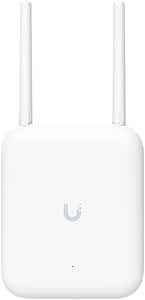 | Best for High-Capacity Wi-Fi 7 Coverage | Wi-Fi generation: Wi-Fi 7 | Frequency bands: 2.4 GHz and 5 GHz | Antenna: 12.5 dBi directional | VIEW ON AMAZON | See Our Full Breakdown |
| TP-Link Omada EAP650-Outdoor AX3000 Wi-Fi 6 Access Point |  | Best for Managed Outdoor Networks | Model and Wi-Fi generation: EAP650-Outdoor; Wi-Fi 6 (802.11ax) | Frequency bands: Dual-band | Maximum wireless speed: Up to 2,976 Mbps | VIEW ON AMAZON | See Our Full Breakdown |
| BrosTrend AX3000 Outdoor WiFi 6 Access Point |  | Best Straightforward Wi-Fi 6 Value | Wi-Fi generation: Wi-Fi 6 | Wireless bands and data rate: 2.4 GHz and 5 GHz; up to 574 Mbps and 2,402 Mbps respectively | Ethernet uplink: Gigabit, up to 1,000 Mbps | VIEW ON AMAZON | See Our Full Breakdown |
| EnGenius ENH1350EXT Wi‑Fi 5 AC1300 Outdoor Access Point – IP67 Weatherproof, Dual‑Band Long‑Range Extender, MU‑MIMO, PoE Injector & Mounting Kit Included |  | Best Complete Kit for Flexible Coverage | Model and Wi-Fi standard: ENH1350EXT; 802.11ac Wi-Fi 5 Wave 2 | Maximum speeds: 867 Mbps on 5 GHz; 400 Mbps on 2.4 GHz | Antennas: 4 detachable 5 dBi SMA antennas | VIEW ON AMAZON | See Our Full Breakdown |
| TP-Link Festa F41 Outdoor N300 Wireless Access Point |  | Best for Basic Long-Range 2.4 GHz Coverage | Wireless standard: 802.11b/g/n; Wi-Fi 4 | Frequency and maximum data rate: 2.4 GHz; up to 300 Mbps | MIMO: 2×2 | VIEW ON AMAZON | See Our Full Breakdown |
| Cudy AP3000 Outdoor AX3000 Wi-Fi 6 Access Point |  | Best for Feature-Rich Wi-Fi 6 Access | Wi-Fi standard: Wi-Fi 6 (AX3000) | Maximum wireless speed: 2402 Mbps at 5 GHz + 574 Mbps at 2.4 GHz | Ethernet port: 2.5GbE | VIEW ON AMAZON | See Our Full Breakdown |
| Cudy AP1200 Outdoor AC1200 Wi-Fi 5 Access Point |  | Best for Basic Outdoor Coverage | Wi-Fi standard: Wi-Fi 5 (802.11ac) | Maximum wireless speed: 867 Mbps at 5 GHz + 300 Mbps at 2.4 GHz | Ethernet port: 1 port, 100 Mbps | VIEW ON AMAZON | See Our Full Breakdown |
| Omada AC1200 Outdoor Wireless Access Point with PoE Injector (EAP225-Outdoor) |  | Best for Omada Network Integration | Wi-Fi standard: 802.11ac Wave 2 | Maximum wireless speed: 1200 Mbps | Frequency bands: 2.4 GHz and 5 GHz | VIEW ON AMAZON | See Our Full Breakdown |
| WAVLINK AX1800 Outdoor WiFi 6 Extender, IP67 Weatherproof |  | Best for Flexible Outdoor Modes | Wi-Fi standard: Wi-Fi 6 (802.11ax) | Maximum data rate: 1800 Mbps | Frequency bands: 2.4 GHz and 5 GHz | VIEW ON AMAZON | See Our Full Breakdown |
| Wavlink AX1800 Outdoor WiFi 6 Extender – Long-Range, IP67 Weatherproof |  | Best for Long-Range PoE Installations | Wi-Fi standard: Wi-Fi 6 (AX1800), dual-band | Frequency bands: 2.4 GHz and 5 GHz | Antennas: Four 8 dBi fiberglass antennas | VIEW ON AMAZON | See Our Full Breakdown |
| outdoor wi fi access point | Wi-Fi standard | Antennas |
|---|---|---|
| BrosTrend AC1200 Outdoor WiFi | 802.11ac Wave 2 (Wi-Fi 5) | 2 adjustable 5 dBi omnidirectional antennas |
| Wavlink AX3000 Outdoor WiFi 6 | Listed as Wi-Fi 6; listed standards include 802.11ac/a/b/g/n | 4 detachable 8 dBi omnidirectional fiberglass antennas |
| Deco 7 Outdoor BE5000 Dual-Ban | Wi-Fi 7, dual-band; no 6 GHz band | — |
| Cudy AP1300 Outdoor AC1200 Wi- | Wi-Fi 5 (802.11ac) | 2 detachable RP-SMA antennas |
| TP-Link EAP110-Outdoor V3 N300 | 802.11b/g/n (Wi-Fi 4) | 2 external 5 dBi omnidirectional antennas |
| Ubiquiti U7 Outdoor Dual-Band | — | — |
| TP-Link Omada EAP650-Outdoor A | — | 4 fixed antennas |
| BrosTrend AX3000 Outdoor WiFi | — | 2 dual 5 dBi high-gain antennas |
| EnGenius ENH1350EXT Wi‑Fi 5 AC | — | 4 detachable 5 dBi SMA antennas |
| TP-Link Festa F41 Outdoor N300 | — | — |
| Cudy AP3000 Outdoor AX3000 Wi- | Wi-Fi 6 (AX3000) | — |
| Cudy AP1200 Outdoor AC1200 Wi- | Wi-Fi 5 (802.11ac) | Two detachable 4.6 dBi RP-SMA antennas |
| Omada AC1200 Outdoor Wireless | 802.11ac Wave 2 | — |
| WAVLINK AX1800 Outdoor WiFi 6 | Wi-Fi 6 (802.11ax) | Four detachable 8 dBi omnidirectional antennas |
| Wavlink AX1800 Outdoor WiFi 6 | Wi-Fi 6 (AX1800), dual-band | Four 8 dBi fiberglass antennas |
More Details on Our Top Picks
BrosTrend AC1200 Outdoor WiFi Access Point with Gigabit Ethernet and PoE
I’d shortlist the BrosTrend when the main job is carrying Wi-Fi across a yard, garden, or pool area without stepping up to a newer, more involved mesh system. Its stated 656-foot coverage, adjustable antennas, and dual-band Wi-Fi 5 give it a useful reach-and-flexibility mix, while the Gigabit Ethernet port avoids the wired bottleneck found on the TP-Link EAP110-Outdoor. The IP65 housing and surge protections suit exposed mounting, but coverage figures are best treated as a guide: walls, placement, and interference affect real results. Unlike the Cudy AP1300, this unit includes a passive PoE injector, though it still needs a wired connection back to the router and weather-resistant Ethernet for an outdoor run. Its 60-device limit and Wi-Fi 5 speeds make it less suited to a busy, high-throughput installation.
Pros:- Dual-band Wi-Fi 5 supports both 2.4 GHz reach and faster 5 GHz connections.
- Stated coverage extends up to 656 feet.
- Gigabit Ethernet and included passive PoE injector simplify wired installation.
- IP65 housing plus stated lightning and ESD protection suits outdoor mounting.
Cons:- Requires Ethernet backhaul to the router.
- Outdoor Ethernet cable must be weather-resistant; a PoE switch is not included.
- Wi-Fi 5 and a 60-device capacity are less suited to demanding or crowded networks.
Best for: Homeowners who can run Ethernet outdoors and want dual-band coverage for a yard, garden, or pool area.
Not ideal for: Buyers seeking a wireless-only setup, Wi-Fi 6, or capacity beyond the stated 60 devices.
- Wi-Fi standard:802.11ac Wave 2 (Wi-Fi 5)
- Bands:2.4 GHz and 5 GHz
- Maximum speeds:867 Mbps (5 GHz) + 300 Mbps (2.4 GHz)
- Stated coverage:Up to 656 feet
- Device capacity:Up to 60 devices
- Ethernet:1 Gbps
- Power:24 V passive PoE; passive PoE injector included
- Weather and surge protection:IP65; 6 kV lightning and 8 kV ESD protection
- Antennas:2 adjustable 5 dBi omnidirectional antennas
Our verdict“Choose the BrosTrend for broad, wired outdoor coverage when Wi-Fi 5 is sufficient and the stated surge protections are useful.”
Wavlink AX3000 Outdoor WiFi 6 Extender & Access Point
The Wavlink is the most mode-flexible pick here: it can work as an access point, router, repeater, or mesh node, and its Wi-Fi 6 dual-band speeds and stated 256-connection capacity give it more headroom than the Wi-Fi 5 BrosTrend AC1200. Four detachable 8 dBi antennas and an IP67 enclosure make it a stronger fit for exposed, wide-area installations than the IP65 Cudy AP1300. Active or passive PoE support also broadens mounting options, but the power arrangement needs careful planning: the optional PoE converter is not waterproof. Mesh operation is limited to other Wavlink devices, and choosing among several network modes may take more setup work than a straightforward access point. I’d pick it for adaptable outdoor coverage, not for a plug-and-play installation.
Pros:- Wi-Fi 6 dual-band operation offers more capacity than the Wi-Fi 5 options in this group.
- Four detachable 8 dBi antennas and a stated 200–300 m radius suit broad outdoor coverage.
- IP67 enclosure provides a higher stated weather-protection rating than IP65 models.
- Supports active and passive PoE and multiple network modes.
Cons:- The optional PoE converter is not waterproof, limiting where it can be placed.
- Mesh mode works only with other Wavlink devices.
- Multiple operating modes can make setup less straightforward.
Best for: Property owners who want Wi-Fi 6 outdoors, several operating modes, and the flexibility to use active or passive PoE.
Not ideal for: Beginners wanting a simple setup, or buyers who need a mesh system that works across brands.
- Wi-Fi standard:Listed as Wi-Fi 6; listed standards include 802.11ac/a/b/g/n
- Bands and maximum speeds:5 GHz up to 2402 Mbps; 2.4 GHz up to 573 Mbps
- Stated coverage radius:200–300 m
- Maximum connections:256
- Antennas:4 detachable 8 dBi omnidirectional fiberglass antennas
- Ethernet:Gigabit, 10/100/1000 Mbps
- PoE:802.3af/at active PoE and passive PoE; up to 100 m cable length
- Weather protection:IP67
- Power protection:15 kV ESD and 6 kV lightning protection
Our verdict“Choose the Wavlink if you need a weather-rated Wi-Fi 6 access point with flexible modes and can plan around its PoE and setup requirements.”
Deco 7 Outdoor BE5000 Dual-Band Wi-Fi 7 Mesh Add-On Extender
This Deco is a different kind of outdoor pick: it is a Wi-Fi 7 mesh add-on, rather than a conventional stand-alone access point. Its stated coverage of up to 2,800 square feet and capacity for 150 devices suit households extending an existing Deco network to a patio or outbuilding. Compared with the Wavlink AX3000, it offers faster stated 5 GHz performance and two 2.5 Gbps PoE+ ports, which can support fast wired connections or backhaul; it also avoids relying on Wavlink-only mesh pairing. The tradeoff is system fit: this model makes the most sense for buyers already committed to Deco, not someone seeking a brand-neutral AP. Wi-Fi 7 here is dual-band without 6 GHz, and PoE+ or an AC adapter adds installation planning.
Pros:- Wi-Fi 7 dual-band speeds offer high stated throughput for an outdoor mesh node.
- Adds up to 2,800 square feet of coverage and supports up to 150 devices.
- Two 2.5 Gbps PoE+ ports provide fast wired connection options.
- Can use PoE+ or an AC adapter and has flexible mounting options.
Cons:- Mesh add-on format is best suited to an existing Deco system.
- Wi-Fi 7 implementation does not include the 6 GHz band.
- PoE+ infrastructure or an AC power source is needed for installation.
Best for: Existing Deco mesh owners who want to extend a fast, high-capacity network into an outdoor area with wired backhaul options.
Not ideal for: Buyers building a stand-alone or brand-neutral access point setup, or those specifically seeking Wi-Fi 7 on 6 GHz.
- Wi-Fi standard:Wi-Fi 7, dual-band; no 6 GHz band
- Maximum speeds:4324 Mbps (5 GHz) / 688 Mbps (2.4 GHz)
- Added coverage:Up to 2,800 sq ft
- Supported devices:Up to 150
- Ports:2 × 2.5 Gbps PoE+
- Power options:PoE+ or AC adapter
- Weather protection:IP65
- Mesh role:Outdoor mesh add-on extender
Our verdict“Pick this Deco when you already use Deco and want a high-capacity outdoor mesh extension with fast wired ports.”
Cudy AP1300 Outdoor AC1200 Wi-Fi 5 Access Point
The Cudy AP1300 is a practical pick for buyers who want more network-management options than a basic outdoor AP provides. It supports mesh networking and fast roaming, plus app and cloud management; its VPN protocol support gives technically inclined owners options the BrosTrend AC1200 does not list. Both models use dual-band Wi-Fi 5 with Gigabit Ethernet and IP65 protection, but Cudy includes a PoE adapter and mounting kit, while the BrosTrend’s stated advantage is its longer 656-foot coverage figure and included passive injector. Cudy’s 128 MB of RAM and support for more than 100 concurrent clients suit a larger, managed setup on paper. Its limits are real: Wi-Fi 5 is older than the Wavlink AX3000’s Wi-Fi 6, and a single Ethernet port leaves little room for wired devices at the AP.
Pros:- Supports mesh networking and fast roaming for connected outdoor coverage.
- IP65 aluminum enclosure is rated for operation from -40 to 65°C.
- PoE adapter, power cord, and pole and wall mounting kit are included.
- App and cloud management plus several VPN protocol options support more involved network setups.
Cons:- Wi-Fi 5 is older than the Wi-Fi 6 Wavlink AX3000.
- Only one shielded Gigabit Ethernet port is provided.
- Management and VPN options may be unnecessary complexity for a basic home access point.
Best for: Network-minded homeowners or small-site operators who want outdoor roaming, app or cloud management, and included mounting and PoE accessories.
Not ideal for: Buyers prioritizing Wi-Fi 6, multiple local Ethernet connections, or a simple setup without management features.
- Wi-Fi standard:Wi-Fi 5 (802.11ac)
- Maximum speeds:867 Mbps (5 GHz) + 300 Mbps (2.4 GHz)
- Weather protection:IP65 aluminum enclosure
- Operating temperature:-40 to 65°C
- Ethernet:1 shielded Gigabit Ethernet PoE input
- PoE support:802.3at/af and passive PoE
- Antennas:2 detachable RP-SMA antennas
- Memory:128 MB RAM
- Included accessories:PoE adapter, power cord, pole and wall mount kit
Our verdict“Choose the Cudy AP1300 for a managed, roaming-capable Wi-Fi 5 outdoor network with key installation accessories in the box.”
TP-Link EAP110-Outdoor V3 N300 Wireless Outdoor Access Point
The TP-Link EAP110-Outdoor is the simplest, most limited option in this group: a single-band 2.4 GHz Wi-Fi 4 access point built for basic outdoor connectivity rather than high throughput. That can suit low-demand devices such as simple sensors or occasional browsing in an outbuilding, and its stated 200-meter coverage and IP65 housing give it a clear outdoor role. But compared with the dual-band BrosTrend AC1200, it gives up 5 GHz and tops out at 300 Mbps; its 10/100 Mbps Ethernet port also constrains wired throughput. The TP-Link offers centralized management, multi-SSID, and captive portal features, which can help with separated networks or guest access. I’d choose it only when those basics meet the need; the Cudy AP1300 is a better fit for buyers wanting dual-band Wi-Fi and more capable wired networking.
Pros:- IP65-rated construction is designed for outdoor exposure.
- Passive PoE allows installation away from a nearby power outlet.
- Centralized management, multi-SSID, and captive portal support provide useful network controls.
- Two external 5 dBi antennas and a stated 200-meter coverage distance suit basic wide-area connectivity.
Cons:- Single-band 2.4 GHz Wi-Fi 4 is slower and less flexible than the dual-band options.
- The 10/100 Mbps Ethernet port limits wired throughput.
- Its 300 Mbps maximum data rate is a poor match for high-throughput outdoor use.
Best for: Buyers extending basic 2.4 GHz connectivity to low-bandwidth outdoor devices or a guest area where advanced speed is not needed.
Not ideal for: Households streaming or transferring large files outdoors, or anyone who needs 5 GHz or Gigabit Ethernet.
- Wi-Fi standard:802.11b/g/n (Wi-Fi 4)
- Frequency band:2.4 GHz
- Maximum data rate:300 Mbps
- Stated coverage:Up to 200 meters
- Antennas:2 external 5 dBi omnidirectional antennas
- LAN port:1 × 10/100 Mbps
- Power:48 V DC passive PoE
- Weather protection:IP65 dustproof and weatherproof
- Management features:Centralized management, multi-SSID, and captive portal
Our verdict“Choose the EAP110-Outdoor for basic, managed 2.4 GHz access where its Fast Ethernet limit and older Wi-Fi standard are acceptable.”
Ubiquiti U7 Outdoor Dual-Band Wi-Fi 7 Access Point with 3 ft Cat6A Patch Cable
The U7 Outdoor is the most forward-looking choice here: Wi-Fi 7, a 2.5 GbE PoE+ port, and stated support for 250+ clients make it a fit for busy outdoor spaces with a fast wired network behind them. Its listed coverage reaches 5,000 square feet, though the directional antenna favors a planned coverage zone rather than equal reach in every direction. Compared with the TP-Link Omada EAP650-Outdoor, it offers a newer Wi-Fi generation and faster Ethernet, while the TP-Link includes a PoE adapter and adds Omada management features. The U7 requires a separate PoE+ switch or 48V injector, so its cable bundle does not make it a complete power-ready kit. I’d choose it for capacity and upgrade headroom, not the simplest installation.
Pros:- Wi-Fi 7 support across 2.4 GHz and 5 GHz bands
- 2.5 GbE PoE+ port can accommodate a faster wired backhaul
- Stated coverage up to 5,000 square feet and capacity for 250+ clients
- Includes a 3 ft slim Cat6A patch cable
Cons:- PoE+ switch or 48V PoE injector is required and sold separately
- Directional antenna can make placement and coverage planning less flexible
- One-year limited warranty
Best for: Property owners and small venues with a PoE+ network, many outdoor clients, and a defined area to cover.
Not ideal for: Buyers who need an all-in-one installation kit, broad omnidirectional coverage, or a standalone wireless extender.
- Wi-Fi generation:Wi-Fi 7
- Frequency bands:2.4 GHz and 5 GHz
- Antenna:12.5 dBi directional
- Stated coverage:Up to 5,000 sq ft
- Client capacity:250+ clients
- Maximum data rate:Up to 4.3 Gbps
- Ethernet and power:One 2.5 GbE PoE+ port; PoE+ switch or 48V injector required, sold separately
- Security and included cable:WPA3; 3 ft slim Cat6A, 28 AWG
Our verdict“Choose the U7 Outdoor if you have PoE+ power and want Wi-Fi 7 capacity for a large, deliberately targeted outdoor zone.”
TP-Link Omada EAP650-Outdoor AX3000 Wi-Fi 6 Access Point
The EAP650-Outdoor balances Wi-Fi 6 performance with the management tools that matter when several access points need to work together. Its IP67 enclosure and included passive PoE adapter make it a more deployment-ready option than the Ubiquiti U7 Outdoor, which requires a separate PoE+ source. Omada SDN brings cloud access, mesh, roaming, and traffic-management features, but some benefits—especially seamless roaming and Omada mesh—depend on an Omada SDN controller. That makes this a stronger fit for a managed network than for someone seeking a basic, independent access point. Its listed 3,500-square-foot coverage is below the U7’s stated 5,000 square feet, but fixed antennas and a management ecosystem may suit multi-access-point layouts better. I’d favor it when coordinated control matters more than Wi-Fi 7 or a faster-than-gigabit port.
Pros:- IP67 weather-resistant enclosure for outdoor installation
- Includes passive PoE adapter, power cord, and mounting kits
- Omada SDN offers app and cloud management
- Supports mesh, seamless roaming, band steering, and load balancing
Cons:- Some mesh and roaming functions require an Omada SDN controller
- Wi-Fi 6 rather than the Wi-Fi 7 offered by the Ubiquiti U7 Outdoor
- Listed coverage is 3,500 square feet, below the U7 Outdoor’s stated 5,000
Best for: Small businesses, schools, and property managers building an Omada-managed network with outdoor coverage.
Not ideal for: People who want Wi-Fi 7, controller-free mesh and roaming, or a simple unmanaged setup.
- Model and Wi-Fi generation:EAP650-Outdoor; Wi-Fi 6 (802.11ax)
- Frequency bands:Dual-band
- Maximum wireless speed:Up to 2,976 Mbps
- Weather resistance:IP67
- Antennas:4 fixed antennas
- Listed coverage:3,500 sq ft
- Management:Omada SDN; app and cloud access
- Security and included power:WPA3; passive PoE adapter and power cord included
Our verdict“Pick the EAP650-Outdoor if you want weatherproof Wi-Fi 6 with Omada management and an included PoE adapter.”
BrosTrend AX3000 Outdoor WiFi 6 Access Point
The BrosTrend AX3000 keeps the outdoor access-point job straightforward: connect it to the router over Gigabit Ethernet, supply PoE, and place it where yard, patio, garage, or barn devices need coverage. Its Wi-Fi 6 dual-band design is a meaningful step up from the single-band TP-Link Festa F41 for households that want 5 GHz capacity as well as 2.4 GHz reach. The tradeoff is a more basic installation and coverage story: the product data gives no square-foot range, and actual results depend on wired placement. Its Gigabit uplink also caps the wired connection below the Ubiquiti U7 Outdoor’s 2.5 GbE port. IP65 protection and a broad stated operating-temperature range suit exposed locations, but this is not a wireless repeater; it needs an Ethernet run back to the network.
Pros:- Dual-band Wi-Fi 6 supports both 2.4 GHz and 5 GHz devices
- IP65 waterproof and dustproof protection
- PoE power can simplify installation where Ethernet is available
- Supports WPA3-SAE alongside WPA-PSK and WPA2-PSK
Cons:- Requires a wired Ethernet connection to the main router
- Gigabit uplink is slower than the Ubiquiti U7 Outdoor’s 2.5 GbE port
- No stated square-foot coverage figure; placement will shape results
Best for: Homeowners and small property operators who can run Ethernet to a patio, garage, yard, or outbuilding and want dual-band Wi-Fi 6.
Not ideal for: Buyers without a wired connection to the outdoor location or those needing a stated large-area coverage rating or multi-gigabit uplink.
- Wi-Fi generation:Wi-Fi 6
- Wireless bands and data rate:2.4 GHz and 5 GHz; up to 574 Mbps and 2,402 Mbps respectively
- Ethernet uplink:Gigabit, up to 1,000 Mbps
- Antennas:2 dual 5 dBi high-gain antennas
- Device capacity:Up to 80 devices
- Weather protection:IP65
- Power and operating temperature:PoE; -22 °F to 140 °F
- Security:WPA-PSK, WPA2-PSK, WPA3-SAE
Our verdict“Choose the BrosTrend AX3000 if you can provide wired backhaul and want a practical dual-band Wi-Fi 6 link for outdoor spaces.”
EnGenius ENH1350EXT Wi‑Fi 5 AC1300 Outdoor Access Point – IP67 Weatherproof, Dual‑Band Long‑Range Extender, MU‑MIMO, PoE Injector & Mounting Kit Included
The ENH1350EXT stands out for a useful installation bundle: IP67 housing, a PoE injector, mounting hardware, and four detachable antennas are included. Those antennas can be repositioned to shape coverage, a practical contrast with the directional Ubiquiti U7 Outdoor, whose pattern asks for more deliberate aiming. This EnGenius model uses Wi-Fi 5, however, so its stated 867 Mbps on 5 GHz and 400 Mbps on 2.4 GHz are modest beside the Wi-Fi 6 BrosTrend AX3000 or Wi-Fi 7 U7. For an older network, a smaller user group, or a location where weather protection and flexible antenna placement matter more than newer wireless standards, the included power gear is convenient. Buyers should accept a single Gigabit LAN port and some setup work for advanced modes.
Pros:- IP67 weatherproof housing
- PoE injector and mounting kit are included
- Four detachable 5 dBi antennas support flexible placement
- MU-MIMO and beamforming support simultaneous clients and signal direction
Cons:- Wi-Fi 5 is an older standard than the Wi-Fi 6 BrosTrend AX3000 and Omada EAP650-Outdoor
- One Gigabit Ethernet port limits wired connections
- Advanced configuration can require networking knowledge
Best for: Owners of existing Wi-Fi 5 networks who want a rugged outdoor access point with included PoE power and adjustable antenna placement.
Not ideal for: Buyers prioritizing Wi-Fi 6 or Wi-Fi 7 speeds, multiple wired devices, or a plug-and-play setup with no network configuration.
- Model and Wi-Fi standard:ENH1350EXT; 802.11ac Wi-Fi 5 Wave 2
- Maximum speeds:867 Mbps on 5 GHz; 400 Mbps on 2.4 GHz
- Antennas:4 detachable 5 dBi SMA antennas
- Weather protection:IP67
- Ethernet:One Gigabit Ethernet port
- Power:54 V, 0.6 A PoE; injector included
- Wireless features:MU-MIMO and beamforming
- Warranty:1 year
Our verdict“Choose the ENH1350EXT if you want a rugged Wi-Fi 5 installation kit with adjustable antennas and included PoE power.”
TP-Link Festa F41 Outdoor N300 Wireless Access Point
The Festa F41 is a narrow-purpose pick: it uses 2.4 GHz Wi-Fi 4 rather than the dual-band Wi-Fi 6 offered by the BrosTrend AX3000 or TP-Link Omada EAP650-Outdoor. That limits speed and leaves no 5 GHz band, but 2.4 GHz can suit basic connections across a wide outdoor area; TP-Link lists coverage up to 200 meters. Its IP65 enclosure, lightning protection, included passive PoE adapter, and three-year warranty make the hardware package appealing for simple deployments. The bigger commitment is its Festa Cloud requirement: it cannot run standalone or under Omada controllers. I’d consider it for basic client access on a Festa-managed network, not for bandwidth-heavy work, local-only management, or buyers expecting compatibility with TP-Link’s Omada ecosystem.
Pros:- Listed coverage up to 200 meters
- IP65 enclosure with 6 kV lightning protection and 15 kV ESD protection
- Passive PoE adapter is included
- Three-year warranty
Cons:- Single-band 2.4 GHz Wi-Fi 4 lacks 5 GHz capacity and newer Wi-Fi features
- Festa Cloud is required; standalone mode is not supported
- Incompatible with Omada controllers
Best for: Festa Cloud users who need basic outdoor connectivity for low-bandwidth devices across a broad area.
Not ideal for: Households needing 5 GHz, high throughput, standalone operation, or compatibility with Omada controllers.
- Wireless standard:802.11b/g/n; Wi-Fi 4
- Frequency and maximum data rate:2.4 GHz; up to 300 Mbps
- MIMO:2×2
- Listed coverage and client capacity:Up to 200 meters; over 100 clients
- Weather and electrical protection:IP65; 6 kV lightning protection; 15 kV ESD protection
- Power and antennas:Passive PoE adapter included; 2 fixed antennas
- Management:Festa app or cloud portal; Festa Cloud required
- Security and warranty:WPA/WPA2 encryption and MAC filtering; 3 years
Our verdict“Pick the Festa F41 for basic, wide-area 2.4 GHz access only if you are comfortable managing it through Festa Cloud.”
Cudy AP3000 Outdoor AX3000 Wi-Fi 6 Access Point
The Cudy AP3000 is the strongest fit here for outdoor networks that need Wi-Fi 6 capacity and more than basic access-point controls. Its AX3000 dual-band speeds, OFDMA, and MU-MIMO are suited to busy yards or work areas with many connected devices, while the 2.5GbE port gives it more wired headroom than the 100 Mbps ports on the Cudy AP1200 and Omada EAP225-Outdoor. IP65 protection and 6 kV surge protection add useful safeguards, and the included PoE injector simplifies placement away from an outlet. The tradeoff is setup complexity: VLANs, VPNs, captive portals, and controller options are more useful to experienced network owners than plug-and-play buyers. OpenWRT features also require firmware flashing, so I would choose a simpler model for a basic coverage extension.
Pros:- Wi-Fi 6 with OFDMA and MU-MIMO supports many simultaneous clients
- 2.5GbE port offers more wired capacity than the 100 Mbps ports on the AP1200 and EAP225-Outdoor
- IP65 enclosure and 6 kV surge protection suit exposed installations
- PoE injector is included, with VLAN, captive portal, VPN, and management options
Cons:- Advanced setup and management can be challenging for less technical buyers
- OpenWRT features require firmware flashing
Best for: Network-savvy homeowners or small businesses that need outdoor Wi-Fi 6 for multiple clients, advanced network controls, and a faster wired uplink
Not ideal for: Buyers who want simple setup or only need to extend a basic network, since its management options can demand networking experience
- Wi-Fi standard:Wi-Fi 6 (AX3000)
- Maximum wireless speed:2402 Mbps at 5 GHz + 574 Mbps at 2.4 GHz
- Ethernet port:2.5GbE
- Weather resistance:IP65
- Surge protection:6 kV
- Operating temperature:-22 to 158°F
- Power:PoE; injector included
- Dimensions:3.94 x 2.13 x 9.45 inches
Our verdict“Choose the AP3000 if you want a capable outdoor Wi-Fi 6 access point with advanced controls and can handle a more involved setup.”
Cudy AP1200 Outdoor AC1200 Wi-Fi 5 Access Point
The AP1200 is a straightforward choice for extending Wi-Fi into a garden, patio, or outbuilding where basic dual-band coverage matters more than high throughput. Its IP65 enclosure, detachable antennas, mounting hardware, and included 24V passive PoE injector cover the practical installation needs without the advanced management stack found on the Cudy AP3000. That simpler profile suits modest networks, but its 100 Mbps Ethernet port is a firm bottleneck: the advertised wireless rates cannot translate into a faster wired connection. The Omada EAP225-Outdoor also has a 100 Mbps port, but adds Omada management options; the AP1200 instead emphasizes a basic standalone installation. I would skip it for high-speed broadband, heavy client loads, or any setup where the temperature specification must be unambiguous, since its listed ranges conflict.
Pros:- IP65 enclosure is suited to outdoor mounting
- Detachable antennas provide flexibility for installation
- Wall and pole mounting hardware is included
- 24V passive PoE injector allows installation without AC power at the mounting point
Cons:- 100 Mbps Ethernet port limits wired throughput
- Published operating temperature ranges are inconsistent
- Wi-Fi 5 lacks the client-handling features of the Wi-Fi 6 Cudy AP3000
Best for: Homeowners extending an existing network to a patio, garden, or small outbuilding who can accept a 100 Mbps wired link
Not ideal for: Users with gigabit internet, demanding outdoor workloads, or installations exposed to temperatures that require a clearly specified operating range
- Wi-Fi standard:Wi-Fi 5 (802.11ac)
- Maximum wireless speed:867 Mbps at 5 GHz + 300 Mbps at 2.4 GHz
- Ethernet port:1 port, 100 Mbps
- Weather resistance:IP65
- Antennas:Two detachable 4.6 dBi RP-SMA antennas
- Power:24V passive PoE
- Operating temperature:Conflicting listings: -4°F to 140°F and -40°F to 149°F
- Warranty:2 years
Our verdict“Pick the AP1200 for uncomplicated, modest outdoor coverage, but avoid it if you need a fast wired uplink or dependable temperature guidance.”
Omada AC1200 Outdoor Wireless Access Point with PoE Injector (EAP225-Outdoor)
The EAP225-Outdoor makes the most sense for buyers who already use, or plan to build around, TP-Link Omada management. It supports cloud, software-controller, hardware-controller, and standalone operation, giving it more room to grow than the Cudy AP1200’s simpler installation. Its IP65 enclosure and support for 802.3af/at as well as passive PoE also make it adaptable to different existing power setups. Performance is still Wi-Fi 5 with a 100 Mbps Ethernet port, so it is a poor match for fast broadband or a busy site that would benefit from Wi-Fi 6, such as one served by the Cudy AP3000. The listed coverage distances are best treated as line-of-sight claims, not a promise through walls or dense landscaping. Buyers outside the Omada ecosystem may find the extra management choices unnecessary.
Pros:- Works with Omada cloud, software-controller, and hardware-controller management, or standalone
- Supports 802.3af/at and passive PoE
- IP65 enclosure and broad stated operating temperature range suit outdoor deployment
- Wave 2 MU-MIMO supports simultaneous wireless clients
Cons:- 100 Mbps Ethernet port restricts wired throughput
- Wi-Fi 5 has less capacity headroom than the Wi-Fi 6 Cudy AP3000
- Controller-based Omada features can add setup complexity
Best for: Small businesses and Omada users who want outdoor coverage managed alongside compatible indoor access points
Not ideal for: Buyers seeking a high-throughput outdoor link, a faster-than-100 Mbps wired connection, or the simplest possible standalone setup
- Wi-Fi standard:802.11ac Wave 2
- Maximum wireless speed:1200 Mbps
- Frequency bands:2.4 GHz and 5 GHz
- Ethernet port:1 port, 10/100 Mbps
- PoE support:802.3af/at and passive PoE
- Weather resistance:IP65
- Operating temperature:-30°C to +70°C
- Management options:Omada cloud, software controller, hardware controller, or standalone
Our verdict“Choose the EAP225-Outdoor if Omada integration and flexible PoE matter more to you than a faster Ethernet link or Wi-Fi 6.”
WAVLINK AX1800 Outdoor WiFi 6 Extender, IP67 Weatherproof
WAVLINK’s AX1800 is the most flexible pick for buyers who may want to switch between access point, router, repeater, or mesh modes. Its IP67 housing offers a higher stated ingress-protection rating than the IP65 Cudy AP3000 and Omada EAP225-Outdoor, while active and passive PoE options give installers more power choices. Four detachable 8 dBi omnidirectional antennas and Wi-Fi 6 make it appealing for a broad yard or similar open area, but the stated reach of up to 300 meters depends on line of sight; buildings, trees, and interference can cut that distance. Mesh mode is limited to WAVLINK products, so it is less open-ended than the Omada management approach. The PoE adapter is not waterproof and must stay indoors, a practical installation limit to plan around.
Pros:- IP67-rated housing provides stronger stated ingress protection than IP65 alternatives here
- Supports AP, router, repeater, AP+repeater, and mesh modes
- Accepts both 802.3af/at active PoE and passive PoE
- Wi-Fi 6 and four detachable 8 dBi omnidirectional antennas suit broad outdoor coverage
Cons:- Advertised 200–300 meter reach depends on line-of-sight conditions
- Included PoE adapter is not waterproof and must be installed indoors
- Mesh mode works only with WAVLINK series products
Best for: Homeowners or property managers who want one outdoor unit to support several network roles and have a suitable sheltered location for its PoE adapter
Not ideal for: Buyers who need mesh compatibility across brands or cannot keep the PoE adapter indoors
- Wi-Fi standard:Wi-Fi 6 (802.11ax)
- Maximum data rate:1800 Mbps
- Frequency bands:2.4 GHz and 5 GHz
- Antennas:Four detachable 8 dBi omnidirectional antennas
- Weather resistance:IP67
- PoE support:802.3af/at active PoE and passive PoE
- Operating temperature:-20°C to 50°C
- Operating modes:Mesh, AP, router, repeater, AP+repeater
Our verdict“Pick this WAVLINK when flexible operating modes and IP67 protection matter, provided its adapter can stay indoors and its mesh limit fits your network.”
Wavlink AX1800 Outdoor WiFi 6 Extender – Long-Range, IP67 Weatherproof
This Wavlink AX1800 is aimed at buyers who want long-range outdoor coverage and several ways to connect the unit to an existing network. Its four 8 dBi fiberglass antennas, Wi-Fi 6, and IP67 enclosure make it a plausible fit for larger open areas and harsher exposure than the IP65 Cudy AP1200. AP, router, repeater, and WISP modes also give it a different kind of flexibility from the Omada EAP225-Outdoor, which focuses more on centralized network management. That range advantage is not a guarantee across obstacles, and the supplied details do not list an Ethernet speed or operating-temperature range, leaving less to judge about wired capacity and site limits. PoE is required, and configuration may be more involved for buyers without networking experience.
Pros:- Four 8 dBi fiberglass antennas are designed for broad outdoor coverage
- IP67 enclosure is specified for protection from rain, snow, dust, and UV
- Wi-Fi 6 AX1800 supports dual-band connections
- 802.3af/at and passive PoE plus AP, router, repeater, and WISP modes offer installation flexibility
Cons:- Requires PoE infrastructure or an injector for power
- Configuration may be challenging for non-technical users
- The provided specifications do not state Ethernet speed or operating-temperature range
Best for: Technically comfortable owners of large yards, rural properties, or Starlink setups who can provide PoE power and have clear outdoor coverage paths
Not ideal for: Buyers who need detailed published Ethernet and temperature specifications or want a simple, outlet-powered installation
- Wi-Fi standard:Wi-Fi 6 (AX1800), dual-band
- Frequency bands:2.4 GHz and 5 GHz
- Antennas:Four 8 dBi fiberglass antennas
- Weather resistance:IP67
- Power options:802.3af/at PoE and passive PoE
- Operating modes:AP, router, repeater, WISP
- Starlink compatibility:Yes
Our verdict“Choose this Wavlink for a PoE-powered, long-range outdoor setup with flexible modes, but look elsewhere if complete wired and temperature specifications are a priority.”

How We Picked
I compared these 15 products as outdoor Wi-Fi access points and coverage extensions, prioritizing the details that affect a real installation: wireless generation and stated class, weather protection where specified, wired networking and PoE support, and whether the product is positioned as an access point, mesh add-on, or extender. I also considered usability factors such as included power or mounting hardware and whether a managed network ecosystem is part of the appeal. A faster wireless class can help with capable devices and busy networks, but it does not by itself guarantee better coverage through walls or across a large property.
The ranking favors useful outdoor access-point capability and a balanced feature set over the highest generation alone. The Omada EAP650-Outdoor leads for its Wi-Fi 6 positioning and dedicated outdoor AP role; the Wi-Fi 7 models rank well for buyers who can use their newer standard, but may be more than a simple yard-coverage job requires. Lower-speed N300 products remain relevant for basic use, though they rank below faster dual-band alternatives for mixed devices and demanding traffic. I also distinguish extenders from wired APs because their installation and connection requirements change the buying decision.
Factors to Consider When Choosing Outdoor Wi Fi Access Point
Before choosing a model, decide how the outdoor device will connect to your network and what you expect it to cover. Placement, backhaul, and weather exposure can matter more than moving up one Wi-Fi class, and an access point may require more setup than a plug-in-style extender.
Choose a Wired Access Point or a Wireless Extender
A wired access point connects to your router or network switch by Ethernet, giving it a dedicated path back to the network. A wireless extender repeats an existing signal, which can be easier to install but depends on receiving a strong signal where it is placed. This distinction matters outdoors: mounting an extender at the edge of weak coverage can repeat a weak connection rather than fix it. Before buying, check the product’s stated operating modes and confirm they match your plan. If you can run Ethernet to the location, a wired AP is often the clearer choice for stable coverage. If you cannot, position an extender where the indoor signal is still healthy, not at the farthest point you hope to reach.
Plan Power, PoE, and the Ethernet Route
Power over Ethernet carries both network data and power over a compatible Ethernet cable, which can make an outdoor mount easier to supply. Do not assume every PoE product includes an injector or that every injector matches the device’s required standard. Check the product package and the capabilities of your router or switch before ordering. The cable run also needs an outdoor-appropriate route and protection from water entry at connectors. A long or awkward cable path can change which mounting position is practical. If there is no safe way to provide power or wired backhaul, a wireless extender may fit better despite its performance tradeoffs.
Match Wi-Fi Generation to Your Devices and Network
Wi-Fi 6 and Wi-Fi 7 can offer newer capabilities, but a newer access point cannot make older client devices use a newer standard. Check the Wi-Fi generation supported by the phones, laptops, cameras, and other devices that will actually connect outdoors. A Wi-Fi 7 model makes more sense when the rest of the network and the client mix can benefit from it, rather than as a standalone upgrade for a single low-bandwidth device. N300 can suit simple tasks, but its limited class leaves less headroom for several users or heavier traffic. Avoid choosing by the combined speed label alone: real throughput also depends on distance, obstructions, interference, and the wired connection feeding the AP.
Read Weather Protection as an Installation Requirement
Outdoor-rated construction is meant for exposure that an indoor access point is not designed to handle, but the rating does not remove the need for careful mounting. Compare stated protection levels and follow the manufacturer’s instructions for cable entries, orientation, and enclosure use. Rain exposure, dust, temperature swings, and direct sun can all affect where a unit belongs. A device mounted under an eave may face different conditions from one fixed to a pole in the open. Do not treat a weatherproof label as permission to submerge equipment or leave connectors unprotected. When the mounting spot is exposed, give the protection details more weight than a small difference in advertised wireless class.
Check Coverage Needs Before Choosing a Speed Tier
Coverage depends on the distance between the access point and clients, building materials, mounting height, antenna design, and local interference. A higher speed class does not automatically reach farther, so a site with thick exterior walls or multiple structures may need a better location or more than one access point. Think about the area you need to cover and where people will use devices, not just the property boundary. For a patio beside the house, a modest model in a clear location may be enough; a detached workshop can call for a dedicated wired link or a separate AP. Avoid placing the unit where the building blocks the signal toward the yard. If broad coverage is the priority, plan placement first and use the product’s speed class as a secondary filter.
Decide How Much Network Management You Need
Some buyers want a simple extension of an existing home network, while others need centralized settings across several access points. A managed ecosystem can make it easier to coordinate devices and maintain consistent network settings, but it may add setup steps and depend on compatible equipment or software. Check whether the access point can run independently or expects a controller or companion system for the features you want. Mesh add-ons can be appealing when the rest of the network already uses the same mesh family. For a one-device installation, advanced management may add little value; for a larger property or multiple APs, it can make ongoing changes easier. Choose the simplest management approach that matches how much control you will actually use.
Frequently Asked Questions
Can I connect an outdoor access point to my existing home router?
Usually, a wired outdoor access point can connect to a router or network switch over Ethernet, but check its operating mode and network requirements before buying. Some models are designed to work within a particular management or mesh ecosystem, while others may be set up more independently. A wireless extender connects differently and needs a usable signal from the existing router at its installation point. Also check whether the router, switch, or included injector can supply the required PoE if the AP uses it. Confirming these details first helps avoid buying a device that does not fit your planned connection.
Should I buy an extender or a wired outdoor access point?
Choose a wired access point when you can run Ethernet outdoors and want a direct network connection at the new coverage area. Choose an extender when running cable is impractical and the device can receive a strong signal from the router or mesh system. Extenders are not a cure for a poor source signal; placing one where the original Wi-Fi is already weak can leave clients with an unreliable connection. Some products in this roundup are identified as extenders, while others are dedicated outdoor APs, so compare their connection modes rather than relying on the word “outdoor.” The better fit comes down to your cable route and the strength of the signal where you can mount the device.
Is Wi-Fi 7 worth choosing for outdoor coverage?
Wi-Fi 7 is most appealing if your existing network and the devices you use outdoors can take advantage of the newer generation. The Ubiquiti U7 Outdoor and Deco 7 Outdoor give buyers Wi-Fi 7 options, but a Wi-Fi 7 label alone does not promise greater range across a yard. Distance, obstructions, placement, and the connection back to the router still shape the result. If your outdoor devices mostly support older Wi-Fi generations or perform basic tasks, a capable Wi-Fi 6 or AC-class model may be a more proportionate choice. Prioritize a sound installation plan before paying for a newer standard.
Do I need a PoE injector if an outdoor access point supports PoE?
Not always: a compatible PoE switch or router can provide power directly, while a standalone injector can supply it when your network equipment cannot. Check the access point’s required PoE type and confirm that the power source supports the same standard. Also verify whether an injector is included, since package contents vary across models. The Ethernet cable must reach the outdoor mounting point, and its route and connectors should suit the installation. Sorting out power compatibility before mounting can prevent a setup that has network cabling but no way to power the device.
Will one outdoor access point cover a large yard or a detached building?
It may, but the answer depends on the distance, obstacles, building materials, and where the access point can be mounted. A wide open yard is different from a detached building separated by exterior walls or trees, and advertised speed class does not tell you how well a signal will pass through those obstacles. For a detached structure, a wired Ethernet run to a second AP can be more dependable than placing an extender at the edge of weak coverage. If a cable route is not possible, test signal strength at a proposed extender location before settling on it. For an unusually broad or obstructed area, plan for multiple access points rather than expecting one device to cover every corner.
Conclusion
For most buyers choosing an outdoor Wi-Fi access point, I would start with the TP-Link Omada EAP650-Outdoor as the best overall option for a balanced Wi-Fi 6 outdoor AP. The TP-Link EAP110-Outdoor V3 is a sensible best-value direction for basic coverage where N300 capacity is enough, while the Ubiquiti U7 Outdoor is my best premium pick for buyers building around Wi-Fi 7. Beginners who want a straightforward way to extend an existing compatible mesh should look at the Deco 7 Outdoor; buyers who need a dedicated wired AP should favor an access-point model rather than an extender. For a simple, low-demand connection, the N300 options fit better than paying for capabilities you will not use. Choose based on your backhaul, devices, and mounting conditions first, then use wireless generation and management features to narrow the field.