Good office lighting for video calls should brighten your face without glare, awkward shadows, or a desk crowded with gear. My best overall pick is the Logitech Litra Glow for its purpose-built video-call format, while the LitONES Video Conference Light with Stand stands out for extensive lighting adjustments and the HumanCentric Double Kit for people who want light from both sides. The main tradeoff is between compact monitor-mounted convenience and the flexibility of larger, adjustable lamps. Features such as color controls and high color rendering matter most when they solve a real problem in your room, not just because they appear on a spec sheet. Read on for the full breakdown and a guide to choosing a setup that suits your desk, camera, and daily calls.

Get the latest gadgets delivered free with Prime
- Fast, free delivery on millions of items
- Prime Video, Amazon Music and more included
- Member-only deals all year
Complete the kit



Key Takeaways
- Mounting style shapes the shortlist: the Logitech Litra Glow and Cyezcor ring light suit monitor-centered setups, while the LitONES swing-arm and 40-inch lamps call for desk space and more reach.
- Adjustability separates flexible picks from simple fill lights: the LitONES conference light offers 30 modes, while simpler ring lights may suit buyers who want fewer controls.
- Two lights solve a different problem than one: the HumanCentric Double Kit and yAyusi dual-lamp kit can spread light across both sides of the face, but require more setup and room.
- Phone holders add utility but can complicate a work-first setup: Yarrashop pairs a ring light with a phone holder, which makes more sense for mixed video-call and phone-content use than for a minimalist desk.
- A tall desk lamp is not automatically a video-call light: the LitONES 40-Inch lamp offers reach and many light modes, but placement and glare control matter more than height alone.
| LitONES Video Conference Light with Stand, 30 Lighting Modes, CRI >98 |  | Best Overall | Light modes: 30 combinations | Brightness: 10%–100% stepless dimming | Color temperature: 2700K–6500K | VIEW ON AMAZON | See Our Full Breakdown |
| Evershop 5-Inch USB Ring Light with Adjustable Stand |  | Best Compact Travel Pick | Light head diameter: 5 inches | Power: 10 W | Power source: USB | VIEW ON AMAZON | See Our Full Breakdown |
| LitONES LED Desk Lamp with Adjustable Swing Arm |  | Best for Shared Desk Work | Light source: LED | Wattage: 15 watts | Voltage: 12 volts | VIEW ON AMAZON | See Our Full Breakdown |
| Cyezcor Video Conference Ring Light for Monitor |  | Best Simple Monitor-Mounted Pick | Model: LT-05 | LEDs: 48 | Color temperatures: 3200K–6800K; 3 settings | VIEW ON AMAZON | See Our Full Breakdown |
| LitONES Diffused LED Ring Light for Laptop, Monitor, and Desk |  | Best Flexible Mounting | Model: F-682B-Black | Power: USB, 5V 2A | Color temperatures: 3000K–6000K; 5 settings | VIEW ON AMAZON | See Our Full Breakdown |
| HumanCentric Video Conference Light, Double Kit | 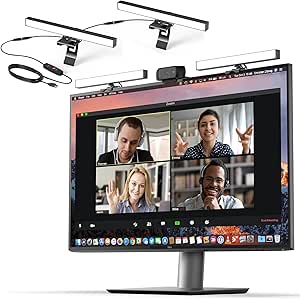 | Best for Balanced Two-Sided Lighting | Brand: HumanCentric | Model: 301-1038-P2 | Kit: Two connected lights | VIEW ON AMAZON | See Our Full Breakdown |
| LitONES Adjustable Desk Ring Light for Video Calls |  | Best for Desk-and-Phone Flexibility | Brand: LitONES | Model: 616 | Light size: 7 inches | VIEW ON AMAZON | See Our Full Breakdown |
| Logitech for Creators Litra Glow Premium LED Streaming Light, Graphite | 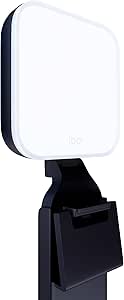 | Best Monitor-Mounted Pick | Brand: Logitech G | Model: Litra Glow | Lighting technology: TrueSoft full-spectrum LED | VIEW ON AMAZON | See Our Full Breakdown |
| Yarrashop Desk Ring Light with Adjustable Stand and Phone Holder |  | Best for Phone-Based Calls | Brand: Yarrashop | Model: F626 | Color temperatures: 3000K–6500K | VIEW ON AMAZON | See Our Full Breakdown |
| yAyusi Dual-Lamp Video Conference Lighting Kit with Remote and Touch Control |  | Best for Remote-Controlled Two-Light Setup | Brand: yAyusi | Model: F-663 | Lighting: 2 light bars | VIEW ON AMAZON | See Our Full Breakdown |
| LitONES 40-Inch Tall LED Desk Lamp with 50 Light Modes |  | Best for Tall, Multi-Monitor Desks | Power: 15W | Height range: 14–40 in (35–102 cm) | Lighting modes: 50 combinations | VIEW ON AMAZON | See Our Full Breakdown |
| office lighting for video call | Power | Brightness | Model | Warranty |
|---|---|---|---|---|
| LitONES Video Conference Light | — | 10%–100% stepless dimming | — | 36 months |
| Evershop 5-Inch USB Ring Light | 10 W | 30 levels | — | — |
| LitONES LED Desk Lamp with Adj | — | Dimmable | — | 36 months |
| Cyezcor Video Conference Ring | 10 W | 5 levels | LT-05 | — |
| LitONES Diffused LED Ring Ligh | USB, 5V 2A | 10 levels | F-682B-Black | — |
| HumanCentric Video Conference | USB-C or USB-A; no battery | Adjustable | 301-1038-P2 | 1 year |
| LitONES Adjustable Desk Ring L | 10W USB (5V, 2A) | — | 616 | — |
| Logitech for Creators Litra Gl | USB-powered | — | Litra Glow | 1-year limited hardware warranty |
| Yarrashop Desk Ring Light with | 5V 2A USB | — | F626 | 2 years |
| yAyusi Dual-Lamp Video Confere | — | — | F-663 | — |
| LitONES 40-Inch Tall LED Desk | 15W | 10 settings, 3%–100% | — | 36 months |
More Details on Our Top Picks
LitONES Video Conference Light with Stand, 30 Lighting Modes, CRI >98
The LitONES Video Conference Light is my most balanced pick for a fixed desk setup: its 7-inch edge-lit panel spreads light more evenly than the smaller heads on the Evershop 5-Inch USB Ring Light and Cyezcor Video Conference Ring Light. With stepless dimming, a 2700K–6500K range, and a memory function, it can be tuned for changing daylight or a warmer evening call without rebuilding the setup each time. The 20.5–28.5-inch stand and rotating head also make it easier to place the light beside or above a monitor rather than directly in front of the screen. The tradeoff is desk space: unlike clip-on options, this needs room for its base, and its panel remains modest in size for lighting a wider background. Choose it for a flexible home-office station, not a travel kit.
Pros:- Edge-lit panel is designed to provide soft, even illumination.
- Stepless brightness and 2700K–6500K color temperature offer broad adjustment.
- Adjustable stand and 360-degree rotating head support flexible placement.
- Memory function can retain preferred settings between calls.
Cons:- The freestanding base takes more desk space than the Cyezcor clip-on light.
- The 7 × 7-inch panel may not cover a wide setup or serve as broad room lighting.
Best for: Home-office workers who want adjustable, soft light on a dedicated desk and need height and angle control for regular video calls.
Not ideal for: People with very limited desk space or frequent travelers who need a light that clips onto a screen or folds into a bag.
- Light modes:30 combinations
- Brightness:10%–100% stepless dimming
- Color temperature:2700K–6500K
- Color rendering index:CRI >98
- Light head dimensions:7 × 7 inches
- Stand height:20.5–28.5 inches
- Rotation:360° light head and phone holder
- Warranty:36 months
Our verdict“Choose this for a dedicated desk where adjustable height, soft light, and saved settings matter more than portability.”
Evershop 5-Inch USB Ring Light with Adjustable Stand
The Evershop 5-Inch USB Ring Light suits callers who value a small, packable setup more than broad facial coverage. At 7.1 ounces, with a bracket that folds and a USB power connection, it is easier to carry between rooms or pack for travel than the freestanding LitONES Video Conference Light. Its three lighting colors and 30 brightness levels give more fine brightness steps than the Cyezcor Video Conference Ring Light, which has five levels. That control helps when a laptop is placed near a window or under mixed indoor lighting. The compromises are its 5-inch head and short 6.5–8.5-inch stand: the light is best close to the user and may not spread evenly across a larger setup. It also needs an external USB power source, so check that one is available at the desk.
Pros:- Lightweight, foldable design is convenient for storage and travel.
- Three color modes and 30 brightness levels allow useful tuning.
- USB power works with compatible computers and other power sources.
- Includes a holder for a phone or tablet.
Cons:- The 5-inch light head may provide limited coverage compared with the LitONES 7-inch panel.
- The 6.5–8.5-inch stand may not reach a useful height for larger monitors.
- Requires an external USB power source.
Best for: Remote workers and students who move between workspaces and want a lightweight light with a phone or tablet holder.
Not ideal for: People who need broad, distant illumination or a tall light positioned above a monitor; its compact head and short stand limit reach.
- Light head diameter:5 inches
- Power:10 W
- Power source:USB
- Lighting modes:White, natural, and warm
- Brightness:30 levels
- Color rendering index:CRI >98
- Weight:7.1 oz (200 g)
- Stand height:6.5–8.5 inches
- Foldability:Bracket folds 90°; base folds 180°
Our verdict“Pick this compact option if you need portable, close-range call lighting and can supply USB power.”
LitONES LED Desk Lamp with Adjustable Swing Arm
The LitONES LED Desk Lamp with Adjustable Swing Arm is the better fit for a desk that needs to serve both paperwork and video calls. Its five-joint, 26.7-inch arm can shift light from a work surface toward the user, while the touch controls, dimming, adjustable color temperature, and memory function support repeatable call settings. That makes it more versatile for everyday desk work than the purpose-built Cyezcor Video Conference Ring Light, which clips to a screen and offers only five brightness levels. The swing arm also lets the lamp sit off to the side, keeping the monitor area less crowded. This is not as compact as the Evershop 5-Inch USB Ring Light, and the product details give conflicting LED counts, so I would not choose it based on that figure. It also lacks water resistance, making it a poor match for damp work areas.
Pros:- Five-joint swing arm makes it adaptable for desk work and face lighting.
- Dimmable output and adjustable color temperature support changes in room light.
- Touch controls, memory, and timer add practical workspace functions.
- Diffused light is designed to reduce harshness during close desk work.
Cons:- Conflicting LED counts appear in the product details.
- A swing-arm lamp takes more setup space than the Cyezcor screen-mounted light.
- Not water resistant.
Best for: People who use one desk for reading, computer work, and calls and want a lamp they can reposition between tasks.
Not ideal for: Travelers or buyers seeking a dedicated clip-on call light; the articulated desk lamp is less compact and its listed LED count is inconsistent.
- Light source:LED
- Wattage:15 watts
- Voltage:12 volts
- Controls:Touch
- Brightness:Dimmable
- Arm:Five pivot joints; 26.7-inch rotating arm
- Lamp head:7.09-inch rotating head
- Functions:Memory and timer
- Warranty:36 months
Our verdict“Choose this if your desk lamp must handle both focused work and calls, rather than serving as a compact video light alone.”
Cyezcor Video Conference Ring Light for Monitor
The Cyezcor Video Conference Ring Light is for callers who want a straightforward light attached to the monitor, without a separate desk base. Its clip-on mount and rotating head keep the light near the camera, which can make setup simpler than positioning the freestanding LitONES Video Conference Light. Three color temperatures from 3200K to 6800K provide a choice between cooler and warmer light, while USB power can come from a compatible computer or laptop. Compared with the newer LitONES Diffused LED Ring Light, Cyezcor has fewer brightness levels and does not offer a desk-stand option, so it is less flexible across devices and placements. The screen-edge clip is also a limitation: it is not a fit for users who cannot attach accessories to their display, and USB power keeps it tethered to a nearby source.
Pros:- Clip-on design keeps the light close to the camera without taking up desk-base space.
- Three color temperature settings allow basic warmth adjustment.
- USB power can draw from compatible computers, laptops, or mobile power supplies.
- Rotating light head helps direct illumination toward the user.
Cons:- Must attach to a screen edge, limiting placement options.
- Five brightness levels offer less adjustment than the LitONES Diffused LED Ring Light.
- USB connection requires a nearby compatible power source.
Best for: Laptop and monitor users who want a basic, screen-mounted light with simple color and brightness controls.
Not ideal for: People who need a free-standing position, more precise brightness adjustment, or a light that works without clipping to a screen.
- Model:LT-05
- LEDs:48
- Color temperatures:3200K–6800K; 3 settings
- Brightness:5 levels
- Power:10 W
- Connectivity:USB
- Dimensions:5.12 × 5.12 × 2.36 inches
- Compatible devices:Computers, laptops, and mobile power supplies
Our verdict“Pick this for uncomplicated monitor-mounted lighting if the screen clip suits your setup.”
LitONES Diffused LED Ring Light for Laptop, Monitor, and Desk
The LitONES Diffused LED Ring Light stands out for buyers whose call setup changes: its clip can attach to a laptop or monitor, while an included desk-stand option gives it a different placement route. The diffused 5-inch head, five color temperatures, and 10 brightness levels offer more tuning than the Cyezcor Video Conference Ring Light, particularly when matching the light to different rooms. A 360-degree rotation and 180-degree tilt help aim it without moving the display. It is also more versatile than the compact Evershop 5-Inch USB Ring Light for screen mounting, though both require USB power and have similarly small heads. The key caveats are the limited coverage of that 5-inch head and an inconsistent warranty listing: the description says 24 months, while product information says one year.
Pros:- Diffused light is designed to soften shadows and reduce ring reflections.
- Five color temperatures and 10 brightness levels give 50 lighting combinations.
- Clip and desk-stand options suit different screen and workspace setups.
- 360-degree rotation and 180-degree tilt allow flexible aiming.
Cons:- The 5-inch head may not light a wide area as evenly as a larger panel.
- Requires a USB power source.
- Warranty information conflicts between the description and product information.
Best for: Laptop and monitor users who alternate between clip mounting and desk placement, including people using ultra-thin laptops.
Not ideal for: Buyers needing a larger source for broad illumination, or anyone who needs a clearly stated warranty term before purchase.
- Model:F-682B-Black
- Power:USB, 5V 2A
- Color temperatures:3000K–6000K; 5 settings
- Brightness:10 levels
- Clip extension:1.57–2.3 inches
- Height adjustment:6–8.9 inches
- Rotation and tilt:360° rotation; 180° tilt
- Weight and head size:11.8 oz; 5-inch lamp head
- CRI and warranty listing:CRI 97.8+; warranty listed as 24 months in description and 1 year in product information
Our verdict“Choose this if you want one compact light that can move between screen mounting and desk placement.”
HumanCentric Video Conference Light, Double Kit
The HumanCentric Double Kit is my pick for people who want light coming from both sides of a monitor rather than one concentrated source. Its two diffused lights help soften shadows across the face, while adjustable brightness and color temperature let you adapt to room lighting. Unlike the Logitech Litra Glow, which uses one wide diffuser mounted behind the screen, this kit spreads light across a wider span and can be expanded by daisy chaining additional lights. The tradeoff is a more involved power setup: it needs a USB connection, and no adapter is included. Its lights also have to fit within a maximum 30-inch spacing, so it may not suit unusually wide displays. I’d choose it for a fixed desk setup where even, two-sided illumination matters more than portability.
Pros:- Two diffused lights spread illumination across both sides of the monitor.
- Brightness and color temperature are adjustable for different rooms and times of day.
- Sits on a monitor or laptop without suction cups or adhesive.
- Can be daisy chained with additional lights for supported setups.
Cons:- Requires USB power and does not include a power adapter.
- The lights have a maximum spacing of 30 inches.
- More than two lights are not recommended when using a USB-C to USB-A adapter.
Best for: Remote workers with a monitor-based desk setup who want adjustable, soft light from both sides of the screen.
Not ideal for: People who need a self-powered or travel-ready light, or who do not have a suitable USB power source or adapter.
- Brand:HumanCentric
- Model:301-1038-P2
- Kit:Two connected lights
- Power:USB-C or USB-A; no battery
- Brightness:Adjustable
- Color temperature:Adjustable
- Maximum spacing between lights:30 inches
- Expansion:Daisy chain up to four lights
- Warranty:1 year
Our verdict“Choose this kit if you want soft, adjustable light on both sides of a screen and can supply USB power.”
LitONES Adjustable Desk Ring Light for Video Calls
The LitONES Adjustable Desk Ring Light makes sense when video calls are only one of several jobs your light needs to do. Its 22-to-32.5-inch stand and 360-degree rotating head let you position the light above a laptop, beside a monitor, or toward a phone held in its included holder. Ten brightness levels and three color temperatures offer more tuning than a fixed monitor light such as the Logitech Litra Glow, while its listed CRI of 97.8 suits people who also record close-up content. The tradeoff is the 7-inch light size: it is better for one person at a desk than for broadly lighting a larger area. It also needs a 10W USB supply, which is not included in the supplied product details.
Pros:- Stand height adjusts from 22 to 32.5 inches for flexible placement.
- Rotating head and included phone holder support calls and recording from different positions.
- Ten brightness levels and three color temperatures allow detailed light adjustment.
- Listed CRI of 97.8 supports natural-looking color in close-up video.
Cons:- The 7-inch light may not illuminate a broad workspace evenly.
- Requires a 10W USB power supply.
Best for: Desk-based callers who switch between laptop meetings, phone recording, and other close-up tasks and want a height-adjustable light.
Not ideal for: People seeking wide-area room illumination or a compact monitor-mounted light that takes up no desk space.
- Brand:LitONES
- Model:616
- Light size:7 inches
- Color temperatures:3000K–6500K
- Brightness levels:10
- CRI:97.8
- Height adjustment:22–32.5 inches
- Light head rotation:360°
- Power:10W USB (5V, 2A)
Our verdict“Pick this if you want one adjustable desk light for video calls and phone-based recording, not broad room lighting.”
Logitech for Creators Litra Glow Premium LED Streaming Light, Graphite
The Logitech Litra Glow is the clearest fit for someone who wants a dedicated call light without adding a stand to the desk. Its wide diffuser is designed to soften shadows, and the three-way monitor mount gives you height, tilt, and rotation adjustments to aim the light around a screen. Compared with the HumanCentric Double Kit, it uses one light rather than two, so it occupies less screen space but does not place separate sources on either side of the display. Brightness and color temperature are adjustable; G HUB app support adds control options, though relying on desktop software may feel unnecessary for basic calls. USB power also means it is not a standalone option. I’d favor it for a tidy, single-monitor setup where easy positioning matters more than two-sided coverage.
Pros:- Wide diffuser helps soften light and reduce harsh facial shadows.
- Three-way mount adjusts height, tilt, and rotation around the monitor.
- Brightness and color temperature can be adjusted.
- USB-powered design is portable between suitable desk setups.
Cons:- Requires a USB power connection.
- Some controls and presets rely on the Logitech G HUB desktop app.
- A single mounted light provides less spread across the screen than a two-light kit.
Best for: Remote workers who want a compact, adjustable light mounted directly to a monitor and already have USB power available.
Not ideal for: Buyers who want two-sided illumination, battery operation, or lighting controls that do not rely on desktop software.
- Brand:Logitech G
- Model:Litra Glow
- Lighting technology:TrueSoft full-spectrum LED
- Mount:Three-way monitor mount with adjustable height, tilt, and rotation
- Controls:Adjustable brightness and color temperature; Logitech G HUB app support
- Power:USB-powered
- Item weight:13.44 ounces
- Warranty:1-year limited hardware warranty
Our verdict“Choose the Litra Glow for a tidy monitor-mounted setup with adjustable, diffused light from one source.”
Yarrashop Desk Ring Light with Adjustable Stand and Phone Holder
The Yarrashop Desk Ring Light is aimed at buyers who want their call lighting and phone positioning in one desk setup. Its stand adjusts from 20.5 to 32 inches, the head turns horizontally and vertically, and the 360-degree phone holder can accommodate devices 2.24–3.5 inches wide. That makes it more adaptable for phone calls and recording than the monitor-mounted Logitech Litra Glow, which keeps a cleaner desk but does not include a phone holder. Ten brightness levels and three color temperatures give useful control, and the listed CRI of 97.8 is a plus for face-focused video. The main compromise is that the stand occupies desk space, and the USB adapter is not included. I’d pick it for a phone-first workflow rather than a minimal monitor-only desk.
Pros:- Adjustable-height stand and rotating head help direct light toward a seated caller.
- Rotating phone holder supports hands-free phone calls and recording.
- Ten brightness levels and three color temperatures provide lighting adjustments.
- Listed CRI of 97.8 and diffused, glare-free illumination suit face-focused video.
Cons:- USB power adapter is not included.
- Desk stand and base take up more space than a monitor-mounted light.
Best for: People who take video calls or record clips on a phone and want adjustable lighting and a hands-free phone holder at their desk.
Not ideal for: Monitor-focused users with very limited desk space or anyone expecting a USB power adapter in the box.
- Brand:Yarrashop
- Model:F626
- Color temperatures:3000K–6500K
- Brightness levels:10
- Height adjustment:20.5–32 inches
- Light head rotation:360° horizontal, 180° vertical
- Phone holder width:2.24–3.5 inches
- Power:5V 2A USB
- Warranty:2 years
Our verdict“Choose this stand-and-phone-holder setup if your calls or recordings often happen on a phone.”
yAyusi Dual-Lamp Video Conference Lighting Kit with Remote and Touch Control
The yAyusi Dual-Lamp Kit suits callers who want two adjustable light bars but prefer desk stands and remote controls over HumanCentric’s monitor-sitting design. Each bar offers three color modes, ten brightness levels, and broad horizontal and vertical rotation, so you can tune and aim the light from more than one direction. The remote and touch controls make adjustments convenient once the lights are placed, and the included adapter reduces the power setup work compared with the HumanCentric Double Kit, which does not include one. The yAyusi bars can mount by clip or stand in horizontal or vertical positions, but their fit is limited to the stated device dimensions. I’d choose this for flexible mounting and remote adjustments, while skipping it if your screen falls outside its supported fit range.
Pros:- Two light bars can provide more even coverage than a single-source monitor light.
- Remote and touch controls make brightness and color adjustments accessible.
- Three color modes and ten brightness levels offer flexible tuning.
- Includes an adapter, two stands, and clip-on mounting options.
Cons:- Mount fit is limited to devices within the stated adjustable dimensions.
- Two lights and multiple mounting parts create a more involved setup than a single monitor light.
Best for: Callers who want two independently positionable light bars, remote brightness adjustments, and both clip-on and desktop mounting options.
Not ideal for: People whose devices fall outside the stated mounting dimensions or who want an uncomplicated, single-light monitor setup.
- Brand:yAyusi
- Model:F-663
- Lighting:2 light bars
- Color modes:3
- Brightness levels:10
- Rotation:360° horizontal and 180° vertical
- Mounting:Clip-on or desktop; horizontal or vertical installation
- Adjustable dimensions:Height: 5.5–8.3 inches; width: 1.55–2.35 inches
- Included items:2 lights, 2 stands, remote control, adapter, cable, wire tie, 4 wire buckles, user manual
Our verdict“Pick the yAyusi kit if you want adjustable two-sided lighting with remote control and your device fits its mounts.”
LitONES 40-Inch Tall LED Desk Lamp with 50 Light Modes
For video calls from a wide or standing desk, this lamp’s reach is its clearest advantage: the adjustable height extends to 40 inches, giving you more room to position light above a multi-monitor setup than a compact conference light such as the LitONES Video Conference Light with Stand. Its edge-lit, diffused output and CRI above 97.8 are suited to even, natural-looking face illumination, while five color temperatures and ten brightness levels let you tune the look around your room lighting. The 50 combinations offer flexibility, but most callers may settle on a small handful of settings. Touch controls and memory make those settings easy to recall. The tradeoff is the desk-space footprint: unlike a monitor-mounted light, it needs room for its metal base, and its auto-off timer only runs for 45 minutes.
Pros:- Height adjusts from 14 to 40 inches for varied desk and monitor arrangements.
- Diffused edge lighting and CRI above 97.8 support even, natural-looking illumination.
- Five color temperatures and ten brightness levels allow fine adjustment for different rooms.
- Memory function recalls the previous lighting settings.
Cons:- The metal base occupies desk space that a monitor-mounted light can leave free.
- The auto-off timer is limited to 45 minutes.
Best for: People who take calls at tall, standing, or multi-monitor desks and have space for a lamp base.
Not ideal for: Desk users with limited surface area or anyone seeking a compact light that attaches directly to a monitor.
- Power:15W
- Height range:14–40 in (35–102 cm)
- Lighting modes:50 combinations
- Color temperatures:5 settings, 2700K–6500K
- Brightness:10 settings, 3%–100%
- CRI:>97.8
- Controls:Touch
- Timer:45-minute auto-off
- Warranty:36 months
Our verdict“Choose this lamp if you need adjustable, diffused lighting above a tall or multi-monitor desk and can spare space for its base.”
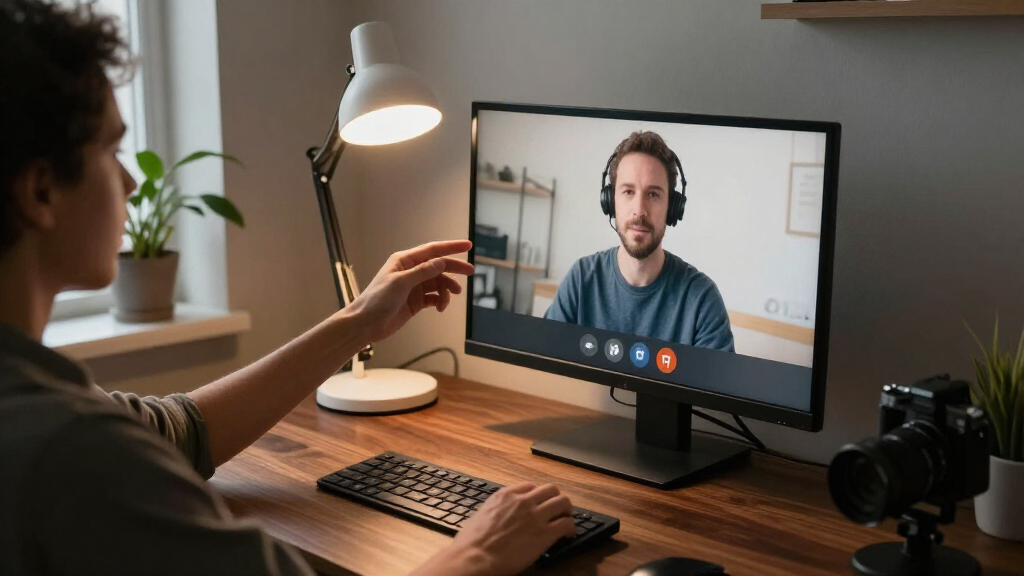
How We Picked
I ranked these products around video-call usefulness, not general room lighting or streaming features alone. The main criteria were how directly each design can illuminate a seated face, how easily it can be positioned around a monitor or desk, the range of lighting adjustments described, and the likely fit for different workspace sizes. I also weighed setup complexity, the footprint of stands or paired lamps, and whether a feature solves a distinct need rather than adding controls for their own sake.
The order reflects versatility and practical fit first, then more specialized strengths. Purpose-built conference lights and adjustable options rise because they give buyers clearer ways to manage placement and brightness; compact monitor lights suit simpler workstations, while dual-light kits suit people seeking more even coverage and willing to manage extra hardware. Product names and supplied specifications inform this comparison, but the ranking does not assume performance that those details cannot establish.
Factors to Consider When Choosing Office Lighting For Video Calls
Before choosing a light, I would match the design to the space between your camera, face, and desk. The right setup depends less on the number of modes than on where the light can sit, how it interacts with your room, and whether you need one dependable call light or a flexible workspace lamp.
Choose a mounting position that works with your camera
A light near the camera tends to illuminate the face from a direction that feels natural on screen, but a monitor-mounted design can compete for limited bezel space. A desk stand gives more freedom to place the light off-center, though it can occupy the keyboard area or sit too low. Before buying, check whether your monitor has a narrow frame, a webcam already mounted at the top, or a shelf that blocks a clamp. A light placed far to one side may create stronger shadows even if it is bright. I would prioritize adjustable positioning over a mount that only works in one fixed spot.
Treat brightness and diffusion as a balance
More brightness is not automatically better for a close webcam shot; an intense, small source can make the face look harsh or create distracting reflections in glasses. A larger or diffused light can spread illumination more gently, but it may take up more space or need careful placement. Start by thinking about your distance from the camera and how much ambient light the room already has. Buyers who work near a window may need a controllable fill light rather than a powerful key light. Avoid aiming a bare or undiffused source directly at reflective screens, glasses, or glossy surfaces.
Prioritize useful controls over a long mode list
Adjustable color and brightness can help a light match daylight, warm room bulbs, or a dim home office. A large selection of modes only helps if the controls are easy to use and the settings are repeatable between calls. For frequent meetings, straightforward dimming and a comfortable color range can be more useful than cycling through effects. If your room lighting changes through the day, choose controls that let you make quick corrections without reaching around the monitor. If your lighting stays consistent, a simpler light may be easier to live with.
Decide whether you need one light or a pair
A single light is usually simpler to place and manage, especially on a compact desk. A pair can illuminate both sides of the face more evenly, but it adds stands, cables, setup time, and more surfaces to keep clear. Two lamps are most useful when one source leaves pronounced shadows or when you need to balance light across a wider framing. They may be unnecessary for a close laptop camera in a small room. Check that you have suitable space on both sides before choosing a dual-light kit.
Separate video-call lighting from all-day desk lighting
A compact conference light is designed around the camera-facing task; a swing-arm or tall desk lamp can serve more of the work surface as well. That flexibility may be useful for reading and desk work, but a general lamp can be harder to position evenly on your face. Think about whether the light will stay set up for calls or need to serve multiple tasks throughout the day. A lamp that reaches across the desk may also cast shadows from your monitor or hands. Buy for the job you do most often, rather than assuming one design will excel at every task.
Check desk space, power, and setup friction
A stand, phone holder, or second lamp can make a setup more capable while also taking up room. Measure the usable area around your screen and check where cables can run before choosing a design with multiple components. USB power can be convenient, but confirm that the intended connection point is accessible and suited to your workspace. If you regularly pack away your equipment, a compact light may be easier to manage than a tall lamp or paired kit. The best feature set is the one you can position and use consistently without rearranging your desk for every meeting.
Frequently Asked Questions
Should I choose a monitor-mounted light or a desk stand for video calls?
I would choose a monitor-mounted light when the desk is tight and the screen has a compatible place to attach it. A stand is a better fit when you need to move the light away from the monitor, adjust its height, or use it with more than one device. Check how the mount interacts with your webcam and monitor frame before deciding; a crowded top edge can make an otherwise convenient design awkward. A stand uses more desk area, but it can offer more placement choices. Match the mounting style to your actual workstation rather than the product photo.
Is one light enough, or do I need a dual-light kit?
For many close-framed calls, a single well-placed light is the simpler starting point. A dual-light kit may help when one-sided illumination leaves distracting shadows or when you sit farther from the camera and need broader coverage. It also adds stands, connections, and placement decisions, so it is less appealing on a crowded desk. Before buying two lights, try changing the position of your existing lamp or reducing harsh overhead lighting. Choose a pair when balanced coverage is a clear need, not just because more hardware sounds more capable.
Do I need a high-CRI light for ordinary work meetings?
A high color rendering index can matter when accurate color appearance is part of your work, such as showing products, artwork, or makeup on camera. For routine meetings, comfortable, even illumination and practical brightness adjustment may matter more than a CRI figure alone. The LitONES conference light lists CRI above 98, giving it a specification-based reason to appeal to color-sensitive users. That number does not by itself tell you how the light will look in your room or on your webcam. Consider it alongside placement, diffusion, and whether color accuracy is part of your call requirements.
Can a ring light cause glare in glasses or on my monitor?
It can, especially when the light sits directly in front of reflective lenses or points toward a glossy screen. A ring shape can place reflections near the camera’s line of sight, so small changes in height or angle may improve comfort. Try positioning the light slightly above eye level or off-center while keeping the face evenly lit. Diffusion and lower brightness can also help reduce harsh reflections. If glasses glare is a recurring concern, choose a light you can reposition instead of relying on a fixed mount.
Is a tall desk lamp a good substitute for a dedicated video-call light?
It can work if its head reaches a useful position near the camera and its beam can be aimed without lighting the desk more strongly than your face. A tall lamp may also serve reading or general desk tasks, which is useful when you want one fixture for several jobs. Dedicated conference lights are usually easier to place around a webcam, while a desk lamp may cast shadows from the monitor or other objects. Check the lamp’s reach and adjustment range against your seated position before treating it as a call light. If video is the main job, prioritize face-level placement over overall height.
Conclusion
For most work-from-home setups, I would start with the Logitech Litra Glow as best overall because its format is focused on camera-facing light. Choose the LitONES Video Conference Light with Stand as best for adjustment options if its 30 modes and stand-style placement suit your workspace, and consider the HumanCentric Double Kit as best for broader two-sided coverage when you have room for paired lights. Beginners who want a compact, straightforward starting point can look at the Evershop 5-Inch USB Ring Light, while the yAyusi dual-lamp kit fits people seeking a more involved setup with remote and touch control. For a tighter budget-conscious choice, compare simple options such as the Evershop and Cyezcor by mounting fit and controls; for a premium-leaning choice, favor the Logitech’s purpose-built call-light design over buying extra gear you may not use. Pick based on where the light can sit in your room, then use brightness and positioning to make the camera view comfortable.