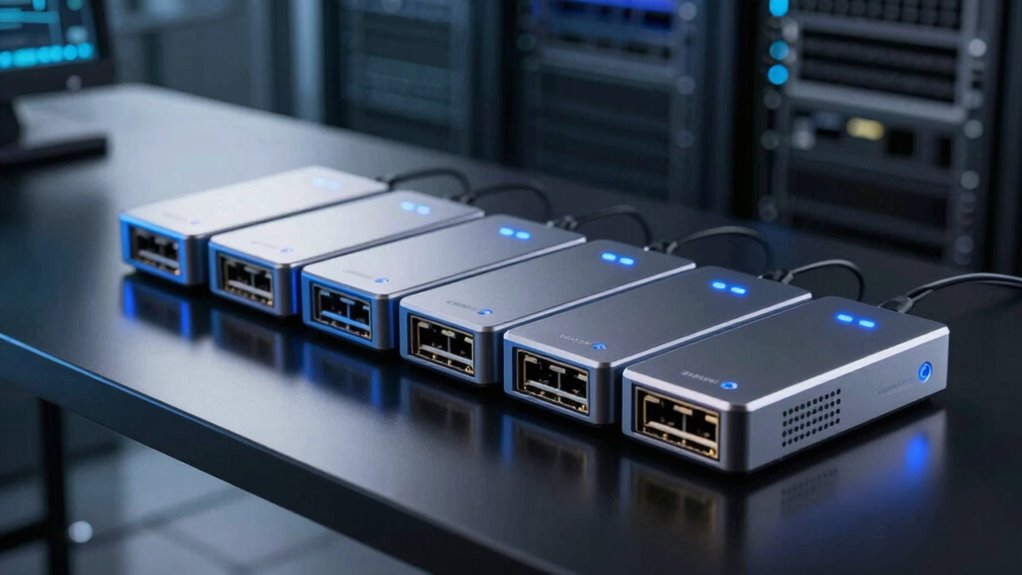

When selecting a network tap device, the goal is to reliably monitor or intercept network traffic without disrupting your existing setup. The best overall pick is the ETAP-XG 10G Network TAP, favored for high-speed performance and professional-grade reliability. The Dualcomm 10/100/1000Base-T Gigabit Ethernet Network TAP offers excellent value for standard gigabit networks, while the SharkTap Gigabit Network Sniffer stands out for ease of use in smaller environments. Choosing the right device involves balancing speed, compatibility, and ease of installation, often with tradeoffs between cost and advanced features. Continue reading for a detailed breakdown of each option and how they compare for different needs.

Get the latest gadgets delivered free with Prime
- Fast, free delivery on millions of items
- Prime Video, Amazon Music and more included
- Member-only deals all year
Complete the kit



Key Takeaways
- High-speed 10G options like the ETAP-XG are ideal for enterprise environments but come with a higher price and complexity.
- Gigabit Ethernet taps such as the Dualcomm provide reliable performance for standard networks at a more accessible price point.
- Ease of use and portability are key strengths of the SharkTap series, making them suitable for quick setups and testing.
- Passive LAN taps offer high reliability with minimal maintenance but may lack some advanced monitoring features found in active devices.
- Choosing a network tap depends heavily on your network speed, security needs, and whether you prefer a plug-and-play or customizable solution.
| 10/100/1000 Gigabit Ethernet/USB Bypass Network Tap |  | Best Overall Network Tap for Reliability and Versatility | Compatible Devices: PC | Connector Type: RJ45 | Number of Ports: 2 | VIEW ON AMAZON | See Our Full Breakdown |
| Dualcomm 10/100/1000Base-T Gigabit Ethernet Network TAP |  | Best for Long-Distance, High-Throughput Ethernet Monitoring | Ethernet Standards: 10/100/1000Base-T | Maximum Cable Length: 200 meters | Data Throughput: 1 Gbps | VIEW ON AMAZON | See Our Full Breakdown |
| ETAP-XG 10G Network TAP |  | Best for Industrial-Grade High-Speed Data Monitoring | Supported Speeds: 100Mb/s to 10Gb/s | Connectivity: Copper and fiber Ethernet links | Ports: Two inline network ports, two monitor ports with SFP+/SFP slots | VIEW ON AMAZON | See Our Full Breakdown |
| SharkTap Gigabit Network Sniffer |  | Best for High-Speed Packet Capture and Troubleshooting | Number of Ports: 3 | Compatible Devices: Desktop | Voltage: 5 volts | VIEW ON AMAZON | See Our Full Breakdown |
| SharkTap USB Ethernet Sniffer |  | Best Portable Ethernet Monitoring Solution | Compatibility: USB 2 and USB 3 | Supported Ethernet Speeds: 10/100/1000Base-T | Power: 400mA | VIEW ON AMAZON | See Our Full Breakdown |
| SharkTapBYP Ethernet Sniffer | 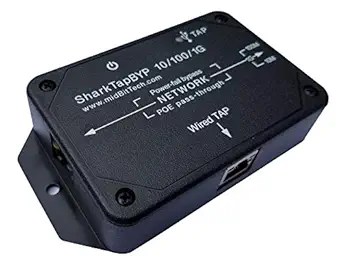 | Best for Permanent and Embedded Network Monitoring | Operation Mode: ON-NONE-ON or ON-ON-ON | Operating Voltage: 5 volts | Contact Type: Normally Open | VIEW ON AMAZON | See Our Full Breakdown |
| Compact Upgraded Passive LAN Tap |  | Best for Small-Scale, Technical Network Monitoring | Number of Ports: 4 | Compatible Devices: Ethernet | Interface: RJ45 | VIEW ON AMAZON | See Our Full Breakdown |
More Details on Our Top Picks
10/100/1000 Gigabit Ethernet/USB Bypass Network Tap
This network tap stands out for its fail-safe bypass feature, ensuring uninterrupted monitoring even during power failures. Unlike simpler passive taps, it actively supports Power-over-Ethernet pass-through and integrates seamlessly with packet analysis tools like Wireshark, making it suitable for troubleshooting critical networks. Its durable aluminum enclosure adds robustness, but setting it up requires a solid understanding of network configurations, and it’s limited to Ethernet and USB3.0 connections. The absence of an included power adapter may also be a drawback for some users. Compared to the SharkTap Gigabit, this device offers more comprehensive features, but at the cost of increased complexity.
Pros:- Provides reliable network monitoring with fail-safe bypass
- Supports Power-over-Ethernet pass-through
- Durable aluminum enclosure for long-term use
Cons:- Requires technical knowledge to set up correctly
- Limited to Ethernet and USB3.0 connections; no universal compatibility
Best for: Network administrators needing reliable, high-availability monitoring for enterprise Ethernet setups
Not ideal for: Home users or small office environments seeking plug-and-play simplicity without advanced features
- Compatible Devices:PC
- Connector Type:RJ45
- Number of Ports:2
- Input Voltage:5 volts
- Power Plug Type:No Plug
- Finish:Aluminum, metal
Our verdict“This pick makes the most sense for IT professionals managing critical networks requiring dependable fail-safe operation.”
Dualcomm 10/100/1000Base-T Gigabit Ethernet Network TAP
Compared with the USB-based SharkTap, the Dualcomm Gigabit Ethernet TAP supports full 1Gbps throughput over cable runs up to 200 meters, making it ideal for dispersed network environments. Its compact and portable design allows easy deployment in field conditions, and the USB-powered setup simplifies installation. However, it lacks detailed info on ruggedness or weather resistance, which might limit outdoor or industrial use. Unlike the more complex ETAP-XG, this device offers straightforward performance for standard enterprise networks, but it may fall short in highly demanding or specialized environments.
Pros:- Supports full 1Gbps throughput for high-speed data transfer
- Capable of long cable runs up to 200 meters
- USB-powered with built-in current limiting for safety
Cons:- Limited information on additional features or accessories
- No explicit weather or dust resistance features
- Compatibility could be limited with non-standard setups
Best for: IT teams needing a portable, high-performance tap for extended Ethernet cable runs up to 200 meters
Not ideal for: Industrial environments requiring ruggedized equipment or users needing fiber support without additional modules
- Ethernet Standards:10/100/1000Base-T
- Maximum Cable Length:200 meters
- Data Throughput:1 Gbps
- Power Source:USB port
- PoE Compatibility:Yes
- Size:Small and portable
Our verdict“This device makes the most sense for field technicians monitoring dispersed Ethernet networks with high bandwidth needs.”
ETAP-XG 10G Network TAP
The ETAP-XG 10G Network TAP excels in environments demanding ultra-reliable, high-speed data capture over copper and fiber links. Its support for speeds from 100Mb/s up to 10Gb/s, along with multiple ports and SFP slots, makes it suitable for data centers and industrial setups where zero packet loss is critical. Its sturdy metal housing and wide temperature range ensure durability under harsh conditions. The setup complexity and price may deter small-scale or budget-conscious users, and compatibility with transceiver modules may require additional research. When compared with simpler gigabit taps, the ETAP-XG offers unmatched speed and industrial robustness but demands more technical expertise.
Pros:- Supports copper and fiber with speeds up to 10Gb/s
- Zero packet loss for accurate, real-time monitoring
- Designed for harsh environments with wide temperature range
Cons:- Setup requires technical expertise
- High cost may be prohibitive for small-scale use
- Limited info on transceiver module compatibility
Best for: Network engineers managing high-speed, industrial, or data center environments requiring real-time, lossless monitoring
Not ideal for: Small offices or casual users seeking easy, plug-and-play solutions without specialized knowledge
- Supported Speeds:100Mb/s to 10Gb/s
- Connectivity:Copper and fiber Ethernet links
- Ports:Two inline network ports, two monitor ports with SFP+/SFP slots
- Temperature Range:-25°C to 85°C
- Size:Approximately the size of a cigarette pack
- Housing Material:Sturdy metal
Our verdict“This device is best for professionals overseeing high-bandwidth, industrial networks where reliability and speed are paramount.”
SharkTap Gigabit Network Sniffer
The SharkTap Gigabit Network Sniffer offers a reliable, protocol-agnostic solution for high-speed Ethernet monitoring, duplicating packets without routing traffic—ideal for troubleshooting. Its auto-MDIX feature simplifies installation, and its compact, lightweight design makes it suitable for portable use. However, it’s limited to Ethernet environments and lacks routing or active management capabilities. Compared with the USB-based SharkTap, this device provides a dedicated, high-performance monitoring solution but requires some technical knowledge for proper deployment. Its primary strength lies in passive packet duplication over gigabit links, making it less suitable for active network control.
Pros:- Supports gigabit Ethernet for fast data capture
- Packet duplication allows analysis without affecting network traffic
- Auto-MDIX eliminates crossover cable needs
Cons:- Requires technical knowledge for correct setup
- Limited to Ethernet monitoring, no routing or management
- No weather or ruggedness features for outdoor use
Best for: Network analysts and troubleshooting teams needing reliable, high-speed packet capture on gigabit Ethernet networks
Not ideal for: Small businesses or casual users who want simple, plug-and-play network monitoring without technical setup
- Number of Ports:3
- Compatible Devices:Desktop
- Voltage:5 volts
- Maximum Power:2.5 watts
- Interface:10/100/1000Base-T
- Color:Black
Our verdict“This pick is ideal for professionals seeking a dedicated device for high-speed passive network analysis in Ethernet environments.”
SharkTap USB Ethernet Sniffer
The SharkTap USB Ethernet Sniffer provides a highly portable option for monitoring Ethernet traffic via USB, compatible with both USB 2 and USB 3 ports. Its copper repeater technology minimizes network impact, and its support for 10/100/1000Base-T links makes it versatile for various network setups. Its light weight and small size make it suitable for on-the-go troubleshooting with laptops or netbooks. However, it requires compatible network analysis software like Wireshark, and it doesn’t support active network management features. When compared to the larger, more dedicated network taps, this device prioritizes portability and ease of use over advanced monitoring features, making it ideal for field technicians or occasional users.
Pros:- Portable and easy to use with laptops
- Supports multiple Ethernet speeds
- Copper repeater technology minimizes network impact
Cons:- Dependent on external analysis software
- Limited to passive network monitoring
- No built-in management or routing features
Best for: IT professionals and field technicians needing a portable, simple Ethernet monitoring tool for laptops
Not ideal for: Large-scale monitoring or environments requiring active network control or robust hardware
- Compatibility:USB 2 and USB 3
- Supported Ethernet Speeds:10/100/1000Base-T
- Power:400mA
- Material:Non-conductive plastic
- Features:Auto cross-over, PoE pass-through
Our verdict“This device makes the most sense for mobile troubleshooting, offering a compact, easy-to-deploy Ethernet monitoring solution.”
SharkTapBYP Ethernet Sniffer
The SharkTapBYP Ethernet Sniffer stands out for its support of multiple Ethernet speeds—10/100/1000Base-T—making it highly adaptable for various network environments. Its plug-and-play design with USB 3 support simplifies setup, especially compared to the Compact Upgraded Passive LAN Tap, which requires more technical knowledge and only offers passive, one-way capture. The power fail bypass feature enhances reliability during power outages, a crucial trait for continuous monitoring setups. However, this device offers limited user feedback and lacks advanced features like remote access or filtering options, which some network professionals might expect from more sophisticated tools. It’s best suited for those needing a robust, permanent monitoring solution without extensive customization.
Pros:- Supports multiple Ethernet speeds (10/100/1000Base-T) for versatile deployment
- Easy plug-and-play setup with USB 3 support simplifies installation
- Features power fail bypass for consistent operation during outages
- Suitable for permanent or embedded network monitoring
Cons:- Limited detailed user feedback makes troubleshooting harder
- Requires familiarity with network tools like Wireshark for effective use
- Lacks remote access or advanced filtering features
Best for: Network administrators who need reliable, continuous monitoring in enterprise or embedded environments.
Not ideal for: Casual users or small office setups that require simple, plug-and-play solutions without ongoing maintenance or complex configuration.
- Operation Mode:ON-NONE-ON or ON-ON-ON
- Operating Voltage:5 volts
- Contact Type:Normally Open
- Connector Type:RJ45, USB-B
- Switch Type:Solid-state
- Wattage:2 watts
Our verdict“This pick is ideal for professionals who need a durable, reliable monitoring device for fixed network setups with minimal fuss.”
Compact Upgraded Passive LAN Tap
The Compact Upgraded Passive LAN Tap offers a streamlined, power-free approach to Ethernet monitoring, making it ideal for smaller or space-constrained setups. Compared with the SharkTapBYP Ethernet Sniffer, which requires power and has more complex setup requirements, this passive tap is straightforward to deploy and requires no external power source. Its compact size—40% smaller than standard taps—fits easily into tight spaces or portable monitoring kits. The main tradeoff is its limitation to one-way packet interception, which can hinder full traffic analysis unless network interfaces are configured in promiscuous mode. It suits technically skilled users who need a simple, reliable, and portable monitoring solution, but not those requiring bidirectional traffic capture or detailed filtering.
Pros:- Compact and lightweight, ideal for space-constrained environments
- Passive operation requires no power, simplifying deployment
- Easy to set up and connect with standard Ethernet tools
- Constructed with high-quality components in the USA
Cons:- Limited to one-way packet capture at a time, restricting traffic analysis
- Requires network interfaces to be in promiscuous mode for full capture
- Best suited for users familiar with network monitoring; not plug-and-play for novices
Best for: Network engineers or security analysts conducting quick, targeted inspections in small or temporary environments.
Not ideal for: Large enterprise networks needing comprehensive, bidirectional traffic analysis or real-time filtering capabilities.
- Number of Ports:4
- Compatible Devices:Ethernet
- Interface:RJ45
- Platform:Linux, Windows
- Switch Type:passive
- Item Dimensions:1.4″L x 1.4″W x 0.5″H
Our verdict“This device is perfect for skilled users needing a portable, power-free tap for quick, targeted network inspections.”

How We Picked
The products were evaluated based on several key factors: performance at different network speeds, build quality, ease of installation, compatibility with various network types, and the level of monitoring or interception features offered. We prioritized devices that deliver reliable, consistent traffic capturing without introducing network disruptions. Cost and versatility also played crucial roles, especially for users with specific technical requirements or budgets. The ranking reflects a balance between professional-grade capabilities and user-friendly design, helping different types of buyers find suitable options.Factors to Consider When Choosing Network Tap Device
Choosing a network tap device requires understanding your specific network environment and monitoring needs. Not all taps are equal—some are designed for high-speed enterprise networks, while others suit smaller or less complex setups. By considering key factors like network speed, installation complexity, and feature set, you can select a device that offers the best value and performance for your application. Avoid common pitfalls such as overspending on features you don’t need or selecting a device incompatible with your network infrastructure.Network Speed and Compatibility
Matching your network speed with the tap device is essential. Devices designed for 10G networks, like the ETAP-XG, are overkill for standard gigabit setups and come at a higher cost. Conversely, a gigabit-only tap might limit future growth if your network upgrades. Compatibility with existing hardware and protocols also matters—ensure the device supports your network’s speed and interface types to prevent bottlenecks or connectivity issues.
Ease of Installation and Management
Some network taps are plug-and-play, ideal for quick deployment and minimal disruption, while others require more technical setup, including configuration and calibration. Consider whether you need a portable, easily removable device or a fixed installation for ongoing monitoring. Also, check if the tap offers management features, such as remote access or integrated monitoring, which can streamline ongoing maintenance.
Monitoring and Interception Capabilities
Not all taps are created equal in terms of traffic analysis. Some provide basic pass-through functionality, while others include advanced features like packet filtering, duplication, or encryption support. Evaluate whether your use case requires raw traffic capture or detailed analysis functions. Over-investing in complex features may be unnecessary for simple monitoring needs, while missing critical capabilities can limit your network visibility.
Build Quality and Reliability
A durable, well-constructed device minimizes downtime and maintenance effort. Look for models with solid connectors, shielded cables, and robust housings. Passive devices tend to require less maintenance but might lack some flexibility, whereas active devices can introduce points of failure if not properly maintained. Consider the environment—rugged or industrial settings demand higher durability.
Cost and Future Scalability
Investing in a more capable device makes sense if your network is expected to grow or require higher speeds. However, overspending on features that won’t be used can lead to wasted budget. Balance your current needs with future expansion plans, choosing a device that offers scalability without unnecessary complexity or expense. Remember, a higher initial investment can sometimes save costs long-term by avoiding frequent upgrades.
Frequently Asked Questions
Can I use a network tap on a managed switch?
Yes, many network taps are compatible with managed switches, but it’s important to verify that the tap supports the required network protocols and speeds. Taps are typically placed inline or via a mirror port; ensure your switch can support the tap’s connection type. Using a dedicated tap device can provide more reliable traffic capture than relying solely on switch port mirroring, especially in high-traffic or critical environments.
What’s the main difference between active and passive network taps?
Active network taps actively process and sometimes modify traffic, often requiring power and offering more features like filtering or analysis. Passive taps, on the other hand, simply split the traffic without power, providing high reliability and minimal interference with the network. Your choice depends on whether you need advanced features or maximum simplicity and reliability—passive models are often preferred for security and stability.
Is it necessary to match the network speed of the tap device to my network?
Matching the device’s speed to your network is essential to ensure accurate traffic capture and avoid bottlenecks. A gigabit tap on a 10G network will be insufficient and possibly hinder data flow, while using a high-speed tap on a slower network might be unnecessary expense. Always select a device that aligns with your current network speed and allows for future upgrades if planned.
How important is build quality in a network tap?
Build quality directly impacts the reliability and lifespan of the device. A well-made tap with durable connectors and shielding reduces the risk of failures or data loss, especially in demanding environments. While cheaper models may seem appealing initially, investing in quality can prevent costly downtime and maintenance over time. Consider the environment in which you’ll deploy the tap to choose a suitable rugged or sealed model if needed.
Should I prioritize features like packet filtering or just basic traffic pass-through?
This depends on your specific needs. If you’re performing detailed security analysis or troubleshooting, advanced features like packet filtering or duplication can be highly valuable. For simple monitoring or data collection, a basic pass-through tap might suffice and will generally be more straightforward to deploy. Weigh the complexity and cost of additional features against your actual use case to avoid overpaying for unnecessary capabilities.
Conclusion
For general enterprise environments with high-speed networks, the ETAP-XG 10G Network TAP offers unmatched performance and reliability. Budget-conscious buyers or small setups will find the Dualcomm Gigabit Ethernet TAP provides excellent value without sacrificing core functionality. Beginners or temporary projects benefit from the simplicity of the SharkTap Gigabit Network Sniffer, which is easy to install and use. Those needing a rugged, passive solution for critical infrastructure should consider the Passive LAN Tap. Ultimately, selecting the right device depends on your network speed, monitoring needs, and future growth plans—match your choice carefully to avoid compromises or overspending.
Columbus Day / Indigenous Peoples' Day Picks
long weekend sales
As an affiliate, we earn on qualifying purchases.