A network attached KVM over IP lets me control a computer remotely at the hardware level, including access before its operating system starts. For a flexible single-computer setup, the GL.iNet Comet GL-RM1 is my best overall pick; the JetKVM Ethernet is a simpler alternative, while the Vertiv Avocent AV3000 suits rack environments with several servers. These options differ in the number of computers they can manage, their connection methods, and how much equipment or setup they demand. A compact remote KVM can be easier to deploy, while a rack switch can consolidate control across a larger installation. Read on for the full comparison and guidance on choosing the right fit.

Get the latest gadgets delivered free with Prime
- Fast, free delivery on millions of items
- Prime Video, Amazon Music and more included
- Member-only deals all year
Complete the kit



Key Takeaways
- The GL.iNet Comet GL-RM1 leads for flexible single-computer access, while the Vertiv Avocent AV3000 is built for controlling multiple rack systems.
- The Tripp Lite NetCommander serves a different scale of setup: its 16 Cat5 ports suit a larger console environment, but it is not a like-for-like compact remote KVM.
- The GL.iNet GL-RM10 Comet Pro adds Wi-Fi 6 and 4K passthrough, making it a better match when those connection and display capabilities matter.
- JetKVM offers two distinct approaches: a straightforward Ethernet unit and a touchscreen model for buyers who want local visual control.
- Port count, network access, and display needs separate these picks more than their shared KVM-over-IP purpose; choosing around the actual computers and workflow narrows the field.
| GL.iNet Comet GL-RM1 Remote KVM |  | Best Compact Wired Pick | Model: GL-RM1 | Resolution: 3840 × 2160 at 30 Hz | Interfaces: Ethernet, HDMI, USB 2.0, USB Type-C | VIEW ON AMAZON | See Our Full Breakdown |
| Tripp Lite NetCommander 16-Port Cat5 KVM Over IP Switch |  | Best for Multi-Server Racks | Number of ports: 16 | Connection type: Cat5 | Remote users: 2 | VIEW ON AMAZON | See Our Full Breakdown |
| GL.iNet GL-RM10 Comet Pro Remote KVM Over Wi-Fi 6 Dual Band 4K Passthrough | 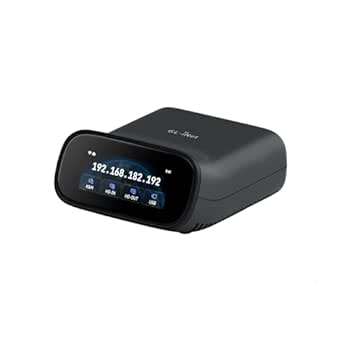 | Best for Flexible Secure Remote Access | Model: GL-RM10 | Video passthrough: 4K at 30 fps | Wireless: Dual-band Wi-Fi 6, 2.4 GHz and 5 GHz | VIEW ON AMAZON | See Our Full Breakdown |
| Vertiv Avocent AV3000 Rackmount KVM Over IP Switch, 8 Port |  | Best for Centralized Rack Management | Ports: 8 | Connectivity: VGA, DisplayPort, DVI, HDMI | Management: KVM over IP and centralized management | VIEW ON AMAZON | See Our Full Breakdown |
| JetKVM IP KVM over Ethernet |  | Best for Low-Latency 1080p Control | Video resolution: 1080p | Frame rate: 60 fps | Latency: 30–60 ms | VIEW ON AMAZON | See Our Full Breakdown |
| JetKVM IP KVM Over IP Ethernet with Touchscreen LCD, 1080P@60FPS, BIOS-Level Remote Access via HDMI & USB-C |  | Best for Open-Source Customization | Video resolution: 1080p at 60FPS | Latency: 30–60ms | Connections: Ethernet, HDMI, USB-C | VIEW ON AMAZON | See Our Full Breakdown |
| network attached kvm over ip | Video resolution |
|---|---|
| GL.iNet Comet GL-RM1 Remote KV | — |
| Tripp Lite NetCommander 16-Por | 1920 × 1080 at 60 Hz |
| GL.iNet GL-RM10 Comet Pro Remo | — |
| Vertiv Avocent AV3000 Rackmoun | — |
| JetKVM IP KVM over Ethernet | 1080p |
| JetKVM IP KVM Over IP Ethernet | 1080p at 60FPS |
More Details on Our Top Picks
GL.iNet Comet GL-RM1 Remote KVM
The Comet GL-RM1 suits a single computer that needs dependable remote access to its firmware and operating system. Its BIOS-level control lets an administrator handle tasks such as rebooting or installing an OS even when host software is unavailable. Compared with the GL.iNet GL-RM10 Comet Pro, it keeps the feature set simpler and the enclosure small, but gives up the Pro’s built-in Wi-Fi 6, touchscreen, and Tailscale features. It can stream 4K video at 30 Hz, transfer files, and carry remote audio, with H.264 encoding handled in hardware. The 30 Hz ceiling is a tradeoff for fast-moving visuals, and the listed restriction against PD adapters narrows power choices. This is a focused remote console, not a multi-server rack switch.
Pros:- BIOS-level access supports recovery, rebooting, and OS installation
- Host computer needs no additional software
- 4K video, remote audio, and file transfer are supported
- Compact 85 g enclosure
Cons:- Maximum listed video refresh rate is 30 Hz
- PD adapters cannot be used
- Designed for a single host rather than centralized multi-server management
Best for: Home lab owners and technicians who need compact, wired BIOS-level access to one computer without installing host software.
Not ideal for: Administrators managing a rack of servers or buyers who need 60 Hz video, built-in wireless networking, or flexible PD power.
- Model:GL-RM1
- Resolution:3840 × 2160 at 30 Hz
- Interfaces:Ethernet, HDMI, USB 2.0, USB Type-C
- Data transfer rate:1000 megabits per second
- Encoding:H.264 hardware encoding
- USB ports:1
- Dimensions:3.15 × 2.36 × 0.68 inches
- Weight:85 g
Our verdict“Choose the GL-RM1 for compact wired access to one machine’s BIOS and desktop, provided 30 Hz video meets your needs.”
Tripp Lite NetCommander 16-Port Cat5 KVM Over IP Switch
For a rack with several machines, the NetCommander 16-Port has a different job from single-host appliances such as the JetKVM IP KVM over Ethernet: it brings as many as 16 computers onto one rack-mounted KVM system. Its Cat5 connections, web browser control, and support for two remote users plus one local user make shared administration more practical than managing each server with a separate device. The 1920 × 1080 video at 60 Hz is a useful fit for routine console work, though it does not offer the 4K output listed for the GL.iNet Comet GL-RM1. Setup takes more planning because it requires Cat5e/6 cabling and specific SIUs, and the configuration may challenge first-time KVM buyers. Choose it for rack density and concurrent access, not a simple one-computer installation.
Pros:- Connects up to 16 computers or servers
- Supports two remote users and one local user at the same time
- Browser-based management with 128-bit AES and HTTPS
- 1U rack-mount design
Cons:- Requires Cat5e/6 cabling and specific SIUs
- Configuration may be complex for beginners
- Limited to 16 ports and 1920 × 1080 video
Best for: IT teams with a rack of up to 16 servers that need shared remote console access and a local operator at the rack.
Not ideal for: Home lab users managing one computer, or beginners who want a straightforward appliance without SIU and cabling setup.
- Number of ports:16
- Connection type:Cat5
- Remote users:2
- Local users:1
- Video resolution:1920 × 1080 at 60 Hz
- Mounting:1U rack mount
- Security:128-bit AES, HTTPS
- Warranty:3 years
Our verdict“Pick the NetCommander when shared access to a multi-server rack matters more than a compact single-host setup.”
GL.iNet GL-RM10 Comet Pro Remote KVM Over Wi-Fi 6 Dual Band 4K Passthrough
The GL-RM10 Comet Pro is aimed at users who want choices in how they reach a single machine: wired Ethernet, dual-band Wi-Fi 6, web cloud control, or a self-hosted setup. Built-in Tailscale adds an encrypted remote connection option, while the touchscreen lets an operator check settings directly on the device. That makes it more adaptable than the wired GL.iNet Comet GL-RM1, though the GL-RM1 remains the smaller, simpler choice if wireless and local controls are unnecessary. The Comet Pro also provides 4K passthrough at 30 fps and two-way audio, but that refresh rate is not suited to smooth high-frame-rate viewing. BIOS access and optional ATX Board or Fingerbot extensions address recovery needs; those extensions add separate hardware to the setup.
Pros:- Dual-band Wi-Fi 6 and Ethernet provide network connection options
- Built-in Tailscale supports encrypted remote connections
- Touchscreen provides on-device settings access
- 4K passthrough, two-way audio, and BIOS-level recovery support
Cons:- 4K passthrough is limited to 30 fps
- ATX Board or Fingerbot extensions are sold separately
- More features and access modes can add setup complexity compared with the GL-RM1
Best for: Home lab operators and small IT teams who want wireless or wired access, Tailscale, and options for self-hosting remote control.
Not ideal for: Buyers who need 60 fps video, a multi-host rack switch, or remote power control without buying extension hardware.
- Model:GL-RM10
- Video passthrough:4K at 30 fps
- Wireless:Dual-band Wi-Fi 6, 2.4 GHz and 5 GHz
- Audio:Two-way audio
- Encoding:H.264
- Touchscreen:2.22-inch
- Storage:32GB eMMC
- Supported systems:Windows, macOS, Linux, iOS, Android
Our verdict“Choose the Comet Pro if you want flexible network access and built-in controls for one host, and can work within its 30 fps video limit.”
Vertiv Avocent AV3000 Rackmount KVM Over IP Switch, 8 Port
The Vertiv Avocent AV3000 is the rack-oriented pick for teams that need centralized access control across several servers. It connects eight ports and combines remote KVM access with local port access, user permissions, and a multilingual graphical OSD. Compared with the Tripp Lite NetCommander 16-Port, its port count is half as large, so it fits a smaller rack or a more limited server group; the supplied details, however, do not specify user concurrency or video resolution, which makes a direct capability comparison difficult. The listed VGA, DisplayPort, DVI, and HDMI support offers flexibility across mixed video connections. The tradeoff is uncertainty: setup requirements and compatibility details are sparse, so buyers should confirm their server interfaces and deployment needs before selecting it.
Pros:- Provides remote IP access and local port access
- Eight ports support a small server group
- Lists VGA, DisplayPort, DVI, and HDMI connectivity
- Includes user access control and multilingual graphical OSD
Cons:- Available details do not specify video resolution or remote-user capacity
- Compatibility and setup requirements are not clearly described
- Eight ports may be insufficient for larger racks compared with the NetCommander 16-Port
Best for: Data center and IT administrators seeking centralized access control for a smaller rack of up to eight servers with varied video connections.
Not ideal for: Buyers who need documented resolution and user-concurrency limits, or a simple single-computer KVM appliance like the JetKVM.
- Ports:8
- Connectivity:VGA, DisplayPort, DVI, HDMI
- Management:KVM over IP and centralized management
- Access:Local port access and user access control
- On-screen display:Graphical multilingual OSD
- CAC support:Supported
Our verdict“Consider the AV3000 for centralized control of a smaller mixed-interface rack after confirming its compatibility and capacity for your environment.”
JetKVM IP KVM over Ethernet
The JetKVM IP KVM over Ethernet emphasizes responsive browser-based control of one computer, with 1080p at 60 fps and listed latency of 30–60 ms. That makes it a better fit for smooth desktop interaction than the 30 Hz 4K streams specified for the GL.iNet Comet GL-RM1 and GL-RM10 Comet Pro, while those GL.iNet devices offer higher listed resolution. Local browser access, optional cloud access, and Wake-on-LAN give administrators several ways to reach or start a host; H.264 encoding keeps the stream practical for remote use. The open-source software and extension port may appeal to users who want to customize hardware behavior. The 256 MB of RAM and dependence on optional extensions for some functions make this a focused appliance rather than a rack-scale KVM system.
Pros:- Streams 1080p video at 60 fps
- Listed latency is 30–60 ms
- Supports local browser access, optional cloud access, and Wake-on-LAN
- Open-source software and extension port support customization
Cons:- Video resolution is limited to 1080p
- Cloud access uses an optional cloud dashboard
- Some hardware functions require separately added extension hardware
Best for: Developers and small IT teams who need responsive 1080p browser access to one computer, plus Wake-on-LAN or open-source hardware customization.
Not ideal for: Rack administrators managing many hosts, or users who require 4K output or built-in remote power extensions.
- Video resolution:1080p
- Frame rate:60 fps
- Latency:30–60 ms
- Video encoding:H.264
- Connections:HDMI, USB-C, Ethernet
- Power options:USB-C, separate 5V supply, DC extension, or ATX board extension
- Operating system:Linux
- Memory:256 MB RAM
- Dimensions:2.36 × 1.77 × 1.38 inches
Our verdict“Choose JetKVM for responsive 1080p browser control and customization of a single host rather than higher-resolution or multi-server management.”
JetKVM IP KVM Over IP Ethernet with Touchscreen LCD, 1080P@60FPS, BIOS-Level Remote Access via HDMI & USB-C
The JetKVM with touchscreen is a strong fit for a single computer or server that needs remote access before its operating system loads. Its BIOS-level control and browser-based access can help troubleshoot startup problems without installing software on the target machine, while 1080p at 60FPS gives a smoother view than basic remote consoles. Compared with the rack-focused Vertiv Avocent AV3000, this is a compact, single-device approach rather than a multi-port management hub. The built-in LCD adds at-a-glance local status, and its open-source system gives technically capable owners room to customize. That flexibility has a learning curve, though, and extension power control is sold separately. The product data also gives limited detail on hardware expansion, so buyers planning a larger setup should look at a purpose-built multi-port switch.
Pros:- BIOS-level remote access without additional software on the target computer
- 1080p at 60FPS with stated latency of 30–60ms
- Built-in touchscreen LCD provides local status monitoring
- Open-source system supports customization
Cons:- Full customization calls for technical knowledge
- Extension power control is sold separately
- Hardware expansion options are not clearly detailed
Best for: Technical home lab owners and small IT teams who want browser-based BIOS access to one computer, plus an open-source platform they can customize.
Not ideal for: IT administrators managing several rack servers or buyers who want extension power control included and a clearly documented expansion path.
- Video resolution:1080p at 60FPS
- Latency:30–60ms
- Connections:Ethernet, HDMI, USB-C
- Remote access:Browser-based, BIOS-level
- Display:Built-in touchscreen LCD
- Open source:Yes
- Power support:USB-C/5V, 12–20V DC
- Compatibility:Windows, Mac, Linux
Our verdict“Choose this JetKVM for customizable, smooth remote access to a single computer; choose a multi-port rack switch for managing a server group.”

How We Picked
I compared these six products by how well they address different network attached KVM needs: remote hardware-level access, number of systems supported, connection options, display capabilities, and practical deployment. I gave weight to usability and fit because a compact device for one computer solves a different problem from a rack switch intended to manage a group of servers. I also considered the maintenance burden implied by the form factor and the value of features such as Wi-Fi 6, 4K passthrough, and an integrated touchscreen.
The ranking reflects the breadth of use each product appears to serve, then the strength of its fit for a narrower buyer. The GL.iNet Comet GL-RM1 takes the overall position as a flexible single-host choice; the Vertiv and Tripp Lite models stand out for rack and multi-port environments. The Comet Pro and touchscreen JetKVM distinguish themselves through particular workflow features, while the Ethernet JetKVM is a simpler option. Buyers should verify compatibility, supported video modes, and network requirements for their exact machines before purchasing.
Factors to Consider When Choosing Network Attached Kvm Over Ip
Before choosing a model, I would map the KVM to the computers it needs to reach and the situations where remote access matters. These decisions help avoid paying for rack capacity you will not use or buying a compact unit that cannot serve a shared server room.
Count the computers you need to control
Start with the number of machines that need independent keyboard, video, and mouse access. A device designed around one host keeps a home lab or workstation setup compact, while a multi-port switch can reduce clutter when several servers share a rack. Do not count only the machines in place today; include planned additions if they are likely soon. At the same time, avoid buying a high port count just because it sounds future-proof, since rack hardware can bring extra cabling and setup overhead. Check how the unit connects to each computer and whether your existing cabling matches that design. The right capacity is the smallest one that covers your real deployment with room for a realistic expansion plan.
Separate remote access from remote management
A KVM over IP provides keyboard, video, and mouse control, often including access before the operating system loads. That is useful for BIOS changes, recovery, and machines that have lost network services. It does not replace a management controller, monitoring system, or secure remote-access policy. Think through who needs access, from which networks, and how credentials will be maintained. A common mistake is to treat any internet-connected KVM as safe to expose directly; remote administration should sit behind appropriate network controls. For shared environments, account management and the ability to limit access can matter as much as the video feed.
Match video capabilities to the host and task
Resolution and frame rate affect whether a KVM is comfortable for detailed desktop work, but they may matter less for server recovery and text-based firmware screens. Check the host’s output connectors and the KVM’s supported input path before buying, including any adapters the installation would require. A 4K passthrough feature is useful when the display chain needs to preserve higher-resolution output, though it should not be assumed to improve every remote session. For headless systems, make sure the device can present a display signal the host accepts. Buyers often focus on the advertised maximum and overlook cable length, compatibility, or the actual resolution needed for their task. Choose around the least capable part of the complete video chain.
Choose wired or wireless connectivity deliberately
Ethernet is usually the easier choice for a fixed server or workstation because it avoids dependence on wireless coverage and credentials. Wi-Fi can simplify placement when running a network cable is awkward, and a Wi-Fi 6 model may better suit a modern wireless environment. It still depends on signal quality, congestion, and network policy, so wireless convenience should not be confused with guaranteed availability. Consider whether the KVM must remain reachable during router or access-point maintenance. For critical infrastructure, a wired path may make recovery more predictable. If wireless is central to the setup, confirm that its bands and security requirements match the network you will use.
Decide whether local controls add real value
An integrated touchscreen can make status checks or nearby operation more direct, especially when the KVM sits on a desk or bench. In a locked rack accessed remotely, that screen may have little day-to-day value and can add a feature you rarely use. Consider where the unit will physically live and whether someone will interact with it on site. Also account for how the screen fits into a shared workspace or a compact bench. Buyers sometimes select visible extras without checking whether they improve the actual recovery workflow. Prioritize local controls when they shorten a task that otherwise requires another monitor or device.
Plan for installation and ongoing upkeep
Check the available rack space, power, cable runs, and network ports before settling on a form factor. A multi-port rack switch can centralize a larger installation, but its cabling and mounting needs differ from those of a small inline KVM. Think about firmware updates, configuration backups, and how credentials will be handed over if the administrator changes. A device that is simple to install can still create maintenance friction if it is difficult to reach or document. Write down the host mappings and recovery steps while the setup is fresh. Paying more for the right management scale or workflow can be sensible when it reduces operational complexity, but extra capacity alone does not make a deployment easier.
Frequently Asked Questions
Can a network attached KVM over IP reach a computer when its operating system is down?
Yes, hardware-level KVM access is intended to provide keyboard and video control outside the operating system, which can help with BIOS configuration or recovery. The host still needs compatible video and USB connections to the KVM. That access does not by itself guarantee the computer is powered on, so check whether your setup also needs remote power control. Confirm the exact pre-boot behavior with the product documentation and your computer model. For a recovery plan, test access on the target hardware before relying on it during an outage.
Should I choose a multi-port rack switch or a compact unit for one server?
For a single host, a compact KVM is generally the more direct fit because it avoids the installation and cabling associated with a rack switch. Multi-port equipment makes more sense when several machines need centralized console access, as with the Tripp Lite NetCommander or Vertiv Avocent options here. Compare how each system connects to hosts; port count alone does not tell you whether the cabling works for your rack. Consider likely expansion, but base the choice on machines you expect to manage. If you only need one remote workstation, extra ports may add complexity without improving the workflow.
Do I need 4K passthrough for remote server management?
Not necessarily. Many maintenance tasks use firmware screens, command prompts, or standard desktop resolution, where reliable access matters more than a 4K path. Higher-resolution passthrough may be useful when the host routinely drives a 4K display or the same setup supports detailed visual work. Check the resolution support of the host, KVM, cables, and remote viewer as a complete chain. The Comet Pro is the standout in this lineup for buyers prioritizing 4K passthrough. If your tasks are mostly server recovery, that feature may be less valuable than port capacity or a dependable wired connection.
Is Wi-Fi suitable for a KVM that I depend on during an outage?
It can work when wireless coverage and network access remain available, but Wi-Fi adds dependencies on the access point and its configuration. During an outage, those dependencies may be exactly what you are trying to troubleshoot. A wired Ethernet connection is often the more predictable fit for a fixed critical system. If wireless placement is necessary, check coverage where the KVM will sit and consider whether the network remains usable during the failure scenarios you care about. The Comet Pro’s Wi-Fi 6 support is a useful connection option, but it does not remove those network dependencies.
What should I check before buying a KVM for BIOS-level access?
Verify that the KVM supports the target computer’s video output and USB input, including any adapters or unusual firmware behavior. Check whether it can display the host’s pre-boot screens and whether access remains available if the operating system or network service fails. If you also need to power-cycle a system remotely, confirm that separate capability rather than assuming KVM control includes it. Review the intended network setup and how you will restrict remote access. A short compatibility check against the exact computer model can prevent a device from meeting the general use case but missing your specific recovery workflow.
Conclusion
For a broadly useful single-computer setup, I recommend the GL.iNet Comet GL-RM1 as the best overall choice. The JetKVM IP KVM over Ethernet is my best value-style pick for buyers who want a simpler wired approach, while the GL.iNet GL-RM10 Comet Pro is the premium fit when Wi-Fi 6 and 4K passthrough matter. Beginners should start by checking host compatibility and connection needs; the compact GL.iNet Comet or Ethernet JetKVM is easier to match to a single machine than a rack switch. For multi-server deployments, choose the Vertiv Avocent AV3000 or the 16-port Tripp Lite NetCommander based on rack scale and port needs. Pick the touchscreen JetKVM when local visual operation is part of the workflow, rather than a feature that will sit unused.
Halloween Picks
halloween
As an affiliate, we earn on qualifying purchases.