
Choosing a NAS drive for 24/7 use means matching capacity and workload headroom to the number of users and bays—not just picking the largest disk. My top choice for demanding multi-user storage is the WD Red Pro 20TB, with its 550TB-per-year workload rating. For a more modest system, the WD Red Plus 8TB offers CMR recording and support for up to eight bays, while the Ultrastar DC HC580 24TB is the capacity leader for buyers willing to accept renewed condition.

Get the latest gadgets delivered free with Prime
- Fast, free delivery on millions of items
- Prime Video, Amazon Music and more included
- Member-only deals all year
The tradeoff is clear: higher-capacity, faster drives can suit busy arrays but may be more drive than a home NAS needs. Lower-workload 8TB models fit smaller archives and file shares, while the Seagate IronWolf options add drive-health tools and recovery services. I rank these picks by their stated suitability for continuous NAS operation, workload capacity, array fit, and the practical caveats buyers should check before installing them.
Complete the kit



Key Takeaways
- WD Red Pro 20TB has the highest stated workload rating among these NAS-focused picks: up to 550TB per year.
- Ultrastar DC HC580 24TB offers the most capacity, but it is renewed, so condition and the seller-backed warranty matter.
- WD Red Plus 8TB is the clearest fit for a smaller always-on NAS, with CMR recording and support for up to eight bays.
- Seagate IronWolf 12TB and 8TB include IronWolf Health Management and three years of Rescue Data Recovery Services; the 12TB listing has conflicting capacity information to verify.
- For a continuous-use array, match the drive’s workload and bay guidance to your NAS, and keep a separate backup: RAID is not a backup.
| Western Digital WD Red Pro 20TB NAS Internal Hard Drive |  | Best Overall for Demanding NAS Workloads | Capacity: 20TB | Interface: SATA 6Gb/s | Rotational speed: 7,200rpm | VIEW ON AMAZON | See Our Full Breakdown |
| Western Digital Ultrastar DC HC580 24TB 7200 RPM SATA 3.5-Inch Enterprise Hard Drive (Renewed) |  | Best for Maximum Capacity | Capacity: 24TB | Interface: SATA 6Gb/s | Rotational speed: 7,200rpm | VIEW ON AMAZON | See Our Full Breakdown |
| Seagate IronWolf 12TB 3.5-Inch NAS Hard Drive, 7200 RPM |  | Best Value for Mid-Size NAS Capacity | Capacity: 12TB, verify listing fields | Form factor: 3.5 inches | Rotational speed: 7,200rpm | VIEW ON AMAZON | See Our Full Breakdown |
| Western Digital 8TB WD Red Plus NAS Internal Hard Drive | 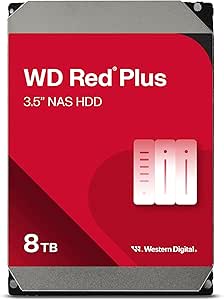 | Best for a Smaller, Steady NAS | Capacity: 8TB | Interface: SATA 6Gb/s | Rotational speed: 5,640rpm | VIEW ON AMAZON | See Our Full Breakdown |
| Seagate IronWolf 8TB Internal NAS Hard Drive (ST8000VNZ04) |  | Best 8TB Pick for Health Tools and Recovery Support | Capacity: 8TB | Interface: SATA 6Gb/s | Form factor: 3.5 inches | VIEW ON AMAZON | See Our Full Breakdown |
| nas hard drives for 24 7 use | Capacity | Interface | Rotational speed | Cache |
|---|---|---|---|---|
| Western Digital WD Red Pro 20T | 20TB | SATA 6Gb/s | 7,200rpm | 512MB |
| Western Digital Ultrastar DC H | 24TB | SATA 6Gb/s | 7,200rpm | 512MB |
| Seagate IronWolf 12TB 3.5-Inch | 12TB, verify listing fields | SATA 6Gb/s | 7,200rpm | Up to 256MB |
| Western Digital 8TB WD Red Plu | 8TB | SATA 6Gb/s | 5,640rpm | 256MB |
| Seagate IronWolf 8TB Internal | 8TB | SATA 6Gb/s | 7,200rpm | 256MB |
More Details on Our Top Picks
Western Digital WD Red Pro 20TB NAS Internal Hard Drive
The WD Red Pro 20TB earns my lead position because it combines substantial capacity with the strongest stated workload rating in this group: up to 550TB per year. That headroom makes it a better match than the 8TB Red Plus or IronWolf drives for a busy multi-user NAS that regularly handles large transfers, backups, or RAID rebuilds. Its 7,200rpm spindle and stated read speed of up to 285MB/s also place it ahead of the listed IronWolf 12TB’s 180MB/s maximum transfer speed on paper.
That performance profile is not automatically the right fit for every home server. A 20TB disk can be excessive if the NAS mostly stores documents and occasional media, and the product description does not provide the same explicit bay limit listed for the IronWolf and Red Plus models. I would check the NAS maker’s compatibility list and account for the acoustic and power characteristics of a 7,200rpm mechanical drive before filling a quiet room with several of them. As with every option here, the stated capacity is not the same as usable formatted space.
Compared with the renewed 24TB Ultrastar, this Red Pro gives up four terabytes but avoids the renewed-condition caveat and states a specific workload rating. Compared with the IronWolf 12TB, it offers more capacity and a higher stated read speed, but the IronWolf includes health-management and recovery-service details that are not listed for this WD model. I would choose the Red Pro for workload headroom, not on the assumption that speed or capacity replaces a backup plan.
Pros:- 20TB capacity reduces the number of disks needed for a given storage pool.
- Rated for workloads up to 550TB per year.
- Designed for 24/7 use in multi-user NAS environments.
- 7,200rpm speed and up to 285MB/s stated read speed.
Cons:- A 20TB drive may be unnecessary for light home storage.
- The supplied details do not state a maximum NAS bay count.
- Actual usable capacity will be lower after formatting and system overhead.
Best for: NAS owners who need a high-capacity disk for frequent multi-user activity, larger archives, or demanding RAID workloads.
Not ideal for: Buyers building a quiet, low-activity home NAS, or anyone who does not need 20TB and would rather prioritize a stated bay limit or included recovery services.
- Capacity:20TB
- Interface:SATA 6Gb/s
- Rotational speed:7,200rpm
- Cache:512MB
- Form factor:3.5 inches
- Read speed:Up to 285MB/s
- Model:WD202KFGX
Our verdict“I would pick the WD Red Pro 20TB for a busy NAS that needs both substantial capacity and the clearest workload headroom in this lineup.”
Western Digital Ultrastar DC HC580 24TB 7200 RPM SATA 3.5-Inch Enterprise Hard Drive (Renewed)
If the goal is to fit the most storage into one bay, the Ultrastar DC HC580 24TB is the capacity leader here. It is an enterprise-class mechanical drive specified for 24/7 operation, with CMR recording, 7,200rpm rotation, and a 512MB cache. Compared with the WD Red Pro 20TB, it adds 4TB per disk and lists a 2.5-million-hour MTBF figure. That makes it attractive for dense storage pools, provided the NAS supports the drive and the buyer accepts its condition.
The defining caveat is that this listing is for a renewed drive, not a new unit. Its stated three-year warranty comes from the seller, so I would check the warranty terms, return process, and what “renewed” means before relying on it for important data. The MTBF figure is a population-level specification, not a promise that an individual disk will last for that duration. A renewed enterprise drive can make sense in a secondary array or for a buyer who has strong backups, but it is a less straightforward choice than the new NAS-targeted Red Pro.
This model is also described for data centers, servers, and cloud storage rather than specifically for a home NAS bay count. Its enterprise focus may suit a compatible system, yet buyers should confirm firmware, acoustics, and NAS compatibility. Compared with the Seagate IronWolf 12TB, it offers twice the stated capacity but does not list the same health-management and rescue-service package. I rank it below the Red Pro because capacity is its standout, while condition and seller warranty add extra uncertainty.
Pros:- 24TB is the largest capacity in this roundup.
- Designed for enterprise workloads and 24/7 operation.
- CMR recording, 7,200rpm speed, and 512MB cache.
- Lists a 2.5-million-hour MTBF figure and hot-swap capability.
Cons:- Renewed condition adds uncertainty compared with a new drive.
- Warranty is seller-provided, so terms need checking.
- NAS bay-count support is not specified in the supplied details.
Best for: Storage builders who prioritize maximum single-drive capacity and can verify compatibility, seller warranty coverage, and backup plans.
Not ideal for: Buyers who want a new drive with clearly stated NAS bay support, or who need a low-risk primary disk without checking renewed-product terms.
- Capacity:24TB
- Interface:SATA 6Gb/s
- Rotational speed:7,200rpm
- Cache:512MB
- Recording technology:CMR
- MTBF:2.5 million hours
- Condition:Renewed
- Warranty:Three-year seller warranty
Our verdict“I would choose this Ultrastar when 24TB per bay matters more than buying new, and only after confirming the seller warranty and NAS compatibility.”
Seagate IronWolf 12TB 3.5-Inch NAS Hard Drive, 7200 RPM
The Seagate IronWolf 12TB takes the mid-size role: enough space for a growing shared library without moving to the 20TB-plus class. It is specified for multi-user NAS systems with up to eight bays, making its array fit more explicit than the Red Pro’s supplied details. Its IronWolf Health Management can provide drive-related status information in supported NAS systems, while the included three years of Rescue Data Recovery Services add a support benefit absent from the WD models listed here.
Its stated maximum transfer speed is 180MB/s, below the WD Red Pro’s 285MB/s read figure. That difference matters most for large sequential transfers and heavy concurrent use; everyday access can also be limited by network speed, NAS configuration, and other drives in the array. Its 7,200rpm spindle keeps it in the faster rotational class represented here, but the supplied listing does not give a workload rating, so I would not assume it has the same documented workload headroom as the Red Pro’s 550TB-per-year rating.
There is a product-information issue worth resolving before purchase: the supplied information says 12TB in the title and description, but notes that capacity fields conflict. I would verify the exact model and capacity shown by the seller rather than treating the inconsistency as harmless. Compared with the 8TB IronWolf, this model gives more room per bay while keeping the same listed bay support and service features. It suits a growing NAS, but buyers seeking unambiguous listing details should check carefully.
Pros:- Designed for multi-user NAS systems with up to eight bays.
- IronWolf Health Management is included.
- Three years of Rescue Data Recovery Services are listed.
- 7,200rpm drive with a stated maximum transfer speed of 180MB/s.
Cons:- The product information has conflicting capacity fields that should be checked.
- Its 180MB/s stated maximum is below the WD Red Pro’s read-speed figure.
- No annual workload rating is provided in the supplied details.
Best for: Home and small-business NAS owners who want more than entry-level capacity, support for up to eight bays, and included health and recovery services.
Not ideal for: Buyers who need the highest stated workload rating or fastest listed read speed, or who are unwilling to verify the listing’s conflicting capacity fields.
- Capacity:12TB, verify listing fields
- Form factor:3.5 inches
- Rotational speed:7,200rpm
- Interface:SATA 6Gb/s
- Cache:Up to 256MB
- NAS bay support:Up to 8 bays
- Maximum transfer speed:Up to 180MB/s
- Warranty and recovery:Three-year limited warranty and Rescue Data Recovery Services
Our verdict“I would shortlist the IronWolf 12TB for a growing multi-bay NAS, but verify the capacity and model details before ordering.”
Western Digital 8TB WD Red Plus NAS Internal Hard Drive
The WD Red Plus 8TB is my pick for a smaller NAS that stays online but does not need the workload ceiling of a Pro drive. Its description explicitly covers 24/7 use, up to eight bays, and workloads up to 180TB per year. It also uses CMR recording, a relevant detail for RAID systems because it avoids the recording behavior associated with some drive types that can complicate sustained writes and rebuilds. This makes it a more clearly specified fit for a modest always-on array than the IronWolf 8TB, whose supplied details do not include a workload rating.
Its 5,640rpm rotational speed is lower than the 7,200rpm IronWolf and Red Pro drives. For an archive, shared files, and routine backup storage, that may be a reasonable trade for a drive aimed at smaller and medium business NAS systems. Buyers running frequent large transfers or a write-heavy multi-user workload may prefer the Red Pro’s substantially higher workload rating and stated read speed. The Red Plus lists a three-year limited warranty, but unlike the IronWolf products here, the provided information does not include Rescue Data Recovery Services.
At 8TB, it is also less space-efficient per bay than the 12TB IronWolf or 20TB Red Pro. That can matter as a storage pool grows, since more bays may be needed to reach the same raw capacity. Still, the combination of CMR, NASware compatibility support, and explicit eight-bay guidance gives it a useful, grounded role. I would choose it for measured workloads, not as a cheaper substitute for a high-demand enterprise-style drive.
Pros:- Designed for 24/7 NAS use and support for up to eight bays.
- CMR recording suits sustained NAS and RAID activity.
- Workload rating of up to 180TB per year is stated.
- NASware firmware supports compatibility with NAS systems.
Cons:- 5,640rpm speed is lower than the 7,200rpm drives in this group.
- 8TB provides less capacity per bay than the 12TB, 20TB, and 24TB options.
- No data recovery service is listed in the supplied details.
Best for: Home offices and small businesses building an always-on NAS for file sharing, archiving, and routine RAID storage.
Not ideal for: Users with heavy write activity, large concurrent transfers, or a need to maximize capacity per bay.
- Capacity:8TB
- Interface:SATA 6Gb/s
- Rotational speed:5,640rpm
- Cache:256MB
- Recording technology:CMR
- NAS bay support:Up to 8 bays
- Warranty:Three-year limited warranty
Our verdict“I would choose the WD Red Plus 8TB for a smaller, steady NAS where clear bay support and CMR matter more than top-end speed.”
Seagate IronWolf 8TB Internal NAS Hard Drive (ST8000VNZ04)
The Seagate IronWolf 8TB is a sensible small-array choice when the included support features matter as much as capacity. It is designed for multi-user NAS systems with up to eight bays and includes IronWolf Health Management alongside three years of Rescue Data Recovery Services. Those additions set it apart from the WD Red Plus 8TB, which lists CMR recording and an annual workload rating but does not list recovery services in the supplied specifications.
Both 8TB drives are aimed at NAS use, yet they make different compromises. The IronWolf spins at 7,200rpm and lists a maximum speed of 180MB/s, with a separate read-speed figure of 210MB/s. The Red Plus runs at 5,640rpm and states a workload rating of up to 180TB per year, a useful measure the IronWolf listing does not provide. I would lean toward WD when the workload ceiling and CMR specification are the deciding factors; I would favor this Seagate when its health tools and recovery-service inclusion are more useful to the buyer.
The IronWolf’s 8TB capacity also limits how far one disk goes in a growing pool, and it remains a mechanical drive rather than a silent or shock-proof storage option. Its NAS focus makes it a poor fit for portable use or a general external enclosure unless the enclosure maker confirms compatibility. I rank it fifth not because the support package lacks value, but because the Red Plus presents a clearer workload specification for continuous NAS duty. This Seagate remains a reasonable alternative for buyers who prefer its listed service features.
Pros:- Designed for multi-user NAS systems with up to eight bays.
- Includes IronWolf Health Management.
- Three years of Rescue Data Recovery Services are listed.
- 7,200rpm speed with up to 180MB/s maximum speed.
Cons:- The supplied details do not state an annual workload rating.
- 8TB capacity is limited beside the larger picks.
- Mechanical operation is less suited to quiet or portable storage setups.
Best for: NAS owners who want an 8TB drive with health-management tools and a stated recovery-service period for an array of up to eight bays.
Not ideal for: Buyers who prioritize an explicit annual workload rating, CMR documentation, or maximum storage per bay.
- Capacity:8TB
- Interface:SATA 6Gb/s
- Form factor:3.5 inches
- Rotational speed:7,200rpm
- Cache:256MB
- Maximum speed:Up to 180MB/s
- NAS bay support:Up to 8 bays
- Warranty and recovery:Three-year limited warranty and Rescue Data Recovery Services
Our verdict“I would choose the IronWolf 8TB when its health and recovery features outweigh the Red Plus’s clearer workload and CMR specifications.”

How We Picked
I ranked these drives for one specific job: running continuously in a NAS. I gave the most weight to explicit 24/7 or NAS-use positioning, stated workload rating, and support for multi-bay systems. Those details help distinguish a drive intended for an always-on array from a general desktop disk, where vibration, shared access, and sustained workloads may differ.
Capacity and speed matter, but they do not tell the whole story. A large drive can reduce the number of disks needed, while a high workload rating is more relevant to a busy multi-user system with frequent writes. I also counted practical protections and support—such as health-management tools, recovery services, and warranty terms—without treating them as substitutes for a backup or a guarantee that a drive will not fail.
My ordering reflects both capability and buyer risk. The WD Red Pro leads for its clearly stated 550TB-per-year rating and 20TB capacity. The renewed Ultrastar is a capacity specialist rather than the safest default because its condition differs from a new drive. The IronWolf 12TB and WD Red Plus 8TB follow for their balance of NAS suitability and bay support, while the IronWolf 8TB is a smaller-capacity alternative with useful support features. I flag inconsistent listing details rather than guessing which specification is correct.
Factors to Consider When Choosing Nas Hard Drives For 24 7 Use
For an always-on NAS, the right drive depends on how hard the system works, how many bays it has, and how much usable space you need. I would compare workload information and NAS compatibility before treating capacity or spindle speed as the deciding factor.
Match workload rating to actual use
A workload rating describes the annual data handling the drive is designed to support, so it helps separate light archive use from frequent writes, backups, and multi-user activity. In this lineup, the WD Red Pro is rated up to 550TB per year, while the WD Red Plus lists up to 180TB per year. The supplied IronWolf details do not state an annual rating; I would not infer that its workload limit matches either WD figure. If your NAS handles frequent large transfers or many users, prioritize a drive with a workload rating that fits that pattern.
Check bay count and NAS compatibility
Multi-bay systems can expose drives to vibration from neighboring disks, and NAS models may have specific compatibility lists. The IronWolf 8TB and 12TB and WD Red Plus list support for up to eight bays; the supplied Red Pro and Ultrastar details do not give a bay limit. Check your NAS maker’s drive list, supported capacity, and any drive-health feature requirements before buying. A drive described for enterprise servers is not automatically the best match for a desktop NAS.
Choose capacity with array planning in mind
The 24TB Ultrastar and 20TB Red Pro offer the most space per bay, while the two 8TB models suit smaller arrays or staged expansion. Raw capacity is not the same as usable capacity: formatting and RAID or parity choices reduce the space available for files. Larger disks can cut the number of bays needed, but a pool’s replacement and rebuild strategy still matters. I would calculate the usable space after redundancy before choosing between an 8TB, 12TB, 20TB, or 24TB drive.
Treat speed as one part of performance
The 7,200rpm drives may suit heavier sequential transfers, while the WD Red Plus’s 5,640rpm spindle is pitched at steadier small and medium NAS duties. The listed speed figures are not directly interchangeable: the Red Pro provides a read-speed figure, while the IronWolf listings give maximum transfer or speed figures. Network speed, NAS processor, RAID layout, and simultaneous users can all limit real-world throughput. I would not pay for rotational speed alone if the NAS is mainly serving occasional backups or media playback.
Understand support features and condition
IronWolf Health Management and the listed Rescue Data Recovery Services add monitoring and support options, but they do not prevent failure or replace a separate backup. The renewed Ultrastar needs extra scrutiny because its warranty is seller-provided and its condition is not new. Review the exact coverage period, return policy, and service eligibility before depending on those terms. For any drive, keep another copy of important files on separate storage or an off-site service.
Frequently Asked Questions
Can these drives run continuously in a NAS?
These models are presented for NAS, enterprise, or 24/7 operation, with the WD Red Pro, WD Red Plus, and Ultrastar descriptions explicitly referring to continuous use. That design intent is not a promise against failure. Check the specific NAS compatibility list, operating conditions, and workload guidance, and keep an independent backup of data that matters.
Is a 7,200rpm drive always better for a NAS?
No. A 7,200rpm drive can be a better fit for some heavier transfer patterns, but spindle speed alone does not determine NAS performance. Network capacity, workload, RAID configuration, and simultaneous users also affect throughput. The WD Red Plus’s lower 5,640rpm speed can suit a steady archive or file-sharing system, while the Red Pro’s faster stated read speed is aimed at more demanding use.
Which of these drives is best for an eight-bay NAS?
The supplied details explicitly list support for up to eight bays on the Seagate IronWolf 8TB and 12TB and the WD Red Plus 8TB. The WD Red Pro and renewed Ultrastar descriptions do not provide a maximum bay count, so verify those models against your NAS maker’s compatibility list before installation. Bay support alone does not establish that a drive is the right choice for your workload.
Should I choose the renewed 24TB Ultrastar over the WD Red Pro 20TB?
I would choose the Ultrastar if maximum capacity per bay is the priority and the renewed condition, seller warranty, and NAS compatibility are acceptable. The WD Red Pro is the more straightforward choice for a demanding NAS because it is described for 24/7 multi-user use and states a workload rating of up to 550TB per year. The Ultrastar lists a higher capacity but does not remove the need to check seller terms or maintain backups.
Do IronWolf recovery services replace a NAS backup?
No. The three years of Rescue Data Recovery Services listed for the IronWolf models are a support benefit, not a substitute for keeping another copy of important files. RAID can help a system stay available after some drive failures, but it does not protect against deletion, malware, theft, or every hardware problem. Keep a separate backup on another device or at another location.
Conclusion
For a busy multi-user NAS, I would start with the WD Red Pro 20TB because its stated 550TB-per-year workload rating gives it the clearest headroom here. If you need the most storage per bay and accept a renewed disk, the Ultrastar DC HC580 24TB is the capacity pick, provided you verify the seller warranty and NAS compatibility.
For a smaller always-on system, choose the WD Red Plus 8TB when its CMR recording and explicit workload rating matter most. Pick the IronWolf 8TB if you value health-management tools and recovery services, or the IronWolf 12TB for more space with the same listed eight-bay guidance—after checking the conflicting capacity fields. Whatever the drive, I would size the array for usable capacity, confirm compatibility, and maintain a separate backup.