A LED desk lamp with a USB port can clear up desk clutter, but the best choice depends on whether you need stronger charging, adaptable light, or a compact task lamp. My best overall pick is the Mifaso 8-in-1 LED Desk Lamp, which pairs a power strip with 30W USB-C PD for a more capable charging setup. The Honeywell HWT-H2 stands out for full-spectrum lighting, while the One Beat suits desks that need several outlets and USB ports. The main tradeoffs are charging capacity versus lamp size, and extra functions versus simple, focused lighting. Read on for the full breakdown and help matching a lamp to your workspace.

Get the latest gadgets delivered free with Prime
- Fast, free delivery on millions of items
- Prime Video, Amazon Music and more included
- Member-only deals all year
Complete the kit



Key Takeaways
- The Mifaso combines a power strip with 30W USB-C PD, making it the most charging-focused option here; buyers who only need a basic USB port may prefer a simpler lamp.
- The One Beat and other power-strip designs are better for consolidating plugs and USB devices than compact task lamps, but they need desk space and a nearby outlet.
- The Honeywell HWT-H2 puts its emphasis on full-spectrum light rather than maximum charging versatility, a useful distinction for readers who spend long stretches reading or working.
- The Dott Arts and the touch-control model add multiple color modes and a night light, while simpler dimmable models may be easier to operate for straightforward desk tasks.
- Wireless charging, a pen holder, a flexible gooseneck, and USB-C PD address different needs; choosing one distinctive feature matters more than collecting extras you will rarely use.
| Dimmable LED Desk Lamp with Power Strip and USB Charging Ports |  | Best for Flexible Charging | Brand and model: Sompaty HD-ZD0502 | Brightness: Stepless, 1%–100% | Color temperature: 2800K–6500K | VIEW ON AMAZON | See Our Full Breakdown |
| Honeywell HWT-H2 LED Desk Lamp, Eye-Caring Full Spectrum, USB Charging |  | Best for Color-Accurate Work | Wattage: 24 watts | Lumen output: 550 lm | Color temperature: 2700K–5700K, 4 settings | VIEW ON AMAZON | See Our Full Breakdown |
| LED Desk Lamp with Touch Control and USB Charging Port | 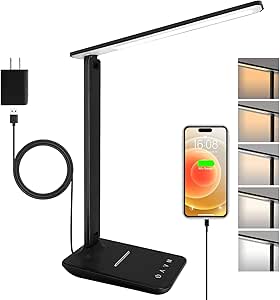 | Best Lightweight Study Lamp | Power: 6 watts | Brightness: 500 lumens | Brightness levels: 5 | VIEW ON AMAZON | See Our Full Breakdown |
| LED Desk Lamp with USB-A and USB-C Ports, Touch Control, 5 Color Modes, and Night Light |  | Best for Desk-to-Bedside Use | Wattage: 8 watts | Light modes: 5 color modes | Brightness levels: 3 | VIEW ON AMAZON | See Our Full Breakdown |
| Mifaso 8-in-1 LED Desk Lamp with Power Strip and 30W USB-C PD |  | Best for Laptop Charging | Light modes: Cold, neutral, and warm | USB ports: 2 USB-C and 2 USB-A | AC outlets: 2 three-prong and 2 two-prong | VIEW ON AMAZON | See Our Full Breakdown |
| Dott Arts LED Desk Lamp with USB-A and USB-C Ports, Touch Controls, 5 Color Modes, and Night Light |  | Best for Bedside Use | Brand: Dott Arts | Model: DL-701-W | Color: Silver | VIEW ON AMAZON | See Our Full Breakdown |
| One Beat LED Desk Lamp with Power Strip, 5 ft Cord, 3 Outlets and 4 USB Ports |  | Best for Outlet and USB Expansion | Brand and color: One Beat; white | AC outlets: 3 | USB ports: 4 total: 2 USB-C and 2 USB-A | VIEW ON AMAZON | See Our Full Breakdown |
| Lampat Dimmable LED Desk Lamp with USB Charging Port |  | Best for Simple Touch-Control Lighting | Brand: Lampat | Color: Piano Black | Lighting modes: Reading, Studying, Relaxation, Bedtime | VIEW ON AMAZON | See Our Full Breakdown |
| Sailstar Wireless Charging LED Desk Lamp with USB Port and Pen Holder |  | Best for Wireless Charging and Desk Organization | Brand and color: Sailstar; matte black | Light output: 8W LED; up to 800 lumens; 95 CRI | Lighting: 3 color modes; dimmable; memory function | VIEW ON AMAZON | See Our Full Breakdown |
| 15W LED Desk Lamp with USB Charging Ports and Flexible Gooseneck | 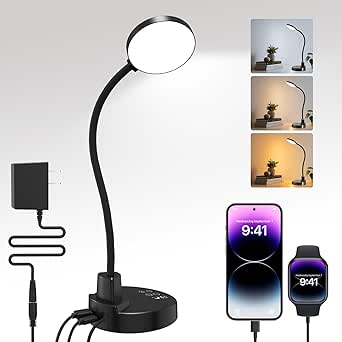 | Best for Flexible Positioning and Timed Use | Brand and color: ZAPLIT; black | Wattage: 15 watts | Lighting: LED with 60 lamp beads; 3000 K, 4500 K, and 6000 K | VIEW ON AMAZON | See Our Full Breakdown |
| Lepro Adjustable LED Desk Lamp with USB Charging Port | 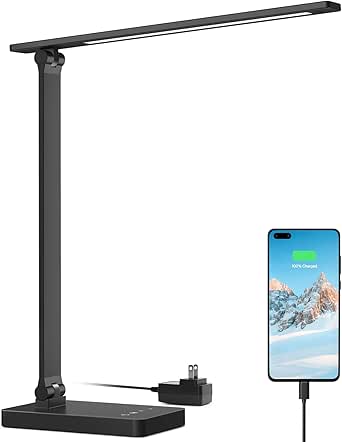 | Best Compact Pick | Light source: LED | Lighting modes: 3 | Brightness levels: 5 | VIEW ON AMAZON | See Our Full Breakdown |
| White Crown Dimmable LED Desk Lamp with USB Charging Port | 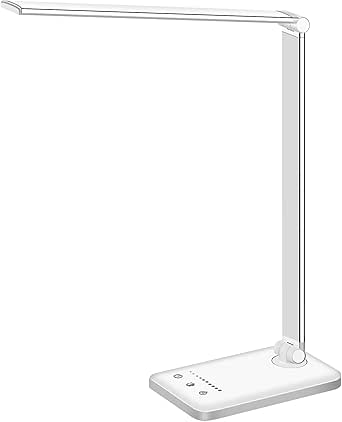 | Best for Study Sessions | Model: QM019 | Number of LEDs: 52 | Lighting modes: 5 | VIEW ON AMAZON | See Our Full Breakdown |
| LED Desk Lamp with Power Strip and USB Charging | 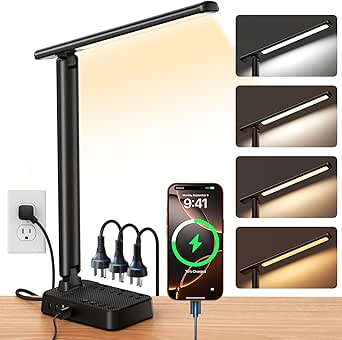 | Best for Charging Multiple Devices | Number of LEDs: 64 | Brightness control: Stepless, 1%–100% | Color temperature: 2800K–6500K | VIEW ON AMAZON | See Our Full Breakdown |
More Details on Our Top Picks
Dimmable LED Desk Lamp with Power Strip and USB Charging Ports
I’d choose the Sompaty HD-ZD0502 when a desk needs more than a lamp and one charging port. Its three AC outlets and four USB ports can consolidate chargers and small electronics around a single cord, while stepless dimming and a broad 2800K–6500K range give more lighting control than the three-mode Mifaso. The adjustable arm, rotating head, timer, and brightness memory make it adaptable for both focused work and softer evening light. The tradeoff is that its combined outlet load tops out at 1200W/10A, below the Mifaso’s 1875W/15A, so I wouldn’t make it the hub for several high-draw devices. Its plastic construction also feels less substantial on paper than a lamp with a metal base.
Pros:- Three AC outlets plus two USB-C and two USB-A ports reduce the need for separate charging adapters
- Stepless brightness and 2800K–6500K color adjustment offer fine lighting control
- Adjustable, foldable arm and 180° light head support flexible positioning
- One-hour timer and brightness memory add useful daily convenience
Cons:- Combined maximum load is limited to 1200W/10A, less than the Mifaso’s stated 1875W/15A
- Plastic construction may feel less durable or substantial than metal-base alternatives
Best for: Desk users who want stepless lighting control and several USB and AC charging connections in one compact setup
Not ideal for: People powering multiple high-wattage devices from the lamp’s outlets, or buyers seeking a more substantial metal build
- Brand and model:Sompaty HD-ZD0502
- Brightness:Stepless, 1%–100%
- Color temperature:2800K–6500K
- Outlets:3 AC outlets
- USB ports:2 USB-C and 2 USB-A
- Maximum power:1200W/10A
- Adjustability:90° arm and 180° light head
- Timer:1-hour auto-off
Our verdict“Choose the Sompaty if you want extensive charging connections and finely adjustable light, but skip it if your desk setup needs a higher outlet load rating.”
Honeywell HWT-H2 LED Desk Lamp, Eye-Caring Full Spectrum, USB Charging
The Honeywell HWT-H2 is the lighting-first pick here: its CRI of at least 94 is useful for tasks where colors need to look more faithful, such as drawing, crafts, or reviewing printed materials. It pairs that with flicker-free full-spectrum light, stepless dimming, and four color temperatures, while USB-A and USB-C ports keep everyday device charging close at hand. Compared with the Sompaty, it gives up the AC outlets and extra USB connections, but puts more emphasis on light quality and a foldable touch-control design. Its 550-lumen output may be more than a very small desk needs, and it requires constant plug-in power. The ABS base also won’t have the feel of a metal-bodied lamp.
Pros:- CRI ≥94 supports more accurate color appearance for visual tasks
- Stepless dimming and four color temperatures allow lighting to suit different activities
- USB-A and USB-C ports cover common charging needs
- Foldable touch-controlled design includes a 30-minute timer and memory function
Cons:- Does not provide AC outlets or the multiple USB connections offered by the Sompaty
- Requires corded power and cannot operate from a battery
- 550-lumen output may feel excessive in a very small workspace, and the ABS base is plastic
Best for: People who do color-sensitive desk work and want adjustable, high-CRI lighting alongside basic USB-A and USB-C charging
Not ideal for: Buyers who need AC outlets, several simultaneous charging connections, battery operation, or a low-output lamp for a tiny workspace
- Wattage:24 watts
- Lumen output:550 lm
- Color temperature:2700K–5700K, 4 settings
- CRI:≥94
- USB ports:USB-A and USB-C
- Controls:Touch
- Timer:30-minute auto-off
- Lifespan:>30,000 hours
Our verdict“Pick the Honeywell for high color fidelity and flexible light settings; choose a power-strip model instead if charging capacity is your main priority.”
LED Desk Lamp with Touch Control and USB Charging Port
At 0.99 pounds, this 6-watt lamp makes a straightforward choice for students or anyone who may need to shift a desk light between rooms. Its 500 lumens, five brightness levels, and five color settings cover common reading and study needs, while the 180° rotating head and foldable base make it easier to aim or store than a fixed lamp. The USB port is a useful extra, though its 5V/1A output is more modest than the Honeywell’s pair of USB-A and USB-C ports or the charging arrays on the Sompaty and Mifaso. It also lacks their timers and added outlet capacity. I’d favor it for simple, portable desk lighting, not for a workstation that needs a charging hub.
Pros:- Lightweight design is easy to reposition between desks or study areas
- Five brightness levels and five color settings provide practical adjustment
- Rotating lamp head and foldable base help direct light and reduce storage space
- Flicker-free illumination and a two-year warranty are stated in the product data
Cons:- Single 5V/1A USB port offers less charging flexibility than the Honeywell or power-strip lamps
- No AC outlets, timer, or memory function are listed
- Requires corded power and is not waterproof
Best for: Students and light-work users who want an easy-to-move lamp with adjustable brightness, color, and a basic USB charging port
Not ideal for: People who need fast or multi-device charging, AC outlets, or a timer and memory function
- Power:6 watts
- Brightness:500 lumens
- Brightness levels:5
- Color temperature:5 settings, 3000K–6000K
- USB output:5V/1A
- Lamp head rotation:180°
- Weight:0.99 lb
- Warranty:2 years
Our verdict“Choose this lamp for lightweight study lighting and basic USB charging, but look to the Honeywell or Sompaty if you need more charging options.”
LED Desk Lamp with USB-A and USB-C Ports, Touch Control, 5 Color Modes, and Night Light
This lamp earns its place for buyers who want one light to serve a desk by day and a bedside table at night. Along with USB-A and USB-C charging, it has five color modes, three brightness levels, and a soft night light—features the lighter B0F22BR222 doesn’t list. Its 230° flexible arm and 90° base axis give more stated positioning range than that model’s 180° rotating head, while the metal base adds a sturdier material choice than the plastic-bodied options. The tradeoff is simpler brightness control: three levels rather than the Sompaty’s stepless dimming. Its charging output is listed as 5V/2.1A, but it has no AC outlets, and the unit still needs corded power.
Pros:- USB-A and USB-C ports provide two common charging connections
- Five color modes, three brightness levels, and a soft night light support desk and bedside use
- 230° flexible arm and 90° base axis allow a broad range of positioning
- Metal base offers a different build feel from the plastic bases on the Honeywell and Sompaty
Cons:- Three brightness levels offer less precise control than the stepless Sompaty and Honeywell
- No AC outlets are listed, so it cannot replace a desk power strip
- Requires corded power and is not water resistant
Best for: People who want a foldable lamp with USB-A and USB-C charging for a bedroom desk or bedside table
Not ideal for: Users who need stepless dimming, AC outlets, water resistance, or a lamp that can run without a cord
- Wattage:8 watts
- Light modes:5 color modes
- Brightness levels:3
- Charging ports:USB-A and USB-C, 5V/2.1A
- Adjustability:230° flexible arm and 90° base axis
- Weight:1.4 lb
- Base material:Metal
- Power source:Corded electric
Our verdict“Choose this model for flexible desk and bedside lighting with USB-A and USB-C charging, but not if you want fine dimming or built-in AC outlets.”
Mifaso 8-in-1 LED Desk Lamp with Power Strip and 30W USB-C PD
The Mifaso is the strongest fit for a desk where charging capacity matters as much as illumination. Its four AC outlets and four USB ports include a 30W USB-C PD port, making it more suited to a compatible laptop or other higher-demand device than the basic 5V/1A port on the B0F22BR222. Its 1875W/15A maximum load also exceeds the Sompaty’s stated 1200W/10A limit. The compromise is simpler lighting: three color modes are listed, with no brightness range or memory function specified, and the product notes that it does not retain the previous light setting. At 12.6 inches tall with a foldable arm, it saves space, though the plastic construction and possible heat at the lamp head during prolonged use deserve attention.
Pros:- Four AC outlets and four USB ports combine lighting and device connections
- 30W USB-C PD port supports compatible higher-demand charging needs
- 1875W/15A maximum load is higher than the Sompaty’s stated 1200W/10A
- Foldable arm, adjustable head, and 12.6-inch height suit compact desks
Cons:- Three light modes offer less specified control than the stepless Sompaty or Honeywell
- Does not retain the previous light setting
- Plastic construction; lamp head housing may become hot during prolonged use
Best for: Desk users with a compatible USB-C PD device who want integrated AC outlets and several charging ports in a space-saving lamp
Not ideal for: Buyers who prioritize stepless dimming, stored lighting settings, or a metal construction
- Light modes:Cold, neutral, and warm
- USB ports:2 USB-C and 2 USB-A
- AC outlets:2 three-prong and 2 two-prong
- USB-C PD output:30W
- Maximum load:1875W/15A
- Height:12.6 in
- Adjustability:180° adjustable head and 90° foldable arm
- Power cord:5 ft
Our verdict“Choose the Mifaso if you want a compact lamp that doubles as a power and 30W USB-C PD hub, and skip it if lighting customization is your priority.”
Dott Arts LED Desk Lamp with USB-A and USB-C Ports, Touch Controls, 5 Color Modes, and Night Light
The Dott Arts suits a desk that doubles as a bedside surface: it pairs adjustable task lighting with both USB-A and USB-C charging, plus a soft warm night light for winding down. Its five color modes and three brightness levels offer more light variety than the Lampat Dimmable LED Desk Lamp, which has activity modes but no listed USB-C port or separate night light. The 230° flexible arm and 90° base axis help direct the beam, while the foldable build can be tucked away when the surface is needed for something else. The tradeoff is a relatively simple three-step brightness range, and its 5V/2.1A ports are for everyday charging rather than a fast-charge setup. It also needs corded power and is not water resistant.
Pros:- Five color modes and three brightness levels provide options for different tasks and times of day.
- USB-A and USB-C ports offer convenient charging from the lamp base.
- Soft warm night light adds a low-light option for bedside use.
- Foldable design and adjustable arm help manage desk space and beam direction.
Cons:- Three brightness levels give less granular control than the five-level Lampat and One Beat lamps.
- USB output is rated at 5V/2.1A, with no fast-charging support listed.
- Requires corded power and is not water resistant.
Best for: Bedside users who want a warm night light, adjustable reading illumination, and both USB-A and USB-C charging on one tabletop.
Not ideal for: Buyers who need many fine brightness adjustments, fast charging, or a lamp that can be used away from a corded outlet.
- Brand:Dott Arts
- Model:DL-701-W
- Color:Silver
- Lighting:LED; 5 color modes; 3 brightness levels
- Controls:Touch
- USB output:USB-A and USB-C; 5V/2.1A
- Adjustability:230° flexible arm; 90° base axis
- Power and mounting:Corded electric; tabletop
Our verdict“Choose the Dott Arts if you want a flexible bedside lamp with a dedicated warm night light and both common USB connector types.”
One Beat LED Desk Lamp with Power Strip, 5 ft Cord, 3 Outlets and 4 USB Ports
The One Beat is the strongest fit here when the charging problem extends beyond phones and tablets: its base combines the lamp with three AC outlets and four USB ports, including two USB-C ports. That makes it more useful as a desktop power hub than the Dott Arts LED Desk Lamp, which has USB-A and USB-C but no AC outlets. For the light itself, four color temperatures and five brightness levels provide a broader adjustment range than Dott Arts’s three brightness steps, and the folding arm can help clear work space. The five-foot cord gives some placement flexibility, though the lamp still needs a nearby wall outlet. Its plastic and polycarbonate construction is less substantial than a dedicated metal power strip, and the housing can heat up during extended use. Touch controls may also need cleaning or recalibration.
Pros:- Three AC outlets and four USB ports consolidate power connections at the desk.
- Two USB-C and two USB-A ports cover a mix of current and older devices.
- Four color temperatures and five brightness levels allow more lighting adjustment than the Dott Arts lamp.
- Foldable arm, adjustable lamp head, and five-foot cord aid placement and storage.
Cons:- Lamp housing can heat up during extended use.
- Touch controls may require cleaning and recalibration.
- Plastic and polycarbonate construction may not suit buyers seeking a more substantial power hub.
Best for: Students or home-office users who need desk lighting plus nearby power for several plugged-in devices and USB-charged gear.
Not ideal for: Buyers who want a cool-running lamp for long uninterrupted sessions, or those who need a compact charger without extra AC outlets.
- Brand and color:One Beat; white
- AC outlets:3
- USB ports:4 total: 2 USB-C and 2 USB-A
- Cord length:5 ft
- Lighting:4 color temperatures; 5 brightness levels; up to 6500 K
- Controls and memory:Touch control; memory function
- Adjustment:180° lamp head; 90° foldable arm
Our verdict“Pick the One Beat if your priority is turning a desk lamp into a combined AC outlet and USB charging station.”
Lampat Dimmable LED Desk Lamp with USB Charging Port
The Lampat keeps the setup straightforward: its four activity-based lighting modes, five brightness levels, and touch-sensitive panel cover everyday reading, studying, and wind-down use without a long feature list to manage. It is a simpler choice than the ZAPLIT 15W LED Desk Lamp, which adds USB-C, flexible gooseneck positioning, a night light, and four timer settings. Lampat’s one-hour auto-off timer is useful for a bedtime routine, but it offers less timing flexibility. Its USB port is rated at 5V/1A, so it is best treated as a convenient place to top up a device rather than a higher-output charging hub like the One Beat. The product data also gives no arm-adjustment details, which may matter if precise light positioning is a priority.
Pros:- Four modes map to reading, studying, relaxation, and bedtime use.
- Five brightness levels provide more adjustment steps than the Dott Arts lamp.
- Touch-sensitive controls make mode and brightness changes simple.
- One-hour auto-off timer can suit a short bedtime reading routine.
Cons:- USB output is limited to 5V/1A, below the One Beat’s multi-port charging setup.
- Auto-off timer is limited to one hour.
- No arm or head adjustment details are provided in the product data.
Best for: Readers or students who want uncomplicated touch dimming, named activity modes, and a basic USB charging port in a piano-black lamp.
Not ideal for: Buyers who need USB-C, multiple charging ports, a flexible arm, or a timer longer or shorter than one hour.
- Brand:Lampat
- Color:Piano Black
- Lighting modes:Reading, Studying, Relaxation, Bedtime
- Brightness levels:5
- Controls:Touch-sensitive
- Auto-off timer:1 hour
- USB output:5V/1A
Our verdict“Choose Lampat for a basic touch-controlled reading lamp with a modest USB port, not for extensive device charging or precise positioning.”
Sailstar Wireless Charging LED Desk Lamp with USB Port and Pen Holder
The Sailstar is the most desk-accessory-focused pick in this group: alongside its lamp, it provides a 10W wireless charger, 5W USB port, and built-in pen holder. That combination suits someone who wants to reduce cable clutter and keep writing tools close at hand. Compared with the Dott Arts LED Desk Lamp, Sailstar adds wireless charging and a stated output of up to 800 lumens, while Dott Arts offers more color modes and both USB-A and USB-C ports. Sailstar’s 360° flexible arm, dimming, and memory function help tailor the light to a working position and retain a preferred setting. The catch is that the USB port is limited to 5W, and wireless charging only helps with compatible devices. Its ABS construction may also feel less substantial than a metal-bodied lamp.
Pros:- 10W wireless charging reduces the need for a separate phone cable.
- Up to 800 lumens, three color modes, and dimming support varied desk tasks.
- 360° flexible arm helps direct light where it is needed.
- Built-in pen holder combines lighting with small-item organization.
Cons:- USB port is limited to 5V/1A and up to 5W.
- Wireless charging requires a compatible device.
- ABS plastic construction may not appeal to buyers seeking a metal lamp.
Best for: Phone users with a compatible wireless-charging device who want a flexible desk light, a wired USB port, and a place to store pens.
Not ideal for: Buyers whose devices lack wireless charging, who need faster wired USB output, or who prefer USB-C charging from the lamp.
- Brand and color:Sailstar; matte black
- Light output:8W LED; up to 800 lumens; 95 CRI
- Lighting:3 color modes; dimmable; memory function
- Wireless charging:Up to 10W
- USB output:5V/1A; up to 5W
- Arm and controls:360° flexible arm; touch controls
- Power:Corded electric; 5V/3A adapter; 1.8 m cord
- Material:ABS plastic
Our verdict“Choose Sailstar if compatible wireless phone charging and desk organization matter more than USB-C or faster wired charging.”
15W LED Desk Lamp with USB Charging Ports and Flexible Gooseneck
ZAPLIT’s defining advantage is its 360° flexible gooseneck, which gives more freedom to aim the light than the folding arm on the One Beat LED Desk Lamp. It also combines three color temperatures, five brightness levels, USB-A and USB-C outputs, a low-brightness night light, and four auto-off settings ranging from 30 to 120 minutes. Those timers offer more choice than the Lampat’s one-hour shutoff, making this a practical fit for work sessions or bedside reading with a set end point. The main compromise is charging speed: the ports do not support fast charging, so they are convenient for ordinary top-ups rather than quick power boosts. It also requires the included AC adapter, and its plastic base and shade may not suit buyers seeking a heavier build.
Pros:- 360° gooseneck provides flexible light positioning.
- Three color temperatures and five brightness levels offer adaptable illumination.
- USB-A and USB-C ports provide two common charging connections.
- Four timer settings and a low-brightness night light support work and bedside routines.
Cons:- USB ports do not support fast charging.
- Requires the included AC adapter and corded power.
- Plastic base and shade may feel less substantial than a metal-bodied alternative.
Best for: People who frequently reposition their lamp and want USB-A and USB-C charging, a night-light setting, and selectable shutoff timers.
Not ideal for: Buyers who need fast USB charging, a cordless lamp, or a sturdier metal construction.
- Brand and color:ZAPLIT; black
- Wattage:15 watts
- Lighting:LED with 60 lamp beads; 3000 K, 4500 K, and 6000 K
- Brightness levels:5
- USB ports:USB-A and USB-C output; no fast charging
- Timer settings:30, 60, 90, and 120 minutes
- Gooseneck:Flexible; 360°
- Power:Corded electric; 12 V
Our verdict“Pick ZAPLIT if precise gooseneck positioning and adjustable timer options matter more than fast charging or cordless use.”
Lepro Adjustable LED Desk Lamp with USB Charging Port
The Lepro is a space-conscious choice for a desk or bedside table where basic USB charging and adjustable light matter more than a wide range of extras. Its three lighting modes and five brightness levels offer more tailoring than a simple dimmer, while the diffused LED is designed to soften glare during reading or computer work. Compared with the White Crown QM019, it has fewer modes and no auto-off timer, but its compact footprint makes it easier to fit on a crowded surface. The main limitation is charging speed: the 5V/1A USB port is suited to modest device charging, not fast charging. Product data also gives conflicting brightness and wattage figures, so I would not choose it based on a precise output expectation.
Pros:- Compact dimensions suit crowded desks and bedside tables
- Three lighting modes and five brightness levels allow useful light adjustments
- Diffused light is designed to reduce glare
- Touch control and adjustable lamp head support convenient positioning
Cons:- USB output is limited to 5V/1A, which is modest for charging newer devices
- Listed brightness and wattage figures conflict between the product title and specifications
- Plastic base offers a less substantial build than the aluminum White Crown QM019
Best for: Readers and students with a small desk or bedside table who want adjustable lighting and a basic USB charging port.
Not ideal for: Buyers who need fast USB charging, a timer, or dependable published brightness and wattage figures.
- Light source:LED
- Lighting modes:3
- Brightness levels:5
- USB output:5V/1A
- Height:15.1 inches
- Dimensions:13.4 × 3.9 × 15.1 inches (D × W × H)
- Power source:Corded electric
- Controls:Touch
Our verdict“Choose the Lepro for a compact, adjustable lamp with basic USB charging, but skip it if you need fast charging or clear output specifications.”
White Crown Dimmable LED Desk Lamp with USB Charging Port
The White Crown QM019 is the more feature-rich choice for someone who studies or reads at a fixed desk and wants the lamp to handle both lighting adjustments and session reminders. Its five modes and five brightness levels give it more lighting options than the Lepro, and the 30- or 60-minute auto-off timer can switch the light off after a planned reading break. Touch controls with memory add convenience when returning to a familiar setting. Its aluminum base and shade also give it a different feel from the Lepro’s plastic base. The tradeoff is that its USB port is still only 5V/1A, so extra lighting settings do not mean faster charging. It also needs a power connection and is not suitable for damp locations.
Pros:- Five lighting modes and five brightness levels provide flexible light adjustment
- 30- and 60-minute timer supports timed reading or study sessions
- Touch controls include a memory function
- Aluminum base and shade provide a sturdier material choice than the Lepro’s plastic base
Cons:- USB output is limited to 5V/1A rather than fast charging
- Requires a corded power connection
- Not water resistant
Best for: Students and regular readers who want several light settings, touch controls, and a timer for focused desk sessions.
Not ideal for: People who need fast USB charging, a cordless lamp, or equipment suitable for wet or splash-prone areas.
- Model:QM019
- Number of LEDs:52
- Lighting modes:5
- Brightness levels:5
- USB output:5V/1A
- Wattage:6 watts
- Timer:30 or 60 minutes
- Base and shade material:Aluminum
- Power source:Corded electric; 5V/2A adapter included
Our verdict“Pick the White Crown if timer and lighting options matter more than compact simplicity or faster USB charging.”
LED Desk Lamp with Power Strip and USB Charging
The Sompat is the practical pick when “USB port” means more than charging one phone: it combines two USB-C ports, two USB-A ports, and three AC outlets in one desk lamp. That makes it a stronger fit for a compact workstation with several accessories than either the Lepro or White Crown, both of which have a single, lower-output USB port. For lighting, its stepless brightness and adjustable color temperature offer finer control than the fixed mode-and-level selections on those lamps. The folding 90-degree arm and 180-degree head also help direct light around a crowded surface. The tradeoff is a more involved power hub: the outlets are capped at 1200W/10A, the cord is five feet, and the unit is not waterproof. Its extra ports suit organized indoor setups, not wet areas or high-power equipment.
Pros:- Combines two USB-C ports, two USB-A ports, and three AC outlets
- Stepless brightness control from 1% to 100% allows fine adjustment
- Color temperature adjusts from 2800K to 6500K
- Foldable arm and adjustable head help direct light in a crowded workspace
Cons:- AC outlets have a stated maximum capacity of 1200W/10A
- Five-foot cord may limit placement relative to a wall outlet
- Not waterproof
Best for: Home-office users with multiple low- to moderate-power devices who want adjustable lighting, USB charging, and AC outlets in one tabletop unit.
Not ideal for: Buyers who need a simple compact lamp, waterproof equipment, a longer cord, or outlets for loads above 1200W/10A.
- Number of LEDs:64
- Brightness control:Stepless, 1%–100%
- Color temperature:2800K–6500K
- USB ports:2 USB-C and 2 USB-A
- AC outlets:3
- Maximum power:1200W/10A
- Cord length:5 ft
- Adjustability:90° arm and 180° light head
- Timer:1 hour
Our verdict“Choose the Sompat when you want a desk lamp to serve as a multi-device charging and outlet hub as well as an adjustable light.”

How We Picked
I compared the 13 lamps by how well they answer the specific two-part need behind this search: useful desk lighting and convenient device charging. I weighed light adjustment and positioning, the type and number of charging connections, added outlet capacity, ease of controls, and space taken up on the desk. I also looked at whether an extra feature—such as wireless charging, a pen holder, a night light, or a flexible neck—solves a clear workspace problem or mainly adds complexity.
The ranking favors models that offer a strong balance of lighting flexibility and practical charging, which puts the Mifaso first for its 30W USB-C PD and power-strip format. Options such as the One Beat rank well for outlet expansion, while the Honeywell earns a distinct place for its lighting focus. Simpler lamps remain worthwhile for buyers who do not need a built-in power hub; they rank below the more versatile picks when charging capacity is a priority, not because every desk needs extra ports.
Factors to Consider When Choosing Led Desk Lamp With Usb Port
Before choosing a lamp, decide what problem you want it to solve: poor task lighting, too few charging points, or a crowded work surface. A USB port is useful, but it does not automatically mean the lamp can charge every device quickly or replace a dedicated charger. These factors can help you avoid paying for features that do not fit your setup.
Match the charging setup to your devices
Start by listing what you actually charge at your desk: a phone, earbuds, tablet, or several devices at once. A USB-A port works with many existing cables, while USB-C can suit newer devices; USB-C PD, as seen on the Mifaso, signals a higher-capability charging feature than a basic USB connection. Port type alone does not tell you the power output, so check the product details for charging specifications before treating a lamp as a replacement for a device’s usual adapter. A built-in port may also share power with other lamp functions or outlets. If rapid charging matters, keep your dedicated charger as a backup unless the lamp’s output is confirmed to meet your device’s needs.
Choose between a lamp and a desk power hub
Power-strip models combine lighting with multiple outlets or USB connections, which can reduce the number of separate accessories on a desk. They make the most sense when outlet access is limited and the lamp will sit close to the devices it powers. The tradeoff is a larger footprint and more cords to arrange, so measure the space around your monitor, keyboard, and wall outlet before choosing one. A basic USB lamp may be a better fit when you only charge one device and want to preserve usable desk area. Do not assume that extra outlets mean the lamp is easy to reposition; check cord length and placement needs too.
Prioritize useful light adjustment over mode count
Dimming helps you adapt brightness as daylight changes, while selectable color modes can make one lamp work across reading, screen work, and softer evening lighting. More settings are only helpful if the controls make them easy to reach and repeat. If you mainly work at one task, a simple dimmable model may be less distracting than a lamp with several modes and extra light functions. Full-spectrum lighting, like the feature highlighted by the Honeywell, may appeal to readers focused on light quality, but it does not replace checking whether the lamp’s brightness and position suit your desk. Think about the activities you perform most often before choosing a feature-rich control panel.
Check reach, positioning, and desk footprint
A lamp that cannot place light where you need it may create glare or shadows, even if it has many brightness settings. A flexible gooseneck offers easy repositioning, while a broader or articulated design may cover a different working area; compare the movement style with your desk layout. Check the base dimensions and how much room remains for papers, a keyboard, or a monitor stand. Compact models preserve workspace, but can be less convenient if the light source cannot reach across a wide desk. For shared or changing work areas, prioritize a lamp you can position without shifting your other equipment.
Pay for extras only when they replace something
Wireless charging, a pen holder, a night light, and added outlets can each reduce clutter, but each solves a different problem. A wireless charging pad is useful only if your phone supports it and the charging spot fits your daily routine. A pen holder may help a small study desk, yet it can take space away from writing or mouse movement. Multiple color modes are helpful for varied tasks but unnecessary if you leave a lamp on one setting. Compare the extra feature with the separate accessory or habit it would replace; if it does not remove a real inconvenience, a simpler lamp may be the better buy.
Frequently Asked Questions
Can a desk lamp’s USB port replace my phone charger?
Sometimes, but the presence of a USB port does not guarantee the charging speed or power your phone needs. Check the lamp’s stated output and compare it with your phone’s charging requirements, especially if you rely on fast charging. USB-C PD models such as the Mifaso are more explicitly aimed at higher-power charging than a lamp described only as having a USB port. Keep your usual adapter available if the lamp’s output is unclear or you need to charge a device quickly. A lamp port is most convenient as an everyday top-up point.
Should I choose a lamp with USB-A, USB-C, or both?
Choose based on the cables and devices you already use, rather than assuming one connector is best for every setup. USB-A remains useful for many common charging cables, while USB-C fits newer devices and may support higher-power charging when the lamp specifies that capability. A model with both types can reduce adapter swapping if you charge a mix of devices. Check the listed output as well as the connector, since port shape alone does not establish charging speed. If you rarely charge more than one device at your desk, a single well-matched port may be enough.
Is a lamp with a built-in power strip worth the extra desk space?
It can be worthwhile if your desk lacks outlets and you regularly plug in several small devices. Models such as the Mifaso and One Beat combine lighting with broader power access, but their value depends on having room to place them and a suitable outlet nearby. Measure the lamp’s footprint and plan where its cord will run before choosing this format. If you only need to charge a phone, a smaller lamp with one USB port may keep the work surface clearer. A power-strip lamp is best treated as a desk organization choice as well as a lighting purchase.
Do multiple color modes matter if I mostly work at a computer?
They can help if your desk serves different tasks, such as screen work, paper reading, and evening use. If you use the same setup every day, adjustable brightness and easy positioning may matter more than having several color presets. A mode is only useful when you can select it without interrupting your work or accidentally changing settings. Consider whether the lamp will light paper clearly without reflecting into your screen. For a single-purpose workstation, a straightforward dimmable model can be easier to live with.
Which features should I prioritize for a small study desk?
For a small desk, protect usable surface area first: check the base footprint and avoid a power-strip design unless you need its extra connections. A compact lamp with a flexible neck can help direct light without requiring a wide lighting area, while a pen holder may combine storage with the lamp if you will use it. If charging is your main reason for buying, a built-in USB port can save a separate accessory, but confirm that its output suits your device. Skip extras that occupy space without replacing something already on the desk. The best fit is the one that keeps both light and charging access within reach.
Conclusion
For most buyers who want lighting and meaningful charging in one unit, I recommend the Mifaso 8-in-1 as the best overall pick: its 30W USB-C PD and power-strip design give it the broadest charging role in this group. For a charging-focused setup with several outlets and USB ports, the One Beat is a strong alternative; for a lighting-first choice, look at the Honeywell HWT-H2. The best value depends on how many features you will use, so a straightforward dimmable lamp such as the Lampat or White Crown makes more sense when basic task lighting and USB charging are enough. Beginners who want simple controls should favor a plain dimmable model over feature-heavy designs, while buyers with a small desk may prefer the Sailstar for its pen holder and wireless-charging focus or the 15W flexible-gooseneck lamp for adjustable positioning. Choose the power-strip models for outlet scarcity, and choose a simpler lamp when desk space and uncomplicated lighting matter more.