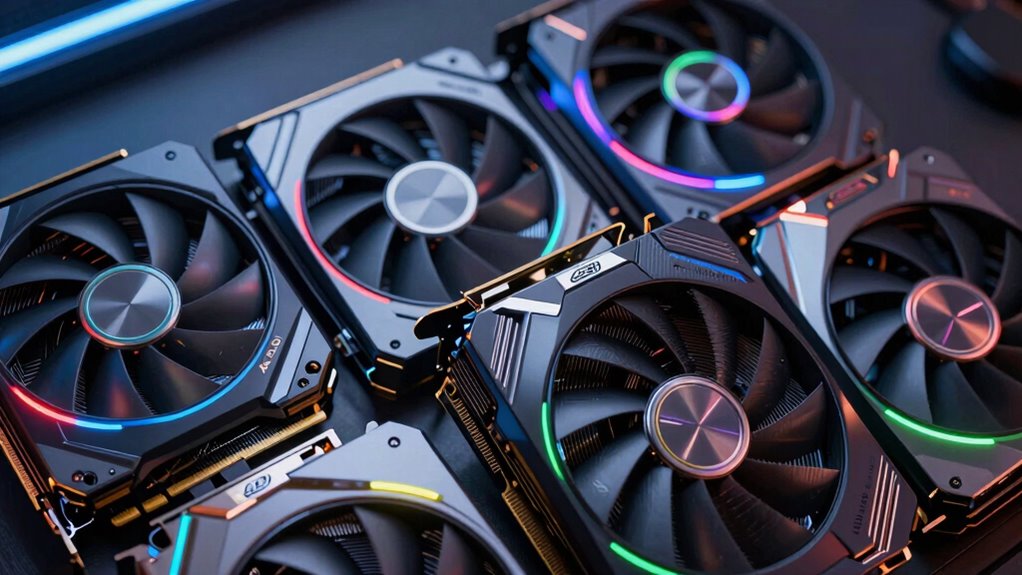

Choosing the right GPU for VR can make or break your virtual reality experience. The best options offer high frame rates, low latency, and reliable performance, but tradeoffs often involve price, power consumption, and future-proofing. The ASRock Radeon RX 9060 XT Challenger 16GB stands out as the overall best for its balance of power and affordability. For more demanding setups, the ZOTAC RTX 5080 Solid CORE OC offers cutting-edge performance, while the ASUS GeForce GTX 1060 6GB remains a solid choice for budget-conscious users. Continue reading to see a detailed breakdown of these options and what makes each suitable for different types of VR enthusiasts.

Get the latest gadgets delivered free with Prime
- Fast, free delivery on millions of items
- Prime Video, Amazon Music and more included
- Member-only deals all year
Key Takeaways
- High-end GPUs like the ZOTAC RTX 5080 provide the best performance but come with significantly higher costs.
- Mid-range options such as the ASRock RX 9060 XT balance performance and affordability effectively.
- VR-specific features like low latency and high VRAM are critical for a smooth experience, not just raw power.
- Power consumption and size can impact compatibility, especially in small or prebuilt systems.
- Future-proofing involves considering not just current VR demands but upcoming VR developments and game titles.
| ASRock Radeon RX 9060 XT Challenger 16GB OC Graphics Card |  | Best Overall for High-Performance VR and 1440p Gaming | GPU Architecture: RDNA 4 | Memory: 16GB GDDR6 | Memory Interface: 128-bit | VIEW ON AMAZON | See Our Full Breakdown |
| XFX Swift AMD Radeon RX 9060 XT OC Triple Fan Gaming Edition with 16GB GDDR6 |  | Best for High-Performance 1440p VR and Gaming | Chipset: AMD RX 9060 XT | Memory: 16GB GDDR6 | Cooling: Triple Fan | VIEW ON AMAZON | See Our Full Breakdown |
| ASUS GeForce GTX 1060 6GB Dual-Fan OC Edition VR Ready Graphics Card |  | Best for Budget-Friendly VR with Reliable Performance | Boost Clock: 1809 MHz | Memory: 6GB GDDR5 | Ports: Dual HDMI 2.0 | VIEW ON AMAZON | See Our Full Breakdown |
| Radeon RX 580 8GB Graphics Card, VR Ready |  | Best for Budget VR with Proven Performance | GPU Chip: Ellesmere | Video Memory: 8 GB GDDR5 | GPU Clock: 1284 MHz | VIEW ON AMAZON | See Our Full Breakdown |
| ZOTAC Gaming GeForce RTX 5080 Solid CORE OC DLSS 4 16GB GDDR7 |  | Best for High-End VR and 8K Gaming | Architecture: NVIDIA Blackwell | Memory: 16GB GDDR7 | Memory Interface: 256-bit | VIEW ON AMAZON | See Our Full Breakdown |
| ASUS Dual GeForce RTX 5060 Ti 16GB GDDR7 OC Edition Gaming Graphics Card |  | Best Overall for High-Performance VR Enthusiasts | Memory: 16GB GDDR7 | Architecture: NVIDIA Blackwell | Clock Speed: 2632 MHz (OC), 2602 MHz (Default) | VIEW ON AMAZON | See Our Full Breakdown |
| ASUS Dual GeForce RTX 3050 6GB GDDR6 OC Edition Gaming Graphics Card |  | Best Compact Choice for Entry-Level VR and Small Builds | GPU: GeForce RTX 3050 | Memory: 6GB GDDR6 | Boost Clock: 1500 MHz (OC), 1470 MHz (Default) | VIEW ON AMAZON | See Our Full Breakdown |
| gpu for vr | Memory | Boost Clock |
|---|---|---|
| ASRock Radeon RX 9060 XT Chall | 16GB GDDR6 | 3290 MHz |
| XFX Swift AMD Radeon RX 9060 X | 16GB GDDR6 | up to 3320 MHz |
| ASUS GeForce GTX 1060 6GB Dual | 6GB GDDR5 | 1809 MHz |
| Radeon RX 580 8GB Graphics Car | — | — |
| ZOTAC Gaming GeForce RTX 5080 | 16GB GDDR7 | — |
| ASUS Dual GeForce RTX 5060 Ti | 16GB GDDR7 | — |
| ASUS Dual GeForce RTX 3050 6GB | 6GB GDDR6 | 1500 MHz (OC), 1470 MHz (Default) |
More Details on Our Top Picks
ASRock Radeon RX 9060 XT Challenger 16GB OC Graphics Card
The ASRock Radeon RX 9060 XT Challenger stands out for its impressive boost clock of up to 3290 MHz, which translates into smooth, high-quality VR experiences at 1440p. Compared to the ZOTAC RTX 5080, it offers a more balanced combination of performance and quieter operation thanks to its dual-fan design. However, it’s less suited for 4K VR gaming, where the RTX 5080’s higher-end architecture might excel. Its 16GB GDDR6 memory provides ample headroom for demanding VR applications and creative work, making it versatile beyond gaming. The card’s support for DisplayPort 2.1a and HDMI 2.1b ensures broad compatibility with modern VR headsets and displays. Its primary tradeoff is size—measuring 249 mm—which requires a spacious case and a solid power supply of 550W. This makes it the best choice for enthusiasts seeking a high-clock, feature-rich GPU for VR at 1440p.
Pros:- High boost clock of up to 3290 MHz for excellent VR performance
- Large 16GB GDDR6 memory suitable for demanding applications
- Supports latest connectivity with DisplayPort 2.1a and HDMI 2.1b
- Quiet operation with dual fans and 0dB silent mode
Cons:- Requires a spacious case to accommodate its 249 mm length
- Needs a dedicated 8-pin power connector and 550W power supply
- Less ideal for 4K VR gaming compared to higher-tier cards
Best for: gamers and content creators targeting smooth 1440p VR experiences with a need for high memory capacity.
Not ideal for: users aiming for 4K VR gaming or with compact cases, due to its size and power demands.
- GPU Architecture:RDNA 4
- Memory:16GB GDDR6
- Memory Interface:128-bit
- Boost Clock:3290 MHz
- Display Outputs:DisplayPort 2.1a, HDMI 2.1b
- Power Connector:1 x 8-pin
Our verdict“This card is a strong pick for those wanting high-clock speeds and ample VR-ready memory at 1440p, but it’s less suited for 4K VR setups.”
XFX Swift AMD Radeon RX 9060 XT OC Triple Fan Gaming Edition with 16GB GDDR6
The XFX Swift AMD Radeon RX 9060 XT OC offers a triple-fan cooling solution that effectively manages the 16GB GDDR6 memory and high boost clock of up to 3320 MHz. Compared to the ASRock Challenger, it emphasizes thermal management, making it suitable for extended VR sessions. Its high clock speeds enhance VR fluidity, but the lack of detailed compatibility info may be a concern for some users. Power consumption could be higher due to its aggressive clock speeds, requiring a robust power supply. It’s an excellent choice for gamers who push hardware limits, especially at 1440p, but less ideal for those seeking a quieter, more energy-efficient build. The triple-fan design adds bulk and noise potential, which might not suit all setups. This makes it an ideal pick for high-end VR gaming where thermal performance is a priority.
Pros:- High boost clock of up to 3320 MHz for demanding VR and gaming
- Triple fan cooling for superior thermal management
- Large 16GB GDDR6 memory supports intensive VR applications
- Effective cooling extends hardware longevity
Cons:- High power consumption may require a stronger PSU
- Bulkier triple-fan design may not fit smaller cases
- Limited compatibility info could be a concern for some builders
Best for: gamers who demand aggressive performance and effective cooling for extended VR play at 1440p.
Not ideal for: users with small cases or those prioritizing energy efficiency, due to potential size and power draw.
- Chipset:AMD RX 9060 XT
- Memory:16GB GDDR6
- Cooling:Triple Fan
- Boost Clock:up to 3320 MHz
Our verdict“A top choice for gamers wanting maximum clock speeds and cooling capacity for high-end VR gaming on 1440p displays.”
ASUS GeForce GTX 1060 6GB Dual-Fan OC Edition VR Ready Graphics Card
The ASUS GTX 1060 6GB OC remains a practical option for entry-level VR, especially when compared with newer, more expensive cards like the RTX 5080. Its boost clock of 1809 MHz and 6GB GDDR5 memory provide decent VR performance for less demanding titles or casual VR users. Its dual-fan cooling ensures quieter operation, and the Auto-extreme technology boosts reliability, making it a dependable choice for those new to VR. However, it struggles to match the frame rates and fluidity of newer models, which could lead to less immersive experiences in demanding VR environments. It’s best suited for budget-conscious buyers or those with modest VR needs, but not for high-end or future-proof setups. The limited VR performance and older architecture are key tradeoffs. This makes it a solid starter VR card, but with clear limitations for demanding applications.
Pros:- Decent boost clock of 1809 MHz for smooth VR performance
- Quiet dual-fan cooling system
- Reliable build with Auto-extreme technology
- Affordable entry point for VR
Cons:- Limited VR performance compared to newer cards
- 6GB GDDR5 memory may be restrictive for future VR titles
- Older architecture may struggle with demanding applications
Best for: entry-level VR users or those on a tight budget wanting reliable performance for casual VR gaming.
Not ideal for: enthusiasts seeking high-fidelity VR or planning to run demanding AAA titles at high settings.
- Boost Clock:1809 MHz
- Memory:6GB GDDR5
- Ports:Dual HDMI 2.0
- Technology:Auto-extreme
- Components:Aerospace-grade super alloy power II
Our verdict“A good budget-friendly option for newcomers to VR, but not suitable for high-end or future-proof setups.”
Radeon RX 580 8GB Graphics Card, VR Ready
The Radeon RX 580 8GB offers reliable VR performance at an accessible price point, making it an attractive option for casual or budget-conscious VR users. Its 8GB GDDR5 memory and PCIe 3.0 support enable smooth gameplay and virtual experiences, comparable to older models like the GTX 1060 but with slightly higher VR readiness. While it excels in affordability and ease of installation, some users report unstable gameplay in certain scenarios, which can affect immersion. It’s best suited for users who want a straightforward VR experience without demanding high resolutions or ultra settings. The card’s VR capabilities are solid, but it’s not designed for intensive or future VR applications. Overall, it offers a dependable entry into VR, with the main tradeoff being older architecture and occasional stability issues. This makes it suitable for casual VR gaming and multimedia use in budget builds.
Pros:- VR-ready with smooth virtual reality support
- 8GB GDDR5 memory suitable for most VR titles
- Easy to install with PCIe 3.0 support
- Affordable and reliable for basic VR needs
Cons:- Some reports of unstable gameplay under certain conditions
- Older architecture limits performance in demanding VR scenarios
- Potential for frame drops in high-intensity applications
Best for: entry-level VR enthusiasts seeking dependable performance at a low cost.
Not ideal for: users aiming for demanding VR experiences or high-fidelity 4K VR content.
- GPU Chip:Ellesmere
- Video Memory:8 GB GDDR5
- GPU Clock:1284 MHz
- Output:HDMI, DisplayPort
- PCIe:3.0
- Flow Processors:2048
Our verdict“A dependable, budget-friendly choice for casual VR use, but not for demanding or future VR applications.”
ZOTAC Gaming GeForce RTX 5080 Solid CORE OC DLSS 4 16GB GDDR7
The ZOTAC RTX 5080 is a powerhouse, built around NVIDIA Blackwell architecture with DLSS 4, making it ideal for demanding VR and 8K gaming. Its 16GB GDDR7 memory, 256-bit interface, and 30 Gbps speed ensure ultra-smooth visuals and fast data throughput, surpassing the ASRock Challenger in raw performance. The advanced cooling system, including vapor chamber and active fan control, manages thermal output even under heavy loads, enabling extended, demanding VR sessions. Its multiple display outputs and 8K support cater to enthusiasts who want future-proof capabilities. However, this level of power comes with a high cost and large form factor, which might not fit smaller cases or budget-conscious builds. For those seeking the ultimate VR experience with high resolutions and immersive details, this card is unmatched. This is the best choice for gamers and creators demanding top-tier performance and longevity in VR setups.
Pros:- NVIDIA Blackwell architecture with DLSS 4 for superior VR performance
- 16GB GDDR7 memory with 30 Gbps speed for high-resolution VR
- Advanced cooling with vapor chamber and active fan control
- Supports 8K, multiple displays, and high-fidelity VR
Cons:- High power consumption requiring robust PSU
- Large size may not fit all cases
- Premium price point limits accessibility
Best for: enthusiasts and professionals needing maximum VR performance and future-proofing at 8K and beyond.
Not ideal for: users with small cases or those on a tight budget, due to size and high power requirements.
- Architecture:NVIDIA Blackwell
- Memory:16GB GDDR7
- Memory Interface:256-bit
- Memory Speed:30 Gbps
- Cooling:IceStorm 3.0
- Display Outputs:3x DisplayPort 2.1b, 1x HDMI 2.1b
Our verdict“The premier choice for VR enthusiasts seeking unmatched performance, high resolutions, and future-proofing in demanding VR scenarios.”
ASUS Dual GeForce RTX 5060 Ti 16GB GDDR7 OC Edition Gaming Graphics Card
This ASUS Dual RTX 5060 Ti OC edition stands out for its impressive AI capabilities, thanks to NVIDIA Blackwell architecture and DLSS 4, making it ideal for demanding VR experiences that rely on AI and ray-tracing. Its 16GB GDDR7 memory offers ample room for complex VR worlds, outperforming cards like the RTX 3050 in both AI tasks and future-proofing. The 2.5-slot design improves cooling, which is essential during extended VR sessions, while dual BIOS options allow customization between performance and quiet operation. However, this power comes with increased power consumption, and availability might be limited due to high demand. Compared to the RTX 3050, it provides better performance for VR but at a higher cost and energy use, making it best suited for serious VR gamers who prioritize cutting-edge tech and can handle the power demands.
Pros:- High AI performance with 767 TOPS, ideal for AI-enhanced VR
- Effective cooling thanks to axial-tech fan design and 2.5-slot form factor
- Quiet operation enabled by 0dB technology and dual BIOS options
- Ample 16GB GDDR7 memory future-proofs VR content
Cons:- Potentially high power consumption requiring robust power supply
- Limited information on current price and availability
Best for: VR gamers who want top-tier AI and ray-tracing performance without compromising on cooling and noise levels
Not ideal for: Budget-conscious users or those with limited power supply capacity, as this card consumes significant energy and may be costly
- Memory:16GB GDDR7
- Architecture:NVIDIA Blackwell
- Clock Speed:2632 MHz (OC), 2602 MHz (Default)
- Design:2.5-slot
- Cooling:Axial-tech fan with barrier ring
- Fan Technology:Dual ball bearings
Our verdict“This card is perfect for VR enthusiasts seeking maximum AI and ray-tracing performance, provided they can accommodate its power needs.”
ASUS Dual GeForce RTX 3050 6GB GDDR6 OC Edition Gaming Graphics Card
The ASUS Dual RTX 3050 OC Edition makes a compelling case for users new to VR or with compact PC cases, thanks to its small 2-slot design that fits easily into limited spaces. Its NVIDIA Ampere architecture provides improved ray-tracing and AI capabilities over older cards, making it suitable for casual VR gaming and light creative tasks. The 6GB VRAM, while sufficient for many current VR titles, may fall short for more demanding or future titles, especially when compared with the 16GB of the RTX 5060 Ti. The durable stainless steel bracket and IP5X dust resistance enhance longevity, which is a plus for long-term VR setups. However, the OC mode boosts power consumption and may generate more heat, which could require better airflow in small cases. This card suits users starting out with VR or those limited by space and budget, but it might struggle with the most demanding VR applications.
Pros:- Enhanced ray-tracing and AI performance with Ampere architecture
- Compact 2-slot design fits small cases easily
- Durable stainless steel bracket and dust resistance
- Good performance for entry-level VR and casual gaming
Cons:- Limited to 6GB VRAM, which may hinder high-end VR applications
- OC mode increases power consumption and heat output
- Lacks detailed info on HDMI or DisplayPort options
Best for: VR beginners or users with small cases seeking a balance of performance and form factor
Not ideal for: Power users or those running high-end VR applications needing maximum GPU VRAM and future-proofing, as 6GB may limit longevity
- GPU:GeForce RTX 3050
- Memory:6GB GDDR6
- Boost Clock:1500 MHz (OC), 1470 MHz (Default)
- Fan Design:Axial-tech
- Design:2-slot
- Dust Resistance:IP5X
Our verdict“This card offers a practical balance for VR newcomers or small build owners, with enough power for casual VR but limited headroom for future growth.”

How We Picked
These GPUs were selected based on their ability to deliver consistent, high-quality VR performance, focusing on frame rates, latency, and VR-specific features. We evaluated each card’s hardware specifications, user reviews, and compatibility with popular VR headsets. Price-to-performance ratios and potential for future upgrades also played a key role. The ranking reflects a balance of raw power, value, and suitability for different user needs, from entry-level VR to high-end gaming setups.Factors to Consider When Choosing Gpu For Vr
When choosing a GPU for VR, several key factors determine how well it will perform and whether it fits your setup and budget. Understanding these elements ensures you avoid common pitfalls like overpaying for unnecessary power or purchasing a card that can’t handle your VR headset’s requirements. A thoughtful selection will lead to a smoother, more immersive experience with fewer technical issues.Performance and VR Requirements
VR gaming demands high frame rates and low latency, so prioritize GPUs with at least 8GB of VRAM and robust processing power. Look for models that support technologies like DLSS or FSR, which help boost frame rates without sacrificing visual quality. Avoid underpowered cards that can cause stuttering or motion sickness, and consider future game requirements to avoid early obsolescence.
Compatibility and Connectivity
Check your VR headset’s input options—most modern headsets require HDMI or DisplayPort connections. Your GPU should have the corresponding outputs, and consider the physical size of the card to fit your case. Power supply capacity and connector types are also crucial; a high-performance GPU might need a robust power supply to function reliably.
Price and Value
Price ranges vary widely, so define your budget upfront. Mid-range options often deliver excellent VR performance at a lower cost, but if you want to future-proof or plan to upgrade, investing in higher-end models could be worthwhile. Beware of overpaying for features you won’t use, but also avoid sacrificing performance for a lower upfront cost if VR is your primary focus.
Power Consumption and Size
High-performance GPUs consume more power and generate more heat, which may require better cooling solutions and a capable power supply. For small or prebuilt systems, size and cooling compatibility are critical to prevent bottlenecks or overheating. Always verify your case’s dimensions and airflow options before choosing a high-end model.
Future-Proofing and Longevity
Consider how well the GPU will handle upcoming VR titles and features. Technologies like ray tracing and higher VRAM capacities will become more common, so selecting a slightly more powerful card than current needs can extend its lifespan. Keep an eye on driver support and upcoming VR developments to avoid premature obsolescence.
Frequently Asked Questions
Is it better to buy a higher-end GPU for VR now or wait for future releases?
Opting for a higher-end GPU now can provide a more seamless VR experience and better performance with current titles. However, waiting for future releases might mean access to more advanced features and longer relevance, but it could also result in missing out on current VR experiences. If you prioritize stability and immediate performance, investing in a proven high-end model makes sense; if you want cutting-edge tech, waiting could be beneficial.
Can I use a mid-range GPU for VR without sacrificing much performance?
Yes, many mid-range GPUs, like the AMD RX 580 or GTX 1060, can handle VR quite well for most titles, especially if you’re willing to lower some graphical settings. These cards are often more affordable and consume less power, making them suitable for budget-conscious users or those with smaller systems. However, they may struggle with the most demanding VR games or future titles that require more VRAM and processing power.
How important is VRAM for VR performance?
VRAM plays a critical role in VR performance, especially for high-resolution headsets or graphically intensive games. At least 8GB of VRAM is recommended for smooth operation, as insufficient VRAM can cause stuttering and lower image quality. For future-proofing, opting for a GPU with 10GB or more can help accommodate upcoming VR technologies and larger textures.
Are all modern graphics cards compatible with VR headsets?
Most modern GPUs support VR headsets, but compatibility depends on having the right outputs (HDMI or DisplayPort) and sufficient performance. Always verify your headset’s input requirements and your GPU’s available ports before purchasing. Additionally, ensure your PC meets the minimum hardware and driver requirements to run VR smoothly.
Should I prioritize raw power or features like DLSS for VR?
While raw power ensures higher frame rates and lower latency, features like DLSS can significantly improve performance without upgrading hardware. For VR, a balance is key: a GPU with enough processing power and support for these technologies will deliver a more immersive and responsive experience. Focus on a GPU that meets current VR demands while offering room for future enhancements.
Conclusion
For those seeking the best overall experience, the ASRock Radeon RX 9060 XT Challenger 16GB provides a strong mix of power and value. Budget-conscious buyers or newcomers will find the ASUS GeForce GTX 1060 6GB a reliable choice, while enthusiasts aiming for cutting-edge performance should consider the ZOTAC RTX 5080 Solid CORE OC. If you’re upgrading a prebuilt or have space constraints, pay attention to size and power requirements. Overall, your choice depends on your VR ambitions, budget, and future plans—matching the right GPU to your needs ensures a smoother, more enjoyable VR experience in 2026.