
A good gaming router for VR can help reduce wireless congestion and keep a headset connection steadier, but a costly router cannot fix weak coverage or a crowded airspace on its own. My best overall pick is the ASUS ROG Rapture GT-BE98 Pro, thanks to its quad-band Wi-Fi 7 design and gaming-focused controls. The TP-Link Archer GE800 is a strong alternative for buyers seeking a powerful Wi-Fi 7 gaming model, while the GL.iNet Flint 2 offers a more restrained Wi-Fi 6 option with dual 2.5G ports. The main tradeoffs are wireless capacity, coverage, setup complexity, and how much headset performance depends on your home layout. Read on for the full breakdown and a guide to matching router features to your VR setup.

Get the latest gadgets delivered free with Prime
- Fast, free delivery on millions of items
- Prime Video, Amazon Music and more included
- Member-only deals all year
Complete the kit



Key Takeaways
- The ASUS ROG Rapture GT-BE98 Pro leads this lineup for buyers prioritizing band capacity and gaming controls, but its high-end feature set is more than many single-headset setups need.
- Wi-Fi 7 is not the only sensible VR choice: the GL.iNet Flint 2 and TP-Link Archer AXE75 offer Wi-Fi 6-class or 6E alternatives for buyers focused on a dedicated wireless path rather than the newest standard.
- Tri-band and quad-band designs offer more ways to manage busy networks, while dual-band routers such as the NETGEAR RS90 and TP-Link BE230 keep things simpler but leave fewer bands to share.
- Router placement and wired PC connections remain central; buying a faster router will not resolve a headset struggling through walls or interference.
- The lineup spans very different levels of complexity: gaming-focused ASUS models offer extensive controls, while more straightforward TP-Link and NETGEAR options may suit buyers who want a simpler home-network upgrade.
| ASUS ROG Rapture GT-BE98 Pro Quad-Band WiFi 7 Gaming Router |  | Best for High-End VR Setups | Wi-Fi standard: WiFi 7 (802.11be) | Frequency bands: Quad-band, including dual 6 GHz bands | Maximum data transfer rate: Up to 30 Gbps | VIEW ON AMAZON | See Our Full Breakdown |
| TP-Link Archer GXE75 Tri-Band Wi-Fi 6E Gaming Router | 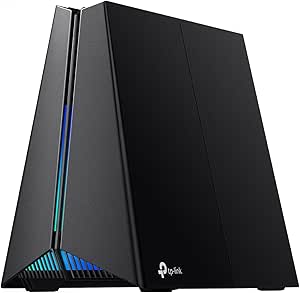 | Best for WiFi 6E VR Value | Wi-Fi standard: Wi-Fi 6E | Bands: Tri-band: 2.4 GHz, 5 GHz, and 6 GHz | Maximum Wi-Fi speed: Up to 5.4 Gbps | VIEW ON AMAZON | See Our Full Breakdown |
| NETGEAR Nighthawk RS90 Dual-Band WiFi 7 Router |  | Best Simple WiFi 7 Upgrade | WiFi generation: WiFi 7 | Frequency bands: Dual-band: 2.4 GHz and 5 GHz | Maximum data rate: Up to 3.6 Gbps | VIEW ON AMAZON | See Our Full Breakdown |
| MSI RadiX AXE6600 Tri-Band WiFi 6E Gaming Router |  | Best for Traffic Prioritization | Wi-Fi generation: WiFi 6 (802.11ax) | Frequency bands: 2.4 GHz, 5 GHz, and 6 GHz | Data transfer rate: Up to 6.6 Gbps | VIEW ON AMAZON | See Our Full Breakdown |
| TP-Link Archer GE800 BE19000 Tri-Band Wi-Fi 7 Gaming Router |  | Best Premium Tri-Band WiFi 7 Pick | Wi-Fi standard: Wi-Fi 7 | Bands: Tri-band | Advertised band speeds: 6 GHz: up to 11,528 Mbps; 5 GHz: up to 5,764 Mbps; 2.4 GHz: up to 1,376 Mbps | VIEW ON AMAZON | See Our Full Breakdown |
| GL.iNet GL-MT6000 Flint 2 Wi‑Fi 6 Gaming Router with Dual 2.5G Ports |  | Best for VPN and Network Control | Wi‑Fi standard: Wi‑Fi 6 (802.11ax) | Wireless speed: Up to 6 Gbps | Frequency bands: Dual-band, 2.4 GHz and 5 GHz | VIEW ON AMAZON | See Our Full Breakdown |
| TP-Link Archer BE230 Dual-Band Wi-Fi 7 Router |  | Best Beginner Wi‑Fi 7 Pick | Wi‑Fi standard: Wi‑Fi 7 (802.11be) | Frequency bands: Dual-band, 2.4 GHz and 5 GHz | Maximum data rate: Up to 3.6 Gbps | VIEW ON AMAZON | See Our Full Breakdown |
| ASUS RT-AX1800S Dual-Band Wi-Fi 6 Router |  | Best Basic Wired VR Setup | Wi‑Fi standard: Wi‑Fi 6 (802.11ax) | Wireless bands: Dual-band | Maximum data rate: Up to 1800 Mbps | VIEW ON AMAZON | See Our Full Breakdown |
| GL.iNet Flint 3 Tri-Band Wi-Fi 7 Router |  | Best for High-Capacity Wi‑Fi 7 VR | Wi‑Fi standard: Wi‑Fi 7 (802.11be) | Frequency bands: Tri-band, including 6 GHz | Maximum wireless speed: Up to 9 Gbps | VIEW ON AMAZON | See Our Full Breakdown |
| TP-Link Archer AXE75 AXE5400 Tri-Band WiFi 6E Router |  | Best Dedicated 6 GHz Value | Wi‑Fi generation: Wi‑Fi 6E | Frequency bands: Tri-band, 6 GHz, 5 GHz, and 2.4 GHz | Maximum data rate: Up to 5400 Mbps | VIEW ON AMAZON | See Our Full Breakdown |
| ASUS ROG Rapture GT-AC5300 WiFi Gaming Router |  | Best for Wired VR Setups | Wireless standard: 802.11ac (Wi-Fi 5) | Bands: Tri-band: 2.4 GHz and dual 5 GHz | Maximum data rate: 5334 Mbps | VIEW ON AMAZON | See Our Full Breakdown |
| NETGEAR Nighthawk RS140 Dual-Band WiFi 7 Router |  | Best Simple Wi-Fi 7 Upgrade | Wi-Fi generation: Wi-Fi 7 | Frequency bands: Dual-band: 2.4 GHz and 5 GHz | Maximum data rate: Up to 5 Gbps | VIEW ON AMAZON | See Our Full Breakdown |
| TP-Link Archer BE550 Tri-Band WiFi 7 Router (BE9300) |  | Best Tri-Band Wi-Fi 7 Pick | Wi-Fi standard: Wi-Fi 7 (802.11be) | Bands: Tri-band: 2.4 GHz, 5 GHz, and 6 GHz | Maximum combined speed: Up to 9.3 Gbps | VIEW ON AMAZON | See Our Full Breakdown |
| ASUS ROG Rapture GT-AX11000 Pro Tri-Band WiFi 6 Gaming Router |  | Best for High-Traffic Gaming Homes | Wi-Fi generation: Wi-Fi 6 | Frequency bands: Tri-band | Maximum data rate: Up to 11,000 Mbps | VIEW ON AMAZON | See Our Full Breakdown |
| GL.iNet Flint 3e Wi-Fi 7 Router with VPN |  | Best for VPN-Focused VR Households | Wi-Fi standard: Wi-Fi 7 (802.11be) | Frequency bands: Dual-band | Maximum Wi-Fi speed: Up to 6.5 Gbps | VIEW ON AMAZON | See Our Full Breakdown |
| gaming router for vr | Frequency bands | Ethernet ports |
|---|---|---|
| ASUS ROG Rapture GT-BE98 Pro Q | Quad-band, including dual 6 GHz bands | 2 × 10 Gbps and 4 × 2.5 Gbps |
| TP-Link Archer GXE75 Tri-Band | — | — |
| NETGEAR Nighthawk RS90 Dual-Ba | Dual-band: 2.4 GHz and 5 GHz | — |
| MSI RadiX AXE6600 Tri-Band WiF | 2.4 GHz, 5 GHz, and 6 GHz | — |
| TP-Link Archer GE800 BE19000 T | — | 2 × 10 Gbps and 4 × 2.5 Gbps |
| GL.iNet GL-MT6000 Flint 2 Wi‑F | Dual-band, 2.4 GHz and 5 GHz | 2 × 2.5GbE, 4 × 1GbE |
| TP-Link Archer BE230 Dual-Band | Dual-band, 2.4 GHz and 5 GHz | 1 × 2.5 Gbps WAN/LAN, 1 × 2.5 Gbps LAN, 3 × 1 Gbps LAN |
| ASUS RT-AX1800S Dual-Band Wi-F | — | 1 Gigabit WAN and 4 Gigabit LAN |
| GL.iNet Flint 3 Tri-Band Wi-Fi | Tri-band, including 6 GHz | 5 × 2.5G |
| TP-Link Archer AXE75 AXE5400 T | Tri-band, 6 GHz, 5 GHz, and 2.4 GHz | — |
| ASUS ROG Rapture GT-AC5300 WiF | — | 8 Gigabit LAN |
| NETGEAR Nighthawk RS140 Dual-B | Dual-band: 2.4 GHz and 5 GHz | — |
| TP-Link Archer BE550 Tri-Band | — | 1 x 2.5G WAN and 4 x 2.5G LAN |
| ASUS ROG Rapture GT-AX11000 Pr | Tri-band | — |
| GL.iNet Flint 3e Wi-Fi 7 Route | Dual-band | — |
More Details on Our Top Picks
ASUS ROG Rapture GT-BE98 Pro Quad-Band WiFi 7 Gaming Router
I rank the GT-BE98 Pro first for buyers building a high-capacity VR network around newer WiFi 7 devices. Its quad-band design with two 6 GHz bands and Multi-Link Operation gives compatible gear more room to share wireless traffic, while gaming acceleration can prioritize play over background activity. The two 10 Gbps and four 2.5 Gbps ports also leave room for wired PCs, storage, or fast internet service—an advantage over the dual-band NETGEAR Nighthawk RS90.
The tradeoff is scale: this router’s headline capacity may be excessive for a single headset and a modest connection, and wireless performance still depends on distance, interference, and the client device. I’d choose it over the TP-Link Archer GE800 when ASUS mesh support and its additional 6 GHz band matter more than a simpler tri-band setup; skip it if you want a compact, basic router.
Pros:- Quad-band WiFi 7 includes two 6 GHz bands and Multi-Link Operation
- Two 10 Gbps and four 2.5 Gbps ports support fast wired connections
- Gaming traffic acceleration and mesh support suit busy gaming networks
- Eight external antennas are designed to improve signal coverage
Cons:- Its extensive wireless and port capacity may go unused in a simple VR setup
- Actual coverage and throughput vary with placement, obstacles, and client compatibility
Best for: VR households with WiFi 7-compatible devices, several active users, and multiple wired gaming or networking devices
Not ideal for: Single-headset users with a small home and no need for multi-gigabit wired connections or extensive network capacity
- Wi-Fi standard:WiFi 7 (802.11be)
- Frequency bands:Quad-band, including dual 6 GHz bands
- Maximum data transfer rate:Up to 30 Gbps
- Ethernet ports:2 × 10 Gbps and 4 × 2.5 Gbps
- Antennas:8 fixed external antennas
- RAM:2 GB
- Features:Multi-Link Operation, game acceleration, mesh support, VPN support, parental controls
- Security protocols:WPA2-Enterprise, WPA3-Personal, WPS
Our verdict“Choose the GT-BE98 Pro if your VR setup needs WiFi 7 capacity, multiple 6 GHz paths, and plentiful multi-gigabit ports.”
TP-Link Archer GXE75 Tri-Band Wi-Fi 6E Gaming Router
The Archer GXE75 is my pick for a VR player who wants a dedicated 6 GHz band without stepping up to WiFi 7 hardware. A compatible headset can use that band while other devices remain on 2.4 or 5 GHz, which may help reduce local wireless competition. Its gaming acceleration, quad-core CPU, and 2.5 Gbps WAN/LAN port make it more gaming-focused than a basic router such as the NETGEAR Nighthawk RS90.
Its limit is that 6 GHz benefits require compatible devices and a suitable layout; the band’s reach can be reduced by walls and distance. The MSI RadiX AXE6600 offers higher advertised aggregate throughput, but the GXE75 provides EasyMesh expansion and app-based management for a more approachable setup. I’d skip it if your VR equipment cannot use 6 GHz or if you specifically want WiFi 7 features.
Pros:- Tri-band Wi-Fi 6E provides a dedicated 6 GHz option for compatible VR devices
- Gaming acceleration can prioritize play traffic on a shared network
- 2.5 Gbps WAN/LAN port supports a faster internet or local connection
- EasyMesh support and app-based management allow straightforward expansion and control
Cons:- The 6 GHz band’s usefulness depends on device compatibility and router placement
- Only one 2.5 Gbps port is provided, with the remaining listed Ethernet ports at 1 Gbps
Best for: VR players with a WiFi 6E headset or PC who want a separate 6 GHz band, gaming controls, and app management
Not ideal for: Buyers whose VR devices lack 6 GHz support, or users seeking WiFi 7 and extensive multi-gigabit LAN ports
- Wi-Fi standard:Wi-Fi 6E
- Bands:Tri-band: 2.4 GHz, 5 GHz, and 6 GHz
- Maximum Wi-Fi speed:Up to 5.4 Gbps
- Band rates:6 GHz: 2402 Mbps; 5 GHz: 2402 Mbps; 2.4 GHz: 574 Mbps
- Processor:Quad-core CPU
- Ports:1 USB; 1 2.5 Gbps WAN/LAN; 1 1 Gbps WAN/LAN; 3 1 Gbps LAN
- Maximum connected devices:Up to 100
- Mesh support:EasyMesh
- Security:WPA3, DoS protection, SPI firewall, IP/MAC address filters
Our verdict“Pick the Archer GXE75 if your VR gear supports 6 GHz and you want gaming-focused Wi-Fi 6E without moving to WiFi 7.”
NETGEAR Nighthawk RS90 Dual-Band WiFi 7 Router
The Nighthawk RS90 makes the most sense for VR buyers who want a straightforward move to WiFi 7 without a large gaming-router feature set. It supports up to 3.6 Gbps, covers a stated area of up to 2,000 square feet, and has a 2.5 Gig WAN port for a faster incoming connection. Compared with the TP-Link Archer GXE75, it trades the dedicated 6 GHz band and gaming-specific acceleration for a simpler dual-band WiFi 7 setup.
That tradeoff matters for wireless VR: this router has no 6 GHz band, so it cannot offer that separate frequency option to compatible headsets. Its four 1 Gig LAN ports are also less flexible for multi-gigabit wired gear than the ASUS GT-BE98 Pro. I’d shortlist it for a modest device count, but remember it needs a separate modem or gateway, and the stated coverage can shrink around walls and interference.
Pros:- WiFi 7 support provides a newer wireless standard than Wi-Fi 6E models in this group
- 2.5 Gig WAN port supports a faster connection from a compatible modem or gateway
- Four Ethernet LAN ports allow wired connections for a PC or console
- Built-in security features and automatic firmware updates simplify routine upkeep
Cons:- Dual-band design has no 6 GHz band for compatible VR devices
- Requires a separate modem or gateway with an RJ45 Ethernet port
- NETGEAR Armor requires a paid subscription after its 30-day trial
Best for: VR users replacing an older router who want WiFi 7, app management, and a modest footprint of wired devices
Not ideal for: Wireless VR buyers seeking a 6 GHz band, gaming-specific traffic controls, or multiple multi-gigabit LAN ports
- WiFi generation:WiFi 7
- Frequency bands:Dual-band: 2.4 GHz and 5 GHz
- Maximum data rate:Up to 3.6 Gbps
- Coverage:Up to 2,000 sq. ft.
- Device capacity:Up to 50 devices
- WAN port:One 2.5 Gig Ethernet port
- LAN ports:Four 1 Gig Ethernet ports
- Processor:Quad-core 2.0 GHz
- Internet service requirement:Separate modem or gateway with an RJ45 Ethernet port
Our verdict“Choose the RS90 for a basic WiFi 7 refresh, but pick a tri-band model if your VR plan depends on 6 GHz.”
MSI RadiX AXE6600 Tri-Band WiFi 6E Gaming Router
The MSI RadiX AXE6600 suits VR homes where headset traffic competes with streaming, work calls, and other gaming. Its AI QoS is designed to prioritize network activity, while tri-band WiFi 6E gives compatible equipment access to 6 GHz. That makes it a more targeted gaming choice than the dual-band NETGEAR Nighthawk RS90, though the RS90 offers WiFi 7 for buyers who prefer the newer standard over a 6 GHz band.
The AXE6600’s advertised 6.6 Gbps and eight-stream design provide room for multiple active connections, but those figures do not guarantee smoother VR: client support, placement, and interference still shape results. It also has just one listed 2.5 Gbps LAN port, so the ASUS GT-BE98 Pro is a better fit for a setup with several fast wired devices. Its large 16.3-inch width may make placement awkward, and RGB lighting adds little to network performance.
Pros:- Tri-band WiFi 6E includes 6 GHz for compatible VR devices
- AI QoS is designed to prioritize gaming alongside streaming and work traffic
- Eight-stream design and up to 6.6 Gbps advertised data transfer support busy networks
- WPA3-PSK security support
Cons:- Its 16.3-inch width can limit placement options
- Only one 2.5 Gbps LAN port is listed, unlike the ASUS GT-BE98 Pro’s multi-gigabit port array
- RGB lighting does not improve VR network performance
Best for: VR households with compatible 6 GHz devices and competing gaming, streaming, or work traffic that could benefit from QoS controls
Not ideal for: Buyers who need a compact router, multiple multi-gigabit Ethernet ports, or WiFi 7
- Wi-Fi generation:WiFi 6 (802.11ax)
- Frequency bands:2.4 GHz, 5 GHz, and 6 GHz
- Data transfer rate:Up to 6.6 Gbps
- Streams:Eight-stream connection
- Processor:1.8 GHz quad-core
- RAM:512 MB
- Antennas:6 fixed
- LAN port bandwidth:2500 Mbps
- Dimensions:16.3 × 12.5 × 5.4 in
Our verdict“Choose the RadiX AXE6600 if traffic prioritization and WiFi 6E matter more than WiFi 7 or compact placement.”
TP-Link Archer GE800 BE19000 Tri-Band Wi-Fi 7 Gaming Router
The Archer GE800 is a premium fit for VR players who want tri-band WiFi 7 and a strong wired backbone without moving to the ASUS GT-BE98 Pro’s quad-band design. Its eight antennas, 2 GB of RAM, and two 10 Gbps plus four 2.5 Gbps ports give a busy gaming setup plenty of connection options. App and web management add flexibility, while gaming performance monitoring helps keep network activity visible.
For VR, the 6 GHz band can be useful with compatible gear, but distance, walls, and client hardware still affect real wireless results. Compared with the TP-Link Archer GXE75, the GE800 adds WiFi 7 and far more multi-gigabit ports, but it is a bigger step for buyers who only need a basic headset connection. Mesh expansion uses EasyMesh; it does not work with TP-Link Deco mesh systems, a limitation for households already invested in Deco.
Pros:- Tri-band WiFi 7 provides advertised rates up to 11,528 Mbps on 6 GHz
- Two 10 Gbps and four 2.5 Gbps Ethernet ports support several fast wired devices
- Eight antennas and 2 GB of RAM suit a feature-rich gaming network
- Tether app and web management include gaming performance monitoring
Cons:- Not compatible with TP-Link Deco mesh systems
- Real wireless performance varies with distance, obstacles, and device capability
- Its extensive speed and port capacity may be unnecessary for a single-headset setup
Best for: VR gaming households with WiFi 7-compatible devices, multi-gigabit wired equipment, and a plan to expand through EasyMesh
Not ideal for: Deco mesh owners, small setups that need few ports, or VR users whose devices cannot use WiFi 7 or 6 GHz
- Wi-Fi standard:Wi-Fi 7
- Bands:Tri-band
- Advertised band speeds:6 GHz: up to 11,528 Mbps; 5 GHz: up to 5,764 Mbps; 2.4 GHz: up to 1,376 Mbps
- Antennas:8
- Ethernet ports:2 × 10 Gbps and 4 × 2.5 Gbps
- Processor:Quad-core
- Memory:2 GB RAM
- Mesh compatibility:EasyMesh routers and range extenders; not compatible with Deco mesh systems
- Management:TP-Link Tether app for Android and iOS, or web interface
Our verdict“Pick the GE800 if you want a tri-band WiFi 7 gaming router with extensive multi-gigabit ports and EasyMesh expansion.”
GL.iNet GL-MT6000 Flint 2 Wi‑Fi 6 Gaming Router with Dual 2.5G Ports
I’d pick the Flint 2 for a VR household that values wired backhaul, VPN flexibility, and detailed network control more than having the newest Wi‑Fi generation. Its two 2.5GbE ports give a PC, access point, or fast NAS room to connect beyond ordinary Gigabit speeds, while its Wi‑Fi 6 and stated capacity of over 100 devices suit busy homes. Compared with the GL.iNet Flint 3, it lacks Wi‑Fi 7 and a 6 GHz band, but its listed VPN throughput is higher and it still offers OpenWrt/Linux customization, AdGuard Home, and QoS. That flexibility comes with a learning curve: setup and firmware updates may take more attention than the Archer BE230’s app-led approach. I’d choose it for an involved home network, not a plug-and-forget setup.
Pros:- Two 2.5GbE ports support fast wired connections for a PC or network equipment.
- Listed WireGuard and OpenVPN throughput reaches up to 900 Mbps and 880 Mbps, respectively.
- OpenWrt/Linux, QoS, and AdGuard Home offer substantial network-control options.
- Designed to support more than 100 connected devices.
Cons:- Dual-band Wi‑Fi 6 lacks the 6 GHz band and newer Wi‑Fi 7 features offered by the Flint 3.
- The Linux-based interface may be harder to manage than the TP-Link Archer BE230’s app-oriented setup.
- A firmware update is recommended to unlock full performance, and real-world speeds depend on network conditions.
Best for: VR PC owners who want 2.5GbE wired connections, strong listed VPN throughput, and hands-on OpenWrt network controls.
Not ideal for: Buyers who want Wi‑Fi 7, a 6 GHz band, or the simplest app-only setup; the Flint 2 is Wi‑Fi 6 and its Linux-based controls can intimidate beginners.
- Wi‑Fi standard:Wi‑Fi 6 (802.11ax)
- Wireless speed:Up to 6 Gbps
- Frequency bands:Dual-band, 2.4 GHz and 5 GHz
- Ethernet ports:2 × 2.5GbE, 4 × 1GbE
- VPN throughput:WireGuard up to 900 Mbps; OpenVPN up to 880 Mbps
- Memory and storage:1 GB DDR4 RAM; 8 GB eMMC
- Software and features:OpenWrt/Linux, QoS, AdGuard Home, access point mode, guest mode
- Device capacity:Supports more than 100 devices
Our verdict“Choose the Flint 2 if wired speed and configurable VPN and network tools matter more to your VR setup than Wi‑Fi 7.”
TP-Link Archer BE230 Dual-Band Wi-Fi 7 Router
The Archer BE230 is my straightforward entry point for VR buyers who want Wi‑Fi 7 without a complex router interface. Its Tether app, voice-control support, and two 2.5 Gbps ports make setup and wired connections approachable, while EasyMesh gives owners a way to extend coverage later. The listed 3.6 Gbps combined rate is below the tri-band GL.iNet Flint 3 and Archer AXE75, and this router has no 6 GHz band. That matters if a VR headset and other devices compete for wireless airtime: Wi‑Fi 7 features such as Multi-Link Operation are present, but this remains a dual-band design. I’d favor it over the Flint 2 for simpler app-led management, but not for advanced VPN controls or heavy network customization.
Pros:- Wi‑Fi 7 supports Multi-Link Operation, Multi-RU, and 4K-QAM.
- Two 2.5 Gbps ports allow faster wired links than the ASUS RT-AX1800S’s Gigabit ports.
- Tether app, voice control, and EasyMesh support offer accessible management and expansion.
- Includes parental controls and network security features.
Cons:- No 6 GHz band, unlike the tri-band TP-Link Archer AXE75 and GL.iNet Flint 3.
- Its stated maximum rate of 3.6 Gbps is lower than the Flint 3’s listed 9 Gbps.
- A separate modem is required for internet service.
Best for: VR owners moving to Wi‑Fi 7 who want app-based setup, two 2.5 Gbps ports, and the option to build an EasyMesh network.
Not ideal for: Homes seeking a dedicated 6 GHz band or extensive VPN and OpenWrt controls; the BE230 is dual-band and needs a separate modem.
- Wi‑Fi standard:Wi‑Fi 7 (802.11be)
- Frequency bands:Dual-band, 2.4 GHz and 5 GHz
- Maximum data rate:Up to 3.6 Gbps
- 5 GHz and 2.4 GHz rates:Up to 2882 Mbps on 5 GHz; up to 688 Mbps on 2.4 GHz
- Ethernet ports:1 × 2.5 Gbps WAN/LAN, 1 × 2.5 Gbps LAN, 3 × 1 Gbps LAN
- Coverage and device capacity:Up to 2,000 sq. ft.; up to 60 devices
- Mesh and management:EasyMesh; TP-Link Tether app; Alexa and Google Assistant voice control
- Modem:Separate modem required
Our verdict“Pick the Archer BE230 if you want an approachable Wi‑Fi 7 router for a modest VR setup and can live without 6 GHz.”
ASUS RT-AX1800S Dual-Band Wi-Fi 6 Router
For a VR setup where the gaming PC can connect by Ethernet, the ASUS RT-AX1800S is a basic Wi‑Fi 6 option with useful household networking tools. Its four Gigabit LAN ports can serve wired devices, while MU-MIMO and OFDMA help manage traffic from multiple connected devices. This is a different proposition from the Wi‑Fi 7 Archer BE230: the ASUS offers neither 2.5GbE nor Wi‑Fi 7, but it includes four external antennas, AiProtection Classic, and AiMesh compatibility. Its 1.8 Gbps listed maximum rate makes it a modest choice for headset wireless traffic, so I’d put a wired PC and keep expectations measured about wireless headroom. It suits buyers seeking familiar ASUS features more than those building a high-throughput or 6 GHz VR network.
Pros:- Wi‑Fi 6 MU-MIMO and OFDMA support efficient service for multiple devices.
- Four Gigabit LAN ports provide wired connections for a PC and other equipment.
- AiProtection Classic and Instant Guard VPN access add network security options.
- Four external antennas and AiMesh compatibility support a flexible home setup.
Cons:- No 2.5GbE ports, unlike the TP-Link Archer BE230 and GL.iNet Flint 2.
- Dual-band Wi‑Fi 6 lacks the 6 GHz option available on the Archer AXE75.
- The 1.8 Gbps maximum data rate offers less listed wireless headroom than other routers here.
Best for: Budget-conscious VR PC owners who can wire the PC to the router and want Wi‑Fi 6, security features, and a possible AiMesh upgrade path.
Not ideal for: Wireless VR users seeking 6 GHz, Wi‑Fi 7, or 2.5GbE connections; its listed maximum rate is 1.8 Gbps and all Ethernet ports are Gigabit.
- Wi‑Fi standard:Wi‑Fi 6 (802.11ax)
- Wireless bands:Dual-band
- Maximum data rate:Up to 1800 Mbps
- Ethernet ports:1 Gigabit WAN and 4 Gigabit LAN
- Antennas:4 external antennas
- Processor and memory:Dual-core processor; 256 MB RAM
- Security:AiProtection Classic, WPA-Enterprise, WPA2-Enterprise
- Mesh compatibility:ASUS AiMesh
Our verdict“Choose the RT-AX1800S for a simple, mostly wired VR setup if you do not need newer Wi‑Fi or faster-than-Gigabit ports.”
GL.iNet Flint 3 Tri-Band Wi-Fi 7 Router
The Flint 3 is the strongest fit in this batch for a VR household that wants Wi‑Fi 7, a 6 GHz band, and several fast wired connections. Its five 2.5G ports stand out against the Archer BE230’s two, while tri-band operation gives compatible devices another band option. GL.iNet lists coverage up to 2,000 square feet and support for over 100 devices, which suits a busy home better than the ASUS RT-AX1800S’s more modest dual-band specification. It also brings MLO, AdGuard Home, parental controls, and VPN support. The tradeoffs are real: listed VPN speeds reach up to 680 Mbps, below the Flint 2’s stated VPN figures, and firmware updates are recommended during setup. I’d favor it for capacity and newer wireless features, not for the highest listed VPN throughput.
Pros:- Tri-band Wi‑Fi 7 includes 6 GHz and supports Multi-Link Operation.
- Five 2.5G Ethernet ports provide more fast wired connections than the Archer BE230.
- Listed capacity exceeds 100 devices, with coverage rated up to 2,000 square feet.
- AdGuard Home, parental controls, remote access, and VPN support are included.
Cons:- Listed VPN speeds of up to 680 Mbps are lower than the Flint 2’s stated WireGuard and OpenVPN speeds.
- Firmware updates are recommended during initial setup.
- Actual wireless and VPN performance depends on network conditions and the VPN provider.
Best for: VR households with Wi‑Fi 7-capable devices, multiple 2.5G wired connections, and many other connected devices.
Not ideal for: Buyers prioritizing the highest listed VPN throughput or a very simple setup; the Flint 2 lists faster VPN performance, and firmware updates are recommended.
- Wi‑Fi standard:Wi‑Fi 7 (802.11be)
- Frequency bands:Tri-band, including 6 GHz
- Maximum wireless speed:Up to 9 Gbps
- Ethernet ports:5 × 2.5G
- VPN speeds:Up to 680 Mbps with WireGuard and OpenVPN
- Coverage and capacity:Up to 2,000 sq. ft.; supports over 100 devices
- Memory and storage:1 GB DDR4 RAM; 8 GB eMMC
- Features:MLO, AdGuard Home, Bark parental controls, remote access
Our verdict“Pick the Flint 3 if you want a high-capacity Wi‑Fi 7 network with 6 GHz and plentiful 2.5G ports for a VR-focused home.”
TP-Link Archer AXE75 AXE5400 Tri-Band WiFi 6E Router
The Archer AXE75 makes sense for VR buyers who want a dedicated 6 GHz band without stepping up to Wi‑Fi 7. That extra band can give compatible devices another wireless route, while the router’s tri-band Wi‑Fi 6E also includes 5 GHz and 2.4 GHz for other household traffic. Compared with the dual-band Archer BE230, the AXE75 offers more band flexibility; compared with the newer Flint 3, it lacks Wi‑Fi 7 and five 2.5G ports. Its listed LAN bandwidth is Gigabit, so wired connections do not match the Flint 2’s 2.5GbE options. VPN client and server support, EasyMesh, and WPA3 broaden its appeal, though some HomeShield security and reporting features require a premium service. A separate modem is needed for most providers.
Pros:- Tri-band Wi‑Fi 6E includes a 6 GHz band absent from the Archer BE230.
- VPN client and server features provide flexible network privacy options.
- EasyMesh support offers a route to extend coverage.
- WPA3 and HomeShield security features are included.
Cons:- Wi‑Fi 6E lacks Wi‑Fi 7 features available on the GL.iNet Flint 3 and Archer BE230.
- Listed LAN port bandwidth is 1000 Mbps, below the 2.5G ports on the Flint 2 and Flint 3.
- A modem is required for most internet providers, and some HomeShield features need a premium service.
Best for: VR headset owners with 6 GHz-compatible devices who want tri-band Wi‑Fi 6E, VPN options, and EasyMesh support.
Not ideal for: Buyers who want Wi‑Fi 7 or multi-gig wired links; the AXE75 is Wi‑Fi 6E and its listed LAN bandwidth is Gigabit.
- Wi‑Fi generation:Wi‑Fi 6E
- Frequency bands:Tri-band, 6 GHz, 5 GHz, and 2.4 GHz
- Maximum data rate:Up to 5400 Mbps
- Processor and memory:1.0 GHz dual-core CPU; 512 MB RAM
- Antennas:8 fixed antennas
- Ports:5 ports; listed LAN bandwidth is 1000 Mbps
- Security and VPN:WPA2, WPA2-Enterprise, WPA3; VPN client and server support
- Mesh compatibility:EasyMesh
Our verdict“Choose the Archer AXE75 if a 6 GHz band matters more than Wi‑Fi 7 or multi-gig wired ports.”
ASUS ROG Rapture GT-AC5300 WiFi Gaming Router
I’d pick the GT-AC5300 when a VR play area can be connected by Ethernet and the home has several other devices competing for airtime. Its eight Gigabit LAN ports offer more room for a PC, console, and wired access points than the three LAN ports on the NETGEAR Nighthawk RS140. Tri-band Wi-Fi and 4×4 MU-MIMO can also help distribute traffic across multiple wireless devices, while WTFast and configurable game features target gaming traffic. The limitation for VR is its age: this is Wi-Fi 5, not Wi-Fi 6 or Wi-Fi 7, so it lacks newer wireless capabilities found in the Archer BE550 and RS140. Its large chassis and feature-heavy interface also suit a technically confident buyer better than someone seeking a simple setup.
Pros:- Eight Gigabit LAN ports support multiple wired gaming and home devices.
- Tri-band design and 4×4 MU-MIMO help manage wireless traffic from many clients.
- WTFast, VPN Fusion, and Game IPS provide gaming, VPN, and security tools.
- AiMesh compatibility allows expansion with compatible ASUS routers.
Cons:- Wi-Fi 5 is an older standard than the Wi-Fi 6 and Wi-Fi 7 options in this roundup.
- Large physical size can make placement awkward.
- Its extensive settings may overwhelm buyers who want simple network management.
Best for: VR PC owners who can wire their headset or gaming computer and need many Ethernet ports for a busy home network.
Not ideal for: Buyers prioritizing newer Wi-Fi standards, a compact router, or a straightforward setup with minimal configuration.
- Wireless standard:802.11ac (Wi-Fi 5)
- Bands:Tri-band: 2.4 GHz and dual 5 GHz
- Maximum data rate:5334 Mbps
- Processor:1.8 GHz quad-core
- MU-MIMO:4×4
- Ethernet ports:8 Gigabit LAN
- USB ports:2 x USB 3.0
- Mesh compatibility:AiMesh
Our verdict“Choose this for a wired-heavy VR setup that benefits from abundant Ethernet ports, but skip it if newer Wi-Fi features are your priority.”
NETGEAR Nighthawk RS140 Dual-Band WiFi 7 Router
The Nighthawk RS140 is a straightforward step into Wi-Fi 7 for VR households that do not need a gaming-specific dashboard or a large port bank. Its 2.5 Gig WAN port can accommodate a faster internet connection than the Gigabit WAN class on the older ASUS GT-AC5300, while Wi-Fi 7 brings a newer wireless generation than that model’s Wi-Fi 5. The tradeoff is its dual-band layout: unlike the tri-band TP-Link Archer BE550, it has no 6 GHz band to separate compatible devices from 2.4 and 5 GHz traffic. For wireless VR, placement and local interference still matter; a high headline rate cannot promise a stable headset link through walls. I’d also factor in the required separate modem or gateway and the limited three-port Gigabit LAN selection.
Pros:- Wi-Fi 7 support offers a newer wireless platform than the Wi-Fi 5 GT-AC5300.
- A 2.5 Gig WAN port supports faster compatible internet service.
- App-based management and automatic firmware updates simplify routine upkeep.
- Rated for up to 80 devices and coverage up to 2,250 square feet.
Cons:- Dual-band design lacks the 6 GHz band available on the tri-band Archer BE550.
- Only three Gigabit LAN ports are provided.
- Requires a separate modem or gateway, and NETGEAR Armor requires a subscription after its trial.
Best for: VR households seeking a current Wi-Fi generation, app-based management, and a 2.5 Gig WAN connection without advanced gaming controls.
Not ideal for: Buyers who need many wired devices, tri-band separation, or a modem included in the package.
- Wi-Fi generation:Wi-Fi 7
- Frequency bands:Dual-band: 2.4 GHz and 5 GHz
- Maximum data rate:Up to 5 Gbps
- Coverage:Up to 2,250 sq. ft.
- Device capacity:Up to 80 devices
- WAN port:1 x 2.5 Gig Ethernet
- LAN ports:3 x 1 Gig Ethernet
- Security protocol:WPA3
Our verdict“Pick the RS140 for a simpler Wi-Fi 7 refresh with a faster WAN port, provided dual-band coverage and a separate modem suit your setup.”
TP-Link Archer BE550 Tri-Band WiFi 7 Router (BE9300)
For a VR household with compatible Wi-Fi 7 devices, I rank the Archer BE550 above the dual-band NETGEAR RS140 because its tri-band design includes 6 GHz, giving supported devices another band to use. That can help keep traffic organized, though it does not guarantee a better headset connection through walls or at long range. The four 2.5G LAN ports are another practical advantage over the RS140’s three Gigabit LAN ports: a wired gaming PC, NAS, or access point can connect without being limited to Gigabit Ethernet. EasyMesh support gives buyers a route to expand coverage. The compromise is that its stated coverage is up to 2,000 square feet, and most internet providers still require a separate modem. I’d choose it for balanced wireless and wired flexibility, not simply for its combined speed figure.
Pros:- Tri-band Wi-Fi 7 includes 2.4, 5, and 6 GHz bands.
- Four 2.5G LAN ports provide more high-speed wired connections than the RS140.
- EasyMesh compatibility supports expansion with compatible equipment.
- HomeShield, WPA3, and an IoT network add security and device-separation options.
Cons:- Coverage is specified at up to 2,000 square feet, less than the RS140 and Flint 3e figures.
- Most internet service providers require a separate modem.
- Wi-Fi 7 and 6 GHz benefits depend on compatible devices and suitable placement.
Best for: VR players with Wi-Fi 7-capable devices who want a 6 GHz band, several faster wired connections, and room to expand coverage.
Not ideal for: Buyers with a small coverage need, no Wi-Fi 7 devices, or a preference for a router that includes a modem.
- Wi-Fi standard:Wi-Fi 7 (802.11be)
- Bands:Tri-band: 2.4 GHz, 5 GHz, and 6 GHz
- Maximum combined speed:Up to 9.3 Gbps
- Ethernet ports:1 x 2.5G WAN and 4 x 2.5G LAN
- USB:1 USB port
- Antennas:6 internal
- Coverage:Up to 2,000 sq. ft.
- Mesh compatibility:EasyMesh
Our verdict“Choose the Archer BE550 if your VR network can use Wi-Fi 7’s 6 GHz band and you want multiple 2.5G wired ports.”
ASUS ROG Rapture GT-AX11000 Pro Tri-Band WiFi 6 Gaming Router
The GT-AX11000 Pro is the lineup’s strongest fit for buyers who want gaming-focused controls and fast wired networking, rather than the newest Wi-Fi generation. Its triple-level game traffic prioritization gives more control over competing network activity than the simpler RS140, which is positioned as a general Wi-Fi 7 router. A configurable 10G port and 2.5G port also give a wired VR PC or other fast device more headroom than the Gigabit ports on the GT-AC5300. The tradeoff is that this remains Wi-Fi 6, while the Archer BE550 and Flint 3e use Wi-Fi 7. Its large eight-antenna design may also be excessive for a small play area, and the supplied details do not specify a coverage figure, so I would not buy it on a range promise alone.
Pros:- Triple-level game traffic prioritization is tailored to managing competing network traffic.
- Configurable 10G and 2.5G ports support faster wired connections than the GT-AC5300.
- Tri-band Wi-Fi 6 supports up to eight simultaneous streams.
- RangeBoost Plus is designed to improve coverage.
Cons:- Wi-Fi 6 is an older generation than the Wi-Fi 7 Archer BE550 and Flint 3e.
- Eight fixed antennas and the gaming-router design may be too much for compact spaces.
- The provided product data does not state a coverage area.
Best for: VR gamers with multiple active household users who want advanced traffic prioritization and configurable high-speed WAN or LAN connections.
Not ideal for: Buyers focused on Wi-Fi 7 or a compact router, or those who need a stated coverage estimate before choosing.
- Wi-Fi generation:Wi-Fi 6
- Frequency bands:Tri-band
- Maximum data rate:Up to 11,000 Mbps
- Simultaneous streams:Up to 8
- Configurable ports:1 x 10G and 1 x 2.5G WAN/LAN
- Processor:2.0 GHz quad-core
- RAM:1 GB
- Antennas:8 fixed
Our verdict“Choose the GT-AX11000 Pro for gaming traffic controls and fast wired links, but take the Archer BE550 instead if Wi-Fi 7 is your priority.”
GL.iNet Flint 3e Wi-Fi 7 Router with VPN
I’d put the Flint 3e on the shortlist for buyers who want Wi-Fi 7 alongside router-level VPN options and network filtering. Its stated WireGuard and OpenVPN speeds make it more clearly suited to VPN use than the Archer BE550, while AdGuard Home and parental controls add tools for managing household traffic. For VR, the key caveat is its dual-band layout: unlike the tri-band Archer BE550, it has no 6 GHz band, so compatible headsets cannot use that extra frequency band. The claimed coverage of up to 2,500 square feet is also a planning estimate, not a promise for rooms separated by walls. Linux-based software and its broad feature set may appeal to hands-on owners, but buyers seeking a simple, gaming-branded interface may prefer the more focused ASUS GT-AX11000 Pro.
Pros:- Wi-Fi 7 features include MLO and 4K-QAM.
- Supports WireGuard and OpenVPN with stated VPN speeds up to 1,100 Mbps.
- AdGuard Home and parental-control features offer added network management.
- Rated for over 100 devices and coverage up to 2,500 square feet.
Cons:- Dual-band Wi-Fi lacks the 6 GHz band offered by the tri-band Archer BE550.
- Actual wireless and VPN speeds depend on network conditions and VPN servers.
- Parental controls rely on Bark support.
Best for: Technically comfortable VR households that want Wi-Fi 7, configurable VPN support, and network-level ad filtering.
Not ideal for: Buyers who specifically want a 6 GHz band, a gaming-focused interface, or parental controls that do not depend on Bark support.
- Wi-Fi standard:Wi-Fi 7 (802.11be)
- Frequency bands:Dual-band
- Maximum Wi-Fi speed:Up to 6.5 Gbps
- VPN speed:Up to 1,100 Mbps with WireGuard or OpenVPN
- Coverage:Up to 2,500 sq. ft.
- Device capacity:Over 100 devices
- LAN bandwidth:2,500 Mbps
- RAM:1 GB DDR4
Our verdict“Choose the Flint 3e if VPN flexibility and filtering matter alongside Wi-Fi 7, but pick a tri-band model if 6 GHz is central to your VR setup.”

How We Picked
I ranked these routers by how well their stated features suit wireless VR: available Wi-Fi bands, generation, gaming and network-management tools, wired port options, and flexibility for other household devices. A headset needs a stable local connection as well as a capable internet connection, so I gave more weight to features that can help manage competing traffic and connect a VR PC by Ethernet than to gaming branding alone.
The order also reflects tradeoffs in cost-independent value, setup demands, and fit. The quad-band ASUS ROG Rapture GT-BE98 Pro ranks first for its broadest feature set; the TP-Link Archer GE800 and other Wi-Fi 7 options follow for buyers wanting newer wireless capability. More accessible models remain worthwhile when their simpler band setup, older standard, or fewer gaming controls better match a modest home network. Router specifications alone cannot promise headset latency or coverage, so I treat room layout, client support, and configuration as part of the buying decision.
Factors to Consider When Choosing Gaming Router For Vr
For VR, the right router is the one that suits the headset, PC, and room—not necessarily the one with the largest number on its box. I would check the whole wireless path before paying for extra bands or advanced gaming features.
Match the Router to Your Headset and PC
Start by checking which Wi-Fi standards and bands your headset supports, then compare those with the router. A Wi-Fi 7 router can still serve an older headset, but the headset will not gain Wi-Fi 7 features it cannot use. For PC-based wireless VR, connect the gaming PC to the router by Ethernet when possible; that removes one wireless hop from the streaming path. Check whether the PC and headset will connect to the same local network, rather than assuming a faster internet plan solves local streaming issues. If your headset is Wi-Fi 6E-capable, a 6E router may offer a useful band choice without paying for features your clients cannot use. Treat future device upgrades as a reason to buy ahead only if you expect to use them during the router’s service life.
Choose Bands for Your Home’s Wireless Traffic
More bands can give a router more ways to separate devices, but they do not automatically create a dedicated VR connection. A tri-band or quad-band model may help when household devices compete for airtime, provided the headset and router settings allow a useful arrangement. Dual-band models can still work well in a less crowded home or when the headset has a strong, nearby connection. Wi-Fi 6E and Wi-Fi 7 support access to newer frequency options on compatible clients, but higher-frequency signals can be more sensitive to walls and distance. Check which bands your headset can use before treating an extra band as a benefit. A router positioned in the same room may matter more than an additional band placed behind several obstacles.
Plan Placement Before Chasing More Speed
VR streaming is sensitive to inconsistent local connectivity, so plan where the router will sit before choosing a model. A central, elevated, open location usually gives the headset a clearer path than a router tucked inside a cabinet or placed at the edge of the home. Avoid assuming that a high advertised wireless rate guarantees good coverage in a separate room. If the play area is far from the router, consider whether a wired access point or a mesh system would address the layout better than a standalone gaming router. Mesh nodes can help extend coverage, but wireless backhaul can also add contention. When possible, use Ethernet for the PC and any access point carrying traffic to the VR area.
Separate Local VR Performance From Internet Gaming
Wireless PC VR streaming and online multiplayer are related but distinct network tasks. The headset and PC exchange a large amount of local data, while online games also depend on the internet connection and the route to their servers. Gaming prioritization features can help manage competing household traffic, but they cannot repair poor signal quality or make a distant game server respond faster. Check whether a router’s controls let you prioritize the PC or manage device traffic in a way you can understand. A wired connection from the PC to the router is often a more direct improvement than changing internet plans. Choose advanced traffic controls when you will use them, not just because they appear in a feature list.
Budget for Useful Ports and Setup Complexity
Look at the actual wired ports you need for a VR PC, console, storage device, or access point. Multi-gigabit ports can help with fast local networking and newer broadband plans, but a port upgrade does not make a Wi-Fi-only headset connect faster by itself. Count Ethernet connections before buying; a router with limited ports may require a separate switch. Also weigh setup demands: gaming dashboards and network controls can offer flexibility, while adding more settings creates more chances to misconfigure a network. If you prefer a straightforward setup, a simpler model may be a better fit even if it offers fewer tuning options. Reserve premium spending for features your devices and layout can actually use.
Frequently Asked Questions
Will a Wi-Fi 7 router make my current VR headset run better?
Only if the headset and the rest of your setup can benefit from the router’s capabilities. An older headset connects using the standards and bands it supports, so it will not become a Wi-Fi 7 client after a router upgrade. A newer router may still help manage traffic from other household devices, but placement and interference remain important. Connect the PC to the router by Ethernet where possible, then test the headset’s connection in the room where you play. If the current router already provides a steady local link, a new generation may offer little visible change for that headset.
Should I pick a tri-band router over a dual-band one for wireless VR?
Choose tri-band when you have compatible devices and enough competing wireless traffic to benefit from another band. The extra band gives the network more flexibility, but it does not guarantee that the headset will use a quieter connection or perform better. A dual-band router can be a sound choice for a small household with a nearby play area and a wired PC. Check the headset’s supported bands and the router’s network controls before deciding. If congestion is not the problem, better placement may do more than adding another band.
Is Wi-Fi 6E a better VR choice than Wi-Fi 7?
It depends on what your headset supports and whether you need Wi-Fi 7 features for other devices. Wi-Fi 6E can provide access to the 6 GHz band for compatible clients, which may be useful in a busy home, while Wi-Fi 7 routers add newer capabilities that compatible devices can use. Neither standard guarantees a strong signal through walls or a stable connection at a distance. Compare the router with your headset and PC rather than choosing by generation alone. For a 6E headset and a nearby play area, a well-placed 6E router may be a more fitting purchase than an expensive Wi-Fi 7 model.
Do I need a gaming router if my VR headset streams from a PC?
No. A conventional router can work if it provides a reliable local wireless connection, suitable band support, and enough capacity for other devices. Gaming routers may add traffic controls, extra bands, or more wired ports, but those features help only when they address a real limitation in your setup. For PC streaming, connecting the computer to the router by Ethernet is a practical first step. If the play area has weak coverage, address router placement or add a wired access point before assuming a gaming model will solve it.
Will a mesh system fix VR lag in another room?
A mesh system can improve coverage, but it is not a guaranteed fix for VR streaming lag. A wireless mesh node may share airtime with the headset and its connection back to the main router, which can limit the benefit. A wired backhaul or wired access point near the play area can create a cleaner path when your home supports it. Before buying, check whether the problem is weak signal, household congestion, or an internet-side issue; each calls for a different fix. Test router placement first, since moving the main router may solve the coverage problem without adding equipment.
Conclusion
For most buyers seeking a feature-rich gaming router for VR, I would start with the ASUS ROG Rapture GT-BE98 Pro as the best overall pick; its quad-band Wi-Fi 7 design gives a busy home more room to manage devices, though it may be excessive for one headset. The GL.iNet Flint 2 is my best value-oriented choice for shoppers who want Wi-Fi 6 and dual 2.5G ports without stepping up to a premium Wi-Fi 7 gaming model. For a premium gaming-focused alternative, look at the TP-Link Archer GE800. Beginners who favor a less gaming-specific setup can shortlist the TP-Link Archer BE230, while buyers with a supported 6E headset and a crowded wireless environment should compare the TP-Link Archer AXE75 or TP-Link Archer GXE75. Choose by headset compatibility, room layout, and wired PC options first; added speed and gaming controls matter only when they fit the way you play.
Evergreen bestsellers Picks
bestsellers
As an affiliate, we earn on qualifying purchases.