
A DOCSIS 3.1 modem router combo can replace two devices, but the right choice depends on your ISP, home size, and need for wired or wireless speed. I’d name the ARRIS SURFboard G36 best overall for its DOCSIS 3.1 and Wi-Fi 6 combination, while the NETGEAR Nighthawk CAX80 is a stronger fit for buyers prioritizing a higher-end feature set. The ARRIS Touchstone DG3450 stands apart for its MoCA 2.0 support, though its renewed condition calls for extra care before buying. Across these nine models, the main tradeoffs are Wi-Fi generation, ISP compatibility, connection needs, and whether a combo is more convenient than separate equipment. Read on for the full comparison and guidance on choosing a model that matches your service and household.

Get the latest gadgets delivered free with Prime
- Fast, free delivery on millions of items
- Prime Video, Amazon Music and more included
- Member-only deals all year
Complete the kit



Key Takeaways
- The ARRIS G36 is my best overall pick for buyers who want a DOCSIS 3.1 modem with Wi-Fi 6 in one device; the G36-RB is a separate renewed listing, so check its condition and included support.
- The NETGEAR CAX80 is the premium-oriented option in this group, while the CAX30 and CAX30S offer a more restrained Wi-Fi 6 alternative; match capabilities to your ISP plan and home rather than assuming the largest model is necessary.
- Most models pair DOCSIS 3.1 with Wi-Fi 6, but the ARRIS SBG8300-RB uses AC2350 Wi-Fi, making it the older wireless-generation choice in this lineup.
- The DG3450 is the only model here identified with MoCA 2.0, which may help homes using compatible coax-based networking, but renewed condition makes purchase terms especially relevant.
- ISP approval matters more than the model name: confirm the exact hardware revision and service-plan compatibility before buying any combo, and check whether your provider supports customer-owned equipment.
| ARRIS SURFboard G20 DOCSIS 3.1 Cable Modem and Wi-Fi 6 Router |  | Best for Straightforward Gigabit Setups | Modem standard: DOCSIS 3.1 | Wi-Fi: Dual-band Wi-Fi 6 (802.11ax), AX3000 | Maximum cable plan speed: 1 Gbps | VIEW ON AMAZON | See Our Full Breakdown |
| ARRIS Surfboard G36-RB DOCSIS 3.1 Cable Modem and Wi-Fi 6 Router |  | Best Renewed Pick for a 1.2 Gbps Plan | Modem standard: DOCSIS 3.1 | Wi-Fi: Dual-band Wi-Fi 6 (AX3000) | Maximum internet speed: 1.2 Gbps | VIEW ON AMAZON | See Our Full Breakdown |
| Arris Touchstone DG3450 DOCSIS 3.1 Cable Modem & Router with MoCA 2.0 (Renewed) |  | Best for Coax-Based Wired Backhaul | DOCSIS standard: DOCSIS 3.1 | Wi-Fi standard: 802.11ac (Wi-Fi 5) | Wi-Fi bands: Dual-band 2.4 GHz / 5 GHz | VIEW ON AMAZON | See Our Full Breakdown |
| ARRIS SURFboard G34 DOCSIS 3.1 Cable Modem and Wi-Fi 6 Router |  | Best for Higher-Speed Cable Plans | Modem standard: DOCSIS 3.1 | Wi-Fi: Dual-band Wi-Fi 6 (802.11ax), AX3000 | Supported cable plan speed: Up to 2.5 Gbps | VIEW ON AMAZON | See Our Full Breakdown |
| ARRIS SURFboard SBG8300-RB DOCSIS 3.1 Cable Modem and AC2350 Wi-Fi Router | 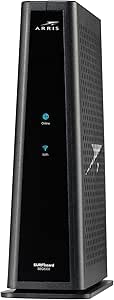 | Best Renewed Choice for Wired Gigabit Homes | Modem standard: DOCSIS 3.1 | Wi-Fi: 802.11ac AC2350 | Ethernet ports: 4 Gigabit Ethernet | VIEW ON AMAZON | See Our Full Breakdown |
| ARRIS SURFboard G36 DOCSIS 3.1 Cable Modem and Wi-Fi 6 Router |  | Best Overall | Modem standard: DOCSIS 3.1 | Wi-Fi: Wi-Fi 6 (802.11ax), dual-band AX3000 | Maximum data transfer rate: 3000 Mbps | VIEW ON AMAZON | See Our Full Breakdown |
| NETGEAR Nighthawk CAX30 DOCSIS 3.1 Cable Modem and WiFi 6 Router |  | Best for App-Based Setup | Model: CAX30 | Modem standard: DOCSIS 3.1 | Wi-Fi: Dual-band Wi-Fi 6 (802.11ax), AX2700 | VIEW ON AMAZON | See Our Full Breakdown |
| NETGEAR Nighthawk CAX80 DOCSIS 3.1 Cable Modem and WiFi 6 Router |  | Best for High-Capacity Wi-Fi | Model: CAX80 | Modem standard: DOCSIS 3.1 | Wi-Fi: Dual-band Wi-Fi 6 (802.11ax), AX6000 | VIEW ON AMAZON | See Our Full Breakdown |
| NETGEAR Nighthawk CAX30S DOCSIS 3.1 Cable Modem and WiFi 6 Router |  | Best for Link Aggregation | Model: CAX30S | Modem standard: DOCSIS 3.1 | Wi-Fi: Dual-band Wi-Fi 6 (802.11ax), AX2700 | VIEW ON AMAZON | See Our Full Breakdown |
| docsis 31 modem router | Ethernet ports | Modem standard | Wi-Fi | Compatible providers |
|---|---|---|---|---|
| ARRIS SURFboard G20 DOCSIS 3.1 | 2 Gigabit Ethernet | DOCSIS 3.1 | Dual-band Wi-Fi 6 (802.11ax), AX3000 | Xfinity, Cox, Spectrum |
| ARRIS Surfboard G36-RB DOCSIS | 4, listed as 2.5 Gbps ports | DOCSIS 3.1 | Dual-band Wi-Fi 6 (AX3000) | — |
| Arris Touchstone DG3450 DOCSIS | 4 Gigabit Ethernet | — | — | — |
| ARRIS SURFboard G34 DOCSIS 3.1 | 4 × 1 Gbps | DOCSIS 3.1 | Dual-band Wi-Fi 6 (802.11ax), AX3000 | Xfinity, Cox, Spectrum |
| ARRIS SURFboard SBG8300-RB DOC | 4 Gigabit Ethernet | DOCSIS 3.1 | 802.11ac AC2350 | Cox, Spectrum, Xfinity, and other compatible U.S. cable providers |
| ARRIS SURFboard G36 DOCSIS 3.1 | 1 × 2.5 GbE, 4 × 1 GbE | DOCSIS 3.1 | Wi-Fi 6 (802.11ax), dual-band AX3000 | — |
| NETGEAR Nighthawk CAX30 DOCSIS | 4 Gigabit | DOCSIS 3.1 | Dual-band Wi-Fi 6 (802.11ax), AX2700 | Select Xfinity, Spectrum, and Cox plans |
| NETGEAR Nighthawk CAX80 DOCSIS | 1 × 2.5 Gigabit, 4 × Gigabit | DOCSIS 3.1 | Dual-band Wi-Fi 6 (802.11ax), AX6000 | Select Xfinity, Spectrum, and Cox plans |
| NETGEAR Nighthawk CAX30S DOCSI | 4 Gigabit Ethernet | DOCSIS 3.1 | Dual-band Wi-Fi 6 (802.11ax), AX2700 | Select Xfinity, Spectrum, and Cox plans |
More Details on Our Top Picks
ARRIS SURFboard G20 DOCSIS 3.1 Cable Modem and Wi-Fi 6 Router
I’d put the ARRIS SURFboard G20 on the shortlist for a household that wants a DOCSIS 3.1 modem and Wi-Fi 6 router in one box without targeting plans above 1 Gbps. Its advertised 2,500-square-foot coverage and AX3000 dual-band Wi-Fi suit a typical home, while compatibility with Xfinity, Cox, and Spectrum covers several major cable providers. Compared with the ARRIS SURFboard G34, the G20 gives up two Ethernet ports and the G34’s stated support for plans up to 2.5 Gbps, so it is a less flexible choice for wired devices or a faster cable tier. In return, the G20’s stated ceiling fits buyers who simply need a clean gigabit setup. Its main compromise is the two-port wired connection; check provider and plan compatibility before buying.
Pros:- Combines a DOCSIS 3.1 cable modem and dual-band Wi-Fi 6 router
- Supports cable plans up to 1 Gbps
- Advertised Wi-Fi coverage of up to 2,500 square feet
- Compatible with Xfinity, Cox, and Spectrum
Cons:- Only two Gigabit Ethernet ports limit wired connections
- Stated maximum plan speed is lower than the G34’s 2.5 Gbps
- Cable-only; provider and service-plan compatibility must be checked
Best for: Cable customers on plans up to 1 Gbps who want Wi-Fi 6 and a single modem-router unit for a home advertised at up to 2,500 square feet.
Not ideal for: Households with several wired devices or plans above 1 Gbps; the G34 offers four Ethernet ports and a higher stated plan-speed ceiling.
- Modem standard:DOCSIS 3.1
- Wi-Fi:Dual-band Wi-Fi 6 (802.11ax), AX3000
- Maximum cable plan speed:1 Gbps
- Maximum downstream transfer rate:1000 Mbps
- Maximum upstream transfer rate:500 Mbps
- Advertised Wi-Fi coverage:Up to 2,500 sq ft
- Ethernet ports:2 Gigabit Ethernet
- Compatible providers:Xfinity, Cox, Spectrum
Our verdict“Choose the G20 for a straightforward gigabit cable setup with Wi-Fi 6, but pick the G34 if you need more Ethernet ports or higher stated plan-speed support.”
ARRIS Surfboard G36-RB DOCSIS 3.1 Cable Modem and Wi-Fi 6 Router
The ARRIS Surfboard G36-RB combines DOCSIS 3.1 with dual-band AX3000 Wi-Fi 6 and is listed for internet plans up to 1.2 Gbps, making it a fit for buyers whose service exceeds the G20’s 1 Gbps ceiling. The product description states that it has four 2.5 Gbps ports, a notable wired-connection advantage over the G20’s two Gigabit ports. That distinction may matter for a home with several wired devices or faster local networking, but confirm the port details with the seller and check the ISP’s approved-device list. This unit is marked Renewed, so it differs from a new device and may not suit buyers who prefer new hardware. Against the G34, its stated plan-speed support is lower, and the renewal condition adds another point to weigh.
Pros:- Combines a DOCSIS 3.1 modem with dual-band AX3000 Wi-Fi 6
- Listed to support plans up to 1.2 Gbps
- Product description states four 2.5 Gbps Ethernet ports
- Listed as compatible with Xfinity, Cox, and Spectrum
Cons:- Renewed condition may not suit buyers who want new hardware
- Provider approval and plan compatibility vary and need confirmation
- Its stated plan-speed ceiling is below the G34’s 2.5 Gbps
Best for: Cable subscribers seeking a renewed DOCSIS 3.1 and Wi-Fi 6 combo for a plan up to 1.2 Gbps, especially if they want multiple faster Ethernet connections.
Not ideal for: Buyers who require new equipment, need a higher stated plan-speed ceiling, or cannot verify the renewed unit’s port configuration and ISP approval.
- Modem standard:DOCSIS 3.1
- Wi-Fi:Dual-band Wi-Fi 6 (AX3000)
- Maximum internet speed:1.2 Gbps
- Ethernet ports:4, listed as 2.5 Gbps ports
- Listed provider compatibility:Xfinity, Cox, Spectrum
- Condition:Renewed
- Color:Black
Our verdict“Consider the renewed G36-RB if you want Wi-Fi 6 and the listed faster multiport setup for a plan up to 1.2 Gbps, after verifying condition, port details, and ISP approval.”
Arris Touchstone DG3450 DOCSIS 3.1 Cable Modem & Router with MoCA 2.0 (Renewed)
The Arris Touchstone DG3450 is the distinctive pick here for homes that can use existing coaxial wiring to extend a wired network. Its MoCA 2.0 support can carry network traffic over coax, which may help connect equipment in rooms where running Ethernet is awkward. It also has four Gigabit Ethernet ports and supports cable plans up to 1 Gbps. Compared with the Wi-Fi 6 G20 and G34, the DG3450 uses older Wi-Fi 5, so it is less appealing if your priority is newer wireless hardware. It is also renewed, and its listed provider compatibility excludes Xfinity/Comcast; buyers must confirm their cable provider supports this model. The payoff is not faster Wi-Fi, but the combination of MoCA and four wired ports.
Pros:- Built-in MoCA 2.0 can use coax wiring for network backhaul
- Four Gigabit Ethernet ports support several wired devices
- DOCSIS 3.1 supports cable plans up to 1 Gbps
- Listed compatibility includes Spectrum, Cox, Mediacom, and other cable providers
Cons:- Wi-Fi 5 is an older wireless generation than the G20 and G34’s Wi-Fi 6
- Renewed condition may not suit buyers seeking new equipment
- Not listed as compatible with Xfinity/Comcast and requires cable-provider confirmation
Best for: Cable households with compatible service, existing coax outlets in multiple rooms, and a need for wired backhaul or several Ethernet connections.
Not ideal for: Buyers who want Wi-Fi 6, new hardware, or a device for Xfinity/Comcast, fiber, DSL, or satellite service.
- DOCSIS standard:DOCSIS 3.1
- Wi-Fi standard:802.11ac (Wi-Fi 5)
- Wi-Fi bands:Dual-band 2.4 GHz / 5 GHz
- MoCA:MoCA 2.0
- Ethernet ports:4 Gigabit Ethernet
- Maximum downstream speed:1 Gbps
- Maximum upstream speed:1 Gbps
- Condition:Professionally renewed
- Listed cable compatibility:Spectrum, Cox, Mediacom, WOW, RCN, CableOne, Atlantic Broadband, Breezeline, Astound
Our verdict“Choose the DG3450 if MoCA over existing coax and four wired ports matter more to you than Wi-Fi 6 or new-device condition.”
ARRIS SURFboard G34 DOCSIS 3.1 Cable Modem and Wi-Fi 6 Router
The ARRIS SURFboard G34 is the strongest fit in this group for buyers who want a DOCSIS 3.1 combo with stated support for cable plans up to 2.5 Gbps. Its dual-band AX3000 Wi-Fi 6 and advertised coverage of up to 2,500 square feet make it more capable on paper than the G20 for a faster plan, while its four Gigabit Ethernet ports suit a home with consoles, computers, or other wired gear. The port speed is a clear limit: four 1 Gbps ports do not provide a 2.5 Gbps wired connection to a single device. Compared with the G36-RB, the G34 has a higher stated plan-speed ceiling, while the renewed G36-RB lists faster ports. It is cable-only, so fiber, DSL, and satellite households should skip it.
Pros:- DOCSIS 3.1 support for cable plans up to 2.5 Gbps
- Dual-band Wi-Fi 6 (AX3000)
- Four Gigabit Ethernet ports
- Advertised coverage of up to 2,500 sq ft
Cons:- Ethernet ports are limited to 1 Gbps each despite the higher plan-speed support
- Not compatible with fiber, DSL, or satellite service
- Provider and plan compatibility should be confirmed before purchase
Best for: Cable subscribers on a plan above 1 Gbps who want Wi-Fi 6, four wired connections, and advertised coverage up to 2,500 square feet.
Not ideal for: Fiber, DSL, or satellite customers, and buyers who need a single Ethernet port faster than 1 Gbps.
- Modem standard:DOCSIS 3.1
- Wi-Fi:Dual-band Wi-Fi 6 (802.11ax), AX3000
- Supported cable plan speed:Up to 2.5 Gbps
- Ethernet ports:4 × 1 Gbps
- Advertised coverage:Up to 2,500 sq ft
- Maximum upstream data transfer rate:450 Mbps
- Security protocols:WPA, WPA2, WPA3
- Compatible providers:Xfinity, Cox, Spectrum
- Incompatible services:Fiber, DSL, satellite
Our verdict“Pick the G34 for a higher-speed cable plan and Wi-Fi 6, provided its 1 Gbps Ethernet ports and cable-only design fit your setup.”
ARRIS SURFboard SBG8300-RB DOCSIS 3.1 Cable Modem and AC2350 Wi-Fi Router
The ARRIS SURFboard SBG8300-RB makes sense for a cable household that values four wired connections and gigabit service more than Wi-Fi 6. Its DOCSIS 3.1 modem supports gigabit-speed internet, while the AC2350 Wi-Fi 5 router is an older wireless generation than the G20 and G34. That makes this a practical wired-focused alternative, not the better choice for someone replacing a router mainly to get newer Wi-Fi. Compared with the renewed Touchstone DG3450, the SBG8300-RB lists compatibility with Xfinity, Cox, and Spectrum, but it does not offer the DG3450’s MoCA 2.0 feature. This model is also renewed and does not support cable digital voice, so buyers who rely on that service should choose another device.
Pros:- DOCSIS 3.1 modem supports gigabit-speed cable internet
- Four Gigabit Ethernet ports for wired devices
- Listed compatibility includes Cox, Spectrum, and Xfinity
- Combines modem and router in one device
Cons:- 802.11ac Wi-Fi 5 is older than the Wi-Fi 6 in the G20 and G34
- Renewed condition may not fit buyers who want new equipment
- Not compatible with DSL, fiber, satellite, or cable digital voice
Best for: Cable customers on gigabit plans who want four Gigabit Ethernet ports and do not need Wi-Fi 6 or cable digital voice.
Not ideal for: Buyers seeking newer Wi-Fi, fiber/DSL/satellite customers, or households that rely on cable digital voice service.
- Modem standard:DOCSIS 3.1
- Wi-Fi:802.11ac AC2350
- Ethernet ports:4 Gigabit Ethernet
- Maximum downstream data transfer rate:1000 Mbps
- Maximum upstream data transfer rate:1000 Mbps
- Compatible providers:Cox, Spectrum, Xfinity, and other compatible U.S. cable providers
- Incompatible services:DSL, fiber, satellite, cable digital voice
- Condition:Renewed
- Warranty:1-year limited
Our verdict“Choose the SBG8300-RB for renewed gigabit cable service and four wired ports if Wi-Fi 5 is sufficient and you do not need cable voice.”
ARRIS SURFboard G36 DOCSIS 3.1 Cable Modem and Wi-Fi 6 Router
I’d put the ARRIS SURFboard G36 first for buyers who want one DOCSIS 3.1 modem-router with a useful mix of wireless and wired connections. Its AX3000 Wi-Fi 6 and coverage claim of up to 2,500 sq ft make it a more flexible fit than the NETGEAR Nighthawk CAX30, which has AX2700 Wi-Fi and a smaller stated coverage area. The G36 also pairs four 1 GbE ports with a 2.5 GbE port, giving a compatible wired device room beyond a standard gigabit connection. The tradeoff is that its advertised coverage and speeds depend on the home layout and internet plan, while provider and plan compatibility must be checked before buying. I’d choose it for a balanced setup, not as a substitute for a mesh system in a large or difficult-to-cover home.
Pros:- Combines a DOCSIS 3.1 modem and Wi-Fi 6 router in one unit
- AX3000 dual-band Wi-Fi and stated coverage up to 2,500 sq ft
- One 2.5 GbE port plus four 1 GbE ports
- Supports compatible Xfinity, Cox, and Spectrum service
Cons:- Compatibility depends on the provider and specific internet plan
- Actual wireless coverage and speed vary with the home and service
- A single router may not cover larger homes or areas with weak signal
Best for: Cable subscribers with compatible Xfinity, Cox, or Spectrum service who want Wi-Fi 6, several wired connections, and a 2.5 GbE port in one device.
Not ideal for: People with DSL, fiber, satellite, bundled voice service, or a large home that needs multiple access points; ISP and plan compatibility may rule it out, and the stated coverage may not reach every room.
- Modem standard:DOCSIS 3.1
- Wi-Fi:Wi-Fi 6 (802.11ax), dual-band AX3000
- Maximum data transfer rate:3000 Mbps
- Maximum upstream data transfer rate:100 Mbps
- Ethernet ports:1 × 2.5 GbE, 4 × 1 GbE
- Coverage:Up to 2,500 sq ft
- Compatible ISPs:Xfinity, Cox, Spectrum
Our verdict“Choose the G36 for a balanced DOCSIS 3.1 setup with stronger listed Wi-Fi and more wired-port flexibility than the CAX30.”
NETGEAR Nighthawk CAX30 DOCSIS 3.1 Cable Modem and WiFi 6 Router
The Nighthawk CAX30 suits buyers who value app-based setup and built-in security over higher wireless capacity. It combines a DOCSIS 3.1 modem with AX2700 Wi-Fi 6, four Gigabit Ethernet ports, and WPA3 encryption, plus a USB 3.0 port. Compared with the ARRIS SURFboard G36, it has a lower Wi-Fi class and a smaller stated coverage area, and it lacks the G36’s 2.5 GbE port. Its clear strengths are guided setup and the stated capacity for 25 or more connected devices, which can work well for a typical household. The limitations are significant for some buyers: it is for compatible US cable plans, activation is required, and NETGEAR Armor moves to a subscription after its trial. I’d skip it if you need a multi-gig wired port or broader service compatibility.
Pros:- Combines DOCSIS 3.1 cable modem and dual-band Wi-Fi 6 router
- App-based setup and management
- Four Gigabit Ethernet ports and one USB 3.0 port
- WPA3 encryption, firewall, and denial-of-service attack prevention
Cons:- AX2700 and stated 2,000 sq ft coverage are more modest than the CAX80
- Only compatible with select US cable providers and plans; activation is required
- NETGEAR Armor requires a subscription after the 30-day trial
Best for: Households on a compatible Xfinity, Spectrum, or Cox cable plan that want app-based setup, WPA3 security, and four wired Gigabit connections.
Not ideal for: Buyers who need a 2.5 GbE port, wider stated coverage than 2,000 sq ft, bundled voice support, or service from DSL, satellite, fiber, or other incompatible providers.
- Model:CAX30
- Modem standard:DOCSIS 3.1
- Wi-Fi:Dual-band Wi-Fi 6 (802.11ax), AX2700
- Coverage:Up to 2,000 sq ft
- Connected devices:25+
- Ethernet ports:4 Gigabit
- USB port:1 USB 3.0
- Security:WPA3 encryption, firewall, denial-of-service attack prevention
- Compatible providers:Select Xfinity, Spectrum, and Cox plans
Our verdict“Pick the CAX30 if guided app setup and four Gigabit ports matter more than the G36’s 2.5 GbE connection or the CAX80’s higher Wi-Fi class.”
NETGEAR Nighthawk CAX80 DOCSIS 3.1 Cable Modem and WiFi 6 Router
Among these four, the Nighthawk CAX80 is the strongest match for a busy household seeking higher listed Wi-Fi capacity. Its dual-band AX6000 Wi-Fi 6, stated support for 30 or more devices, and coverage up to 2,500 sq ft put it ahead of the AX2700 CAX30 and CAX30S on paper. The wired selection is also more flexible: one 2.5 Gigabit port sits alongside four Gigabit ports, matching the G36’s multi-gig option while offering a higher stated Wi-Fi class. That capacity comes with limits. It supports only select Xfinity, Spectrum, and Cox plans, requires ISP activation, and does not support bundled voice plans. The stated plan limits also matter: support is listed up to 800 Mbps on Xfinity and up to 1 Gbps on Spectrum and Cox. I’d choose it for a device-heavy cable home, not for a plan or provider it doesn’t support.
Pros:- DOCSIS 3.1 modem combined with dual-band AX6000 Wi-Fi 6
- Stated coverage up to 2,500 sq ft and support for 30+ devices
- One 2.5 Gigabit port plus four Gigabit Ethernet ports
- WPA3 encryption, firewall, and denial-of-service attack prevention
Cons:- Compatible only with select Xfinity, Spectrum, and Cox plans
- Listed plan support is limited to up to 800 Mbps on Xfinity and up to 1 Gbps on Spectrum and Cox
- Does not support bundled voice plans; NETGEAR Armor requires a subscription after its 30-day trial
Best for: Households with many connected devices on a compatible Xfinity, Spectrum, or Cox cable plan that can use the CAX80’s AX6000 Wi-Fi and 2.5 Gigabit port.
Not ideal for: Subscribers with incompatible providers, bundled voice plans, or plans beyond the listed provider support limits; buyers seeking a smaller coverage footprint or a basic Wi-Fi setup may not need its capacity.
- Model:CAX80
- Modem standard:DOCSIS 3.1
- Wi-Fi:Dual-band Wi-Fi 6 (802.11ax), AX6000
- Coverage:Up to 2,500 sq ft
- Connected devices:30+
- Ethernet ports:1 × 2.5 Gigabit, 4 × Gigabit
- Compatible providers:Select Xfinity, Spectrum, and Cox plans
- Listed plan support:Xfinity up to 800 Mbps; Spectrum and Cox up to 1 Gbps
- Setup and management:NETGEAR Nighthawk app or web browser
Our verdict“Choose the CAX80 for a compatible cable plan and a device-heavy home that can benefit from its AX6000 Wi-Fi and multi-gig port.”
NETGEAR Nighthawk CAX30S DOCSIS 3.1 Cable Modem and WiFi 6 Router
The Nighthawk CAX30S has a specific advantage for wired-network planners: Link Aggregation can provide up to 2 Gbps with a compatible device. That feature separates it from the CAX30, which also has AX2700 Wi-Fi 6, four Gigabit ports, and a stated 2,000 sq ft coverage area but does not list Link Aggregation. It remains below the CAX80 for wireless capacity and device count, with AX2700 and support for 25 or more devices rather than AX6000 and 30 or more. WPA3, firewall protection, and app or browser management round out the package. The tradeoff is that Link Aggregation only helps with compatible equipment, while provider support remains limited to select Xfinity, Spectrum, and Cox plans. I’d favor it over the CAX30 only when that wired feature has a clear use.
Pros:- DOCSIS 3.1 modem and dual-band AX2700 Wi-Fi 6 router in one device
- Link Aggregation supports up to 2 Gbps with a compatible device
- Four Gigabit Ethernet ports
- WPA3 encryption, firewall, and denial-of-service attack prevention
Cons:- Link Aggregation depends on compatible equipment and may not benefit every home
- Lower listed Wi-Fi capacity and coverage than the CAX80
- Select cable-provider compatibility, ISP activation, and a NETGEAR Armor subscription after the 90-day trial
Best for: Cable subscribers with compatible Xfinity, Spectrum, or Cox service who own compatible wired equipment and want Link Aggregation alongside Wi-Fi 6.
Not ideal for: Buyers who won’t use Link Aggregation, need more than 2,000 sq ft of stated coverage, want a 2.5 GbE port, or rely on DSL, satellite, or bundled voice service.
- Model:CAX30S
- Modem standard:DOCSIS 3.1
- Wi-Fi:Dual-band Wi-Fi 6 (802.11ax), AX2700
- Coverage:Up to 2,000 sq ft
- Connected devices:25+
- Ethernet ports:4 Gigabit Ethernet
- Link Aggregation:Up to 2 Gbps with a compatible device
- Compatible providers:Select Xfinity, Spectrum, and Cox plans
- Setup and management:NETGEAR Nighthawk app or web browser
Our verdict“Choose the CAX30S over the standard CAX30 when you have compatible equipment for Link Aggregation; otherwise, the added feature may not justify the tradeoff.”

How We Picked
I compared these nine combos around the decisions that affect ownership: DOCSIS 3.1 support, Wi-Fi generation, wired and special-networking needs, and product condition. A modem router combo earns a place only if it can plausibly simplify a home network without asking buyers to pay for capabilities their ISP plan or home cannot use. I also treated renewed listings differently from standard listings because condition, included accessories, and warranty terms can change the ownership experience.
The ranking favors broad fit and current wireless capability over the biggest-sounding specification alone. The ARRIS G36 leads as a balanced DOCSIS 3.1 and Wi-Fi 6 option; the CAX80 is a better match for buyers seeking a more feature-forward NETGEAR choice, while the CAX30 models suit less demanding setups. Models with older Wi-Fi or renewed status rank lower for buyers who want a straightforward new purchase, though the DG3450’s MoCA support gives it a distinct role. I would verify ISP certification for the exact model before treating any ranking as a substitute for compatibility checks.
| docsis 31 modem router | Compatible providers |
|---|---|
| ARRIS SURFboard G20 DOCSIS 3.1 | Xfinity, Cox, Spectrum |
| ARRIS Surfboard G36-RB DOCSIS | — |
| Arris Touchstone DG3450 DOCSIS | — |
| ARRIS SURFboard G34 DOCSIS 3.1 | Xfinity, Cox, Spectrum |
| ARRIS SURFboard SBG8300-RB DOC | Cox, Spectrum, Xfinity, and other compatible U.S. cable providers |
| ARRIS SURFboard G36 DOCSIS 3.1 | — |
| NETGEAR Nighthawk CAX30 DOCSIS | Select Xfinity, Spectrum, and Cox plans |
| NETGEAR Nighthawk CAX80 DOCSIS | Select Xfinity, Spectrum, and Cox plans |
| NETGEAR Nighthawk CAX30S DOCSI | Select Xfinity, Spectrum, and Cox plans |
Factors to Consider When Choosing Docsis 31 Modem Router
Before choosing a DOCSIS 3.1 combo, I’d start with the service you can actually use and the layout of your home—not the largest number on a product page. These broader checks can prevent compatibility surprises and help decide whether an all-in-one unit is the right approach.
Confirm ISP Approval for the Exact Model
DOCSIS 3.1 support does not mean every provider accepts every modem, and approval can vary by exact model or hardware revision. Check your ISP’s current approved-device list and verify that the model supports your specific plan before ordering. Ask whether the provider allows customer-owned equipment and whether voice service requires a provider-supplied gateway. A device can connect successfully yet fail to qualify for the speed tier or services you pay for. I’d also confirm whether activation can be completed without a technician visit, especially if you are replacing a rented gateway. This check is more useful than relying on a general claim that a modem is compatible with a major cable provider.
Match the Modem to Your Plan, Not a Headline Speed
Advertised maximum throughput describes lab or aggregate capability, not a promise that one household will receive that speed over Wi-Fi. Your plan, the provider’s network configuration, connected devices, and signal conditions all shape real performance. A higher-capability combo may make sense if you expect to upgrade service or run several demanding wired connections, but it may add little for a modest plan and a few devices. Check the manufacturer’s supported channel configuration and your ISP’s requirements rather than comparing marketing figures alone. Also remember that upload performance on cable is usually determined by the provider’s network and plan, not just the modem’s DOCSIS label. Spend on capacity you can use now or reasonably expect to need.
Plan Wi-Fi Around Your Home Layout
Wi-Fi 6 is a useful baseline across much of this group, but it cannot guarantee coverage through several floors, dense walls, or distant rooms. A single combo is easiest to manage when the modem can sit near the center of the home and away from enclosed cabinets or interference. If the coax outlet is fixed at one end of the house, a separate access point or mesh system may solve coverage better than buying a more powerful combo. Before upgrading, check whether dead zones come from placement, congestion, or the internet connection itself. A Wi-Fi speed test beside the router and another in the problem room can help distinguish those causes. Choose an all-in-one device for simplicity, not as a substitute for a coverage plan.
Count Wired Ports and Special Network Needs
List the devices you expect to connect by Ethernet, including a desktop, television, game console, or network switch. A port count that seems adequate today can become limiting as a home office or entertainment setup grows. For homes with compatible coax wiring, MoCA can provide a way to extend a wired network without running new Ethernet, which is why the DG3450 may suit a specific household better than a more general Wi-Fi pick. MoCA requires compatible equipment and a suitable coax layout; it is not an automatic benefit just because coax enters the home. Check whether your existing adapters, splitters, and provider setup support the intended arrangement. Buyers without those needs should not rank MoCA above basic ISP compatibility and Wi-Fi fit.
Weigh the Convenience of a Combo Against Flexibility
A combo reduces clutter, power adapters, and setup steps, but it also ties the modem and router together when one part needs replacement. Separate devices can make it easier to upgrade Wi-Fi while keeping a compatible modem, or to position an access point where coverage is better. The tradeoff becomes more relevant if you already own a capable router or expect to build a mesh network. Before buying, check whether the combo supports bridge mode and whether your preferred router features can be used alongside it. A single unit is a sensible choice when simple setup and fewer devices matter most. Buyers who value independent upgrades may prefer separate components even if the initial setup takes more work.
Treat Renewed Listings as a Different Buying Decision
A renewed device can be a practical fit, but its condition and purchase protections matter as much as its feature list. Check the seller’s return window, warranty coverage, included power supply, and whether the unit has been reset and tested for activation. This is especially relevant for the DG3450 and the renewed ARRIS listings in this roundup. Ask whether the exact unit or hardware version remains supported by your ISP, since an older product listing may not reflect current provider requirements. Do not assume that renewed status guarantees the same accessories or support as a standard retail package. If uninterrupted service and a simple warranty path matter most, a new, currently approved model may be the lower-hassle choice.
Frequently Asked Questions
Will any DOCSIS 3.1 modem router in this roundup work with my cable provider?
No. DOCSIS 3.1 describes the cable modem standard, not universal approval from every provider. Check your ISP’s current compatibility list for the exact model and hardware revision, then confirm it supports your plan and any voice service you use. Providers can change approved-device lists, so an old compatibility claim may not reflect current policy. If the device is renewed, verify its condition and activation eligibility before purchase.
Should I choose the ARRIS G36 or the NETGEAR CAX80?
I’d favor the ARRIS G36 for a balanced DOCSIS 3.1 and Wi-Fi 6 combo, while the CAX80 makes more sense for buyers seeking a more feature-forward option and whose plan and wired setup can use its capabilities. Neither is automatically the better choice for every home. Compare the ISP’s approved list, the number of wired devices you need to connect, and the expected Wi-Fi coverage area. If those needs are modest, a CAX30-class model may be a more sensible fit than stepping up to a larger unit.
Is Wi-Fi 6 enough, or should I avoid the ARRIS SBG8300-RB because it uses AC2350 Wi-Fi?
Wi-Fi 6 is the more current wireless generation among most models here, but that alone does not make the SBG8300-RB unsuitable. Older Wi-Fi equipment can still serve a home with modest demands and compatible client devices, especially when the main goal is replacing an aging modem router. The limitation is reduced access to newer Wi-Fi features and less headroom for a home upgrading its wireless devices. Check the capabilities of your phones, computers, and plan before deciding whether the newer generation justifies choosing another model.
Does the Touchstone DG3450’s MoCA 2.0 support mean I can use my home’s coax outlets for networking?
It may help, but MoCA support on the device alone does not guarantee every coax outlet will work for networking. The home’s coax wiring, splitters, filters, and any provider equipment must support a compatible setup. You may also need other MoCA-capable devices at the locations where you want network access. Check your wiring and provider requirements before buying, and confirm how MoCA is enabled on the specific unit. Its renewed condition adds a separate reason to review return and warranty terms.
When is a separate modem and router a better choice than one of these combos?
Separate devices can be a better fit if you already own a strong router, want mesh coverage, or expect to replace the Wi-Fi system before the modem. They also let you place access points more flexibly when the coax outlet is poorly located. A combo is simpler and cuts down on equipment, but a failure or upgrade can affect both functions at once. Compare the cost and setup effort of separate devices with the value of easy installation and one enclosure. Before using a separate router, check that your chosen modem and router support the features and service you need.
Conclusion
For most buyers seeking one DOCSIS 3.1 device with current wireless capability, I’d choose the ARRIS SURFboard G36 as best overall. The ARRIS G34 is my best value-oriented alternative for shoppers who want a straightforward Wi-Fi 6 combo, while the NETGEAR Nighthawk CAX80 is the best premium-oriented pick for homes that can use its broader feature set. Beginners should focus on an ISP-approved model with a simple setup path; the G36 is a strong starting point, provided the provider confirms compatibility. For a specific networking need, the Touchstone DG3450 is the one to investigate for MoCA 2.0, while buyers who prefer renewed gear should carefully check condition and warranty details on the ARRIS renewed listings. If your home needs better coverage or independent upgrade options, consider a separate router or mesh system instead of choosing a combo by headline speed alone.
Halloween Picks
halloween
As an affiliate, we earn on qualifying purchases.