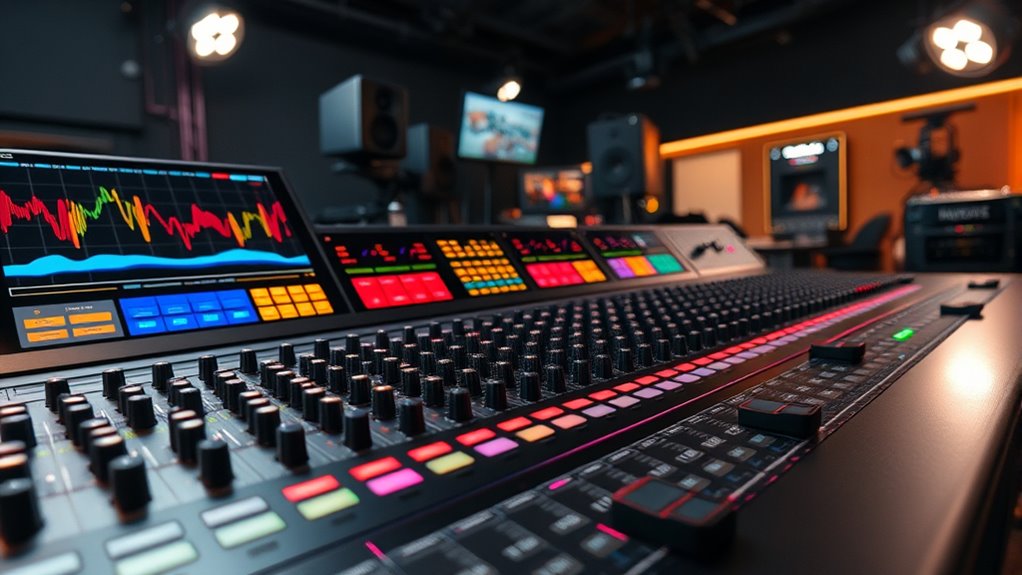

A digital mixer for streaming can simplify mic control, guest audio, sound effects, and recording, but the right choice depends on how much routing and hands-on control your setup needs. My best overall pick is the Mackie DLZ Creator XS for its streaming-focused workflow, while the Yamaha MGX12 stands out for more involved multi-source setups and the FIFINE Ampligame SC3W for accessible gaming controls. The tradeoff is clear: compact gaming mixers keep setup simple, while larger consoles offer more connection options and room to grow. Bundles can get a new creator started, but may be less flexible than choosing a mixer and microphone separately. Read on for the full breakdown and guidance on matching a mixer to your stream.

Get the latest gadgets delivered free with Prime
- Fast, free delivery on millions of items
- Prime Video, Amazon Music and more included
- Member-only deals all year
Complete the kit

Key Takeaways
- The Mackie DLZ Creator XS is the most purpose-built podcast and streaming choice in this group; its adaptive workflow gives it an advantage over conventional analog-style mixers for creators who want guided control.
- The Yamaha MGX12 is the stronger fit for complex setups where multiple sources and dual USB-C connectivity matter more than a compact gaming layout.
- FIFINE and MAONO gaming mixers emphasize accessible, immediate controls, but their simpler streaming focus may not suit creators who need extensive routing or room to expand.
- Bundles from G10, TENLAMP, and MAONO can reduce setup friction, though a bundled microphone and mixer may limit upgrade flexibility compared with building a setup piece by piece.
- The Zoom LiveTrak L6 serves a different priority: recording and handling multiple sources away from a standard PC-streaming workflow, rather than providing the simplest desktop control surface.
| G10 Podcast Equipment Bundle with Audio Mixer and Microphone |  | Best Starter Bundle | Channels: 2 | Connectivity: 3.5 mm, 6.35 mm, XLR/48V microphone, Bluetooth, USB Type-C | Power source: Battery powered | VIEW ON AMAZON | See Our Full Breakdown |
| PUPGSIS Gaming Audio Mixer for PC Streaming with Soundboard and Voice Changer |  | Best for Soundboard-Focused Gaming Streams | Channels: 4 | Connectivity: USB | Audio input: 1/4-inch TRS | VIEW ON AMAZON | See Our Full Breakdown |
| Yamaha MG10XU 10-Input Stereo Mixer with Effects |  | Best for Multi-Source Audio Setups | Channels: 10 | Connectivity: USB | Audio inputs: XLR, 1/4-inch line | VIEW ON AMAZON | See Our Full Breakdown |
| FIFINE Ampligame SC3W Gaming Audio Mixer | 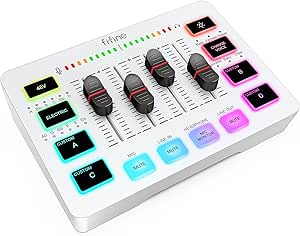 | Best Compact Gaming Mixer | Channels: 4 | Connectivity: USB; XLR microphone input | Phantom power: 48V | VIEW ON AMAZON | See Our Full Breakdown |
| Mackie DLZ Creator XS Adaptive Digital Mixer for Podcasting |  | Best Premium Digital Workflow | Channels: 2 | Connectivity: USB-C, Bluetooth, XLR, NDI | Recording: Multitrack via USB-C, NDI, or SD card | VIEW ON AMAZON | See Our Full Breakdown |
| Elgato Stream Deck + Audio Mixer and Studio Controller |  | Best for Software-Rich Studio Control | Controls: LCD keys, touch strip, and dials | Functions: Audio mixer, studio controller, and production console | Workflow features: Multi Actions and Smart Profiles | VIEW ON AMAZON | See Our Full Breakdown |
| MAONO G1 Neo Gaming Audio Mixer with XLR Input and 48V Phantom Power | 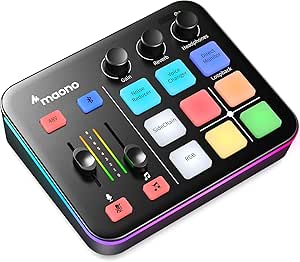 | Best Compact Gaming Mixer | Channels: 4 | Connectivity: Auxiliary, Bluetooth, and USB | Microphone input: XLR with 48V phantom power | VIEW ON AMAZON | See Our Full Breakdown |
| FIFINE SC8 Gaming Audio Mixer for Live Streaming |  | Best for Game-and-Chat Mixing | Microphone input: XLR or 6.35 mm; USB microphones not supported | Phantom power: 48V | Connectivity: USB-C, optical, AUX, and 3.5 mm AUX-In | VIEW ON AMAZON | See Our Full Breakdown |
| MAONO Podcast Equipment Bundle with Audio Mixer & 3.5mm Mic for Streaming |  | Best All-in-One Starter Bundle | Channels: 9 | Connectivity: USB Type-C, auxiliary, and Bluetooth | Power source: Battery powered | VIEW ON AMAZON | See Our Full Breakdown |
| Yamaha MGX12 18-Channel Digital Mixing Console with Dual USB-C Audio Interface, White |  | Best for Complex, Multi-Source Streams | Channels: 18 | Connectivity: Auxiliary, Bluetooth, and USB | Power source: Corded electric | VIEW ON AMAZON | See Our Full Breakdown |
| MAONO E2 Gen2 Podcast Audio Interface and Mixer |  | Best for Mobile Streaming | XLR inputs: 2 combo inputs | Preamp gain: Up to 60 dB | Sound effect buttons: 8 customizable; up to 20 seconds per button | VIEW ON AMAZON | See Our Full Breakdown |
| Zoom LiveTrak L6 Mixer Recorder for Musicians and Podcasters |  | Best for Multitrack Recording | Channels: 10 | Recording: Up to 10 discrete tracks plus stereo mix to SD card | Recording format: 32-bit float | VIEW ON AMAZON | See Our Full Breakdown |
| FIFINE AmpliGame SC3 Gaming Audio Mixer |  | Best for Beginner Gaming Streams | Channels: 4 | Microphone input: XLR | Phantom power: 48V | VIEW ON AMAZON | See Our Full Breakdown |
| TENLAMP G10 Creator Audio Mixer Bundle with Microphone |  | Best Complete Starter Bundle | Channels: 2 | Connectivity: AUX, Bluetooth, USB | Power source: Battery powered | VIEW ON AMAZON | See Our Full Breakdown |
| K-mxerpro 8-Channel Audio Mixer with USB, Bluetooth, and 48V Phantom Power |  | Best for Multi-Source Streaming | Channels: 8 | Inputs: XLR and 1/4-inch | Connectivity: USB, Bluetooth, AUX, XLR | VIEW ON AMAZON | See Our Full Breakdown |
| digital mixer for streaming | Channels | Connectivity | Power source | Dimensions |
|---|---|---|---|---|
| G10 Podcast Equipment Bundle w | 2 | 3.5 mm, 6.35 mm, XLR/48V microphone, Bluetooth, USB Type-C | Battery powered | 11.73 × 5.51 × 8.58 in |
| PUPGSIS Gaming Audio Mixer for | 4 | USB | — | 16.5 × 15 × 3.5 inches |
| Yamaha MG10XU 10-Input Stereo | 10 | USB | Corded electric | 9.6 × 2.8 × 11.6 inches |
| FIFINE Ampligame SC3W Gaming A | 4 | USB; XLR microphone input | Corded electric | 4.44 × 6.45 × 1.6 in |
| Mackie DLZ Creator XS Adaptive | 2 | USB-C, Bluetooth, XLR, NDI | Corded electric | 8.01 × 3.28 × 10.23 in |
| Elgato Stream Deck + Audio Mix | — | — | — | — |
| MAONO G1 Neo Gaming Audio Mixe | 4 | Auxiliary, Bluetooth, and USB | — | 6.29 x 2 x 5.19 inches |
| FIFINE SC8 Gaming Audio Mixer | — | USB-C, optical, AUX, and 3.5 mm AUX-In | — | — |
| MAONO Podcast Equipment Bundle | 9 | USB Type-C, auxiliary, and Bluetooth | Battery powered | 9.44 x 5.11 x 1.65 inches |
| Yamaha MGX12 18-Channel Digita | 18 | Auxiliary, Bluetooth, and USB | Corded electric | — |
| MAONO E2 Gen2 Podcast Audio In | 10 | USB-C, Bluetooth, AUX, 3.5 mm | — | — |
| Zoom LiveTrak L6 Mixer Recorde | 10 | USB | Battery powered | 4.49 x 8.78 x 1.83 in |
| FIFINE AmpliGame SC3 Gaming Au | 4 | — | USB-C | 4.44 x 6.45 x 1.6 in |
| TENLAMP G10 Creator Audio Mixe | 2 | AUX, Bluetooth, USB | Battery powered | 10.9 x 2.28 x 7.67 in |
| K-mxerpro 8-Channel Audio Mixe | 8 | USB, Bluetooth, AUX, XLR | Corded electric | — |
More Details on Our Top Picks
G10 Podcast Equipment Bundle with Audio Mixer and Microphone
The G10 is a practical entry point for a streamer who needs a mixer, microphone, and boom arm in one package. Its plug-and-play connections and built-in noise reduction, voice effects, and reverb give new creators ways to shape a voice feed without assembling a separate software chain. Compared with the FIFINE Ampligame SC3W, which adds 48V phantom power for compatible XLR condenser microphones, the G10 is more of a ready-to-start kit but relies on its included 3.5 mm microphone. Its range of input and output connections offers flexibility, though the feature list may feel busy if all you need is a clean mic signal. The stated battery power is useful for portable setups, but warranty and software update details are not provided.
Pros:- Includes a 3.5 mm condenser microphone and boom arm
- Plug-and-play connectivity for PC, Mac, and mobile devices
- Built-in noise reduction, voice changing, and 12 sound effects
- Multiple input and output connection types
Cons:- The included microphone is 3.5 mm rather than an XLR model
- Warranty and software update support details are unspecified
- The listed frequency specification is limited to 60 Hz
Best for: New PC, Mac, or mobile streamers who want a bundled microphone and boom arm with built-in voice effects.
Not ideal for: Creators who already own a quality XLR microphone and specifically need documented 48V phantom power or clearly stated long-term support.
- Channels:2
- Connectivity:3.5 mm, 6.35 mm, XLR/48V microphone, Bluetooth, USB Type-C
- Power source:Battery powered
- Microphone:3.5 mm condenser microphone
- Sound effects:12 built-in effects
- Reverb modes:5 preset modes; 19 customizable modes
- Dimensions:11.73 × 5.51 × 8.58 in
- Weight:4.6 lb
Our verdict“Choose the G10 if you want a bundled starter setup with onboard effects, but pick an XLR-focused mixer if microphone upgrades are your priority.”
PUPGSIS Gaming Audio Mixer for PC Streaming with Soundboard and Voice Changer
The PUPGSIS puts gaming-stream controls ahead of broad microphone compatibility: its four channels, programmable sound pads, voice changer, and reverb are aimed at creators who trigger sounds while talking. Bluetooth adds a way to bring in background audio, but it is input only; monitoring still requires wired headphones. That makes this a more specialized pick than the Mackie DLZ Creator XS, whose touchscreen modes and AutoMix are better suited to managing a two-person spoken show. There is also a notable setup restriction: the PUPGSIS does not support USB microphones or 48V dynamic microphones, and an XLR mic needs a separate 1/4-inch TRS-to-XLR cable. Buyers should check their mic and monitoring gear before choosing it; the feature set does not offset those compatibility limits for every desk.
Pros:- Four channels for handling multiple audio sources
- Four programmable sound effect pads
- Built-in noise reduction, reverb, and voice changing
- Bluetooth input for background audio playback
Cons:- Does not support USB microphones or 48V dynamic microphones
- XLR microphones require a separate 1/4-inch TRS-to-XLR cable
- Bluetooth does not provide wireless headphone or microphone output
Best for: PC gaming streamers who want several channels, programmable sound cues, and voice effects and already use compatible wired audio gear.
Not ideal for: Streamers using USB microphones, needing Bluetooth headphone monitoring, or expecting direct XLR microphone connection without an adapter cable.
- Channels:4
- Connectivity:USB
- Audio input:1/4-inch TRS
- Microphone compatibility:XLR microphones; does not support USB microphones or 48V dynamic microphones
- Sound effect pads:4 programmable pads
- Bluetooth:Input only for background audio
- Monitoring:Wired monitoring required
- Dimensions:16.5 × 15 × 3.5 inches
Our verdict“Pick the PUPGSIS for a wired gaming setup built around sound cues, but skip it if your microphone or monitoring depends on USB or wireless connections.”
Yamaha MG10XU 10-Input Stereo Mixer with Effects
The Yamaha MG10XU is the lineup’s strongest fit for streamers who need a conventional mixer to balance several microphones and line-level sources. Its 10 inputs, D-PRE preamps, three-band EQ, one-knob compressors, and onboard effects give more hands-on signal control than the compact, gaming-oriented FIFINE Ampligame SC3W. USB connectivity also supports recording to a DAW, making the Yamaha a more studio-minded choice than a soundboard-first interface. The tradeoff is a less streamlined streaming workflow: it is an analog mixer rather than an adaptive touchscreen console like the Mackie DLZ Creator XS, and the provided information does not describe dedicated streaming conveniences such as trigger pads or automatic level mixing. Its metal chassis and 7.7-pound weight favor a stable desk or portable production kit over a lightweight gaming setup.
Pros:- 10-channel capacity for multiple microphones and audio sources
- D-PRE Class A preamps and three-band EQ
- One-knob compressors and onboard digital effects
- USB connectivity supports direct recording to a DAW
Cons:- Analog workflow lacks the adaptive touchscreen and AutoMix features of the Mackie DLZ Creator XS
- At 7.7 pounds, it is less convenient for a compact gaming desk
- The listed 10-channel capacity may not suit larger productions
Best for: Streamers and podcasters who need several XLR or line inputs, physical mixing controls, and USB recording to a computer.
Not ideal for: Solo gaming streamers seeking a small, plug-in-and-play controller with dedicated sound pads or automatic mic mixing.
- Channels:10
- Connectivity:USB
- Audio inputs:XLR, 1/4-inch line
- Output connector:TRS
- Frequency:48 kHz
- Power source:Corded electric
- Dimensions:9.6 × 2.8 × 11.6 inches
- Weight:7.7 lb
Our verdict“Choose the Yamaha when hands-on control of multiple sources matters more than gaming-focused shortcuts or an adaptive digital interface.”
FIFINE Ampligame SC3W Gaming Audio Mixer
For a gaming desk where space and fast physical controls matter, the SC3W keeps its footprint small while providing four individually controlled channels, an XLR input, mute control, and real-time monitoring. Built-in 48V phantom power makes it a more direct match for compatible condenser microphones than the G10 bundle, which centers on an included 3.5 mm mic. The SC3W also adds voice effects, customizable sound buttons, and RGB lighting, though those extras are less important for a straightforward spoken stream. Its compact format comes with fewer setup details than the more production-oriented Yamaha MG10XU, and the product information does not spell out compatibility across different streaming configurations. It is corded and offers a 3.5 mm output, so buyers wanting a flexible multichannel studio mixer should look beyond this gaming-focused unit.
Pros:- Compact 4.44 × 6.45 × 1.6-inch footprint
- XLR microphone input with built-in 48V phantom power
- Four individually controlled channels
- Mute, real-time monitoring, voice effects, and customizable sound buttons
Cons:- Requires corded power
- Setup and compatibility guidance is limited in the product information
- 3.5 mm output may not suit every audio routing setup
Best for: Gaming streamers with limited desk space who use an XLR condenser microphone and want simple mute, volume, and monitoring controls.
Not ideal for: Podcast producers needing many physical inputs, detailed routing information, or a mixer designed for a broader studio workflow.
- Channels:4
- Connectivity:USB; XLR microphone input
- Phantom power:48V
- Output connector:3.5 mm
- Power source:Corded electric
- Dimensions:4.44 × 6.45 × 1.6 in
- Weight:8 oz
- Warranty:1 year
Our verdict“Choose the SC3W for compact gaming-stream control and XLR condenser support, not for a full-featured studio mixing workflow.”
Mackie DLZ Creator XS Adaptive Digital Mixer for Podcasting
The DLZ Creator XS is the most purpose-built digital option here for a spoken stream or podcast, especially when the operator wants guidance without giving up control. Its 7-inch touchscreen offers Easy, Enhanced, and Pro modes, while Mix Agent and AutoMix help manage levels between two speakers. That makes it easier to shape a two-person show than on the Yamaha MG10XU, which has more inputs but relies on conventional mixer controls. The Mackie also records multitrack audio over USB-C, NDI, or directly to SD, and its trigger pads put samples and effects within quick reach. Those workflow advantages come with a firm limit: two channels leave less room for expanding guests or sources. Condenser microphones also require 48V phantom power, so the setup needs to account for that.
Pros:- 7-inch touchscreen with Easy, Enhanced, and Pro control modes
- AutoMix helps manage levels between two microphones
- USB-C, NDI, and SD card multitrack recording options
- Customizable trigger pads provide quick access to samples and effects
Cons:- Two-channel capacity restricts larger guest or source setups
- Condenser microphones require 48V phantom power
- Corded operation limits use away from a powered setup
Best for: Podcast hosts and streaming creators who run a one- or two-microphone show and want guided touchscreen mixing plus multitrack recording options.
Not ideal for: Streamers planning to connect several microphones or numerous live sources, or buyers who prefer a simple low-feature mixer.
- Channels:2
- Connectivity:USB-C, Bluetooth, XLR, NDI
- Recording:Multitrack via USB-C, NDI, or SD card
- Display:7-inch touchscreen
- Microphone feature:AutoMix for two microphones
- Power source:Corded electric
- Dimensions:8.01 × 3.28 × 10.23 in
- Weight:4.2 lb
Our verdict“Choose the DLZ Creator XS for a guided, feature-rich two-person streaming or podcast workflow, but select the Yamaha MG10XU if input count comes first.”
Elgato Stream Deck + Audio Mixer and Studio Controller
The Stream Deck + is the most control-oriented pick here: its LCD keys, touch strip, and dials can manage audio alongside OBS, lighting, and other studio tasks. That makes it a better fit than the MAONO G1 Neo if your stream depends on switching scenes and controlling several apps, not just adjusting a microphone and game audio. Multi Actions and Smart Profiles can reduce repetitive clicks by grouping commands or changing controls for different workflows. The tradeoff is that this is a customizable controller rather than a self-contained mixer with specified channel counts or preamp details. Its usefulness also depends on setting up the Stream Deck app and compatible plugins, so buyers who want straightforward physical audio routing may prefer the FIFINE SC8.
Pros:- LCD keys, touch strip, and dials provide visual and tactile control
- Can manage audio, video, lighting, and other studio functions
- Multi Actions and Smart Profiles can group controls and adapt layouts
- Plugins support popular apps and services including OBS, Twitch, Spotify, and Philips Hue
Cons:- Requires app and plugin setup to tailor controls to a streaming workflow
- The supplied specifications do not state audio channel count or detailed preamp and routing capabilities
Best for: PC streamers who already use compatible apps and want one customizable surface for audio, scenes, and studio controls.
Not ideal for: Buyers seeking a standalone multi-input audio mixer with clearly specified microphone channels and hardware routing.
- Controls:LCD keys, touch strip, and dials
- Functions:Audio mixer, studio controller, and production console
- Workflow features:Multi Actions and Smart Profiles
- Setup:Drag-and-drop Stream Deck app
- Compatible plugins:Elgato Wave Link, Camera Hub, Control Center, OBS, Twitch, YouTube, Twitter, Discord, Spotify, Philips Hue, and more
- Physical interface:Customizable LCD keys, touch strip, and dials with visual feedback
Our verdict“Choose the Stream Deck + if app and studio control matter more to you than a conventional, fully specified audio mixer.”
MAONO G1 Neo Gaming Audio Mixer with XLR Input and 48V Phantom Power
The MAONO G1 Neo puts gaming-stream essentials into a compact unit: XLR input with 48V phantom power, Bluetooth accompaniment, direct monitoring, and one-click mute and loopback. Compared with the FIFINE SC8, its listed feature set favors a smaller, simpler streaming desk setup rather than dedicated game/chat balance, virtual surround, and multiple EQ presets. Voice effects and customizable RGB add performance flair, but the main practical advantage is keeping common mic and accompaniment controls close at hand. The compromises matter: it does not support USB microphones or Xbox consoles, and the supplied information says stable performance under heavy load requires the included 5V adapter. Choose it for a compatible XLR mic and PC or supported console setup; the MAONO podcast bundle is a better starting point if you need a microphone included.
Pros:- XLR preamp with 48V phantom power supports compatible condenser microphones
- Bluetooth input can bring accompaniment audio into a stream
- One-click mute, loopback, and direct monitoring support live control
- Compact 6.29 x 2 x 5.19-inch design
Cons:- USB microphones are not supported
- Not compatible with Xbox consoles
- Requires the included 5V power adapter for stable performance under heavy load
Best for: PC and compatible-console gamers using an XLR microphone who want a small mixer with quick mute, loopback, and Bluetooth input.
Not ideal for: Streamers with a USB microphone or Xbox console, or buyers who want a complete mic-and-mixer package.
- Channels:4
- Connectivity:Auxiliary, Bluetooth, and USB
- Microphone input:XLR with 48V phantom power
- Output connectors:3.5 mm and USB-C
- Power:Corded electric; 5-volt operation
- Dimensions:6.29 x 2 x 5.19 inches
- Weight:1.2 pounds
- Compatibility:PC, consoles, and major streaming software; USB microphones and Xbox consoles are not supported
Our verdict“Pick the G1 Neo for a compact XLR-based gaming setup, but skip it if your mic is USB or you need Xbox support.”
FIFINE SC8 Gaming Audio Mixer for Live Streaming
The FIFINE SC8 is the gaming-focused choice when keeping game and chat audio balanced is central to your stream. Its dedicated balance control, 48V-capable XLR input, and virtual 7.1 surround give it a more specific gaming role than the broader MAONO G1 Neo, which instead emphasizes compact controls, Bluetooth input, and quick mute and loopback. Three EQ presets and eight voice effects add ways to shape the listening and mic experience without relying solely on software. This focus brings limits: USB microphones are unsupported, and the XLR cable is not included, so an XLR setup needs that extra piece. The SC8 also prioritizes gaming features over the wider studio and app control of the Elgato Stream Deck +.
Pros:- Dedicated game/chat balance control helps adjust competing audio sources
- XLR input with 48V phantom power supports compatible condenser microphones
- Virtual 7.1 sound and three EQ presets offer gaming-oriented audio options
- Four customizable sound buttons and eight voice effects support live interaction
Cons:- USB microphones are not supported
- XLR cable is not included
- Gaming-specific controls are less suited to streamers seeking broad studio app control
Best for: PC and console gamers who use an XLR or 6.35 mm microphone and want physical game/chat balance control.
Not ideal for: Streamers using USB microphones or buyers who need an XLR cable included in the box.
- Microphone input:XLR or 6.35 mm; USB microphones not supported
- Phantom power:48V
- Connectivity:USB-C, optical, AUX, and 3.5 mm AUX-In
- Compatibility:PC, PS5, Switch, mobile, PS4, and TV
- Surround sound:Virtual 7.1-channel
- EQ presets:Game, Music, and Movie
- Voice effects and sound buttons:8 voice effects and 4 customizable sound buttons
- Microphone audio:Less than 0.2% distortion; 75 dB SNR
- Headphone audio:32-ohm impedance; 93 dB SNR
Our verdict“Choose the SC8 if physical game/chat balancing and gaming audio effects matter more than USB-mic support or studio-wide controls.”
MAONO Podcast Equipment Bundle with Audio Mixer & 3.5mm Mic for Streaming
The MAONO podcast bundle suits a new streamer who needs a mic and accessories alongside a mixer, rather than an existing XLR setup. Its included 3.5 mm condenser microphone, tripod, cables, and windscreen make it more immediately complete than the FIFINE SC8, which requires a separate XLR cable and microphone. Battery power and support for iOS, Android, PC, and Mac also make this a flexible option for creators moving between devices. The tradeoff is microphone growth: there is no phantom power, so the included mic cannot take advantage of it, unlike the phantom-powered XLR inputs on the G1 Neo and SC8. Its effects, denoise, and multi-user/device support add flexibility, but the bundle is less suited to buyers building a higher-spec XLR microphone chain.
Pros:- Includes a microphone, tripod, cables, and windscreen for a ready-to-start setup
- Battery powered and compatible with iOS, Android, PC, and Mac
- Built-in sound effects, voice modulation, and denoise provide live audio options
- Supports up to two speakers and four devices
Cons:- No phantom power for microphones that require it
- 6.35 mm-to-3.5 mm instrument adapters are not included
- Some phones without a 3.5 mm jack may need an OTG adapter
Best for: First-time streamers or mobile creators who want a bundled 3.5 mm microphone, mixer, tripod, and cables for compatible devices.
Not ideal for: Creators planning to use a phantom-powered condenser microphone or needing a compact gaming mixer with dedicated game/chat controls.
- Channels:9
- Connectivity:USB Type-C, auxiliary, and Bluetooth
- Power source:Battery powered
- Output connectors:1/4-inch XLR, 3.5 mm audio, and USB Type-C
- Audio inputs:Microphone, AUX, and Bluetooth
- Supported devices:iOS, Android, PC, and Mac
- Dimensions:9.44 x 5.11 x 1.65 inches
- Weight:1.3 kg
- Included accessories:3.5 mm microphone, tripod, cables, and windscreen
Our verdict“Choose this bundle for an included mic and broad device compatibility, not for a phantom-powered XLR upgrade path.”
Yamaha MGX12 18-Channel Digital Mixing Console with Dual USB-C Audio Interface, White
The Yamaha MGX12 is the most production-oriented option in this group, with 18 channels, tactile faders, a touchscreen, and built-in DSP for monitoring. That breadth makes more sense for streams with several microphones or audio sources than the compact MAONO G1 Neo or the game/chat-focused FIFINE SC8. The 4.3-inch touchscreen and physical faders offer direct access to mix adjustments, while the included Cubase AI, WaveLab Cast LE, Basic FX Suite, and Steinberg Plus software extend its use to recording and editing. Its main drawback is uncertainty: the supplied product information does not spell out the full input and output configuration, so I would verify that it fits a planned signal chain before buying. It is also a larger-scale choice than a simple gaming mixer.
Pros:- 18 channels accommodate more sources than the compact gaming mixers in this roundup
- Touchscreen and tactile faders provide direct access to mix adjustments
- Built-in DSP supports latency-free monitoring
- Includes software for recording, editing, and production
Cons:- Full input and output configuration is not specified in the supplied product data
- Its 18-channel feature set may be more involved than a solo streamer needs
- Corded power is less suited to mobile streaming than the battery-powered MAONO bundle
Best for: Streamers and podcasters managing multiple microphones or audio sources who also want recording and production software.
Not ideal for: Solo gaming streamers seeking a small, simple mixer with clearly listed connections and dedicated game/chat controls.
- Channels:18
- Connectivity:Auxiliary, Bluetooth, and USB
- Power source:Corded electric
- Output connectors:HDMI and USB Type-B
- Audio input:XLR
- Display:4.3-inch touchscreen
- Preamp gain range:86 dB
- Additional features:microSD card slot, built-in DSP, and 4K video capture and pass-through
- Included software:Cubase AI, WaveLab Cast LE, Basic FX Suite, and Steinberg Plus
Our verdict“Choose the MGX12 for a multi-source streaming and recording setup, after confirming its connections match your gear.”
MAONO E2 Gen2 Podcast Audio Interface and Mixer
The MAONO E2 Gen2 is a flexible fit for creators who move between computer and phone streaming. Its two combo inputs and up to 60 dB of preamp gain suit co-hosts and many dynamic microphones, while loopback helps route computer audio into a stream. Bluetooth, AUX, and USB-C add more source options than the more studio-focused Zoom LiveTrak L6, and the built-in battery supports setup away from an outlet. Custom sound buttons, voice effects, and reverb are useful for lively shows, though they add less value to straightforward speech recording. The tradeoff is that its battery lasts up to eight hours and cannot charge a phone or provide power delivery. Choose it for portable, effects-friendly streaming; skip it if you need long sessions without access to power or extensive multitrack recording.
Pros:- Two combo inputs and up to 60 dB of gain support two microphones, including many dynamic models.
- Loopback and USB-C, Bluetooth, and AUX connectivity suit computer and mobile streaming setups.
- Eight customizable sound buttons, voice effects, and reverb support interactive live shows.
- Built-in battery supports up to eight hours of use away from an outlet.
Cons:- Battery runtime is limited to up to eight hours.
- Does not support phone charging or power delivery.
- Its effects-oriented streaming feature set is less suited to buyers focused on multitrack recording.
Best for: Mobile podcasters and co-hosted streamers who want two XLR-capable inputs, loopback, and built-in effects in a battery-powered setup.
Not ideal for: Creators who stream for longer than the stated battery runtime, need phone charging, or want the Zoom LiveTrak L6’s multitrack SD recording features.
- XLR inputs:2 combo inputs
- Preamp gain:Up to 60 dB
- Sound effect buttons:8 customizable; up to 20 seconds per button
- Connectivity:USB-C, Bluetooth, AUX, 3.5 mm
- Battery:1500 mAh; up to 8 hours
- Channels:10
- Maximum sample rate:48 kHz
- Dimensions and weight:9.64 x 6.18 x 2.16 in; 0.89 kg
Our verdict“Choose the MAONO E2 Gen2 for portable, two-microphone streaming with effects and loopback, but pick the Zoom LiveTrak L6 for multitrack SD recording.”
Zoom LiveTrak L6 Mixer Recorder for Musicians and Podcasters
For streamers who also want separate recordings of each source, the Zoom LiveTrak L6 brings recording capabilities that simpler gaming mixers do not. It can save up to ten discrete tracks plus a stereo mix to an SD card, while 32-bit float recording reduces the risk of clipped takes when levels vary. Each track gets a channel strip with EQ and effects, and USB operation, MIDI I/O, and assignable pads give it a place in a more involved production setup. Compared with the MAONO E2 Gen2, the L6 favors recording depth and post-production over mobile-style voice effects and connectivity options. Its two combo inputs may constrain larger microphone setups, and battery operation calls for session planning. Pick it when separate tracks matter more than immediate, simplified stream controls.
Pros:- Records up to ten discrete tracks and a stereo mix directly to an SD card.
- 32-bit float recording helps manage changing levels without the same risk of clipped takes.
- Per-track EQ and effects support shaping sources before or after streaming.
- USB interface, MIDI I/O, and assignable sound pads support integrated production workflows.
Cons:- Only two combo inputs may limit larger multi-microphone setups.
- Battery operation can constrain long sessions without recharging.
- Automatic gain handling may not suit users who prefer manual gain knobs.
Best for: Podcasters and musician-streamers who want to record separate sources to SD while also sending audio to a computer over USB.
Not ideal for: Streamers who need numerous XLR microphones, simple gaming-focused controls, or long sessions without managing battery power.
- Channels:10
- Recording:Up to 10 discrete tracks plus stereo mix to SD card
- Recording format:32-bit float
- Connectivity:USB
- Inputs:XLR/TRS combo and TRS
- Power source:Battery powered
- Dimensions:4.49 x 8.78 x 1.83 in
- Weight:1.4 lb
Our verdict“Choose the LiveTrak L6 when separate SD recordings and production flexibility matter more than a larger number of microphone inputs.”
FIFINE AmpliGame SC3 Gaming Audio Mixer
The FIFINE AmpliGame SC3 puts the streamer’s immediate controls front and center: independent channel adjustments, a mute button, and monitoring controls are easier to use during a live session than the recording-focused workflow of the Zoom LiveTrak L6. Its XLR input and 48V phantom power allow use with compatible condenser microphones, while customizable effects and voice-changing modes add on-stream variety. USB power keeps the setup straightforward at a desk, and RGB lighting suits a gaming station. The tradeoff is a single XLR microphone input and no support for USB microphones, so it is less adaptable if your gear changes or you want multiple mic channels. An XLR cable is also not included. I’d choose it for a first XLR-based gaming setup, not for complex podcast production.
Pros:- Independent controls for microphone, line-in, headphone, and line-out channels.
- 48V phantom power supports compatible condenser microphones.
- Mute and monitoring buttons give streamers quick access to common live controls.
- Customizable sound effects and voice-changing modes add options for gaming broadcasts.
Cons:- Does not support USB microphones.
- Has a single XLR microphone input, limiting multi-microphone use.
- XLR cable is not included.
Best for: New PC or Mac gaming streamers who use one XLR microphone and want accessible mute, monitoring, and sound-effect controls.
Not ideal for: Creators using USB microphones, co-hosts needing multiple XLR inputs, or producers seeking multitrack recording like the Zoom LiveTrak L6.
- Channels:4
- Microphone input:XLR
- Phantom power:48V
- Power source:USB-C
- Outputs:3.5 mm line-out and headphone jacks
- Compatibility:Windows and macOS
- Dimensions:4.44 x 6.45 x 1.6 in
- Weight:0.5 kg
Our verdict“Choose the SC3 for a straightforward single-XLR gaming stream setup, but look elsewhere if you need USB mic support or multiple mic inputs.”
TENLAMP G10 Creator Audio Mixer Bundle with Microphone
The TENLAMP G10 bundle is aimed at creators who want a mixer and microphone in one package rather than assembling a setup piece by piece. Its two-channel design includes noise reduction, voice effects, and real-time bass, treble, reverb, and pitch controls, with compatibility spanning computers, phones, and tablets. That makes it a more ready-to-start option than the FIFINE AmpliGame SC3, which has an XLR input but does not include a microphone. The G10’s listed TRS/XLR audio input and Bluetooth, USB, and AUX connections also give it varied routing options. However, the supplied accessory details are not specified, so buyers cannot tell exactly what else is in the box from the product information. At 4.2 pounds, it is also less appealing for frequent travel than a compact desktop mixer.
Pros:- Includes a mixer, condenser microphone, and accessories for getting started.
- Noise reduction and voice effects provide options for shaping a live vocal.
- Real-time bass, treble, reverb, and pitch controls support quick adjustments.
- Compatible with Windows, Mac, iOS, and Android devices.
Cons:- The product information does not specify which accessories are included.
- Two channels offer less room for sources than the eight-channel K-mxerpro mixer.
- At 4.2 pounds, it is relatively heavy for a portable streaming bundle.
Best for: New streamers who want a mixer and condenser microphone bundle with voice shaping for computer or mobile broadcasts.
Not ideal for: Traveling creators who need a lightweight mixer, or experienced producers who want clearly documented accessories and a larger channel count.
- Channels:2
- Connectivity:AUX, Bluetooth, USB
- Power source:Battery powered
- Audio input:TRS / XLR
- Output connectors:3.5 mm TRS, 6.35 mm TRS, OTG/Type-C
- Compatibility:Windows, Mac, iOS, Android
- Dimensions:10.9 x 2.28 x 7.67 in
- Weight:4.2 lb
Our verdict“Choose the TENLAMP G10 if you want a microphone-and-mixer starting bundle with mobile compatibility, but verify the included accessories before buying.”
K-mxerpro 8-Channel Audio Mixer with USB, Bluetooth, and 48V Phantom Power
The K-mxerpro 8-channel mixer suits streams that bring together several microphones, instruments, and playback sources. Its eight channels offer more room than the two-channel TENLAMP G10, and per-channel gain, three-band EQ, effects controls, and faders let a host adjust sources individually. USB playback and recording, Bluetooth music streaming, AUX, and headphone monitoring with PFL/AFL cover common live-production tasks. That channel count makes this the more adaptable pick for panel-style shows or music streams, but its corded power ties it to a fixed setup. Unlike the Zoom LiveTrak L6, it does not list multitrack SD recording or 32-bit float capture, so buyers focused on preserving isolated takes should look to Zoom instead. Choose K-mxerpro for hands-on source mixing, not portable or recording-first production.
Pros:- Eight channels support more simultaneous sources than the two-channel TENLAMP G10.
- Per-channel gain, three-band EQ, effects, and faders allow individual source adjustments.
- USB playback and recording plus Bluetooth and AUX support varied audio sources.
- Headphone monitoring includes PFL/AFL.
Cons:- Corded electric power limits use away from a fixed setup.
- The listed features do not include multitrack SD recording like the Zoom LiveTrak L6.
- Its larger channel count and hands-on controls may be more than a one-microphone streamer needs.
Best for: Desk-based streamers running several microphones, instruments, and playback sources who want individual physical channel controls.
Not ideal for: Mobile creators who need battery power, or podcasters who require separate multitrack SD recordings and 32-bit float capture.
- Channels:8
- Inputs:XLR and 1/4-inch
- Connectivity:USB, Bluetooth, AUX, XLR
- Phantom power:48V
- Equalizer:3-band EQ per channel
- Effects:Reverb and delay
- Power source:Corded electric
- Warranty:1 year
Our verdict“Choose the K-mxerpro for a fixed streaming desk with many sources and per-channel controls, but choose the Zoom LiveTrak L6 for multitrack field recording.”

How We Picked
I ranked these products by how well their stated features address real streaming tasks: managing a microphone, balancing game or computer audio, controlling effects, connecting guests, and sending a usable mix to streaming software. I gave more weight to streaming-ready routing and practical controls than to channel count alone, since extra inputs do little for a creator who only needs a mic and computer feed. I also considered setup demands, connection types, bundled accessories, recording options, and whether the design appears suited to gaming, podcasting, music, or general live production.
The order reflects the tradeoff between streaming fit, flexibility, and ease of use, not a claim that one product is best for every creator. Purpose-built creator and gaming models rank well when they reduce routine setup work; larger mixers rank higher for complex source needs but can be more than a simple stream requires. Bundles and compact interfaces are judged by how quickly they can serve a new setup, with flexibility and expansion limits counted against them. I have not treated products with similar names as interchangeable: buyers should verify the exact model and included connections before ordering.
| digital mixer for streaming | Power source |
|---|---|
| G10 Podcast Equipment Bundle w | Battery powered |
| PUPGSIS Gaming Audio Mixer for | — |
| Yamaha MG10XU 10-Input Stereo | Corded electric |
| FIFINE Ampligame SC3W Gaming A | Corded electric |
| Mackie DLZ Creator XS Adaptive | Corded electric |
| Elgato Stream Deck + Audio Mix | — |
| MAONO G1 Neo Gaming Audio Mixe | — |
| FIFINE SC8 Gaming Audio Mixer | — |
| MAONO Podcast Equipment Bundle | Battery powered |
| Yamaha MGX12 18-Channel Digita | Corded electric |
| MAONO E2 Gen2 Podcast Audio In | — |
| Zoom LiveTrak L6 Mixer Recorde | Battery powered |
| FIFINE AmpliGame SC3 Gaming Au | USB-C |
| TENLAMP G10 Creator Audio Mixe | Battery powered |
| K-mxerpro 8-Channel Audio Mixe | Corded electric |
Factors to Consider When Choosing Digital Mixer For Streaming
Before choosing a mixer, map out what must reach your stream and what you need to control during a broadcast. A feature list can look impressive while missing a key connection or adding complexity you will rarely use. These factors help separate a convenient desktop control surface from a mixer intended for a broader production setup.
Map Every Audio Source Before Counting Inputs
Write down each source you expect to use at the same time: microphone, PC audio, console, phone, co-host, or music player. Then check which connection each source requires; a channel count does not tell you whether the mixer accepts your specific device without adapters. A USB connection may carry computer audio, while analog inputs serve microphones and external devices, but routing differs by model. A common mistake is buying for the number of channels and discovering that the needed sources cannot be separated or monitored as expected. Leave a little spare capacity if you plan to add a guest or second microphone. For a one-person stream, easy control of a few sources may matter more than a large input count.
Check USB Routing and Monitoring for Your Software
For streaming, the important question is not just whether a mixer has USB, but what audio it sends to the computer and what it can return from the computer. Separate channels or buses can let you balance game sound and voice independently; a basic stereo feed may combine them before the streaming application receives them. Check whether you can monitor your microphone without distracting delay and whether computer audio can be heard through headphones. Confirm compatibility with your operating system and streaming software rather than assuming every USB mixer behaves like a class-compliant interface. If you record locally as well as stream, look for a workflow that avoids extra software steps. Simpler routing is easier to set up, but can restrict later production choices.
Choose Controls You Can Operate Mid-Stream
Think about which adjustments you need to make while speaking or gaming: mute, mic level, headphone volume, sound effects, or voice processing. Physical faders and buttons can be quicker to reach than software menus, while a screen-led interface may make deeper settings easier to find and save. Sound pads and voice effects are useful only if they fit your content; they should not outweigh clean, reliable control of the microphone. Test the layout against your desk space and dominant-hand reach before deciding that a compact unit is automatically more convenient. New streamers often buy feature-heavy controls before they know which actions they will use repeatedly. A more focused panel can make live operation calmer and less error-prone.
Match Microphone Support to the Mic You Own
Check whether your microphone uses XLR, USB, or a 3.5 mm connection, and confirm that the mixer supports that exact type. XLR models may need phantom power for condenser microphones, while dynamic microphones generally do not require it; the microphone specification should guide the choice. A bundle can be a practical starting point, but included microphones and cables may not match the sound or connection needs you want later. Avoid paying for phantom power if your mic does not need it, but do not assume every XLR input provides it. Also check whether the mixer offers enough gain for your microphone without an additional preamp. Matching the mic and mixer first can prevent adapter purchases and awkward upgrades.
Decide Whether You Need Recording Beyond the Stream
Some creators only need a clean feed to streaming software; others want separate recordings for editing, music sessions, or backup. A mixer with onboard recording can reduce reliance on a computer during capture, while a more basic mixer may keep the workflow centered on the PC. Separate tracks are more useful for post-production than a single mixed recording, but they can add file management and setup work. Ask whether you would actually edit individual voices or sources after a broadcast. A recording-focused unit can make sense for interviews and live music, whereas a straightforward desktop mixer may be easier for routine gaming streams. Choose based on the recordings you plan to keep, not a feature you might never use.
Budget for the Whole Setup and Future Changes
The mixer is only one part of a working streaming chain: you may also need a microphone, headphones, cables, a boom arm, or adapters. A bundle can lower the number of compatibility decisions, but compare its included parts with what you already own before treating the package as a complete setup. Paying more makes sense when it buys a workflow you will use, such as more independent inputs, recording options, or streamlined controls. Extra channels alone are a weak reason to upgrade if your setup will remain a single microphone and computer. Consider desk footprint, power needs, and how easily you can add a co-host or second source. Buying for a specific next step is more sensible than buying for a vague idea of future-proofing.
Frequently Asked Questions
Do I need a digital mixer if my stream only uses one microphone?
Not always. If your microphone and computer audio already work well through a simple interface or software controls, a mixer may add cost and desk clutter without solving a real problem. It becomes more useful when you want hands-on mute and level controls, hardware effects, guest inputs, or independent management of several sources. Before buying, identify the task you cannot handle comfortably with your current setup. For a single-mic stream, prioritize easy monitoring and reliable computer connection over extra channels.
Can I use a gaming mixer for podcast interviews with remote guests?
Possibly, but confirm how the mixer handles computer return audio and whether the guest can hear the conversation without echo. Some compact gaming mixers focus on microphone controls and effects rather than flexible routing for calls and separate recordings. Check whether your call application receives the intended mix and whether you can monitor both your voice and the guest. If you plan to edit each speaker separately, verify multitrack recording or routing support before choosing. A podcast-oriented model may suit recurring interviews better than a soundboard-first device.
Is an included microphone bundle a better starting point than buying separately?
A bundle can make setup easier when you own no compatible microphone, cables, or mixer and want a single package to begin with. Its convenience does not guarantee that every included component will match your preferred sound, desk layout, or upgrade plans. Compare the mic connection, power requirements, and included accessories with the mixer’s inputs before deciding. If you already own a microphone, a bundle may duplicate gear and offer less value for your needs. Buying separately gives you more control over each component but requires checking compatibility yourself.
When does a larger mixer make sense for a streaming setup?
A larger mixer earns its place when you regularly handle several microphones, instruments, guest devices, or independent audio feeds. More channels can simplify a growing production, but they may also take up more desk space and introduce controls that a solo streamer rarely touches. Think about simultaneous sources, not the number of devices you own; a phone and a console that are never connected at once may not need separate channels. If you need only a mic, PC sound, and headphones, a smaller creator mixer can be easier to operate. Choose a larger console when its routing or recording options solve a current workflow problem.
Should I choose onboard recording or rely on my streaming computer?
Computer recording is convenient when your stream software already captures the mix and your PC is dependable. Onboard recording can provide a separate backup or help when you want to capture audio without relying entirely on the streaming session. The key distinction is whether the device records a single mixed output or separate sources you can edit later. Separate tracks offer more freedom but take more setup and file management. Match the recording method to your editing habits and backup needs rather than treating onboard recording as automatically better.
Conclusion
For most creators seeking a streaming-focused mixer with a guided workflow, I would start with the Mackie DLZ Creator XS. The Yamaha MGX12 is my pick for premium, more complex productions that need broader source handling and dual USB-C connectivity, while the FIFINE Ampligame SC3W is a more approachable choice for gamers who value straightforward controls. For a bundled entry setup, compare the G10, TENLAMP, and MAONO packages against the microphone and connections you already own. Choose the Zoom LiveTrak L6 when recording and handling multiple sources matter more than a simple desktop streaming layout. The best value depends on your actual setup: favor a compact gaming mixer for a focused stream, and pay for a larger console only when its extra routing or recording features solve a real need.