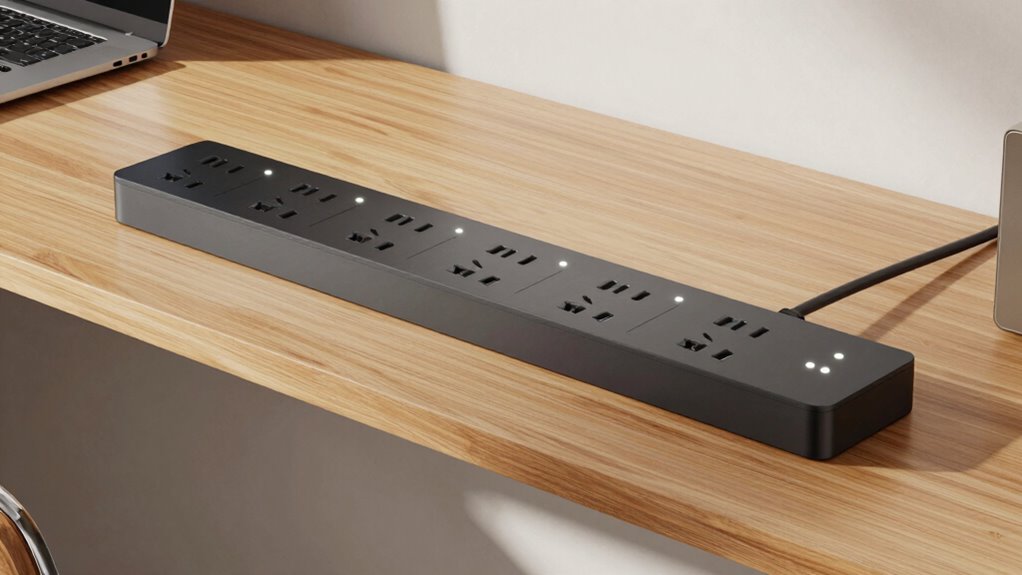
A desk-mounted power strip can keep frequently used plugs within reach, but the right choice depends on whether you need laptop charging, many AC outlets, or a flexible mounting position. I rank the Anker Nano first for its 70W USB-C charging and 1,500-joule surge protection; the Acozvin is the high-capacity pick when outlet and USB count matter most; and the VIPWELL suits desks where mounting flexibility matters more than a clamp-only design. Their tradeoffs are clear: stronger USB-C charging comes with fewer charging ports, while high port counts can mean shared USB power and a larger clamp footprint.

Get the latest gadgets delivered free with Prime
- Fast, free delivery on millions of items
- Prime Video, Amazon Music and more included
- Member-only deals all year
Complete the kit



Key Takeaways
- Anker Nano is the clearest fit for a desk setup that needs USB-C laptop charging: it offers up to 70W USB-C output, six AC outlets, and 1,500-joule surge protection.
- Acozvin has the largest port count here—nine AC outlets and eight USB ports—but its 40W USB output is shared across all eight ports.
- VIPWELL stands apart with a flexible clip for desk, wall, or table-leg mounting and a stated 1,800-joule surge rating; its load limit is 13A.
- Jgstkcity combines four USB-C ports with 1,200-joule surge protection and a clamp that fits desks up to 1.96 inches thick, the widest stated fit in this lineup.
- TenTrend is a simpler four-outlet option with two 20W USB-C ports; check its 1.7-inch desk-thickness limit before choosing it.
| Anker Nano 10-Port Desk Clamp Power Strip, 70W USB-C, 1500J Surge Protection |  | Best Overall for USB-C Laptop Charging | AC outlets: 6 | USB ports: 2 USB-C and 2 USB-A | Maximum USB-C output: 70W | VIEW ON AMAZON | See Our Full Breakdown |
| Acozvin Desk Clamp Power Strip with 10 ft Cord and 40W USB Charging |  | Best for Maximum Port Count | AC outlets: 9 | USB ports: 4 USB-A and 4 USB-C | Total USB output: 40W shared | VIEW ON AMAZON | See Our Full Breakdown |
| VIPWELL 360° Mountable Surge Protector Power Strip with 6 Outlets, 4 USB Ports, and 6 ft Extension Cord |  | Best for Flexible Mounting | AC outlets: 6 | USB ports: 2 USB-A and 2 USB-C | Surge protection: 1,800 joules | VIEW ON AMAZON | See Our Full Breakdown |
| Jgstkcity Desk Clamp Power Strip with USB-C |  | Best for Multiple USB-C Devices | AC outlets: 5 | USB ports: 4 USB-C and 2 USB-A | Total USB output: 40W shared | VIEW ON AMAZON | See Our Full Breakdown |
| TenTrend Desk Clamp Power Strip with 4 AC Outlets and 4 USB Ports |  | Best Compact, Straightforward Pick | AC outlets: 4 | USB ports: 2 USB-C and 2 USB-A | USB-C output: Up to 20W per port | VIEW ON AMAZON | See Our Full Breakdown |
| desk mounted power strip | AC outlets | USB ports | Cord length | Surge protection |
|---|---|---|---|---|
| Anker Nano 10-Port Desk Clamp | 6 | 2 USB-C and 2 USB-A | 5 ft | 1,500 joules |
| Acozvin Desk Clamp Power Strip | 9 | 4 USB-A and 4 USB-C | 10 ft | — |
| VIPWELL 360° Mountable Surge P | 6 | 2 USB-A and 2 USB-C | 6 ft | 1,800 joules |
| Jgstkcity Desk Clamp Power Str | 5 | 4 USB-C and 2 USB-A | 6 ft | 1,200 joules |
| TenTrend Desk Clamp Power Stri | 4 | 2 USB-C and 2 USB-A | 6 ft | — |
More Details on Our Top Picks
Anker Nano 10-Port Desk Clamp Power Strip, 70W USB-C, 1500J Surge Protection
I put the Anker Nano first because it addresses a common desk-mounted power problem particularly well: powering peripherals while giving a laptop a more capable USB-C charging option. Its 70W USB-C output exceeds the stated USB-C output on every other pick here, while six AC outlets and two USB-A ports leave room for monitors, accessories, and smaller devices. The 1,500-joule surge rating adds a stated layer of protection that not every model in this group specifies.
Compared with Acozvin, Anker offers fewer total USB ports and AC outlets, but a much stronger stated USB-C charging ceiling. That makes it a better match for a laptop-centered workspace than Acozvin’s eight-port USB arrangement, where 40W is shared. The tradeoff is reach: its five-foot cord is shorter than Acozvin’s 10-foot lead, so it may not suit a desk far from a wall outlet.
The clamp fits desk edges from 0.6 to 1.8 inches thick, but it cannot attach to curved or steeply sloped edges or desks without a suitable lip. Its two-pin Type A plug is also a different configuration from the three-pin Type B plugs specified for several rivals. I would choose it for a compatible desk and a laptop that can benefit from USB-C charging, not for a setup that needs the most outlets or a long reach to the wall.
Pros:- Up to 70W USB-C output is the highest stated USB-C capacity in this lineup.
- Six AC outlets and four USB ports are arranged in two zones.
- Includes a stated 1,500-joule surge-protection rating.
- Clamp mounting can keep connections accessible at the desk edge.
Cons:- The five-foot cord is shorter than the six- and 10-foot cords offered by other picks.
- Clamp compatibility excludes curved and steeply sloped edges and requires a 0.6–1.8-inch desk edge.
Best for: Laptop users who want strong USB-C charging, six AC outlets, and a clamp-mounted strip on a straight desk edge within the stated thickness range.
Not ideal for: People with curved or steeply sloped desk edges, a desk outside the 0.6–1.8-inch clamp range, or a workstation that needs a long cord or the highest port count.
- AC outlets:6
- USB ports:2 USB-C and 2 USB-A
- Maximum USB-C output:70W
- Surge protection:1,500 joules
- Cord length:5 ft
- Desk edge compatibility:0.6–1.8 in
- Dimensions:6.02 × 2.06 in
- Warranty:24 months
Our verdict“I recommend the Anker Nano for a compatible desk where laptop-ready USB-C charging matters more than maximum port count or cord reach.”
Acozvin Desk Clamp Power Strip with 10 ft Cord and 40W USB Charging
When one desk needs to serve a lot of plugged-in equipment, Acozvin’s 17 total ports make it the standout capacity pick: nine AC outlets plus eight USB ports. It also has the longest cord in this group at 10 feet, which gives more placement flexibility when the nearest wall outlet is not close to the desk. The slim flat plug is a useful match for furniture placed near a wall.
Compared with Anker, Acozvin gives up high-output USB-C charging in exchange for many more connection points. Its total USB output is 40W shared across eight ports, so the port count should not be mistaken for eight high-power charging channels. Anker is the more compelling choice for charging a laptop over USB-C; Acozvin makes more sense when several lower-demand devices and AC plugs need to stay organized at once.
The clamp fits desk edges only up to 1.7 inches thick, a narrower upper limit than Jgstkcity’s 1.96 inches. Its maximum stated load is 15A and 1,875W, but buyers still need to account for the combined load of connected equipment. I would skip it if the desk is too thick for its clamp or if the main goal is fast laptop charging rather than connection density.
Pros:- Nine AC outlets and eight USB ports provide the largest total port count in this lineup.
- A 10-foot cord gives more reach than the other listed models.
- Slim flat plug can help with placement near a wall.
- Clamp mounting keeps the strip attached to a compatible desk edge.
Cons:- The 40W USB output is shared across eight ports.
- The clamp fits desk edges only up to 1.7 inches thick.
Best for: People who need many AC and USB connections at the desk and want a longer cord for flexible placement.
Not ideal for: Laptop users seeking a high-output USB-C charging port, owners of desk edges thicker than 1.7 inches, or buyers who expect full charging output from several USB ports at once.
- AC outlets:9
- USB ports:4 USB-A and 4 USB-C
- Total USB output:40W shared
- USB-C output:Two ports up to 20W each; two up to 12W each
- Maximum power and current:1,875W; 15A
- Cord length:10 ft
- Maximum desk edge thickness:1.7 in
- Plug type:Type B, 3-pin
Our verdict“I would choose Acozvin when the priority is fitting many devices at one desk, not delivering high USB-C wattage to a laptop.”
VIPWELL 360° Mountable Surge Protector Power Strip with 6 Outlets, 4 USB Ports, and 6 ft Extension Cord
VIPWELL earns its place because it is not restricted to a desk-edge clamp. Its flexible clip design is described as supporting desk, wall, or table-leg mounting, which gives it a wider range of placement options than Anker, Acozvin, Jgstkcity, or TenTrend. Six AC outlets and four USB ports cover a typical mixed-device workspace, and the 1,800-joule surge rating is the highest stated in this lineup.
Compared with Jgstkcity, VIPWELL offers more mounting choices and a higher stated surge rating, while Jgstkcity gives a specific desk-thickness range and four USB-C ports. VIPWELL’s USB port types are listed as two USB-A and two USB-C, but no charging wattage is provided here, so I would not choose it over Anker for a USB-C laptop based on the available specifications. Its 45-degree flat plug and six-foot cord help with furniture placement, though they cannot make a distant outlet closer than the cord allows.
The main limitation is its 13A, 1,625W load ceiling, lower than the 15A, 1,875W figures listed for Acozvin and TenTrend. It also has no stated desk-edge thickness range, so buyers who specifically need a clamp fitted to a measured lip should confirm the mounting design and fit. I rank it as the most adaptable mount, not as the strongest choice for demanding USB charging or the highest load rating.
Pros:- Flexible clip design supports desk, wall, or table-leg mounting.
- Six AC outlets and four USB ports suit mixed-device setups.
- Stated 1,800-joule surge protection is the highest figure in this group.
- 45-degree flat plug and six-foot cord support adaptable placement.
Cons:- The 13A or 1,625W maximum load is lower than the 15A models listed here.
- USB charging wattage and a desk-edge thickness range are not specified in the supplied details.
Best for: People who want to mount a power strip on a desk, wall, or table leg instead of relying on a desk-edge clamp alone.
Not ideal for: Buyers who need a specified clamp fit for a measured desk edge, a load rating above 13A or 1,625W, or documented high-wattage USB-C charging.
- AC outlets:6
- USB ports:2 USB-A and 2 USB-C
- Surge protection:1,800 joules
- Cord length:6 ft
- Maximum current and power:13A; 1,625W
- Voltage:125V
- Plug angle:45°
- Dimensions:12.8 × 2.2 × 1.3 in
Our verdict“I recommend VIPWELL when mounting flexibility and its stated surge rating matter more than a documented clamp fit or higher load limit.”
Jgstkcity Desk Clamp Power Strip with USB-C
Jgstkcity is a useful middle ground for a desk where several USB-C devices need convenient ports but surge protection also matters. It has four USB-C ports, two USB-A ports, and five AC outlets, along with a stated 1,200-joule surge rating. Its clamp fits desks up to 1.96 inches thick, the broadest stated maximum in this group, making it a more plausible fit for thicker desk edges than Acozvin or TenTrend.
That broader fit comes with a practical installation caveat: the clamp needs 0.4–0.5 inches of clearance from the wall. A desk pushed flush against a wall may not leave enough room. Compared with VIPWELL, Jgstkcity is more clearly specified for desk-edge mounting and USB-C port count, while VIPWELL offers more mounting locations and a higher stated surge rating. Anker remains the stronger choice when a laptop needs its single high-output USB-C option; Jgstkcity lists 40W total USB output shared across ports.
The six-foot flat-plug cord suits a desk within reach of an outlet, and ETL listing is stated for this model. Its maximum current is 12A, below the 13A VIPWELL limit and the 15A listed for Acozvin and TenTrend, so I would compare that limit with the planned equipment load. This pick is best for charging several smaller USB-C devices at a mounted desk, not for treating all four ports as independent 20W chargers.
Pros:- Four USB-C ports and two USB-A ports offer varied device connections.
- The clamp accommodates desk edges up to 1.96 inches thick.
- Includes a stated 1,200-joule surge rating and ETL listing.
- Six-foot flat-plug cord offers practical reach for many desk setups.
Cons:- The 40W USB output is shared across the ports.
- Clamp installation needs 0.4–0.5 inches of clearance from the wall.
- Its 12A maximum current is lower than the other stated current limits in this group.
Best for: People with a desk edge up to 1.96 inches thick who want several USB-C ports, a clamp mount, and stated surge protection.
Not ideal for: Anyone whose desk sits too close to a wall for clamp clearance, who needs high USB-C laptop wattage, or whose connected equipment calls for a higher current rating.
- AC outlets:5
- USB ports:4 USB-C and 2 USB-A
- Total USB output:40W shared
- Surge protection:1,200 joules
- Maximum current:12A
- Cord length:6 ft
- Maximum desk thickness:1.96 in
- Wall clearance:0.4–0.5 in
- Certification and warranty:ETL listed; 1 year
Our verdict“I would pick Jgstkcity for a thick, wall-spaced desk edge and several USB-C accessories, rather than for high-wattage laptop charging.”
TenTrend Desk Clamp Power Strip with 4 AC Outlets and 4 USB Ports
TenTrend keeps the setup relatively simple: four AC outlets and four USB ports in a clamp-mounted unit with a six-foot cord. Its two USB-C ports are each listed for up to 20W, which gives it a clearer charging specification than VIPWELL, whose USB wattage is not provided. Overload and surge protection are also listed, though the supplied details do not give a joule rating for surge protection.
Compared with Acozvin, TenTrend gives up five AC outlets and four USB ports, but it avoids the same high port count and shared 40W total USB specification. Compared with Anker, it has less USB-C output per port and fewer AC outlets, but its 15A and 1,875W limits match Acozvin’s stated electrical ceiling. The flat plug and angled design can help fit a compact workspace, although the six-foot cord is much shorter than Acozvin’s.
The clamp fits desks up to 1.7 inches thick, so it is not the choice for a thick edge; Jgstkcity allows up to 1.96 inches. The USB-A ports are listed up to 3.4A each, but buyers should not read that as a guarantee that every connected device receives its preferred charging rate at the same time. I see TenTrend as a practical, smaller-capacity desk pick for everyday accessories, rather than a hub for a heavily equipped workstation.
Pros:- Two USB-C ports are each listed for up to 20W.
- Four AC outlets and four USB ports cover a modest desk setup.
- Includes overload and surge protection.
- Flat plug, angled design, and six-foot cord support space-conscious placement.
Cons:- The clamp fits desks only up to 1.7 inches thick.
- Four AC outlets may be limiting for a larger workstation.
- No surge-protection joule rating is provided in the supplied details.
Best for: People who want a compact clamp-mounted strip with four AC outlets, two specified 20W USB-C ports, and overload protection.
Not ideal for: Owners of desk edges thicker than 1.7 inches, users who need many AC outlets, or laptop users seeking the 70W USB-C output offered by Anker.
- AC outlets:4
- USB ports:2 USB-C and 2 USB-A
- USB-C output:Up to 20W per port
- USB-A output:Up to 3.4A per port
- Cord length:6 ft
- Maximum desk thickness:1.7 in
- Maximum power and current:1,875W; 15A
- Dimensions:9.45 × 1.57 in
Our verdict“I recommend TenTrend for a smaller desk setup that needs clear, moderate USB-C charging rather than maximum outlet capacity.”

How We Picked
I ranked these five options around the job implied by the title: adding accessible power to a desk without leaving a loose strip rolling around on the floor. I compared their mounting design and desk-edge fit, the number and type of outlets, USB charging capacity, cord length, stated surge or overload protection, and practical limits that might rule out a setup.
The ranking favors useful differences rather than the largest number on a spec sheet. That is why the Anker Nano leads for laptop-oriented charging, while Acozvin ranks highly for total connection capacity and VIPWELL earns a distinct place for flexible mounting. Jgstkcity and TenTrend are more specialized picks: one balances USB-C ports with surge protection and a broader clamp fit, while the other keeps the arrangement simpler.
I did not treat specifications as proof of performance beyond what is stated. USB output described as shared may not deliver the maximum to every device at once, and a clamp is only useful if it fits the desk edge and leaves the needed clearance. I also distinguish a stated surge rating from overload protection; they address different aspects of a power strip’s design. Buyers should verify the fit, load limits, and charging needs for their own equipment before purchasing.
Factors to Consider When Choosing Desk Mounted Power Strips
I would narrow the choice by checking the desk edge first, then matching the strip’s outlets and charging limits to the equipment you actually plan to connect. A desk-mounted unit is only useful when its mount fits securely and its cord reaches the wall outlet.
Check the desk edge before comparing ports
Measure the thickness of the edge where the strip will sit, and check whether its shape gives the clamp a flat, stable surface. Anker’s stated range is 0.6–1.8 inches; Acozvin and TenTrend fit edges up to 1.7 inches; Jgstkcity lists a 1.96-inch maximum but needs 0.4–0.5 inches of wall clearance. VIPWELL uses a flexible clip and allows desk, wall, or table-leg mounting, but the supplied specifications do not give a desk-edge thickness range. If your desk has a curved edge, steep slope, apron, or nearby wall, those details can matter more than an extra outlet.
Match USB-C output to the device
A USB-C port count alone does not tell you how quickly a device can charge. Anker is the standout here with up to 70W USB-C output, while Acozvin lists two ports up to 20W and two up to 12W, and TenTrend lists two ports up to 20W each. Jgstkcity has four USB-C ports but a 40W total shared across its USB ports. VIPWELL’s USB charging wattage is not stated in the supplied details. For a laptop, compare the stated output with the laptop’s charging needs; for phones and accessories, port availability may matter more than high wattage.
Choose capacity for the devices you use together
Acozvin’s nine AC outlets and eight USB ports are the clear choice for connection density, but its shared USB output means multiple charging devices may divide a limited total. Anker and VIPWELL each offer six AC outlets, while Jgstkcity has five and TenTrend has four. Make a list of devices that will remain plugged in, including monitors, lamps, chargers, and any equipment with a higher power draw. The maximum load is not a recommendation to use every outlet at full capacity; check the equipment labels and stay within the strip’s stated limit.
Read surge and overload details as separate claims
A stated joule rating gives buyers a point of comparison for surge protection: VIPWELL lists 1,800 joules, Anker 1,500, and Jgstkcity 1,200. The supplied specifications do not give a joule figure for Acozvin or TenTrend, even though TenTrend lists surge protection. Overload protection and a maximum current or wattage limit are different specifications, so I would not treat one as a substitute for the other. If surge protection is central to your decision, compare the stated protection details and check the manufacturer’s instructions for the equipment and location.
Plan cord reach and outlet placement
The cord length ranges from Anker’s five feet to Acozvin’s 10 feet, with VIPWELL, Jgstkcity, and TenTrend listing six-foot cords. Measure the route from the desk to the wall outlet rather than estimating from where the strip will clamp. A flat or angled plug may help furniture sit closer to the wall, but it does not add reach. Also check whether the strip’s body, attached plugs, and cable path leave enough room for a comfortable workstation layout.
Decide what tradeoff you can live with
For USB-C laptop charging, I would start with Anker and accept its shorter cord and narrower mounting compatibility. For the most AC and USB connections, Acozvin is the logical pick, provided shared USB output suits the devices. VIPWELL is the flexible mounting option, Jgstkcity suits people who want several USB-C ports and a wider specified clamp fit, and TenTrend keeps the setup simpler. Choosing by these distinct roles is more useful than treating every added port or protection number as equally valuable.
Frequently Asked Questions
Which desk-mounted power strip is best for charging a laptop over USB-C?
I would start with the Anker Nano because it lists up to 70W USB-C output, the strongest stated USB-C capacity among these five options. Check your laptop’s charging requirements before relying on a USB-C port, and keep in mind that Anker has a five-foot cord and a clamp that fits only specific desk edges. Acozvin and TenTrend list lower USB-C output, while Jgstkcity describes a shared 40W total across its USB ports.
Which option has the most outlets and USB ports?
Acozvin has the highest total connection count in this comparison, with nine AC outlets and eight USB ports. Its advantage is capacity for many devices, not the strongest charging performance: the total USB output is 40W shared across the ports. If the priority is fewer devices but higher USB-C charging output, Anker is a stronger alternative despite having fewer total ports.
How do I know whether a clamp will fit my desk?
Measure the desk edge where you plan to install the strip and check its shape, clearance, and thickness against the product details. Anker lists a 0.6–1.8-inch range, Acozvin and TenTrend list a maximum of 1.7 inches, and Jgstkcity lists up to 1.96 inches but needs clearance from the wall. Anker also excludes curved and steeply sloped edges. VIPWELL offers other mounting positions, but its supplied details do not state a clamp thickness range.
Does a higher joule rating mean a power strip has more USB charging power?
No. A joule rating describes the stated surge-protection capacity, while USB charging output is specified separately in watts or amps. VIPWELL lists 1,800 joules and Anker lists 1,500 joules, but Anker has the highest stated USB-C output at 70W. I would compare these specifications independently and choose based on both your protection priorities and charging needs.
Which model is a good choice for a small or lightly equipped desk?
TenTrend is a reasonable place to start if four AC outlets and four USB ports are enough; it also lists two USB-C ports up to 20W each and has a six-foot cord. Anker may suit a compact arrangement when laptop charging is the priority, but its clamp needs a compatible edge. For a small desk with many devices, Acozvin offers far more ports, though that larger capacity may be unnecessary and its USB output is shared.
Conclusion
My recommendation depends on what the desk needs to power. Choose the Anker Nano if USB-C laptop charging and a stated surge rating lead your list, and your desk edge fits its clamp. Pick Acozvin when you need the most outlets and USB connections, with the understanding that its USB output is shared. Go with VIPWELL for flexible mounting around a desk, wall, or table leg; choose Jgstkcity for several USB-C ports and a thicker compatible desk edge; or select TenTrend for a smaller everyday setup. Before ordering, I would measure the desk, map the cord route, and check the total load and charging needs of the devices I plan to connect.
Fall Picks
fall essentials
As an affiliate, we earn on qualifying purchases.