For a color laser printer for a home office, my best overall pick is the Brother MFC-L3720CDW, which pairs color printing with scanning, copying, and faxing. The HP Color LaserJet Pro 3201dw is a strong fit if you mainly need a straightforward printer, while the Canon Color imageCLASS MF753Cdw II suits offices that want a more capable all-in-one. The main tradeoffs are multifunction features versus a smaller footprint, and convenience versus the space and upkeep of a color laser device. I compare all 11 options by role, features, and limitations below so you can choose for your actual workload.

Get the latest gadgets delivered free with Prime
- Fast, free delivery on millions of items
- Prime Video, Amazon Music and more included
- Member-only deals all year
Complete the kit



Key Takeaways
- Multifunction models lead on flexibility: the Brother MFC-L3720CDW and Canon MF753Cdw II add scanning and copying for paperwork-heavy work, while print-only models keep the job simpler.
- Print-only is a meaningful way to save space: the HP 3201dw, Xerox C230, Brother HL-L3220CDW and HL-L3280CDW, and Canon LBP646Cdw are better matches when scanning is not part of the routine.
- Brother offers several distinct home-office paths: the MFC-L3720CDW provides all-in-one capability, while the HL-L3220CDW and HL-L3280CDW focus on printing with different feature sets.
- Canon and HP both cover more than one workflow: Canon has print-only and all-in-one options, while HP’s 3201dw is print-focused and the 3301sdw adds scan and copy functions.
- Choose by paperwork and placement, not color alone: the Xerox C230 and C240 are compact print-focused alternatives, while larger multifunction choices make more sense when consolidating office tasks matters more than footprint.
| Brother MFC-L3720CDW Wireless Color Laser All-in-One Printer |  | Best All-in-One for a Home Office | Functions: Print, scan, copy, fax | Print technology: Color laser | Print speed: Up to 19 pages per minute | VIEW ON AMAZON | See Our Full Breakdown |
| HP Color LaserJet Pro 3201dw Wireless Color Laser Printer |  | Best for Fast Document Printing | Printer type: Color laser | Print speed: Up to 26 pages per minute in black and color | Duplex printing: Automatic | VIEW ON AMAZON | See Our Full Breakdown |
| Xerox C230 Color Laser Printer |  | Best Compact Print-Only Option | Printer type: Color laser | Print speed: Up to 24 pages per minute | Print resolution: 600 x 600 dpi | VIEW ON AMAZON | See Our Full Breakdown |
| Brother HL-L3220CDW Wireless Color Laser Printer |  | Best Straightforward Home-Office Printer | Printer type: Color laser | Functions: Print only | Print speed: Up to 19 pages per minute | VIEW ON AMAZON | See Our Full Breakdown |
| Brother HL-L3280CDW Wireless Color Laser Printer | 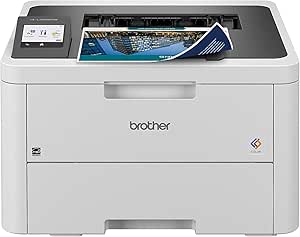 | Best for Fast, Flexible Home-Office Printing | Printer type: Color laser | Print speed: Up to 27 pages per minute | Duplex printing: Automatic | VIEW ON AMAZON | See Our Full Breakdown |
| Canon Color imageCLASS MF753Cdw II All-in-One Color Laser Printer |  | Best for High-Volume Home Offices | Functions: Print, scan, copy, fax | Print speed: Up to 35 pages per minute | Automatic document feeder: 50-sheet duplex, single-pass | VIEW ON AMAZON | See Our Full Breakdown |
| HP Color LaserJet Pro MFP 3301sdw Wireless All-in-One Color Laser Printer |  | Best for Wired and Wireless Office Setups | Functions: Print, scan, copy | Print speed: Up to 26 pages per minute in black and color | Connectivity: Wi-Fi, Ethernet | VIEW ON AMAZON | See Our Full Breakdown |
| Canon Color imageCLASS LBP646Cdw Wireless Laser Printer |  | Best Compact Print-Only Pick | Functions: Print only | Print speed: Up to 26 pages per minute | First print time: Approximately 10.3 seconds | VIEW ON AMAZON | See Our Full Breakdown |
| Canon Color imageCLASS MF665Cdw Wireless All-in-One Duplex Laser Printer |  | Best for Two-Sided Scanning | Functions: Print, scan, copy, fax | Print speed: Up to 26 pages per minute, color and monochrome | Automatic document feeder: 50-sheet duplex, single-pass | VIEW ON AMAZON | See Our Full Breakdown |
| Xerox C240 Wireless Color Laser Printer |  | Best for Flexible Wireless Printing | Functions: Print only | Print speed: Up to 26 pages per minute, color and black and white | Maximum print resolution: 2400 × 600 dpi | VIEW ON AMAZON | See Our Full Breakdown |
| Canon Color imageCLASS MF652Cw Wireless Color Laser All-in-One Printer |  | Best for Straightforward Home-Office Scanning and Copying | Printer type: Color laser all-in-one | Functions: Print, scan, copy | Print speed: Up to 22 pages per minute in color and black-and-white | VIEW ON AMAZON | See Our Full Breakdown |
| color laser printer for home office | Print speed | Connectivity | Functions | Duplex printing |
|---|---|---|---|---|
| Brother MFC-L3720CDW Wireless | Up to 19 pages per minute | — | Print, scan, copy, fax | Automatic |
| HP Color LaserJet Pro 3201dw W | Up to 26 pages per minute in black and color | Wi-Fi, Ethernet, USB | — | Automatic |
| Xerox C230 Color Laser Printer | Up to 24 pages per minute | Wi-Fi, Wi-Fi Direct, Apple AirPrint, Mopria | — | Automatic |
| Brother HL-L3220CDW Wireless C | Up to 19 pages per minute | Wireless, network-ready | Print only | Automatic |
| Brother HL-L3280CDW Wireless C | Up to 27 pages per minute | Dual-band wireless, Ethernet, mobile printing | — | Automatic |
| Canon Color imageCLASS MF753Cd | Up to 35 pages per minute | Wireless; mobile printing support | Print, scan, copy, fax | — |
| HP Color LaserJet Pro MFP 3301 | Up to 26 pages per minute in black and color | Wi-Fi, Ethernet | Print, scan, copy | Automatic |
| Canon Color imageCLASS LBP646C | Up to 26 pages per minute | Wi-Fi, USB, Ethernet | Print only | — |
| Canon Color imageCLASS MF665Cd | Up to 26 pages per minute, color and monochrome | Wireless, USB | Print, scan, copy, fax | — |
| Xerox C240 Wireless Color Lase | Up to 26 pages per minute, color and black and white | Dual-band Wi-Fi, Apple AirPrint, Mopria | Print only | Auto-duplex |
| Canon Color imageCLASS MF652Cw | Up to 22 pages per minute in color and black-and-white | USB, Ethernet, wireless | Print, scan, copy | — |
More Details on Our Top Picks
Brother MFC-L3720CDW Wireless Color Laser All-in-One Printer
The Brother MFC-L3720CDW is the most capable choice here when a home office needs more than printing: it handles scanning, copying, and faxing as well, with a 50-sheet feeder for multi-page jobs. Automatic duplex printing and a 250-sheet tray reduce paper handling, while the touchscreen and cloud access offer more hands-on control than the print-only Brother HL-L3220CDW. Its speed tops out at 19 pages per minute, though, so the Xerox C230 or HP Color LaserJet Pro 3201dw is a better fit when print throughput matters more than an all-in-one. The tradeoff is a larger feature set to manage, and some cloud or mobile functions need an internet or wireless connection. I’d choose it for varied office tasks, not for the fastest printing.
Pros:- Prints, scans, copies, and faxes from one device
- 50-sheet automatic document feeder helps with multi-page scanning and copying
- Automatic duplex printing and a 250-sheet paper tray reduce routine paper handling
- Dual-band wireless, Wi-Fi Direct, touchscreen, and cloud service access
Cons:- Up to 19 pages per minute is slower than the HP Color LaserJet Pro 3201dw and Xerox C230
- Some cloud and mobile features depend on an internet or wireless connection
- The advertised print speed is for one-sided printing
Best for: Home-office owners who regularly scan, copy, or fax multi-page documents and want automatic two-sided printing.
Not ideal for: Buyers who only need fast color printing, or who prefer a simpler print-only machine such as the Brother HL-L3220CDW.
- Functions:Print, scan, copy, fax
- Print technology:Color laser
- Print speed:Up to 19 pages per minute
- Scan speed:Up to 29 images per minute in black and 22 in color
- Automatic document feeder:50 sheets
- Paper tray capacity:250 sheets
- Duplex printing:Automatic
- Connectivity and display:Dual-band wireless, Wi-Fi Direct, USB 2.0; 3.5-inch color touchscreen
- Energy certifications:ENERGY STAR compliant; EPEAT Silver
Our verdict“Choose the MFC-L3720CDW if your home office needs scanning, copying, and faxing alongside color laser printing.”
HP Color LaserJet Pro 3201dw Wireless Color Laser Printer
For a home office that prints frequent work documents, the HP Color LaserJet Pro 3201dw puts speed ahead of all-in-one flexibility: it prints up to 26 pages per minute in both black and color, faster than the Brother HL-L3220CDW and MFC-L3720CDW. Automatic duplexing and a 250-sheet tray make it practical for longer jobs, while Wi-Fi, Ethernet, and USB give a home workspace several connection options. Unlike the Xerox C230, it lists a 250-sheet output capacity, useful when a batch needs to sit before pickup. The key compromise is that it only prints; there’s no scanner or copier. It also blocks toner cartridges without original HP chips or circuitry, which limits cartridge flexibility, and its 33-pound weight makes it less convenient to move.
Pros:- Up to 26 pages per minute in black and color
- Automatic duplex printing for two-sided documents
- Wi-Fi, Ethernet, and USB connections suit different home-office setups
- 250-sheet input and output capacities support longer print jobs
Cons:- Print-only design lacks scanning and copying
- Designed to block toner cartridges without original HP chips or circuitry
- At 33 pounds, it is less convenient to relocate than the Brother HL-L3220CDW
Best for: Home-office workers who print substantial volumes of color reports and want faster output plus Ethernet connectivity.
Not ideal for: People who need scanning or copying, move their printer often, or want flexibility to use toner without original HP chips or circuitry.
- Printer type:Color laser
- Print speed:Up to 26 pages per minute in black and color
- Duplex printing:Automatic
- Input tray capacity:250 sheets
- Output tray capacity:250 sheets
- Connectivity:Wi-Fi, Ethernet, USB
- Maximum media size:8.5 x 14 inches
- Resolution:600 x 600 dpi
- Weight:33 pounds
Our verdict“Pick the HP 3201dw if print speed and wired-network options matter more than scanning or cartridge flexibility.”
Xerox C230 Color Laser Printer
The Xerox C230 is a sensible match for a home office that wants a straightforward color printer without paying for unused scanning or fax functions. Its footprint is smaller than the HP Color LaserJet Pro 3201dw’s, and it still delivers up to 24 pages per minute, automatic duplex printing, and a 250-sheet tray. Wi-Fi Direct, Apple AirPrint, Mopria, and guided setup through the Easy Assist app make it easier to place and connect than a printer dependent on a single workstation. It’s slower than the HP 3201dw and the Brother HL-L3280CDW, so frequent large print batches may take longer. The 500-page-rated starter toner is another limitation for busy users, and, like the HL-L3220CDW, it cannot scan or copy.
Pros:- Smaller listed footprint than the HP Color LaserJet Pro 3201dw
- Up to 24 pages per minute with automatic duplex printing
- Wi-Fi Direct, Apple AirPrint, and Mopria support mobile printing
- 250-sheet paper tray and guided setup through the Xerox Easy Assist app
Cons:- Print-only; no scanning or copying
- Starter toner is rated for 500 pages
- Slower than the HP Color LaserJet Pro 3201dw and Brother HL-L3280CDW
Best for: Home-office users with limited desk space who need reliable color printing, duplexing, and mobile-device support but no scanning.
Not ideal for: Buyers who need an all-in-one or print frequent high-volume batches and want a higher-rated starter toner supply.
- Printer type:Color laser
- Print speed:Up to 24 pages per minute
- Print resolution:600 x 600 dpi
- Duplex printing:Automatic
- Connectivity:Wi-Fi, Wi-Fi Direct, Apple AirPrint, Mopria
- Paper tray capacity:250 sheets
- Dimensions:15.5 x 16.2 x 9.6 inches
- Monthly recommended volume:Up to 1,500 pages
- Certifications:ENERGY STAR, EPEAT
Our verdict“Choose the Xerox C230 for a space-conscious home office that needs mobile-friendly color printing but not multifunction features.”
Brother HL-L3220CDW Wireless Color Laser Printer
The Brother HL-L3220CDW keeps the job simple: it prints color documents, supports automatic duplexing, and holds up to 250 sheets, without the added controls or functions of the MFC-L3720CDW. At 24.7 pounds, it is lighter than the 30-pound Xerox C230 and 33-pound HP 3201dw, a practical advantage if the printer needs to move between a desk and shelf. Its 19-page-per-minute speed is more modest than those alternatives, and the print-only design means scanning and copying require another device. A manual feed slot adds some flexibility for specialty media, while the 150-sheet output capacity is adequate for ordinary home-office use but less suited to unattended, large print runs. I’d rank it as a simple daily printer rather than a speed or multifunction pick.
Pros:- Automatic duplex printing reduces manual page handling
- 250-sheet input tray supports routine document work
- Lighter than the Xerox C230 and HP Color LaserJet Pro 3201dw
- Manual feed slot accommodates specialty media
Cons:- Print-only design has no scanning or copying
- Up to 19 pages per minute is slower than the Xerox C230 and HP 3201dw
- 150-sheet output capacity may require more frequent clearing during larger jobs
Best for: Home-office users who mainly print routine documents, want automatic two-sided printing, and value a lighter printer over higher speed.
Not ideal for: People who need scanning or copying, frequently print large batches, or want the faster output of the HP 3201dw or Brother HL-L3280CDW.
- Printer type:Color laser
- Functions:Print only
- Print speed:Up to 19 pages per minute
- Duplex printing:Automatic
- Paper tray capacity:250 sheets
- Output capacity:150 sheets
- Resolution:2400 x 600
- Weight and dimensions:24.7 pounds; 15.7 x 15.7 x 9.4 inches
- Connectivity:Wireless, network-ready
Our verdict“Pick the HL-L3220CDW for uncomplicated color printing and duplexing when you do not need a scanner or higher print speed.”
Brother HL-L3280CDW Wireless Color Laser Printer
The Brother HL-L3280CDW pairs the fastest listed print speed in this group—up to 27 pages per minute—with automatic duplexing, Ethernet, dual-band wireless, and a 2.7-inch touchscreen. That makes it a stronger fit for a busy home office than the slower HL-L3220CDW, while keeping the setup print-focused rather than adding the scan and fax functions found on the MFC-L3720CDW. Its support for labels, envelopes, cardstock, and glossy photo paper gives it useful media range for occasional office projects. The tradeoff is its 33.9-pound weight, which undercuts the compact-workspace pitch if you need to lift or relocate it often. Some cloud and mobile features require internet access or an app, and the listed EZ Print trial may involve enrollment and charges.
Pros:- Fastest listed print speed in this group at up to 27 pages per minute
- Automatic duplex printing for two-sided documents
- Dual-band wireless, Ethernet, and mobile printing support
- Touchscreen controls and support for labels, envelopes, cardstock, and glossy photo paper
Cons:- Print-only; it cannot scan or copy like the Brother MFC-L3720CDW
- At 33.9 pounds, it is relatively heavy for a compact-workspace printer
- Some cloud and mobile functions require internet access or an app; EZ Print trial enrollment may involve charges
Best for: Home-office users who print frequent color documents, want Ethernet or dual-band Wi-Fi, and occasionally use specialty media.
Not ideal for: Buyers who need scanning and copying, want a light printer to move around, or prefer to avoid app-dependent features and trial enrollment.
- Printer type:Color laser
- Print speed:Up to 27 pages per minute
- Duplex printing:Automatic
- Connectivity:Dual-band wireless, Ethernet, mobile printing
- Display:2.7-inch touchscreen
- Weight and dimensions:33.9 pounds; 15.7 x 10.8 x 15.7 inches
- Supported media:Cardstock, envelopes, glossy photo paper, labels, plain paper
- Energy certification:ENERGY STAR compliant; EPEAT Silver
- Warranty:1-year limited warranty
Our verdict“Choose the HL-L3280CDW if your priority is quick, flexible color printing and you can do without scanning or copying.”
Canon Color imageCLASS MF753Cdw II All-in-One Color Laser Printer
The MF753Cdw II is the strongest fit here for a home office that regularly handles substantial paperwork. Its 35-page-per-minute speed leads the other listed models, while the 50-sheet single-pass duplex feeder can scan both sides of documents without turning pages by hand. Compared with the MF665Cdw, it also offers faster printing and expandable paper capacity, making it better suited to busy shared workspaces. That capacity reaches 850 sheets only with an optional cassette, though, and the printer already weighs 50 pounds. Its print, scan, copy, and fax functions cover a wider set of office tasks than the print-only LBP646Cdw, but that flexibility takes more desk and moving effort. I’d choose it when document throughput matters more than a light, compact setup.
Pros:- Prints up to 35 pages per minute, faster than the other products in this batch
- 50-sheet single-pass duplex feeder scans both sides of documents
- Print, scan, copy, and fax functions suit varied office paperwork
- Paper capacity can expand to 850 sheets with an optional cassette
Cons:- The 850-sheet capacity requires buying and fitting an optional cassette
- At 50 pounds, it is difficult to reposition
- Its all-in-one features and capacity may be more than a light-duty home office needs
Best for: Home-office owners who print frequent document batches, scan two-sided paperwork, and need faxing alongside color printing.
Not ideal for: People with limited desk space or anyone who needs to move the printer often; it weighs 50 pounds and is larger than a print-only model.
- Functions:Print, scan, copy, fax
- Print speed:Up to 35 pages per minute
- Automatic document feeder:50-sheet duplex, single-pass
- Standard paper capacity:250-sheet cassette and 50-sheet multipurpose tray
- Maximum paper capacity:850 sheets with optional cassette
- Display:5-inch color touchscreen
- Connectivity:Wireless; mobile printing support
- Weight:50 pounds
- Warranty:3-year limited
Our verdict“Choose the MF753Cdw II for a busy home office that values fast printing and high-volume document handling over a lightweight footprint.”
HP Color LaserJet Pro MFP 3301sdw Wireless All-in-One Color Laser Printer
The HP Color LaserJet Pro MFP 3301sdw makes sense for a home office that needs printing, scanning, and copying but does not require fax. Its combination of Wi-Fi and Ethernet gives a useful choice between flexible wireless placement and a wired network connection—an advantage over the wireless-and-USB Canon MF665Cdw if Ethernet matters. At up to 26 pages per minute, it is a capable document printer, though it cannot match the MF753Cdw II’s 35-page-per-minute pace or duplex single-pass feeder. The 250-sheet tray and automatic duplex printing help reduce routine interruptions and paper use. One ownership constraint deserves attention: it requires HP cartridges with HP chips or circuitry. I’d skip it if cartridge flexibility is a priority or if faxing and two-sided document scanning are regular tasks.
Pros:- Wi-Fi and Ethernet support different home-office network setups
- Automatic duplex printing reduces manual page handling
- Automatic document feeder supports routine multi-page scanning
- 250-sheet input tray accommodates larger print jobs
Cons:- Does not include fax, unlike the Canon MF665Cdw and MF753Cdw II
- Print speed is lower than the MF753Cdw II
- Requires HP cartridges with HP chips or circuitry
Best for: Home-office users who want an all-in-one for print, scan, and copy, with the option to connect by either Wi-Fi or Ethernet.
Not ideal for: People who need faxing, a duplex document feeder, or freedom to choose toner without HP chips or circuitry.
- Functions:Print, scan, copy
- Print speed:Up to 26 pages per minute in black and color
- Connectivity:Wi-Fi, Ethernet
- Input tray capacity:250 sheets
- Automatic document feeder:Yes
- Duplex printing:Automatic
- Maximum print resolution:600 x 600 dpi
- Weight:37.7 pounds
- Compatible toner:HP 218A standard and 218X high-yield cartridges
Our verdict“Pick the HP 3301sdw if you want a network-flexible print, scan, and copy machine and do not need fax or cartridge choice.”
Canon Color imageCLASS LBP646Cdw Wireless Laser Printer
The Canon LBP646Cdw is the straightforward choice for a home office that needs reliable color output but already has a separate scanner or rarely scans. It keeps the essentials—automatic duplex printing, wireless connectivity, and a 250-sheet cassette—without the extra hardware of the MF665Cdw. At 27.6 pounds and 10.5 inches tall, it is also easier to place than that 50-pound all-in-one. Its 26-page-per-minute speed is on par with the Xerox C240, but the Canon accepts legal-size media while the Xerox is listed for A4 and letter. The tradeoff is firm: this is print only, and its one-sheet multipurpose tray is limited for specialty paper jobs. A five-line LCD also offers a simpler interface than the touchscreen on the Canon all-in-ones.
Pros:- Automatic duplex printing helps cut paper use without manual page turning
- 250-sheet cassette supports routine office printing
- Wi-Fi, USB, and Ethernet provide multiple connection options
- Supports legal-size media and weighs less than the Canon MF665Cdw
Cons:- Print-only design has no scanner, copier, or fax
- Multipurpose tray holds only one sheet
- One-year limited warranty is shorter than the three-year coverage listed for the Canon all-in-ones
Best for: Home-office users who mainly print documents, want automatic two-sided output, and have separate equipment for scanning or copying.
Not ideal for: People who need scanning, copying, faxing, or frequent use of specialty media that calls for more than a one-sheet multipurpose tray.
- Functions:Print only
- Print speed:Up to 26 pages per minute
- First print time:Approximately 10.3 seconds
- Paper capacity:250-sheet cassette and 1-sheet multipurpose tray
- Maximum media size:Legal (8.5 x 14 inches)
- Connectivity:Wi-Fi, USB, Ethernet
- Display:5-line LCD
- Weight:27.6 pounds
- Warranty:1-year limited
Our verdict“Choose the LBP646Cdw if you want a comparatively easy-to-place color laser printer and do not need all-in-one functions.”
Canon Color imageCLASS MF665Cdw Wireless All-in-One Duplex Laser Printer
The Canon MF665Cdw brings the most useful feature for paperwork-heavy home offices into a more moderate-speed all-in-one: its 50-sheet, single-pass duplex feeder scans both sides of a document in one pass. That can save repetitive handling compared with the HP 3301sdw, whose listed feeder does not specify duplex scanning. The Canon also prints, copies, and faxes, with a 5-inch color touchscreen that gives it a more direct control panel than the print-only LBP646Cdw. Printing tops out at 26 pages per minute, so it gives up the MF753Cdw II’s higher speed and expandable paper capacity. It remains a substantial 50 pounds, and its multipurpose tray holds just one sheet. I’d favor it when scanning two-sided forms matters more than faster output or a lighter machine.
Pros:- 50-sheet duplex, single-pass feeder scans both sides of pages in one pass
- Combines print, scan, copy, and fax functions
- Automatic duplex printing handles two-sided output
- 5-inch color touchscreen and wireless printing support
Cons:- Weighs 50 pounds, making it hard to reposition
- One-sheet multipurpose tray limits specialty-paper workflows
- Print speed is lower than the MF753Cdw II
Best for: Home-office users who regularly scan two-sided forms or contracts and want printing, copying, and faxing in one machine.
Not ideal for: People who prioritize a light printer, high-volume printing speed, or a multipurpose tray for frequent specialty-media jobs.
- Functions:Print, scan, copy, fax
- Print speed:Up to 26 pages per minute, color and monochrome
- Automatic document feeder:50-sheet duplex, single-pass
- Display:5-inch color touchscreen
- Paper capacity:250-sheet cassette and 1-sheet multipurpose tray
- Connectivity:Wireless, USB
- Maximum media size:Legal (8.5 x 14 inches)
- Weight:50 pounds
- Warranty:3-year limited warranty
Our verdict“Choose the MF665Cdw if duplex document scanning is a regular task and you want a full-featured all-in-one without the MF753Cdw II’s higher print speed.”
Xerox C240 Wireless Color Laser Printer
The Xerox C240 suits a home office that wants a print-only machine with broad wireless-device support and guidance during setup. Dual-band Wi-Fi, AirPrint, and Mopria make it a natural match for mixed-device households, while the Easy Assist app can help people who prefer guided setup. Its 26-page-per-minute speed and auto-duplex printing put it alongside the Canon LBP646Cdw for everyday document work. The Xerox lists support for card stock, envelopes, glossy photo paper, and labels, giving it useful media flexibility; however, its stated maximum is letter/A4, while the Canon also handles legal-size paper. Like the Canon print-only model, it cannot scan or copy. High-yield toner options may help manage ongoing costs, but they remain an added consideration for frequent printing.
Pros:- Dual-band Wi-Fi with AirPrint and Mopria supports varied devices
- Easy Assist app provides guided setup
- Automatic duplex printing handles two-sided jobs
- Supports card stock, envelopes, glossy photo paper, and labels
Cons:- Print-only design has no scanning or copying
- Maximum media size is letter/A4, unlike the legal-size Canon LBP646Cdw
- High-yield toner options may be needed to help manage ongoing printing costs
Best for: Freelancers and small home-office teams printing from a mix of Apple and other mobile devices, with occasional specialty-media needs.
Not ideal for: People who need scanning, copying, faxing, legal-size printing, or an all-in-one device for shared office paperwork.
- Functions:Print only
- Print speed:Up to 26 pages per minute, color and black and white
- Maximum print resolution:2400 × 600 dpi
- Connectivity:Dual-band Wi-Fi, Apple AirPrint, Mopria
- Duplex printing:Auto-duplex
- Maximum media size:A4, Letter (8.5 × 11 inches)
- Supported media:Card stock, envelopes, glossy photo paper, labels, plain paper
- Recommended monthly printing:Up to 1,500 pages
- Weight:35.9 pounds
Our verdict“Pick the Xerox C240 for a print-only home office that values broad mobile compatibility and varied media more than scanning or legal-size output.”
Canon Color imageCLASS MF652Cw Wireless Color Laser All-in-One Printer
The Canon MF652Cw suits a home office that needs printing plus everyday scanning and copying without adding separate machines. Its 250-sheet cassette reduces paper refills for routine work, while the 5-inch color touchscreen gives you a more direct way to manage common tasks than a basic button panel. With speeds up to 22 pages per minute and USB, Ethernet, and wireless connections, it can fit either a shared desk setup or a wired network.
Compared with the print-only HP Color LaserJet Pro 3201dw, the Canon adds scan and copy functions, but takes up more room and weighs 39.7 pounds. Its main limitation is the single-sheet multipurpose tray, which makes frequent switching between paper types less convenient; the listed simplex printing also means it is not the pick for automatic two-sided output. I’d choose it for practical all-in-one use, not for compactness or duplex-heavy jobs.
Pros:- Combines color printing, scanning, and copying in one machine.
- Offers wireless, USB, and Ethernet connections for flexible placement and networking.
- A 250-sheet cassette supports routine office printing with fewer paper reloads.
- 5-inch color touchscreen and 3-year limited warranty add practical convenience and support.
Cons:- The multipurpose tray holds only one sheet, slowing frequent media changes.
- Duplex printing is listed as simplex, so automatic two-sided output is not offered in the supplied specifications.
- At 39.7 pounds and 18.2 x 17.8 x 14.2 inches, it needs a substantial, stable workspace.
Best for: Home-office users who regularly scan and copy documents, want wireless and wired connection options, and can make room for a full-size all-in-one.
Not ideal for: People who need automatic two-sided printing, frequently print on different media, or have limited desk space; the listed simplex printing and one-sheet multipurpose tray are constraints.
- Printer type:Color laser all-in-one
- Functions:Print, scan, copy
- Print speed:Up to 22 pages per minute in color and black-and-white
- Connectivity:USB, Ethernet, wireless
- Paper capacity:250-sheet cassette and 1-sheet multipurpose tray
- Display:5-inch color touchscreen
- Print resolution:Up to 1200 x 1200 dpi
- Dimensions and weight:18.2 x 17.8 x 14.2 inches; 39.7 pounds
- Warranty:3-year limited warranty
Our verdict“Choose the MF652Cw if your home office needs scanning and copying alongside color laser printing, but skip it if compact size or automatic duplex printing matters most.”
How We Picked
I ranked these printers for home-office fit, not for the longest feature list. I weighed whether each model prints only or also scans and copies, how well its feature mix suits common work tasks, and whether its footprint and operating demands seem proportionate to a home workspace. I also compared the lineup’s usability, connectivity, duplex capability where specified, and flexibility for different printing routines.
The top positions go to models that cover common home-office needs without forcing every buyer into the same setup. The Brother MFC-L3720CDW leads for its all-in-one role; print-focused models rank well for buyers who value a simpler setup, while premium-oriented multifunction options suit heavier paperwork needs. Models with overlapping roles are separated by the specific workflow they serve, so a compact printer is not treated as interchangeable with a device intended to replace a scanner or copier.
| color laser printer for home office | Functions | Duplex printing |
|---|---|---|
| Brother MFC-L3720CDW Wireless | Print, scan, copy, fax | Automatic |
| HP Color LaserJet Pro 3201dw W | — | Automatic |
| Xerox C230 Color Laser Printer | — | Automatic |
| Brother HL-L3220CDW Wireless C | Print only | Automatic |
| Brother HL-L3280CDW Wireless C | — | Automatic |
| Canon Color imageCLASS MF753Cd | Print, scan, copy, fax | — |
| HP Color LaserJet Pro MFP 3301 | Print, scan, copy | Automatic |
| Canon Color imageCLASS LBP646C | Print only | — |
| Canon Color imageCLASS MF665Cd | Print, scan, copy, fax | — |
| Xerox C240 Wireless Color Lase | Print only | Auto-duplex |
| Canon Color imageCLASS MF652Cw | Print, scan, copy | — |
Factors to Consider When Choosing Color Laser Printer For Home Office
Before choosing, I would map the printer to the work it needs to handle. The right machine depends on whether you scan paperwork, how often you print, what space you can give it, and how much setup and upkeep you are willing to manage.
Decide Whether You Need an All-in-One
A scanner can be more useful than a small speed difference if your work involves signed forms, receipts, or documents that must be sent digitally. A print-only model avoids features you may never use and can simplify placement, but it leaves scanning and copying to another device. Think about whether those tasks happen weekly or only a few times a year; occasional needs may not justify a larger all-in-one. Also check how you handle multi-page originals, since a printer’s scan setup can matter more than its headline print functions. A common mistake is buying an all-in-one for theoretical flexibility, then giving up valuable desk or shelf space for features that sit idle.
Match the Printer to Your Printing Pattern
Color laser printers make particular sense when you need crisp text and color documents without waiting for ink to dry, but they are not automatically the best fit for every home. Estimate how many pages you print in an ordinary month and how often the printer may sit unused. A busy office may value convenience and ready access more than someone who prints a handful of pages occasionally. If most output is monochrome, ask whether color is needed often enough to warrant a color device. Do not choose on a burst-speed figure alone; routine document volume, print jobs, and the printer’s place in your workflow matter more.
Measure the Space You Actually Have
Check the printer’s dimensions with its paper trays open and leave room to reach the output area, controls, and supplies. Multifunction machines need extra working space when you lift the scanner lid or feed a document. A compact print-only model may fit a shelf more easily, but a tight enclosure can make paper loading and maintenance frustrating. Measure the path into the room as well as the final location, especially if the device will sit in a cabinet or on an upper floor. Buyers often compare only the printer’s footprint and forget that access and ventilation affect day-to-day convenience.
Look Beyond the Printer’s Feature List
Wireless printing is useful when a home office serves several computers or phones, but the setup experience and network compatibility still matter. Check that the printer supports the devices and operating systems you actually use, and confirm whether you need wired networking or a direct connection. Duplex printing can reduce paper handling for routine documents, yet it is less valuable if nearly all output is single-page forms or labels. Think about who will add the printer to the network and whether guest devices need access. A long list of connection options is not a benefit if your household will use only one reliable method.
Plan for Consumables and Maintenance
Compare the ongoing supplies and replacement parts listed for each model before buying, rather than judging the printer by its initial features. Color printing uses multiple toner colors, so a job with small amounts of color can still affect more than one cartridge over time. Check how the manufacturer handles toner, drum units, and other replaceable components, and whether the supplies are easy to find for that exact model. Low-volume users should also think about whether an idle printer’s size and upkeep make sense for occasional work. The common misstep is treating toner as a minor afterthought when it shapes long-term convenience and ownership cost.
Frequently Asked Questions
Should I choose a print-only color laser printer or an all-in-one for my home office?
Choose print-only if scanning and copying are rare and you already have another way to handle them; models such as the HP 3201dw and Xerox C230 keep the job focused on printing. If you regularly digitize paperwork or need copies, an all-in-one such as the Brother MFC-L3720CDW or Canon MF753Cdw II can consolidate equipment and steps. The tradeoff is a larger, more involved device. Make a short list of the tasks you performed over the past month instead of paying for features you only imagine needing. If scanning is occasional but important, consider where you would do it before ruling out an all-in-one.
Is a color laser printer a good choice if I print only a few pages each week?
It can be, particularly if your pages need sharp text and color output without inkjet-style drying concerns. But a low print volume makes footprint and supply management more prominent: a large multifunction device may be more machine than your work requires. A print-only option can keep the setup simpler if you do not scan or copy. Think about what you print, not just how many pages: occasional charts or business documents may justify color, while mostly black-and-white pages may not. Compare the exact supplies and maintenance needs before deciding.
Which features should I prioritize when the printer will be shared by several people?
Start with reliable network access and compatibility with everyone’s computers and phones. Duplex printing is handy for shared document work because it can reduce manual page turning, while an all-in-one becomes more useful if several people need to scan or copy. If users print from different rooms, placement and access to paper and supplies can matter as much as the printer’s controls. Confirm that each person’s device can connect using the method you plan to use. Avoid choosing a model based on a feature that only one person needs unless that task is frequent enough to shape the whole office workflow.
How much room should I leave for a home-office color laser printer?
Plan for more than the printer’s listed footprint. Leave room to open the scanner lid on an all-in-one, extend paper trays, collect printed pages, and reach any access panels used for paper jams or supplies. A shelf that fits the base of a printer may not provide enough space for comfortable loading or scanning. Measure the device’s operating dimensions if available, then check the space around your intended location. If you are short on room, compare print-only choices such as the Xerox C230 or Canon LBP646Cdw with multifunction models before committing.
When does it make sense to choose a more capable all-in-one over a simpler printer?
A more capable all-in-one makes sense when printing, scanning, and copying are recurring parts of your work and replacing separate devices would simplify the office. The Canon MF753Cdw II and Brother MFC-L3720CDW represent options for buyers who want that broader role, while the HP 3201dw and Brother HL models suit a print-first setup. More functions can also mean more space and setup complexity, so frequency matters. If you scan only once in a while, a separate existing scanner may be enough. Pay for extra functions when they remove a regular point of friction, not just because they appear on a feature list.
Conclusion
For most home offices, I would start with the Brother MFC-L3720CDW as best overall because its print, scan, copy, and fax functions cover a broad mix of work. My best value for a print-first setup is the Brother HL-L3220CDW, while the Canon Color imageCLASS MF753Cdw II is my best premium-style all-in-one for buyers who want a fuller document station. Beginners who want a straightforward printer can start with the HP Color LaserJet Pro 3201dw; buyers with little room should compare print-only picks such as the Xerox C230 and Canon LBP646Cdw. For specific needs, choose the HP Color LaserJet Pro MFP 3301sdw or Canon MF665Cdw if an all-in-one suits your workflow, and keep the Xerox C240, Brother HL-L3280CDW, and Canon MF652Cw on the shortlist if their particular feature mix fits better. My final rule is simple: pick print-only for occasional document output, and pay for multifunction capability when scanning and copying are regular home-office tasks.
Columbus Day / Indigenous Peoples' Day Picks
long weekend sales
As an affiliate, we earn on qualifying purchases.