If you’re searching for an all in one laser printer, you’re likely balancing cost, performance, and versatility. The Brother DCP-L2640DW stands out as the best overall for its reliable performance and compact design, while the Canon Color imageCLASS MF753Cdw II offers vibrant color printing for creative needs. Many models in this category require tradeoffs between speed, print quality, and cost of supplies. Keep reading to find the full breakdown of the 14 best options for 2026, tailored for different priorities and budgets.

Get the latest gadgets delivered free — and shop member deals
- Fast, free delivery on millions of items
- Access to Prime Big Deal Days deals on October 6–7
- Prime Video, Amazon Music and more included
Complete the kit



Key Takeaways
- Most top-performing models balance print speed and print volume, making them suitable for busy offices.
- Color laser printers tend to be larger and more expensive but are essential for vibrant document or marketing material printing.
- Wireless connectivity is nearly universal in this roundup, but some models offer better app and mobile printing features.
- Cost of toner significantly impacts long-term value; higher upfront costs can be offset by lower per-page expenses.
- Compact designs are available but may sacrifice some features like paper capacity or speed, ideal for small spaces.
| Brother DCP-L2640DW Wireless Compact Monochrome Multi-Function Printer |  | Best Overall | Functionality: Print, Copy, Scan | Print Type: Monochrome laser | Print Speed: Up to 36 ppm | VIEW ON AMAZON | See Our Full Breakdown |
| HP LaserJet Pro MFP 3105sdw Wireless Monochrome Laser Printer (3G646A) |  | Best for Small Teams | Functions: Print, scan, copy, fax | Printer Type: Monochrome laser MFP | Print Speed: Up to 33 ppm | VIEW ON AMAZON | See Our Full Breakdown |
| Canon Color imageCLASS MF753Cdw II All-in-One Color Duplex Laser Printer |  | Best Premium Color Pick | Functionality: Print, scan, copy, fax | Print Type: Color laser | Duplex Printing: Yes (automatic) | VIEW ON AMAZON | See Our Full Breakdown |
| Brother MFC-L3720CDW Wireless Color Laser All-in-One Printer |  | Best Color Value for Small Offices | Functions: Print, Copy, Scan, Fax | Print Type: Color laser | Print Speed: Up to 19 ppm | VIEW ON AMAZON | See Our Full Breakdown |
| HP LaserJet MFP M235sdw All-in-One Monochrome Laser Printer |  | Best Budget Compact Pick | Functions: Print, Scan, Copy | Print Type: Monochrome laser | Print Speed: Up to 28 ppm | VIEW ON AMAZON | See Our Full Breakdown |
| Canon imageCLASS MF273dw Monochrome Wireless Laser Printer | 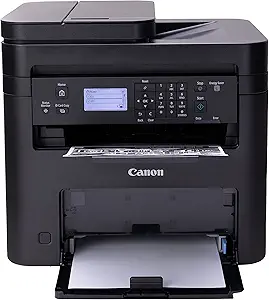 | Best Overall Monochrome Laser Printer | Print Speed: 30 PPM (BW, Letter) | First Print Out Time: Approximately 5.3 seconds | Functions: Print, Copy, Scan | VIEW ON AMAZON | See Our Full Breakdown |
| Xerox C235dni Wireless Color Laser All-in-One Printer |  | Best for Color Laser Functionality | Print Speed: 24 ppm (Letter) | Display: 2.8-inch color touchscreen | Functions: Print, Scan, Copy | VIEW ON AMAZON | See Our Full Breakdown |
| Canon imageCLASS MF465dw II Monochrome Wireless Duplex Laser Printer |  | Best for High-Volume Monochrome Work | Print Speed: 42 ppm (B&W) | Resolution: 600 x 600 dpi | Functions: Print, Copy, Scan, Fax | VIEW ON AMAZON | See Our Full Breakdown |
| HP LaserJet MFP M140we Wireless Black & White All-in-One Printer |  | Best Compact Monochrome Multifunction Printer | Print Speed: Up to 21 ppm | Functions: Print, Scan, Copy | Connectivity: Wireless | VIEW ON AMAZON | See Our Full Breakdown |
| HP LaserJet Pro MFP 3101sdw Wireless Black-and-White All-in-One Laser Printer |  | Best for Fast Monochrome Office Printing | Print Speed: Up to 35 ppm | Functions: Print, Scan, Copy | Duplex Printing: Automatic | VIEW ON AMAZON | See Our Full Breakdown |
| HP Color LaserJet Pro MFP 3301sdw Wireless All-in-One Color Laser Printer (499Q3F) |  | Best Overall for Small Office Color Printing | Printer Type: Color Laser All-in-One | Print Speed: 26 ppm B&W / 30 ppm color | Resolution: 1200 x 1200 dpi | VIEW ON AMAZON | See Our Full Breakdown |
| HP LaserJet Pro MFP 3101fdw Wireless Black & White All-in-One Laser Printer (3G628F) |  | Best for Small Teams Needing Fast Monochrome Printing | Print Type: Black & White Laser | Functions: Print, Scan, Copy, Fax | Print Speed: Up to 35 ppm | VIEW ON AMAZON | See Our Full Breakdown |
| Canon imageCLASS MF3010 VP Wired Monochrome Multifunction Laser Printer with Scanner, Copier, and USB Cable |  | Best for Budget-Conscious, Basic Monochrome Needs | Print Speed: 19 PPM | Functions: Print, Scan, Copy | Scan Quality: Up to 600 dpi (interpolated) | VIEW ON AMAZON | See Our Full Breakdown |
| Brother MFC-L2820DW Wireless Compact Monochrome All-in-One Laser Printer with Copy, Scan, Fax, and Duplex Printing |  | Best Compact All-in-One for Space-Conscious Small Offices | Print Speed: Up to 36 ppm | Functions: Print, Copy, Scan, Fax | Automatic Document Feeder: 50 pages | VIEW ON AMAZON | See Our Full Breakdown |
| all in one laser printer | Connectivity | Print Speed | Functions | Duplex Printing |
|---|---|---|---|---|
| Brother DCP-L2640DW Wireless C | Dual-band Wi-Fi, Ethernet, USB | Up to 36 ppm | — | Yes |
| HP LaserJet Pro MFP 3105sdw Wi | Wi-Fi, HP app mobile printing | Up to 33 ppm | Print, scan, copy, fax | Automatic 2-sided |
| Canon Color imageCLASS MF753Cd | Wireless | — | — | Yes (automatic) |
| Brother MFC-L3720CDW Wireless | Dual-band Wi-Fi, Wi-Fi Direct, USB 2.0 | Up to 19 ppm | Print, Copy, Scan, Fax | — |
| HP LaserJet MFP M235sdw All-in | Dual-band Wi-Fi, Ethernet, mobile printing | Up to 28 ppm | Print, Scan, Copy | Yes (fastest two-sided in class) |
| Canon imageCLASS MF273dw Monoc | Wireless | 30 PPM (BW, Letter) | Print, Copy, Scan | Automatic 2-sided |
| Xerox C235dni Wireless Color L | Wi-Fi, Wi-Fi Direct, USB | 24 ppm (Letter) | Print, Scan, Copy | — |
| Canon imageCLASS MF465dw II Mo | Wireless, mobile printing | 42 ppm (B&W) | Print, Copy, Scan, Fax | — |
| HP LaserJet MFP M140we Wireles | Wireless | Up to 21 ppm | Print, Scan, Copy | — |
| HP LaserJet Pro MFP 3101sdw Wi | Wireless | Up to 35 ppm | Print, Scan, Copy | Automatic |
| HP Color LaserJet Pro MFP 3301 | Wireless, Ethernet | 26 ppm B&W / 30 ppm color | — | — |
| HP LaserJet Pro MFP 3101fdw Wi | Wi-Fi, Ethernet, Bluetooth | Up to 35 ppm | Print, Scan, Copy, Fax | Automatic |
| Canon imageCLASS MF3010 VP Wir | Wired USB | 19 PPM | Print, Scan, Copy | — |
| Brother MFC-L2820DW Wireless C | Dual-band Wi-Fi, Ethernet, USB | Up to 36 ppm | Print, Copy, Scan, Fax | — |
More Details on Our Top Picks
Brother DCP-L2640DW Wireless Compact Monochrome Multi-Function Printer
For most buyers hunting an all in one laser printer, the DCP-L2640DW hits the sweet spot: 36 ppm print speeds, a genuine 50-page automatic document feeder, and every connection option that matters, including dual-band Wi-Fi and Ethernet. Compared with the HP LaserJet M235sdw, it prints noticeably faster and adds wired networking, which matters if your office Wi-Fi is flaky. Unlike the HP LaserJet Pro MFP 3105sdw, there’s no fax, but honestly, many small businesses never send one anymore — dropping it keeps the price and footprint down. The tradeoff is straightforward: monochrome only, and you’re locked into Brother’s TN830 toner line, so consumable costs deserve a look before committing. This pick makes the most sense for buyers who want speed and document handling without paying for features they won’t touch.
Pros:- Class-leading 36 ppm print speed for the price
- 50-page ADF handles multi-page scan and copy jobs unattended
- Dual-band Wi-Fi plus Ethernet gives flexible, reliable networking
- Compact footprint for a full-featured 3-in-1
Cons:- Monochrome only — no color printing at all
- Requires proprietary Brother TN830/TN830XL toner, limiting supply options
Best for: Small businesses and home offices that print, scan, and copy high volumes of black-and-white documents and want fast wired and wireless networking
Not ideal for: Anyone who needs color output, faxing, or cheaper third-party toner options
- Functionality:Print, Copy, Scan
- Print Type:Monochrome laser
- Print Speed:Up to 36 ppm
- Scan Speed:Up to 23.6/7.9 ipm (black/color)
- ADF Capacity:50 pages
- Connectivity:Dual-band Wi-Fi, Ethernet, USB
- Duplex Printing:Yes
- Compatible Toner:Brother TN830 / TN830XL
Our verdict“If you want the fastest, most connected monochrome all-in-one for the money and can live without fax, this is the one to beat.”
HP LaserJet Pro MFP 3105sdw Wireless Monochrome Laser Printer (3G646A)
HP positions the 3105sdw for teams of up to seven users, and that’s exactly where it fits — a step up from the HP LaserJet MFP M235sdw’s one-to-five-person sweet spot. Its differentiators are real: built-in faxing, automatic two-sided printing, and HP Wolf Pro Security, which matters more when multiple people share a device on a business network. The AI-assisted scan-to-email subject lines and web print cleanup are genuinely useful time-savers, not gimmicks. Against the Brother DCP-L2640DW, you trade 3 ppm of speed for fax plus stronger security — a reasonable swap for a shared office device. The catch is supply lock-in: HP blocks third-party cartridges with non-HP chips, and firmware updates enforce that restriction. Budget accordingly for original HP toner, because cheap refills aren’t on the menu.
Pros:- Full 4-in-1 functionality including fax
- HP Wolf Pro Security protects shared, networked use
- AI features simplify scan-to-email and clean web/email printing
- Automatic 2-sided printing and ADF scanning with jam recovery
Cons:- Monochrome only — no color printing
- Blocks third-party cartridges with non-HP chips, locking you into HP supplies
- Periodic firmware updates needed to maintain cartridge restrictions
Best for: Shared small-office workgroups up to 7 people who need fax, strong security, and AI-assisted document workflows
Not ideal for: Budget-conscious buyers who rely on third-party toner to keep per-page costs down
- Functions:Print, scan, copy, fax
- Printer Type:Monochrome laser MFP
- Print Speed:Up to 33 ppm
- Duplex Printing:Automatic 2-sided
- Scanning:Auto 1-sided via document feeder
- Connectivity:Wi-Fi, HP app mobile printing
- Security:HP Wolf Pro Security
- Recommended Users:Up to 7
Our verdict“The right choice for a shared small-team office that values security and fax, provided original HP toner costs fit your budget.”
Canon Color imageCLASS MF753Cdw II All-in-One Color Duplex Laser Printer
When color is non-negotiable, the MF753Cdw II is the most complete package here: a true 4-in-1 color laser with print, scan, copy, fax, wireless, and automatic duplex. Compared with the Brother MFC-L3720CDW, Canon’s imageCLASS line sits at a higher tier, and the MF753Cdw II is built for offices where professional-looking color documents — client proposals, brochures, reports — are part of the weekly routine rather than a rarity. The duplex printing cuts paper consumption roughly in half on double-sided jobs, which adds up fast in a busy office. The honest tradeoff: color lasers cost more upfront and per page than monochrome units like the Brother DCP-L2640DW, so if your output is 95% text documents, you’d be paying for capability you rarely use. Also worth noting, the listing is thin on detailed specs, so verify speed and capacity figures before buying.
Pros:- Genuine color laser output for professional documents
- Complete 4-in-1 functionality including fax
- Automatic duplex printing reduces paper use
- Wireless connectivity for flexible placement
Cons:- Higher purchase and toner costs than monochrome alternatives
- Detailed specifications are thin in the listing, making pre-purchase comparison harder
Best for: Small offices that regularly produce color client-facing documents and want full fax-plus-duplex capability in one machine
Not ideal for: Text-heavy offices — a monochrome model like the DCP-L2640DW costs far less to buy and run
- Functionality:Print, scan, copy, fax
- Print Type:Color laser
- Duplex Printing:Yes (automatic)
- Connectivity:Wireless
Our verdict“The pick for offices where color output is a daily requirement and monochrome models simply won’t do the job.”
Brother MFC-L3720CDW Wireless Color Laser All-in-One Printer
This model is better suited to price-conscious offices that still need color. Against the Canon MF753Cdw II, the MFC-L3720CDW trades a bit of premium polish for a more accessible price while keeping the essentials: 4-in-1 functionality, 19 ppm color and mono printing, and a 3.5-inch color touchscreen with direct cloud access to Google Drive, Dropbox, and OneNote — something no other pick in this lineup offers so prominently. Scanning is quick too at up to 29 ipm. The compromises are real, though: 19 ppm feels slow next to the Brother DCP-L2640DW’s 36, and the 250-sheet tray will need refilling in higher-volume offices. Watch out for the optional Refresh EZ Print subscription — convenient, but it introduces recurring costs and cartridge restrictions you may not want. This pick makes the most sense for teams that need color occasionally without premium-tier spending.
Pros:- Full 4-in-1 color laser functionality at an accessible price point
- Touchscreen with direct cloud service access (Drive, Dropbox, OneNote)
- Fast scanning at up to 29 ipm black / 22 ipm color
- ENERGY STAR compliant with EPEAT Silver rating
Cons:- 19 ppm print speed lags well behind monochrome rivals like the DCP-L2640DW
- Optional Refresh EZ Print subscription adds recurring costs and cartridge restrictions
- 250-sheet paper capacity limits high-volume workflows
Best for: Budget-aware small offices that need color printing, fax, and cloud workflows without paying premium-tier prices
Not ideal for: High-volume offices — 19 ppm speed and a 250-sheet tray become bottlenecks fast
- Functions:Print, Copy, Scan, Fax
- Print Type:Color laser
- Print Speed:Up to 19 ppm
- Scan Speed:Up to 29 ipm black / 22 ipm color
- Paper Capacity:250 sheets
- ADF Capacity:50 sheets
- Display:3.5-inch color touchscreen
- Connectivity:Dual-band Wi-Fi, Wi-Fi Direct, USB 2.0
- Warranty:1-year limited
Our verdict“A smart middle path for small offices that want color and cloud features on a budget, as long as speed isn’t the top priority.”
HP LaserJet MFP M235sdw All-in-One Monochrome Laser Printer
This option stands out as the value play for very small operations. At 28 ppm it’s slower than the Brother DCP-L2640DW, but it claims the fastest two-sided printing in its class — a distinction that matters if your documents skew toward double-sided drafts and reports. Compared with the HP LaserJet Pro MFP 3105sdw, you give up fax and the AI workflow features, but for a one-to-five person office that just needs dependable print-scan-copy, those omissions are savings, not losses. Connectivity is surprisingly complete for the price: dual-band Wi-Fi with self-reset, Ethernet, and broad platform support from AirPrint to Chromebook. There’s no ADF-based duplex scanning and no color, and the self-reset Wi-Fi feature won’t fix every network hiccup. Still, for a home office or tiny team buying on a budget, this model covers the fundamentals without padding the bill.
Pros:- Fastest two-sided printing in its class
- Complete connectivity: dual-band Wi-Fi, Ethernet, and mobile printing
- Broad platform support including AirPrint, Android, and Chromebook
- Built-in security features at a budget price
Cons:- Black-and-white printing only
- 28 ppm trails faster rivals like the Brother DCP-L2640DW
- Wi-Fi self-reset doesn’t resolve all connectivity issues
Best for: Home offices and 1-5 person teams on a budget that mostly print double-sided black-and-white documents
Not ideal for: Buyers who need fax, color, or high-volume paper handling — larger teams should step up to the 3105sdw
- Functions:Print, Scan, Copy
- Print Type:Monochrome laser
- Print Speed:Up to 28 ppm
- Duplex Printing:Yes (fastest two-sided in class)
- Connectivity:Dual-band Wi-Fi, Ethernet, mobile printing
- Compatible Platforms:Windows, Mac, AirPrint, Android, Chromebook
- Recommended Users:1-5 people
Our verdict“The best entry point for tiny offices that want reliable wireless printing and fast duplex output without paying for features they don’t need.”
Canon imageCLASS MF273dw Monochrome Wireless Laser Printer
The Canon imageCLASS MF273dw stands out as a versatile monochrome laser printer with reliable speed and efficient features. Its 30 pages per minute output, combined with automatic duplex printing and an auto document feeder, makes it ideal for busy small offices or home setups that prioritize high-volume monochrome tasks. Compared with the HP LaserJet Pro MFP 3101sdw, it offers slightly faster print speeds, but without the color capabilities that some users might need. The tradeoff here is that while it excels in speed and paper handling, it’s limited to black-and-white printing, which could be a drawback for those needing color. The toner costs are a consideration, as high-capacity cartridges can add up over time. Overall, it makes the most sense for users who need a fast, reliable mono printer without the extra expense of color features.
Pros:- Fast print speed of 30 pages per minute, boosting productivity
- 3-in-1 functionality with print, copy, scan for versatile use
- Automatic 2-sided printing reduces paper consumption
- Auto document feeder simplifies multi-page scanning and copying
Cons:- Limited to monochrome output, no color printing available
- Toner costs may become significant with high-volume use
Best for: Small business owners or home offices that require high-volume monochrome printing with quick turnaround times.
Not ideal for: Users who need color printing or occasional photo printouts, as it is monochrome only and lacks color capabilities.
- Print Speed:30 PPM (BW, Letter)
- First Print Out Time:Approximately 5.3 seconds
- Functions:Print, Copy, Scan
- Connectivity:Wireless
- Duplex Printing:Automatic 2-sided
- Toner Compatibility:Toner 071 / 071 High-Capacity
Our verdict“This printer is a solid choice for those needing fast, reliable monochrome output in a small office or home setting.”
Xerox C235dni Wireless Color Laser All-in-One Printer
The Xerox C235dni offers a compelling balance of color capabilities and all-in-one features, making it suitable for small offices or creative home projects. Its 24 pages per minute print speed, combined with a 2.8-inch color touchscreen and built-in Wi-Fi, provides a user-friendly experience comparable to the Canon MF465dw II. Unlike monochrome-only options, this model supports vibrant color printing, scanning, and copying, but that comes with a tradeoff: the starter toner yield is only 500 pages, meaning higher ongoing toner expenses. Its support for mobile printing via AirPrint and Mopria simplifies workflow, but the low initial toner capacity makes it less ideal for high-volume color printing compared to dedicated monochrome models like the Canon MF273dw. It’s best suited for users who need reliable, colorful output without extensive volume demands.
Pros:- Reliable color printing with crisp, vibrant output
- Built-in Wi-Fi and mobile support for flexible workflows
- Intuitive 2.8-inch color touchscreen simplifies operation
- Automatic duplex printing saves time and paper
Cons:- Starter toner yield is limited to 500 pages, increasing replacement frequency
- Limited to 2.4 GHz Wi-Fi networks, restricting some environments
- High-yield toner options are optional and add to costs
Best for: Small teams or home users needing high-quality color printing and multifunctional capabilities without high-volume requirements.
Not ideal for: Heavy-volume document printing where toner replacement costs could become prohibitive, or users needing solely monochrome output.
- Print Speed:24 ppm (Letter)
- Display:2.8-inch color touchscreen
- Functions:Print, Scan, Copy
- Connectivity:Wi-Fi, Wi-Fi Direct, USB
- Auto Document Feeder Capacity:50 sheets
- Recommended Monthly Volume:Up to 1,500 pages
Our verdict“This model suits users who want color multifunctionality with manageable volume, but not for high-volume color printing tasks.”
Canon imageCLASS MF465dw II Monochrome Wireless Duplex Laser Printer
The Canon imageCLASS MF465dw II is tailored for environments requiring rapid, high-volume monochrome printing, with an impressive 42 pages per minute and a 5-inch color touchscreen for straightforward operation. Its 50-sheet one-pass duplex automatic document feeder and expandable paper capacity up to 900 sheets give it a significant edge over smaller-capacity models like the HP LaserJet MFP M140we. However, it remains monochrome-only, which could be limiting for users who need color. The optional paper cassette expansion, sold separately, adds flexibility but also increases initial investment. Compared to the MF273dw, this printer is better suited for larger print volumes but doesn’t include scanning or copying for multi-functionality beyond printing. It’s ideal for demanding small offices with high-volume black-and-white needs.
Pros:- High-speed printing at 42 ppm for demanding workflows
- One-pass duplex scanning increases efficiency
- Expandable paper capacity up to 900 sheets for heavy workloads
- Easy wireless setup with mobile printing support
Cons:- Limited to monochrome output, no color option
- Additional cost for optional paper cassettes
- Relatively larger size, less suitable for tight spaces
Best for: Small offices or workgroups with high-volume black-and-white printing, needing fast throughput and expandable paper capacity.
Not ideal for: Those requiring color printing or a compact footprint, as it is larger and monochrome-only.
- Print Speed:42 ppm (B&W)
- Resolution:600 x 600 dpi
- Functions:Print, Copy, Scan, Fax
- Paper Capacity:250 sheets + expandable to 900 sheets
- ADF Capacity:50 sheets
- Connectivity:Wireless, mobile printing
Our verdict“This printer is perfect for busy offices that need rapid monochrome printing and high capacity, but it’s not suitable if color output is required.”
HP LaserJet MFP M140we Wireless Black & White All-in-One Printer
The HP LaserJet MFP M140we introduces a compact, space-saving design ideal for small teams or individual professionals who need essential monochrome printing, copying, and scanning. Its 21 pages per minute speed and simple wireless setup through the HP Smart app make it accessible for users with limited technical experience. Compared to bulkier models like the Canon MF273dw, it’s significantly smaller and easier to place in tight spaces, but that comes with tradeoffs: it only handles black-and-white documents and blocks third-party cartridges with HP chips, which can limit options and increase costs. The firmware updates can enforce restrictions, making it less flexible for some. Overall, it’s a good fit for single users or small teams that prioritize space and simplicity over high-volume or color needs.
Pros:- Extremely compact footprint fits in small spaces
- Decent print speeds of 21 ppm for quick output
- Mobile-friendly, easy wireless setup with HP Smart app
- Supports scanning and copying with simple controls
Cons:- Limited to monochrome printing only, no color option
- Blocks third-party toner cartridges, raising ongoing costs
- Firmware restrictions may impact cartridge flexibility
Best for: Single professionals or small teams needing a compact, reliable monochrome multifunction device with straightforward wireless operation.
Not ideal for: Offices or users requiring color printing or larger paper capacities, as this model is limited to black-and-white output and smaller input trays.
- Print Speed:Up to 21 ppm
- Functions:Print, Scan, Copy
- Connectivity:Wireless
- Size:World’s smallest laser in its class
- App:HP Smart
- Cartridge Compatibility:HP chipped cartridges only
Our verdict“This printer is best for space-constrained environments where basic monochrome multifunctionality suffices, but it’s not suited for color or high-volume needs.”
HP LaserJet Pro MFP 3101sdw Wireless Black-and-White All-in-One Laser Printer
The HP LaserJet Pro MFP 3101sdw offers a compelling combination of speed and reliability for small workgroups with high monochrome throughput. Its 35 pages per minute speed surpasses many competitors like the Canon MF273dw and caters to environments where quick turnaround is essential. Its automatic duplex printing and 250-sheet input tray support sustained high-volume use, while the 50-sheet auto document feeder streamlines multi-page scanning and copying. However, it remains monochrome-only, limiting its versatility if color is needed. The device also enforces HP’s cartridge restrictions, which could increase ongoing costs. Despite this, for teams focused on fast, efficient black-and-white printing, it offers a strong balance of speed, capacity, and ease of use.
Pros:- Fast print speeds of up to 35 ppm for high-volume workflows
- Automatic duplex printing saves paper and time
- Large 250-sheet input tray and 50-sheet ADF support sustained productivity
- Wireless connectivity offers flexible setup and use
Cons:- Limited to monochrome output, no color option
- Restricts third-party toner use with HP chips, raising costs
- Firmware updates may further restrict third-party cartridges
Best for: Small office teams requiring swift, high-volume monochrome printing with reliable wireless connectivity.
Not ideal for: Offices needing color printing or seeking budget-friendly third-party toner options, due to enforced cartridge restrictions.
- Print Speed:Up to 35 ppm
- Functions:Print, Scan, Copy
- Duplex Printing:Automatic
- Input Tray Capacity:250 sheets
- Auto Document Feeder:50 sheets
- Connectivity:Wireless
Our verdict“Ideal for small teams needing quick, reliable monochrome printing with large capacity and minimal fuss, but not suitable for color printing needs.”
HP Color LaserJet Pro MFP 3301sdw Wireless All-in-One Color Laser Printer (499Q3F)
The HP Color LaserJet Pro MFP 3301sdw stands out for delivering vibrant color prints alongside reliable all-in-one functionality. Compared with the monochrome Brother MFC-L2820DW, it provides superior color capabilities, making it ideal for small offices that need both quality and versatility. Its fast print speeds and automatic duplexing improve efficiency, while built-in security features add peace of mind. However, the reliance on HP-specific toner chips and the higher cost of OEM cartridges can be drawbacks for budget-conscious users. Still, this model’s combination of color quality, security, and office-ready features makes it a strong choice for those prioritizing professional-looking documents.
Pros:- Vivid color output with TerraJet toner for professional-quality prints
- All-in-one with automatic duplex and document feeder boosts productivity
- Wi-Fi and Ethernet with HP Wolf Pro security for network safety
Cons:- Proprietary HP toner chips limit third-party cartridge use
- Heavy at 37.7 pounds, making repositioning cumbersome
- OEM toner cartridges can be costly over time
Best for: Small office teams that require high-quality color printing alongside scanning, copying, and secure network access
Not ideal for: Budget-conscious users seeking a low-cost monochrome device or those who prefer third-party toner options
- Printer Type:Color Laser All-in-One
- Print Speed:26 ppm B&W / 30 ppm color
- Resolution:1200 x 1200 dpi
- Weight:37.7 pounds
- Dimensions:16.46″D x 13.44″W x 16.5″H
- Connectivity:Wireless, Ethernet
- Input Capacity:250 sheets
- Toner Cartridges:HP 218A / 218X
Our verdict“Ideal for small offices that value vibrant color output and robust security, despite higher ongoing toner costs.”
HP LaserJet Pro MFP 3101fdw Wireless Black & White All-in-One Laser Printer (3G628F)
The HP LaserJet Pro MFP 3101fdw offers impressive speeds up to 35 ppm, making it well-suited for busy small offices. Unlike the color-focused HP 3301sdw, it emphasizes efficient black-and-white output, which can reduce toner costs and simplify workflow. Its comprehensive features include fax, scan, and copy functions, plus automatic duplexing and auto document feeding, streamlining multiple tasks. The versatile connectivity options—including Wi-Fi, Ethernet, and Bluetooth—support a range of devices. The primary tradeoff is that it only prints in monochrome, which limits its use for offices needing color. For high-volume, fast monochrome printing with security, this model hits the sweet spot.
Pros:- Fast printing up to 35 pages per minute for high productivity
- All-in-one with scanning, copying, and faxing capabilities
- Flexible connectivity with Wi-Fi, Ethernet, and Bluetooth
Cons:- Limited to monochrome printing, not suitable for color needs
- Laser toner and maintenance can be costly over time
- No wireless or network features for this model’s predecessors
Best for: Small office teams that primarily need fast, reliable black-and-white printing and scanning
Not ideal for: Offices that require color printing or those seeking budget-friendly, low-cost monochrome devices
- Print Type:Black & White Laser
- Functions:Print, Scan, Copy, Fax
- Print Speed:Up to 35 ppm
- Duplex Printing:Automatic
- Connectivity:Wi-Fi, Ethernet, Bluetooth
- Security:HP Wolf Pro Security
Our verdict“Best suited for small teams focused on rapid, secure monochrome output, with all-in-one convenience.”
Canon imageCLASS MF3010 VP Wired Monochrome Multifunction Laser Printer with Scanner, Copier, and USB Cable
The Canon imageCLASS MF3010 VP provides essential multifunctionality in a compact, wired design. Its slower speed of 19 PPM makes it less suitable for high-volume environments compared to the HP models. Its energy-efficient sleep mode and high-yield toner help keep running costs manageable, and the included USB connection simplifies setup for users with limited networking needs. The monochrome-only output limits its use for offices that require color, but for small, budget-conscious setups with basic printing, this device offers reliable performance in a minimal footprint. Still, the lack of wireless options and lower speed are notable tradeoffs.
Pros:- Compact and energy-efficient with 1.2W sleep mode
- High-yield toner yields up to 2,300 pages for long-term savings
- Includes USB cable and ID Card Copy feature
Cons:- Limited to wired USB connection, no wireless or network support
- Slower print speed of 19 PPM, less suited for high-volume tasks
- No color printing capabilities
Best for: Small offices or home users needing an affordable, wired monochrome multifunction device
Not ideal for: Environments requiring wireless printing or faster output for larger workflows
- Print Speed:19 PPM
- Functions:Print, Scan, Copy
- Scan Quality:Up to 600 dpi (interpolated)
- Paper Capacity:150 sheets
- Power (Sleep Mode):Approximately 1.2 watt
- Connectivity:Wired USB
Our verdict“A straightforward, budget-friendly choice for basic monochrome printing needs with minimal setup requirements.”
Brother MFC-L2820DW Wireless Compact Monochrome All-in-One Laser Printer with Copy, Scan, Fax, and Duplex Printing
The Brother MFC-L2820DW combines compact design with robust functionality, making it ideal for small offices with limited space. Its high-speed black-and-white output—up to 36 ppm—outperforms the slower Canon MF3010, while the 50-page automatic document feeder accelerates multi-page tasks. Its dual-band Wi-Fi, Ethernet, and USB support flexible connections, and the 2.7-inch touchscreen simplifies operation. However, the device only prints in monochrome, and ongoing toner costs, plus the need for regular cartridge replacements, could add up. Despite these tradeoffs, its space-saving profile and fast, all-in-one capabilities make it an excellent choice for small teams that prioritize speed and convenience.
Pros:- Compact size with a 50-page automatic document feeder
- Fast black-and-white printing at up to 36 ppm
- Flexible connectivity including dual-band Wi-Fi and Ethernet with touchscreen
Cons:- Limited to monochrome output, no color printing
- Toner replacement costs can be ongoing and substantial
- Subscription trial included may not suit all users
Best for: Small offices needing an efficient, space-saving monochrome multifunction printer with easy connectivity
Not ideal for: Offices that require color printing or multi-function devices with wireless capabilities beyond Wi-Fi and Ethernet
- Print Speed:Up to 36 ppm
- Functions:Print, Copy, Scan, Fax
- Automatic Document Feeder:50 pages
- Connectivity:Dual-band Wi-Fi, Ethernet, USB
- Display:2.7-inch touchscreen
- Recommended Use:Small offices
Our verdict“An excellent choice for small spaces that require fast monochrome printing and versatile connectivity without the need for color.”
How We Picked
This list was curated based on a combination of performance metrics, usability, build quality, and value. We prioritized printers that offer reliable multi-functionality, easy setup, and consistent print quality, while also considering ongoing maintenance costs. Models were ranked by how well they balance speed, print quality, and feature set relative to their price, ensuring options for different user needs—from small offices to home use. We avoided models with overly complex interfaces or poor connectivity options, focusing instead on those that provide straightforward, dependable performance in an all-in-one format.| all in one laser printer | Duplex Printing | Functions |
|---|---|---|
| Brother DCP-L2640DW Wireless C | Yes | — |
| HP LaserJet Pro MFP 3105sdw Wi | Automatic 2-sided | Print, scan, copy, fax |
| Canon Color imageCLASS MF753Cd | Yes (automatic) | — |
| Brother MFC-L3720CDW Wireless | — | Print, Copy, Scan, Fax |
| HP LaserJet MFP M235sdw All-in | Yes (fastest two-sided in class) | Print, Scan, Copy |
| Canon imageCLASS MF273dw Monoc | Automatic 2-sided | Print, Copy, Scan |
| Xerox C235dni Wireless Color L | — | Print, Scan, Copy |
| Canon imageCLASS MF465dw II Mo | — | Print, Copy, Scan, Fax |
| HP LaserJet MFP M140we Wireles | — | Print, Scan, Copy |
| HP LaserJet Pro MFP 3101sdw Wi | Automatic | Print, Scan, Copy |
| HP Color LaserJet Pro MFP 3301 | — | — |
| HP LaserJet Pro MFP 3101fdw Wi | Automatic | Print, Scan, Copy, Fax |
| Canon imageCLASS MF3010 VP Wir | — | Print, Scan, Copy |
| Brother MFC-L2820DW Wireless C | — | Print, Copy, Scan, Fax |
Factors to Consider When Choosing All In One Laser Printer
Choosing the right all in one laser printer involves more than just looking at features. To make an informed decision, consider factors like print volume, color capabilities, connectivity options, and ongoing costs. Understanding these can help prevent costly mistakes and ensure the printer you select truly meets your needs over its lifespan.Print Volume and Speed
Assess your typical monthly print volume to avoid overpaying for a model with excessive capacity or underperforming in a busy environment. Higher speed ratings are essential for high-volume printing, reducing wait times and increasing productivity. For infrequent use, a lower-cost, slower model might suffice, but beware of sacrificing too much speed for a lower price.
Color vs. Monochrome
If you mainly print text documents, monochrome models offer faster speeds and lower running costs. However, for marketing materials, presentations, or creative projects, a color laser printer becomes worthwhile despite higher initial and ongoing costs. Be mindful that color models are generally larger and may demand more space.
Connectivity and Mobile Printing
Most printers now support Wi-Fi, but check for ease of setup and compatibility with your devices, especially if you rely on smartphones or tablets. Features like NFC, cloud printing, and app integration can streamline workflows, but they often come with a learning curve or additional costs. If you need seamless, quick printing from multiple devices, prioritize models with robust connectivity options.
Toner Cost and Replacement
Long-term expenses hinge on toner prices and page yields. Cheaper toner cartridges can reduce operational costs but may require more frequent replacements, affecting convenience. Conversely, higher-capacity toners cost more upfront but lower the cost per page, making them ideal for high-volume users seeking value over time.
Size, Design, and Paper Handling
Space constraints matter, especially in home offices. Compact models save room but might offer smaller paper trays or slower speeds. Consider your typical paper size and capacity needs, along with whether the printer has features like automatic duplexing, which can save paper and improve efficiency in the long run.
Frequently Asked Questions
Can I use third-party toner cartridges with these printers?
Many printers in this roundup are compatible with third-party toner cartridges, which can reduce ongoing costs. However, using non-OEM supplies may affect print quality or void warranties in some cases. It’s important to verify compatibility and read reviews to ensure the third-party toner performs reliably without damaging your device.
How often will I need to replace toner cartridges?
The replacement frequency depends on the toner capacity and your print volume. High-yield cartridges can last thousands of pages, reducing the frequency of replacements for busy offices. For infrequent use, standard cartridges are sufficient, but keep in mind that lower capacity models will require more frequent changes.
Are color laser printers suitable for high-volume printing?
Yes, many color laser models in this list are designed for high-volume use, with fast speeds and large toner capacities. However, they tend to be more expensive both upfront and in ongoing toner costs. For very high-volume, monochrome printing, dedicated monochrome models might offer better value and speed.
What features should I prioritize for a home office?
For a home office, prioritize compact size, easy wireless setup, and low running costs. Automatic duplex printing and multiple connectivity options can boost efficiency, while a modest paper capacity is usually sufficient. Avoid models with overly complex controls if you prefer simplicity in daily use.
Is it better to buy a multifunction printer or separate devices?
An all-in-one laser printer consolidates printing, scanning, copying, and sometimes faxing into one device, saving space and reducing clutter. For most small to medium offices, this integration offers convenience and cost savings. However, if your printing needs are highly specialized or volume is extremely high, dedicated devices might be more efficient.
Conclusion
For most users seeking an all-in-one laser printer, the Brother DCP-L2640DW offers outstanding reliability and value, making it ideal for small offices or home use. If vibrant color printing is a priority, the Canon Color imageCLASS MF753Cdw II stands out for its quality, though at a higher price point. Budget-conscious buyers should consider models like the HP LaserJet MFP M235sdw for solid performance without breaking the bank. For those new to laser printing or with limited space, compact and simple models like the Brother MFC-L2820DW provide an excellent starting point. Ultimately, your choice depends on your volume, color needs, and budget—use this guide to pick the best fit for your specific situation.
Halloween Picks
halloween
As an affiliate, we earn on qualifying purchases.