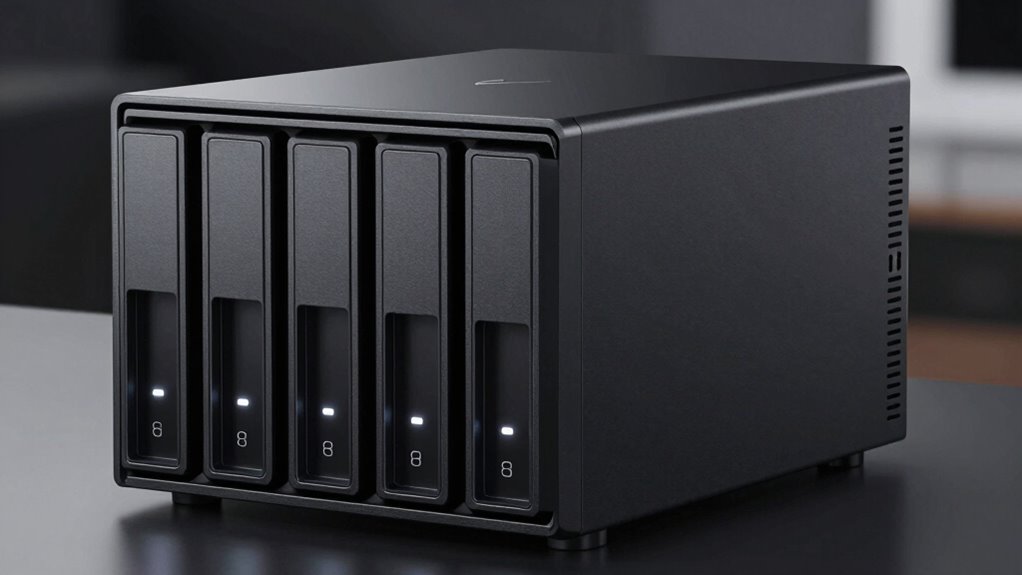
Searching for the best 8bay NAS enclosure in 2026? The top choice overall is the TERRAMASTER F8 SSD Plus NAS, thanks to its powerful Intel Core i3 processor and ample memory for demanding workloads. For those prioritizing business features, the UGREEN NAS DXP8800 Plus offers robust performance and expandability. If premium build quality and speed matter most, the OWC ThunderBay 8 excels with Thunderbolt connectivity. This category often involves tradeoffs between performance, ease of use, and price, so keep reading for the full breakdown to find the right fit for your needs.

Get the latest gadgets delivered free with Prime
- Fast, free delivery on millions of items
- Prime Video, Amazon Music and more included
- Member-only deals all year
Complete the kit



Key Takeaways
- Performance varies significantly; the most powerful units feature high-end CPUs like Intel Core i3 or Xeon.
- Build quality and cooling systems are critical for reliability, especially in continuous operation environments.
- Business and enterprise models tend to prioritize expandability and network features over simple plug-and-play setups.
- Price differences reflect features like drive support, software, and connectivity options—budget models may lack advanced management tools.
- Compatibility with existing infrastructure and future expansion plans should guide your choice, especially for professional use.
| TERRAMASTER F8 SSD Plus NAS 8-Bay Intel Core i3-8 Core, 16GB DDR5, Diskless |  | Best Overall for High Performance and Compact Design | Processor: Intel Core i3-N305 8-core, 3.4GHz | Memory: 16GB DDR5 4800MHz | Storage Capacity: Supports 8 SSDs up to 8TB each, 64TB total | VIEW ON AMAZON | See Our Full Breakdown |
| 8 Bay Mini ITX Micro ATX NAS Case with Hot Swap Drive Bays and Dual Cooling System |  | Best for Enthusiasts and DIY Builders Needing Hot-Swap Convenience | Drive Bays: 8 hot-swap | Supported Drives: 3.5″ HDD and 2.5″ SSD | Cooling System: Dual independent silent fans | VIEW ON AMAZON | See Our Full Breakdown |
| UGREEN NAS DXP8800 Plus 8-Bay Business NAS |  | Best for Large-Scale Business Storage with High Capacity | Processor: 12th Gen, 10-core, 12-thread Intel Core i5 | Maximum Storage Capacity: 272TB | Network Ports: 2 x 10GbE | VIEW ON AMAZON | See Our Full Breakdown |
| QNAP TS-873A-8G 8-Bay NAS |  | Best for Power Users Needing High Performance and Expandability | Processor: AMD Ryzen Embedded V1500B quad-core 2.2 GHz | RAM: 8GB DDR4 (up to 64GB) | Ethernet Ports: 2 x 2.5 Gigabit Ethernet | VIEW ON AMAZON | See Our Full Breakdown |
| OWC ThunderBay 8 Eight-Bay Thunderbolt Storage Enclosure with SoftRAID |  | Best for Mac Users and High-Speed External Storage | Drive Bays: 8 | Drive Compatibility: 2.5″ or 3.5″ SSD/HDD | Ports: Dual Thunderbolt 3 | VIEW ON AMAZON | See Our Full Breakdown |
| UGREEN NAS DXP4800 Pro 4-Bay for IT Professionals, Developers & Power Users |  | Best for Demanding Workflows and Advanced Security | Processor: Intel Core i3-1315U (6 Cores, Up to 4.5GHz) | RAM: 8GB DDR5 (expandable to 96GB) | Network Ports: 10GbE + 2.5GbE | VIEW ON AMAZON | See Our Full Breakdown |
| Asustor Lockerstor 8 Gen3 AS6808T 8-Bay NAS (Diskless) |  | Best for Enterprise and Creative Workloads | Processor: AMD Ryzen Embedded V3C14 quad-core | Memory: 16GB ECC DDR5 (up to 64GB) | Number of Bays: 8 | VIEW ON AMAZON | See Our Full Breakdown |
| Synology DS1825+ Enterprise NAS, 8-Bay Diskless Storage with 25GbE, Supports Up to 360TB |  | Best for High-Throughput Enterprise Video Storage | Number of Bays: 8 | Maximum Storage Capacity: 360TB | Network Speed: 25GbE | VIEW ON AMAZON | See Our Full Breakdown |
| QNAP TS-832PX-4G 8-Bay NAS |  | Best for Budget-Conscious High-Speed Networking | Processor: AnnapurnaLabs Alpine AL324 ARM Cortex-A57 1.7GHz | RAM: 4 GB DDR4 (expandable to 16 GB) | Drive Bays: 8 x 3.5-inch SATA | VIEW ON AMAZON | See Our Full Breakdown |
| UGREEN DXP4800 Plus 4-Bay NAS for Families, Creators & Small Teams |  | Best for Home Use, Small Teams, and Creators | Storage Capacity: Up to 144TB | Number of Bays: 4 | Network Ports: 10GbE, USB 3.2 | VIEW ON AMAZON | See Our Full Breakdown |
| 8bay nas enclosure | Processor |
|---|---|
| TERRAMASTER F8 SSD Plus NAS 8- | Intel Core i3-N305 8-core, 3.4GHz |
| 8 Bay Mini ITX Micro ATX NAS C | — |
| UGREEN NAS DXP8800 Plus 8-Bay | 12th Gen, 10-core, 12-thread Intel Core i5 |
| QNAP TS-873A-8G 8-Bay NAS | AMD Ryzen Embedded V1500B quad-core 2.2 GHz |
| OWC ThunderBay 8 Eight-Bay Thu | — |
| UGREEN NAS DXP4800 Pro 4-Bay f | Intel Core i3-1315U (6 Cores, Up to 4.5GHz) |
| Asustor Lockerstor 8 Gen3 AS68 | AMD Ryzen Embedded V3C14 quad-core |
| Synology DS1825+ Enterprise NA | — |
| QNAP TS-832PX-4G 8-Bay NAS | AnnapurnaLabs Alpine AL324 ARM Cortex-A57 1.7GHz |
| UGREEN DXP4800 Plus 4-Bay NAS | — |
More Details on Our Top Picks
TERRAMASTER F8 SSD Plus NAS 8-Bay Intel Core i3-8 Core, 16GB DDR5, Diskless
The TERRAMASTER F8 SSD Plus NAS stands out for its combination of a robust Intel Core i3 processor and support for SSDs, making it ideal for demanding tasks like virtualization and media server hosting. Compared with the UGREEN NAS DXP8800 Plus, which supports larger capacities and enterprise features, this model prioritizes speed and quiet operation in a smaller, more accessible form. Its tool-free SSD and memory installation simplifies setup, but users must purchase SSDs separately, adding to the overall cost. The NAS’s compact size and 10Gbps Ethernet port deliver high-speed data transfer in a quiet, space-efficient package. This pick is best suited for small businesses or tech-savvy home users who need speed without a large footprint.
Pros:- High-performance Intel Core i3 processor for demanding workloads
- Supports up to 64TB SSD storage with quick access speeds
- Quiet operation with advanced cooling system
Cons:- Requires separate purchase of SSDs for optimal use
- Limited to SSD storage — no HDD support
- No included disks, adding initial setup cost
Best for: Small business owners or advanced home users requiring fast SSD-based storage with a compact footprint
Not ideal for: Users seeking large-capacity HDD storage or budget-friendly options, as SSDs can be costly and the device lacks HDD support
- Processor:Intel Core i3-N305 8-core, 3.4GHz
- Memory:16GB DDR5 4800MHz
- Storage Capacity:Supports 8 SSDs up to 8TB each, 64TB total
- Ethernet:10Gbps port
- Noise Level:Below 19dB in standby
- Cooling:Convection heat sinks and silent fans
Our verdict“This NAS is perfect for users needing high-speed SSD storage in a compact, quiet form factor, especially for virtualization and media tasks.”
8 Bay Mini ITX Micro ATX NAS Case with Hot Swap Drive Bays and Dual Cooling System
This NAS case excels in flexibility, supporting 8 hot-swap bays for easy drive replacement, which makes it ideal for those who prefer frequent hardware upgrades or maintenance without system downtime. Unlike the QNAP TS-873A-8G that provides powerful processing in a ready-to-use package, this case offers the chassis only, requiring users to add their own motherboard, CPU, and power supply. Its dual independent cooling system helps maintain optimal temperatures, but setup demands technical skill and familiarity with PC building. The steel construction offers durability, but users must invest in compatible components separately. This product is best for advanced users who want a customizable, high-capacity storage enclosure with professional-grade cooling.
Pros:- Supports 8 hot-swap drives for easy maintenance
- Effective dual cooling system for quiet, reliable operation
- Wide compatibility with various motherboards and power supplies
Cons:- Requires technical knowledge to assemble and configure
- Motherboard and CPU are not included, increasing complexity and cost
- Limited to low-power hardware compatibility
Best for: DIY enthusiasts or IT professionals assembling custom NAS solutions with hot-swap drives
Not ideal for: Beginners or those seeking an all-in-one, plug-and-play NAS solution with included hardware
- Drive Bays:8 hot-swap
- Supported Drives:3.5″ HDD and 2.5″ SSD
- Cooling System:Dual independent silent fans
- Motherboard Compatibility:Mini-ITX & Micro-ATX
- Power Supply Compatibility:1U / FLEX small power supplies
- Maximum CPU Cooler Height:58mm
Our verdict“This case is best suited for experienced builders wanting a durable, customizable NAS chassis with hot-swap capability.”
UGREEN NAS DXP8800 Plus 8-Bay Business NAS
The UGREEN NAS DXP8800 Plus distinguishes itself with enterprise-grade features, including support for up to 272TB of storage and dual 10GbE ports, making it ideal for large businesses or data centers. Compared to the QNAP TS-873A-8G, which offers excellent expandability and processing power, this model emphasizes raw capacity and high-speed networking. Its support for a wide variety of RAID levels and multiple platform compatibility ensures flexible, secure data management. However, it does not include drives, requiring additional investment, and its wired-only network connection might limit deployment options in wireless environments. This NAS is best for organizations needing large-scale storage with fast, reliable network access.
Pros:- Supports up to 272TB of storage capacity
- Dual 10GbE ports for fast data transfer
- Flexible RAID and security options
Cons:- Requires separate purchase of drives
- Wired Ethernet only, limiting flexibility
- Higher cost for enterprise-grade features
Best for: Large businesses or IT teams managing extensive data with high-speed network needs
Not ideal for: Small offices or home users who don’t need such massive capacity or enterprise features
- Processor:12th Gen, 10-core, 12-thread Intel Core i5
- Maximum Storage Capacity:272TB
- Network Ports:2 x 10GbE
- Supported RAID Levels:JBOD, RAID0, RAID1, RAID5, RAID6, RAID10
- Drive Compatibility:Third-party drives
- Connectivity:Wired Ethernet only
Our verdict“This NAS suits large organizations with high-capacity and high-performance data needs, especially in network-heavy environments.”
QNAP TS-873A-8G 8-Bay NAS
The QNAP TS-873A-8G offers a compelling choice for demanding users, thanks to its AMD Ryzen Embedded V1500B quad-core processor and expandable RAM up to 64GB, supporting intensive workloads like virtualization and media editing. Compared with the OWC ThunderBay 8, which focuses on external Thunderbolt connectivity, this NAS provides robust internal network capabilities with dual Ethernet ports and multiple USB options. Its higher price reflects its premium hardware and expandability, but beginners might find the setup complex. The device’s versatility makes it suitable for tech-savvy professionals who need a powerful, expandable NAS platform for a mix of storage and computing tasks.
Pros:- Powerful AMD Ryzen processor handles demanding tasks
- Expandable RAM up to 64GB for virtual machines and heavy workloads
- Multiple high-speed Ethernet and USB ports
Cons:- No included storage drives, additional cost required
- Complex setup process for beginners
- Higher price point for advanced features
Best for: Advanced users or small enterprise IT environments demanding high performance and scalability
Not ideal for: Entry-level users or those seeking simple, plug-and-play storage solutions
- Processor:AMD Ryzen Embedded V1500B quad-core 2.2 GHz
- RAM:8GB DDR4 (up to 64GB)
- Ethernet Ports:2 x 2.5 Gigabit Ethernet
- USB Ports:3 x USB 3.2 Gen 2, 1 x USB 3.2 Gen 1
- Supported Drives:Various 3.5″ and 2.5″ drives
- Price Range:Premium
Our verdict“This NAS is ideal for professionals who need high performance, expandability, and multitasking capabilities in a compact form.”
OWC ThunderBay 8 Eight-Bay Thunderbolt Storage Enclosure with SoftRAID
The OWC ThunderBay 8 excels in high-speed external storage, supporting up to 8 drives via Thunderbolt 3, making it ideal for creative professionals working with large media files. Unlike the UGREEN NAS DXP8800 Plus with network-based storage, this enclosure emphasizes ultra-fast direct connection and flexible RAID configurations, including Apple RAID and Windows Disk Manager options. Its SoftRAID software offers advanced management features, but the premium price and reliance on Thunderbolt ports limit its compatibility to Mac and high-end Windows systems. This device is best for users who need quick, reliable external storage with flexible RAID and are willing to invest in high-performance hardware.
Pros:- Supports up to 8 drives with flexible RAID options
- High-speed Thunderbolt 3 connectivity with daisy-chaining
- Includes SoftRAID software for advanced management
Cons:- Premium price point makes it costly
- Limited compatibility outside Thunderbolt-equipped systems
- External enclosure, not a standalone NAS
Best for: Mac-based creative professionals or power users needing external high-speed storage
Not ideal for: Users with budget constraints or those requiring network-attached storage in a NAS environment
- Drive Bays:8
- Drive Compatibility:2.5″ or 3.5″ SSD/HDD
- Ports:Dual Thunderbolt 3
- RAID Support:RAID 0/1/4/5/10, Apple RAID, Windows Disk Manager
- Connectivity:Thunderbolt 2/3 (backward compatible)
- Warranty:Up to 1 Year
Our verdict“This external Thunderbolt storage enclosure suits professionals requiring fast, flexible external storage with robust RAID management, especially on Mac systems.”
UGREEN NAS DXP4800 Pro 4-Bay for IT Professionals, Developers & Power Users
The UGREEN NAS DXP4800 Pro stands out for its high-performance hardware, making it ideal for IT professionals and power users who need robust processing, large storage options, and virtualization support. Compared to the UGREEN DXP4800 Plus, it offers more advanced security certifications and enterprise-grade features, though it comes with a more complex setup and higher price. Its powerful Intel Core i3 processor, extensive RAM, and support for Docker or virtual machines allow for demanding workflows, but those without technical expertise may find configuration daunting. The large physical size could also be an issue in tighter spaces. This pick is best suited for businesses or advanced users who prioritize performance and security over simplicity or budget.
Pros:- High-performance hardware with an Intel Core i3 processor
- Massive storage capacity supporting RAID configurations
- Supports Docker and virtual machines for versatile workloads
- Enhanced security certifications for enterprise use
Cons:- Setup process is complex and may require technical expertise
- High hardware cost may be prohibitive for small-scale users
- Large physical footprint requires significant space
Best for: IT professionals and enterprise users needing high performance, security, and virtualization capabilities
Not ideal for: Small teams or home users with limited technical skills and simpler storage needs
- Processor:Intel Core i3-1315U (6 Cores, Up to 4.5GHz)
- RAM:8GB DDR5 (expandable to 96GB)
- Network Ports:10GbE + 2.5GbE
- Storage Capacity:144TB (4x HDD + 2x M.2 SSD)
- Supported RAID:0, 1, 5, 10
- Operating System:UGOS Pro
Our verdict“This device is a strong choice for technical users demanding enterprise-level performance and security, despite its complexity and cost.”
Asustor Lockerstor 8 Gen3 AS6808T 8-Bay NAS (Diskless)
The Asustor Lockerstor 8 Gen3 AS6808T excels at handling intensive tasks like virtualization, media editing, and AI applications. Its AMD Ryzen embedded processor makes it more suitable for demanding workflows than the QNAP TS-832PX, which uses an ARM-based processor. With dual 10GbE and 5GbE ports, plus four NVMe SSD slots, it supports high-speed data transfer and fast caching, ideal for small to medium-sized enterprise environments. However, being diskless, it requires additional investment in drives, and its setup complexity might challenge beginners. Its high cost is justified mainly for users needing maximum throughput and upgrade flexibility. This NAS is best for creative professionals or IT teams that require high performance and expandability but are prepared for a steeper learning curve and investment.
Pros:- Powerful AMD Ryzen processor for demanding tasks
- High-speed dual 10GbE and 5GbE networking
- Supports four NVMe SSDs for caching or all-flash setups
- ECC DDR5 memory for data integrity and stability
Cons:- Requires purchasing drives separately, increasing overall cost
- Setup can be complex for less experienced users
- High price point for small-scale or casual users
Best for: Creative professionals and IT teams needing high-speed networking and flexible caching options
Not ideal for: Home users or small offices with limited technical skills and budget constraints
- Processor:AMD Ryzen Embedded V3C14 quad-core
- Memory:16GB ECC DDR5 (up to 64GB)
- Number of Bays:8
- Networking:Dual 10GbE, Dual 5GbE
- SSD Slots:4 M.2 NVMe PCIe 4.0
- Supported Drives:No drives included
Our verdict“This NAS suits users needing top-tier performance and expandability, accepting higher cost and setup complexity.”
Synology DS1825+ Enterprise NAS, 8-Bay Diskless Storage with 25GbE, Supports Up to 360TB
The Synology DS1825+ is tailored for enterprise environments requiring large, reliable storage and high-speed access. Its support for up to 360TB with expansion units and 25GbE networking makes it ideal for multi-user video editing and data-intensive workflows, surpassing the QNAP TS-832PX in scalability and network speed. The device’s high-availability clustering and data protection features make it suitable for critical business operations. However, to reach maximum capacity, additional expansion units are necessary, which adds to the cost and complexity. Its setup process may be intimidating for less technical users. This NAS is best for large teams or organizations that need scalable, high-throughput storage with robust data protection, even if it requires extra investment and technical know-how.
Pros:- Supports up to 360TB with expansion units
- High-speed 25GbE networking for rapid data transfer
- Expandable storage for growing enterprise needs
- Enterprise-grade data protection and high-availability features
Cons:- Requires additional expansion units for full capacity
- Complex setup and management for non-technical users
- Higher overall cost due to scalability features
Best for: Large enterprises or media production teams needing scalable, high-capacity storage
Not ideal for: Small businesses or casual users requiring simple, plug-and-play solutions
- Number of Bays:8
- Maximum Storage Capacity:360TB
- Network Speed:25GbE
- Warranty:3 years
Our verdict“This NAS is perfect for organizations needing scalable, high-capacity, high-speed storage with enterprise-level protections, accepting added complexity and cost.”
QNAP TS-832PX-4G 8-Bay NAS
The QNAP TS-832PX-4G offers a compelling balance of speed and affordability for users who need high-speed network connectivity without enterprise-level features. Its ARM Cortex-A57 processor and expandable RAM up to 16GB make it suitable for large storage needs, but it lacks the raw processing power of the Asustor Lockerstor 8. Dual 2.5GbE and two 10GbE ports provide fast network access, making it ideal for small to medium-sized offices. Since it’s diskless, users must factor in the cost of drives separately. Its setup might be complex for beginners, especially when configuring network options. This NAS makes the most sense for users seeking fast, flexible network connectivity at a lower initial cost, provided they are comfortable with setup complexity and adding their own drives.
Pros:- High-speed 10GbE and 2.5GbE connectivity
- Expandable RAM up to 16GB for future-proofing
- Supports multiple SATA drives for large storage capacity
- Cost-effective for high-speed networking
Cons:- No drives included, adding to total cost
- Requires technical knowledge to set up network features
- ARM processor limits high-end tasks compared to x86 options
Best for: Small to medium-sized businesses needing fast networking without high upfront hardware costs
Not ideal for: Users who prefer pre-installed drives or require more processing power for intensive tasks
- Processor:AnnapurnaLabs Alpine AL324 ARM Cortex-A57 1.7GHz
- RAM:4 GB DDR4 (expandable to 16 GB)
- Drive Bays:8 x 3.5-inch SATA
- Network Ports:2 x 2.5GbE, 2 x 10GbE
- Drive Type:Diskless
- Supported Drives:Requires separate purchase
Our verdict“This NAS is well-suited for budget-conscious users needing fast network speeds and expandable memory, with some setup effort required.”
UGREEN DXP4800 Plus 4-Bay NAS for Families, Creators & Small Teams
The UGREEN DXP4800 Plus caters well to families, small teams, and creators needing large storage and versatile features. Its support for up to 144TB, combined with fast transfer speeds via 10GbE and USB, makes it suitable for media-heavy workflows and remote access. Unlike the Synology DS1825+, it offers a more straightforward setup and supports a broader range of devices, including mobile platforms. However, drives are sold separately, and it relies solely on wired Ethernet, which could limit flexibility in some environments. Its AI-powered photo organization and support for Docker and virtual machines add value for creative users. This device makes sense for those seeking large storage, high speed, and advanced features in a user-friendly package, yet it requires additional investment in drives.
Pros:- Massive storage capacity up to 144TB
- Fast data transfer speeds via 10GbE and USB
- Supports Docker, virtual machines, and AI photo features
- Compatible with multiple devices and platforms
Cons:- Hard drives are not included, increasing overall cost
- Limited to wired Ethernet, no Wi-Fi support
- Transfer speeds vary with network setup
Best for: Families, content creators, and small teams needing large, fast storage and remote access
Not ideal for: Users expecting all-in-one solutions with included drives or Wi-Fi support
- Storage Capacity:Up to 144TB
- Number of Bays:4
- Network Ports:10GbE, USB 3.2
- Compatibility:Windows, macOS, Linux, iOS, Android
- Hard Drives Included:No
- Encryption:Advanced data security
Our verdict“This NAS is ideal for users seeking large, fast, and versatile storage solutions tailored for media and creative workflows, with some additional setup costs.”
How We Picked
Products were selected based on a combination of hardware robustness, expandability, performance benchmarks, and user-centric features. We prioritized models with proven reliability, good thermal management, and versatile connectivity options. The ranking reflects a balance between value and high-end capabilities, ensuring options are suitable for both small teams and enterprise deployments. Ease of setup, manageability, and potential for future growth also played key roles in our evaluation, helping to identify models that truly stand out in the 8bay NAS enclosure market.Factors to Consider When Choosing 8bay Nas Enclosure
Choosing the right 8bay NAS enclosure requires considering several critical factors beyond raw specifications. Understanding your current storage needs, future growth, and environment will help narrow down the best options. Investing in a model with scalable features and reliable hardware can save costs and headaches later, especially in business or professional settings. Let’s explore the key considerations that will guide you to a smart purchase.Performance and Processor Power
Processing power directly impacts data transfer speeds, multi-tasking, and application support. High-end CPUs like Intel Core i3 or Xeon processors are better suited for heavy workloads, such as virtualization or media editing. Cheaper models with basic ARM or entry-level Intel chips might suffice for simple backups or small teams but can struggle under load. It’s essential to match the processor with your expected workload to avoid bottlenecks and future upgrades.
Drive Compatibility and Expandability
Most 8bay NAS enclosures support a range of drive types, but check for compatibility with the specific SSDs or HDDs you plan to use. Consider models that support hot-swapping for easier maintenance and upgrades. Additionally, look at how the enclosure handles expansion—can it support additional drives or integrate with existing storage arrays? Overlooking these factors may limit your ability to scale or complicate future upgrades.
Connectivity and Network Features
Network performance often depends on available ports and interfaces like 10GbE or multi-Gig Ethernet. For demanding environments, models with faster network interfaces reduce data bottlenecks. Wireless options are rare in high-capacity enclosures, so prioritize wired connections for stability and security. Also, consider management interfaces and software that facilitate remote administration and monitoring.
Build Quality and Cooling
Enclosures with sturdy construction and efficient cooling systems tend to last longer and run more reliably, especially in continuous operation. Look for models with well-ventilated cases, quality fans, and thermal management features. Poor cooling can lead to drive failures or thermal throttling, impacting data integrity and performance. Investing in a durable, well-ventilated unit pays off over time.
Price and Total Cost of Ownership
While budget models might seem appealing upfront, they often lack advanced features like robust management software or high-speed network interfaces. Conversely, premium models come with higher initial costs but can reduce operational overhead and improve reliability. Consider ongoing expenses such as maintenance, support, and potential upgrades, and weigh them against your budget and performance needs.
Future-Proofing and Compatibility
Assess whether the enclosure supports future hardware upgrades or integration with your existing infrastructure. Features like modular drives, scalable network options, and software adaptability help extend the lifespan of your investment. Overlooking compatibility can lead to obsolescence or costly replacements sooner than expected.
Frequently Asked Questions
Can I use standard desktop drives in an 8bay NAS enclosure?
Yes, most 8bay NAS enclosures support standard desktop drives, but it’s important to verify compatibility with the specific model. Enterprise or NAS-rated drives tend to perform better under continuous operation and are more reliable over time. Using drives designed for NAS environments can reduce failure rates and ensure more stable, long-term operation.
Is a higher number of network ports better for my NAS?
More network ports, especially those supporting 10GbE or multi-Gig speeds, can significantly improve data transfer rates and network redundancy. If your workflow involves large data transfers or multiple users accessing the NAS simultaneously, investing in models with advanced networking features makes a noticeable difference. For smaller setups, standard Gigabit Ethernet may suffice.
Should I buy a diskless NAS or one with drives included?
Choosing a diskless NAS provides flexibility to select drives that meet your specific needs, whether for performance, capacity, or reliability. It also allows for mixing drives of different sizes or brands. However, pre-filled models can be convenient and save setup time, especially for users who want an all-in-one solution. The decision depends on your technical comfort and customization preferences.
How important is cooling in choosing an 8bay NAS enclosure?
Effective cooling is vital for maintaining drive health and system stability, especially during prolonged operation or in warm environments. Overheated drives are more prone to failure, which can jeopardize your data. Look for enclosures with good airflow, quality fans, and thermal management features. Investing in proper cooling reduces maintenance costs and extends the lifespan of your hardware.
What’s the benefit of enterprise-grade features in a NAS?
Enterprise-grade features, such as advanced RAID configurations, high-speed networking, and robust management software, provide higher reliability, better performance, and easier administration. These features are especially valuable for business-critical applications, large data volumes, or environments requiring minimal downtime. However, they come at a higher cost and complexity, so evaluate your needs carefully before investing.
Conclusion
For most home users or small teams prioritizing simplicity and affordability, the Ugreen NAS DXP4800 Plus offers excellent value with reliable performance. If you need a versatile, high-performance system with future expandability, the QNAP TS-873A-8G stands out as a balanced choice. Businesses and enterprise users should consider the Synology DS1825+ for its scalability and robust management tools. Power users seeking premium build and speed might lean toward the OWC ThunderBay 8 with Thunderbolt connectivity. Assess your current needs and future plans carefully to select the best 8bay NAS enclosure for your situation.
As an affiliate, we earn on qualifying purchases.Halloween Picks

Star Wars Yoda and R2-D2 Inflatable Halloween Decor, 6 ft with LEDs, Indoor/Outdoor

HOPOCO Halloween Pumpkin Fog Machine with 12 LED Colors and 4 Light Modes

Pumpkin Halloween Fog Machine with 12-Color LED Lights, Bluetooth Speaker, and Remote