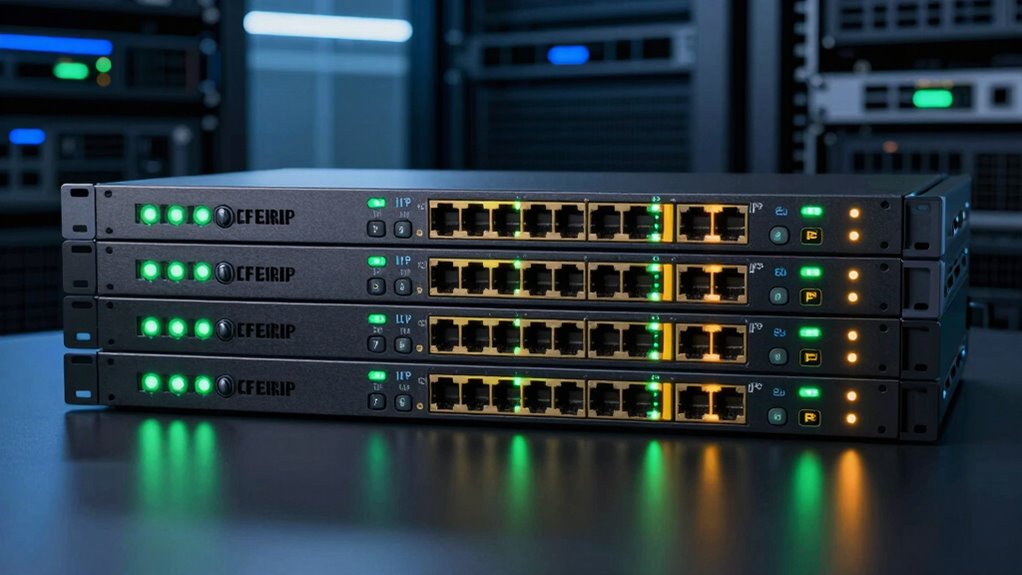

Choosing the right 8 port KVM over IP switch depends heavily on your specific needs—whether you prioritize high-resolution video, remote management, or ease of setup. The MT-VIKI 8 Port HDMI KVM Switch excels for users who need straightforward 4K support and simple controls. For those managing complex data centers, the Vertiv Avocent AV3000 offers extensive interface options and centralized control. Meanwhile, the Tripp Lite NetDirector stands out for its integrated LCD and security features, ideal for server rooms requiring secure access. Each option balances features with tradeoffs—such as resolution limits or setup complexity—making it essential to match your environment with the right product.

Get the latest gadgets delivered free — and shop member deals
- Fast, free delivery on millions of items
- Access to Prime Big Deal Days deals on October 6–7
- Prime Video, Amazon Music and more included
Complete the kit



Key Takeaways
- High-resolution support at 4K 30Hz is common, but some switches limit refresh rates, affecting visual clarity for fast-moving visuals.
- Remote access capabilities vary from basic LAN/WAN to advanced centralized management with security features.
- Compatibility with different interfaces (HDMI, DisplayPort, VGA, DVI) impacts setup flexibility and future-proofing.
- Ease of installation and included accessories differ, with some models offering plug-and-play packages and others requiring complex setup.
- Daisy-chaining and scalability are critical for larger, multi-device environments but may require additional hardware investments.
| MT-VIKI 8 Port HDMI KVM Switch 4K@30Hz Rack Mount with IR Remote & Cables |  | Best Overall for Simplicity and 4K Support | Number of Ports: 8 | Resolution: 4K@30Hz | Mounting Type: Rack Mount 1U | VIEW ON AMAZON | See Our Full Breakdown |
| Vertiv Avocent AV3000 Rackmount KVM Over IP Switch, 8 Port |  | Best for Centralized Management and Multiple Display Interfaces | Number of Ports: 8 | Display Interfaces: VGA, DVI, DisplayPort, HDMI | Access Types: Local and Remote | VIEW ON AMAZON | See Our Full Breakdown |
| Tripp Lite NetDirector 8-Port DisplayPort KVM Switch with 17-inch LCD, IP Remote Access, 1U Rack-Mount |  | Best for Secure, Remote Management with Built-in Display | Number of Ports: 8 | Display: 17-inch LCD | Connectivity: DisplayPort | VIEW ON AMAZON | See Our Full Breakdown |
| TRIPP LITE 8-Port Steel Rackmount IP KVM Switch with On-Screen Display (B022-U08-IP), Black |  | Best for Large-Scale, Networked Environments | Number of Ports: 8 | Mounting Size: 1U | Connectivity: USB, PS/2 | VIEW ON AMAZON | See Our Full Breakdown |
| TESmart 8×1 HDMI KVM Switch 4K@30Hz with 8 Cables |  | Best for Value and Easy Setup | Number of Ports: 8 HDMI inputs, 1 HDMI output | Resolution Support: 4K@30Hz | USB Ports: 2 USB 2.0 hub ports | VIEW ON AMAZON | See Our Full Breakdown |
| port kvm over ip switch | Number of Ports | Connectivity |
|---|---|---|
| MT-VIKI 8 Port HDMI KVM Switch | 8 | HDMI, USB 2.0 |
| Vertiv Avocent AV3000 Rackmoun | 8 | — |
| Tripp Lite NetDirector 8-Port | 8 | DisplayPort |
| TRIPP LITE 8-Port Steel Rackmo | 8 | USB, PS/2 |
| TESmart 8×1 HDMI KVM Switch 4K | 8 HDMI inputs, 1 HDMI output | — |
More Details on Our Top Picks
MT-VIKI 8 Port HDMI KVM Switch 4K@30Hz Rack Mount with IR Remote & Cables
This switch stands out for its straightforward approach to managing 8 HDMI-connected computers at 4K resolution. It supports 30Hz, making it suitable for general use but less ideal for fast-paced visuals like gaming or high-refresh-rate applications. The inclusion of multiple control options—panel button, IR remote, and desktop selector—adds convenience, and the rack-mount design suits professional environments. Compared with more advanced options, it lacks features like audio switching or higher refresh rates, but for users seeking reliable HD video and simple operation, it delivers solid value.
Pros:- Supports 4K resolution at 30Hz for clear, high-quality video.
- Multiple control options improve flexibility.
- Includes necessary cables and rack-mount accessories.
Cons:- Limited to 30Hz at 4K, which may not suit fast-motion content.
- Requires physical connection setup and multiple cables.
- Lacks advanced features like audio switching or network control.
Best for: Small offices or general users needing reliable 4K video at 8 ports with straightforward controls.
Not ideal for: High-refresh-rate applications, advanced audio needs, or environments requiring complex remote management.
- Number of Ports:8
- Resolution:4K@30Hz
- Mounting Type:Rack Mount 1U
- Connectivity:HDMI, USB 2.0
- Control Methods:Panel button, IR remote, desktop selector
- Power:10 watts
Our verdict“A reliable, easy-to-use switch best suited for basic 4K display needs in small setups.”
Vertiv Avocent AV3000 Rackmount KVM Over IP Switch, 8 Port
The Vertiv Avocent AV3000 offers a more versatile approach, supporting multiple display interfaces like VGA, DVI, DisplayPort, and HDMI, making it suitable for varied hardware environments. Its ability to enable both local and remote management with centralized control makes it a top choice for larger or more complex setups. The space-saving rackmount form factor is a plus, but its complexity and limited port count could be drawbacks for users with larger or more dynamic needs. Compared to simpler HDMI-only switches, it provides extensive interface options but may be overkill for basic users.
Pros:- Supports multiple display interfaces for broad compatibility.
- Enables centralized, remote management of connected systems.
- Space-efficient rackmount design.
Cons:- Limited to 8 ports, less suitable for larger setups.
- Setup complexity may challenge beginners.
- Lacks detailed info on system compatibility specifics.
Best for: IT professionals managing multi-platform environments requiring versatile connection options and remote control.
Not ideal for: Small-scale or home users, or those seeking plug-and-play simplicity without extensive configuration.
- Number of Ports:8
- Display Interfaces:VGA, DVI, DisplayPort, HDMI
- Access Types:Local and Remote
- Additional Features:CAC support, Centralized Management
Our verdict“Ideal for medium to large IT environments needing flexible interface support and centralized control.”
Tripp Lite NetDirector 8-Port DisplayPort KVM Switch with 17-inch LCD, IP Remote Access, 1U Rack-Mount
The Tripp Lite NetDirector combines a built-in 17-inch LCD with advanced security features, making it perfect for data centers or sensitive environments. Its DisplayPort support ensures high-quality video, and remote IP access allows for management from anywhere. The secure authentication options and encryption add peace of mind, but its reliance on DisplayPort limits compatibility with other interfaces. The integrated LCD is a unique advantage, but it requires rack space and may not include all necessary accessories upfront.
Pros:- Large 17-inch LCD simplifies local management.
- Secure remote access with multiple authentication options.
- Space-efficient 1U rack-mount design.
Cons:- Limited to DisplayPort connections.
- Requires rack space and additional setup for accessories.
- No mention of included cables or external power specifics.
Best for: Data centers or server rooms requiring secure, remote access with a display built into the switch.
Not ideal for: Small offices or users needing multiple interface compatibility or plug-and-play simplicity.
- Number of Ports:8
- Display:17-inch LCD
- Connectivity:DisplayPort
- Remote Access:IP
- Security:Password, encryption, LDAP, RADIUS, Active Directory
Our verdict“Best suited for environments prioritizing security and remote management with integrated display.”
TRIPP LITE 8-Port Steel Rackmount IP KVM Switch with On-Screen Display (B022-U08-IP), Black
This KVM switch emphasizes remote network access, supporting LAN, WAN, and Internet browser control. Its daisy-chain capability allows management of up to 248 computers, making it perfect for data centers or large server farms. The inclusion of on-screen display simplifies navigation, but the need for multiple switches and potential setup complexity could deter less technical users. Compatibility with USB and PS/2 systems adds flexibility, though the absence of detailed video resolution specs might be a concern for high-resolution applications.
Pros:- Supports remote access via network browsers.
- Daisy-chain capability for scalability.
- Compatible with USB and PS/2 devices.
Cons:- Setup can be complex for non-technical users.
- Requires additional hardware for very large configurations.
- No specific mention of video resolution limits.
Not ideal for: Small setups or users seeking simple, standalone switches with high-definition video support.
- Number of Ports:8
- Mounting Size:1U
- Connectivity:USB, PS/2
- Remote Access:LAN, WAN, Internet
- Daisy-Chaining:Yes, up to 248 computers
Our verdict“Designed for extensive, networked environments needing remote control of many servers.”
TESmart 8×1 HDMI KVM Switch 4K@30Hz with 8 Cables
The TESmart 8×1 HDMI KVM switch offers a budget-friendly solution with included cables, making it an appealing option for straightforward setups. It supports 4K at 30Hz, enough for most general video needs, and offers multiple control methods including IR remote, hotkeys, LAN, and auto scan. The presence of EDID emulators helps maintain display settings across switches, but reliance on batteries for remote operation and the limited refresh rate at 4K may limit its appeal for high-motion or professional use. The external power requirement is not explicitly specified, which could affect certain environments.
Pros:- Supports 4K resolution at 30Hz.
- Includes 8 cables and remote for quick setup.
- Multiple switching options enhance convenience.
Cons:- Remote batteries are not included, adding extra cost.
- Limited to 30Hz at 4K, which may not suit fast-motion content.
- Requires external power, not specified in detail.
Best for: Home offices or small business setups seeking cost-effective, easy-to-install KVM switches with multiple control options.
Not ideal for: High-refresh-rate, professional, or gaming environments demanding more advanced video performance.
- Number of Ports:8 HDMI inputs, 1 HDMI output
- Resolution Support:4K@30Hz
- USB Ports:2 USB 2.0 hub ports
- Cable Length:8 x 5ft KVM cables
- Switching Methods:IR remote, front panel, hotkeys, mouse wheel, RS232, LAN, auto scan
- EDID Emulator:Yes
Our verdict“A practical, budget-friendly choice for basic 4K switching needs with versatile controls.”

How We Picked
Our selection process focused on real-world usability, balancing feature sets with practical tradeoffs. We prioritized products that offer reliable remote access, high-quality video output, and flexible control options. Compatibility with standard interfaces and ease of installation were key factors, as was the product’s scalability for different environments. We also considered user security features and value for money, ensuring each pick addresses specific buyer needs—from simple setups to complex data center management.
| port kvm over ip switch | Connectivity |
|---|---|
| MT-VIKI 8 Port HDMI KVM Switch | HDMI, USB 2.0 |
| Vertiv Avocent AV3000 Rackmoun | — |
| Tripp Lite NetDirector 8-Port | DisplayPort |
| TRIPP LITE 8-Port Steel Rackmo | USB, PS/2 |
| TESmart 8×1 HDMI KVM Switch 4K | — |
Factors to Consider When Choosing 8 Port Kvm Over Ip Switch
When selecting an 8 port KVM over IP switch, consider your specific setup requirements—such as resolution needs, remote management capabilities, and interface compatibility. The right device should seamlessly fit into your existing infrastructure while providing reliable control and security. Here are key aspects to evaluate:
Resolution and Video Quality
High-resolution support is often a priority, especially for media professionals or detailed workstations. Most switches support 4K at 30Hz, but some may limit refresh rates or only support lower resolutions. Consider whether your applications require higher refresh rates for smooth visuals or if 4K at 30Hz suffices.
Remote Access and Management
For managing multiple computers remotely, look at whether the switch supports IP-based access, centralized management, or security features like encryption and user authentication. Basic LAN/WAN access is suitable for smaller setups, but enterprise environments benefit from advanced security and management tools.
Interface Compatibility
Identify the types of video outputs your devices use—HDMI, DisplayPort, VGA, or DVI—and choose a switch that matches or offers versatility. Flexibility in interface support can extend the lifespan of your hardware investments and simplify future upgrades.
Ease of Installation and Accessories
Some switches come as complete packages with cables and remote controls, making setup faster. Others may require additional purchases or complex configurations. Consider your technical comfort level and whether included accessories justify the overall value.
Scalability and Future Growth
If you anticipate expanding your setup, features like daisy-chaining or network-based access become important. These options enable seamless growth but may require more initial investment and setup effort.
Frequently Asked Questions
What is the main difference between HDMI and DisplayPort KVM switches?
HDMI and DisplayPort are both digital video interfaces, but DisplayPort generally supports higher refresh rates and more versatile configurations, making it suitable for professional or gaming environments. HDMI is more common in consumer electronics and offers wider compatibility with standard monitors and TVs. Your choice depends on your hardware and performance needs.
Can I add more than 8 computers to a KVM switch?
Most 8 port KVM switches do not support direct expansion, but many can be daisy-chained with additional switches. This setup allows control of many more systems, though it increases complexity and setup time. For truly large environments, dedicated management solutions or network-based KVMs may be more effective.
Is remote access secure on these KVM switches?
Security varies by model. Some switches include advanced features like encryption, user authentication, and support for secure protocols, making them suitable for sensitive environments. Others may only offer basic IP access, which could pose security risks if not properly configured—always check the security features before purchasing for sensitive applications.
What should I consider regarding video resolution and refresh rate?
If you work with high-motion content, a switch supporting higher refresh rates than 30Hz at 4K—such as 60Hz—is preferable. For general office tasks, 4K at 30Hz is often sufficient, but verify whether your applications require smoother visuals to avoid performance issues.
Are included accessories important when choosing a KVM switch?
Included cables, remote controls, and mounting hardware can significantly reduce setup time and initial costs. However, ensure that the included accessories match your needs and that the cables are of adequate length and quality. If not included, factor in additional purchase costs and compatibility considerations.
Conclusion
For buyers seeking simplicity and high-quality 4K video at an affordable price, the MT-VIKI 8 Port HDMI KVM Switch offers reliable performance with multiple control options. Larger organizations or data centers that require extensive interface support and centralized management should consider the Vertiv Avocent AV3000 for its versatility. For environments demanding secure, remote control with an integrated display, the Tripp Lite NetDirector provides a capable solution. Budget-conscious users or those with straightforward needs will find the TESmart 8×1 HDMI KVM an excellent value, while the TRIPP LITE 8-Port Steel Rackmount suits growing or highly networked setups. Ultimately, matching your specific environment and future plans with these features ensures optimal performance and value.
Fall Picks
fall essentials
As an affiliate, we earn on qualifying purchases.