
A 5G router with failover can keep your connection online by switching to cellular service when a primary link drops. For most buyers, I’d start with the MOFINETWORK MOFI6500 for its stated auto-failover and dual-SIM setup; the GL.iNet Spitz AX is a flexible home option, while the Miri X510 stands out for dual-cellular bonding. The right choice depends on whether you need automatic backup from a wired connection, redundancy between SIMs, or bonding that combines cellular links. You’ll also need to weigh coverage, data-plan rules, Wi-Fi capacity, and installation needs. Read on for the full breakdown and a buying guide to help match the router to your connection plan.

Get the latest gadgets delivered free with Prime
- Fast, free delivery on millions of items
- Prime Video, Amazon Music and more included
- Member-only deals all year
Complete the kit



Key Takeaways
- Auto-failover and dual SIM are different capabilities: a router may switch between SIMs without switching from wired broadband to cellular, so verify the failover paths you need.
- The MOFI6500 is the clearest listed fit for automatic cellular backup: its product name explicitly identifies auto failover, while other models need closer checking for WAN-to-cellular behavior.
- The Miri X510 takes a different approach: its dual-cellular bonding and Speedify license target combining connections, not simply keeping a primary wired link as the preferred route.
- Portable routers trade fixed-install practicality for mobility: the GL.iNet MUDI 7 and Puli AX include batteries, but buyers should plan around battery runtime, charging, and cellular data use.
- Industrial models serve a different job from home Wi-Fi routers: the InHand IR624 and Teltonika RUTM50 are aimed at cellular networking deployments, so check whether their management and Wi-Fi setup suit your environment.
| InHand FWA02 5G Wi-Fi 6 Router |  | Best Overall for Managed Home and Small-Business Failover | Model: FWA02 | Cellular peak download: Up to 4.76 Gbps | Wi-Fi: Wi-Fi 6 (802.11ax), up to 3,600 Mbps | VIEW ON AMAZON | See Our Full Breakdown |
| Miri X510 Dual Cellular Bonding Router with 90-Day Speedify License |  | Best for Live Production and Connection Bonding | Model: X510 | Cellular modems: One 4G LTE modem and one 5G modem | SIM ports: 2; SIM cards sold separately | VIEW ON AMAZON | See Our Full Breakdown |
| InHand Networks 5G Router Indoor CPE WiFi 6 AX5400 with 2.5GbE Ports |  | Best for High-Device Business Networks | Wi-Fi standard: Wi-Fi 6 (802.11ax), AX5400 class | Listed data transfer rate: 5,400 Mbps | Maximum upstream data transfer: 550 Mbps | VIEW ON AMAZON | See Our Full Breakdown |
| InHand Networks CR602 5G Cellular Router with Wi-Fi 7 and 10,000 mAh Battery |  | Best Portable Pick for Battery-Powered Failover | Cellular connectivity: 5G NR SA/NSA and 4G LTE | Peak download and upload: Up to 7.01 Gbps download; up to 2.5 Gbps upload | Wi-Fi: Dual-band Wi-Fi 7 (802.11be), BE3000, 160 MHz channels | VIEW ON AMAZON | See Our Full Breakdown |
| Hitron D60 5G Cellular Router with Wi-Fi 6 |  | Best for Straightforward Carrier-Certified Backup | Cellular connectivity: 5G and 4G LTE | Maximum 5G NSA download: Up to 3.4 Gbps | Wi-Fi: Dual-band Wi-Fi 6, up to 5.4 Gbps | VIEW ON AMAZON | See Our Full Breakdown |
| MOFINETWORK MOFI6500-5GXeLTE-RM520-HP 4G LTE 5G Dual SIM Cellular Router with Wi-Fi 6 and Auto Failover |  | Best for Rugged Business Use | Cellular connectivity: 5G and 4G LTE | SIM support: Dual SIM with automatic failover | Wi-Fi: Wi-Fi 6, dual-band | VIEW ON AMAZON | See Our Full Breakdown |
| InHand Networks IR624 Industrial 5G Cellular Router |  | Best for Industrial Failover | Cellular speed: Downlink up to 3.4 Gbps | SIM and failover: Dual-nano-SIM failover | Ethernet: 4 x 10/100/1000 Mbps ports with 1.5 kV isolation | VIEW ON AMAZON | See Our Full Breakdown |
| Cudy P5 5G AX3000 Wi-Fi 6 Router with Dual SIM and 4 Gigabit Ports |  | Best Value for Flexible Failover | 5G modem: Qualcomm X62, up to 3.4 Gbps | SIM slots: 2 Nano SIM | Failover: WAN, Cellular 1, Cellular 2 | VIEW ON AMAZON | See Our Full Breakdown |
| GL.iNet GL-E5800 NA MUDI 7 5G Tri-Band Wi-Fi 7 Travel Router with eSIM |  | Best for Travel and Multi-Network Backup | Cellular connectivity: 5G and LTE | SIM options: Built-in eSIM and dual nano-SIM slots | Wi-Fi: Wi-Fi 7, tri-band (2.4 GHz, 5 GHz, 6 GHz) | VIEW ON AMAZON | See Our Full Breakdown |
| SquareWiz RM520N AX3000 WiFi 6 5G Cellular Router with SIM Card Slot |  | Best for High-Device-Count Coverage | Modem: Qualcomm SDX62 | 5G speed: Up to 3.4 Gbps | Wi-Fi: Wi-Fi 6 (802.11ax) | VIEW ON AMAZON | See Our Full Breakdown |
| Teltonika RUTM50 5G Industrial Router |  | Best for Industrial Failover | Model number: RUTM50000000 | Cellular connectivity: 5G and 4G LTE | Failover: Dual SIM | VIEW ON AMAZON | See Our Full Breakdown |
| GL.iNet GL-X3000 Spitz AX 5G Cellular Router with Wi-Fi 6 and Dual SIM |  | Best for Flexible Multi-WAN Failover | Cellular connectivity: 5G NR, LTE, UMTS, WCDMA | WAN modes: Ethernet, repeater, cellular, tethering | SIM: Dual SIM, single standby | VIEW ON AMAZON | See Our Full Breakdown |
| GL.iNet GL-XE3000 Puli AX 5G Wi-Fi 6 Router with Dual SIM and 6400mAh Battery | 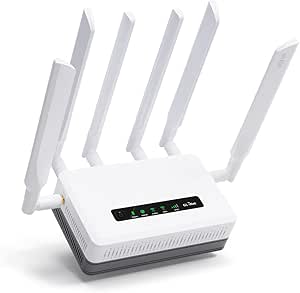 | Best Battery-Powered Failover | Model: GL-XE3000 | Cellular connectivity: 5G NSA/SA and 4G LTE | Failover connections: 5G, Ethernet, Wi-Fi repeater, and tethering | VIEW ON AMAZON | See Our Full Breakdown |
| 5g router with failover | Wi-Fi | Cellular connectivity |
|---|---|---|
| InHand FWA02 5G Wi-Fi 6 Router | Wi-Fi 6 (802.11ax), up to 3,600 Mbps | — |
| Miri X510 Dual Cellular Bondin | Dual-band Wi-Fi 6 (802.11ax) | — |
| InHand Networks 5G Router Indo | — | — |
| InHand Networks CR602 5G Cellu | Dual-band Wi-Fi 7 (802.11be), BE3000, 160 MHz channels | 5G NR SA/NSA and 4G LTE |
| Hitron D60 5G Cellular Router | Dual-band Wi-Fi 6, up to 5.4 Gbps | 5G and 4G LTE |
| MOFINETWORK MOFI6500-5GXeLTE-R | Wi-Fi 6, dual-band | 5G and 4G LTE |
| InHand Networks IR624 Industri | Wi-Fi 5 (802.11ac) | — |
| Cudy P5 5G AX3000 Wi-Fi 6 Rout | Dual-band Wi-Fi 6 | — |
| GL.iNet GL-E5800 NA MUDI 7 5G | Wi-Fi 7, tri-band (2.4 GHz, 5 GHz, 6 GHz) | 5G and LTE |
| SquareWiz RM520N AX3000 WiFi 6 | Wi-Fi 6 (802.11ax) | — |
| Teltonika RUTM50 5G Industrial | Wi-Fi 6; listed standard: 802.11ac | 5G and 4G LTE |
| GL.iNet GL-X3000 Spitz AX 5G C | Dual-band Wi-Fi 6 | 5G NR, LTE, UMTS, WCDMA |
| GL.iNet GL-XE3000 Puli AX 5G W | Dual-band Wi-Fi 6; maximum data rate 3000 Mbps | 5G NSA/SA and 4G LTE |
More Details on Our Top Picks
InHand FWA02 5G Wi-Fi 6 Router
I rank the InHand FWA02 first for buyers who want a capable 5G router that treats failover as part of a managed network, not just a backup connection. Its dual SIM support, cellular failover, and cloud management give home offices and small businesses more ways to keep service available than the simpler Hitron D60. Two 2.5 GbE ports also leave more room for fast wired links than the D60’s single gigabit port, while Wi-Fi 6 suits a range of everyday devices. Firewall, access-control, and VPN features add useful network tools without requiring a separate security appliance. The tradeoff is that eSIM service may take extra setup, and the stated peak speeds depend on carrier coverage. Buyers who need battery-powered portability should choose the InHand CR602 instead.
Pros:- Cellular failover and dual SIM support provide backup-path flexibility
- Two switchable 2.5 GbE ports accommodate faster wired equipment
- Cloud management, firewall, access controls, and VPN support
- Wi-Fi 6 and a stated cellular peak of up to 4.76 Gbps
Cons:- Optional eSIM support may require extra service setup
- Peak cellular and Wi-Fi rates depend on network conditions and compatible equipment
- No built-in battery for off-grid or mobile operation
Best for: Home-office owners and small businesses that want cloud-managed 5G backup, dual SIM flexibility, and faster-than-gigabit wired connections.
Not ideal for: Travelers who need a battery-powered router, or buyers seeking a plug-and-play setup without carrier or eSIM configuration.
- Model:FWA02
- Cellular peak download:Up to 4.76 Gbps
- Wi-Fi:Wi-Fi 6 (802.11ax), up to 3,600 Mbps
- Ethernet:2 × 2.5 GbE RJ45, WAN/LAN switchable
- SIM:Nano SIM and optional eSIM
- VPN protocols:IPSec, L2TP
- Security:WPA2, WPA3
- Antennas:6
Our verdict“Choose the FWA02 for a managed home or small-business network where dual-SIM 5G failover and 2.5 GbE ports matter more than battery-powered mobility.”
Miri X510 Dual Cellular Bonding Router with 90-Day Speedify License
The Miri X510 is the specialist pick here: it is designed to combine available connections for live streaming and remote production, rather than serve as a straightforward fixed-site 5G backup router. Its one 5G modem and one 4G LTE modem can work alongside Ethernet or Wi-Fi through Speedify, giving production crews a way to use multiple paths instead of relying on a single cellular link. That makes it a closer fit for mobile broadcasts than the InHand FWA02, which offers a more conventional dual-SIM failover and stronger wired-port speeds. The X510 includes a 90-day Speedify pass, but that benefit is time-limited; SIM cards are separate, and ongoing bonding requires a continuing service arrangement. Its 2.6-pound weight also makes it portable in a vehicle or kit, not pocket-friendly.
Pros:- Combines a 5G modem and a 4G LTE modem
- Speedify can bond cellular, Ethernet, and Wi-Fi connections
- Wi-Fi 6 and Gigabit Ethernet support local devices and wired gear
- Includes a 90-day Speedify pass with a 1 TB-per-month plan
Cons:- SIM cards are not included
- Included Speedify access lasts only 90 days
- At 2.6 pounds, it is less convenient for light travel than a compact mobile router
Best for: Live-streaming crews and remote production teams that need to bond cellular, Ethernet, and Wi-Fi connections while working away from a fixed broadband line.
Not ideal for: Households seeking a simple permanent 5G backup router, or users who do not want separate SIM purchases and a time-limited bonding plan.
- Model:X510
- Cellular modems:One 4G LTE modem and one 5G modem
- SIM ports:2; SIM cards sold separately
- Wi-Fi:Dual-band Wi-Fi 6 (802.11ax)
- Ethernet:Gigabit Ethernet
- Antennas:8
- Included Speedify plan:90-day pass, 1 TB/month
- Dimensions and weight:8.5 × 5 × 1.75 inches; 2.6 pounds
Our verdict“Pick the X510 for mobile production where connection bonding is more useful than a simple automatic 5G failover setup.”
InHand Networks 5G Router Indoor CPE WiFi 6 AX5400 with 2.5GbE Ports
For an office or busy worksite with many connected devices, this InHand indoor CPE makes a stronger case than the more portable Miri X510: it is described as supporting up to 200 devices, with cloud-based remote configuration and failover for business continuity. Its Wi-Fi 6 AX5400 class and multiple Ethernet ports suit a mix of wireless users and wired equipment, while the listed load-balancing capability gives network managers more flexibility than basic backup alone. The published data is less complete than the FWA02’s, though: it identifies three ports but lists 1 Gbps LAN bandwidth, so buyers should confirm port capabilities for their setup rather than assume 2.5 GbE performance. Carrier-specific APN work or non-standard configuration may also make deployment less approachable for a home user.
Pros:- Designed to support up to 200 connected devices
- Failover and load balancing support business continuity
- Cloud platform allows remote configuration
- Wi-Fi 6 AX5400 class and three listed Ethernet ports
Cons:- Some carriers may require manual APN setup or extra configuration
- Listed LAN port bandwidth is 1 Gbps, despite the product title referencing 2.5GbE ports
- The supplied product details do not specify SIM configuration
Best for: Small and midsize businesses or shared workspaces with many devices, a need for remote configuration, and staff able to handle carrier setup.
Not ideal for: Home users who want a simple installation, or buyers who need clearly specified 2.5 GbE performance on every wired port.
- Wi-Fi standard:Wi-Fi 6 (802.11ax), AX5400 class
- Listed data transfer rate:5,400 Mbps
- Maximum upstream data transfer:550 Mbps
- Ports:3
- Listed LAN port bandwidth:1 Gbps
- Device capacity:Up to 200 devices
- Operating system:InCloud OS
- Security protocols:IPsec, L2TP
Our verdict“Choose this InHand CPE for a managed, device-heavy business network if you can verify the port details and handle carrier-specific setup.”
InHand Networks CR602 5G Cellular Router with Wi-Fi 7 and 10,000 mAh Battery
The InHand CR602 is the clear choice when backup internet needs to move with you. Unlike the stationary FWA02, it has a 10,000 mAh removable battery rated for up to 12 hours of continuous 5G operation, plus dual Nano-SIM slots and configurable SIM prioritization. Wi-Fi 7 and two 2.5G Ethernet ports also give it a more modern local connection mix than the Wi-Fi 6 Hitron D60. Its built-in eSIM is a narrower advantage than the dual-SIM label may suggest: that eSIM is Verizon-only and requires activation, while physical SIMs and a data plan are not included. The 32-device wireless limit makes it a better fit for a traveling team or temporary site than a large office, and some carriers may need manual APN setup.
Pros:- Removable 10,000 mAh battery rated for up to 12 hours of continuous 5G use
- Dual Nano-SIM slots support configurable failover
- Wi-Fi 7 and two 2.5G Ethernet ports
- App and cloud management include firewall, DNS filtering, and VPN tools
Cons:- Built-in eSIM is limited to Verizon and requires activation
- SIM card and data plan are not included
- Manual APN setup may be needed for some carriers
Best for: Field teams, mobile professionals, and temporary worksites that need battery-backed 5G internet with configurable SIM failover.
Not ideal for: Large offices with many wireless clients, or buyers who need an eSIM that works across carriers without direct activation.
- Cellular connectivity:5G NR SA/NSA and 4G LTE
- Peak download and upload:Up to 7.01 Gbps download; up to 2.5 Gbps upload
- Wi-Fi:Dual-band Wi-Fi 7 (802.11be), BE3000, 160 MHz channels
- SIM:Dual Nano-SIM and built-in Verizon-only eSIM
- Battery:10,000 mAh removable; up to 12 hours of continuous 5G operation
- Ethernet:Two 2.5G Ethernet ports
- Device capacity:Up to 32 wireless devices; up to 128 via Ethernet
- Security and VPN:Firewall, DNS filtering, IPsec, L2TP, WPA2-PSK, WPA3
Our verdict“Choose the CR602 when portable, battery-backed 5G failover matters more than broad eSIM choice or high client capacity.”
Hitron D60 5G Cellular Router with Wi-Fi 6
The Hitron D60 keeps the proposition simple: add a certified carrier Nano SIM and use 5G or 4G LTE as a backup connection, without the bonding features of the Miri X510 or the cloud-management emphasis of the InHand FWA02. Its listed compatibility with T-Mobile, AT&T, and US Cellular helps narrow the carrier question for buyers on those networks, and dual-band Wi-Fi 6 can serve typical home or small-office devices. The tradeoff is expansion: the D60 has only one gigabit LAN port, versus two 2.5 GbE ports on the FWA02, and its three-month limited warranty is shorter than many buyers may want for an always-on gateway. Its 3.4 Gbps 5G NSA figure is a peak specification, not a guaranteed real-world connection.
Pros:- Supports 5G and 4G LTE cellular connectivity
- Cellular failover can provide a backup internet path
- Dual-band Wi-Fi 6 supports 2.4 GHz and 5 GHz devices
- Lists compatibility with T-Mobile, AT&T, and US Cellular
Cons:- Only one gigabit LAN port limits wired-device connections
- Requires a Nano SIM from a certified carrier
- Listed warranty is limited to three months
Best for: Households or small offices on a listed certified carrier that want a basic 5G/4G cellular backup path and Wi-Fi 6.
Not ideal for: Businesses needing several fast wired connections, extensive cloud controls, or a longer stated warranty.
- Cellular connectivity:5G and 4G LTE
- Maximum 5G NSA download:Up to 3.4 Gbps
- Wi-Fi:Dual-band Wi-Fi 6, up to 5.4 Gbps
- Ethernet:1 port; 1,000 Mbps LAN bandwidth
- SIM:Nano SIM
- Listed compatible carriers:T-Mobile, AT&T, US Cellular
- Antennas:5
- Warranty:3-month limited warranty
Our verdict“Pick the D60 for a basic carrier-certified 5G failover setup if one gigabit LAN port and its short stated warranty fit your needs.”
MOFINETWORK MOFI6500-5GXeLTE-RM520-HP 4G LTE 5G Dual SIM Cellular Router with Wi-Fi 6 and Auto Failover
The MOFI6500 is a strong fit when failover needs to sit inside a durable, business-oriented router rather than a travel-friendly package. Its dual-SIM automatic failover can switch cellular connections when one carrier becomes unavailable, while Wi-Fi 6 and internal amplification support local wireless coverage. Compared with the Cudy P5, MOFI emphasizes a rugged all-metal build and enterprise security; Cudy offers more explicitly listed VPN choices and mesh support. The metal housing and broad feature set make this better suited to a fixed office, remote worksite, or mobile installation than a simple home setup. The tradeoff is practical: its bulkier design and more involved configuration may be excessive for buyers who want quick, uncomplicated backup internet.
Pros:- Dual SIM with automatic cellular failover
- Wi-Fi 6 with internal amplification for extended wireless coverage
- Rugged all-metal construction
- WPA3 and WPA2-Enterprise security support
Cons:- Setup may be challenging for buyers without networking experience
- Metal construction makes it bulkier than a portable backup router
- The feature set may be more involved than a basic home connection requires
Best for: Small businesses, remote offices, and mobile operators seeking dual-SIM failover, Wi-Fi 6, and a rugged metal router.
Not ideal for: Non-technical home users who want a compact router with a simple setup and do not need enterprise-oriented features.
- Cellular connectivity:5G and 4G LTE
- SIM support:Dual SIM with automatic failover
- Wi-Fi:Wi-Fi 6, dual-band
- Ports:5
- Maximum data transfer rate:3.4 Gbps
- RAM:1 GB
- Antennas:9 retractable antennas
- Security:WPA2-Enterprise, WPA2-PSK, WPA3
Our verdict“Choose the MOFI6500 if rugged construction and dual-SIM failover matter more than a compact design or beginner-friendly setup.”
InHand Networks IR624 Industrial 5G Cellular Router
The InHand IR624 is built around industrial continuity, not whole-home Wi-Fi. Dual-nano-SIM failover backs up its 5G connection, while four Gigabit Ethernet ports and RS232/RS485 interfaces let it connect directly to equipment used in factories, utilities, and remote monitoring. Its fanless metal enclosure, DIN-rail mounting, and stated operating range from -20°C to 70°C make it a more natural fit for harsh installations than the MOFI6500, which puts more emphasis on Wi-Fi 6 coverage and general business use. The IR624’s Wi-Fi 5 is a generation behind newer wireless options such as the Cudy P5, and its industrial interfaces may be wasted in a typical home. Carrier provisioning and network configuration also call for more technical know-how than a plug-in consumer router.
Pros:- Dual-nano-SIM failover for cellular redundancy
- Four Gigabit Ethernet ports with electrical isolation
- RS232 and RS485 interfaces for industrial equipment
- Fanless metal housing with DIN-rail mounting and a -20°C to 70°C operating range
Cons:- Wi-Fi 5 is older than the Wi-Fi 6 offered by the MOFI6500 and Cudy P5
- Industrial setup and carrier provisioning may require specialist knowledge
Best for: Industrial operators and system integrators who need dual-SIM backup, wired equipment connections, and serial interfaces in a temperature-tolerant enclosure.
Not ideal for: Households or small offices prioritizing newer Wi-Fi, simple setup, or wireless coverage over industrial device integration.
- Cellular speed:Downlink up to 3.4 Gbps
- SIM and failover:Dual-nano-SIM failover
- Ethernet:4 x 10/100/1000 Mbps ports with 1.5 kV isolation
- Serial interfaces:1 x RS232 and 1 x RS485
- Wi-Fi:Wi-Fi 5 (802.11ac)
- VPN:IPsec VPN and L2TP VPN
- Operating temperature:-20°C to 70°C
- Enclosure and mounting:IP30; DIN-rail compatible
Our verdict“Pick the IR624 for industrial equipment and environmental demands; choose a Wi-Fi 6 router instead for a conventional office or home.”
Cudy P5 5G AX3000 Wi-Fi 6 Router with Dual SIM and 4 Gigabit Ports
The Cudy P5 makes failover flexibility unusually clear: it can move between WAN, Cellular 1, and Cellular 2, so buyers can combine a wired connection with two cellular paths. That gives it a broader stated backup sequence than the MOFI6500’s dual-SIM cellular failover alone. Its Wi-Fi 6, four Gigabit ports, mesh support, and detachable cellular antennas make it adaptable for a home office or small business, while a broad VPN protocol list suits users who want remote-access options. Compared with the travel-focused GL.iNet MUDI 7, the P5 is a stationary router with no listed battery, but it provides four Ethernet ports for local devices. Its 256 MB of RAM is modest, and cellular backup still depends on compatible SIMs and active carrier plans.
Pros:- Failover options include WAN and two cellular connections
- Wi-Fi 6 with four Gigabit Ethernet ports
- Detachable cellular antennas allow antenna upgrades
- Supports mesh networking and a wide range of VPN protocols
Cons:- Requires compatible SIM cards and cellular plans for mobile backup
- 256 MB RAM is limited compared with the 1 GB MOFI6500 and 2 GB GL.iNet MUDI 7
- No battery is listed for portable operation
Best for: Home-office owners and small businesses who want wired WAN backup plus two cellular SIM options in a Wi-Fi 6 router.
Not ideal for: Frequent travelers who need an integrated battery, or buyers who want a router with high-capacity memory specified for demanding workloads.
- 5G modem:Qualcomm X62, up to 3.4 Gbps
- SIM slots:2 Nano SIM
- Failover:WAN, Cellular 1, Cellular 2
- Wi-Fi:Dual-band Wi-Fi 6
- Wi-Fi data rate:2402 Mbps (5 GHz) + 574 Mbps (2.4 GHz)
- Ethernet:4 Gigabit ports: 1 configurable WAN/LAN and 3 LAN
- VPN protocols:WireGuard, OpenVPN, IPsec, Zerotier, PPTP, L2TP
- RAM:256 MB
Our verdict“Choose the Cudy P5 if you want a clear WAN-to-dual-cellular failover path and wired home-office connectivity.”
GL.iNet GL-E5800 NA MUDI 7 5G Tri-Band Wi-Fi 7 Travel Router with eSIM
The GL.iNet MUDI 7 stands apart because its failover-ready connectivity travels with the user. Built-in eSIM and dual nano-SIM slots provide several ways to connect, while its battery supports use away from a power outlet; the touchscreen makes connection management more approachable than the specialist setup expected with the InHand IR624. Its Wi-Fi 7 tri-band radio is also the most advanced wireless generation in this group. The tradeoff is that its three listed ports and travel-router format suit a portable workstation better than a fixed site with numerous wired devices. By contrast, the Cudy P5 offers four Gigabit ports and a clearly specified WAN/cellular failover sequence, while MUDI 7’s supplied details describe multi-WAN failover without spelling out the sequence. VPN throughput can also vary by provider and network conditions.
Pros:- Built-in eSIM plus two nano-SIM slots provide flexible cellular options
- Wi-Fi 7 tri-band support
- 5380 mAh battery and 2.8-inch touchscreen suit mobile use
- 2.5G Ethernet and USB-C support professional connectivity
Cons:- Three listed ports provide fewer wired connections than the Cudy P5
- Advanced configuration may be challenging for less technical users
- VPN speeds can vary with the provider and cellular network
Best for: Mobile professionals who need battery-powered 5G connectivity, flexible SIM options, Wi-Fi 7, and a portable VPN-capable network.
Not ideal for: Fixed industrial sites or offices that need several wired connections, DIN-rail mounting, or clearly specified failover behavior.
- Cellular connectivity:5G and LTE
- SIM options:Built-in eSIM and dual nano-SIM slots
- Wi-Fi:Wi-Fi 7, tri-band (2.4 GHz, 5 GHz, 6 GHz)
- Maximum data transfer rate:5765 Mbps
- Ports:3, including 2.5G Ethernet and USB-C
- RAM:2 GB
- Battery:5380 mAh
- Display:2.8-inch touchscreen
- Operating system:OpenWrt 23.05.4 (Linux Kernel 5.15.170)
Our verdict“Choose the MUDI 7 when portable multi-network access and Wi-Fi 7 matter more than a fixed installation with many wired ports.”
SquareWiz RM520N AX3000 WiFi 6 5G Cellular Router with SIM Card Slot
The SquareWiz RM520N targets buyers who want 5G failover alongside broad local coverage and many connected devices. Its Qualcomm SDX62 modem is rated for up to 3.4 Gbps, while nine detachable antennas split cellular and Wi-Fi roles; the stated capacity of up to 128 users suits a busy home, remote office, or small venue. Multi-WAN failover and load balancing add network-management options, but the supplied specifications do not spell out a dual-SIM arrangement or a specific failover sequence. That makes the Cudy P5 a clearer choice for buyers who specifically want two cellular SIMs and WAN-to-cellular backup. SquareWiz instead stands out for its listed 10 Gbps LAN bandwidth and antenna count. The coverage figure is line-of-sight, so walls and placement can change real-world reach.
Pros:- Qualcomm SDX62 modem supports stated 5G speeds up to 3.4 Gbps
- Nine detachable antennas serve cellular and Wi-Fi connections
- Multi-WAN failover and load balancing are supported
- Listed capacity of up to 128 connected users
Cons:- Supplied specifications do not confirm dual-SIM support or detail the failover sequence
- The stated 300-meter coverage is line-of-sight and may not reflect indoor conditions
Best for: Remote-site operators and busy households seeking 5G backup, detachable antennas, VPN options, and capacity for many connected devices.
Not ideal for: Buyers who require confirmed dual-SIM cellular failover or a clearly documented automatic switching sequence before purchase.
- Modem:Qualcomm SDX62
- 5G speed:Up to 3.4 Gbps
- Wi-Fi:Wi-Fi 6 (802.11ax)
- Wi-Fi data rate:574 Mbps (2.4 GHz) + 2402 Mbps (5 GHz)
- Antennas:9 detachable: 4 x 5 dBi cellular and 5 x 5 dBi Wi-Fi
- Failover and WAN:Multi-WAN failover and load balancing
- VPN protocols:PPTP, L2TP, GRE, WireGuard, Zerotier
- Maximum connected users:128
- LAN port bandwidth:10 Gbps
Our verdict“Consider the SquareWiz for high device capacity and detachable antennas, but choose a model with explicitly documented dual-SIM failover if carrier redundancy is your main requirement.”
Teltonika RUTM50 5G Industrial Router
The Teltonika RUTM50 is the strongest fit here for fixed industrial sites that need cellular backup integrated into a managed network. Its dual-SIM failover, five Gigabit Ethernet ports, VPN options, and remote administration through Teltonika RMS give operators more wired connections and fleet-management capability than the portable GL.iNet Puli AX. That makes it a better match for equipment cabinets, branch sites, or remote installations than for travel. The tradeoff is a more specialized design: its antennas are fixed, and it has no built-in battery, so it depends on suitable mounting and continuous power. The RUTM50’s stated peak transfer rate is high, but actual cellular performance still depends on coverage and service. I’d choose it for managed infrastructure, not for a grab-and-go backup kit.
Pros:- Dual-SIM 5G and 4G LTE failover supports cellular backup
- Five Gigabit Ethernet ports accommodate multiple wired devices
- OpenVPN, IPsec, and WireGuard support a range of secure remote-access setups
- Teltonika RMS enables remote monitoring and configuration
Cons:- Fixed antennas offer less flexibility for repositioning than the GL.iNet GL-X3000’s detachable antennas
- No built-in battery for operation during a power outage
- Industrial management features may be more than a small home network needs
Best for: Industrial operators and IT teams who need dual-SIM cellular backup, several wired device connections, and remote router management at fixed sites.
Not ideal for: RV travelers or users who need battery-powered backup, easily repositioned antennas, or a portable setup.
- Model number:RUTM50000000
- Cellular connectivity:5G and 4G LTE
- Failover:Dual SIM
- Wi-Fi:Wi-Fi 6; listed standard: 802.11ac
- Ethernet ports:5 Gigabit Ethernet ports
- Maximum data transfer rate:3.4 Gbps
- VPN protocols:OpenVPN, IPsec, WireGuard
- Remote management:Teltonika RMS
- Warranty:2 years
Our verdict“Choose the RUTM50 for a powered industrial or branch site where managed dual-SIM failover and wired ports matter more than portability.”
GL.iNet GL-X3000 Spitz AX 5G Cellular Router with Wi-Fi 6 and Dual SIM
The GL.iNet GL-X3000 Spitz AX suits buyers who want more than a cellular backup link: it can use Ethernet, repeater, cellular, or tethered WAN connections and switch between connection options. Compared with the industrial-focused Teltonika RUTM50, it is easier to picture in a home office or RV setup, thanks to six detachable antennas and Wi-Fi 6. OpenWrt-based firmware and OpenVPN or WireGuard also give technically minded owners room to tailor the network. Its dual SIM is single standby, not simultaneous dual-carrier operation, so it should not be mistaken for bonded cellular service. The separate physical eSIM card requirement and regional cellular restrictions add setup checks before purchase. With just two ports listed, it offers less wired expansion than the RUTM50’s five-port layout.
Pros:- Supports failover across Ethernet, repeater, cellular, and tethered WAN modes
- Wi-Fi 6 and dual-band networking serve local wireless devices
- Six detachable antennas allow more flexible placement than fixed-antenna designs
- OpenVPN and WireGuard support secure remote connections
Cons:- Dual SIM operates in single-standby mode rather than keeping both SIMs active
- Physical eSIM card must be purchased separately
- Cellular functionality is restricted in some countries and regions
Best for: Home-office owners, remote workers, and RV users who want multiple WAN choices and configurable 5G failover in a Wi-Fi 6 router.
Not ideal for: Buyers who need simultaneous active SIM connections, broad wired-device expansion, or cellular service in a region where this model is restricted.
- Cellular connectivity:5G NR, LTE, UMTS, WCDMA
- WAN modes:Ethernet, repeater, cellular, tethering
- SIM:Dual SIM, single standby
- Wi-Fi:Dual-band Wi-Fi 6
- Wi-Fi data rate:Up to 574 Mbps at 2.4 GHz and 2402 Mbps at 5 GHz
- Antennas:6 detachable antennas
- VPN:OpenVPN and WireGuard
- Maximum VPN speed:150 Mbps OpenVPN; 300 Mbps WireGuard
- Ports:2
Our verdict“Pick the GL-X3000 if you want configurable multi-WAN failover for a home office or RV and can confirm cellular availability in your region.”
GL.iNet GL-XE3000 Puli AX 5G Wi-Fi 6 Router with Dual SIM and 6400mAh Battery
The GL.iNet GL-XE3000 Puli AX stands out because its failover options come with a built-in power reserve. It can switch among cellular, Ethernet, repeater, and tethered connections, while its 6400mAh battery is rated for up to eight hours of operation. That makes it a more suitable outage or mobile backup choice than the mains-powered Teltonika RUTM50, though the Teltonika provides five Ethernet ports versus one Gigabit LAN port listed for the Puli AX. The Puli’s OpenWrt-based firmware and OpenVPN and WireGuard support suit owners who want network control, but VPN throughput is capped at the stated 150 Mbps for OpenVPN or 300 Mbps for WireGuard. Check regional cellular support and the separate physical eSIM requirement before relying on it as a backup link.
Pros:- Automatic failover supports cellular, Ethernet, repeater, and tethered connections
- Built-in 6400mAh battery is rated for up to 8 hours of operation
- Wi-Fi 6 and dual-SIM support combine local wireless access with cellular flexibility
- OpenVPN, WireGuard, and OpenWrt-based firmware offer secure and customizable networking
Cons:- Only one Gigabit LAN port is listed, limiting wired expansion compared with the Teltonika RUTM50
- Physical eSIM card must be purchased separately
- Cellular service is restricted in some regions, and real-world speeds vary with network conditions
Best for: Remote workers, field teams, and travelers who need a 5G failover router that can keep running through brief power outages.
Not ideal for: Fixed installations needing several wired LAN ports, long-duration backup without recharging, or cellular service in a restricted region.
- Model:GL-XE3000
- Cellular connectivity:5G NSA/SA and 4G LTE
- Failover connections:5G, Ethernet, Wi-Fi repeater, and tethering
- SIM:Dual SIM, single standby; physical eSIM card supported separately
- Wi-Fi:Dual-band Wi-Fi 6; maximum data rate 3000 Mbps
- Battery:6400 mAh; up to 8 hours
- VPN:OpenVPN and WireGuard
- Maximum VPN speed:150 Mbps OpenVPN; 300 Mbps WireGuard
- LAN port bandwidth:1000 Mbps
Our verdict“Choose the Puli AX when battery-backed, multi-source failover matters more than a large number of wired ports or extended operation without recharging.”

How We Picked
I ranked these options by how directly their listed features match the promise of a 5G router with failover. The first priority was clarity around backup behavior: automatic switching between a primary WAN and cellular is not the same as dual-SIM selection or bonding. I also weighed the number and type of cellular paths, network and Wi-Fi features, ports, and whether a model is designed for fixed, industrial, or portable use. Those details affect whether a router can serve as a practical backup rather than just a 5G access point.
Ranking reflects the fit between the stated features and common buyer needs, not a claim that every model behaves identically across carriers or configurations. A dedicated failover feature places a model ahead for continuity; bonding ranks well for buyers who need a combined cellular link, but it is a different solution. Wi-Fi 7, battery power, and industrial design earn value when they fit the use case, not simply because they sound more advanced. I’d confirm carrier compatibility, supported bands, failover settings, and service-plan terms before choosing any of these routers.
Factors to Consider When Choosing 5g Router With Failover
Before choosing a model, I’d map the backup path you actually need. A router can have 5G, two SIM slots, and Wi-Fi without automatically moving traffic from a failed broadband line to cellular. These broader checks can prevent buying a capable router that does not match your outage plan.
Define What Must Fail Over
Start by writing down the connection that should be primary and the connection that should take over. If you want fiber or cable to remain in use until it fails, look for explicit WAN-to-cellular failover support and a way to set health checks. Dual SIM often means choosing or switching between cellular subscriptions; it does not automatically prove that wired WAN can hand off to 5G. Bonding is different again: it can combine links for selected traffic or sessions, but may need compatible software or a service. Ask how the router detects a failed link and whether it returns to the primary connection on its own. This distinction is more important than the presence of a 5G modem alone.
Check Carrier Support and Data Rules
A router’s 5G label does not guarantee it will work well with every carrier or plan. Compare the device’s supported bands with the frequencies used where the router will sit, then check SIM activation and carrier approval requirements. A backup SIM can still fail if the plan blocks router use, has a strict data cap, or deprioritizes traffic during congestion. Estimate how much data essential work uses during an outage, including video calls, cloud backups, and security cameras. If your budget depends on occasional backup rather than regular cellular use, choose a plan that supports that pattern instead of assuming any phone plan will do.
Plan for Coverage, Antennas, and Placement
Cellular performance depends on location, building materials, network load, and signal quality, not only the router’s advertised generation. Check whether the router supports external antennas if it will sit far from a window or inside a cabinet. For a fixed installation, test signal at the intended mounting spot before relying on 5G as a backup path. A faster Wi-Fi standard cannot compensate for a weak cellular signal reaching the router. Buyers in rural areas may gain more from antenna flexibility and careful placement than from a premium Wi-Fi feature. Also confirm that the antenna connectors and any required cables match the setup you can install.
Match Ports and Wi-Fi to the Devices That Matter
List the equipment that must stay connected during an outage, such as a work computer, phone system, point-of-sale terminal, or security recorder. Wired Ethernet can provide a more dependable local connection for fixed devices, while Wi-Fi capacity matters when many people or devices will use the backup network. Check the port count and speeds against your actual equipment rather than choosing by the largest number on a spec sheet. A router with advanced Wi-Fi may still be a poor fit if it lacks a needed wired port or sits in a crowded radio environment. For a small office, prioritize stable access for essential devices over features that only benefit peak-speed testing.
Choose Fixed, Industrial, or Portable Hardware
Form factor changes what a router can reasonably do. A fixed indoor model suits a home or office where power and Ethernet are available, while industrial hardware may fit remote sites that need deployment-specific networking and management. A battery-equipped travel router can keep a small setup mobile, but it introduces charging and runtime limits that a mains-powered router avoids. Do not assume that a portable battery model can support every device through a long outage without external power. Likewise, industrial positioning does not automatically make a unit the easiest choice for home Wi-Fi. Pick the form factor around where it will operate and who will maintain it.
Compare Failover Costs Beyond the Router
The router is only one part of a resilient connection. A usable backup also depends on an active SIM, a data plan, enough coverage, and a configuration that switches traffic as intended. Bonding may involve a separate license or service, so check what continues to function if that subscription ends. Consider whether the router can notify you when it has moved to cellular; unnoticed backup use can consume data quickly. Test the complete setup before an outage by disconnecting the primary link and checking that important devices reconnect. A simpler configuration that you can monitor may serve you better than extra features you cannot maintain.
Frequently Asked Questions
Does a dual-SIM 5G router automatically fail over when my broadband goes down?
Not necessarily. Dual SIM commonly refers to switching between two cellular subscriptions, while broadband-to-cellular failover requires the router to monitor a wired WAN link and route traffic over 5G when that link fails. Check the configuration guide for WAN health checks, automatic switching, and recovery behavior. If the product description only mentions dual SIM, ask the manufacturer or seller whether wired WAN failover is supported. Test the setup before relying on it for work or business continuity.
Should I choose cellular failover or a dual-cellular bonding router?
Choose failover when your main goal is to keep a primary broadband connection in use and switch to cellular only when needed. Bonding is aimed at using multiple links together for selected traffic, which can help in use cases that need more consistent combined connectivity. It may depend on a service, license, or compatible software, so check ongoing requirements as well as hardware features. Bonding does not automatically mean the router will take over from a failed wired WAN. Match the approach to the outage behavior you need, not the feature name alone.
Can I use a phone SIM plan in a 5G router for backup internet?
It depends on the carrier and plan. Some plans restrict router or hotspot use, apply different data allowances, or manage traffic differently from phone use. Before buying, confirm that the carrier permits the SIM in a router and that the router supports the carrier’s bands and activation process. Estimate how much data your essential devices consume during an outage, since video calls and cloud syncing can use far more than basic email. A backup plan that looks suitable on paper may be costly or limited once several devices connect.
Will a 5G failover router keep my devices online without interruption?
Failover can reduce downtime, but a switch may still interrupt active sessions while the router detects the outage and changes routes. Some applications reconnect quickly; others, such as remote desktop or voice calls, may drop and need to be restarted. Results depend on the router’s detection settings, cellular coverage, carrier response, and how devices handle a change in connection. If uninterrupted sessions matter, look at bonding options and confirm which applications they support. Test with the services you rely on rather than assuming all failover methods behave the same way.
Is a battery-powered 5G router a good choice for home broadband backup?
It can suit a small setup that needs mobility or temporary operation away from mains power, but battery capacity limits how long it can serve connected devices. For a permanent home backup, a mains-powered router may be simpler to leave connected and ready. Check whether the model supports operation while charging and whether its battery is intended for sustained use. Remember that cellular data use and charging needs continue during a long outage. Choose a battery model when portability is a real requirement, not just because a battery sounds like extra resilience.
Conclusion
For the best overall fit for automatic cellular backup, I’d start with the MOFINETWORK MOFI6500 because auto failover is explicitly part of its listed feature set. The best value in a flexible home setup is the GL.iNet Spitz AX if dual-SIM 5G and Wi-Fi 6 suit your needs, though I’d verify its exact WAN failover behavior before purchase. For a premium bonding use case, consider the Miri X510, especially if combining cellular paths matters more than a basic wired-to-cellular handoff. Beginners should favor whichever model offers clear setup instructions and a straightforward failover interface; I’d confirm that point with the vendor rather than assume it from the hardware name. For travel, the MUDI 7 or Puli AX offers battery-powered portability, while buyers outfitting remote or industrial sites should compare the InHand IR624 and Teltonika RUTM50 against their management and installation requirements. My final check would be carrier support, data-plan terms, and a real failover test before depending on any router.
Halloween Picks
halloween
As an affiliate, we earn on qualifying purchases.