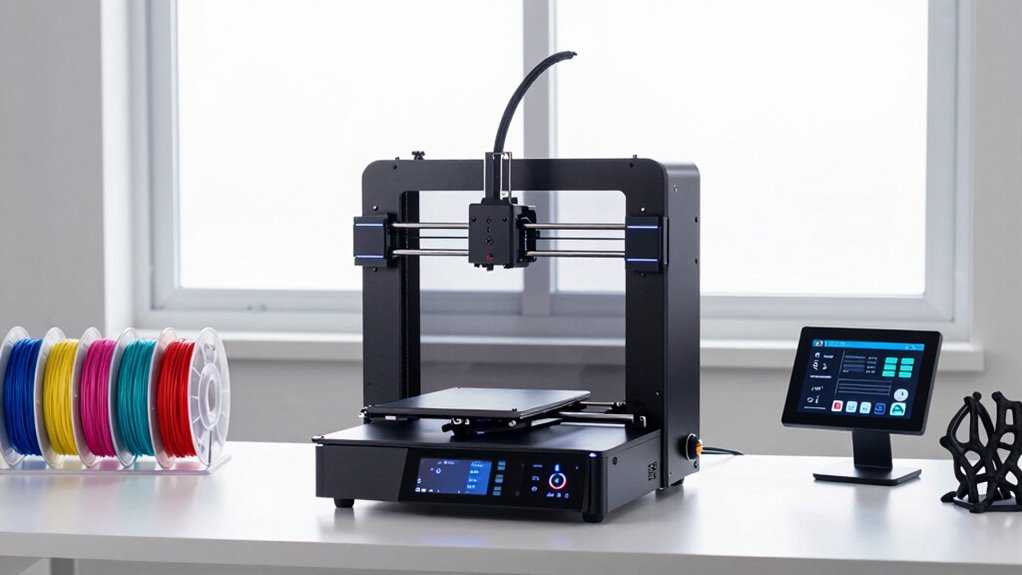
Finding a 3D printer suited for advanced beginners involves balancing ease of use with enough features to grow skills. The Creality Ender 3 V3 SE stands out as a reliable, user-friendly option with auto-leveling, ideal for those wanting a solid start. The Flashforge Adventurer 5M offers fast printing and auto-leveling, making it perfect for quicker projects and learning. However, many models in this category come with tradeoffs like limited build volume or higher costs. Continue reading to explore the top options and find the best fit for your growing 3D printing skills.

Get the latest gadgets delivered free with Prime
- Fast, free delivery on millions of items
- Prime Video, Amazon Music and more included
- Member-only deals all year
Complete the kit


Key Takeaways
- Auto-leveling features significantly reduce setup frustration for advanced beginners.
- Multicolor and multi-material options are increasingly accessible but often come with higher costs and complexity.
- Build volume varies widely; choose based on your project size needs to avoid limitations or unnecessary expense.
- Ease of use, including intuitive controls and good community support, strongly influences success for beginners.
- Higher-priced models often include advanced features that justify the cost for those ready to expand their skills.
| Creality Ender 3 V3 SE Beginner-Friendly 3D Printer with Auto Leveling |  | Best Overall for Ease and Reliability | Print Speed: 250mm/s | Acceleration: 2500mm/s² | Auto Leveling: CR Touch | VIEW ON AMAZON | See Our Full Breakdown |
| Flashforge Adventurer 5M 3D Printer for Beginners, Fast Printing, Auto-Leveling, PEI Build Plate |  | Best for Speed and Educational Use | Build Volume: 8.7 x 8.7 x 8.7 inches | Item Weight: 23.3 pounds | Maximum Nozzle Temperature: 280°C | VIEW ON AMAZON | See Our Full Breakdown |
| Anycubic Kobra X Multicolor 3D Printer |  | Best for Artistic and Multi-Material Projects | Color Support: Up to 19 colors | Build Volume: 260x260x260 mm | Max Nozzle Temperature: 300°C | VIEW ON AMAZON | See Our Full Breakdown |
| AOSEED AI 3D Printer for Kids, Fast 400mm/s, 8000+ Models, Enclosed Safe |  | Best for Kids and Educational Fun | Printing Speed: up to 400 mm/s | Model Library: 8,000+ models | Build Volume: not specified | VIEW ON AMAZON | See Our Full Breakdown |
| Entina Tina2C 3D Printer for Kids & Beginners, Fully Assembled Mini 3D Printer with App & WiFi Control |  | Best Compact and Easy Setup for Beginners and Kids | Print Volume: 3.9 × 3.9 × 3.9 inches | Connectivity: WiFi, TF card | Compatible OS: Windows, macOS, Linux, Chromebook | VIEW ON AMAZON | See Our Full Breakdown |
| Bambu Lab P1S 3D Printer |  | Best Overall for Advanced Beginners Wanting Speed and Multi-Color Capabilities | Colors: Up to 16 | Max Speed: 500mm/s | Acceleration: 20000 mm/s² | VIEW ON AMAZON | See Our Full Breakdown |
| FlashForge AD5X Multi-Color 3D Printer, CoreXY, 600mm/s High-Speed, Auto Leveling, 300°C Extruder, 220x220x220mm Build Volume |  | Best High-Speed Multi-Color for Precise, Efficient Printing | Print Speed: 600mm/s | Build Volume: 220x220x220mm | Extruder Temperature: 300°C | VIEW ON AMAZON | See Our Full Breakdown |
| Anycubic Kobra X Multicolor 3D Printer, Easy Setup, Native 4-Color |  | Best Multi-Color for Ease of Use and Flexibility | Product Dimensions: 23 x 13 x 22 inches | Print Size: 260mm x 260mm x 260mm | Max Nozzle Temperature: 300°C | VIEW ON AMAZON | See Our Full Breakdown |
| Creality K2 Combo 3D Printer, Multicolor Printing with CFS | 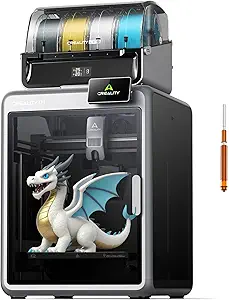 | Best for Multi-Color Flexibility and User-Friendly Operation | Maximum Print Speed: 600 mm/s | Frame Material: Aerospace-grade aluminum | Connectivity: Wi-Fi, local storage 8G | VIEW ON AMAZON | See Our Full Breakdown |
| Bambu Lab P2S Combo, P2S 3D Printer & AMS 2 Pro, Multi-Color 3D Printing |  | Best for Professional-Grade Multi-Color and Multi-Material Workflow | Product Dimensions: 18 x 22 x 18 inches | First Available: July 30, 2026 | VIEW ON AMAZON | See Our Full Breakdown | |
| Creality K2 Combo 3D Printer, Multicolor Printing, Auto Leveling, 260x260x260mm Build Volume |  | Best Overall for Advanced Beginners Who Want Versatility | Build Volume: 260 x 260 x 260 mm | Printing Speed: 600 mm/s | Weight: 65.9 pounds | VIEW ON AMAZON | See Our Full Breakdown |
| FlashForge Adventurer 5M 3D Printer with Auto Leveling and High-Speed Printing |  | Best for High-Speed, User-Friendly Printing | Product Dimensions: 14.29 x 15.83 x 19.21 inches | Item Weight: 29 pounds | Max Printing Speed: 600mm/s | VIEW ON AMAZON | See Our Full Breakdown |
| Bambu Lab A1 3D Printer, Ready-to-Use FDM 3D Printer for Beginners and Kids |  | Best for High-Speed, Precise, Kid-Friendly Printing | Acceleration: 10,000 mm/s² | Multi-Color Printing: Supported with AMS lite | Calibration: Full-auto calibration | VIEW ON AMAZON | See Our Full Breakdown |
| Creality Ender 3 V3 SE 3D Printer Bundle with 4 Packs of PLA Filament (Black, White, Red, Blue) |  | Best for Speed and Stability with a Bundle of Filaments | Maximum Printing Speed: 250mm/s | Acceleration: 2500mm/s² | Extruder: Full metal dual-gear “Sprite” | VIEW ON AMAZON | See Our Full Breakdown |
| FlashForge Adventurer 5M 3D Printer, Support Multi Materials, High Precision |  | Best for Versatile Material Support and High Precision | Max travel speed: 600mm/s | Acceleration: 20000mm/s² | Nozzle options: 0.25/0.4/0.6/0.8 mm | VIEW ON AMAZON | See Our Full Breakdown |
More Details on Our Top Picks
Creality Ender 3 V3 SE Beginner-Friendly 3D Printer with Auto Leveling
The Ender 3 V3 SE stands out for its combination of straightforward assembly, auto leveling, and quiet operation, making it an excellent choice for those who want a dependable machine without extensive tinkering. Compared with the Flashforge Adventurer 5M, it offers more customization options and a larger community for troubleshooting, but it lacks some of the rapid print speeds and enclosed safety features. Its auto leveling with CR Touch minimizes manual calibration, which is a major advantage for users transitioning from entry-level to more advanced printing. The 32-bit silent mainboard ensures quieter operation, ideal for home or office environments. The direct drive extruder supports flexible filaments, broadening creative possibilities. However, its specifications are somewhat basic in the description, and total beginner might find initial setup a slight challenge. Overall, it makes the most sense for users seeking a reliable, versatile, and quieter machine that can grow with their skills.
Pros:- Auto leveling with CR Touch simplifies setup
- Quiet operation ideal for shared spaces
- Reliable extrusion supports various filament types
- High-speed printing enhances productivity
Cons:- Limited detailed specs in the product description
- Potential learning curve for absolute beginners
Best for: Advanced beginners who prioritize ease of use, quiet operation, and reliable performance for a variety of filaments
Not ideal for: Complete newcomers who want a plug-and-play experience without any assembly or calibration involved
- Print Speed:250mm/s
- Acceleration:2500mm/s²
- Auto Leveling:CR Touch
- Extruder:Sprite Direct Drive
- Build Plate:Flexible PC spring steel
- Mainboard:32-bit silent
Our verdict“This model suits users seeking a dependable, quiet, and versatile 3D printer that balances ease of use with advanced features.”
Flashforge Adventurer 5M 3D Printer for Beginners, Fast Printing, Auto-Leveling, PEI Build Plate
The Adventurer 5M excels in offering quick, straightforward printing with auto bed leveling and a durable PEI build plate, making it ideal for educational environments or home users who value speed. Compared to the Ender 3 V3 SE, it emphasizes rapid printing speeds up to 600mm/s and a user-friendly design, but it sacrifices some customization flexibility. Its auto leveling and sturdy PEI surface ensure easy first layers and reliable adhesion, reducing frustration for beginners. The relatively compact dimensions make it suitable for smaller spaces, and its support for multiple filament types adds versatility. However, customer ratings are moderate, and detailed specifications are limited, which might concern more experienced users. The absence of explicit price details also makes value harder to assess. Overall, this printer makes the most sense for those who prioritize quick setup, fast prints, and a straightforward learning curve.
Pros:- Fast printing speeds up to 600mm/s
- Auto bed leveling for hassle-free setup
- Durable PEI build plate for reliable adhesion
- Compact design for small spaces
Cons:- Moderate customer ratings may reflect inconsistent quality
- Limited detailed specs in the description
Best for: Beginners in educational or home settings who need fast, reliable prints with minimal calibration
Not ideal for: Advanced users seeking extensive customization or specialized filament compatibility
- Build Volume:8.7 x 8.7 x 8.7 inches
- Item Weight:23.3 pounds
- Maximum Nozzle Temperature:280°C
- Auto-Leveling:Yes
- Build Plate:PEI
- Printer Dimensions:15.75 x 14.29 x 17.64 inches
Our verdict“This printer is best suited for users who want quick, simple, and reliable prints without complex features.”
Anycubic Kobra X Multicolor 3D Printer
The Kobra X offers impressive multi-color capabilities with support for up to 19 colors, making it ideal for detailed artistic models. Compared with the Ender 3 V3 SE or Flashforge Adventurer 5M, it introduces complex features like AI-powered monitoring and multi-material support, but these come with a steeper learning curve. Its automatic bed leveling with LeviQ 3.0 provides excellent first-layer consistency, essential for multi-color and detailed prints. Though high-speed printing up to 600mm/s is appealing, it demands careful calibration and experience to avoid errors. Its quiet operation is suitable for home studios. The extensive material support broadens creative possibilities, but the complexity might overwhelm beginners who prefer straightforward operation. Overall, this makes the most sense for advanced beginners ready to explore multi-color and multi-material printing with some technical confidence.
Pros:- Supports up to 19 colors for complex models
- Automatic bed leveling with LeviQ 3.0
- Quiet operation suitable for home use
- Supports various advanced materials
Cons:- High-speed printing requires careful calibration
- Complex features may pose a learning challenge for beginners
- Limited to specific materials for optimal results
Best for: Creative users interested in multi-color, multi-material, and artistic projects who have some prior 3D printing experience
Not ideal for: Complete novices seeking a simple, plug-and-play machine with minimal setup
- Color Support:Up to 19 colors
- Build Volume:260x260x260 mm
- Max Nozzle Temperature:300°C
- Supported Materials:PLA, PETG, TPU, PVA, ASA
- Operation Noise:≤48 dB
- Automatic Bed Leveling:LeviQ 3.0 with 49-point auto
Our verdict“This printer is ideal for advanced beginners ready to experiment with multi-color and multi-material projects, despite its steeper learning curve.”
AOSEED AI 3D Printer for Kids, Fast 400mm/s, 8000+ Models, Enclosed Safe
The AOSEED AI is designed for younger users and educational environments, with a focus on safety, speed, and ease of use. Its enclosed design and pinch-resistant features make it suitable for kids, while support for over 8,000 models simplifies creative projects. Compared to the Ender 3 V3 SE, it sacrifices some advanced features for safety and simplicity, but still offers AI-powered design tools and real-time monitoring. Its print speed of up to 400mm/s allows quick results, and the included accessories make it a ready-to-use kit. However, it supports only PLA filament and single-color printing, limiting complexity. The small build volume might restrict larger projects, and the app setup could be a barrier for some. Overall, this is best for parents or educators seeking a secure, fast, and engaging entry-level machine for kids.
Pros:- Enclosed, safe design for kids
- Fast printing speeds of up to 400mm/s
- Supports over 8,000 models for easy creativity
- Includes comprehensive starter kit
Cons:- Supports only single-color PLA printing
- Limited build volume for bigger projects
- Requires app setup which may be challenging for some users
Best for: Parents or educators looking for a safe, easy-to-use 3D printer for kids’ creative learning
Not ideal for: Users wanting multi-color, complex models or larger build volumes for advanced projects
- Printing Speed:up to 400 mm/s
- Model Library:8,000+ models
- Build Volume:not specified
- Filament Support:PLA
- Safety Features:Enclosed, pinch-resistant
- Connectivity:Wi-Fi, voice control, iOS, Android, Windows
Our verdict“This printer works best for young learners and educators prioritizing safety, speed, and simplicity over advanced multi-color capabilities.”
Entina Tina2C 3D Printer for Kids & Beginners, Fully Assembled Mini 3D Printer with App & WiFi Control
The Tina2C offers quick setup in around 8 minutes and a compact design, making it suitable for small spaces and users new to 3D printing. Its automatic leveling and self-cleaning nozzle reduce technical hurdles, and WiFi plus app control provide flexible operation options. Compared to larger or more feature-rich models like the Ender 3 V3 SE or Kobra X, it emphasizes simplicity and portability, which is perfect for casual or educational use. The built-in safety features and LED lighting enhance usability for beginners and kids. However, its small print volume limits the scale of projects, and full functionality depends on app and software setup, which might intimidate some newcomers. Overall, this mini 3D printer makes the most sense for users seeking a straightforward, space-saving device for small projects and learning.
Pros:- Quick setup in approximately 8 minutes
- Auto leveling and self-cleaning nozzle
- WiFi and app control for flexible operation
- Compact size ideal for small spaces
Cons:- Limited print volume for larger projects
- Full features require app/software setup
- Supports only basic filament types
Best for: Beginners and kids who want an easy-to-setup, portable 3D printer for small projects and learning
Not ideal for: Users needing larger build volumes or advanced multi-color features
- Print Volume:3.9 × 3.9 × 3.9 inches
- Connectivity:WiFi, TF card
- Compatible OS:Windows, macOS, Linux, Chromebook
- Features:Auto leveling, self-cleaning, power-loss recovery
- Precision:0.05 mm
- Included Accessories:Filament, tools, magnetic build plate
Our verdict“This compact, easy-to-use printer is perfect for beginners and kids focusing on small-scale projects and simple operation.”
Bambu Lab P1S 3D Printer
The Bambu Lab P1S stands out for its combination of high-speed printing—up to 500mm/s—and vibrant multi-material, multi-color options, making it a versatile choice for those ready to explore more complex projects. Compared with the FlashForge AD5X, which supports up to four colors and has smart features, the P1S offers faster speeds but requires connecting to the Bambu Lab AMS for multi-color printing, adding some setup complexity. Its automatic bed leveling and quick 15-minute setup make it accessible for advanced beginners who want quick results without extensive calibration. However, its incompatibility with carbon or glass fiber filaments limits some high-performance material options. This model is ideal for those who prioritize speed and multi-material capabilities but are comfortable with a slightly more involved setup.
Pros:- Vibrant multi-color and multi-material printing options
- High-speed printing reduces project turnaround
- Automatic bed leveling simplifies setup
- Quick setup in just 15 minutes
Cons:- Requires additional Bambu Lab AMS for multi-color printing
- Limited support for fiber-reinforced filaments
- Higher price point compared to basic models
Best for: Advanced beginners seeking high-speed multi-material printing with vibrant results
Not ideal for: Users wanting to print with reinforced or specialty filaments like carbon fiber or glass fiber
- Colors:Up to 16
- Max Speed:500mm/s
- Acceleration:20000 mm/s²
- Enclosure:Fully enclosed
- Auto Bed Leveling:Yes
- Setup Time:15 minutes
Our verdict“Best suited for advanced beginners eager for fast, multi-material prints with vibrant color options, accepting some setup complexity.”
FlashForge AD5X Multi-Color 3D Printer, CoreXY, 600mm/s High-Speed, Auto Leveling, 300°C Extruder, 220x220x220mm Build Volume
The FlashForge AD5X excels with its blazing-fast speed of 600mm/s and multi-color support up to four colors, making it a strong choice for those who want rapid, multi-color projects. Unlike the Bambu Lab P1S, which offers high speed but requires a dedicated multi-material module, the AD5X integrates multi-color capabilities directly, streamlining workflow. Its auto bed leveling and remote control via mobile app add convenience, but the high speed can pose calibration challenges, potentially affecting print quality if not carefully managed. This pick makes the most sense for users who prioritize speed and color versatility, and are comfortable with some technical calibration.
Pros:- Supports up to 4 colors simultaneously
- Exceptional speed of 600mm/s for quick projects
- Auto bed leveling simplifies initial setup
- Remote control via mobile app enhances usability
Cons:- High speed may compromise print quality if not properly calibrated
- Complex setup could be challenging for beginners
- Price may be higher than comparable models
Best for: Advanced beginners needing rapid multi-color prints with remote operation
Not ideal for: Those new to 3D printing who prefer a more forgiving, slower setup process
- Print Speed:600mm/s
- Build Volume:220x220x220mm
- Extruder Temperature:300°C
- Nozzle Sizes:0.25mm to 0.8mm
- Auto Leveling:Yes
- Connectivity:Mobile app control
Our verdict“Ideal for advanced beginners who want rapid, multi-color printing with integrated features, and are willing to handle some setup complexity.”
Anycubic Kobra X Multicolor 3D Printer, Easy Setup, Native 4-Color
The Anycubic Kobra X offers a native 4-color multi-material capability with expansion potential to 19 colors, making it a flexible choice for users who want straightforward multi-color printing. Its built-in LeviQ 3.0 auto bed leveling ensures first layers are reliable, a key benefit over more manual systems like the Creality K2. While the setup process is generally user-friendly, expanding to 19 colors requires additional units, which may complicate the process for some. Its support for high-speed printing—up to 600mm/s—and remote control features make it suitable for enthusiastic beginners ready to take on more complex projects. Still, some connectivity issues reported by users suggest a learning curve in managing network features.
Pros:- Native 4-color multi-material support
- Auto bed leveling with LeviQ 3.0
- High-speed printing up to 600mm/s
- Remote control capability and large model library
Cons:- Expansion to 19 colors is multi-unit and complex
- Connectivity can be inconsistent
- Setup may still require some technical understanding
Best for: Home or educational users wanting multi-color printing with simple setup
Not ideal for: Users seeking a plug-and-play experience without future expansion plans
- Product Dimensions:23 x 13 x 22 inches
- Print Size:260mm x 260mm x 260mm
- Max Nozzle Temperature:300°C
- Connectivity:Wi-Fi, LAN
Our verdict“Best for those who want multi-color versatility with straightforward auto-leveling and moderate expansion potential.”
Creality K2 Combo 3D Printer, Multicolor Printing with CFS
The Creality K2 Combo offers a compelling balance of multi-color capability—supporting up to 16 colors with expandable CFS units—and user-friendly features like automatic leveling. Unlike the Anycubic Kobra X, which has native 4-color support, the K2’s expandable CFS system allows for a larger palette, appealing to users who plan more complex multi-color projects. Its high speed of 600mm/s and quiet operation make it suitable for both hobbyists and semi-professionals. However, the lack of specific build volume data and the potential complexity of expanding multi-color units might intimidate some beginners. The setup process, while guided, can still demand some technical comfort.
Pros:- Supports up to 16 colors with expandable CFS units
- Automatic leveling with guided calibration
- High-speed operation at 600mm/s
- Quiet, vibration-free design
Cons:- Build volume details are not specified
- Setup may require technical skills for expansion
- Price details are not provided
Best for: Advanced beginners interested in expanding multi-color options over time with easy operation
Not ideal for: Beginners seeking a straightforward, non-expandable multi-color printer
- Maximum Print Speed:600 mm/s
- Frame Material:Aerospace-grade aluminum
- Connectivity:Wi-Fi, local storage 8G
Our verdict“Ideal for users wanting multi-color flexibility with easy automatic leveling and scalable options, provided they’re comfortable with some setup steps.”
Bambu Lab P2S Combo, P2S 3D Printer & AMS 2 Pro, Multi-Color 3D Printing
The Bambu Lab P2S Combo pairs a high-speed, precise printer with the AMS 2 Pro for seamless multi-color and multi-material workflows, supporting filament drying and clean airflow. Compared with the P1S, which is more geared toward speed and multi-materials, the P2S Combo emphasizes integrated multi-color, multi-material printing with a robust workflow suitable for professionals and serious hobbyists. Its automatic calibration and quick setup make it accessible for advanced beginners stepping into more complex projects. The large, heavy design demands ample space, and the price may be a consideration for casual users, but it offers a streamlined experience for those ready to invest in quality multi-color production.
Pros:- High-speed printing up to 600mm/s
- Automatic calibration and quick setup
- Supports multi-color and multi-material printing with AMS 2 Pro
- Filament drying and airflow for consistent quality
Cons:- Large and heavy, requiring significant space
- Price likely higher than standalone printers
- No specific build volume listed
Best for: Advanced users seeking professional multi-color/multi-material capabilities with reliable workflow
Not ideal for: Casual hobbyists or those with limited space or budget
- Product Dimensions:18 x 22 x 18 inches
- First Available:July 30, 2026
Our verdict“Best suited for advanced users and professionals demanding seamless multi-color/multi-material workflows and quick setup, with space considerations.”
Creality K2 Combo 3D Printer, Multicolor Printing, Auto Leveling, 260x260x260mm Build Volume
The Creality K2 Combo stands out for its ability to handle multicolor printing with up to 16 colors using multiple CFS units, making it a versatile choice for those eager to expand their skills. Its nearly pre-assembled design significantly reduces setup time, and the quiet operation benefits home or shared spaces. The AI-powered auto-leveling with camera enhances print accuracy, especially compared to manual leveling on simpler models like the Ender 3 V3 SE. However, some users report inconsistency in print quality and the printer’s weight and size could pose challenges in tight spaces. This model is best suited for advanced beginners who want to experiment with multicolor projects without complex manual calibration, but those prioritizing lightweight or compact design should consider alternatives.
Pros:- Supports multicolor printing with up to 16 colors for complex projects
- Nearly pre-assembled, reducing setup time
- Quiet operation with noise reduction technology
- Fast, precise auto-leveling with AI camera
Cons:- Mixed customer feedback on print quality consistency
- Heavy and bulky design limits portability
- Warranty and support details are less transparent
Best for: Advanced beginners interested in multicolor printing and high-quality finishes, who have space for a larger, more feature-rich machine
Not ideal for: Users with limited space or those seeking a compact, lightweight 3D printer for occasional use
- Build Volume:260 x 260 x 260 mm
- Printing Speed:600 mm/s
- Weight:65.9 pounds
- Item Dimensions:16.93 x 16.54 x 21.06 inches
- Auto Leveling:AI camera with auto calibration
- Supported Materials:PLA, PETG, ABS
Our verdict“This printer is ideal for advanced beginners ready to explore multicolor printing who prioritize versatility and print quality over portability.”
FlashForge Adventurer 5M 3D Printer with Auto Leveling and High-Speed Printing
The FlashForge Adventurer 5M offers a compelling balance of ease of use and speed, making it suitable for both beginners and more experienced users. Its automatic bed leveling simplifies setup, akin to the Adventurer 5M’s predecessor but with added speed capabilities up to 600mm/s, which can significantly cut down print times on simpler models like the Ender 3 V3 SE. The quick-detach nozzle makes maintenance easier, and Wi-Fi connectivity allows remote operation, a feature less emphasized in budget models. However, some users report calibration issues, and its weight at 29 pounds may make mobility a concern. This printer is best for those who want fast, straightforward printing without sacrificing quality, but beginners concerned with portability might prefer lighter options.
Pros:- Automatic bed leveling streamlines setup
- High-speed printing up to 600mm/s for efficiency
- Quick-detach nozzle simplifies maintenance
- Wi-Fi and remote control support
Cons:- Some calibration issues reported by users
- Relatively heavy at 29 pounds, less portable
- Limited detailed specs in the description
Best for: Enthusiasts who want rapid, reliable prints with minimal setup, especially those monitoring via app or remote connection
Not ideal for: Users needing a lightweight, portable machine or those who prefer detailed technical specifications upfront
- Product Dimensions:14.29 x 15.83 x 19.21 inches
- Item Weight:29 pounds
- Max Printing Speed:600mm/s
- Nozzle Temperature:280℃
- Material Compatibility:PETG, others
- Warranty:Details available via manufacturer
Our verdict“This model suits advanced beginners who value speed, ease, and remote control features for versatile printing tasks.”
Bambu Lab A1 3D Printer, Ready-to-Use FDM 3D Printer for Beginners and Kids
The Bambu Lab A1 shines for its combination of speed, precision, and user-friendly features, making it an excellent choice for beginners and younger users. Its automatic calibration and active flow rate compensation help produce consistently high-quality results, surpassing simpler models like the Ender 3 V3 SE in terms of reliability and ease. Multi-color printing with AMS lite adds creative flexibility, although it requires an extra purchase, which could be a barrier for some. The touchscreen and quiet operation further enhance the user experience, but the complexity of its features might be overwhelming for absolute beginners without technical support. Overall, this printer is best for those who want a ready-to-go solution that balances speed and accuracy, especially for educational or creative projects.
Pros:- High-speed and precise printing for complex projects
- Automatic calibration simplifies setup
- Supports multi-color printing with AMS lite
- Quiet operation and intuitive touchscreen
Cons:- Requires additional AMS lite purchase for multi-color capability
- Features can be complex for absolute beginners
- Price point may be higher than entry-level models
Best for: Beginners and kids seeking fast, precise, and multi-color printing in a user-friendly package
Not ideal for: Users looking for a simple, budget-friendly unit without additional accessories or advanced features
- Acceleration:10,000 mm/s²
- Multi-Color Printing:Supported with AMS lite
- Calibration:Full-auto calibration
- Flow Rate Compensation:Active
- Nozzle:1-Clip quick swap
- Noise Level:Active motor noise canceling
Our verdict“This printer is ideal for beginners who want speed, accuracy, and multi-color options in a straightforward and safe design.”
Creality Ender 3 V3 SE 3D Printer Bundle with 4 Packs of PLA Filament (Black, White, Red, Blue)
The Ender 3 V3 SE offers a solid balance of speed, stability, and affordability, especially with its upgraded “Sprite” direct extruder and auto-leveling with CR Touch. Its maximum speed of 250mm/s and dual Z-axis setup provide better accuracy compared to older models or basic printers, making it attractive for users who want reliable results without complex features. The bundle includes four colors of high-quality PLA filament, ideal for starting projects immediately. However, it requires initial setup, calibration, and some troubleshooting to reach optimal performance, which could be daunting for the most novice users. This model is suited for those who want to learn and grow with a dependable machine that can handle more ambitious projects over time.
Pros:- High-speed printing at 250mm/s for efficient production
- Auto leveling with CR Touch improves print consistency
- Stable dual Z-axis and linear shafts enhance accuracy
- Includes multiple filament colors for immediate use
Cons:- Requires initial setup and calibration, possibly challenging for beginners
- Limited to PLA, TPU, PETG compatibility, no advanced material support
- Manual calibration may be needed for best results
Best for: Intermediate users aiming for speed and precision, ready to learn calibration and setup with a comprehensive filament bundle
Not ideal for: Absolute beginners seeking a plug-and-play experience or those with limited space for assembly and calibration
- Maximum Printing Speed:250mm/s
- Acceleration:2500mm/s²
- Extruder:Full metal dual-gear “Sprite”
- Auto Leveling:CR Touch sensor
- Z-axis:Dual lead screws
- Filament Compatibility:PLA, TPU, PETG
Our verdict“This bundle appeals to advanced beginners ready to refine their skills while benefiting from higher speed and stability.”
FlashForge Adventurer 5M 3D Printer, Support Multi Materials, High Precision
The FlashForge Adventurer 5M excels in handling multiple filament types with high precision, making it a versatile choice for creative and educational projects. Its rapid heat-up time and automatic leveling simplify setup, similar to the Adventurer series but with a focus on multi-material support, including ABS, PETG, and CF-filled filaments. The remote control via app adds convenience for monitoring prints from afar, a feature less common in basic models like the Ender 3 V3 SE. Still, the absence of a specified build volume and the complexity of multi-material printing may pose challenges to newcomers. This printer is best for users who want high-quality, multi-material output with minimal fuss, but those on a tight budget or seeking a straightforward single-material printer might prefer simpler options.
Pros:- Supports a wide range of filament types including ABS and CF-filled filaments
- Rapid heating and automatic leveling improve workflow
- High precision for detailed models
- Remote control and monitoring via app
Cons:- Requires additional camera kit for remote features, increasing cost
- Limited build volume details provided, which could be limiting
- Complex features may be overwhelming for absolute beginners
Best for: Users requiring multi-material capabilities and high precision, especially in educational or prototyping contexts
Not ideal for: Beginners seeking a simple, low-cost machine with straightforward operation without multi-material features
- Max travel speed:600mm/s
- Acceleration:20000mm/s²
- Nozzle options:0.25/0.4/0.6/0.8 mm
- Material Compatibility:PLA, PETG, ABS, ASA, PLA+, CF-filled
- Heating time:35 seconds to 200°C
- Cooling system:Dual-channel cooling fan
Our verdict“This printer suits advanced beginners who need high precision and multi-material support in a versatile platform, despite a steeper learning curve.”

How We Picked
Our evaluation focused on performance, usability, build quality, and value for advanced beginners. We prioritized models with straightforward setup, reliable auto-leveling, and features that support skill development without overwhelming new users. Durability and community support were also key, along with an eye for models that balance cost with meaningful capabilities. The ranking reflects a combination of these factors, aiming to recommend printers that are approachable yet capable of growing with their user.Factors to Consider When Choosing 3d Printer For Advanced Beginners
Choosing the right 3D printer for an advanced beginner involves understanding several key factors that influence usability, project scope, and learning potential. While ease of use is critical, investing in features that facilitate growth can make a big difference. Consider these factors carefully to avoid common pitfalls like overpaying for unnecessary features or choosing models too limited for your ambitions.Ease of Use and Setup
For advanced beginners, a 3D printer with intuitive controls, straightforward assembly, and auto-leveling simplifies the learning curve. Avoid overly complex models that require extensive calibration or troubleshooting. Reliable touchscreen interfaces and detailed instructions can save significant time and frustration, making the printing process more enjoyable and productive.
Build Volume and Project Size
The size of the print bed determines the maximum dimensions of your projects. Larger volumes enable more ambitious projects but often come with increased cost and setup complexity. Beginners should balance the need for space with ease of handling, choosing a size that matches typical project demands without overwhelming their workspace or budget.
Material Compatibility and Versatility
Many advanced beginner models now support multiple filament types, including PLA, PETG, and TPU. Multimaterial capabilities, especially multi-color or multi-material printing, open up creative possibilities but can also introduce complexity. Consider your primary material needs and whether the added features align with your skill level and project goals.
Reliability and Support
A dependable printer minimizes downtime and learning frustration. Look for models with strong community support, readily available replacement parts, and manufacturer warranties. Reliable auto-leveling and consistent extrusion are vital for producing quality prints and building confidence in your skills.
Cost and Future Scalability
While budget constraints matter, investing slightly more can unlock features that support skill development and complex projects. Be wary of very cheap models that sacrifice reliability or features. Also, consider whether the printer can handle future upgrades or expansions, making it a long-term addition to your hobby.
Frequently Asked Questions
Is auto-leveling necessary for an advanced beginner?
Auto-leveling greatly reduces setup time and calibration errors, making it highly beneficial for those still mastering the basics. While not strictly necessary, it minimizes common frustrations and helps ensure consistent print quality, allowing beginners to focus more on improving their skills and less on troubleshooting. Many models with auto-leveling are designed specifically with learners in mind, making them a wise choice for those looking to progress quickly.
Should I prioritize build volume over ease of use?
For an advanced beginner, ease of use often matters more initially than large build volume. Larger printers can be tempting for bigger projects, but they also tend to be more complex to calibrate and operate. Starting with a smaller, user-friendly model allows you to learn the fundamentals comfortably, with the option to upgrade or add a larger printer later as your skills grow.
Are multi-material or multi-color printers worth it for beginners?
Multi-material and multi-color capabilities can expand creative options but often introduce additional complexity and cost. For those still mastering basic printing techniques, a single-material, straightforward model might be more effective. Once comfortable, exploring multi-material options can improve your projects, but it’s generally better to build foundational skills first.
What features should I avoid when choosing a printer as an advanced beginner?
Steer clear of overly complex features that aren’t essential, such as high-end multi-material setups or extremely large build volumes, unless you have specific needs and willingness to troubleshoot. Also, avoid models with poor community support or hard-to-find parts, as these can lead to prolonged downtime and frustration. Prioritize reliability, ease of maintenance, and good documentation instead.
Is it better to buy a kit or a fully assembled 3D printer for beginners?
For advanced beginners, a fully assembled 3D printer typically offers a smoother start because it reduces assembly errors and setup time. Kits can be rewarding but often require technical skills and patience, which may slow initial progress. If you’re eager to learn assembly and calibration as part of your journey, a kit can be educational, but for most beginners, ready-to-use models are more practical.