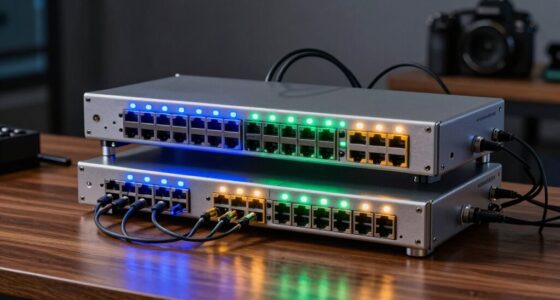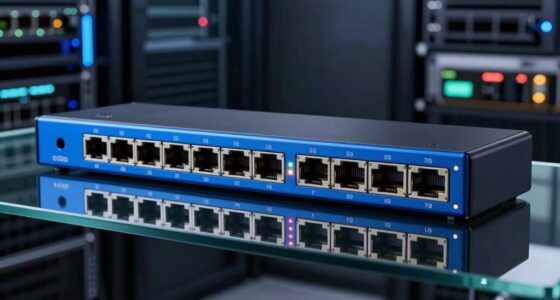

The best tech gadgets solve a real task without adding needless complexity. I’d put the Revopoint POP 4 3D Scanner first for its broad appeal among makers, while the UGREEN Uno 30W Charger is a more practical everyday pick and the HOTO 25-Piece Cordless Electric Screwdriver Kit suits home repairs. The main tradeoff is between specialized capability and simple, frequent usefulness: a 3D scanner can do far more, but only matters if you have compatible projects. I also weigh ease of use, portability, versatility and the limits each gadget brings. Read on for the full breakdown and a pick for each kind of buyer.

Get the latest gadgets delivered free — and shop member deals
- Fast, free delivery on millions of items
- Access to Prime Big Deal Days deals on October 6–7
- Prime Video, Amazon Music and more included
Complete the kit



Key Takeaways
- The POP 4 is the broadest 3D-scanning pick in this lineup; the MetroY Ultra and Creality Pika make more sense when a buyer has specific scanning demands.
- Everyday usefulness favors compact tools: the UGREEN charger, OXO laptop cleaner and HOTO laser measurer address recurring tasks without requiring a specialist workflow.
- Electric screwdrivers serve different jobs: HOTO covers general household fixes, while the Fanttik E2 Ultra and E1 Max target smaller electronics work.
- Portability does not guarantee simplicity: smart glasses and portable scanners still depend on setup, controls and a clear use case.
- Several gadgets are narrow-purpose purchases, including the ear camera and hand warmers, so their value depends more on how often that specific need comes up.
| Revopoint POP 4 3D Scanner |  | Best for Versatile 3D Scanning | Single-frame accuracy: Up to 0.03 mm | Volumetric accuracy: 0.03 mm + 0.05 mm × L(m) | Full-field structured light accuracy: 0.08 mm | VIEW LATEST PRICE | See Our Full Breakdown |
| Creality Pika Portable 3D Scanner with Blue Laser and NIR Scanning |  | Best for Portable, Cross-Platform Scanning | Scanning modes: 7-line blue laser and NIR structured light | Accuracy: Up to 0.03 mm | 3D resolution: 0.1 mm | VIEW LATEST PRICE | See Our Full Breakdown |
| Rechargeable Hand Warmers, 2-Pack |  | Best for Cold-Weather Everyday Carry | Quantity: 2 hand warmers | Battery capacity: 6,000 mAh | Heat settings: 3 | VIEW LATEST PRICE | See Our Full Breakdown |
| OXO Good Grips Sweep & Swipe Laptop Cleaner |  | Best Compact Desk Accessory | Brand: OXO | Model: 12246100 | Weight: 45 g | VIEW LATEST PRICE | See Our Full Breakdown |
| AI Smart Glasses with Camera, 4K Video, Translation, and Voice Assistant |  | Best for Hands-Free Capture and Assistance | Camera resolution: 4K | Battery capacity: 290 mAh | Connectivity: Bluetooth | VIEW LATEST PRICE | See Our Full Breakdown |
| UGREEN Uno 30W USB-C GaN Charger with LED Display, Black |  | Best Travel Charger | Connector: USB Type-C | Maximum wattage: 30W | USB ports: 1 | VIEW LATEST PRICE | See Our Full Breakdown |
| Revopoint POP 3 Plus Full-Color 3D Scanner |  | Best Portable 3D Scanner | Scanner type: 3D scanner | Accuracy: Within 20 microns | Resolution: 0.05 mm fused point distance | VIEW LATEST PRICE | See Our Full Breakdown |
| HOTO Pocket-Size Laser Distance Measurer |  | Best for Home Projects | Distance range: 0.16–98 ft (0.05–30 m) | Accuracy: Up to ±1/16 in (±2 mm) | Measurement response: About 0.2 seconds | VIEW LATEST PRICE | See Our Full Breakdown |
| Revopoint MetroY Ultra 3D Scanner |  | Best for Industrial Scanning | Scanner type: 3D scanner | Single-frame precision: Up to 0.01 mm | Volumetric accuracy: 0.015 + 0.04 mm × L (m) | VIEW LATEST PRICE | See Our Full Breakdown |
| LEIPUT 1080P Ear Wax Removal Camera Kit |  | Best for Visual Guidance | Camera resolution: 1080P HD | LED lights: 6 | Battery capacity: 240 mAh | VIEW LATEST PRICE | See Our Full Breakdown |
| HOTO 25-Piece Cordless Electric Screwdriver Kit | 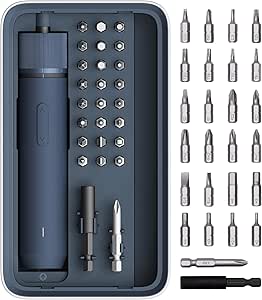 | Best for Everyday Home Repairs | Model: QWLSD011 | Weight: 1.54 lbs | Dimensions: 8.3 × 1.81 × 4.72 inches | VIEW LATEST PRICE | See Our Full Breakdown |
| Fanttik E2 Ultra Electric Screwdriver Set for Electronics |  | Best for Delicate Electronics | Maximum torque: 0.6 N·m | Torque settings: 5: 0.05, 0.1, 0.2, 0.4, and 0.6 N·m | Motor speed: 270 RPM | VIEW LATEST PRICE | See Our Full Breakdown |
| Fanttik E1 Max 53-in-1 Electric Precision Screwdriver, Grey | 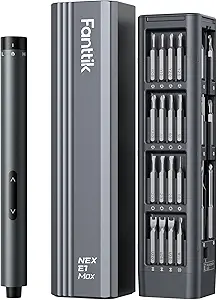 | Best for Manual Torque Control | Motor speed: 200 RPM | Electric torque settings: 0.05 N·m and 0.2 N·m | Manual torque: Up to 3 N·m | VIEW LATEST PRICE | See Our Full Breakdown |
More Details on Our Top Picks
Revopoint POP 4 3D Scanner
The Revopoint POP 4 earns its place for covering an unusually broad range of scanning jobs, from tiny parts to objects as large as two meters. Its five modes and stated accuracy up to 0.03 mm give it more range than a simple capture tool, while wireless scanning and a battery grip make work away from a desk more practical. Compared with the Creality Pika Portable 3D Scanner, the POP 4 lists a wider scan-volume range and up to four hours of battery-grip use; the Pika counters with a touchscreen and support for mobile platforms. The POP 4’s software setup also has limits: AI segmentation is Windows-only, and Revo Design and Revo Measure cost extra and require Windows. It suits buyers who value adaptable capture over an all-in-one software bundle.
Pros:- Five scanning modes cover varied object surfaces and lighting conditions.
- Scan volume ranges from 10 mm objects to objects up to 2 m.
- Wireless scanning and a 5,500 mAh battery grip support mobile work.
- Included Revo Scan 6 provides a starting point for scan workflows.
Cons:- AI segmentation is limited to Windows.
- Revo Design and Revo Measure are sold separately and require Windows.
- The stated accuracy and scanning speed vary by mode and measurement context.
Best for: Makers and small product teams scanning a mix of tiny components and larger objects, especially those working outdoors or on Windows.
Not ideal for: Buyers who need Mac-based AI segmentation or included design and measurement software.
- Single-frame accuracy:Up to 0.03 mm
- Volumetric accuracy:0.03 mm + 0.05 mm × L(m)
- Full-field structured light accuracy:0.08 mm
- Scanning speed:Up to 105 fps or 5,000,000 points/s, depending on mode
- Scan volume:10 × 10 × 10 mm to 2 × 2 × 2 m
- Scanning modes:5
- Wireless:Wi-Fi 6.0
- Battery grip:5,500 mAh; up to 4 hours
- Included software:Revo Scan 6
Our verdict“Choose the POP 4 if you need one scanner for varied object sizes and surfaces and can work within its Windows software limits.”
Creality Pika Portable 3D Scanner with Blue Laser and NIR Scanning
The Creality Pika Portable 3D Scanner is the more self-contained travel pick in this group: it pairs blue laser and NIR scanning with a 3-inch touchscreen, Wi-Fi 6, and swappable batteries. That screen gives users a way to handle scans on the device, while support for Windows, macOS, iOS, and Android offers more platform flexibility than the Revopoint POP 4, whose AI segmentation is Windows-only. Both scanners state accuracy up to 0.03 mm, so the Pika’s case rests more on mobility and its listed platform support than on a clear accuracy advantage. Its tradeoffs matter for hands-free capture: marker-free scanning is listed for wired PC mode, and AI body completion may need photos in addition to a face scan. Pick it for a portable, multi-platform setup; skip it if untethered marker-free scanning is central to your workflow.
Pros:- Blue laser and NIR modes support different scanning needs.
- Touchscreen and Wi-Fi 6 make portable operation more convenient.
- Two swappable batteries help extend sessions away from a charger.
- Supports Windows, macOS, iOS, and Android with common 3D exports.
Cons:- Marker-free scanning is available in wired PC mode.
- AI body completion may require extra photos after a face scan.
- Its 260 g weight is portable, but still adds a dedicated device to a travel kit.
Best for: Creators who scan on the move and want a touchscreen workflow with support for several operating systems.
Not ideal for: Buyers who need marker-free scanning while untethered or expect AI body completion from a face scan alone.
- Scanning modes:7-line blue laser and NIR structured light
- Accuracy:Up to 0.03 mm
- 3D resolution:0.1 mm
- Scanning speed:Up to 110 frames per second
- Connectivity:Wi-Fi 6 and USB
- Display:3-inch HD touchscreen, 500 nits
- Battery:Two swappable 3,350 mAh batteries
- Weight:260 g (9.12 oz)
- Supported platforms:Windows, macOS, iOS, Android
Our verdict“Choose the Pika if touchscreen control and broad platform support matter more than marker-free scanning away from a wired PC.”
Rechargeable Hand Warmers, 2-Pack
These rechargeable hand warmers make the list as a practical comfort gadget: the pair can warm two hands separately or join together for 360-degree warmth. Three heat settings let users choose a gentler setting for a commute or more heat outdoors, and USB Type-C charging fits many existing charging kits. Compared with the OXO Good Grips Sweep & Swipe Laptop Cleaner, this is the more useful pick for winter travel and outdoor time, though it is seasonal rather than a general desk accessory. The stated runtime spans 8.5 to 20 hours, a wide range that means actual use depends on the selected setting. Buyers should also plan around recharging a 6,000 mAh set. Choose these for portable warmth; skip them if you need a year-round tech tool.
Pros:- Two warmers can be used separately or combined.
- Three heat settings allow users to adjust warmth.
- USB Type-C charging works with common charging cables.
- Compact design suits pockets and outdoor outings.
Cons:- Runtime varies substantially, from 8.5 to 20 hours.
- High heat use may reduce time between charges.
- Its usefulness is mostly tied to cold weather.
Best for: Commuters, spectators, and outdoor hobbyists who want reusable warmth in a pocket-sized format.
Not ideal for: Buyers looking for a year-round productivity accessory or a guaranteed runtime at the maximum heat setting.
- Quantity:2 hand warmers
- Battery capacity:6,000 mAh
- Heat settings:3
- Maximum temperature:130°F
- Runtime:8.5–20 hours
- Charging:USB Type-C
- Safety certifications:CE and FCC
Our verdict“Pick this set for reusable warmth during commutes and outdoor activities, provided variable runtime fits your plans.”
OXO Good Grips Sweep & Swipe Laptop Cleaner
The OXO Good Grips Sweep & Swipe Laptop Cleaner is the simplest gadget here, but it earns a spot as a compact tool for keeping screens and keyboards tidier. Its retractable brush and microfiber pad give it two jobs: sweep away loose crumbs and dust, then wipe smudges from a laptop, tablet, or phone. That makes it more versatile for daily desk cleanup than the rechargeable hand warmers, which are mainly useful in cold conditions. At just 45 g, it can live in a laptop bag without adding much bulk. Its limits are equally straightforward: it is a manual cleaner, hand washing is required, and the listing does not specify replacement pads or brushes. Choose it for quick surface care, not for deep cleaning or removing grime that needs a damp cloth.
Pros:- Brush and microfiber pad handle loose debris and screen smudges.
- Retractable brush and storage cap protect the cleaning surfaces.
- Compact 45 g design fits a desk drawer or laptop bag.
- Works across laptops, tablets, phones, and other screens.
Cons:- Manual cleaning takes more effort than a powered device.
- Hand wash only care requires occasional maintenance.
- The listing does not specify replacement cleaning components.
Best for: Laptop and tablet owners who want a small, reusable tool for routine dust and fingerprint cleanup.
Not ideal for: People who need a powered cleaning device or a solution for deep grime and sticky residue.
- Brand:OXO
- Model:12246100
- Weight:45 g
- Brush:Retractable soft brush
- Cleaning pad:Microfiber
- Handle material:Plastic
- Color:White
- Product care:Hand wash only
Our verdict“Choose this cleaner for quick, low-bulk screen care, but look elsewhere for powered or heavy-duty cleaning.”
AI Smart Glasses with Camera, 4K Video, Translation, and Voice Assistant
These AI Smart Glasses bundle several phone-adjacent functions into a wearable: 4K video capture, voice assistance, object recognition, translation, and open-ear audio for calls while keeping ears uncovered. Compared with the Creality Pika Portable 3D Scanner, they are aimed at capturing moments and getting spoken assistance rather than producing exportable 3D models; compared with the OXO screen cleaner, they offer a much broader but more software-dependent feature set. The fit will appeal to people who want hands-free capture and listening, but the 290 mAh battery has no stated runtime, making it hard to judge how long those features last in daily use. Water protection is also unclear: the description claims IP65, while the specifications say not water resistant. Choose them only if those uncertainties are acceptable.
Pros:- Combines 4K video, translation, voice assistance, and object recognition.
- Open-ear speakers support calls while leaving ears uncovered.
- Transparent lenses and rectangular styling resemble conventional glasses.
- Bluetooth connectivity and app control support phone-linked use.
Cons:- Water protection claims conflict with the specifications.
- Battery runtime is not stated.
- The listed operating system is Android, limiting stated platform compatibility.
Best for: Android users who want hands-free video, calls, translation, and voice assistance in a glasses-style device.
Not ideal for: Buyers who need dependable battery-life details, verified water protection, or compatibility beyond Android.
- Camera resolution:4K
- Battery capacity:290 mAh
- Connectivity:Bluetooth
- Audio:Open-ear speakers and hands-free calls
- Features:Real-time translation, voice assistant, object recognition, GPS geotagging
- Operating system:Android
- Lens color:Transparent
- Shape:Rectangular
- Water resistance:Conflicting listing details: IP65 in description; not water resistant in specifications
Our verdict“Consider these glasses for hands-free Android features if the missing battery runtime and conflicting water-resistance details are acceptable.”
UGREEN Uno 30W USB-C GaN Charger with LED Display, Black
The UGREEN Uno 30W earns a place among the best tech gadgets by making a basic travel accessory compact and more expressive. Its foldable plug is easy to pack, while 30W output suits many USB-C phones and tablets and can charge some lightweight laptops. The small LED display adds a quick charging-status cue, though it is more of a design flourish than a practical upgrade over a standard charger. Compared with the HOTO Pocket-Size Laser Distance Measurer, this is a more everyday phone accessory; unlike that tool, it does not solve a specialized home-project task. The tradeoff is a single USB-C port, so charging two devices requires another adapter. Its robot styling may also feel less discreet than a conventional wall charger.
Pros:- Foldable plug makes it easier to pack
- 30W output supports fast charging for many USB-C devices
- LED display shows charging status
- GaN II design keeps the charger compact
Cons:- One USB-C port limits simultaneous charging
- Robot-shaped design may not suit buyers who prefer a conventional look
Best for: Travelers who want one compact USB-C charger for a phone, tablet, or compatible lightweight laptop
Not ideal for: People who regularly charge several devices at once or prefer a plain, understated adapter
- Connector:USB Type-C
- Maximum wattage:30W
- USB ports:1
- Input voltage:240V
- Plug type:Type A, 2-pin
- Key features:GaN II technology, foldable plug, LED display, short-circuit protection
Our verdict“Choose this charger if portability and a distinctive status display matter more than having multiple ports.”
Revopoint POP 3 Plus Full-Color 3D Scanner
The Revopoint POP 3 Plus is the more approachable portable scanner in this group for makers who need full-color captures and flexible device support. It scans objects from 20 mm up to 2 m, exports common formats such as OBJ and STL, and weighs just 190 g, so carrying it between a workbench and a shoot is straightforward. Its advertised accuracy reaches 20 microns, but results still depend on the object and scanning setup. Compared with the more industrial Revopoint MetroY Ultra, the POP 3 Plus is lighter and less demanding to carry, while MetroY offers more scanning modes and much faster capture. The POP 3 Plus’s key limitation is software compatibility: it supports only x86_64 architecture, which can rule out some computers despite its broad mobile and desktop device compatibility.
Pros:- Captures full-color 3D scans
- Lightweight at 190 g
- Supports Wi-Fi 6 and USB-C connections
- Exports to common 3D formats including PLY, OBJ, STL, and 3MF
Cons:- Software is limited to x86_64 architecture
- Up to 18 fps is slower than the MetroY Ultra’s advertised maximum
- Accuracy depends on the object and scanning conditions
Best for: Makers and small product studios who want portable, full-color scans across phones, tablets, and compatible computers
Not ideal for: Users with non-x86_64 computers or teams needing industrial scanning modes and higher capture speeds
- Scanner type:3D scanner
- Accuracy:Within 20 microns
- Resolution:0.05 mm fused point distance
- Scanning speed:Up to 18 fps
- Connectivity:Wi-Fi 6, USB Type-C
- Supported scan size:20 × 20 × 20 mm to 2 × 2 × 2 m
- Weight:190 g
- Export formats:PLY, OBJ, STL, ASC, 3MF, GLTF, FBX
Our verdict“Pick the POP 3 Plus for portable, color-rich scanning when your workflow does not require the MetroY Ultra’s industrial speed and modes.”
HOTO Pocket-Size Laser Distance Measurer
For home planning, the HOTO Pocket-Size Laser Distance Measurer turns a tape-measure task into a quick, one-button reading. It covers indoor distances up to 98 feet, gives a stated accuracy of up to ±2 mm, and stores easily on a keychain. The OLED display and USB-C recharging make it simple to check measurements without keeping disposable batteries on hand. Compared with the UGREEN Uno 30W charger, this is a far more specialized gadget: it earns its spot by helping with furniture layouts and room measurements rather than everyday device charging. Its limits are just as specific. It is intended mainly for indoor or shaded use, so bright outdoor conditions can make it less useful, and its Class 2 laser calls for care around eyes. Buyers who need long-distance outdoor surveying should choose a different tool.
Pros:- Compact, lightweight body is easy to carry
- One-button operation simplifies quick measurements
- USB-C rechargeable with up to 1,000 measurements per charge
- Measures up to 98 feet with stated accuracy up to ±2 mm
Cons:- Designed primarily for indoor or shaded use
- Class 2 laser requires avoiding direct eye exposure
Best for: Renters, homeowners, and DIY decorators measuring rooms or checking whether furniture will fit
Not ideal for: Outdoor contractors or surveyors who need measurements in bright sunlight or beyond 98 feet
- Distance range:0.16–98 ft (0.05–30 m)
- Accuracy:Up to ±1/16 in (±2 mm)
- Measurement response:About 0.2 seconds
- Display:OLED
- Charging:USB-C rechargeable
- Measurements per charge:Up to 1,000
- Weight:0.09 lb
- Laser class:Class 2
Our verdict“Choose the HOTO if you want a pocketable tool for quick indoor measurements and room planning.”
Revopoint MetroY Ultra 3D Scanner
The Revopoint MetroY Ultra is the specialist pick here for reverse engineering, measurement work, and demanding 3D-printing workflows. Its five scanning modes handle different object sizes and surface types, including dark and glossy materials, while outdoor operation is rated for bright sunlight up to 100,000 lux. That versatility and a stated single-frame precision of up to 0.01 mm set it apart from the lighter POP 3 Plus, which is better suited to portable full-color capture. The MetroY Ultra can also scan at up to 90 fps with an NVIDIA GPU, but reaching that rate calls for a capable computer; the Windows requirements specify 32 GB RAM and an RTX 3060. Wireless operation adds freedom, though about 2.5 hours of battery life may interrupt longer sessions.
Pros:- Five modes support varied object sizes and scanning tasks
- Handles dark, glossy, and metallic surfaces without scanning spray
- Wireless scanning and support for bright outdoor conditions
- Up to 90 fps with a compatible NVIDIA GPU
Cons:- Windows requirements include 32 GB RAM and an NVIDIA RTX 3060
- Battery life is about 2.5 hours
- Heavier than the 190 g POP 3 Plus at 450 g
Best for: Reverse-engineering professionals and advanced makers with a powerful workstation who scan varied surfaces indoors and outdoors
Not ideal for: Casual hobbyists or laptop users without the specified processing hardware and who need all-day untethered scanning
- Scanner type:3D scanner
- Single-frame precision:Up to 0.01 mm
- Volumetric accuracy:0.015 + 0.04 mm × L (m)
- Scanning speed:Up to 90 fps with NVIDIA GPU; up to 60 fps with CPU
- Scanning modes:34 laser cross-lines, 15 parallel lines, single-line, full-field blue structured light, automatic turntable scanning
- Maximum outdoor light:100,000 lux
- Battery capacity and life:5,500 mAh; about 2.5 hours
- Weight:450 g
- Connections:USB, Wi-Fi 6
Our verdict“Choose the MetroY Ultra for demanding surface and measurement work if you have the hardware to run it and can work around its battery life.”
LEIPUT 1080P Ear Wax Removal Camera Kit
The LEIPUT 1080P Ear Wax Removal Camera Kit stands out from the other gadgets here by pairing a small otoscope camera with cleaning accessories. Its 1080P camera and six LEDs provide a view while cleaning, and support for Android and iOS makes it usable with many phones. Compared with the HOTO laser measurer, which gives a direct numerical result with one button, this kit depends on a phone app and Wi-Fi connection; that adds setup and puts the screen view at the center of the task. It is rechargeable and offers up to 90 minutes of use per charge, but the product data does not describe it as fully immersible: the whole otoscope should not be submerged. This is a specialized personal-care gadget, so it makes sense for buyers comfortable with app-based guidance, not for anyone seeking a simple standalone tool.
Pros:- 1080P camera and six LEDs provide visibility during use
- Compatible with Android and iOS devices
- Rechargeable battery offers up to 90 minutes of use
- Includes silicone covers and traditional ear scoops
Cons:- Requires an app download and Wi-Fi connection
- The whole otoscope should not be immersed in water
- Phone-based viewing adds setup compared with a one-button gadget
Best for: Adults who want phone-based visual guidance while using the included ear-cleaning accessories
Not ideal for: People who want a standalone device, do not want to connect through an app and Wi-Fi, or expect the whole unit to be submerged for cleaning
- Camera resolution:1080P HD
- LED lights:6
- Battery capacity:240 mAh
- Battery life:Up to 90 minutes
- Standby time:Up to 30 days
- Compatibility:Android and iOS
- Included accessories:5 silicone ear scoop covers, storage bottle, 7 traditional ear scoops, charging cable, instruction manual
Our verdict“Choose the LEIPUT kit if phone-guided visibility is useful to you and you are comfortable with its app setup and cleaning limits.”
HOTO 25-Piece Cordless Electric Screwdriver Kit
The HOTO 25-Piece Cordless Electric Screwdriver Kit is the most practical pick here for furniture assembly and routine fixes around the house. Its electric mode reaches 4 N·m, with manual torque up to 8 N·m for extra control when a screw needs a firmer finish. The included extension rod and circular LED help with recessed fasteners and dim corners, while the magnetic case keeps the bits together between jobs. Compared with the Fanttik E2 Ultra and Fanttik E1 Max, this HOTO is built for larger everyday tasks rather than delicate electronics work. That broader usefulness comes with a tradeoff: it is less suited to tiny device screws, and the USB-C charging cable is not included. Its light-duty design also rules out demanding construction work.
Pros:- 25 S2 steel bits and a 60 mm extension rod cover a range of common household screws
- Three torque settings and manual operation give more control than a single-speed driver
- Circular LED helps illuminate recessed screws and dim work areas
- Magnetic case keeps the driver and bits organized
Cons:- USB-C charging cable is not included
- Designed for light-duty projects rather than demanding drilling or construction work
Best for: Homeowners and renters who regularly assemble furniture, hang pictures, or handle light household repairs
Not ideal for: Electronics repair hobbyists or anyone tackling heavy-duty construction, since its size and torque range are aimed at everyday light-duty work
- Model:QWLSD011
- Weight:1.54 lbs
- Dimensions:8.3 × 1.81 × 4.72 inches
- Voltage:3.6 V
- Battery:1500 mAh lithium-ion
- Electric torque:Up to 4 N·m
- Manual torque:Up to 8 N·m
- Bits:25 S2 steel bits, 60 HRC
- Charging:USB-C; under 150 minutes
Our verdict“Choose this HOTO for a compact household driver with more reach and torque than the Fanttik precision sets, provided your projects stay light duty.”
Fanttik E2 Ultra Electric Screwdriver Set for Electronics
The Fanttik E2 Ultra puts precision ahead of raw turning force, making it the clearest fit for phones, watches, laptops, and other small devices. Its five torque settings start at 0.05 N·m and top out at 0.6 N·m, giving repairers finer control than the two electric settings on the Fanttik E1 Max. The 50 precision bits, pry bar, tweezers, and magnetic case make it a more complete bench kit for opening and servicing compact electronics. Its 270 RPM motor supports quick work on small fasteners, but this is not a general household screwdriver: the HOTO 25-Piece Cordless Electric Screwdriver Kit is the better match for furniture and home repairs. The E2 Ultra’s low torque ceiling is a real limit for larger screws and stubborn fasteners.
Pros:- Five torque settings provide fine adjustment for delicate screws
- 50 S2 steel precision bits cover 12 types
- Pry bar and tweezers support device opening and small-part handling
- Rechargeable battery uses USB-C
Cons:- Maximum torque of 0.6 N·m is unsuitable for larger household fasteners
- Its precision-focused accessories and bit range are less useful for furniture assembly
Best for: DIY electronics repairers who work on phones, tablets, watches, or laptops and want fine torque control with opening tools
Not ideal for: People assembling furniture or repairing appliances, because its low torque is intended for small fasteners
- Maximum torque:0.6 N·m
- Torque settings:5: 0.05, 0.1, 0.2, 0.4, and 0.6 N·m
- Motor speed:270 RPM
- Battery:800 mAh
- Charging port:USB-C
- Bits:50 S2 steel precision bits across 12 types
- Included accessories:Pry bar and tweezers
- Long bit:1.78-inch HEX 2.0
Our verdict“Pick the E2 Ultra for delicate device repairs that benefit from five low torque settings and included opening tools.”
Fanttik E1 Max 53-in-1 Electric Precision Screwdriver, Grey
The Fanttik E1 Max suits repairers who want powered precision for small screws but also value a manual fallback when an electric setting is not enough. It offers two electric torque levels, 0.05 and 0.2 N·m, then allows manual torque up to 3 N·m for careful finishing. That makes it more adaptable by hand than the Fanttik E2 Ultra, whose focus is its five lower electric settings and included pry bar and tweezers. The E1 Max’s 50 S2 steel bits and magnetic case form a tidy kit for phones, watches, cameras, and graphics cards. It is still a precision tool: even its manual torque does not make it a substitute for the HOTO 25-Piece Cordless Electric Screwdriver Kit on furniture or household jobs.
Pros:- Two electric torque settings support controlled work on delicate screws
- Manual torque up to 3 N·m gives added control for finishing
- 50 S2 steel bits across 12 types suit varied small-device repairs
- Magnetic case keeps the tool and bits organized
Cons:- Precision-focused torque range is not intended for furniture or heavy-duty tasks
- Two electric settings offer less adjustment than the E2 Ultra’s five
Best for: Electronics repair hobbyists who want powered low-torque driving plus manual control for device screws
Not ideal for: People who need one screwdriver for household assembly or large fasteners, as its electric settings and bit set target precision repairs
- Motor speed:200 RPM
- Electric torque settings:0.05 N·m and 0.2 N·m
- Manual torque:Up to 3 N·m
- Bits:50 S2 steel bits across 12 types
- Battery:350 mAh
- Charging port:USB Type-C
- Color:Grey
- Battery capacity claim:Over 450 M2.5 × 5 mm screws per charge
Our verdict“Choose the E1 Max if you want a compact electronics driver with manual torque for finishing, and skip it for household fastening.”

How We Picked
I compared these gadgets by the job they perform, how often a typical buyer might use them, and how much effort it takes to get useful results. I looked at practical capability, usability, portability, build and upkeep, along with whether a product has a clear advantage over a simpler tool. A technically capable gadget can still rank lower if its use case is narrow or its setup asks more of the owner.
The order gives priority to versatility and a clear buyer benefit, then accounts for specialization. That puts the POP 4 ahead as the most approachable general 3D-scanning choice, while specialized scanners rank for buyers who need their particular approach. Everyday accessories and repair tools follow according to how directly they address common tasks; niche personal gadgets rank lower because fewer people will need them. The rankings reflect fit and tradeoffs, not a claim that every buyer should choose the same device.
Factors to Consider When Choosing Best Tech Gadgets
Before choosing a gadget, I’d start with the task it needs to improve and how regularly that task occurs. The best fit can be a small accessory if it removes daily friction, or a specialist device if it makes a demanding project possible.
Start With the Job, Not the Feature List
Write down the task you expect the gadget to handle and how often it comes up. A long feature list can make a device seem versatile even when most features solve problems you do not have. For occasional work, borrowing or using a simpler tool may be more sensible than learning a specialized device. Frequent tasks can justify a dedicated tool because saved time and fewer workarounds accumulate. Check what materials, software, accessories or compatible devices the job requires. That list reveals hidden friction before it becomes part of ownership.
Match Complexity to Your Skills
Some gadgets ask buyers to learn setup, calibration, an app or a careful operating technique. That effort may be worthwhile when the result is hard to get another way, but it can make a simple task feel cumbersome. Beginners should look for clear controls and a workflow they can repeat without consulting instructions each time. Experienced users may prefer finer control even if it takes longer to master. Avoid assuming that a product described as portable or smart will be effortless. Think about who will actually use it and whether they will tolerate the learning curve.
Check the Whole Ownership Package
A gadget’s practical cost includes more than the device itself: consider charging, batteries, replacement parts, cleaning, storage and any required app or service. Small tools are easy to misplace, while devices with delicate optics or tips may need careful storage and upkeep. If a product depends on a phone, check that the relevant operating system and connection method work for the intended user. For rechargeable gear, consider how often it will need power and whether that fits your routine. A device that sits uncharged or cannot be maintained easily may deliver less value than its specifications suggest.
Pay for Capability You Can Put to Work
Paying for a more capable gadget makes sense when the extra capability changes what you can accomplish. For example, a specialist tool may be justified by repeated projects that need its particular precision or workflow. If you cannot name those projects, a simpler option may be the better purchase. Compare the result you need with the result the extra features enable, rather than treating a larger spec as an automatic upgrade. Account for supporting equipment and time as well as the gadget itself. A premium tool earns its place when it removes a real limitation.
Choose for the Person and Setting
A gift that suits a hobbyist may frustrate someone who wants a ready-to-use household tool. Consider hand size, vision, dexterity, comfort and whether the device will be used at home, at a desk or outdoors. Gadgets involving cameras, microphones or connected apps can also raise privacy and sharing questions, so learn how capture and storage work before buying. In shared spaces, consider noise, cleanliness and whether accessories are easy to keep together. The best choice is the one the recipient can use safely and comfortably in the setting where the task happens.
Frequently Asked Questions
Which gadget in this roundup is the most useful for everyday ownership?
That depends on which small annoyance you encounter most often. The UGREEN charger and OXO laptop cleaner address recurring desk or travel needs, while a screwdriver kit is more useful if you regularly maintain household items. A specialist scanner may deliver much more capability, but only for someone with active scanning projects. I’d choose based on repeated use rather than how impressive a feature sounds. If none of the listed tasks comes up often, waiting is a reasonable decision.
Should I choose a 3D scanner based on color or scanning method?
Start with the objects you intend to scan and how you plan to use the resulting model. Color capture can matter when appearance is part of the output, while scanning method affects how the device handles different surfaces and shapes. Consider the workflow too: setup, tracking, processing and export can matter as much as the scanner itself. Do not assume that a more specialized scanner is automatically better for every object. Compare the device’s supported workflow with your actual project before choosing.
Is one electric screwdriver enough for both home repairs and electronics?
Often, but the right choice depends on the size and delicacy of the fasteners you work with. Household fixes may call for a more general kit, while small electronics benefit from a precision-focused tool and suitable bits. Using a bulky tool on tiny screws can damage parts, and a delicate driver may feel slow on larger household jobs. Think about your most common repair and the second-most common one. If those tasks differ sharply, separate tools can be more practical than asking one kit to cover everything.
What should I check before buying smart glasses with a camera?
Check how recording starts and stops, where captured files are stored, and how they transfer to other devices. Comfort, fit and battery habits matter because glasses are worn differently from a camera carried in a bag. Translation and voice features also depend on language support and connectivity, so confirm that the functions you need work in your setting. Consider the people around you and whether visible recording is appropriate where you plan to use them. If you only need occasional video, a dedicated camera or phone may fit more naturally.
Are niche gadgets worth buying if I only need them occasionally?
They can be, particularly when the gadget addresses a task that is difficult, uncomfortable or unsafe with ordinary tools. For rare, low-consequence tasks, borrowing or hiring may avoid storage and maintenance. For a recurring personal need, having the right tool nearby can make occasional use worthwhile. Consider consumables, charging and whether the device needs careful cleaning after each use. I’d also check that the user is comfortable operating it, since a specialized gadget offers little benefit if it stays unused.
Conclusion
For the best overall balance among specialist gadgets, I’d choose the Revopoint POP 4 for buyers who want to explore 3D scanning without starting at the most specialized end. The best value for frequent practical tasks depends on the buyer: the UGREEN Uno charger suits everyday carry, while the HOTO 25-Piece kit covers varied household repairs. For a best premium, project-focused pick, consider the Revopoint MetroY Ultra when its specific scanning strengths match your work. The best choice for beginners is a simple, familiar-use gadget such as the OXO laptop cleaner or HOTO laser measurer. For specific needs, match the Creality Pika or POP 3 Plus to scanning priorities, pick a Fanttik driver for electronics, and choose the hand warmers or ear camera only when that particular use is likely. The strongest choice is the one that fits a task you expect to repeat.
Fall Picks
fall essentials
As an affiliate, we earn on qualifying purchases.