For most buyers, the Dual-Frequency RFID Reader for 125 kHz and 13.56 MHz Cards is the strongest starting point because it covers both common frequency bands in one reader. The YARONGTECH 13.56 MHz USB M1 S50 suits buyers who already use compatible M1 cards, while the FIYYIA handheld reader and writer includes fobs and cards for a ready-to-use 125 kHz project kit. The main tradeoff is between broad frequency coverage and a reader tailored to one card type; writing capability, portability, and bundled tags also affect the choice. Frequency alone does not guarantee compatibility, since card protocols and system requirements matter too. Continue reading for the full comparison and guidance on matching a reader to your cards and setup.

Get the latest gadgets delivered free with Prime
- Fast, free delivery on millions of items
- Prime Video, Amazon Music and more included
- Member-only deals all year
Complete the kit



Key Takeaways
- Dual-frequency models lead for flexibility: The lineup includes several USB readers that support both 125 kHz and 13.56 MHz, making them better starting points when the card type is uncertain.
- Single-frequency USB readers make a clearer match: The HiLetgo and Ossiygar focus on 125 kHz, while YARONGTECH and the reader bundled with three cards focus on 13.56 MHz.
- Handheld writers serve a different job: The standalone handheld model and FIYYIA kit add portability and writing functions that ordinary USB readers do not offer.
- Included tags change out-of-box usefulness: FIYYIA supplies ten T5577 fobs and cards, and one 13.56 MHz model includes three cards; these bundles help with projects but do not establish compatibility with every system.
- Frequency support is only the first filter: Buyers still need to check card family, read versus write needs, connection method, and whether their access software accepts the reader’s output.
| Dual-Frequency RFID Reader for 125 kHz and 13.56 MHz Cards |  | Best Overall for Format Flexibility | Frequencies: 125 kHz and 13.56 MHz | Interface: USB | Supported cards: EM4100; 1326/1346/1386 ISO Prox; MIFARE S50/S70; compatible ISO 14443 | VIEW ON AMAZON | See Our Full Breakdown |
| Handheld 125 kHz RFID Reader and Writer |  | Best Portable Reader and Writer | Frequency: 125 kHz | Compatible chips: T5577, EM4205/4305, EL8265/8268 | Functions: Read and write compatible cards | VIEW ON AMAZON | See Our Full Breakdown |
| 125 kHz USB RFID Reader for Proximity and ID Cards |  | Best for 125 kHz Desktop Setup | Frequency: 125 kHz | Connectivity: USB Type A, USB 2.0 | Supported cards: 1326-family proximity cards and 4100-series ID cards | VIEW ON AMAZON | See Our Full Breakdown |
| YARONGTECH RFID Card Reader 13.56 MHz USB M1 S50 |  | Best for Simple Windows Workstations | Frequency: 13.56 MHz | Connectivity: USB Type A | Supported tags: Compatible 13.56 MHz tags | VIEW ON AMAZON | See Our Full Breakdown |
| Dual-Frequency RFID Card Reader, 125 kHz and 13.56 MHz, USB |  | Best for Simple Cross-Platform Reading | Brand: Navfmru | Model: MJ-6709 | Working frequencies: 125 kHz and 13.56 MHz | VIEW ON AMAZON | See Our Full Breakdown |
| Ajfwm Dual-Frequency USB RFID Reader with Metal Case |  | Best for Format Flexibility | Model: R15-DC | Connection: USB Type-A | Frequencies: 125 kHz and 13.56 MHz | VIEW ON AMAZON | See Our Full Breakdown |
| 13.56 MHz USB RFID Reader with 3 Cards |  | Best Starter Kit | Frequency: 13.56 MHz | Protocol: ISO 14443A | UID support: 4-byte and 7-byte | VIEW ON AMAZON | See Our Full Breakdown |
| HiLetgo 125 kHz EM4100 USB RFID ID Card Reader |  | Best Simple 125 kHz Pick | Frequency: 125 kHz | Card compatibility: 125 kHz ID cards; does not read IC cards | Output: First 10 digits | VIEW ON AMAZON | See Our Full Breakdown |
| FIYYIA Handheld 125 kHz RFID Reader and Writer with 10 T5577 Fobs and Cards |  | Best Handheld Writer Kit | Frequency: 125 kHz | Supported chips: T5577, EM4305, CE5200, and other compatible unencrypted 125 kHz chips | Included media: 5 T5577 key fobs and 5 blank T5577 cards | VIEW ON AMAZON | See Our Full Breakdown |
| BlissKiss Dual-Frequency RFID Reader, 125 kHz and 13.56 MHz, USB |  | Best Overall for Read-Only Use | Frequencies: 125 kHz and 13.56 MHz | Supported card types: TK4001, EM4100, MIFARE Classic S50/S70, ISO 14443A, HID Prox H10301 and H10304 | Interface: USB HID keyboard emulation | VIEW ON AMAZON | See Our Full Breakdown |
| Dual-Frequency USB RFID Reader for 125 kHz and 13.56 MHz Cards |  | Best for Flexible Desktop Compatibility | Frequencies: 125 kHz and 13.56 MHz | Interface: USB | Supported cards: EM4100 ID cards, ISO Prox cards, and compatible ISO14443 cards | VIEW ON AMAZON | See Our Full Breakdown |
| Ossiygar 125 kHz USB RFID Contactless Card Reader |  | Best for Beginners | Frequency: 125 kHz | Compatible cards: EM4100, EM4200, and TK4100 | Default data output: First 10 digits | VIEW ON AMAZON | See Our Full Breakdown |
| Edinruis X100 Multi-Frequency RFID Reader and Writer | 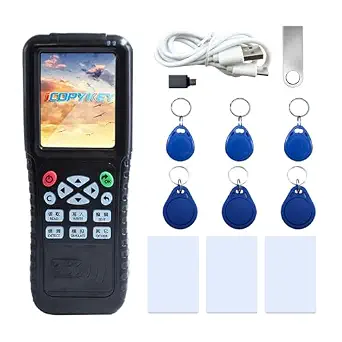 | Best for Advanced Card Work | Supported frequencies: 125 kHz, 175 kHz, 250 kHz, 300 kHz, 375 kHz, 500 kHz, and 13.56 MHz | Supported card types: S50, S70, TK4100, EM4100, EM4200, T5577, TK4100-D, TK4168, HID, and AWID | Functions: Reads and writes supported ID and IC cards; NFC simulation | VIEW ON AMAZON | See Our Full Breakdown |
More Details on Our Top Picks
Dual-Frequency RFID Reader for 125 kHz and 13.56 MHz Cards
Two-frequency support and configurable output make this the most adaptable USB pick in this group. It reads EM4100 cards at 125 kHz and supported ISO Prox and ISO 14443 cards at 13.56 MHz, then sends data as keyboard input without a driver. Compared with the YARONGTECH RFID Card Reader 13.56 MHz USB M1 S50, it covers more card types and offers broader output choices, including raw Wiegand data. That flexibility suits access-control administrators working with mixed credentials, but it also means checking protocol compatibility before purchase: two frequencies do not mean it reads every card. It is read-only, and the description does not specify included cards. I’d choose it when output configuration matters more than a simple, single-format reader.
Pros:- Reads supported cards at both 125 kHz and 13.56 MHz
- Driver-free USB keyboard input
- Configurable card-number formats and raw Wiegand output
- Lists compatibility with Linux, Android, Windows, Mac, and iOS
Cons:- Reader only; included cards are not specified
- Listed operating-system compatibility may vary by device and card protocol
- Read-only, so it cannot encode credentials
Best for: Access-control administrators who need a driver-free USB reader for supported cards at both 125 kHz and 13.56 MHz, with configurable output.
Not ideal for: Buyers who need to write or clone cards, or who cannot verify that their cards use one of the listed compatible protocols.
- Frequencies:125 kHz and 13.56 MHz
- Interface:USB
- Supported cards:EM4100; 1326/1346/1386 ISO Prox; MIFARE S50/S70; compatible ISO 14443
- EM4100 output:40 configurable card-number formats; maximum 40-bit card number
- 1326 family output:40 formats or raw Wiegand data
- Wiegand range:24 to 80 bits
- Driver requirement:No driver required
- Listed operating systems:Linux, Android, Windows, Mac, and iOS
Our verdict“Choose this for broad supported card coverage and output flexibility in a USB reader, provided your credential protocols match.”
Handheld 125 kHz RFID Reader and Writer
Standalone reading and writing set this handheld apart from the USB readers in the lineup, which are described as keyboard-input readers. It works with compatible 125 kHz chips such as T5577, EM4205, and EM4305, and the package includes writable cards and key fobs for encoding. That makes it more useful for authorized on-site credential work than the 125 kHz USB RFID Reader for Proximity and ID Cards, which can configure output but cannot write cards. The tradeoff is narrower frequency coverage and compatibility that depends on the original card type; it is not a universal copier. You will also need two AAA batteries, which are not included, and the supplied blanks must be written before use. I’d pick it for mobile work where a computer-free writer matters more than broad card coverage.
Pros:- Reads and writes compatible 125 kHz cards and fobs
- Works with several listed chip families
- Includes three writable key fobs and three writable cards
- Portable operation does not require a computer
Cons:- Two AAA batteries are required and not included
- Compatibility depends on the original card or chip type
- Included blank credentials need encoding before use
Best for: Technicians handling authorized 125 kHz credential duplication or setup on site who need a handheld device and included writable blanks.
Not ideal for: Users with 13.56 MHz credentials, users who need USB keyboard input, or anyone expecting the reader to copy every card type.
- Frequency:125 kHz
- Compatible chips:T5577, EM4205/4305, EL8265/8268
- Functions:Read and write compatible cards
- Power:Two 1.5 V AAA batteries, not included
- Package contents:Reader/writer, 3 writable key fobs, 3 writable cards, user manual
- Item weight:3.2 ounces
- Package dimensions:5.12 x 3.23 x 1.65 inches
- Model:RFID-125kid-fx4
Our verdict“Choose this handheld for authorized, compatible 125 kHz writing tasks away from a computer, and bring your own batteries.”
125 kHz USB RFID Reader for Proximity and ID Cards
This is a practical fit for a desk that handles 125 kHz proximity and ID cards and needs their data entered into an active window. Its USB keyboard-style input is plug-and-play, while configurable formats, prefixes, suffixes, and raw Wiegand output give administrators more control than the simpler YARONGTECH RFID Card Reader 13.56 MHz USB M1 S50. The tradeoff is that this model only reads; unlike the handheld reader and writer, it cannot encode cards. Its stated read distance is also modest, especially for fobs, so users should expect to present credentials close to the reader. Android use needs an OTG adapter. The included sample cards and configuration card make setup easier, but I’d still confirm that existing credentials belong to the supported 1326 or 4100 families.
Pros:- Reads both 1326-family proximity and 4100-series ID cards
- Driver-free USB keyboard input
- Supports configurable formats, prefixes, suffixes, and raw Wiegand data
- Includes sample cards and a configuration card
Cons:- Read-only; cannot encode cards
- Short stated read distance, particularly for fobs
- Android devices require an OTG adapter
Best for: Office administrators and integrators who need configurable keyboard input from supported 125 kHz proximity and ID cards at a computer.
Not ideal for: People who need to write cards, scan at a distance, or use Android without an OTG adapter.
- Frequency:125 kHz
- Connectivity:USB Type A, USB 2.0
- Supported cards:1326-family proximity cards and 4100-series ID cards
- Output:Up to 40 configurable formats; prefixes, suffixes, and raw Wiegand data
- Card read distance:3–8 cm
- Fob read distance:1–4 cm
- Power draw:40 mA standard, 100 mA maximum
- Operating temperature:-20°C to +70°C
- Package contents:Reader, cable, menu, ID card, proximity card, configuration card
Our verdict“Choose this for configurable 125 kHz credential input at a computer, if its short read range and read-only operation fit your workflow.”
YARONGTECH RFID Card Reader 13.56 MHz USB M1 S50
The YARONGTECH is the straightforward choice when a workstation needs a 13.56 MHz USB reader and a limited identifier output is enough. Plug-and-play setup avoids driver installation, and the reader can present the first 10 digits in decimal or hexadecimal. That narrower output is the key tradeoff: compared with the Dual-Frequency RFID Reader for 125 kHz and 13.56 MHz Cards, it covers only 13.56 MHz and offers fewer stated output options. Its Windows support spans older versions through Windows 10, but the listing does not name Mac, Linux, Android, or iOS support. I’d consider it for a legacy Windows station with compatible tags and a simple identifier workflow; buyers who need full tag data or mixed-frequency support should choose a more configurable model.
Pros:- Plug-and-play USB operation with no driver installation
- Supports decimal and hexadecimal output for the first 10 digits
- Works with compatible 13.56 MHz tags
- Lists Windows compatibility from 2000 through 10
Cons:- Outputs only the first 10 digits of tag data
- Limited to listed Windows operating systems
- Does not support the 125 kHz credentials covered by dual-frequency models
Best for: Windows workstation users with compatible 13.56 MHz tags who only need the first 10 digits in decimal or hexadecimal.
Not ideal for: Users who need 125 kHz support, full tag data, configurable Wiegand output, or a listed non-Windows operating system.
- Frequency:13.56 MHz
- Connectivity:USB Type A
- Supported tags:Compatible 13.56 MHz tags
- Output:First 10 digits
- Output formats:Decimal or hexadecimal
- Setup:Plug and play; no driver installation required
- Compatible operating systems:Windows 2000, XP, Vista, 7, and 10
- Data transfer rate:480 megabits per second
Our verdict“Choose this for a simple Windows-based 13.56 MHz workflow where the first 10 digits are sufficient.”
Dual-Frequency RFID Card Reader, 125 kHz and 13.56 MHz, USB
Broad listed operating-system support and clear read indicators make this a simple dual-frequency option for users who want card numbers entered as keyboard input. It reads supported 125 kHz and 13.56 MHz cards over USB, with lights and a buzzer signaling standby and successful reads. Compared with the first Dual-Frequency RFID Reader for 125 kHz and 13.56 MHz Cards, this model lists fewer configuration details: the other specifies many output formats and raw Wiegand data, while this one emphasizes straightforward card-number entry. That simplicity may suit shared workstations, but the supported protocols are limited to ISO14443-A/B as listed, and the package contains no cards. It is read-only. I’d choose it when audible and visual feedback is useful and advanced output control is not a requirement.
Pros:- Reads supported credentials at both 125 kHz and 13.56 MHz
- Plug-and-play USB keyboard input
- Lists Windows, Linux, Android, Mac OS, and iOS compatibility
- Lights and built-in buzzer indicate reader status and successful reads
Cons:- No cards are included
- Protocol support is limited to the listed ISO14443-A/B
- No card-writing or advanced output-format features are specified
Best for: Teams using shared computers across listed operating systems who want a dual-frequency reader with visible and audible read feedback.
Not ideal for: Administrators who need configurable Wiegand output, card writing, or compatibility with credentials outside the listed frequencies and protocols.
- Brand:Navfmru
- Model:MJ-6709
- Working frequencies:125 kHz and 13.56 MHz
- Supported protocols:ISO14443-A/B
- Connectivity:USB
- Compatible operating systems:Windows, Linux, Android, Mac OS, iOS
- Read indicators:Lights and built-in buzzer
- Color:Black
- Warranty:2 years
Our verdict“Choose this for straightforward cross-platform card-number entry with read feedback, if its listed protocol support matches your cards.”
Ajfwm Dual-Frequency USB RFID Reader with Metal Case
Two-frequency coverage and 40 configurable output formats make the Ajfwm a flexible fit for workflows that handle different compatible cards. It reads 125 kHz and 13.56 MHz media, while keyboard input lets card data appear in the active field without specialized software. Compared with the BlissKiss Dual-Frequency RFID Reader, Ajfwm lists more output-format choices and raw Wiegand data, which may suit users who need to adjust how data is presented. That flexibility comes with a compatibility caveat: the product description gives inconsistent protocol and compatibility details, so buyers should confirm their specific card type before relying on it. It is also a reader, not a card-writing tool. I’d choose it for a mixed-format setup where configurable output matters more than a clearly bounded compatibility list.
Pros:- Reads compatible cards at both 125 kHz and 13.56 MHz
- Offers 40 configurable output formats
- Can provide raw Wiegand data from 24 to 80 bits
- USB keyboard input supports several operating systems
Cons:- Protocol and compatibility details in the description are inconsistent
- Works only with compatible card and tag protocols
- No card-writing capability is specified
Best for: IT staff and system integrators handling compatible 125 kHz and 13.56 MHz cards who need configurable data output
Not ideal for: Buyers who need confirmed support for a specific encrypted or proprietary card, or who need to write cards
- Model:R15-DC
- Connection:USB Type-A
- Frequencies:125 kHz and 13.56 MHz
- Supported media:EM4100, 1326 family, MIFARE S50/S70, and other compatible ISO 14443-A/B tags
- Output formats:40 configurable formats
- Wiegand data:Raw data from 24 to 80 bits
- Compatibility:Windows, macOS, Linux, Android, and iOS
- Included:1 reader
Our verdict“Choose the Ajfwm if you need broad output-format control across compatible dual-frequency cards and can verify protocol support first.”
13.56 MHz USB RFID Reader with 3 Cards
For a first 13.56 MHz ISO 14443A setup, this reader keeps the basic workflow simple: connect it over USB, focus a text field, and present a supported card. Its three included cards give a beginner media to try without sourcing cards separately. Compared with the HiLetgo 125 kHz EM4100 USB RFID ID Card Reader, it targets a different card family and supports both 4-byte and 7-byte UIDs, but it cannot read 125 kHz ID cards. The 28 selectable output formats add useful control over how scanned data appears, though its scope remains specific: ISO 14443A only. I’d pick it for learning or a small single-protocol workflow where driver-free keyboard input is the priority, and skip it for mixed-frequency access systems.
Pros:- No driver required for USB HID keyboard use
- Supports 4-byte and 7-byte ISO 14443A UIDs
- Includes three cards
- Provides 28 selectable output formats
Cons:- Reads ISO 14443A cards only
- No 125 kHz support is specified
Best for: New users setting up a basic ISO 14443A reader who want included cards for initial setup and practice
Not ideal for: Facilities teams that need to read 125 kHz badges, other protocols, or a mixed-frequency card population
- Frequency:13.56 MHz
- Protocol:ISO 14443A
- UID support:4-byte and 7-byte
- Interface:USB HID keyboard emulation
- Driver:Not required
- Output formats:28 selectable formats
- Default format:8H 10D
- Included cards:3
Our verdict“Pick this as a straightforward starter for ISO 14443A cards if its single-protocol limit matches your setup.”
HiLetgo 125 kHz EM4100 USB RFID ID Card Reader
The HiLetgo suits a narrow, practical job: reading 125 kHz ID cards over USB and returning the first 10 digits. A built-in buzzer gives an audible cue during use, and its listed dimensions make it a compact desktop option. Compared with the dual-frequency BlissKiss RFID Reader, HiLetgo is more limited in card coverage and output, but its straightforward 125 kHz focus may be enough for a basic ID-entry station. That simplicity also sets a firm boundary: it cannot read IC cards, and the fixed digit output leaves less room to tailor data formatting. I’d choose it when the card population is already known to use compatible 125 kHz IDs; buyers with mixed badges or 13.56 MHz cards should look elsewhere.
Pros:- Plug-and-play USB connection
- Built-in buzzer provides an audible read cue
- Compact 110 × 80 × 26 mm dimensions
Cons:- Reads 125 kHz ID cards only
- Cannot read IC cards
- Outputs only the first 10 digits
Best for: Small offices or hobbyists who need simple USB entry from compatible 125 kHz ID cards
Not ideal for: Teams with IC cards, 13.56 MHz badges, or a need for configurable UID output
- Frequency:125 kHz
- Card compatibility:125 kHz ID cards; does not read IC cards
- Output:First 10 digits
- Connection:USB
- Dimensions:110 × 80 × 26 mm
- Buzzer:Built-in
Our verdict“Choose HiLetgo for a basic 125 kHz ID-entry station when fixed 10-digit output is sufficient.”
FIYYIA Handheld 125 kHz RFID Reader and Writer with 10 T5577 Fobs and Cards
Unlike the USB keyboard-style readers in this group, the FIYYIA is a handheld reader and writer for compatible, unencrypted 125 kHz chips. Its push-button controls, LED indicators, and buzzer make read and write operations more direct, while the included five T5577 fobs and five blank cards give buyers media for compatible tasks. Compared with the read-only BlissKiss Dual-Frequency RFID Reader, FIYYIA adds writing capability and portability, but gives up 13.56 MHz support and computer-based UID entry. Its narrow chip compatibility is a real constraint: it does not support NFC, 13.56 MHz, or 960 MHz cards, and the two AAA batteries must be purchased separately. I’d choose it for hands-on work with supported 125 kHz media, not for general-purpose badge reading.
Pros:- Reads and writes supported unencrypted 125 kHz chips
- Includes five writable T5577 fobs and five blank T5577 cards
- Push-button controls with LED and buzzer guidance
- Handheld ABS body with listed compact dimensions
Cons:- Does not support NFC, 13.56 MHz, or 960 MHz cards
- Limited to compatible unencrypted 125 kHz chips
- Requires two AAA batteries, sold separately
Best for: Technicians or hobbyists who need a portable tool to read and write compatible unencrypted 125 kHz chips
Not ideal for: Office users who need computer text-field entry, NFC or 13.56 MHz support, or out-of-box battery power
- Frequency:125 kHz
- Supported chips:T5577, EM4305, CE5200, and other compatible unencrypted 125 kHz chips
- Included media:5 T5577 key fobs and 5 blank T5577 cards
- Power:2 AAA batteries, not included
- Controls:Push buttons
- Dimensions:2.75 × 1.25 × 4.5 inches
- Material:ABS
- Color:Dark blue
Our verdict“Choose FIYYIA when portable read and write functions for compatible 125 kHz chips matter more than broad card coverage.”
BlissKiss Dual-Frequency RFID Reader, 125 kHz and 13.56 MHz, USB
The BlissKiss is the most balanced pick here for buyers who need a read-only USB reader across two frequencies. It supports listed 125 kHz types such as TK4001 and EM4100 alongside 13.56 MHz cards including MIFARE Classic S50/S70 and ISO 14443A, then types the UID into the active text field using keyboard emulation. Compared with the HiLetgo 125 kHz reader, it covers an additional frequency and more card families; unlike the FIYYIA handheld writer, it cannot modify cards. That makes BlissKiss a better fit for routine data capture than card programming. Its broad list still has limits: encrypted smart cards and special security chips are unsupported, and output is limited to UID in decimal or hexadecimal depending on card and configuration.
Pros:- Supports compatible cards at both 125 kHz and 13.56 MHz
- USB HID keyboard emulation types UIDs into active fields
- Works with Windows, macOS, iOS, Android, and Linux
- Lists multiple common card families and protocols
Cons:- Read-only; cannot write, clone, or modify cards
- Does not support encrypted smart cards or special security chips
- UID output format depends on card type and configuration
Best for: Small businesses and IT teams that need driver-free UID entry from compatible 125 kHz and 13.56 MHz cards
Not ideal for: Card administrators who need to write, clone, modify, or read encrypted smart cards
- Frequencies:125 kHz and 13.56 MHz
- Supported card types:TK4001, EM4100, MIFARE Classic S50/S70, ISO 14443A, HID Prox H10301 and H10304
- Interface:USB HID keyboard emulation
- Operating systems:Windows, macOS, iOS, Android, and Linux
- Operation:Read-only; outputs card UID
- UID formats:Decimal or hexadecimal, depending on card type and configuration
Our verdict“Choose BlissKiss for convenient, read-only UID capture across compatible dual-frequency cards without installing drivers.”
Dual-Frequency USB RFID Reader for 125 kHz and 13.56 MHz Cards
Two-frequency support makes this a practical choice for people who need one USB reader for compatible 125 kHz and 13.56 MHz cards. It presents card data as keyboard input, so scans can go directly into a focused text field without a dedicated driver. Compared with the Ossiygar 125 kHz USB RFID Contactless Card Reader, this model covers more card technologies, while Ossiygar includes a test card and gives a specified reading distance. Configurable output formats and raw Wiegand data also give this reader more flexibility for technical workflows. The tradeoff is that setup still depends on matching the card’s frequency and protocol; dual-frequency support does not mean it reads every RFID card. It is a reader, and cards are not included.
Pros:- Reads compatible cards at both 125 kHz and 13.56 MHz
- USB keyboard emulation works without a driver
- Offers configurable card-number output formats
- Can output raw 24–80-bit Wiegand data
Cons:- No cards are included for initial setup
- Compatibility depends on the card’s frequency and protocol
- The supplied data does not specify reading distance
Best for: IT staff and access-control hobbyists who need driver-free USB input from compatible 125 kHz and 13.56 MHz cards across different operating systems
Not ideal for: Buyers who need a ready-to-use kit with cards, or who cannot confirm their cards use a supported frequency and protocol
- Frequencies:125 kHz and 13.56 MHz
- Interface:USB
- Supported cards:EM4100 ID cards, ISO Prox cards, and compatible ISO14443 cards
- Output formats:Up to 40 EM4100 formats; 24–80-bit raw Wiegand data
- Maximum card number:40 bits
- Driver requirement:No driver required
- Compatible systems:Linux, Android, Windows, Mac, and iOS
Our verdict“Choose this reader if you need flexible, driver-free USB input across supported 125 kHz and 13.56 MHz cards and can verify card compatibility.”
Ossiygar 125 kHz USB RFID Contactless Card Reader
For a first 125 kHz reader, Ossiygar keeps the setup straightforward: connect it by Mini USB, scan a compatible card, and get the first 10 digits by default. Its included test ID card lets a new user check the basic workflow without sourcing a tag first. Compared with the Dual-Frequency USB RFID Reader for 125 kHz and 13.56 MHz Cards, this model is narrower in card support, but its stated reading distance and response time make the basic scanning expectations clearer. It can work with several operating systems, though the output-format customization tool is limited to Windows. That makes it less convenient for Mac or Linux users who need to change how card numbers appear. Its 125 kHz-only compatibility also rules out 13.56 MHz cards.
Pros:- Includes a test ID card and USB cable
- Plug-and-play operation requires no external power supply
- Supports Windows, Mac OS, Linux, Chrome OS, and Android 7.0+
- Specified response time is under 0.2 seconds, with reading distance up to 8 cm depending on tag
Cons:- Reads only supported 125 kHz card and tag types
- Output customization tool works only on Windows
- Default output is limited to the first 10 digits
Best for: First-time users with EM4100, EM4200, or TK4100 cards who want a simple USB reader and an included test card
Not ideal for: Mac or Linux users who need to customize output formats, or anyone working with 13.56 MHz cards
- Frequency:125 kHz
- Compatible cards:EM4100, EM4200, and TK4100
- Default data output:First 10 digits
- Reading distance:Up to 8 cm, depending on tag type
- Response time:Less than 0.2 seconds
- Connectivity:Mini USB
- Supported operating systems:Windows, Mac OS, Linux, Chrome OS, and Android 7.0+
- Dimensions:4.33 × 3.15 × 1.02 in
- Included:USB card reader, USB cable, and test ID card
Our verdict“Pick Ossiygar for an uncomplicated start with common 125 kHz cards, provided its Windows-only customization tool and card limits fit your setup.”
Edinruis X100 Multi-Frequency RFID Reader and Writer
The X100 is the most feature-packed option here for buyers who need reading and writing across a broad set of supported card types. Its display shows card information on the device, while USB-C, app support, and NFC simulation add ways to work beyond a basic desktop scan. Compared with the Dual-Frequency USB RFID Reader for 125 kHz and 13.56 MHz Cards, the X100 covers more listed frequencies and card types, but it is also less straightforward: its software supports Windows and Android, not Mac, and its default language is Chinese. The supplied details do not specify write compatibility for every listed card, so buyers should confirm their target cards before relying on that feature. This is a specialized tool rather than the simpler keyboard-style reader most people need for entering card IDs.
Pros:- Supports a broad range of listed frequencies from 125 kHz to 13.56 MHz
- Reads and writes supported ID and IC cards
- 2.8-inch color screen displays card information
- Includes app operation and NFC simulation
Cons:- Not compatible with Mac
- Default language is Chinese
- The supplied product data does not clarify write support for every listed card type
Best for: Access-control technicians and RFID hobbyists who need a handheld reader-writer with broad listed frequency and card support and use Windows or Android
Not ideal for: Mac users, buyers who need an English default interface, or people who only want simple USB card-number input
- Supported frequencies:125 kHz, 175 kHz, 250 kHz, 300 kHz, 375 kHz, 500 kHz, and 13.56 MHz
- Supported card types:S50, S70, TK4100, EM4100, EM4200, T5577, TK4100-D, TK4168, HID, and AWID
- Functions:Reads and writes supported ID and IC cards; NFC simulation
- Display:2.8-inch TFT color screen
- Interface:USB-C
- Compatibility:Windows and Android; not compatible with Mac
- Item weight:9.3 ounces
- Package dimensions:6 × 3 × 2 inches
- Default language:Chinese
Our verdict“Choose the X100 for advanced multi-frequency card work if Windows or Android compatibility and its Chinese default language suit your workflow.”
How We Picked
I ranked these RFID card readers by how well their stated capabilities match practical buying needs: card frequency, supported card family where specified, USB or handheld operation, and whether the device reads only or also writes. Models that cover both 125 kHz and 13.56 MHz rank ahead for general-purpose use because they reduce the chance of choosing the wrong frequency at the outset. Within that group, a metal case or a clear project bundle can help distinguish the intended use, but neither replaces protocol compatibility.
Single-frequency models rank higher for buyers with a known card type, since their narrower scope can make selection simpler. Handheld writers earn a distinct place for portable encoding tasks, with the FIYYIA bundle standing out for including tags. Product names and listed features do not establish compatibility with every card or access-control system, so I treat claims cautiously and favor clear, buyer-relevant distinctions over broad promises. The order reflects versatility first, then fit for specific tasks and the practical value of the included setup.
Factors to Consider When Choosing Rfid Card Readers
Before choosing a reader, I would start with the card and the job it needs to do. The same frequency label can cover different card families, and a reader that works as a USB keyboard may not fit software expecting another interface. These checks help avoid buying a technically plausible device that cannot do the work you need.
Match the card family, not just the frequency
Check the exact card or fob type used by your system before ordering. A 125 kHz label or 13.56 MHz label narrows the field, but it does not identify every protocol or data format. Look for the card’s model, technology, or system documentation, then compare that detail with the reader’s stated support. A dual-frequency reader can cover two bands while still missing a particular card family. If the card type is unknown, identify it first where possible; frequency-only guessing can leave you with a reader that powers on but cannot read the tag you have.
Decide whether you need to write tags
Many buyers only need to present an existing card and capture its identifier, so a reader-only model may be enough. Writing or cloning is a separate capability and depends on the tag’s technology, permissions, and the software used. A product described as a writer does not mean it can alter every access card, and protected credentials may not be writable. For a project involving blank fobs, confirm that the reader supports the exact tag type you plan to use. If your goal is simply to log card IDs, paying for writer functions may add complexity without helping the task.
Check how the reader communicates with your computer
USB readers often present a scanned card number as keyboard input, which can make basic data entry straightforward. That behavior may not work for software that expects a dedicated device driver, a serial connection, or a particular reader protocol. Check the product details and your application’s requirements before assuming that a USB plug makes the reader universally compatible. Also consider where the reader will sit: a fixed desktop setup favors a compact USB unit, while field work can call for a handheld device. Cable reach, operating system support, and available ports can matter as much as the reader’s frequency.
Treat included cards and fobs as project supplies
A bundle can save setup time when it contains tags suited to practice, testing, or a small prototype. It does not prove those included tags match your existing access system or that they can replace credentials issued by an administrator. Check the frequency and tag family of every included item, and keep test tags separate from active credentials. Buyers building a demo may value a ready-made bundle more than someone who already owns compatible cards. For a workplace or building system, follow the system owner’s credential process instead of assuming a retail fob can be enrolled.
Choose portability and casing for the work setting
A handheld reader is easier to carry between locations and may suit enrollment or bench work away from a computer station. A desktop USB reader is usually a simpler fit for repeated scans at one workstation. A metal case may appeal when the reader will see regular handling, though casing alone does not establish durability or read performance. Consider how often the device moves, whether it must stay connected during use, and how it will be stored. Avoid choosing on appearance alone when the more important question is whether the reader supports your cards and software.
Plan for software and credential rules
A reader can identify a tag without granting access or managing credentials itself. Access permissions are typically controlled by the system that stores and validates credentials, so confirm where the reader fits in that setup. For a personal project, check that the software can accept the reader’s output and store the data in the needed format. In managed buildings or workplaces, ask the system administrator which readers and tags are approved. This check prevents confusing successful tag detection with successful system integration.
Frequently Asked Questions
Will a dual-frequency reader work with any RFID card?
No. Dual-frequency support means the reader covers both 125 kHz and 13.56 MHz bands, but cards within those bands can use different technologies and data formats. Check the exact card family against the reader’s specifications. If the card belongs to a managed access system, the system may also restrict which readers can enroll or process credentials. Treat dual-frequency support as broader coverage, not universal compatibility.
Can I use one of these readers to copy my building access card?
Do not assume so. Reader and writer functions depend on the card technology, and some credentials use protections that prevent copying or require authorization from the access system. A reader may only report an identifier rather than reproduce a usable credential. For a replacement or additional access card, contact the building or system administrator. That route also helps avoid creating a tag the system will reject.
Should I buy a USB reader or a handheld model?
Choose USB when scans will happen at a computer and the reader’s output matches your software workflow. A handheld model makes more sense when you need portability or tag writing away from a fixed desk. Check whether the handheld device requires a separate cable, software, or setup process for the task. If you only need to enter card IDs into a computer, a basic USB reader may be easier to use. The deciding factor is where the work happens and what the application expects.
Are bundled cards and fobs compatible with my current access system?
Not necessarily. Bundled tags are useful for testing or prototyping, but their frequency and card family must match the reader and the access system. Some systems also require credentials to be issued or registered by an administrator. Check the specifications for the included tags and ask the system owner about approved credentials before relying on them for access. A bundle confirms what is included, not what systems it will work with.
What should I verify if the reader detects a card but my software does not?
First check whether the reader sends data as keyboard input, through a serial port, or through a specific driver. Then confirm the software accepts that input format and the card’s identifier length or encoding. Test with a simple text field if the device is expected to behave like a keyboard, and consult the software documentation for other connection types. A detected card shows that the reader can see a tag; it does not confirm that the application can process its data. If the setup is part of a managed access system, ask the administrator about supported reader models.
Conclusion
For an all-purpose starting point, I recommend the Dual-Frequency RFID Reader for 125 kHz and 13.56 MHz Cards because its stated frequency coverage suits buyers who need room to identify their card type. The best value for a known 125 kHz setup is a focused USB option such as the HiLetgo or Ossiygar, while the best beginner pick for a 13.56 MHz project is the reader bundled with three cards. For a more substantial-feeling USB unit, consider the Ajfwm model with a metal case; for portable writing and included project tags, the FIYYIA handheld kit is the more specific choice. Match the card family and software requirements before choosing, since those details matter more than a broad frequency label.
Halloween Picks
halloween
As an affiliate, we earn on qualifying purchases.