
For an ergonomic keyboard for office work, my best overall pick is the Logitech Ergo K860, with its split layout and built-in wrist rest; the Logitech Wave Keys is a more approachable choice, while the wired Perixx PERIBOARD-512B suits buyers who want a pronounced split without wireless setup. The main tradeoff is how much layout change you are ready to learn: a split keyboard can encourage a different hand position, while a wave design asks less of your muscle memory. Wireless convenience, desk space, wrist support, and the need for a number pad also separate these options. Read on for the full breakdown, buying advice, and picks for different office setups.

Get the latest gadgets delivered free with Prime
- Fast, free delivery on millions of items
- Prime Video, Amazon Music and more included
- Member-only deals all year
Complete the kit



Key Takeaways
- The Logitech Ergo K860 leads for a reason: its split layout and integrated wrist rest make it the most complete fit for buyers prioritizing a dedicated ergonomic shape.
- The Logitech Wave Keys is the easier shape change: its wave-style layout offers a gentler step away from a conventional keyboard than the more pronounced Perixx split design.
- Wired models still have a clear office role: the Perixx PERIBOARD-512B and X9 avoid wireless pairing and charging, but tether the keyboard to the desk.
- Combo bundles trade choice for convenience: EAYBLLY, ULSOU, and other keyboard-and-mouse bundles can simplify a setup, though their bundled peripherals may not suit every user.
- Backlighting and extras do not guarantee a better typing fit: RGB, phone holders, and color lighting are secondary to layout, wrist position, and whether the keyboard fits your daily tasks.
| EAYBLLY 2.4G Wireless Ergonomic Keyboard with Phone Holder and Wrist Rest |  | Best for Phone-First Multitasking | Connectivity: 2.4G wireless | Wireless range: Up to 33 feet | Power: 1 AA battery, not included | VIEW ON AMAZON | See Our Full Breakdown |
| TECKNET Rechargeable Wireless Ergonomic Keyboard |  | Best for Multi-Device Windows Desks | Connectivity: Bluetooth 5.0 and 2.4 GHz USB receiver | Device pairing: Up to 4 devices | Number of keys: 104 | VIEW ON AMAZON | See Our Full Breakdown |
| ULSOU Ergonomic Wireless Keyboard and Mouse Combo with Wrist Rest, Black |  | Best Value Desk Set | Connectivity: 2.4 GHz wireless via USB receiver | Wireless range: Up to 33 feet | Keyboard layout: QWERTY with wave keys, wrist rest, and adjustable stand | VIEW ON AMAZON | See Our Full Breakdown |
| COLIKES Wireless Ergonomic RGB Keyboard with Wrist Rest |  | Best for Quiet, Backlit Typing | Model: PC436A | Layout and switch type: QWERTY; membrane | Connectivity: 2.4 GHz USB wireless; range up to 33 feet | VIEW ON AMAZON | See Our Full Breakdown |
| Perixx PERIBOARD-512B Wired Ergonomic Keyboard, Split Layout, Wrist Rest, US English, Black |  | Best for a Fixed Windows Workstation | Model: PERIBOARD-512B | Connectivity: Wired USB | Layout and language: Split ergonomic; US English | VIEW ON AMAZON | See Our Full Breakdown |
| Ergonomic Wireless Keyboard and Mouse Combo, Full Size Wave, Natural Typing |  | Best for a Simple Wireless Setup | Layout: Full-size | Design: Wave | Connectivity: Wireless | VIEW ON AMAZON | See Our Full Breakdown |
| Wireless Ergonomic Keyboard and Mouse Combo |  | Best for Quiet, Multi-OS Offices | Connectivity: Radio frequency | Wireless range: Up to 10 m (33 ft) | Receiver: One shared USB nano receiver | VIEW ON AMAZON | See Our Full Breakdown |
| Logitech Ergo K860 Wireless Ergonomic Split Keyboard with Wrist Rest |  | Best Overall for Ergonomic Office Typing | Connectivity: Bluetooth, USB receiver | Layout: Full-size QWERTY | Number of keys: 105 | VIEW ON AMAZON | See Our Full Breakdown |
| Arteck Split Ergonomic Wireless Keyboard with Cushioned Palm Rest |  | Best Rechargeable Split-Layout Value | Model: HW315 | Connectivity: 2.4 GHz USB wireless | Layout: QWERTY split keyset | VIEW ON AMAZON | See Our Full Breakdown |
| Frixalox Wired Ergonomic Split Keyboard with RGB Backlight and Numpad |  | Best Wired Full-Size Feature Set | Layout: QWERTY, 120 keys | Keyboard type: Membrane | Connectivity: USB-A, USB-C adapter | VIEW ON AMAZON | See Our Full Breakdown |
| X9 Wired Ergonomic Keyboard – Comfortable Typing – Ergonomic Full Size USB Keyboard with Wrist Rest, Number Pad, Multimedia and 114 Keys – External Computer Keyboard for Laptop, Desktop and Office PC |  | Best for a Full-Size Wired Setup | Connection: Wired USB-A | Cable length: 5 feet | Key count: 114 | VIEW ON AMAZON | See Our Full Breakdown |
| Arteck Ergonomic USB Wired Keyboard with Cushioned Wrist & Palm Rest, Backlit 7 Colors & Adjustable Brightness | 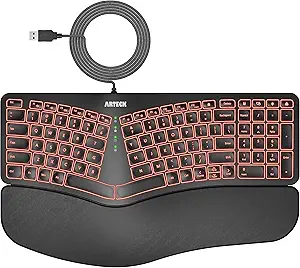 | Best for a Backlit Split Layout | Connection: USB wired | Cable length: 6 feet | Layout: Split ergonomic design | VIEW ON AMAZON | See Our Full Breakdown |
| Logitech Wave Keys Ergonomic Wireless Keyboard with Palm Rest, Graphite |  | Best for a Wireless, Multi-Device Office | Connectivity: Bluetooth and Logi Bolt USB-A receiver | Key count: 101 | Layout: QWERTY | VIEW ON AMAZON | See Our Full Breakdown |
| ergonomic keyboard for office work | Connectivity | Layout |
|---|---|---|
| EAYBLLY 2.4G Wireless Ergonomi | 2.4G wireless | — |
| TECKNET Rechargeable Wireless | Bluetooth 5.0 and 2.4 GHz USB receiver | — |
| ULSOU Ergonomic Wireless Keybo | 2.4 GHz wireless via USB receiver | — |
| COLIKES Wireless Ergonomic RGB | 2.4 GHz USB wireless; range up to 33 feet | — |
| Perixx PERIBOARD-512B Wired Er | Wired USB | — |
| Ergonomic Wireless Keyboard an | Wireless | Full-size |
| Wireless Ergonomic Keyboard an | Radio frequency | — |
| Logitech Ergo K860 Wireless Er | Bluetooth, USB receiver | Full-size QWERTY |
| Arteck Split Ergonomic Wireles | 2.4 GHz USB wireless | QWERTY split keyset |
| Frixalox Wired Ergonomic Split | USB-A, USB-C adapter | QWERTY, 120 keys |
| X9 Wired Ergonomic Keyboard | — | Full-size with number pad |
| Arteck Ergonomic USB Wired Key | — | Split ergonomic design |
| Logitech Wave Keys Ergonomic W | Bluetooth and Logi Bolt USB-A receiver | QWERTY |
More Details on Our Top Picks
EAYBLLY 2.4G Wireless Ergonomic Keyboard with Phone Holder and Wrist Rest
The EAYBLLY pairs a wave-shaped key layout with a memory foam wrist rest, giving office typists more wrist support than a basic flat keyboard. Its standout is the built-in phone holder: keeping a phone in view can make it easier to follow messages or calls without shifting devices around the desk. Compared with the rechargeable TECKNET, this model uses a single AA battery and a 2.4G USB connection rather than offering Bluetooth pairing, so it suits a simple one-computer setup better than a multi-device desk. Adjustable tilt and water resistance add practical flexibility, but the holder is sized for phones rather than larger tablets. I’d choose it for phone-led multitasking, not for switching among several work devices.
Pros:- Wave-shaped keys and memory foam wrist rest are designed to support a more comfortable typing position.
- Built-in holder keeps a phone visible while working.
- Adjustable 8° and 12° tilt settings offer two typing angles.
- Water-resistant construction and wireless range up to 33 feet suit varied desk setups.
Cons:- Requires an AA battery that is not included.
- Uses 2.4G wireless rather than Bluetooth or multi-device pairing.
- The 7.28-inch holder may not accommodate larger tablets.
Best for: Office workers who keep a phone visible for messages or calls and want a wireless keyboard with a cushioned wrist rest.
Not ideal for: People who switch between several computers or tablets, or who want a rechargeable keyboard and Bluetooth connectivity.
- Connectivity:2.4G wireless
- Wireless range:Up to 33 feet
- Power:1 AA battery, not included
- Compatibility:Windows, Mac OS, Chrome OS
- Phone holder size:7.28 inches
- Tilt settings:8° and 12°
- Material:Water-resistant
Our verdict“Choose the EAYBLLY if a phone holder and supported wrist position matter more than rechargeable power or multi-device connectivity.”
TECKNET Rechargeable Wireless Ergonomic Keyboard
The TECKNET is the most adaptable wireless option in this group for a Windows office that uses more than one device. Its split, curved 104-key layout and dual-density memory foam wrist rest put ergonomic support at the center, while Bluetooth 5.0 and a USB receiver let it pair with up to four devices. That flexibility is a clear step beyond the EAYBLLY and COLIKES, which rely on a 2.4 GHz receiver. The rechargeable battery is rated for up to 200 hours of use, reducing the need to keep spare AA batteries on hand. The tradeoff is its stated Windows-only compatibility; Mac and Chrome OS users should check compatibility before choosing it. Its plastic enclosure and registration-required warranty also make it less appealing to buyers prioritizing premium materials or simple warranty setup.
Pros:- Split, curved layout and dual-density memory foam wrist rest are designed for supported typing.
- Pairs with up to four devices through Bluetooth 5.0 and a 2.4 GHz USB receiver.
- Rechargeable 500 mAh battery is rated for up to 200 hours of use.
- Four adjustable feet settings provide tilt from 0° to 6.2°.
Cons:- Listed operating system compatibility is limited to Windows.
- The 36-month warranty requires registration.
- The plastic enclosure may not suit buyers seeking a more substantial keyboard build.
Best for: Windows-based office workers who regularly switch among a computer, laptop, and other paired devices and want a supported split layout.
Not ideal for: Mac or Chrome OS users who need clearly listed system support, or buyers who prefer a simple wired setup.
- Connectivity:Bluetooth 5.0 and 2.4 GHz USB receiver
- Device pairing:Up to 4 devices
- Number of keys:104
- Battery:Rechargeable 500 mAh; up to 200 hours of use
- Charging:USB-C; approximately 4 hours
- Layout and wrist rest:Split ergonomic layout; integrated dual-density memory foam
- Adjustable tilt:0°, 1.2°, 3°, and 6.2°
- Compatibility:Windows
- Warranty:36 months; registration required
Our verdict“Pick the TECKNET for a Windows office with several devices to manage; skip it if you need confirmed Mac or Chrome OS support.”
ULSOU Ergonomic Wireless Keyboard and Mouse Combo with Wrist Rest, Black
The ULSOU stands apart by including a keyboard and contoured right-hand mouse under one wireless receiver, making it a practical pick for buyers setting up a complete office desk. The keyboard has wave-style keys, a wrist rest, and an adjustable stand, while the mouse adds forward and back buttons plus three DPI settings. Compared with the keyboard-only EAYBLLY, it covers more of the desk setup; compared with the TECKNET, it gives up rechargeable power and multi-device pairing for a straightforward shared receiver. Both the keyboard and mouse need an AA battery that is not included, so the convenience of a bundle comes with ongoing battery planning. Its mouse is also specifically right-handed, which rules it out for left-handed users.
Pros:- Wave keys, wrist rest, and adjustable stand support a more comfortable typing position.
- One 2.4 GHz USB receiver connects both included devices.
- Contoured mouse includes forward and back buttons and three DPI settings.
- Compatibility includes Windows and Mac.
Cons:- Keyboard and mouse each require an AA battery, and neither battery is included.
- Mouse shape is designed for right-handed use.
- A single receiver setup is less flexible for switching among multiple devices than the TECKNET.
Best for: Right-handed office workers who need both a comfortable keyboard and a matching wireless mouse for one computer.
Not ideal for: Left-handed users, or anyone who wants a rechargeable set or Bluetooth device switching.
- Connectivity:2.4 GHz wireless via USB receiver
- Wireless range:Up to 33 feet
- Keyboard layout:QWERTY with wave keys, wrist rest, and adjustable stand
- Mouse:Contoured right-hand design; forward and back buttons; 3-level adjustable DPI
- Power:1 AA battery for keyboard and 1 AA battery for mouse; not included
- Compatibility:Windows XP/Vista/7/8/10/11, Mac, and other operating systems
- Color:Black
Our verdict“Choose the ULSOU if you need a matched wireless keyboard-and-mouse set and use a right-handed mouse.”
COLIKES Wireless Ergonomic RGB Keyboard with Wrist Rest
The COLIKES is a good fit for shared offices or evening work where quiet membrane keys and visible backlighting both matter. Its wave design, soft leather wrist rest, and adjustable legs address typing comfort, while 15 RGB effects, dedicated media keys, and 12 FN shortcuts add desk convenience without adding a separate control pad. Compared with the EAYBLLY, it swaps the phone holder for lighting and shortcut controls; unlike the rechargeable TECKNET, it has no listed Bluetooth pairing or device switching. The 2500 mAh rechargeable battery avoids disposable cells, but the listed backlight-on runtime is 10 days, so frequent lighting use means more regular charging. It connects through a 2.4 GHz USB receiver, which may also be a drawback for laptops with limited USB ports.
Pros:- Quiet membrane keys are suited to shared workspaces.
- Wave design, soft wrist rest, and adjustable legs provide multiple comfort features.
- Rechargeable 2500 mAh battery charges through USB-C.
- Includes media keys, 12 FN shortcuts, and 15 RGB lighting effects.
Cons:- Wireless connection requires a 2.4 GHz USB receiver rather than Bluetooth.
- Listed battery life with backlighting on is 10 days.
- A 12-month warranty is shorter than the TECKNET’s listed registered warranty.
Best for: Office workers who want quiet typing, visible keys in dim rooms, and dedicated media controls in a wireless keyboard.
Not ideal for: People who need Bluetooth pairing, frequent multi-device switching, or the longest possible runtime with the backlight on.
- Model:PC436A
- Layout and switch type:QWERTY; membrane
- Connectivity:2.4 GHz USB wireless; range up to 33 feet
- Battery:Rechargeable 2500 mAh
- Charging:USB-C; approximately 5 hours
- Backlighting:RGB; 15 effects, 5 modes, 3 brightness levels
- Features:Media keys, 12 FN shortcuts, adjustable legs, spill-resistant design
- Compatibility:Windows, Mac, Chrome OS, Linux
- Warranty:12 months
Our verdict“Choose the COLIKES if quiet keys and customizable backlighting matter more than Bluetooth or extended backlight-on runtime.”
Perixx PERIBOARD-512B Wired Ergonomic Keyboard, Split Layout, Wrist Rest, US English, Black
The Perixx PERIBOARD-512B takes the most direct approach to ergonomic typing here: a one-piece split layout, curved key rows, and contoured keycaps, all connected by USB. Its 111-key arrangement and 4.2 mm key travel give office typists a full-size layout with tactile feedback, while the wired connection avoids batteries and wireless receiver management. Compared with the wireless TECKNET, it sacrifices placement flexibility and device switching; compared with the COLIKES, it forgoes backlighting and rechargeable operation. The larger, fixed shape may work well at a dedicated desk, but its 19.09-inch width takes substantial space. Perixx also notes that the ergonomic shape may take time to get used to, so this is better for buyers willing to adapt their typing habits than for those seeking an immediate change.
Pros:- Split layout and curved rows are designed to support a more natural hand position.
- Contoured keycaps and 4.2 mm key travel provide a distinct typing feel.
- Wired USB connection requires no battery charging or replacement.
- Rated for up to 20 million keystrokes.
Cons:- The ergonomic shape may require an adjustment period.
- Wired USB limits placement flexibility compared with wireless options such as the TECKNET.
- Its 19.09-inch width takes considerable desk space.
Best for: Windows office workers with a permanent desk who want a full-size split keyboard and prefer a wired connection.
Not ideal for: People with limited desk space, frequent laptop users, or anyone who needs wireless placement flexibility or Mac support.
- Model:PERIBOARD-512B
- Connectivity:Wired USB
- Layout and language:Split ergonomic; US English
- Key switch and travel:Membrane; 4.2 mm
- Number of keys:111
- Durability:Rated for up to 20 million keystrokes
- Dimensions:19.09 × 9.29 × 1.73 inches
- Compatibility:Laptop and PC; Windows
- Material:ABS
Our verdict“Pick the Perixx for a spacious, fixed Windows workstation where a full-size split layout and dependable wired connection outweigh flexibility.”
Ergonomic Wireless Keyboard and Mouse Combo, Full Size Wave, Natural Typing
This combo is the most basic route here to a full-size wireless workspace: its wave-shaped keyboard is intended to make typing feel more natural, and the included mouse means you can set up both essentials together. Compared with the Logitech Ergo K860, it offers much less detail about its ergonomic construction and lacks stated wrist support or adjustable tilt. That makes it harder to judge as a dedicated posture-focused choice, even though its full-size layout may suit familiar office routines. The main tradeoff is uncertainty: the available information does not specify battery life, operating-system compatibility, or receiver details. I’d choose it when a wave design and wireless convenience are the priorities, but favor a better-documented option if compatibility or long-term ergonomic fit matters.
Pros:- Wave-shaped design is intended to support a more natural typing position.
- Wireless keyboard and mouse provide a less cluttered desk setup.
- Full-size keys suit users who prefer a familiar office layout.
Cons:- Compatibility and wireless receiver details are not provided.
- No battery-life information is available.
- No stated wrist rest or adjustable tilt features to tailor desk posture.
Best for: Office workers who want a full-size wave keyboard and matching wireless mouse for a straightforward home or desk setup.
Not ideal for: Buyers who need confirmed operating-system compatibility, battery-life details, or explicit wrist-rest and tilt support.
- Layout:Full-size
- Design:Wave
- Connectivity:Wireless
- Included device:Mouse
- Intended use:Office or home
- Keyboard keys:Full-size keys
Our verdict“Choose this combo for a simple full-size wireless setup, but pick the Logitech Ergo K860 if you want more clearly specified ergonomic support.”
Wireless Ergonomic Keyboard and Mouse Combo
For shared workspaces, this combo pairs quiet membrane keys with a quiet symmetrical mouse, keeping routine typing and cursor work less disruptive. One nano receiver connects both devices, while the stated support for Windows, Mac OS, Chrome OS, and Linux makes it more flexible across mixed-device offices than the Windows-only Arteck Split. Adjustable tilt legs let you change the keyboard angle, but this is a conventional QWERTY layout rather than a split design, so it offers less specific wrist and forearm positioning than the Logitech Ergo K860. The mouse has three DPI settings, a useful way to adjust pointer speed, though the combo relies on two AA batteries and both peripherals share one receiver. I’d shortlist it for quiet everyday work, not for pronounced ergonomic shaping.
Pros:- Quiet membrane keyboard and mouse suit shared workspaces.
- One shared nano receiver connects both devices.
- Adjustable tilt legs allow changes to the keyboard angle.
- Three mouse DPI settings and broad stated operating-system compatibility.
Cons:- Requires two AA batteries.
- Keyboard and mouse depend on the same USB receiver.
- Conventional layout lacks the split shaping and wrist rest of the Logitech Ergo K860.
Best for: People in quiet offices or shared work areas who need a wireless keyboard and mouse compatible with several operating systems.
Not ideal for: Buyers seeking a split keyboard, a cushioned wrist rest, or separate receivers for keyboard and mouse.
- Connectivity:Radio frequency
- Wireless range:Up to 10 m (33 ft)
- Receiver:One shared USB nano receiver
- Keyboard layout:QWERTY
- Keyboard features:Quiet membrane keys; 9 shortcut keys
- Mouse:Quiet optical, symmetrical design; 800 / 1200 / 1600 DPI
- Tilt adjustment:Front and back adjustable tilt legs
- Power:2 AA batteries required
- Compatible operating systems:Windows, Mac OS, Chrome OS, Linux
Our verdict“Pick this combo for quiet typing and broad OS support, but choose a split model if wrist positioning is your main concern.”
Logitech Ergo K860 Wireless Ergonomic Split Keyboard with Wrist Rest
The Ergo K860 earns the leading spot for office work because its ergonomic features work as a coordinated set: a curved split keyframe, scooped keys, a memory foam wrist rest, and three tilt settings all address different parts of a long typing day. Compared with the Arteck Split, it adds Bluetooth alongside a USB receiver and supports a broader range of operating systems; compared with the Frixalox, it avoids a cable across the desk. Its full-size layout and number pad preserve familiar office functions, though the split arrangement can take time to learn and may slow someone who needs to switch immediately between keyboards. It also relies on two batteries. I’d rank it ahead of simpler wave or combo models for buyers prioritizing adjustable ergonomic support, while recognizing that its larger footprint and learning curve are not for everyone.
Pros:- Curved split frame and scooped keys encourage a more natural hand position.
- Memory foam wrist rest supports the wrists during extended typing.
- Three tilt settings accommodate different seated or standing desk positions.
- Bluetooth and USB receiver connectivity support flexible wireless setups.
Cons:- Split layout may require an adjustment period.
- Full-size design takes substantial desk space.
- Requires two batteries.
Best for: Full-time office typists who want a split layout, wrist support, adjustable tilt, and wireless options across multiple operating systems.
Not ideal for: People who need a compact keyboard, prefer a standard straight layout, or cannot spare time to adapt to split keys.
- Connectivity:Bluetooth, USB receiver
- Layout:Full-size QWERTY
- Number of keys:105
- Tilt settings:0°, -4°, -7°
- Dimensions:17.95 × 9.17 × 1.89 in
- Power:2 batteries required
- Compatible operating systems:Windows, macOS, Linux, Chrome OS
- Color:Graphite
- Recycled plastic content:71% of plastic parts
Our verdict“Choose the Ergo K860 if you want the most complete combination of split-key ergonomics, wrist support, and wireless flexibility in this batch.”
Arteck Split Ergonomic Wireless Keyboard with Cushioned Palm Rest
The Arteck is a focused choice for Windows users who want a split keyset and cushioned palm rest without stepping up to the Logitech Ergo K860’s broader connectivity options. Its scissor-switch keys and rechargeable battery make it a distinct alternative to the battery-powered K860, with stated runtime of up to six months at two hours of daily typing. That estimate is usage-dependent, and the product connects through a USB nano receiver rather than Bluetooth, so it is less convenient for devices without a USB port. Its listed OS support is Windows only, a narrower fit than the K860 or the multi-platform Frixalox. I’d consider it for a Windows desk where wrist support and rechargeability matter more than cross-platform flexibility; buyers who move between computers should check compatibility carefully.
Pros:- Split keyset is designed to support a more relaxed wrist and forearm position.
- Cushioned palm rest adds support during extended typing.
- Rechargeable battery is rated for up to six months under the stated usage conditions.
- Nano receiver stores in the keyboard for convenient transport.
Cons:- Requires a USB receiver; Bluetooth is not listed.
- Listed operating-system compatibility is limited to Windows.
- Battery-life estimate is based on two hours of typing per day.
Best for: Windows office users who want a split keyboard with a cushioned palm rest and rechargeable power.
Not ideal for: Mac, Chrome OS, or Linux users, and anyone who needs Bluetooth or a keyboard that connects without a USB receiver.
- Model:HW315
- Connectivity:2.4 GHz USB wireless
- Layout:QWERTY split keyset
- Number of keys:102
- Switch type:Scissor-switch
- Power:Rechargeable lithium battery
- Battery life:Up to 6 months at 2 hours of use per day
- Dimensions:16.5 × 9.6 × 1.02 in
- Compatible operating system:Windows
Our verdict“Choose the Arteck for rechargeable split-key comfort at a Windows desk, but favor the Logitech Ergo K860 for broader OS and connection support.”
Frixalox Wired Ergonomic Split Keyboard with RGB Backlight and Numpad
The Frixalox combines a split-key layout with a number pad, integrated hard wrist rest, adjustable kickstands, and a wired connection. That makes it a more feature-rich desk fixture than the simpler wireless combos, and its USB-A connection with a USB-C adapter gives it a straightforward plug-and-play route across several listed operating systems. Compared with the Logitech Ergo K860, it trades Bluetooth freedom and a memory foam wrist rest for a cable, RGB lighting, and dedicated shortcuts. Its hard plastic rest may feel less yielding than the K860’s padded support, while shortcut behavior can vary by OS. The full-size body also occupies a sizeable footprint. I’d choose it for a fixed office station where dependable wired use and a numpad matter more than a cable-free desk or softer wrist cushioning.
Pros:- Split-key design, integrated wrist rest, and adjustable kickstands offer several ergonomic features.
- Full-size layout includes a number pad and 17 dedicated shortcuts.
- Wired USB connection includes a USB-C adapter for flexible ports.
- Compatible with Windows, macOS, Chrome OS, and Linux.
Cons:- Wired connection limits desk placement and adds cable clutter.
- Integrated wrist rest is hard plastic rather than cushioned.
- Shortcut functions may differ across operating systems.
Best for: Office workers at a fixed desk who want a wired split keyboard with a numpad, adjustable kickstands, and broad stated OS compatibility.
Not ideal for: People who want a wireless desk, a soft padded wrist rest, or a keyboard primarily for PS5 or Xbox use.
- Layout:QWERTY, 120 keys
- Keyboard type:Membrane
- Connectivity:USB-A, USB-C adapter
- Cable length:5.6 ft
- Features:Split-key design, integrated wrist rest, adjustable kickstands, number pad
- Dedicated shortcuts:17
- Backlighting:RGB; 10 rainbow modes, 7 solid colors, 17 lighting effects, 5 brightness levels
- Dimensions:17.1 × 9.4 × 1.1 in
- Compatible operating systems:Windows, macOS, Chrome OS, Linux
Our verdict“Pick the Frixalox for a wired, feature-heavy office station with a numpad, but choose the Logitech Ergo K860 for wireless use and softer wrist support.”
X9 Wired Ergonomic Keyboard – Comfortable Typing – Ergonomic Full Size USB Keyboard with Wrist Rest, Number Pad, Multimedia and 114 Keys – External Computer Keyboard for Laptop, Desktop and Office PC
The X9 is a practical fit for office workers who want a familiar, full-size layout with a few comfort-focused additions. Its integrated wrist rest and adjustable kickstand give more support than a basic keyboard, while the number pad suits spreadsheet work and frequent data entry. Compared with the Logitech Wave Keys, the X9 offers a more conventional key arrangement and dedicated media controls, but it lacks wireless connectivity and a shaped, wavy layout. The 114 keys, including shortcut and multimedia keys, can speed up routine tasks without requiring software setup. The tradeoff is that its ergonomic support is relatively simple: the product data does not describe a split layout or adjustable tenting. I’d choose it for a straightforward wired desk, not for buyers seeking a more pronounced ergonomic design.
Pros:- Full-size layout includes a number pad for data entry
- Integrated wrist rest adds a support surface
- Dedicated media controls and shortcut keys provide quick access to common tasks
- Plug-and-play USB-A connection requires no additional software
Cons:- Wired connection limits desk placement and portability
- Ergonomic features are less specialized than the split layout of the Arteck Ergonomic USB Wired Keyboard
- Product details do not specify operating-system compatibility beyond general PC use
Best for: Office workers who use a number pad, prefer a conventional full-size layout, and want a simple wired keyboard with basic wrist support.
Not ideal for: Buyers seeking a split or wave-shaped layout, wireless flexibility, or a keyboard with detailed ergonomic adjustability.
- Connection:Wired USB-A
- Cable length:5 feet
- Key count:114
- Layout:Full-size with number pad
- Media controls:10 multimedia keys
- Shortcut keys:14
- Wrist support:Integrated wrist rest
- Adjustability:Adjustable kickstand
Our verdict“Choose the X9 if you want a familiar full-size office keyboard with a number pad and simple wired setup, rather than a more specialized ergonomic shape.”
Arteck Ergonomic USB Wired Keyboard with Cushioned Wrist & Palm Rest, Backlit 7 Colors & Adjustable Brightness
The Arteck pairs a split ergonomic design with a cushioned palm rest, making it a more deliberate choice for wrist and forearm positioning than the conventional X9. Its colored backlighting and three brightness levels can also help when working in a dim office, though lighting is a preference feature rather than a substitute for a comfortable fit. A 6-foot USB cable gives more reach than the X9’s five-foot lead, but this remains a wired, Windows-only option. Compared with the Logitech Wave Keys, it offers a split layout and backlighting, while Logitech adds wireless device switching and broader listed operating-system support. The Arteck makes most sense for Windows users who want a split design without giving up a cushioned rest; skip it if you need a wireless desk or use macOS regularly.
Pros:- Split design is intended to support a more natural wrist and forearm position
- Cushioned wrist and palm rest provides a soft support area
- Seven backlight colors and three brightness levels allow lighting adjustment
- Six-foot USB cable offers useful reach across a desk
Cons:- Wired-only connection limits placement flexibility
- Compatibility is listed for Windows, which may rule it out for some mixed-device offices
- Backlighting may add little value for users who work in a well-lit space
Best for: Windows office users who want a split keyboard layout, cushioned palm support, and adjustable backlighting at a wired workstation.
Not ideal for: Mac users or workers who need wireless connectivity, frequent device switching, or a keyboard that is easy to move between desks.
- Connection:USB wired
- Cable length:6 feet
- Layout:Split ergonomic design
- Wrist rest:Cushioned
- Backlight colors:7
- Brightness levels:3
- Compatibility:Windows
Our verdict“Pick the Arteck if split positioning and a cushioned rest matter more than wireless use or cross-platform flexibility.”
Logitech Wave Keys Ergonomic Wireless Keyboard with Palm Rest, Graphite
The Wave Keys is the most flexible office pick here for people who move between computers or tablets. Its wavy shape is designed to support a natural typing position, and the cushioned memory foam palm rest adds a softer contact point than the X9’s integrated rest. Unlike the wired Arteck Ergonomic USB Wired Keyboard, it connects through Bluetooth or the included Logi Bolt receiver and can switch among up to three devices. That versatility comes with a different ergonomic approach: this is a compact wave-style keyboard, not a split model, so buyers who specifically want separated key sections may prefer the Arteck or a dedicated split option. It also uses two batteries rather than a rechargeable connection. I’d favor it for a shared-device workspace, while buyers who need a number pad should choose a full-size alternative.
Pros:- Bluetooth and Logi Bolt receiver provide two wireless connection options
- Easy-Switch supports use with up to three devices
- Wavy shape and memory foam palm rest are designed for a more comfortable typing posture
- Listed compatibility spans Windows, macOS, iPadOS, and ChromeOS
Cons:- Compact 101-key layout does not provide the same full-size number-pad setup as the X9
- Requires two batteries rather than charging by cable
- Wave-shaped layout may not suit buyers seeking a clearly split keyboard
Best for: Office workers who switch among a laptop, desktop, or tablet and want a compact wireless keyboard with a cushioned palm rest.
Not ideal for: Frequent number-pad users, buyers who require a split keyboard, or workers who prefer a rechargeable keyboard over replaceable batteries.
- Connectivity:Bluetooth and Logi Bolt USB-A receiver
- Key count:101
- Layout:QWERTY
- Switch type:Membrane
- Palm rest:Cushioned memory foam
- Battery requirement:2 batteries
- Battery life:Up to 3 years
- Dimensions:14.8 x 8.62 x 1.18 inches
- Compatible operating systems:Windows, macOS, iPadOS, ChromeOS
Our verdict“Choose the Wave Keys for wireless multi-device office work and a cushioned palm rest, but look elsewhere if you need a number pad or split layout.”

How We Picked
I compared these 13 keyboards through the needs of an office workday: sustained typing, document and spreadsheet tasks, desk fit, and straightforward setup. I gave the most weight to layout and wrist-support design, then considered connection type, full-size keys and number pads, charging or battery needs, and useful controls. A feature mattered only when it could change how the keyboard fits into everyday work; decorative lighting and bundled accessories received less weight than typing shape and practical usability.
The ranking puts the Logitech Ergo K860 first because its split layout and wrist rest form the strongest all-around ergonomic package in this group. I placed the Logitech Wave Keys and Perixx PERIBOARD-512B as distinct alternatives: one favors a gentler layout adjustment, the other a wired, more clearly split form. Remaining options rank by how well their stated design supports a particular office need, such as a compact wireless setup, low-maintenance wired connection, backlighting, or a bundled mouse. Where product details do not establish a clear ergonomic advantage, I treat extras as convenience rather than evidence of a better fit.
Factors to Consider When Choosing Ergonomic Keyboard For Office Work
Choosing a keyboard for office work is less about finding the most unusual shape and more about matching its layout to your hands, tasks, and desk. These broader checks can help you avoid paying for features that do not solve your actual typing problem.
Choose a layout you can adapt to
A split keyboard separates the key areas and may encourage a more open hand position, but it can take time to adjust if you have typed on a standard layout for years. A wave-style board keeps a more familiar overall arrangement, which may be easier when you need to switch between devices or type quickly from the first day. Do not assume a more dramatic split is automatically more comfortable; fit depends on your hands, posture, and habits. If possible, check the layout image and key spacing before buying. For work with frequent keyboard changes, familiarity can matter as much as the shape.
Match wrist support to your desk posture
A built-in palm or wrist rest can make the keyboard feel more complete, but it does not correct a desk that is too high or a chair that leaves your shoulders raised. The keyboard should let your shoulders relax and your wrists stay close to a neutral position rather than pressing into the rest while typing. Check whether the rest is attached, cushioned, or simply part of the keyboard casing, since these designs feel different and are not equally easy to replace or clean. A thick rest can also change the angle and height of your hands. Treat it as one part of workstation fit, not a stand-alone fix for discomfort.
Decide whether wireless freedom is worth upkeep
Wireless keyboards reduce cable clutter and can make a shared or flexible desk easier to arrange, but they introduce charging or battery management and a connection step. Rechargeable models suit buyers who prefer not to replace batteries, while a wired board avoids the question of power and pairing altogether. For a fixed office computer, a cable may be a practical advantage rather than a drawback. If you switch among computers, check how the keyboard connects and whether your devices support that connection. Do not choose wireless solely for a cleaner-looking desk if a cable would be more dependable for your routine.
Keep number-pad needs in the decision
People who enter figures throughout the day usually benefit from a full-size keyboard with a dedicated number pad. That layout takes more desk width, which can leave less room to position a mouse close to the body. If spreadsheet work is occasional, a narrower board may make it easier to arrange the desk without giving up much day-to-day convenience. Consider where the mouse sits, not only how much room the keyboard occupies. A bundled mouse does not automatically solve this fit issue; the full setup still needs to suit your reach and workspace.
Separate useful work features from extras
Backlighting can help in a dim room, and multimedia keys can save small steps, but neither changes the keyboard’s core shape. A phone holder or included mouse may be handy if it replaces gear you already planned to buy, yet those additions should not outweigh layout and wrist position. RGB lighting can also add visual activity without helping an office task. Before choosing a feature-rich model, list the two or three functions you will use every workday. This keeps convenience extras from distracting from the physical fit that makes a keyboard suitable for long typing sessions.
Plan for a learning period and a return window
Changing to a split or unusual layout can slow typing at first, even when the design eventually feels more natural. If your job depends on fast, uninterrupted entry, avoid making the switch immediately before a deadline. Give yourself a practice period with lower-stakes tasks and check whether accuracy and comfort improve. Keep the original keyboard available until you know the new layout works for you. A return policy is especially useful when you cannot try the keyboard in person, because product descriptions cannot predict how its shape will feel in your posture.
Frequently Asked Questions
Should I choose a split keyboard or a wave-style keyboard for office work?
Choose a split design if you want a more distinct separation between the hand areas and are willing to spend time adapting. A wave-style board is often a gentler change for someone coming from a conventional keyboard, so it may be easier to use during a busy workday. In this roundup, the Logitech Ergo K860 and Perixx PERIBOARD-512B represent the more pronounced split approach, while the Logitech Wave Keys favors a more familiar wave shape. Neither layout is guaranteed to suit every hand. If possible, try the shape or buy from a seller with a practical return policy.
Is a wired ergonomic keyboard a better choice for a fixed office desk?
It can be, especially if the keyboard will stay beside one computer and you want to avoid pairing or power upkeep. Wired choices here include the Perixx PERIBOARD-512B, X9, Frixalox, and Arteck USB model, each with a different layout or feature emphasis. A cable does limit how freely you can reposition the keyboard and can add clutter to a small desk. Wireless is more useful for shared spaces or frequent device changes, provided you are comfortable managing its power and connection. Decide based on how your desk is used rather than treating wireless as an automatic upgrade.
Will a built-in wrist rest prevent office typing discomfort?
A wrist rest may add cushioning or make the keyboard feel more supportive, but it cannot by itself fix poor desk height, reaching, or shoulder tension. Many rests are intended to support the palms while you pause, rather than hold the wrists down throughout active typing. Check that the keyboard height and your chair allow relaxed shoulders and hands close to a neutral position. If the rest feels too high or too firm, it may not suit your posture even if it looks comfortable. Adjust your whole workstation before concluding that a keyboard feature alone will resolve discomfort.
Do I need a full-size keyboard with a number pad for office work?
A dedicated number pad is useful if you regularly enter figures, manage spreadsheets, or work with accounting tools. It is less compelling if your work is mostly writing, messaging, and browsing, since a full-size layout uses more desk width. That extra width can push the mouse farther away, which may affect how comfortably you arrange the workspace. Several options in this roundup include a number pad, so compare the complete footprint with your desk and mouse position. Choose the layout that matches your recurring tasks, not every task you might do occasionally.
How long should I give a new ergonomic keyboard before deciding it is not for me?
Allow a gradual practice period, particularly with a split layout, since your hands may need time to adjust to key spacing and position. Start with shorter, lower-pressure tasks instead of making a new keyboard your only option during deadline work. Track practical signs such as typing accuracy, hand position, and whether the layout still feels awkward after regular use. If discomfort increases or you cannot work reliably, stop using it and reassess rather than forcing adaptation. A return window matters because comfort is personal and cannot be settled by specifications alone.
Conclusion
For the broadest fit across office typing needs, I recommend the Logitech Ergo K860 as best overall, with the clear split layout and integrated wrist rest setting it apart. The Logitech Wave Keys is my best pick for beginners who want a less pronounced change from a standard keyboard, while the Perixx PERIBOARD-512B is my wired alternative for buyers who prefer a defined split and no wireless upkeep. For value, compare the simpler wired and wireless options against the features you will actually use; bundled mice and lighting are not worth prioritizing over fit. My premium recommendation is also the K860 when its full ergonomic design matches your needs, while the Wave Keys is the more approachable choice for a specific need: easing into a different keyboard shape. If none of the layouts feels familiar, prioritize trying the shape over adding more accessories.