A network attached KVM over IP lets me recommend remote control that still works when an operating system, remote desktop service, or server agent fails. The GL.iNet Comet GL-RM1 is my best overall pick because its 4K input support, BIOS-level access, and Tailscale compatibility create the strongest balance for a single remote machine. The JetKVM models offer better value for home labs, while the Tripp Lite NetCommander 16-Port is the practical choice when one appliance must manage a full rack. The main tradeoffs are single-device simplicity versus multiport scale, encoded stream quality versus local passthrough, and consumer-friendly setup versus enterprise administration. Continue reading for my full breakdown of which design fits each buyer.
Complete the kit



Key Takeaways
- The GL.iNet Comet GL-RM1 ranks first because it combines high-resolution input, BIOS control, and straightforward remote networking without the size or expense of an eight- or sixteen-port rack appliance.
- The two JetKVM listings share nearly the same core proposition, so listing price, included accessories, seller support, and return terms matter more than their similar 1080p60 and touchscreen specifications.
- The Vertiv Avocent AV3000 earns the premium role through its rack-focused, eight-port design, while the Tripp Lite NetCommander trades some of that premium positioning for twice the port density.
- The GL.iNet GL-RM10 Comet Pro is the wireless specialist; Wi-Fi 6 and 4K passthrough give it a distinct use case, but wired Ethernet remains my preference for unattended systems.
- Port count changes the buying decision more than headline resolution: JetKVM and Comet models suit one machine, Avocent fits a smaller managed rack, and Tripp Lite addresses high-density control.
| GL.iNet Comet GL-RM1 Remote KVM |  | Best Overall | Maximum Resolution: 3840×2160 at 30Hz | Video Encoding: Hardware H.264 | Remote Access: Tailscale integration | VIEW ON AMAZON | See Our Full Breakdown |
| Tripp Lite NetCommander 16-Port Cat5 KVM Over IP Switch |  | Best for Large Server Racks | Computer Ports: 16 | Connection Type: Cat5 with required SIUs | Remote Users: 2 simultaneous | VIEW ON AMAZON | See Our Full Breakdown |
| Vertiv Avocent AV3000 8-Port Rackmount KVM Over IP Switch |  | Best for Mixed Video Interfaces | Computer Ports: 8 | Form Factor: Rackmount | Remote Management: KVM over IP | VIEW ON AMAZON | See Our Full Breakdown |
| JetKVM IP KVM Over IP with Touchscreen LCD |  | Best for Cross-Platform Labs | Video Resolution: 1080p at 60FPS | Stated Latency: 30–60ms | Network Connection: Ethernet | VIEW ON AMAZON | See Our Full Breakdown |
| JetKVM IP KVM Over IP for Data Center and Home Lab Control |  | Best for Expandable Power Control | Video Resolution: 1080p at 60FPS | Stated Latency: 30–60ms | Video Codec: H.264 | VIEW ON AMAZON | See Our Full Breakdown |
| GL.iNet GL-RM10 Comet Pro Remote KVM | 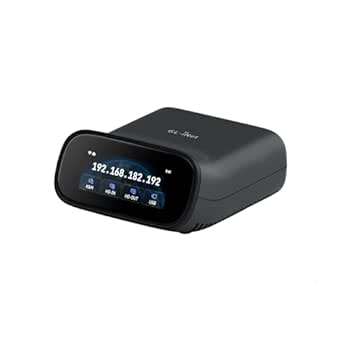 | Best Wireless Connectivity | Wi-Fi Bands: 2.4 GHz and 5 GHz | Wireless Standard: Wi-Fi 6 | Video Passthrough: 4K@30FPS | VIEW ON AMAZON | See Our Full Breakdown |
More Details on Our Top Picks
GL.iNet Comet GL-RM1 Remote KVM
I rank the GL.iNet Comet GL-RM1 first because it balances sharp video, approachable setup, and serious recovery tools for one remotely managed computer. Its BIOS-level control and remote reboot let an administrator repair boot failures or install an operating system without host-side software. The 4K feed offers more workspace and finer text than either JetKVM model, while one-click app connection and Tailscale integration lower the networking burden. That advantage comes with a motion tradeoff: 4K is capped at 30Hz, whereas JetKVM provides smoother 1080p at 60FPS. It also lacks the GL-RM10 Comet Pro’s Wi-Fi 6 flexibility and 4K passthrough. I see the GL-RM1 as the strongest all-around choice for detailed single-system administration, provided the buyer can accept no PD-adapter support.
Pros:- 4K resolution makes small text and dense administrative screens easier to read
- BIOS control and remote reboot support recovery when the operating system is unavailable
- Host computer requires no installed control software
- Tailscale integration and one-click app connection simplify remote access
Cons:- 4K output is limited to 30Hz, making motion less fluid than on either JetKVM
- PD adapters cannot be used
- Remote responsiveness depends on a stable internet connection
Best for: Remote IT staff and advanced home-lab owners who need sharp BIOS-level access to one laptop, desktop, or server
Not ideal for: Buyers who prioritize fluid 60FPS interaction, Wi-Fi connectivity, or USB-C PD power compatibility
- Maximum Resolution:3840×2160 at 30Hz
- Video Encoding:Hardware H.264
- Remote Access:Tailscale integration
- System Control:BIOS control and remote reboot
- File Handling:Remote file transfer
- Compatible Systems:Laptops, desktops, and servers
- Setup:One-click app connection
- Power Limitation:PD adapters are not supported
Our verdict“I recommend the GL-RM1 for buyers who value 4K detail and accessible remote recovery more than 60FPS motion or Wi-Fi.”
Tripp Lite NetCommander 16-Port Cat5 KVM Over IP Switch
The Tripp Lite NetCommander 16-Port earns its place through scale rather than maximum resolution. It controls twice as many systems as the Vertiv Avocent AV3000 and permits two remote users plus one local user at the same time, making it better suited to shared server rooms. Its 1080p 60Hz output is smoother than the GL.iNet GL-RM1’s 4K 30Hz feed, though it gives up that model’s finer image detail and compact single-machine simplicity. Browser access, HTTPS, and 128-bit AES provide a practical management path for distributed IT teams. The costs appear in deployment: every target requires suitable Cat5e/6 cabling and a compatible SIU, while configuration is more involved than with the one-click GL-RM1. I reserve this pick for buyers who genuinely need rack-scale access, since the 16-port ceiling still limits future expansion.
Pros:- Manages as many as 16 computers or servers from one 1U switch
- Supports two remote users and one local user concurrently
- 1080p at 60Hz delivers fluid console interaction
- HTTPS and 128-bit AES protect browser-based sessions
Cons:- Requires Cat5e/6 cabling and compatible server interface units
- Configuration is less approachable than compact single-host KVM devices
- Expansion stops at 16 connected systems
Best for: IT departments managing up to 16 rack-mounted servers that need concurrent access for two remote technicians and one local operator
Not ideal for: Single-computer users or small offices that do not want to purchase SIUs, run dedicated cabling, and configure a rack appliance
- Computer Ports:16
- Connection Type:Cat5 with required SIUs
- Remote Users:2 simultaneous
- Local Users:1 simultaneous
- Maximum Resolution:1920×1080 at 60Hz
- Mounting:1U rack mount
- Security:128-bit AES and HTTPS
- Warranty:3 years
Our verdict“I recommend the NetCommander when multi-user access to a populated rack matters more than compactness, 4K detail, or simple setup.”
Vertiv Avocent AV3000 8-Port Rackmount KVM Over IP Switch
I place the Vertiv Avocent AV3000 behind the NetCommander for capacity, but ahead of compact KVMs when interface variety and managed access matter. Its support for VGA, DisplayPort, DVI, and HDMI makes an eight-system rack easier to standardize when old servers and newer hardware coexist. Centralized management, user access controls, CAC support, and a multilingual graphical OSD also fit organizations with structured administrator permissions. By comparison, the Tripp Lite NetCommander doubles the port count and documents two simultaneous remote users, while the JetKVM units provide clearer published video and latency figures for single-host control. The AV3000’s main weakness is limited setup and compatibility detail in the supplied information, which makes purchase planning harder. I would choose it for a controlled enterprise rack, not for buyers seeking transparent performance specifications or easy home-lab installation.
Pros:- Supports four common video interfaces across mixed-generation equipment
- Centralized user access control suits managed IT environments
- CAC support accommodates organizations using card-based authentication
- Local access and a multilingual graphical OSD aid on-site administration
Cons:- Eight ports provide half the capacity of the Tripp Lite NetCommander
- Published compatibility and setup information is limited
- No specific video resolution or remote-user count is supplied
Best for: Enterprise administrators managing an eight-server rack with mixed display standards and controlled user authentication
Not ideal for: Home-lab buyers who need published streaming performance, simple installation guidance, or more than eight managed systems
- Computer Ports:8
- Form Factor:Rackmount
- Remote Management:KVM over IP
- Video Interface:VGA
- Digital Video Interfaces:DisplayPort, DVI, and HDMI
- Authentication:CAC support
- Local Interface:Graphical multilingual OSD
- Administration:Centralized management and user access control
Our verdict“I recommend the AV3000 for access-controlled eight-server racks where broad video-interface support outweighs sparse published performance details.”
JetKVM IP KVM Over IP with Touchscreen LCD
The JetKVM with touchscreen LCD is my cross-platform pick because its stated Windows, Mac, and Linux compatibility covers more varied lab environments than the Linux-focused listing for the other JetKVM. It streams 1080p at 60FPS with 30–60ms latency, producing smoother cursor movement and console updates than the GL.iNet GL-RM1 at 4K 30Hz. BIOS-level access works without host software, while the built-in screen gives an administrator immediate status feedback beside the machine. Open-source software also permits deeper adaptation than the closed rack switches. That flexibility asks more of the buyer: advanced customization requires technical knowledge, and remote power control costs extra because the extension is sold separately. I rank the other JetKVM higher for expansion-heavy installations, but this version is the clearer fit for mixed-OS bench work and direct visual monitoring.
Pros:- 1080p 60FPS streaming supports smooth cursor and console movement
- 30–60ms stated latency suits interactive remote administration
- BIOS-level control works without host-side software
- Touchscreen status display and open-source software aid technical lab work
Cons:- Advanced customization calls for technical knowledge
- Extension hardware for remote power control is sold separately
- Hardware expansion details are limited
Best for: Developers and home-lab operators who manage Windows, macOS, and Linux machines and want smooth remote video plus local status visibility
Not ideal for: Non-technical buyers who need bundled remote power cycling or a fully guided customization process
- Video Resolution:1080p at 60FPS
- Stated Latency:30–60ms
- Network Connection:Ethernet
- Host Interfaces:HDMI and USB-C
- Local Display:Built-in touchscreen LCD
- Remote Control Level:BIOS-level access
- Power Input:USB-C 5V or 12–20V DC
- Platform Compatibility:Windows, macOS, and Linux
- Software Model:Open source
Our verdict“I recommend this JetKVM for mixed-platform labs that favor fluid video, open-source control, and an on-device display over bundled power management.”
JetKVM IP KVM Over IP for Data Center and Home Lab Control
I give this JetKVM IP KVM the expansion role because it goes beyond video and keyboard control with connections for ATX power, DC power, and RS-232 serial. Those options make it more suitable than the touchscreen JetKVM B0G48CJRZR for a permanent rack or home-lab installation where remote recovery may include power cycling or serial administration. It retains the same useful 1080p 60FPS stream and 30–60ms stated latency, while H.264 encoding keeps video practical across a network. Local access, cloud management, and Wake on LAN provide several ways back into a system. The tradeoff is a more demanding deployment: network configuration and open-source customization can challenge newcomers, and the listed platform support centers on Linux. Its power-control capabilities also depend on the relevant extensions. I favor it for planned infrastructure growth, not plug-and-play desktop support.
Pros:- 1080p 60FPS H.264 streaming combines fluid video with network-friendly encoding
- Local, cloud, and Wake on LAN access provide multiple recovery paths
- ATX, DC power, and RS-232 expansion ports support broader infrastructure control
- Open-source software permits custom integrations and development
Cons:- Network setup and customization may be difficult for non-technical users
- Relevant extension hardware may be needed for power-control functions
- Supplied platform support lists Linux rather than the broader compatibility stated for the other JetKVM
Best for: Linux-oriented home-lab and data-center operators who want a KVM platform that can grow into power and serial-device control
Not ideal for: Beginners or mixed-OS offices seeking a guided setup with all remote power hardware included
- Video Resolution:1080p at 60FPS
- Stated Latency:30–60ms
- Video Codec:H.264
- Input Interfaces:HDMI and USB-C
- Storage:32GB TF card
- Power Options:USB-C, DC extension, and ATX power
- Remote Access:Local, cloud, and Wake on LAN
- Expansion Ports:ATX power control, DC power control, and RS-232 serial
- Supported Platform:Linux
Our verdict“I recommend this JetKVM for technical Linux environments that need a smooth remote console today and power or serial expansion later.”
GL.iNet GL-RM10 Comet Pro Remote KVM
I rank the GL.iNet GL-RM10 Comet Pro as the best wireless pick because its dual-band Wi-Fi 6 lets buyers reach machines where running Ethernet is awkward. That flexibility separates it from the Ethernet-based JetKVM, while 4K passthrough at 30FPS favors desktop detail over JetKVM’s smoother 1080p-at-60FPS feed. The 2.22-inch touchscreen makes local status checks easier, and built-in Tailscale, cloud control, and self-hosting give IT users several ways to manage access. This model also handles two-way audio, broadening its usefulness for remote support. The tradeoffs are real: 32GB of storage leaves limited local headroom, advanced deployment features demand networking knowledge, and ATX or Fingerbot control requires extra hardware. Compared with the rackmount Tripp Lite NetCommander, its single-machine focus suits distributed systems rather than dense server racks.
Pros:- Dual-band Wi-Fi 6 supports flexible placement away from Ethernet drops
- 4K@30FPS passthrough preserves fine desktop and diagnostic detail
- Touchscreen provides convenient local status and management access
- Tailscale, cloud control, and self-hosting support varied remote-access policies
Cons:- 30FPS video is less fluid than the JetKVM models’ 1080P@60FPS output
- Self-hosting and advanced networking features require technical setup knowledge
- ATX Board and Fingerbot functions depend on separately purchased accessories
Best for: Home-lab owners, remote workers, and IT support staff who need BIOS-level control over Wi-Fi where wired networking is unavailable or inconvenient
Not ideal for: Data-center teams managing many rack-mounted servers, or buyers who prioritize 60FPS video and plug-and-play setup
- Wi-Fi Bands:2.4 GHz and 5 GHz
- Wireless Standard:Wi-Fi 6
- Video Passthrough:4K@30FPS
- Touchscreen:2.22 inches
- Storage:32GB eMMC
- Remote Access Software:Tailscale, web-based cloud control, and GLKVM app
- Supported OS:Windows, macOS, Linux, iOS, and Android
- Self-Hosting:Yes, with Linux and Ubuntu support
- Accessory Support:ATX Board and Fingerbot
Our verdict“I recommend the GL-RM10 Comet Pro for buyers who value wireless placement, 4K detail, and flexible access methods more than high-frame-rate video or multi-server density.”

How We Picked
I ranked these products by how reliably they support out-of-band, BIOS-level control, since that is the main reason to buy a network KVM instead of relying on remote desktop software. I compared video capture and passthrough capabilities, USB keyboard and mouse access, network connection choices, physical format, port count, and the likely effort required to reach a machine remotely. I also examined whether each design fits an unattended home server, a small business rack, or a multi-user equipment room.
My ordering gives the most weight to useful capability per managed machine, followed by usability, network flexibility, administration, and value. A sixteen-port unit did not receive a higher rank merely for having more ports, because that capacity adds cost and bulk for a buyer managing one host. Likewise, I treated Wi-Fi and open-source software as role-specific advantages rather than automatic wins. The highest-ranked options make their intended job clear and offer fewer compromises for that buyer than the products below them.
Factors to Consider When Choosing Network Attached Kvm Over Ip
I would start by matching the KVM to the number of machines, the type of failures I need to recover from, and the network path available at the site. Those choices matter more than buying the model with the longest feature list. A good match provides reliable pre-boot access without forcing me to pay for unused rack capacity or administration tools.
Match Port Count to the Next Few Years
I would buy a single-host KVM for one server, workstation, firewall, or headless mini PC because it is cheaper and easier to place near the target. For two or three machines, several compact devices may still make sense when each system sits in a different room or location. An eight- or sixteen-port rack switch becomes more attractive when the machines share a cabinet and one central console can replace several network endpoints. Port count alone can be misleading because some rack systems require separate interface modules or proprietary cabling for every attached computer. I would include those parts when calculating the real per-host price. I would also leave some growth capacity, but I would not pay for sixteen ports when my realistic ceiling is four systems.
Separate Capture Resolution From Local Passthrough
A product may accept or pass through a 4K video signal while delivering a lower-resolution remote stream, and those are different capabilities. Local passthrough matters when the target computer also drives a nearby monitor, since it keeps the normal desk or rack display usable. Remote resolution and frame rate shape how readable small text feels and how smoothly the pointer moves, but they do not tell me the whole latency story. Firmware screens and server consoles need clarity more than cinematic motion, while remote creative work benefits from higher frame rates and lower delay. I would verify support for the unusual resolutions produced by boot menus, recovery environments, and older hardware. A stable 1080p60 remote feed can be more useful than a 4K label attached only to the input or passthrough path.
Check Pre-Boot USB Behavior and Recovery Tools
The defining advantage of KVM over IP is control before the operating system loads, so I would confirm that keyboard and mouse emulation works in BIOS or UEFI screens. Some tasks also require virtual media, allowing an installer or recovery image to appear as a USB drive on the remote machine. That feature can save a site visit, but image transfer speed and browser support may vary. I would check how the unit behaves after a power outage and whether it reconnects without someone pressing a local button. A KVM alone usually cannot restart a fully frozen machine, so power control may require a managed outlet, smart PDU, or motherboard connection. Buyers who expect complete remote recovery should plan for both console access and power cycling.
Choose the Network Path Before the Hardware
I favor wired Ethernet for unattended equipment because it avoids wireless coverage changes, password updates, and radio interference. Wi-Fi is useful in temporary installations or rooms without a convenient cable, but it adds another dependency during an outage. Directly exposing a KVM login page to the public internet creates unnecessary risk, even when the device supports its own authentication. I would place remote access behind a VPN, private overlay, or controlled management network and restrict which accounts can reach it. Tailscale support can simplify that arrangement for a home lab, while a business may prefer existing firewall and identity policies. Whatever path I choose, firmware update availability and account management deserve as much attention as video quality.
Calculate the Full Ownership Cost
The sticker price can hide required cables, interface modules, rack hardware, and subscriptions. Single-host devices usually have fewer extras, though short included leads may still force me to buy replacements for a clean installation. Rack KVMs can justify their higher cost by centralizing administration across many servers, especially when technician time is expensive. Open-source software offers more inspection and customization, but I would still check the pace of updates and the availability of replacement hardware. Enterprise products often charge more for support channels and fleet-oriented administration, benefits that may have little value in a two-server home lab. I compare total cost per connected host while giving separate weight to downtime and maintenance effort.
Frequently Asked Questions
Should I Buy One Multiport KVM or Several Single-Host Devices?
I would choose a multiport rack KVM when the servers share one cabinet, centralized administration matters, and the cabling can remain organized. Separate single-host devices fit distributed systems better and avoid making one KVM a shared point of failure. They can also be added gradually as the lab grows. The tradeoff is managing more addresses, power adapters, firmware installations, and login credentials. For fewer than four nearby machines, I would compare the full accessory cost before assuming a rack switch offers better value.
Does 4K Support Mean I Will See a 4K Remote Stream?
No, because 4K input, 4K passthrough, and 4K remote capture describe separate parts of the video path. A device may accept a 4K source and feed that signal to a local monitor while encoding a lower-resolution image for the browser. That arrangement is often enough for server management and firmware work. Buyers handling dense desktop applications should inspect the stated remote-stream resolution and frame rate rather than relying on the largest resolution printed in the product name. I would also prioritize text clarity and latency over raw pixel count.
Is Wi-Fi Reliable Enough for a Remote KVM?
Wi-Fi can work well for occasional access and flexible placement, particularly when running Ethernet would be disruptive. I would not make it my first choice for a server that must remain reachable during network changes or troubleshooting. Wireless credentials, access-point reboots, interference, and weak coverage add failure points that do not exist on a direct cable. A dual-band Wi-Fi 6 model offers more placement freedom, but it still depends on the local wireless infrastructure. For unattended systems, I prefer wired Ethernet with remote access through a private network.
Does Open-Source Firmware Make JetKVM the Better Buy?
Open-source software makes JetKVM attractive to buyers who value code visibility, community development, and the possibility of integrations. It does not automatically make the hardware easier to deploy or better supported than a commercial rack platform. I would check update activity, documentation, accessory compatibility, and the recovery process if an update fails. Businesses may place more value on vendor support and centralized administration, while home-lab buyers may prefer flexibility and a lower entry price. Between the two similar JetKVM listings here, seller terms and included items may settle the choice.
Can a KVM Over IP Reboot a Completely Frozen Computer?
A standard KVM provides video, keyboard, and mouse access, but those controls cannot revive a machine that no longer responds to input. Full recovery usually requires a smart power outlet, managed PDU, server management controller, or accessory connected to the motherboard’s power and reset headers. I would verify whether the KVM exposes any power-control integration before assuming that capability is included. Cutting power can also risk data loss, so graceful shutdown remains preferable when the operating system still responds. For truly unattended equipment, I would budget for a separate remote power path.
Conclusion
The GL.iNet Comet GL-RM1 is my best overall recommendation for controlling one important server or workstation because it balances BIOS access, high-resolution input, and remote-network flexibility. For the best value, I would choose the open-source JetKVM listing, provided its seller terms and included accessories beat the nearly identical alternative. The touchscreen JetKVM package is my beginner pick because its focused single-host design avoids the overhead of a rack platform. The Vertiv Avocent AV3000 is the premium choice for an eight-system rack where business-oriented administration carries real value. Buyers managing a denser cabinet should choose the Tripp Lite NetCommander for its sixteen ports, while buyers who cannot run Ethernet should select the GL.iNet GL-RM10 Comet Pro for Wi-Fi 6 and 4K passthrough. My final choice comes down to location: one wired host favors the GL-RM1, a budget home lab favors JetKVM, and a shared rack justifies Avocent or Tripp Lite.