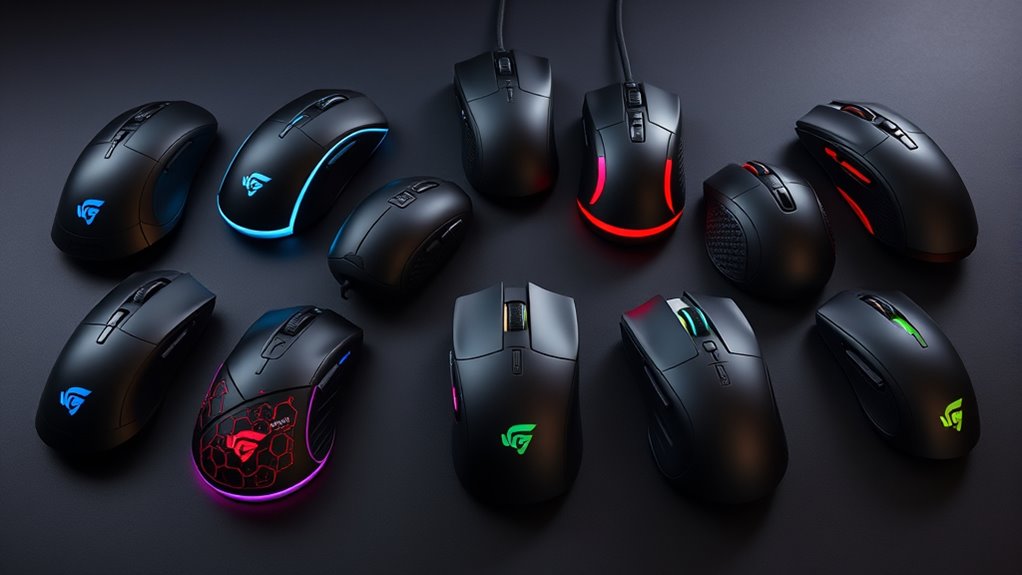

Wireless gaming mice have become essential for gamers seeking freedom of movement combined with high performance. The best options like the Logitech G502 Lightspeed excel with precision and build quality, while models like the Razer Viper V3 HyperSpeed offer lightweight designs for fast, agile play. However, you’ll often face tradeoffs between battery life, latency, and customization features. Continue reading for a detailed breakdown of the top picks and what each brings to your gaming experience.
Complete the kit



Key Takeaways
- The top models balance low latency with reliable connectivity, crucial for competitive gaming.
- Lightweight designs like the Razer Viper V3 appeal to fast-paced, FPS players, but may sacrifice some grip comfort.
- Battery life varies widely; some mice offer fast charging or rechargeable options that extend playtime.
- Customization features, such as programmable buttons and adjustable DPI, significantly impact usability.
- Price differences reflect build quality and feature sets; paying more often yields better durability and performance.
| Aula SC620 Wireless Gaming Mouse, Tri-Mode 2.4GHz/USB-C/BT5.3, 12000 DPI, Programmable Macro, RGB Lighting |  | Best Versatile Connectivity for Gaming and Productivity | Connection Modes: 2.4GHz wireless, BT5.3, wired USB | DPI: 800, 1600, 3200, 4800, 8000, 12000 | Polling Rate: 1000Hz | VIEW ON AMAZON | See Our Full Breakdown |
| Logitech G305 Lightspeed Wireless Gaming Mouse – White |  | Best for Long-Lasting Wireless Performance | DPI: 12,000 | Response Time: 1 ms | Battery Life: up to 250 hours | VIEW ON AMAZON | See Our Full Breakdown |
| Redragon M656 Wireless Optical Gaming Mouse 4000 DPI with Remapping Keys |  | Best for Customization and Aesthetic Flair | DPI: 4000 | Wireless: Yes | Polling Rate: 500Hz | VIEW ON AMAZON | See Our Full Breakdown |
| Keychron M6 8K Wireless Gaming Mouse, 2.4G/Bluetooth/Wired, PixArt 3950 Sensor, 8000Hz Polling, Silent Clicks, 5 Profiles, Compatible with Mac/Win/Linux | 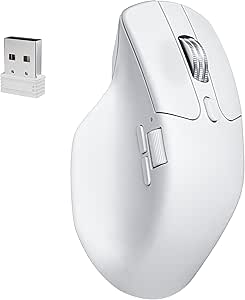 | Best for Multi-Device Power Users and Customization | Sensor: PixArt 3950 | DPI: 30,000 | Polling Rate: 8000Hz | VIEW ON AMAZON | See Our Full Breakdown |
| Logitech G502 Lightspeed Wireless Gaming Mouse – Black |  | Best for High-End Precision and Customization | Wireless Technology: Lightspeed | Sensor: Hero 25K | Max DPI: 25,600 | VIEW ON AMAZON | See Our Full Breakdown |
| Razer Orochi V2 Wireless Gaming Mouse |  | Best for Portability and Long Battery Life | Weight: <60g (excluding battery) | Wireless Modes: Bluetooth, Razer HyperSpeed Wireless | Battery Life: Up to 950 hours (Bluetooth), Up to 425 hours (HyperSpeed Wireless) | VIEW ON AMAZON | See Our Full Breakdown |
| Razer Viper V3 HyperSpeed Wireless PC Gaming Mouse, 82g, Black |  | Best for Competitive Gaming with High Precision | Weight: 82g | Sensor: Focus Pro 30K Optical Sensor | Battery Life: Up to 280 hours | VIEW ON AMAZON | See Our Full Breakdown |
| INPHIC A9 V2 Explorer Wireless Gaming Mouse, 12800 DPI Silent Mouse |  | Best for Versatility and Quiet Operation | DPI: 12800 | Connection Types: Bluetooth, 2.4G wireless, USB-C wired | Weight: 102g | VIEW ON AMAZON | See Our Full Breakdown |
| Razer Basilisk V3 X HyperSpeed Wireless Gaming Mouse, Black |  | Best for Customization and Extended Play | Connectivity: Razer HyperSpeed Wireless and Bluetooth | Battery Life: Up to 285 hours (HyperSpeed), 535 hours (Bluetooth) | Sensor: Razer 5G Advanced 18K Optical Sensor | VIEW ON AMAZON | See Our Full Breakdown |
| Logitech G305 Lightspeed Wireless Gaming Mouse – Black |  | Best for Simplicity and Long Battery Life | Sensor: HERO optical | DPI: 12,000 | IPS: 400 | VIEW ON AMAZON | See Our Full Breakdown |
| Wireless Gaming Mouse with Rechargeable Battery and Type-C Fast Charging |  | Best Overall Wireless Gaming Mouse | Connectivity: 2.4GHz wireless | Range: 33 feet (10 meters) | DPI: 800, 1200, 1600 | VIEW ON AMAZON | See Our Full Breakdown |
| Logitech G305 Lightspeed Wireless Gaming Mouse – Blue |  | Best Lightweight Wireless Gaming Mouse | Sensor: HERO optical | DPI: 12,000 | Wireless Technology: Lightspeed | VIEW ON AMAZON | See Our Full Breakdown |
| Redragon M810 PRO Wireless RGB Gaming Mouse 10000 DPI Remapping Keys |  | Best Customization-Focused Wireless Gaming Mouse | DPI: 10,000 | Connectivity: Wireless (2.4GHz) | Number of Programmable Buttons: 8 | VIEW ON AMAZON | See Our Full Breakdown |
| wireless gaming mice | DPI | Battery Life | Sensor |
|---|---|---|---|
| Aula SC620 Wireless Gaming Mou | 800, 1600, 3200, 4800, 8000, 12000 | — | — |
| Logitech G305 Lightspeed Wirel | 12,000 | up to 250 hours | — |
| Redragon M656 Wireless Optical | 4000 | — | PAW3104 Pixart |
| Keychron M6 8K Wireless Gaming | 30,000 | — | PixArt 3950 |
| Logitech G502 Lightspeed Wirel | — | — | Hero 25K |
| Razer Orochi V2 Wireless Gamin | — | Up to 950 hours (Bluetooth), Up to 425 hours (HyperSpeed Wireless) | Razer 5G 18K DPI optical sensor |
| Razer Viper V3 HyperSpeed Wire | — | Up to 280 hours | Focus Pro 30K Optical Sensor |
| INPHIC A9 V2 Explorer Wireless | 12800 | — | — |
| Razer Basilisk V3 X HyperSpeed | — | Up to 285 hours (HyperSpeed), 535 hours (Bluetooth) | Razer 5G Advanced 18K Optical Sensor |
| Logitech G305 Lightspeed Wirel | 12,000 | Up to 9 months | HERO optical |
| Wireless Gaming Mouse with Rec | 800, 1200, 1600 | Over 21 days per full charge | — |
| Logitech G305 Lightspeed Wirel | 12,000 | up to 9 months | HERO optical |
| Redragon M810 PRO Wireless RGB | 10,000 | 45 hours | — |
More Details on Our Top Picks
Aula SC620 Wireless Gaming Mouse, Tri-Mode 2.4GHz/USB-C/BT5.3, 12000 DPI, Programmable Macro, RGB Lighting
This pick stands out for its triple-mode connectivity, offering seamless switching between wireless and wired setups, which surpasses the single-focus approach of the Logitech G305. The 12000 DPI sensor provides high precision for competitive gaming, while programmable macros and a fire key boost productivity. However, the BT mode doesn’t support macro programming, and the device’s driver requirements could be a hurdle for some users. Its lightweight, ergonomic design makes extended gaming sessions comfortable, but battery life details remain vague. Compared to the G502, the Aula SC620’s triple connectivity is more flexible, but it sacrifices some advanced customization options that the G502 offers via software. This mouse is best for gamers who need versatile connection options and customization on multiple OS, but not for those seeking a purely wired or plug-and-play experience.
Pros:- Supports triple-mode connectivity for versatile use
- High-precision 12000 DPI with adjustable levels
- Programmable macro buttons and fire key for enhanced control
- Lightweight ergonomic design reduces fatigue
Cons:- BT mode doesn’t support macro programming
- Requires driver installation for full customization
- Rechargeable battery life details are not specified
Best for: Gamers and professionals who value flexible connectivity options and customizable controls across multiple devices.
Not ideal for: Users who prefer plug-and-play simplicity or require extensive macro customization via software, as BT macro support is limited.
- Connection Modes:2.4GHz wireless, BT5.3, wired USB
- DPI:800, 1600, 3200, 4800, 8000, 12000
- Polling Rate:1000Hz
- Number of Programmable Buttons:7
- Weight:67g
- Lighting:RGB customizable
Our verdict“This mouse suits users seeking adaptable connectivity and customization, especially across different operating systems.”
Logitech G305 Lightspeed Wireless Gaming Mouse – White
The G305 Lightspeed excels with its exceptionally long battery life of up to 250 hours, far surpassing most competitors like the Redragon M656, which requires battery replacements or external power. The 12000 DPI HERO sensor ensures precise tracking, making it ideal for esports players. Its lightweight, portable design is perfect for gaming on the go, but it’s limited to wireless connection, lacking wired flexibility. The 1 ms response time guarantees low latency, yet some users might find the AA battery setup less convenient than rechargeable options. Compared with the Aula SC620, the G305’s simplicity and longer battery life make it more user-friendly for casual and competitive gamers who prioritize reliability over extensive customization. This mouse is best for gamers who need a straightforward, high-performance wireless mouse with long endurance but not for those who want extensive macro options or multi-mode connectivity.
Pros:- High-precision 12,000 DPI sensor
- Ultra-fast 1 ms response time
- Long battery life of up to 250 hours
- Lightweight and portable for travel
Cons:- Requires AA battery replacement, less eco-friendly
- Limited to wireless connectivity only
- Lacks onboard profiles for customization
Best for: Gamers who prioritize battery longevity and reliable wireless performance for extended play sessions.
Not ideal for: Users who prefer multi-device connectivity or require extensive macro customization, as the G305 is focused on core gaming performance.
- DPI:12,000
- Response Time:1 ms
- Battery Life:up to 250 hours
- Color:White
- Wireless:Lightspeed wireless
- Design:Lightweight, portable
Our verdict“Ideal for gamers seeking a durable, long-lasting wireless mouse that emphasizes simplicity and performance over extensive features.”
Redragon M656 Wireless Optical Gaming Mouse 4000 DPI with Remapping Keys
The Redragon M656 offers a 4000 DPI optical sensor that balances precision and smoothness, suitable for mid-tier gaming. Its customizable macro buttons and remapping keys make it stand out compared to the more basic Logitech G305, especially for gamers who want more control options. The backlit red LED adds visual appeal, but the software for customization can be cumbersome, and the battery is not included, adding extra cost. The 500Hz polling rate is decent but not as fast as higher-end models like the Keychron M6, which boasts 8000Hz. While it supports wireless connectivity with minimal latency, its lower DPI and simpler features make it a better fit for casual or mid-level gamers rather than professionals. If aesthetics and macro flexibility are priorities, this mouse fills that niche, but it’s less suited for ultra-competitive scenarios.
Pros:- 4000 DPI optical sensor for accurate tracking
- Customizable macro buttons and remapping keys
- Wireless connectivity with minimal latency
- Red LED backlight adds aesthetic appeal
Cons:- Battery not included, requiring additional purchase
- Backlight on scroll wheel is inconsistent
- Software customization may be complex for some users
Best for: Casual to mid-level gamers who want customizable features and aesthetic flair without the high price tag.
Not ideal for: High-level esports competitors or users seeking ultra-high DPI or maximum polling rates, as this mouse’s specs are more modest.
- DPI:4000
- Wireless:Yes
- Polling Rate:500Hz
- Battery:Not included
- Backlight:Red LED
- Sensor:PAW3104 Pixart
Our verdict“This mouse works well for gamers who value style and macro flexibility over top-tier DPI or response rates.”
Keychron M6 8K Wireless Gaming Mouse, 2.4G/Bluetooth/Wired, PixArt 3950 Sensor, 8000Hz Polling, Silent Clicks, 5 Profiles, Compatible with Mac/Win/Linux
The Keychron M6 stands out with its highly versatile connectivity options, including Bluetooth, 2.4GHz, and wired connections, making it ideal for users managing multiple devices—more flexible than the simpler Redragon M656. Its PixArt 3950 sensor with 30,000 DPI allows for precise, customizable control, surpassing many similarly priced mice. The five onboard profiles enable quick switching between setups, perfect for productivity and gaming alike. However, its complex customization features could overwhelm newcomers, and the higher price reflects its advanced capabilities. The 8000Hz polling rate ensures responsiveness, but the device’s limited color options and premium cost might deter budget-conscious buyers. Compared with the G502, the M6’s multi-device support and multi-profile system make it better suited for multi-taskers, though it sacrifices some of the G502’s extensive button customization for simplicity.
Pros:- High-precision PixArt 3950 sensor with 30,000 DPI
- Multi-mode connectivity: Bluetooth, 2.4G, wired
- Five onboard profiles for quick switching
- Ergonomic and lightweight design for all-day comfort
Cons:- Complex setup may intimidate casual users
- Higher price point compared to simpler mice
- Limited color options (only white)
Best for: Power users who need multi-device support and extensive customization for both work and gaming.
Not ideal for: Casual gamers or users unfamiliar with advanced setup procedures, as the device can be complex to configure.
- Sensor:PixArt 3950
- DPI:30,000
- Polling Rate:8000Hz
- Profiles:5 onboard
- Connectivity:2.4G, Bluetooth 5.3, Wired
- Compatible OS:Mac, Windows, Linux
Our verdict“This mouse is ideal for multi-device users who want advanced customization and high precision in a single package.”
Logitech G502 Lightspeed Wireless Gaming Mouse – Black
The G502 Lightspeed combines ultra-fast Lightspeed wireless technology with the Hero 25K sensor, delivering up to 25,600 DPI for extreme precision. Its 11 customizable buttons and hyper-fast scrolling make it a favorite for serious gamers who need quick, reliable inputs. The support for PowerPlay wireless charging ensures continuous use without battery worries, a feature that sets it apart from most competitors like the Aula SC620. Still, the PowerPlay system is sold separately, adding to the overall cost. The mouse’s weight and size might not suit everyone, especially those seeking a more compact form. Compared to the G305, the G502 offers more customization options and higher sensor precision, making it better for competitive players willing to invest more. This mouse is best for dedicated gamers demanding top-tier performance and wireless convenience, but not for budget-conscious or minimalist users.
Pros:- Hero 25K sensor with up to 25,600 DPI
- Low-latency Lightspeed wireless technology
- 11 programmable buttons for customization
- Supports PowerPlay wireless charging
Cons:- PowerPlay system sold separately, increasing total cost
- Heavier and larger than some competitors
- Premium price may be a barrier for some users
Best for: Hardcore gamers who want maximum precision, customization, and wireless performance in a premium package.
Not ideal for: Casual gamers or those on a budget, as the high price and additional costs for wireless charging can be prohibitive.
- Wireless Technology:Lightspeed
- Sensor:Hero 25K
- Max DPI:25,600
- Buttons:11 customizable
- Scroll Wheel:Hyper fast
- Charging System:PowerPlay wireless charging (sold separately)
Our verdict“This mouse suits players seeking the highest precision and customization, willing to invest in a premium wireless experience.”
Razer Orochi V2 Wireless Gaming Mouse
The Razer Orochi V2 stands out for its astonishing battery life, reaching up to 950 hours on Bluetooth, making it ideal for users who dislike frequent recharging. Its ultra-lightweight design under 60g and ambidextrous shape make it perfect for gamers on the go or travelers. Compared to the Logitech G305 Lightspeed, which offers a similar lightweight build but with a more traditional form factor, the Orochi V2 sacrifices rechargeable convenience for battery longevity, requiring replacement batteries instead. While the high-precision 18K DPI sensor ensures accurate tracking, the reliance on AA or AAA batteries may be a drawback for those seeking a fully rechargeable setup. The absence of advanced onboard customization and the need for frequent battery replacements can be inconveniences for power users. This mouse makes most sense for mobile gamers or professionals needing long-lasting, portable performance without wired constraints.
Pros:- Extremely long battery life up to 950 hours on Bluetooth
- Lightweight and portable, ideal for travel
- High-precision 18K DPI optical sensor
- Ambidextrous design suitable for both hands
Cons:- Requires frequent battery replacements, which can be inconvenient
- No built-in rechargeable battery, limiting convenience
Best for: Travelers and mobile gamers who prioritize battery life and portability over rechargeable convenience
Not ideal for: Heavy gamers or desk-bound users who prefer rechargeable mice with more onboard customization
- Weight:<60g (excluding battery)
- Wireless Modes:Bluetooth, Razer HyperSpeed Wireless
- Battery Life:Up to 950 hours (Bluetooth), Up to 425 hours (HyperSpeed Wireless)
- Sensor:Razer 5G 18K DPI optical sensor
- Switches:2nd Gen Razer Mechanical Switches
- Battery Type:AA or AAA (included)
Our verdict“This pick is perfect for those who need an ultra-light, long-lasting mouse for mobile use and are okay with replacing batteries regularly.”
Razer Viper V3 HyperSpeed Wireless PC Gaming Mouse, 82g, Black
The Razer Viper V3 HyperSpeed makes a compelling case for esports enthusiasts thanks to its lightweight 82g frame and focus pro 30K DPI optical sensor, providing ultra-precise tracking across diverse surfaces. Its long battery life of up to 280 hours and low-latency HyperSpeed wireless connectivity support intense gaming sessions without interruption. In comparison to the Logitech G305 Lightspeed, which is lighter at 3.4 oz but offers a slightly lower DPI, the Viper V3’s focus on high-end sensors and customizable controls makes it a more serious choice for competitive players. The use of AA batteries means ongoing replacement, which might be a minor inconvenience for some, but the overall performance benefits outweigh this tradeoff. This mouse is ideal for serious gamers seeking speed, accuracy, and responsiveness in a wireless package.
Pros:- Lightweight design enhances maneuverability for fast reactions
- High-precision 30K DPI sensor for accurate tracking
- Long battery life of up to 280 hours reduces charging interruptions
- Low-latency HyperSpeed wireless connection
Cons:- Requires AA battery, which may need replacement over time
- Limited to 5 DPI stages, which might not satisfy all users
Best for: Competitive gamers and esports players who need high precision and low latency
Not ideal for: Casual users or those preferring fully rechargeable mice with fewer DPI options
- Weight:82g
- Sensor:Focus Pro 30K Optical Sensor
- Battery Life:Up to 280 hours
- Wireless Technology:HyperSpeed Wireless
- Switches:Mechanical Switches Gen-2, 60 million clicks
- DPI Stages:5
Our verdict“This mouse suits gamers seeking top-tier accuracy and responsiveness with a lightweight build, accepting the tradeoff of battery replacements.”
INPHIC A9 V2 Explorer Wireless Gaming Mouse, 12800 DPI Silent Mouse
The INPHIC A9 V2 Explorer offers a versatile wireless experience with a high 12800 DPI optical sensor, making it suitable for gaming, work, and everyday tasks. Its silent click technology is a standout feature, ideal for shared spaces or quiet environments. Unlike the Razer Basilisk V3 X, which is more focused on gaming customization, the A9 V2 emphasizes multi-device compatibility and silent operation, making it a better fit for hybrid use. The multiple connection options—Bluetooth, 2.4G wireless, and USB-C wired—add to its flexibility. Its rechargeable battery with fast charging minimizes downtime, but the 102g weight is slightly heavier than similar gaming mice, which could affect long sessions for some users. This mouse makes sense for users who need a multi-use device with quiet clicks and flexible connectivity.
Pros:- High-precision 12800 DPI sensor with adjustable levels
- Multiple connection options for versatile device use
- Silent clicking reduces noise in shared environments
- Fast-charging rechargeable battery
Cons:- Requires driver installation for advanced customization on Windows
- Heavier weight at 102g, less ideal for ultra-fast maneuvering
Best for: Office workers or multitaskers who also want decent gaming performance and silent operation
Not ideal for: Hardcore gamers who prioritize ultra-lightweight mice or extensive customization
- DPI:12800
- Connection Types:Bluetooth, 2.4G wireless, USB-C wired
- Weight:102g
- Battery:High-capacity rechargeable
- Compatibility:Windows, macOS, Android, iOS
- Features:Silent click, auto sleep, fast charging
Our verdict“This mouse caters to users seeking a quiet, multi-device mouse that balances performance and versatility for both work and casual gaming.”
Razer Basilisk V3 X HyperSpeed Wireless Gaming Mouse, Black
The Razer Basilisk V3 X is designed for gamers who want a customizable experience with a focus on comfort and control. Its ergonomic shape and 9 programmable buttons allow for tailored setups, while the high-precision 18K DPI sensor ensures accurate tracking. Compared to the Logitech G305 Lightspeed, which is lighter and more straightforward, the Basilisk V3 X offers more control options and RGB customization, making it better suited for dedicated gamers. Its battery life of up to 285 hours on HyperSpeed wireless or 535 hours via Bluetooth provides flexibility for long gaming sessions. However, it might lack some advanced features found in premium models like adjustable weights or extensive onboard profiles. This mouse suits players seeking a balance between comfort, customization, and solid performance.
Pros:- Ergonomic shape with 9 programmable buttons
- High-precision 18K DPI optical sensor
- Long battery life for extended gaming sessions
- Customizable RGB lighting for personalization
Cons:- Limited to gaming-focused features, lacking weight adjustment
- Battery life varies with usage conditions
Best for: Gamers who value ergonomic design, multiple programmable controls, and RGB aesthetics
Not ideal for: Casual gamers or those preferring a minimalist mouse with fewer controls
- Connectivity:Razer HyperSpeed Wireless and Bluetooth
- Battery Life:Up to 285 hours (HyperSpeed), 535 hours (Bluetooth)
- Sensor:Razer 5G Advanced 18K Optical Sensor
- Switches:Razer Mechanical Mouse Switches Gen-2
- Lighting:Razer Chroma RGB with 16.8 million colors
- Controls:9 customizable buttons
Our verdict“This mouse is a solid choice for gamers who want customization and comfort without sacrificing performance, accepting some limitations in advanced features.”
Logitech G305 Lightspeed Wireless Gaming Mouse – Black
The Logitech G305 Lightspeed offers a straightforward yet high-performance experience with its HERO sensor boasting up to 12,000 DPI and 400 IPS. Its ultra-fast 1 ms response and impressive battery life of up to 9 months make it an excellent choice for gamers who prefer minimal fuss and maximum efficiency. Compared to the Razer Orochi V2, which emphasizes portability and battery life, the G305 is more traditional in design, with a slightly heavier weight at 3.4 oz but better suited for users wanting a reliable, no-frills gaming mouse. Its limited customization options and right-handed design may not suit those seeking extensive onboard controls or ambidextrous shapes. For gamers prioritizing a lightweight, durable, and highly responsive wired-like experience with minimal maintenance, this mouse is a clear winner.
Pros:- High-precision HERO sensor with 12,000 DPI
- Ultra-fast 1 ms wireless response
- Long battery life up to 9 months on a single AA battery
- Lightweight and portable for mobility
Cons:- Requires AA battery replacement after extended use
- Limited to right-handed users
Best for: Gamers who want a durable, reliable wireless mouse with minimal setup and long-lasting battery life
Not ideal for: Users seeking extensive customization or ambidextrous design for varied grip styles
- Sensor:HERO optical
- DPI:12,000
- IPS:400
- Wireless Technology:Lightspeed
- Battery Life:Up to 9 months
- Weight:3.4 oz
Our verdict“This mouse is ideal for gamers wanting a straightforward, highly reliable wireless experience with excellent battery longevity, accepting some customization limits.”
Wireless Gaming Mouse with Rechargeable Battery and Type-C Fast Charging
This mouse excels in combining long battery life with quick recharging, making it ideal for gamers who dislike interruptions. Its ergonomic shape supports extended play without fatigue, while customizable RGB lighting adds a personal touch. Compared with the Redragon M810 PRO, it offers a longer battery life and a more refined ergonomic design, though it sacrifices some programmability and may produce slight noise on the side buttons. The fast Type-C charging enables quick top-ups, making it a reliable choice for marathon gaming sessions, but some users may find the silent feature limited, as not all buttons are silent. Tradeoffs include the slight click noise from back and forward buttons and the absence of a dedicated programmable button profile, which could matter for competitive players who need full customization.
Pros:- Long-lasting battery life with support for fast charging
- Ergonomic shape reduces hand fatigue during extended use
- Adjustable DPI for versatile control
- Customizable RGB lighting enhances personalization
Cons:- Back and Forward buttons produce slight clicking noise
- Silent mode does not include all buttons, limiting quiet operation
Best for: Gamers who prioritize long battery life, ergonomic comfort, and customizable aesthetics in a wireless mouse.
Not ideal for: Competitive players who require completely silent buttons or zero latency for high-stakes gaming.
- Connectivity:2.4GHz wireless
- Range:33 feet (10 meters)
- DPI:800, 1200, 1600
- Charging:Type-C fast charging, supports charging while in use
- Battery Life:Over 21 days per full charge
- Buttons:6 customizable buttons
Our verdict“This pick is best suited for gamers who want a comfortable, feature-rich wireless mouse with excellent battery performance.”
Logitech G305 Lightspeed Wireless Gaming Mouse – Blue
The Logitech G305 Lightspeed stands out for its ultra-lightweight design, weighing just 3.4 oz, which makes it perfect for fast, flick-based gameplay. Its HERO optical sensor with 12,000 DPI provides exceptional precision, comparable to more premium models like the Redragon M810 PRO, but with far less weight and a more comfortable grip for players who prefer minimal bulk. The 1 ms wireless response time ensures virtually lag-free performance, though its reliance on AA batteries means ongoing replacement costs and inconvenience compared to rechargeable options. Its design is optimized for right-handed users, which could exclude left-handed gamers. This mouse is better suited for players seeking a portable, high-performance device, but those wanting a rechargeable or ambidextrous option might prefer alternatives.
Pros:- High-precision HERO sensor with 12,000 DPI
- Ultra-fast 1 ms wireless response time
- Extremely lightweight at 3.4 oz for fast maneuvering
- Long battery life up to 9 months
Cons:- Requires AA battery replacement, which can be inconvenient
- Limited to right-handed users, lacking ambidextrous design
Best for: Competitive gamers who prioritize rapid response and portability with a lightweight build.
Not ideal for: Casual gamers or those who prefer rechargeable batteries and ergonomic features for long sessions.
- Sensor:HERO optical
- DPI:12,000
- Wireless Technology:Lightspeed
- Battery Life:up to 9 months
- Weight:3.4 oz
Our verdict“This mouse is ideal for competitive players who need a lightweight, high-precision wireless option for quick reactions.”
Redragon M810 PRO Wireless RGB Gaming Mouse 10000 DPI Remapping Keys
The Redragon M810 PRO offers a compelling blend of high DPI, extensive programmable buttons, and customizable lighting, making it well-suited for gamers who want tailored control. Its 10,000 DPI sensor delivers accurate tracking suitable for most competitive scenarios, and the 8 programmable buttons enable complex remapping for various game genres. Compared to the more minimalist Logitech G305, the M810 PRO provides more customization options but at the expense of weight and battery life, which can vary with usage. Its 45-hour battery life is decent but less than the Logitech’s longevity, and the need for software for full customization might be a turnoff for some users. The design may not fit all hand sizes comfortably, especially for those with smaller hands.
Pros:- High-precision 10,000 DPI sensor for accurate tracking
- Multiple programmable buttons for customization
- RGB lighting with extensive customization options
- Low latency wireless connectivity
Cons:- Battery life can vary significantly with usage
- Requires software for full button remapping and customization
- Design may not suit all hand sizes, potentially affecting comfort
Best for: Gamers who need extensive programmable controls and customizable aesthetics for immersive gameplay.
Not ideal for: Players seeking a lightweight, plug-and-play mouse or those with smaller hands who find the design bulky.
- DPI:10,000
- Connectivity:Wireless (2.4GHz)
- Number of Programmable Buttons:8
- Battery Life:45 hours
- Lighting:RGB customizable
Our verdict“This mouse suits gamers looking for maximum control customization and precise tracking, with some tradeoffs in weight and size.”

How We Picked
Our evaluation focused on performance, usability, build quality, and value. We prioritized mice with low latency, stable wireless connections, and ergonomic comfort for extended gaming sessions. Battery life and charging convenience were also key, along with customization options like programmable buttons and adjustable DPI. Products were ranked based on how well they balanced these factors, ensuring options suited various gaming styles and budgets. Our lineup highlights the best overall performers, while also considering niche needs and price points.Factors to Consider When Choosing Wireless Gaming Mice
Choosing the right wireless gaming mouse involves several factors that can make or break your gaming experience. Beyond just sensor specs, you should consider how the mouse fits in your hand, its latency, and battery management. Additional features like customizable buttons and software support can enhance usability but may come with added complexity or cost. Being aware of these tradeoffs helps you select a model that aligns with your gaming style and setup preferences.Performance and Latency
Latency is critical in competitive gaming. A wireless mouse with low latency ensures your movements are registered instantly, which can be the difference between victory and defeat. Look for models with high polling rates (like 1000Hz) and dedicated wireless protocols designed for minimal delay. Cheaper mice often compromise here, so investing in a reputable brand can provide a noticeable performance boost.
Battery Life and Charging
Battery longevity varies among wireless mice. Some models feature rechargeable batteries, while others use replaceable batteries. Fast-charging capabilities can extend playtime quickly, which is especially useful during long gaming sessions. Keep in mind that frequent charging or low battery life can interrupt gameplay, so choose a model that offers a balance between performance and ease of charging.
Ergonomics and Size
Comfort and grip style matter significantly. Larger, palm-style mice suit players with bigger hands, while smaller or ambidextrous models are better for compact setups or left-handed users. An ergonomic design reduces fatigue during extended use, but a mouse that’s too bulky or too small may hinder quick reactions. Consider your grip type and preference when selecting a model.
Customization and Software
Advanced gamers value programmable buttons, adjustable DPI, and customizable lighting. Software support allows for complex profiles and macro setups, but can also add to the learning curve. Overly complex software can sometimes cause stability issues, so ensure the software is reliable and user-friendly for your needs.
Price and Durability
Higher prices typically correlate with better build quality, more advanced features, and longer-lasting components. Cheaper models might save money upfront but often sacrifice durability or performance. Consider how much you’re willing to invest based on your gaming frequency and whether you prefer a model that will last through intense use or a budget option for casual play.
Frequently Asked Questions
How important is latency in a wireless gaming mouse?
Latency directly impacts how responsive your mouse feels during gameplay. A high-latency mouse may introduce noticeable delays, which can hinder quick reactions in competitive scenarios. Many high-end wireless mice now use advanced wireless protocols to minimize this delay to levels comparable with wired mice, making them suitable even for fast-paced games. When precision matters, prioritizing low latency is essential to avoid any lag that could affect your performance.
Can I use a wireless gaming mouse for competitive esports?
Yes, many wireless gaming mice are designed with low latency and high responsiveness suitable for esports. Models like the Logitech G502 Lightspeed and Razer Viper V3 offer features that meet professional standards, including high polling rates and stable connections. However, some players still prefer wired mice for absolute minimal latency, so consider your comfort level with wireless technology, especially if you’re competing at the highest levels.
How does battery life impact gaming performance?
Battery life determines how often you need to recharge or replace batteries, which can interrupt gameplay. Some mice offer long-lasting batteries that support extended sessions, while others rely on quick-charging features to minimize downtime. If you tend to play for many hours continuously, a model with robust battery life or fast-charging capabilities will provide a smoother experience without constant concern about power levels.
Are lightweight mice better for gaming?
Lightweight mice are generally preferred for fast, precise movements, especially in FPS games. They reduce fatigue during long sessions and enable quicker flicks. However, some gamers might find ultra-light mice less stable or harder to control for certain tasks. The ideal weight depends on your grip style and preferences, but for competitive agility, lighter models often deliver a noticeable advantage.
What should I look for in a wireless gaming mouse if I use a Mac or Linux system?
Compatibility is key when using non-Windows systems. Look for mice with drivers or software that support MacOS or Linux, or models that operate plug-and-play without requiring proprietary software. Some brands, like Logitech and Keychron, emphasize cross-platform support, making setup easier. Confirming compatibility beforehand avoids frustration and ensures your customization features function smoothly across your preferred OS.
Conclusion
For gamers seeking the best overall experience, the Logitech G502 Lightspeed stands out with its combination of low latency, durability, and customization. If you’re on a budget but still want reliable performance, the Redragon M656 offers excellent value with solid features at a more accessible price. Beginners or casual players will find models like the Razer Orochi V2 easy to use and portable. Serious eSports competitors should consider lightweight, high-end options like the Razer Viper V3 HyperSpeed for competitive edge. Ultimately, your choice depends on your play style, budget, and specific needs, but these picks cover a broad spectrum to help you find the perfect wireless gaming mouse.