
For a surge protector for a home office, my best overall pick is the Anker 351: its 12 outlets and 2100J surge protection suit a desk with several devices, while USB-C and USB-A ports cut down on charger clutter. The Belkin 12-Outlet is a strong alternative if an 8-foot flat-plug cord helps you reach a wall outlet, and the Anker Nano Desk Clamp stands out for a tidy setup with 70W USB-C charging. The main tradeoffs are outlet count versus desk space, cord reach versus cable clutter, and built-in USB convenience versus keeping charging gear separate. A crowded workstation may need a high-capacity strip, while a laptop-focused desk may benefit more from accessible USB-C ports. Read on for the full breakdown and help matching a pick to your setup.

Get the latest gadgets delivered free with Prime
- Fast, free delivery on millions of items
- Prime Video, Amazon Music and more included
- Member-only deals all year
Complete the kit



Key Takeaways
- The amazon.com/dp/B09SG2Q23M?tag=digitechbytes.com-20&ascsubtag=dc-618827″ target=”_blank” rel=”nofollow sponsored noopener”>Anker 351 leads for balanced desk use: its 12 AC outlets and 2100J surge protection make it more versatile than compact outlet extenders, while USB-C and USB-A ports reduce adapter clutter.
- High outlet counts are not automatically a better fit: the SUPERDANNY 28-outlet and QINLIANF 24-outlet models suit equipment-heavy desks, but their large footprints can crowd a typical home-office surface.
- Cord length changes where a strip can live: the 8-foot Belkin options and 10-foot SUPERDANNY offer more placement flexibility than the 5-foot Anker strips.
- USB-C charging is a key differentiator: the Anker Nano adds desk-clamp access and 70W USB-C charging, while many high-outlet-count options focus on AC sockets and USB-A ports.
- Choose by workspace layout, not socket count alone: desk clamps and outlet extenders prioritize access, towers use vertical space, and flat-plug cords can help furniture sit closer to the wall.




| surge protector for home office | AC outlets | Surge protection | Cord length | USB ports |
|---|---|---|---|---|
| HANYCONY Surge Protector Power | 8 | 1080 joules | 5 ft | 4 (2 USB-C) |
| Belkin 12-Outlet Surge Protect | 12 | — | 8 ft (2.4 m) | — |
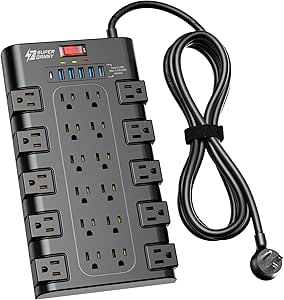
| SUPERDANNY 28-Outlet Power Str | 22 | 2100 joules | 6.5 ft | 6 (5 USB-A, 1 USB-C) |
| POWSAV 18-Outlet Surge Protect | 18 | 2100 joules | 6 ft | 4 |
| Yintar 6-Foot Surge Protector | 6 | 1680 joules | 6 ft | 3 (2 USB-A, 1 USB-C) |
| Anker 351 Power Strip with 210 | 12 | 2100 joules | 5 ft | 1 USB-C and 2 USB-A |
| QINLIANF Surge Protector Power | 24 | 4100 joules | 6 ft | 4, including 2 USB-C |
| Anker Power Strip with 300J Su | 6 | 300 joules | 5 ft | 4, including 2 USB-C and 2 USB-A |
| Power Strip Tower with Surge P | 12 | 1800 joules | 6 ft | 4, including 2 USB-A and 2 USB-C |
| Belkin 8-Outlet Surge Protecto | 8 | 2500 joules | About 8 ft | — |
| SUPERDANNY 10 ft Extension Cor | 8 | 1050 joules | 10 ft | 2 USB-C and 2 USB-A |
| Alestor 6-Foot Surge Protector | 12 | 2700 joules | 6 feet | 4 (3 USB-A and 1 USB-C) |
| Amazon Basics 12-Outlet Surge | — | 4000 joules | — | — |
| Anker Nano 10-Outlet Desk Clam | 6 | 1500 joules | — | 2 USB-C and 2 USB-A |
| HANYCONY Surge Protector Power | 8 | 1080 joules | 5 ft | 4, including 2 USB-C |
More Details on Our Top Picks
HANYCONY Surge Protector Power Strip with 8 Outlets and 4 USB Ports
For a home office short on desk or wall space, this compact eight-outlet strip adds USB charging without taking up the footprint of a large multi-outlet board. Its four USB ports, including two USB-C ports, can handle phones and accessories alongside a computer setup, while the slim right-angle plug helps keep furniture closer to the wall. Compared with the Belkin 12-Outlet Surge Protector, it gives up outlet capacity and a longer cord in favor of a smaller body and built-in USB charging. The tradeoff is that its USB output is limited to 5V, so it is not a fast-charging substitute, and 1080 joules is a more modest surge rating than the SUPERDANNY 28-Outlet model’s 2100 joules. I’d choose it for a tidy, lighter-duty workstation, not a crowded equipment hub.
Pros:- Eight AC outlets include spacing for larger adapters.
- Four USB ports, including two USB-C ports, reduce the need for separate charging plugs.
- Slim right-angle plug suits outlets behind desks or cabinets.
- Includes overload and short-circuit protection alongside surge protection.
Cons:- USB ports provide only 5V charging, limiting their usefulness for faster charging.
- The 1080-joule surge rating is lower than the 2100-joule rating listed for the SUPERDANNY 28-Outlet model.
- Five-foot cord may be restrictive when the wall outlet is far from the desk.
Best for: Home-office users with a laptop, monitor, and a few USB-charged devices who need a small strip near the desk.
Not ideal for: People powering many bulky adapters or seeking a higher listed surge rating and faster USB charging.
- AC outlets:8
- USB ports:4 (2 USB-C)
- USB output:5V/3.1A total
- Surge protection:1080 joules
- Maximum current:15 A
- Cord length:5 ft
- Dimensions:4.5 × 3.7 in
- Warranty:1 year
Our verdict“Choose this compact HANYCONY for a modest workstation where built-in USB ports and a close-to-wall plug matter more than high outlet capacity.”
Belkin 12-Outlet Surge Protector Power Strip with 8-Foot Flat-Plug Cord
The Belkin makes sense when several people or pieces of office equipment need a connection at the same desk: 12 widely spaced AC outlets give it more room for bulky plugs than the HANYCONY eight-outlet strip. Its 8-foot flat-plug cord also offers more placement freedom than that compact alternative’s five-foot lead. A safety indicator, overload protection, and power safety shutdown add useful safeguards for an always-on workstation, while the cable clip helps keep excess cord under control. The tradeoff is a larger, heavier unit with no USB ports, so phone charging still takes up an AC outlet. The listed surge ratings conflict—3,780 and 3,940 joules—so I would not treat either figure as settled. Its recycled-material housing is a further distinction, but the main reason to pick it is outlet capacity and reach.
Pros:- Twelve widely spaced outlets accommodate a broad mix of office plugs.
- Eight-foot cord and angled flat plug help reach outlets behind furniture.
- Safety indicator, overload protection, and power safety shutdown are included.
- Housing uses at least 72% post-consumer recycled material.
Cons:- No USB ports, so charging devices uses AC outlets or separate adapters.
- Listed surge protection figures conflict between 3,780 and 3,940 joules.
- At 2 lb and 13 inches long, it is less suited to a compact desktop.
Best for: Households sharing a workstation or users with multiple monitors, peripherals, and bulky AC adapters who need a long reach.
Not ideal for: Minimal desk setups that need built-in USB charging, a lightweight strip, or a clearly stated surge rating.
- AC outlets:12
- Cord length:8 ft (2.4 m)
- Plug type:Type B, 3-pin
- Dimensions:13 × 4.13 in
- Weight:2 lb
- Safety certification:UL-compliant
- Housing material:At least 72% post-consumer recycled material
- Warranty:2-year limited warranty
Our verdict“Pick the Belkin when outlet count and an eight-foot reach matter more than USB charging or a compact footprint.”
SUPERDANNY 28-Outlet Power Strip Surge Protector with 6 USB Ports
When a home office has expanded well beyond a laptop and monitor, the SUPERDANNY’s 22 AC outlets and six USB ports make it the capacity leader in this group. Widely spaced sockets help accommodate larger adapters, and the keyholes allow mounting under or beside a desk instead of surrendering desktop space. Its 2100-joule surge protection is also higher than the HANYCONY’s listed 1080 joules, making this a more suitable fit for a larger cluster of connected equipment. That capacity has costs: the 11.65-by-6.37-inch body is substantial, and the side outlets cannot be rotated, which may complicate some plug layouts. USB-C tops out at 5V/3A, so it is for basic device charging rather than a high-power charging hub. I’d favor it over the Belkin 12-Outlet model only when the extra connections and mounting option will actually be used.
Pros:- Twenty-two AC outlets and six USB ports provide unusually high connection capacity.
- Widely spaced outlets make room for larger power adapters.
- Mounting keyholes and a flat plug support under-desk or wall placement.
- Listed 2100-joule surge protection exceeds the HANYCONY model’s 1080 joules.
Cons:- Large body can be awkward to place in a compact home office.
- Side outlets cannot be rotated, limiting plug-layout flexibility.
- USB-C output is limited to 5V/3A.
Best for: Users with many peripherals, adapters, and USB-charged accessories who want to mount a high-capacity strip near a desk.
Not ideal for: Small work areas or buyers who need a compact strip, rotating side outlets, or higher-power USB-C charging.
- AC outlets:22
- USB ports:6 (5 USB-A, 1 USB-C)
- Surge protection:2100 joules
- Cord length:6.5 ft
- Maximum power:1875 W
- Maximum current:15 A
- USB-C output:Up to 5V/3A
- Mountable:Yes
Our verdict“Choose the SUPERDANNY when your workstation genuinely needs a large number of connections and you have room to mount or place its broad body.”
POWSAV 18-Outlet Surge Protector Power Strip with 4 USB Ports
The POWSAV occupies useful middle ground for a home office that has outgrown an ordinary strip but does not need the SUPERDANNY’s 22 AC outlets. It supplies 18 AC outlets and four USB ports, with a 2100-joule rating that is higher than the HANYCONY’s 1080 joules. A six-foot cord with a right-angle flat plug helps it sit behind a desk, and included cable ties can make a dense collection of cords easier to manage. ETL listing adds a clear certification detail in the supplied product data. The compromise is that this is still a broad 11.7-inch strip, and its 15 A, 1875 W maximum means outlet count should not be mistaken for permission to run every high-draw device at once. USB output is shared at 3.4 A total, so several charging devices divide that capacity. It’s a practical capacity step-up, not a compact or high-power charging solution.
Pros:- Eighteen AC outlets and four USB ports suit a crowded collection of office accessories.
- Listed 2100-joule surge protection is higher than the HANYCONY model’s 1080 joules.
- Flat right-angle plug and six-foot cord help with placement behind furniture.
- Cable ties support cord organization, and the strip is ETL listed.
Cons:- The 15 A and 1875 W limits constrain the combined load.
- USB output is 3.4 A total, shared across the ports.
- Its 11.7-inch length may take up too much space on a small desk.
Best for: Home-office users with numerous low-to-moderate-draw peripherals who want more outlets than a standard strip without moving to a 22-outlet model.
Not ideal for: People with limited desk space, many high-draw devices, or a need for fast USB charging across several devices.
- AC outlets:18
- USB ports:4
- Surge protection:2100 joules
- Cord length:6 ft
- Maximum current:15 A
- Maximum power:1875 W
- USB output:5 V DC, 3.4 A total
- Certification:ETL listed
Our verdict“Choose the POWSAV if you need many office connections and a higher listed surge rating than the compact HANYCONY, but do not need the SUPERDANNY’s extra outlets.”
Yintar 6-Foot Surge Protector Power Strip with 6 Outlets and 3 USB Ports
The Yintar is the simplest fit here for a small home-office setup that needs a few AC connections and USB charging, rather than a wall of outlets. It pairs six AC outlets with three USB ports, including USB-C, and its six-foot flat-plug cord gives it more reach than the HANYCONY while keeping the outlet count modest. The 1680-joule surge rating also sits above the HANYCONY’s 1080 joules, though below the 2100 joules listed for the POWSAV and SUPERDANNY models. Mounting holes can help keep the strip off a crowded desktop, and the included cable ties offer basic cord control. The key limitation is its 10 A maximum current, lower than the 15 A ratings on those higher-capacity alternatives. USB charging is also modest. I’d use it for a laptop, monitor, and accessories—not an equipment-heavy workstation.
Pros:- Six AC outlets and three USB ports cover a small workstation’s basic connections.
- Listed 1680-joule surge protection exceeds the HANYCONY model’s 1080 joules.
- Six-foot flat-plug cord helps reach an outlet behind furniture.
- Mounting holes and cable ties support tidier placement.
Cons:- The 10 A maximum current is lower than the 15 A rating of the POWSAV and SUPERDANNY models.
- Six AC outlets may be insufficient for a workstation with several monitors and peripherals.
- USB-A output is limited to 2.4 A per port, and USB-C to 3 A.
Best for: Laptop-based home-office users with a monitor and a few accessories who want a mountable strip with basic USB charging.
Not ideal for: Users connecting many devices, running higher-load equipment, or needing more than six AC outlets and fast USB charging.
- AC outlets:6
- USB ports:3 (2 USB-A, 1 USB-C)
- Surge protection:1680 joules
- Maximum current:10 A
- Voltage:125 V
- Cord length:6 ft
- Dimensions:11.59 × 1.89 in
- Warranty:1 year
Our verdict“Pick the Yintar for a light-duty desk that needs a longer cord and basic USB charging, but choose a 15 A model for a more demanding setup.”
Anker 351 Power Strip with 2100J Surge Protection, 12 Outlets, USB-C and USB-A Ports, 5 ft Cord
The Anker 351 suits a home office that needs many AC connections and built-in charging without taking up the space of an outlet tower. Its 12 outlets and extra spacing make it easier to plug in bulky adapters alongside a monitor, computer, and peripherals. Compared with the Belkin 8-Outlet Surge Protector, it offers four more outlets and USB charging, but its five-foot cord gives less placement freedom than Belkin’s eight-foot lead. The 2100-joule rating and overload and temperature protection add a reassuring layer for everyday desk equipment. The USB-C port is rated at 20W, but shared USB output is capped at 15W, so several devices charging at once may be slow. I’d skip it if individual outlet controls or a longer cord are priorities.
Pros:- 12 AC outlets and three USB ports reduce the need for separate adapters
- Extra-spaced outlets make room for bulky plugs
- 2100-joule surge protection plus overload and temperature protection
- Five-foot cord works for many desk and bedside setups
Cons:- USB output is limited to 15W total when shared
- Five-foot cord offers less reach than the Belkin 8-Outlet Surge Protector’s eight-foot cord
- Individual outlet switches are not listed
Best for: Home-office users with several AC-powered devices and a phone or tablet to charge at the desk
Not ideal for: People whose desk is far from a wall outlet or who need fast, simultaneous charging across multiple USB devices
- AC outlets:12
- USB ports:1 USB-C and 2 USB-A
- USB-C output:20W
- Maximum shared USB output:15W
- Surge protection:2100 joules
- Cord length:5 ft
- Maximum current:13 A
- Dimensions:13 x 4.17 in
Our verdict“Choose the Anker 351 if you want a crowded home-office desk to gain abundant outlets and basic USB charging in one strip.”
QINLIANF Surge Protector Power Strip with 24 Outlets and 4 USB Ports
When a home office has equipment spread across a shared desk or workbench, the QINLIANF’s 24 AC outlets are its defining advantage. It offers twice the AC sockets of the Anker 351, making it better suited to a setup with multiple monitors, speakers, chargers, and other always-connected gear. Its 4100-joule surge rating is also the highest among these five picks, and the six-foot cord with a flat plug gives more placement flexibility than the Anker 351’s five-foot lead. The tradeoff is that this is a large-capacity solution rather than a polished fast-charging hub: its four USB ports share 3.4A at 5V, and the USB-C ports do not support higher-voltage charging. I’d pass if your office needs a compact strip or faster USB-C power delivery.
Pros:- 24 AC outlets accommodate an unusually large device lineup
- 4100-joule surge protection
- Six-foot cord and flat plug offer flexible placement
- Overload protection, an on/off switch, and ETL-listed design
Cons:- USB-C ports do not support devices requiring 9–22V charging
- USB output is limited to 3.4A total at 5V
- Its high outlet count may be excessive for a compact home-office desk
Best for: People running a multi-device home office or shared workspace who need many AC outlets in one location
Not ideal for: Desk users with limited surface area or newer devices that need higher-voltage USB-C charging
- AC outlets:24
- USB ports:4, including 2 USB-C
- USB output:DC 5V, total 3.4A
- Surge protection:4100 joules
- Cord length:6 ft
- Input voltage:125 VAC, 60 Hz
- Maximum current:15 A
- Safety certification:ETL listed
Our verdict“Pick the QINLIANF when outlet capacity and a high surge rating matter more than compact size or fast USB-C charging.”
Anker Power Strip with 300J Surge Protector, 5ft Outlet Extender, 20W, 6 AC Outlets, 2 USB-C, 2 USB-A
The Anker A91F2 is the space-saving choice here: its compact body and flat plug suit a desk where a full-size strip would crowd the work area. Four USB ports—two USB-C and two USB-A—make it convenient for phones and small accessories, while six AC outlets cover a modest workstation. Compared with the Anker 351, it gives up six AC outlets and uses a much lower 300-joule surge rating, but takes up less room and includes an extra USB-C port. Its 20W total USB output is shared, so it is not a strong fit for charging several power-hungry devices at once. I’d choose it for a light, tidy setup, not as the main protection hub for a desk full of valuable electronics.
Pros:- Compact dimensions help keep a desk less crowded
- Flat plug fits more easily behind furniture
- Six AC outlets and four USB ports combine common desk connections
- Two USB-C and two USB-A ports suit a mix of current and older devices
Cons:- 300-joule surge rating is much lower than the Anker 351’s 2100 joules
- 20W total USB output is limited when charging multiple devices
- Five-foot cord may not reach distant outlets
Best for: Remote workers with a small desk, a few AC-powered devices, and several phones or low-power accessories
Not ideal for: Users protecting a large or valuable workstation who want a higher surge rating, more AC sockets, or longer cable reach
- AC outlets:6
- USB ports:4, including 2 USB-C and 2 USB-A
- Total USB power:20W
- Surge protection:300 joules
- Cord length:5 ft
- Dimensions:6.29 x 3.13 x 1.22 in
- Plug type:Type B flat plug
- Warranty:18 months
Our verdict“Choose this Anker when desk space and convenient USB access matter more than high surge capacity or a large number of AC outlets.”
Power Strip Tower with Surge Protection, 12 Outlets, 4 USB Ports, 6 ft Cord
This tower makes sense when the desk is short on surface area but the equipment list is not: its vertical layout packs 12 AC outlets and four USB ports into a small footprint. Compared with the Anker 351, it has two extra USB ports and a longer six-foot cord, while its 1800-joule surge rating is lower than the Anker’s 2100 joules. The tower shape can also make plugs easier to reach than sockets spread across a long strip, though the available information does not specify outlet spacing. Overload protection with automatic shutoff adds a useful response to excessive load. USB output totals just 3.4A, so I would not choose it for fast charging several devices. Its main advantage is a tidy vertical form, not top-end surge capacity.
Pros:- 12 AC outlets and four USB ports support a multi-device setup
- Vertical design uses a small footprint
- Six-foot cord and angled flat plug help with placement
- 1800-joule surge protection and overload protection with automatic shutoff
Cons:- USB output is limited to 3.4A total
- Surge rating is lower than the Anker 351’s 2100 joules and QINLIANF’s 4100 joules
- Tower layout may not suit users who prefer outlets spread across a horizontal strip
Best for: Home-office users with limited desk or floor space who want several outlets arranged in a compact tower
Not ideal for: People who need high-output USB charging, a horizontal strip layout, or the highest surge rating in this group
- AC outlets:12
- USB ports:4, including 2 USB-A and 2 USB-C
- USB output:3.4A total
- Surge protection:1800 joules
- Cord length:6 ft
- Maximum current:3.4 A
- Dimensions:3.15 x 3.15 x 5.79 in
- Shape:Vertical
Our verdict“Pick this tower if saving space matters more than fast USB charging or leading surge capacity.”
Belkin 8-Outlet Surge Protector with 8-Foot Flat-Plug Cord
The Belkin is a straightforward fit for a home office that needs reliable AC outlet access and extra cord reach, rather than built-in USB charging. Its eight widely spaced sockets leave room for larger adapters, and the eight-foot flat-plug cord is three feet longer than the Anker 351’s—useful when the desk sits away from a wall outlet. At 2500 joules, its surge rating also exceeds the Anker 351’s 2100 joules and the tower’s 1800. Sliding safety covers and status indicators add practical safeguards and make protection and grounding conditions easier to check. The tradeoff is a smaller outlet count than those options, with no USB ports listed. I’d favor it for a simpler computer-and-peripherals setup, not a desk that needs many device connections or direct USB charging.
Pros:- 2500-joule surge protection
- Eight widely spaced outlets accommodate larger plugs
- Eight-foot flat-plug cord reaches farther than the Anker 351’s five-foot cord
- Sliding outlet covers and status indicators add useful safeguards
Cons:- Eight outlets may not cover a densely equipped workstation
- No USB charging ports are listed
- Designed for North American Type B outlets
Best for: Home-office users who need a longer reach, spacious AC sockets, and visible protection and grounding indicators
Not ideal for: People who need more than eight outlets or want USB-C and USB-A charging built into the strip
- AC outlets:8
- Surge protection:2500 joules
- Cord length:About 8 ft
- Voltage:125 V
- Maximum current:15 A
- Maximum power:1875 W
- Maximum spike voltage:6000 V
- Safety certification:UL-compliant
Our verdict“Choose the Belkin if your office needs a longer cord and well-spaced AC outlets more than a high outlet count or USB charging.”
SUPERDANNY 10 ft Extension Cord and Surge Protector Power Strip
The 10-foot cord makes this SUPERDANNY a practical choice when the nearest wall outlet is far from a home-office desk. It has eight AC outlets and four USB ports, with extra spacing for bulkier adapters, so a mixed setup can connect without giving up as much outlet access. Compared with the HANYCONY Surge Protector Power Strip with 8 Outlets and 4 USB Ports, this model offers a longer cord and a stated 1050-joule surge rating, but its USB output is capped at 15 W total, limiting how well it can charge several devices at once. The flat angled plug and mounting option help with tight or cluttered spaces. I would choose it for reach and layout flexibility, not fast USB charging; it is also specified for indoor use only.
Pros:- Ten-foot cord offers more placement flexibility than shorter-cord options.
- Eight AC outlets and four USB ports serve a varied desk setup.
- Extra outlet spacing accommodates some larger plugs.
- Flat angled plug and mounting holes suit tight or organized workspaces.
Cons:- USB output is limited to 15 W total.
- 1050-joule surge rating is lower than the Alestor’s 2700 joules and the Amazon Basics model’s 4000 joules.
- Designed for indoor use only.
Best for: Home-office users whose desks sit far from a wall outlet and who need multiple AC connections plus occasional USB charging.
Not ideal for: People who need fast USB-C laptop charging or want to charge several high-demand USB devices simultaneously; total USB output is limited to 15 W.
- AC outlets:8
- USB ports:2 USB-C and 2 USB-A
- Cord length:10 ft
- Surge protection:1050 joules
- USB output:Up to 15 W total
- Maximum current:10 A
- Mountable:Yes
- Enclosure material:Polycarbonate and polyvinyl chloride
Our verdict“Choose this SUPERDANNY when cord reach and flexible placement matter more than high-output USB charging.”
Alestor 6-Foot Surge Protector Power Strip with 12 Outlets and 4 USB Ports
For a home office with a desktop, monitors, printer, speakers, and several accessories, the Alestor PS951’s 12 AC outlets reduce the need to choose which equipment gets plugged in. Its 2700-joule surge rating is higher than the SUPERDANNY’s 1050 joules, while two widely spaced outlets leave room for larger adapters. The tradeoff is a six-foot cord, which gives less placement freedom than SUPERDANNY’s 10-foot lead. Four USB ports add convenience, but their listed outputs are suited to routine device charging rather than the Anker Nano’s 70 W USB-C charging for a laptop. ETL listing and overload protection are useful safety details, though no per-outlet switches are specified. I’d pick this for a crowded workstation that needs many connections, not for a desk where charging speed or individual outlet control is the priority.
Pros:- Twelve AC outlets provide more connection capacity than the eight-outlet SUPERDANNY and HANYCONY models.
- Two widely spaced outlets help accommodate larger adapters.
- 2700-joule surge protection and overload protection are specified.
- ETL listed.
Cons:- Six-foot cord offers less reach than the SUPERDANNY’s 10-foot cord.
- USB charging output is modest compared with the Anker Nano’s 70 W USB-C capability.
- Per-outlet switches are not specified.
Best for: Desktop users with several monitors, peripherals, and adapters who want many AC outlets and stated surge and overload protection.
Not ideal for: Laptop users seeking high-wattage USB-C charging, or anyone whose desk is too far from an outlet for a six-foot cord.
- Model:PS951
- AC outlets:12
- USB ports:4 (3 USB-A and 1 USB-C)
- Surge protection:2700 joules
- Cord length:6 feet
- Maximum current:15 A
- Safety certification:ETL listed
- Dimensions:11 × 3.9 inches
Our verdict“Choose the Alestor for a connection-heavy workstation that values outlet count and surge capacity over fast USB-C charging.”
Amazon Basics 12-Outlet Surge Protector with 8-Foot Extension Cord
The Amazon Basics stands out for its stated 4000-joule surge protection, the highest listed rating among these five options. For a home office with valuable desktop equipment, that rating gives it a clear purpose compared with the Alestor PS951’s 2700 joules. It also supplies 12 outlets, an eight-foot cord, a 15-amp circuit breaker, safety shutters, and a keyhole mount, making it a straightforward AC-focused choice for a fixed workstation. The main compromise is that no USB charging ports are specified, so phones and accessories will need separate chargers or another strip. Unlike the SUPERDANNY, it does not add a longer 10-foot cord or USB connections. I’d favor it when outlet capacity and listed surge protection matter more than charging convenience at the desk.
Pros:- 4000-joule surge protection is the highest listed rating in this group.
- Twelve outlets suit a workstation with many AC-powered devices.
- Includes a 15-amp circuit breaker and safety shutters.
- Eight-foot cord and keyhole mount support flexible installation.
Cons:- No USB charging ports are specified.
- Its eight-foot cord is shorter than the SUPERDANNY’s 10-foot lead.
- No outlet spacing details for oversized adapters are provided.
Best for: Home-office owners connecting multiple AC-powered devices who prioritize a high stated joule rating, a circuit breaker, and wall mounting.
Not ideal for: People who want built-in USB charging or need more than eight feet of cord to reach their preferred desk location.
- Outlets:12
- Surge protection:4000 joules
- Extension cord length:8 feet
- Circuit breaker:15 A
- Mounting:Back keyhole wall mount
- Material:PC flame-retardant material
- Color:Black
Our verdict“Pick the Amazon Basics if you want many AC outlets and the highest stated surge rating here, and can do without built-in USB ports.”
Anker Nano 10-Outlet Desk Clamp Power Strip with 70W USB-C Charging
The Anker Nano’s key advantage is up to 70 W USB-C charging, which makes it the clearest fit here for someone who wants a capable laptop charger built into a desk-mounted strip. Its clamp keeps six AC outlets and four USB ports close at hand, unlike the Amazon Basics 12-Outlet Surge Protector, which offers more AC connections but no listed USB ports. That convenience comes with real limits: the Nano has a 1500-joule surge rating, below the Alestor’s 2700 joules and the Amazon Basics model’s 4000 joules, and its five-foot cord restricts placement. The clamp also only fits desk edges 0.6–1.8 inches thick and excludes certain curved or steeply sloped edges. I’d choose it for a compatible desk and USB-C-centric workflow, not for maximum AC capacity or surge rating.
Pros:- Up to 70 W USB-C output can handle more demanding charging needs than the other listed USB options.
- Desk clamp keeps outlets within reach without placing the strip on the floor.
- Combines six AC outlets with four USB ports.
- Clamp fits desk edges from 0.6 to 1.8 inches thick.
Cons:- 1500-joule surge rating is below the Alestor and Amazon Basics models.
- Six AC outlets provide less capacity than the 12-outlet Alestor and Amazon Basics strips.
- Five-foot cord and clamp compatibility limit where it can be installed.
Best for: Laptop users with a compatible desk edge who want high-output USB-C charging and easy access to power at the desktop.
Not ideal for: Users with curved, steeply sloped, or out-of-range desk edges, or buyers who prioritize a high joule rating and numerous AC outlets.
- AC outlets:6
- USB ports:2 USB-C and 2 USB-A
- Maximum USB-C output:70 W
- Surge protection:1500 joules
- Power cord length:5 ft
- Desk edge compatibility:0.6–1.8 in thick
- Weight:1.4 pounds
- Warranty:24 months
Our verdict“Choose the Anker Nano for a compatible desk setup where fast USB-C charging and clamp-mounted access outweigh outlet count and surge rating.”
HANYCONY Surge Protector Power Strip with 8 Outlets and 4 USB Ports
The HANYCONY suits a compact home-office setup that needs a mix of AC and USB connections without a long cable run. It offers eight AC outlets and four USB ports, along with a flat plug, mounting holes, and a braided five-foot cord. Compared with the SUPERDANNY 10 ft Extension Cord and Surge Protector, it is the more compact placement choice, but gives up five feet of reach and has a slightly higher listed surge rating at 1080 joules. Neither option is a strong pick for high-wattage USB charging; the HANYCONY’s USB-C output is listed at 5 V/3 A, and its USB ports may briefly interrupt charging when devices are connected or disconnected. Its 15-amp, 1875-watt load limit also calls for sensible device selection. I’d choose it for a nearby outlet and a tidy, mountable setup.
Pros:- Eight AC outlets and four USB ports support a mixed desk setup.
- Flat plug and mounting holes help keep the strip close to a wall or desk.
- Braided five-foot cord offers a tidy, durable-looking connection.
- Includes surge and overload protection and lists ETL certification.
Cons:- Five-foot cord provides less reach than the SUPERDANNY’s 10-foot cord.
- USB charging may briefly interrupt when a device is plugged in or removed.
- Connected load must stay within 1875 W or 15 A.
Best for: Home-office users with a nearby wall outlet who want a mountable strip for standard AC devices and routine USB charging.
Not ideal for: People who need a long cord, fast laptop charging, or uninterrupted USB charging while connecting and disconnecting devices.
- AC outlets:8
- USB ports:4, including 2 USB-C
- Surge protection:1080 joules
- Cord length:5 ft
- Maximum current:15 A
- USB-C output:5 V/3 A
- Certifications:ETL and RoHS
- Plug type:Type B, 3-pin
Our verdict“Pick the HANYCONY for a compact, mountable setup near an outlet, but choose SUPERDANNY if you need substantially more cord reach.”

How We Picked
I compared these 15 power strips as home-office tools, prioritizing surge protection information, usable outlet layout, and cord reach. I also looked at whether USB-C or USB-A ports can simplify charging, whether the form factor suits a desktop or floor setup, and how the number of outlets affects desk space. A high socket count only helps when devices can fit side by side and the unit has a sensible place to sit.
The ranking favors balanced protection and everyday usability over headline outlet counts alone. That puts the Anker 351 ahead as a versatile all-rounder, while the Anker Nano ranks for buyers who value accessible, higher-wattage USB-C charging and a clamp-mounted design. Belkin’s longer flat-plug models score well for reach and placement flexibility. Large multi-outlet strips remain useful for dense equipment setups, but their size and more specialized fit keep them from leading the general home-office picks. I treat stated specifications as product claims, not as proof of performance in every electrical event.
Factors to Consider When Choosing Surge Protector For Home Office
Before choosing, map your desk setup: list what needs AC power, what can charge by USB, and where the nearest wall outlet sits. Then match protection details and physical layout to those needs; the most useful strip is one you can place safely without blocking outlets or creating a tangle.
Match Surge Protection to the Equipment You Need to Protect
Look for a stated surge-protection rating rather than assuming that every multi-outlet strip offers the same level of protection. This roundup includes models that list joule ratings, such as the Anker 351 at 2100J and an Anker outlet extender at 300J, as well as products whose supplied names do not state a rating. A larger figure alone does not tell the whole story, but it gives you a specification to compare. Check the full product documentation for protection status indicators, electrical ratings, and any warranty terms before buying. For a workstation with a computer and monitor, favor a clearly specified protector over a basic strip that merely adds outlets. A surge protector also cannot prevent every power problem, so back up important files and consider a UPS if keeping equipment running during an outage matters.
Count Plugs, Then Check Their Shape and Spacing
Count both the devices you use now and the chargers or peripherals you expect to add, but do not treat the outlet total as the only measure of capacity. Bulky power bricks can cover neighboring sockets, so outlet spacing and orientation may matter more than a high number printed in a product name. The SUPERDANNY 28-outlet and QINLIANF 24-outlet strips target unusually dense setups; most desks may be better served by a 10- or 12-outlet model that takes less room. Keep the strip’s electrical capacity in mind too: many sockets do not mean you can safely run unlimited equipment at once. Avoid stacking strips or plugging one surge protector into another. If you need more connections, choose a suitable single unit and follow its load guidance.
Choose USB Ports for the Devices You Actually Charge
Built-in USB ports can clear phone and accessory chargers from AC outlets, but their number matters less than their type and charging output. A USB-C port is useful for compatible newer devices, while multiple USB-A ports can still suit older accessories. The Anker Nano’s stated 70W USB-C charging makes it a different proposition from strips with several USB ports but no comparable power detail in their product names. Check whether the listed output is shared across ports and whether it suits your laptop or other device; a USB-C socket does not automatically replace a dedicated laptop power adapter. If you already use a charging dock, extra USB ports may add little value. Choose AC capacity first if your computer, monitor, and peripherals all need wall-style plugs.
Measure the Route from Wall Outlet to Desk
Measure the actual path along the wall or under the desk, not just the straight-line distance to the outlet. The Belkin 8-foot models and SUPERDANNY 10-foot strip offer more placement freedom than the 5-foot Anker options, but a longer cord can create a trip hazard if it crosses a walkway. A flat-plug design may let furniture sit closer to the wall, though the cord still needs room to bend without strain. Avoid stretching a cord tightly or routing it beneath rugs where heat can build up. Check the outlet orientation and nearby furniture before choosing a strip that mounts to a desk or extends directly from a wall socket. A well-measured cord can matter more than a few extra outlets.
Pick a Form Factor That Fits the Room and Your Routine
Decide whether the protector belongs on the desktop, beneath it, or near the wall before choosing a shape. A desk clamp such as the Anker Nano keeps ports within reach and can free surface space, while a tower uses vertical space to separate plugs across levels. An outlet extender can be convenient when you want connections close to a wall socket, but its weight and leverage may not suit every outlet location. A conventional strip is easier to tuck under a desk, provided it has a stable, accessible mounting position. Do not hide a protector where you cannot see its indicator or inspect its cord. Favor a layout that keeps plugs accessible without putting the unit where it can be kicked, covered, or splashed.
Know When to Pay More for Convenience or Capacity
Pay for a feature only when it solves a real problem in your setup. Higher-capacity USB-C charging or a desk clamp can be valuable if you regularly charge a laptop at the desk and want ports within reach; a long cord helps when the wall outlet is distant. A very high outlet count makes sense for a workstation with many powered peripherals, but it is wasted space if several sockets remain unused. If your main need is simply extra AC connections, a straightforward strip may be easier to place and understand. Compare protection specifications and build details rather than choosing by port count or appearance alone. Also replace a protector that is damaged, has a loose plug fit, or shows signs of overheating.
Frequently Asked Questions
Is a 300J surge protector enough for a home-office computer?
A 300J rating is a stated surge-energy figure, not a promise that a protector will handle every event or protect every device equally. This roundup includes the Anker outlet extender with 300J listed, while the Anker 351 lists 2100J, so buyers comparing these two have a clear specification difference to weigh. Check the manufacturer’s documentation for the unit’s protection features and status indicator, and consider the value and sensitivity of the equipment connected to it. Do not use joules as your only buying test; layout, ratings, and electrical condition matter too. If uninterrupted power is your concern, a surge protector alone will not keep a computer running during an outage.
Can I plug a laptop charger into a power strip with USB-C ports?
Yes, a laptop charger can generally use an AC outlet on a suitably rated strip, while a compatible USB-C laptop may charge from a built-in USB-C port if that port supplies enough power. The Anker Nano lists 70W USB-C charging, but the wattage your laptop needs depends on its model and workload. Check the strip’s documentation for per-port and shared output, then compare that with the laptop’s charging requirements. If the USB-C output falls short, keep using the laptop’s supplied adapter in an AC socket. Do not assume that every USB-C port can replace a laptop charger.
Should I choose a desk-clamp strip or a regular power strip?
A desk-clamp model makes sense when you want charging ports and outlets reachable at the desktop without taking up much surface area. It may be less suitable if your desk edge is too thick, has an awkward lip, or leaves no safe path for the cord. A regular strip is easier to place under a desk or along a wall, though you may need to reach down to switch or unplug devices. Before buying a clamp design, check the supported desk thickness and available clearance. Choose based on your desk construction and daily access needs, not just the number of ports.
Do I need a longer cord if my desk is close to the wall?
Not necessarily: measure the route the cord will take, including turns around furniture and any path down to the floor. A cord that barely reaches can pull on the strip or wall outlet, while excess length may need careful routing to keep it out of walkways. The Belkin models with 8-foot cords and the SUPERDANNY with a 10-foot cord suit desks farther from outlets better than 5-foot options. A flat plug can help furniture sit nearer the wall, but it does not add cord reach. Avoid running cords under rugs or where chairs and feet can damage them.
Can a surge protector replace a UPS for my home-office computer?
No. A surge protector is designed to provide surge protection and extra outlets; it does not supply backup power when the electricity goes out. A UPS includes a battery that can give you time to save work and shut down equipment, though its runtime depends on the connected load and model. If brief outages or voltage interruptions could disrupt your work, compare UPS capacity and runtime for your computer and monitor. Some users may pair a UPS with surge protection, but follow both manufacturers’ instructions rather than connecting devices in an unsupported chain. For ordinary outlet expansion and surge protection, a properly specified power strip may be enough.
Conclusion
For most home offices, I recommend the Anker 351 as the best overall because it balances 12 AC outlets, 2100J listed surge protection, and USB charging. The Anker outlet extender is a practical best-value-style choice for a compact setup where wall access and USB-C ports matter more than a high joule rating. For a best premium, desk-focused option, the Anker Nano suits buyers who want clamp-mounted access and stated 70W USB-C charging. Beginners who want a familiar strip with room to grow can start with the Amazon Basics 12-outlet or Belkin 12-outlet model, checking the protection details and cord fit for their desk. For specific needs, choose the 8-foot Belkin for a distant outlet, the 10-foot SUPERDANNY for greater reach, or the SUPERDANNY 28-outlet strip for an unusually device-dense workstation. Match the form factor and protection specifications to your actual setup rather than buying the largest strip.
Halloween Picks
halloween
As an affiliate, we earn on qualifying purchases.