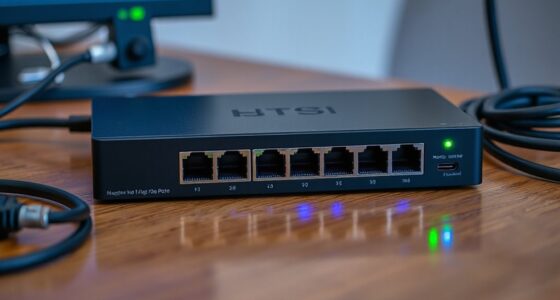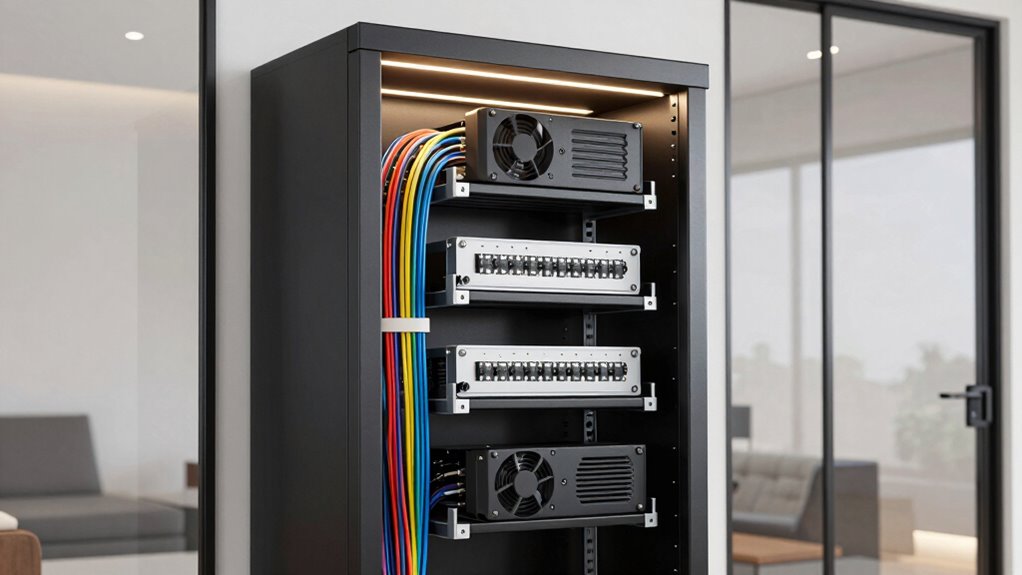

For most home network cabinets, I’d start with the QiaoYoubang 1U Vented Shelves: their 12-inch depth and two-shelf pack offer flexible space for non-rack devices. The GeeekPi 0.5U CAT6 Patch Panel is a standout for compact wired networks, while the Tecmojo Brush Panels help route cables through rack openings. The main tradeoffs are cabinet depth and rack format, how much airflow your gear needs, and whether you need to mount equipment or simply tidy cables. Small cabinets especially reward careful measurement, since a shelf or panel that fits the rack width may still conflict with doors or nearby gear. Continue reading for the full comparison and guidance on choosing accessories that suit your cabinet.

Get the latest gadgets delivered free with Prime
- Fast, free delivery on millions of items
- Prime Video, Amazon Music and more included
- Member-only deals all year
Complete the kit



Key Takeaways
- The QiaoYoubang 12-inch shelves offer a useful middle ground for home cabinets: more depth than the 10-inch VEVOR shelves, with a two-shelf pack rather than four.
- The VEVOR 10-inch shelf set favors shallow cabinets and buyers needing several small platforms, but its reduced depth limits the devices it can support.
- The GeeekPi 0.5U patch panel stands apart as a space-conscious way to terminate CAT6 runs; it serves a different job from shelves, blank panels, and cable organizers.
- Brush panels and D-rings solve different cable problems: Tecmojo brush panels guide cables through rack spaces, while QiaoYoubang D-rings keep runs routed along the cabinet.
- Hardware kits and blank panels address setup details, not capacity: Kraftex and Sunxeke supply rack fasteners, while Suprwin and the 2U hinged panel cover unused rack space.
| QiaoYoubang 1U Vented Server Rack Shelves, 12-Inch Deep, 2-Pack |  | Best for Adding Flexible Shelf Space | Quantity: 2 shelves | Rack height: 1U (1.73 inches) per shelf | Width: 19 inches | VIEW ON AMAZON | See Our Full Breakdown |
| Kraftex M6 Rack Screws, Cage Nuts, and Washers, 50-Piece Set |  | Best for a Small Hardware Refill | Screw size: M6 × 16 mm | Listed set contents: 25 screws, 25 cage nuts, and 25 washers | Listed number of items: 50 | VIEW ON AMAZON | See Our Full Breakdown |
| Sunxeke 45-Pack M6 x 16 mm Rack Screws, Cage Nuts, and Washers with Storage Box |  | Best for Organized Rack Builds | Screw size: M6 × 16 mm | Quantity: 135 pieces: 45 screws, 45 cage nuts, and 45 washers | Material: Carbon steel | VIEW ON AMAZON | See Our Full Breakdown |
| Tecmojo 1U Rack Brush Panel for 19-Inch Server Racks, Black, 2-Pack |  | Best for Cable Pass-Throughs | Pack quantity: 2 panels | Rack height: 1U (1.73 inches) | Rack width: 19 inches | VIEW ON AMAZON | See Our Full Breakdown |
| Suprwin 1U Rack Mount Blank Panels, 5-Pack |  | Best for Covering Multiple Empty Slots | Quantity: 5 panels | Panel size: 19 inches wide × 1U high | Material: Cold-rolled steel listed in specifications; description also refers to aluminum | VIEW ON AMAZON | See Our Full Breakdown |
| Tecmojo 1U Rack Mount Cable Management Panel with Brush (2 Pack) |  | Best for Dust-Conscious Cable Routing | Brand: Tecmojo | Pack size: 2 panels | Rack height: 1U each | VIEW ON AMAZON | See Our Full Breakdown |
| VEVOR 1U Vented Server Rack Shelves, Set of 4, 10-Inch Depth |  | Best Multi-Shelf Set for Shallow Equipment | Brand: VEVOR | Quantity: 4 shelves | Rack height: 1U per shelf | VIEW ON AMAZON | See Our Full Breakdown |
| GeeekPi 12-Port CAT6 Patch Panel, 10-Inch, 0.5U | 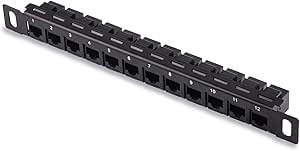 | Best Compact Patch Panel for Small Racks | Manufacturer: GeeekPi | Ports: 12 | Cable type: CAT6 | VIEW ON AMAZON | See Our Full Breakdown |
| QiaoYoubang 10-Pack 1U Server Rack Cable Management D-Ring Hooks |  | Best for Flexible Cable Routing | Brand: QiaoYoubang | Quantity: 10 hooks | Size: 1U; 1.73 × 2.7 × 1.73 in (44 × 68.5 × 44 mm) | VIEW ON AMAZON | See Our Full Breakdown |
| 2U Hinged Ventilated Blank Rack Mount Panel |  | Best for Service Access Behind a Ventilated Cover | Rack size: 19 inches | Panel height: 2U (3.5 in) | Dimensions: 3.5 in H × 19 in W × 0.39 in D | VIEW ON AMAZON | See Our Full Breakdown |
| rack accessories for home network cabinet | Material | Warranty | Quantity | Rack height |
|---|---|---|---|---|
| QiaoYoubang 1U Vented Server R | — | — | 2 shelves | 1U (1.73 inches) per shelf |
| Kraftex M6 Rack Screws | — | — | — | — |
| Sunxeke 45-Pack M6 x 16 mm Rac | Carbon steel | — | 135 pieces: 45 screws, 45 cage nuts, and 45 washers | — |
| Tecmojo 1U Rack Brush Panel fo | — | 3 years | — | 1U (1.73 inches) |
| Suprwin 1U Rack Mount Blank Pa | Cold-rolled steel listed in specifications; description also refers to aluminum | 360 days | 5 panels | — |
| Tecmojo 1U Rack Mount Cable Ma | SPCC cold-rolled steel | 3-year manufacturer warranty | — | 1U each |
| VEVOR 1U Vented Server Rack Sh | 1.5 mm Q235 carbon steel | 1 year | 4 shelves | 1U per shelf |
| GeeekPi 12-Port CAT6 Patch Pan | — | — | — | 0.5U |
| QiaoYoubang 10-Pack 1U Server | Cold-rolled steel | 30 days after purchase | 10 hooks | — |
| 2U Hinged Ventilated Blank Rac | Cold-rolled steel | 1 year | — | — |
More Details on Our Top Picks
QiaoYoubang 1U Vented Server Rack Shelves, 12-Inch Deep, 2-Pack
When a home network cabinet has equipment that cannot mount directly to the rails, these shelves add a practical resting place without taking up more than 1U per shelf. The two-pack is useful for separating a modem, small switch, or other compact device rather than stacking gear. Their 12-inch depth suits shallow cabinets, while the vented steel surface leaves airflow paths around equipment. Each shelf is rated for up to 30 pounds and includes mounting and assembly hardware.
Compared with the VEVOR 1U Vented Server Rack Shelves, this pair offers more depth for devices that need it, but fewer shelves overall. The tradeoff is fit: equipment must stay within the stated usable depth, and assembly adds a step before installation. I’d choose these for a couple of compact, non-rackmount devices, not deep or heavy hardware.
Pros:- Two shelves provide separate platforms for compact devices.
- Vented steel construction allows airflow beneath equipment.
- Fits standard 19-inch racks and cabinets.
- Includes assembly and rack-mounting hardware.
Cons:- Usable depth limits the size of equipment that can sit on the shelves.
- Each shelf supports up to 30 pounds, which rules out heavier devices.
- Assembly is required.
Best for: Home network owners with one or two compact, non-rackmount devices and a standard 19-inch cabinet that can accommodate shelves up to 12 inches deep.
Not ideal for: Buyers with equipment deeper than 12 inches, or anyone needing several shelves for a larger cabinet build.
- Quantity:2 shelves
- Rack height:1U (1.73 inches) per shelf
- Width:19 inches
- Depth:12 inches
- Usable dimensions:17.2 inches wide × 11.9 inches deep
- Maximum load:30 pounds per shelf
- Material and finish:Cold-rolled steel with powder-coated finish
- Compatibility:Standard 19-inch server racks and cabinets
Our verdict“Choose this pair for compact devices that need shelf space in a 19-inch cabinet, provided they fit within the 12-inch depth and 30-pound limit.”
Kraftex M6 Rack Screws, Cage Nuts, and Washers, 50-Piece Set
For a home rack build that needs a handful of mounting points, this set supplies the three pieces that often go missing together: M6 screws, cage nuts, and washers. Its truss-head screws are intended for straightforward installation, and the zinc chromate finish on the carbon steel hardware helps resist corrosion. The kit is a practical match for square-hole racks, where cage nuts provide the threaded mounting point.
Compared with the Sunxeke 45-Pack M6 x 16 mm Rack Screws, Cage Nuts, and Washers, Kraftex is the smaller, simpler choice for a modest installation or a limited refill; Sunxeke supplies more complete sets and a storage box. One specification needs attention before ordering: the contents list 25 screws, 25 cage nuts, and 25 washers, while the listed total of 50 items does not match that count. I’d verify the delivered quantity if exact counts matter. This is not for non-square-hole rails or racks using another screw size.
Pros:- Includes screws, cage nuts, and washers for square-hole mounting.
- M6 × 16 mm size suits compatible racks and cabinets.
- Truss-head screws are designed for straightforward installation.
- Zinc chromate finish helps resist corrosion.
Cons:- Limited to M6 hardware and compatible square-hole racks.
- The stated 50-item total conflicts with the listed quantities of 25 each.
- No storage box is specified for keeping loose hardware organized.
Best for: Home users adding or replacing a small number of mounting points in a standard square-hole rack that uses M6 hardware.
Not ideal for: Installers outfitting a large cabinet, users with round-hole or threaded rails, or buyers who need a clearly stated complete-set count.
- Screw size:M6 × 16 mm
- Listed set contents:25 screws, 25 cage nuts, and 25 washers
- Listed number of items:50
- Materials:Carbon steel, nylon, and zinc
- Finish:Zinc chromate
- Screw head style:Truss
- Rack compatibility:Square-hole racks and cabinets
Our verdict“Pick Kraftex for a small M6 mounting job on square-hole rails, but check the quantity details and rack compatibility first.”
Sunxeke 45-Pack M6 x 16 mm Rack Screws, Cage Nuts, and Washers with Storage Box
This kit is the more organized hardware pick for a cabinet build that needs many mounting points: it includes 45 screws, 45 cage nuts, and 45 washers, with each type kept in a compartmentalized box. That makes it easier to find matching pieces during installation and to store leftovers for later changes. The M6 × 16 mm hardware is intended for standard 10 mm square-hole racks, and the carbon steel parts have a black nickel finish.
Compared with the smaller Kraftex M6 Rack Screws, Cage Nuts, and Washers set, Sunxeke gives a larger, clearly itemized supply and adds storage. That’s useful for a more involved home rack, but the extra quantity may be unnecessary for a single device. Compatibility is also narrow: this is for square-hole rails, not every cabinet style. I’d favor it over Kraftex when organization and a larger set matter more than keeping the kit minimal.
Pros:- Provides 45 screws, 45 cage nuts, and 45 washers.
- Compartmentalized box keeps hardware types organized.
- M6 × 16 mm size is specified for standard 10 mm square-hole racks.
- Carbon steel construction has a black nickel finish.
Cons:- Designed for square-hole racks, limiting use with other rail types.
- The larger set may be excessive for a small installation.
- No alternate screw size is included.
Best for: DIY network installers fitting several devices into a standard 10 mm square-hole rack who want spare hardware stored by type.
Not ideal for: Owners of threaded-hole or round-hole racks, or anyone who needs only a few mounting fasteners.
- Screw size:M6 × 16 mm
- Quantity:135 pieces: 45 screws, 45 cage nuts, and 45 washers
- Material:Carbon steel
- Finish:Black nickel
- Rack compatibility:Standard 10 mm square-hole racks and cabinets
- Storage:Compartmentalized plastic box
- Item dimensions:6 × 4 × 0.75 inches
Our verdict“Choose Sunxeke when a square-hole rack build calls for plenty of organized M6 hardware and you expect to use or store the extras.”
Tecmojo 1U Rack Brush Panel for 19-Inch Server Racks, Black, 2-Pack
These panels address a specific cabinet problem: cables need to pass between rack areas without leaving a wide-open gap. The nylon brush opening gives cables a tidy route while helping limit dust entry, and the panel’s rack-mounted frame uses just 1U. A two-pack is useful when a home network cabinet needs separate pass-through points, such as one for cable entry and another between equipment sections. The design also allows airflow rather than sealing the opening completely.
Unlike the Suprwin 1U Rack Mount Blank Panels, which cover unused rack spaces, these are for cable movement and leave a brush-lined opening. That makes them a better fit when wiring needs to cross the cabinet, but a weaker choice if the goal is to close off open rack space. They fit 19-inch racks only, so cabinet width must match. I’d choose the pair for cable routing, not for blanking panels or active cable management.
Pros:- Brush opening provides a tidy route for cables through the rack.
- Helps limit dust entry while leaving the pass-through open.
- Two panels allow routing at separate rack locations.
- Steel frame has a powder-coated finish.
Cons:- Does not close off the rack opening like a blank panel.
- Designed for 19-inch racks, limiting compatibility with other widths.
- The brush panel organizes pass-throughs but does not secure cables along their full route.
Best for: Home network owners routing patch, power, or equipment cables through one or more openings in a standard 19-inch rack.
Not ideal for: Buyers trying to fully cover unused rack units, or owners of cabinets that are not 19 inches wide.
- Pack quantity:2 panels
- Rack height:1U (1.73 inches)
- Rack width:19 inches
- Dimensions:0.3 inches deep × 19 inches wide × 1.73 inches high
- Materials:Alloy steel frame and nylon brush
- Mounting type:Rack mount
- Warranty:3 years
Our verdict“Buy this two-pack when cables need clean pass-throughs in a 19-inch cabinet, rather than a solid cover for vacant rack space.”
Suprwin 1U Rack Mount Blank Panels, 5-Pack
When unused rack openings are collecting dust or leaving the cabinet front unfinished, this five-pack lets you cover several separate 1U spaces with steel panels. Each panel fits a standard 19-inch equipment rack, and the included 20 M6 screws provide hardware for installation. Because the panels are separate rather than one large cover, you can place them wherever gaps appear as the cabinet layout changes.
Compared with the Tecmojo 1U Rack Brush Panel, Suprwin blocks the opening instead of leaving a brush-lined route for cables. That makes it the better choice for unused slots, but not for wiring that needs to pass through the rack. The panels are only 1U each, so larger gaps require several pieces. The product description also conflicts on material, identifying it as both steel and aluminum; the listed specification says cold-rolled steel. I’d select it for basic gap coverage when separate 1U panels fit the layout.
Pros:- Five separate panels can cover openings at different rack locations.
- Fits standard 19-inch equipment racks.
- Includes 20 M6 screws for installation.
- Solid panels help keep dust and dirt out of unused openings.
Cons:- Each panel covers only 1U, so larger gaps need multiple panels.
- The product description is inconsistent about whether the material is steel or aluminum.
- Solid panels do not provide a cable pass-through.
Best for: Home network cabinet owners who want to cover several separate 1U openings in a standard 19-inch rack using included M6 screws.
Not ideal for: Anyone needing a cable pass-through, a single panel spanning multiple rack units, or certainty about the panel material before purchase.
- Quantity:5 panels
- Panel size:19 inches wide × 1U high
- Material:Cold-rolled steel listed in specifications; description also refers to aluminum
- Thickness:1.2 mm
- Color:Black
- Included hardware:20 M6 screws
- Mounting type:Rack mount
- Warranty:360 days
Our verdict“Choose this set to close several unused 1U gaps in a 19-inch cabinet, but pick a brush panel instead if cables need to pass through.”
Tecmojo 1U Rack Mount Cable Management Panel with Brush (2 Pack)
The Tecmojo brush panels suit home network cabinets where cables need to pass between rack spaces without leaving a large open gap. Their nylon brush strip helps limit dust entry while keeping cables accessible, and the steel 1U frame fits standard 19-inch racks. Compared with the QiaoYoubang D-ring hooks, these panels create a neater pass-through across a rack opening; the hooks are more flexible when you need to route bundles along several points. This two-pack also offers a second panel for another opening, but each panel takes a full 1U and may be too restrictive for a crowded cable bundle. It is a good match for tidier, enclosed installations, not a substitute for larger cable-routing space.
Pros:- Brush pass-through helps reduce dust entering unused rack openings
- Two panels can serve separate cable entry points
- Cold-rolled steel construction
- Includes screws for square and tapped rack holes
Cons:- Each panel occupies 1U, which may be costly in a compact cabinet
- The brush opening may be limiting for unusually large cable bundles
Best for: Owners of 19-inch home network cabinets who want a dust-reducing pass-through at one or two rack openings.
Not ideal for: Buyers routing bulky cable bundles through a single opening or those with no spare 1U of rack height.
- Brand:Tecmojo
- Pack size:2 panels
- Rack height:1U each
- Dimensions:19 in W × 1.73 in H × 2.5 in D
- Material:SPCC cold-rolled steel
- Compatibility:Standard 19-inch server racks and network cabinets
- Standard:EIA/ECA-310-E compliant
- Warranty:3-year manufacturer warranty
Our verdict“Choose this two-pack for dust-conscious cable pass-throughs in a standard 19-inch cabinet when you can spare the rack space.”
VEVOR 1U Vented Server Rack Shelves, Set of 4, 10-Inch Depth
This four-shelf set is useful when a home cabinet needs to hold several small devices that lack rack ears, such as compact network or AV equipment. Each shelf is 10 inches deep, vented, and rated to support up to 50 lb, so the set can add separate landing spots without blocking airflow beneath devices. Compared with the QiaoYoubang 12-inch-deep shelves, these are better suited to shallow racks and short equipment, but their reduced depth rules out many deeper components. The shelves are specified for 19-inch, four-post racks, so they are not a universal fit for every cabinet design. I would choose this set for multiple light-to-medium devices in a shallow rack, rather than for deep gear or a two-post installation.
Pros:- Four shelves provide separate mounting surfaces for multiple devices
- Vented bottoms support airflow around equipment
- Stated load capacity of 50 lb per shelf
- Mounting screws and nuts are included
Cons:- 10-inch depth is unsuitable for many deeper devices
- Designed for 19-inch four-post racks, limiting compatibility
- Using all four shelves takes 4U of rack space
Best for: Home-lab owners with a 19-inch four-post rack who need separate shelves for several shallow, non-rack-mount devices.
Not ideal for: Buyers with deep equipment, a two-post rack, or devices that need more than 10 inches of shelf depth.
- Brand:VEVOR
- Quantity:4 shelves
- Rack height:1U per shelf
- Shelf depth:10 in (254 mm)
- Dimensions:9.84 × 18.9 × 1.7 in (D × W × H)
- Material:1.5 mm Q235 carbon steel
- Load capacity:50 lb (22.68 kg) per shelf
- Compatibility:19-inch, four-post server rack
- Warranty:1 year
Our verdict“Pick this set when you need several ventilated shelves for shallow devices in a compatible four-post rack.”
GeeekPi 12-Port CAT6 Patch Panel, 10-Inch, 0.5U
The GeeekPi 12-port panel brings structured cabling to a 10-inch rack without consuming a full rack unit: its 0.5U format leaves more vertical room for compact switches and other accessories. Pre-numbered CAT6 ports make cable identification more straightforward than loose terminations, and the listed DeskPi RackMate compatibility gives small-rack owners a clear fit target. Compared with the Tecmojo 1U brush panels, this is for terminating and labeling network runs, not passing cables through an opening or managing dust. Its main boundary is also clear: it is specified for CAT6, and CAT6A users are directed to a different model. I’d choose it for a compact CAT6 installation, but not for a cabinet built around higher-category cabling or a standard 19-inch layout.
Pros:- 12 pre-numbered ports simplify cable identification
- 0.5U height preserves space in compact racks
- Supports straight-through connections without drilling
- Compatible with listed DeskPi RackMate models and 10-inch racks
Cons:- Specified for CAT6 rather than CAT6A
- 10-inch format does not fit standard 19-inch rack openings
- Package includes only two screws and two washers
Best for: Small-rack and DeskPi RackMate owners building a labeled CAT6 network termination point while conserving rack height.
Not ideal for: Installers using CAT6A cabling or buyers who need a patch panel for a standard 19-inch rack.
- Manufacturer:GeeekPi
- Ports:12
- Cable type:CAT6
- Rack size:10 inches
- Rack height:0.5U
- Compatibility:DeskPi RackMate T1, T0, T2, T1 Plus, T0 Plus, TL1, and 10-inch racks or network cabinets
- Package dimensions:10.47 × 2.28 × 1.06 in
- Included accessories:2 screws and 2 washers
Our verdict“Choose this panel for a compact, labeled CAT6 setup in a compatible 10-inch rack, and skip it for CAT6A or 19-inch installations.”
QiaoYoubang 10-Pack 1U Server Rack Cable Management D-Ring Hooks
For cabinets where cable paths change as equipment is added, the QiaoYoubang D-ring hooks offer more placement freedom than a fixed-width panel. The pack supplies 10 separate hooks, so a homeowner can distribute support along a vertical or horizontal route and keep power, fiber, and network cables from pressing against equipment. Compared with the Tecmojo brush panels, these hooks are better for guiding exposed bundles around the rack, while the brush panels provide a cleaner pass-through across a rack opening and help limit dust. The tradeoff is installation effort: each hook needs two screws, and the individually placed brackets take more planning than mounting one panel. Their stated warranty is also limited to 30 days after purchase.
Pros:- Ten hooks allow cable support at multiple locations
- Can organize power, fiber-optic, and network cables
- Cold-rolled steel with black powder-coated finish
- Flexible placement can leave equipment airflow paths open
Cons:- Each hook requires two screws, adding installation steps
- Individual brackets offer less coverage than a continuous panel
- 30-day warranty is limited compared with the Tecmojo panels
Best for: Home network cabinet owners who want to route and support separate cable bundles at multiple points around the rack.
Not ideal for: Buyers seeking a single finished pass-through panel, dust control at rack openings, or minimal installation work.
- Brand:QiaoYoubang
- Quantity:10 hooks
- Size:1U; 1.73 × 2.7 × 1.73 in (44 × 68.5 × 44 mm)
- Cable storage space:2.56 × 1.57 in
- Material:Cold-rolled steel
- Finish:Black powder coating
- Mounting:Rack mount; two screws per hook
- Warranty:30 days after purchase
Our verdict“Choose these hooks when flexible, distributed cable support matters more than a single finished panel or dust-blocking pass-through.”
2U Hinged Ventilated Blank Rack Mount Panel
This hinged 2U panel is a practical way to cover a larger unused opening while retaining a route for airflow and access behind the panel. Its hinged construction is useful in confined cabinet installations, where removing a conventional panel entirely may be awkward; opening it does still require removing two screws. Compared with the Tecmojo 1U brush panels, this model covers more vertical space and is aimed at access to the area behind a blanking panel, rather than cable pass-through. The vented, powder-coated steel construction gives it a more substantial role than a simple open gap, but its 2U height can consume scarce rack space, and it does not provide the brush strip found on the Tecmojo option. It arrives assembled, making it a straightforward fit for a standard 19-inch cabinet.
Pros:- Hinged design allows access in confined installations
- Vented panel supports airflow through the covered space
- Cold-rolled steel with a black powder-coated finish
- Arrives fully assembled
Cons:- Uses 2U of rack height
- Two screws must be removed to swing the panel open
- Does not provide the brush pass-through of the Tecmojo panels
Best for: Owners of 19-inch home network cabinets who need to cover a 2U opening but want hinged access behind the panel.
Not ideal for: Buyers with limited spare rack height or those who need a brush-lined cable pass-through rather than a vented cover.
- Rack size:19 inches
- Panel height:2U (3.5 in)
- Dimensions:3.5 in H × 19 in W × 0.39 in D
- Weight:0.45 kg
- Material:Cold-rolled steel
- Finish:Black powder coating
- Assembly:Fully assembled
- Warranty:1 year
Our verdict“Choose this panel for a 2U opening where ventilation and hinged access matter more than saving rack height or routing cables through a brush.”

How We Picked
I compared these accessories by the problems they solve in a home network cabinet: supporting devices, organizing or routing cables, terminating network runs, filling open rack spaces, and supplying mounting hardware. Fit was a major ranking factor, including rack-unit footprint, shelf depth, pack size, and whether the product’s format makes sense in a compact installation. I also weighed practical handling, ventilation or cable access, and how much flexibility each option offers as a home network changes.
The order reflects usefulness across common home setups, not a claim that one accessory can replace another. The QiaoYoubang shelves rank first for their adaptable depth and two-shelf pack; the VEVOR set is a better match for shallow cabinets or multiple small devices. Purpose-specific parts rank lower for broad utility, but can be the right choice when a buyer needs a patch panel, cable pass-through, cable restraint, blanking, or fasteners. No single option earns a place by features alone: fit and the actual job it performs matter more than adding rack units.
Factors to Consider When Choosing Rack Accessories For Home Network Cabinets
Before choosing rack accessories, I’d treat the cabinet as a measured layout rather than a collection of empty spaces. A few checks can prevent blocked airflow, awkward cable bends, and hardware that cannot be mounted where you expect.
Measure the Cabinet Beyond Its Rack Width
Rack width alone does not tell you whether an accessory will fit your installation. Measure usable internal depth, including clearance needed for doors, plugs, cable bends, and any rear supports. Shelf depth is especially easy to misjudge: a 12-inch shelf may suit a deeper cabinet but interfere with a shallow enclosure, while a 10-inch shelf trades support area for clearance. Check the manufacturer’s stated dimensions against your cabinet’s usable space, not its external measurements. Also allow room to reach screws and connectors after the accessory is installed. If you are uncertain, map the intended position with cardboard before ordering.
Match Rack Units and Mounting Hardware
Rack-unit height adds up quickly in a compact home cabinet, so count the space needed by equipment as well as accessories. A 0.5U patch panel can preserve more room than a 1U part, but only if its mounting format works with the cabinet and nearby equipment. Confirm whether your rack uses square holes with cage nuts, threaded holes, or another mounting arrangement before buying fasteners. M6 kits are useful only when their thread and length match the rack and accessory. Avoid filling every opening simply because it is available; leave room for service access and future changes. A simple layout drawing can reveal conflicts that product dimensions alone miss.
Choose Shelf Depth for the Device, Not the Listing
A shelf’s rated or advertised depth should be compared with the full footprint of the device, including feet, cables, and power connectors. Small switches, modems, and hubs may sit comfortably on a shallow shelf, while larger equipment can overhang or become difficult to secure. Vented shelves allow air to pass through their surface, but ventilation does not compensate for a device packed tightly against a wall or another component. Think about how the shelf will be supported and whether the equipment can shift when cables are pulled. If the cabinet will hold several small items, multiple shallow shelves may offer more layout options than one deep platform. For a single larger device, prioritize stable support and adequate clearance.
Separate Cable Routing From Cable Restraint
Brush panels, D-rings, and patch panels address distinct stages of cable management. A brush panel lets cables pass through a rack opening while reducing the size of the exposed gap, whereas D-rings guide cable runs along a route and keep them from spreading across the cabinet. A patch panel provides an organized termination point for permanent network cabling, which can make moves and troubleshooting easier. Buying one type does not remove the need for the others if your cabinet has both incoming cable runs and equipment patch leads. Plan cable paths before mounting parts so that bundles do not block vents or cover labels. Leave enough slack for servicing, but avoid tight bends and loops that make changes harder.
Decide Whether Open Rack Space Needs Covering
Blank panels can make a cabinet neater, but they also change how air moves through it. A solid panel can limit airflow through an unused opening, while a ventilated option provides a different balance between coverage and air passage. Do not assume that filling every gap improves cooling; the effect depends on where equipment intakes and exhausts air. A hinged panel offers access behind the covered area, but its added mechanism and 2U height may be unnecessary if you only want a finished front. Leave spaces open when they serve cable access or ventilation, and cover them when a more contained layout is useful. Decide based on cabinet airflow and access needs, not appearance alone.
Buy Hardware and Capacity for the Next Change
Fastener kits differ in piece count and packaging, and a kit is most useful when it matches the mounting holes and screw length your rack requires. Count the positions you plan to populate and keep a small reserve for replacements, but avoid assuming that every supplied washer or cage nut will suit every cabinet. For shelves and cable accessories, consider whether your network is likely to grow or move before selecting a multi-piece pack. Extra parts can be useful when they fit several locations, but they can also go unused in a small fixed setup. Keep spare screws and cage nuts together with the cabinet’s layout notes. Planning for service and incremental upgrades can save more frustration than buying the largest pack available.
Frequently Asked Questions
Should I choose a 10-inch or 12-inch-deep rack shelf?
Choose based on usable cabinet depth and the device’s complete footprint, including plugs and cable clearance. A 10-inch shelf suits a shallow cabinet or small device but offers less room for wider or deeper equipment. A 12-inch shelf gives more support area, though it may crowd doors or rear cabling in a compact enclosure. Measure the internal space and check the shelf’s mounting position before deciding. If the device is close to the shelf’s limits, allow extra clearance rather than relying on a tight fit.
Can I install a 0.5U patch panel in a standard 19-inch rack?
Rack width and mounting format both matter: a 19-inch rack describes the common mounting width, while 0.5U describes the panel’s vertical space. Check the panel’s stated rack compatibility and how its mounting points align with your cabinet. Half-unit products may use a mounting arrangement that differs from a conventional 1U accessory, so do not infer compatibility from width alone. Also confirm that patch cables can bend and exit without pressing against adjacent equipment. A small layout check can show whether the space saving is useful in your rack.
Do brush panels replace D-ring cable managers?
No. A brush panel creates a pass-through at a rack opening, helping cables enter or leave the cabinet while covering much of the gap. D-rings guide cable bundles along a route and help keep them from hanging loosely across the rack. Many cabinets benefit from both when cables need to pass between rack areas and then follow a controlled path. If your main issue is a loose cable run, D-rings address it more directly; if cables need to pass through an open rack space, a brush panel is the closer fit. Plan the route first so neither accessory obstructs ventilation or access.
When should I cover unused rack spaces with blank panels?
Blank panels can tidy the cabinet front and separate equipment, but whether they help airflow depends on the cabinet’s cooling path. Check where devices draw in and exhaust air before covering openings, especially in a tightly packed enclosure. A solid panel may be suitable when you want to close an unused space; a ventilated panel may make more sense when airflow through that area matters. A hinged panel can be useful when access behind the opening is part of the layout, though its larger footprint may not be needed for a simple finish. Leave openings available when they serve cable access or a deliberate airflow route.
How do I know whether an M6 rack screw kit will fit my cabinet?
First identify the cabinet’s hole style and thread: square mounting holes commonly use cage nuts, while threaded rails need screws that match their thread. M6 hardware will not fit every threaded rack, and a screw that is too long can interfere with equipment or reach beyond the intended mounting point. Check the accessory’s mounting requirements as well as the cabinet documentation. Confirm the supplied cage nuts match the rail thickness and shape, since fit can vary across racks. If the cabinet’s hardware is unknown, inspect an existing fastener or confirm the specification before assembling a replacement kit.
Conclusion
For a versatile starting point, I recommend the QiaoYoubang 12-inch vented shelves as best overall, while the VEVOR 10-inch shelf set is the better value-oriented choice for shallow cabinets and several small devices. Beginners can build a straightforward setup with a shelf and a compatible M6 hardware kit, checking rack depth and hole type before ordering. For a premium-style, purpose-built network layout, choose the GeeekPi patch panel when permanent CAT6 runs need a compact termination point; it is a specialized pick rather than a universal upgrade. Buyers focused on cable routing should look at Tecmojo brush panels or QiaoYoubang D-rings, while those covering unused openings can compare the Suprwin 1U panels with the 2U hinged ventilated panel. Match the accessory to your cabinet’s measurements and the specific job you need done, and the right choice becomes much clearer.
Halloween Picks

Gemmy 6-Foot Leatherface Animatronic Halloween Decoration

ELAMAS 11ft Animatronic Flying Witch Halloween Decoration

Star Wars Yoda and R2-D2 Inflatable Halloween Decor, 6 ft with LEDs, Indoor/Outdoor
As an affiliate, we earn on qualifying purchases.