If you’re looking to connect your NVMe M.2 SSD to a PCIe slot, an NVMe to PCIe adapter is the key component. The best adapters offer high-speed data transfer, reliable build quality, and compatibility with various PCIe slots. GLOTRENDS PA09-X1 stands out as the overall best for its solid performance and affordability. JEYI PCIe 5.0 4X is a top pick for future-proofing with PCIe 5.0 support, while SABRENT Gen5 Adapter offers premium cooling for demanding workloads. Balancing performance, heat management, and compatibility can be tricky, so continue reading for the full breakdown to find your ideal match.

Get the latest gadgets delivered free — and shop member deals
- Fast, free delivery on millions of items
- Access to Prime Big Deal Days deals on October 6–7
- Prime Video, Amazon Music and more included
Complete the kit



Key Takeaways
- High-speed PCIe 4.0 and 5.0 support significantly improve SSD performance, but compatibility depends on your motherboard.
- Effective heat dissipation is essential for sustained speeds, especially with high-performance NVMe drives.
- Adapters with multiple slots or support for various SSD sizes provide greater versatility for different setups.
- Build quality and connector stability impact long-term reliability, particularly in demanding environments.
- Pricing varies based on features like heatsinks, PCIe version, and form factor; balancing cost and needs is key.
| GLOTRENDS PA09-X1 M.2 NVMe to PCIe 4.0 X1 Adapter |  | Best Budget-Friendly Slot Saver | Compatibility: Windows 11/10/8, Linux, Mac OS | Supported M.2 Sizes: 2230, 2242, 2260, 2280 | Supports SATA SSDs: No | VIEW ON AMAZON | See Our Full Breakdown |
| JEYI PCIe 5.0 4X to M.2 NVMe Adapter Card with Heatsink |  | Best for High-Speed Enthusiasts | Speed: 128Gbps (16GB/s) | Heatsink: Built-in aluminum | Compatibility: PCIe 5.0/4.0 x4, x8, x16 | VIEW ON AMAZON | See Our Full Breakdown |
| PCIe NVMe Adapter Card with Heat Sink for Desktop |  | Best for Versatile Desktop Expansion | Interface: PCIe x16 (compatible with x4/x8 slots) | Supports: PCIe 2.0/3.0/4.0 SSDs | SSD Sizes: 2230/2242/2260/2280 | VIEW ON AMAZON | See Our Full Breakdown |
| M.2 NVMe to PCIe Adapter with Aluminum Heatsink, Supports PCIe 3.0/4.0 x4, x8, x16 Slots | 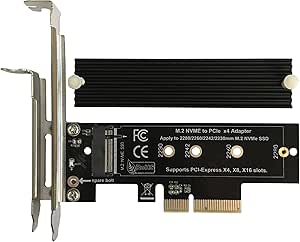 | Best for High-Speed Data Transfer | Supported M.2 Sizes: 2280/2260/2242/2230 | Interface: PCIe 3.0/4.0 x4 | Bandwidth: Up to 64Gbps | VIEW ON AMAZON | See Our Full Breakdown |
| SK1 M.2 NVMe SSD to PCIe 4.0 Expansion Card |  | Best for Large Capacity and Flexibility | Supports SSD Capacity: up to 4TB | Supported Lengths: 2230/2242/2260/2280 | Interface: PCIe X1 to M.2 Key M | VIEW ON AMAZON | See Our Full Breakdown |
| Poyiccot M.2 NVMe to PCIe 4.0 x16 Adapter, PCI-e M.2 NVMe Expansion Card for M.2 SSDs |  | Best for Versatile Compatibility and Upgrading Old Systems | Supported SSD Sizes: 2230, 2242, 2260, 2280 | Slots Supported: PCIe 4X, 8X, 16X | Compatibility: PCIe NVMe M. Key SSDs | VIEW ON AMAZON | See Our Full Breakdown |
| RGEEK M.2 NVMe to PCIe 4.0 x4 Riser Extension Adapter Card |  | Best for High-Speed Data Transfer in Small Spaces | Conversion Type: M.2 to PCIe 4.0 x4 | Bandwidth: 64 Gbps | Supported M.2 Sizes: 2230, 2242, 2260, 2280 | VIEW ON AMAZON | See Our Full Breakdown |
| Quad NVMe PCIe Adapter with Heatsink for 2280/2260/2242/2230 M.2 SSDs |  | Best for High Capacity and Multi-Drive Setups | Number of Ports: 4 | Supported SSD Sizes: 80x22mm, 60x22mm, 42x22mm, 30x22mm | Heatsink: Yes | VIEW ON AMAZON | See Our Full Breakdown |
| GLOTRENDS M.2 NVMe to PCIe 4.0 X4 Adapter with Heatsink (22x70mm) |  | Best for Flexible Cooling and Broad Compatibility | Compatibility: PCIe 4.0/3.0 M.2 NVMe SSDs | Supported Sizes: 2230, 2242, 2260, 2280 | Heatsink: Yes | VIEW ON AMAZON | See Our Full Breakdown |
| SABRENT M.2 NVMe SSD to PCIe x16 Adapter Card, Gen5, Heatsink |  | Best for Future-Proof PCIe 5.0 Performance | Supported Drives: M.2 M-key NVMe SSDs (2230–2280), B+M key PCIe drives | Interface: PCIe x16 | Supports: PCIe 5.0, 4.0, 3.0 | VIEW ON AMAZON | See Our Full Breakdown |
| ELUTENG Dual M.2 NVMe to PCIe Adapter with Heat Sink – Supports 2230/2242/2260/2280 SSDs, Low Profile Bracket |  | Best for High-Density Dual Storage Expansion | Compatibility: Supports PCIe X1/X4/X8/X16 slots, M-Key and M+B Key SSDs | Supported SSD Sizes: 2230, 2242, 2260, 2280 | Data Transfer Speed: 5Gbps | VIEW ON AMAZON | See Our Full Breakdown |
| M.2 NVMe to PCIe 4.0 x4 Adapter with Aluminum Heatsink |  | Best for High-Speed PCIe 4.0 Compatibility | Supported M.2 Sizes: 2280/2260/2242/2230 | Interface: PCIe 4.0 x4 | Cooling: Aluminum heatsink | VIEW ON AMAZON | See Our Full Breakdown |
| StarTech M.2 PCIe SSD Adapter, x4 PCIe 3.0 NVMe/AHCI, M-Key/NGFF |  | Best for Versatile Compatibility and Performance | Compatibility: PCIe 3.0, backward compatible with PCIe 2.0 and 1.0 | Supported Drives: 2242, 2260, 2280, 22110 M.2 SSDs | Form Factors: Full-profile and low-profile brackets | VIEW ON AMAZON | See Our Full Breakdown |
| ELUTENG M.2 NVMe PCIe Adapter with Aluminum Heatsink and Low Profile Bracket |  | Best for High-Speed Compatibility and Easy Setup | Compatibility: M.2 PCIe NVMe M key SSDs | Max Transfer Speed: 16Gb/s | Heatsink: Aluminum | VIEW ON AMAZON | See Our Full Breakdown |
| nvme to pcie adapter | Compatibility |
|---|---|
| GLOTRENDS PA09-X1 M.2 NVMe to | Windows 11/10/8, Linux, Mac OS |
| JEYI PCIe 5.0 4X to M.2 NVMe A | PCIe 5.0/4.0 x4, x8, x16 |
| PCIe NVMe Adapter Card with He | — |
| M.2 NVMe to PCIe Adapter with | Windows 11/10/8, Linux, Fedora, SUSE, Ubuntu, Red Hat |
| SK1 M.2 NVMe SSD to PCIe 4.0 E | PCIe 4.0/3.0/2.0/1.0 NVMe |
| Poyiccot M.2 NVMe to PCIe 4.0 | PCIe NVMe M. Key SSDs |
| RGEEK M.2 NVMe to PCIe 4.0 x4 | Multiple M.2 form factors |
| Quad NVMe PCIe Adapter with He | — |
| GLOTRENDS M.2 NVMe to PCIe 4.0 | PCIe 4.0/3.0 M.2 NVMe SSDs |
| SABRENT M.2 NVMe SSD to PCIe x | — |
| ELUTENG Dual M.2 NVMe to PCIe | Supports PCIe X1/X4/X8/X16 slots, M-Key and M+B Key SSDs |
| M.2 NVMe to PCIe 4.0 x4 Adapte | — |
| StarTech M.2 PCIe SSD Adapter | PCIe 3.0, backward compatible with PCIe 2.0 and 1.0 |
| ELUTENG M.2 NVMe PCIe Adapter | M.2 PCIe NVMe M key SSDs |
More Details on Our Top Picks
GLOTRENDS PA09-X1 M.2 NVMe to PCIe 4.0 X1 Adapter
This adapter stands out for offering a simple way to utilize an available PCIe X1 slot for M.2 NVMe SSDs without sacrificing a primary PCIe x16 slot. Compared to high-speed options like the JEYI PCIe 5.0 adapter, it limits performance to PCIe X1 speeds, which may inhibit full SSD potential. However, its broad OS compatibility and support for multiple M.2 sizes make it accessible for casual upgrades and secondary storage. The lack of SATA support and potential need for formatting are tradeoffs that could be inconvenient for less technical users. This pick makes the most sense for users seeking a low-cost, space-efficient solution to add NVMe storage without high throughput needs.
Pros:- Utilizes free PCIe X1 slot, saving primary slots for graphics or other devices
- Supports various M.2 sizes and capacities, offering flexibility
- Compatible with multiple operating systems including Windows, Linux, and Mac OS
- Includes both regular and low-profile brackets for versatile installation
Cons:- Bandwidth limited to PCIe X1 speeds, restricting SSD performance
- No support for SATA-based M.2 SSDs, limiting options for certain users
Best for: Budget-conscious users who want to add NVMe support without high performance requirements or occupying their main PCIe slot.
Not ideal for: Power users or gamers who need maximum SSD speeds or plan to run demanding applications, as bandwidth is limited by PCIe X1.
- Compatibility:Windows 11/10/8, Linux, Mac OS
- Supported M.2 Sizes:2230, 2242, 2260, 2280
- Supports SATA SSDs:No
- Includes:12cm regular bracket, 8cm low-profile bracket
- Certification:FCC, CE
Our verdict“Ideal for users seeking an inexpensive, straightforward way to add NVMe storage to systems with limited PCIe slots.”
JEYI PCIe 5.0 4X to M.2 NVMe Adapter Card with Heatsink
This adapter makes the most of PCIe 5.0’s blistering speeds, supporting SSDs up to 128Gbps, a significant step beyond the PCIe 4.0 options like the M.2 NVMe to PCIe Adapter with Aluminum Heatsink. Its built-in aluminum heatsink ensures thermal stability during sustained data transfers, ideal for heavy workloads or gaming setups. Compared to the PCIe NVMe Adapter Card with Heat Sink for Desktop, its PCIe 5.0 support offers a future-proof edge, although it requires compatible PCIe 5.0 slots to realize full speed. Its plug-and-play design suits users who want maximum performance without driver fuss, but systems with older PCIe slots will see no benefit. This adapter is tailored for users wanting the absolute fastest NVMe SSD speeds currently available.
Pros:- Supports ultra-high-speed PCIe 5.0 SSDs up to 128Gbps
- Integrated aluminum heatsink for thermal management
- Easy screwless installation without drivers
- Compatible with PCIe 4.0/5.0 x4, x8, x16 slots
Cons:- Requires PCIe 5.0 or 4.0 slots for full performance
- Less effective in systems with poor airflow, as heatsink alone may not suffice
Best for: High-performance PC builders, gamers, and content creators who demand the fastest SSD connection and have PCIe 5.0 slots available.
Not ideal for: Users with older motherboards or systems that only support PCIe 3.0 or below, as they won’t achieve the advertised speeds.
- Speed:128Gbps (16GB/s)
- Heatsink:Built-in aluminum
- Compatibility:PCIe 5.0/4.0 x4, x8, x16
- Supported SSD Sizes:2280/2260/2242/2230
- Operating Systems:Windows 10/11, Linux, macOS
Our verdict“Best suited for users with PCIe 5.0 motherboards aiming to maximize SSD speed and thermal stability.”
PCIe NVMe Adapter Card with Heat Sink for Desktop
This card excels in transforming PCIe x16/x8/x4 slots into an NVMe-compatible interface, matching the capabilities of more advanced models like the M.2 NVMe to PCIe Adapter with Aluminum Heatsink but offering broader compatibility with PCIe versions from 2.0 to 4.0. Its included heatsink helps manage heat during intensive tasks, making it suitable for high-speed data transfers. Compared to the more specialized JEYI PCIe 5.0 adapter, it trades off maximum speed for broader motherboard compatibility, including older PCIe versions. Easy to install with no driver requirements, it suits users who want flexibility across multiple PCIe standards. Its main tradeoff involves needing an available PCIe slot and ensuring the motherboard supports the SSD sizes chosen.
Pros:- Supports PCIe 2.0/3.0/4.0 SSDs for broad compatibility
- Includes heatsink for temperature control during high loads
- Supports multiple PCIe slot types and SSD sizes
- Easy plug-and-play installation without drivers
Cons:- Requires available PCIe slot on motherboard
- Maximum performance limited by PCIe version of motherboard
Best for: Desktop users looking to upgrade older systems or use a variety of PCIe slots for NVMe SSDs without sacrificing compatibility.
Not ideal for: Enthusiasts seeking cutting-edge PCIe 5.0 speeds or systems with limited PCIe slots, since it supports a wide range but not the latest standard exclusively.
- Interface:PCIe x16 (compatible with x4/x8 slots)
- Supports:PCIe 2.0/3.0/4.0 SSDs
- SSD Sizes:2230/2242/2260/2280
- Includes:Heat sink, mounting screws
Our verdict“Ideal for users upgrading older desktops or needing flexible PCIe NVMe expansion options.”
M.2 NVMe to PCIe Adapter with Aluminum Heatsink, Supports PCIe 3.0/4.0 x4, x8, x16 Slots
This adapter offers a robust solution for high-speed NVMe SSDs, supporting PCIe 3.0 and 4.0 x4 connections with bandwidth up to 64Gbps, making it more capable than the GLOTRENDS PA09-X1. Its aluminum heatsink with thermal pads ensures effective cooling during extended data transfers, suitable for demanding workloads. Compared to the JEYI PCIe 5.0 adapter, it doesn’t reach the maximum speeds of PCIe 5.0 but remains a reliable choice for users with PCIe 3.0/4.0 slots. Its support for multiple operating systems and SSD sizes adds versatility, though driver installation might be necessary for some systems. The absence of detailed thermal performance metrics and optional thermal pads could be a consideration for heat-intensive environments.
Pros:- Supports PCIe 3.0/4.0 x4 connections for high data transfer rates
- Includes aluminum heatsink with thermal pads for cooling
- Supports multiple SSD sizes and OS compatibility
- Supports high-speed data transfer up to 64Gbps
Cons:- Requires driver installation on some systems
- Lacks detailed thermal performance data or additional thermal pads
Best for: Power users seeking a high-performance, cooling-enhanced PCIe NVMe adapter compatible with PCIe 3.0 and 4.0 systems.
Not ideal for: Those with PCIe 5.0 slots aiming for the fastest possible speeds, or users with older systems that don’t support PCIe 4.0.
- Supported M.2 Sizes:2280/2260/2242/2230
- Interface:PCIe 3.0/4.0 x4
- Bandwidth:Up to 64Gbps
- Compatibility:Windows 11/10/8, Linux, Fedora, SUSE, Ubuntu, Red Hat
- Heatsink:Aluminum with thermal pads
Our verdict“Great for users with PCIe 3.0/4.0 systems demanding fast, cooled NVMe SSD connectivity.”
SK1 M.2 NVMe SSD to PCIe 4.0 Expansion Card
This expansion card enables adding a sizable NVMe SSD up to 4TB through a PCIe X1 slot, similar in function to the M.2 NVMe to PCIe Adapter with Aluminum Heatsink, but with a focus on capacity and flexibility. It supports PCIe 4.0/3.0/2.0/1.0 NVMe drives, making it suitable for a wide range of systems, including older motherboards. While its PCIe X1 bandwidth significantly limits maximum speeds compared to PCIe x4 or x16 cards, it excels in offering high-capacity SSD options for secondary storage. Its plug-and-play approach with multiple OS compatibility benefits less technical users, but the speed limitations mean it’s not ideal for performance-critical applications. This card is perfect for expanding storage capacity where speed is less of a concern.
Pros:- Supports SSD capacities up to 4TB, ideal for large data storage
- Compatible with PCIe 4.0/3.0/2.0/1.0 NVMe drives
- Easy to install with no drivers needed in most systems
- Works across multiple operating systems
Cons:- Limited to PCIe X1 bandwidth, restricting maximum SSD speed
- Does not support M.2 SATA drives, only NVMe
Best for: Users needing large-capacity NVMe storage on systems with limited PCIe slots, prioritizing capacity over maximum speed.
Not ideal for: Enthusiasts or professionals requiring high-speed data transfers or using PCIe slots x4 and above for maximum SSD performance.
- Supports SSD Capacity:up to 4TB
- Supported Lengths:2230/2242/2260/2280
- Interface:PCIe X1 to M.2 Key M
- Compatibility:PCIe 4.0/3.0/2.0/1.0 NVMe
- Supported OS:Windows 11/10/8, Linux, Mac OS
Our verdict“Best suited for users who prioritize storage capacity expansion over raw speed on systems with limited PCIe slots.”
Poyiccot M.2 NVMe to PCIe 4.0 x16 Adapter, PCI-e M.2 NVMe Expansion Card for M.2 SSDs
This adapter stands out for supporting a wide range of M.2 SSD sizes (2230, 2242, 2260, 2280) and PCIe slot types (4X, 8X, 16X), making it highly adaptable for upgrading older motherboards that lack M.2 slots. Its hollow design promotes heat dissipation, which is vital during intensive editing or design tasks, but it only supports PCIe NVMe M. Key SSDs, not SATA-based drives. Compared to the GLOTRENDS M.2 Adapter, it offers broader compatibility with different PCIe slot configurations but lacks dedicated cooling features beyond the hollow design. This pick makes the most sense for users needing a flexible, cost-effective upgrade especially on legacy systems, but it requires a compatible PCIe slot and does not include advanced cooling solutions.
Pros:- Supports multiple SSD sizes and PCIe slot types
- Good heat dissipation with hollow design
- Easy to install with included accessories
- Compatible with older motherboards lacking M.2 slots
Cons:- Only supports PCIe NVMe M. Key SSDs, not SATA
- Requires compatible PCIe slots on motherboard
- No dedicated cooling or advanced thermal management
Best for: Users with older motherboards lacking M.2 slots who want flexible support for multiple SSD sizes and PCIe configurations
Not ideal for: Builds that prioritize high-performance cooling or require SATA support, as it lacks dedicated cooling features and only supports NVMe SSDs
- Supported SSD Sizes:2230, 2242, 2260, 2280
- Slots Supported:PCIe 4X, 8X, 16X
- Compatibility:PCIe NVMe M. Key SSDs
- Supports:PCIe x4, x8, x16 slots
- Includes:Fixing screws, nuts, bracket
Our verdict“Ideal for users upgrading older systems needing flexible NVMe support without extra cooling features.”
RGEEK M.2 NVMe to PCIe 4.0 x4 Riser Extension Adapter Card
This adapter excels at converting M.2 NVMe to PCIe 4.0 x4, supporting blazing transfer speeds up to 64 Gbps, making it perfect for high-performance builds. Its compatibility across various M.2 sizes (2230–2280) and flexible 20cm cable length provide installation versatility in tight setups. Compared with the GLOTRENDS M.2 Adapter, it offers PCIe 4.0 speed but requires more technical skill during installation, and its cable length might be restrictive for some cases. This makes it a top choice for advanced users seeking maximum data throughput in limited spaces, although it’s less suitable for beginners or systems without PCIe 4.0 support.
Pros:- Supports PCIe 4.0 x4 speeds for maximum performance
- Compatible with multiple M.2 sizes
- Flexible cable length for tight spaces
- Supports high-speed data transfer up to 64 Gbps
Cons:- Requires technical installation knowledge
- Limited to PCIe x4 devices
- Cable length may not fit all setups
Best for: Enthusiasts and professionals aiming for ultra-fast NVMe performance in confined cases or custom builds
Not ideal for: Beginners or users with basic systems, as installation and compatibility require technical knowledge
- Conversion Type:M.2 to PCIe 4.0 x4
- Bandwidth:64 Gbps
- Supported M.2 Sizes:2230, 2242, 2260, 2280
- Cable Length:20cm
- Compatibility:Multiple M.2 form factors
Our verdict“Best suited for advanced users needing maximum PCIe 4.0 speed in space-constrained environments.”
Quad NVMe PCIe Adapter with Heatsink for 2280/2260/2242/2230 M.2 SSDs
This quad NVMe adapter is designed for expanding storage capacity by supporting four drives simultaneously via a PCIe x16 slot with bifurcation. Its integrated heatsink helps prevent thermal throttling during heavy workloads, and LED indicators keep track of drive health. Compared to the single-drive-focused GLOTRENDS or GLOTRENDS models, this unit is tailored for high-demand environments like servers or high-end workstations. The main tradeoff is its dependency on motherboard support for bifurcation and the need for software RAID, limiting its compatibility with some systems. It’s ideal for users who want maximum storage density without sacrificing thermal management, but it’s not suited for systems without bifurcation support or RAID needs.
Pros:- Supports four NVMe SSDs simultaneously
- Includes heatsink to maintain thermal performance
- LED indicators for individual drive status
- Compatible with multiple M.2 sizes
Cons:- Requires motherboard support for bifurcation
- Limited to software RAID, no hardware RAID support
- Does not support SATA M.2 SSDs
Best for: Power users running servers or high-end desktops needing multiple NVMe drives in one system
Not ideal for: Casual users or those with systems lacking PCIe bifurcation support, as it won’t function properly without motherboard support
- Number of Ports:4
- Supported SSD Sizes:80x22mm, 60x22mm, 42x22mm, 30x22mm
- Heatsink:Yes
- Supports RAID:Software RAID only
- Motherboard Compatibility:Most Server, X299, X399 with PCIe x16 bifurcation
Our verdict“Perfect for high-capacity, multi-drive setups in compatible high-end motherboards, with thermal management included.”
GLOTRENDS M.2 NVMe to PCIe 4.0 X4 Adapter with Heatsink (22x70mm)
This adapter transforms your PCIe slot into an M.2 NVMe slot supporting PCIe 4.0/3.0 SSDs, with included heatsinks that effectively lower SSD temperatures by 5-20°C, extending drive longevity during intense use. Its support for multiple sizes (2230–2280) and OS compatibility (Windows, Linux, Mac) makes it versatile across various builds. Compared with the RGEEK or Sabrent options, this offers a good balance of cooling and broad OS support, but it doesn’t support PCIe X1 slots or older PCIe 3.0 systems that don’t support NVMe booting. This is ideal for those seeking reliable thermal management and multi-OS compatibility, though it requires a compatible motherboard and CPU to achieve PCIe 4.0 speeds.
Pros:- Supports PCIe 4.0 and 3.0 SSDs
- Includes effective heatsinks for thermal management
- Compatible with multiple OS including Windows, Linux, and Mac
- Supports a range of M.2 sizes and booting from SSD
Cons:- No support for PCIe X1 slots
- Requires compatible motherboard/CPU for PCIe 4.0 speeds
- Older motherboards may limit performance or boot options
Best for: Power users and creatives needing cooling solutions for high-performance NVMe SSDs across different operating systems
Not ideal for: Basic users or older systems without PCIe 4.0 support, as full speed and boot support may be limited
- Compatibility:PCIe 4.0/3.0 M.2 NVMe SSDs
- Supported Sizes:2230, 2242, 2260, 2280
- Heatsink:Yes
- Supports Boot:Yes (most systems)
- Includes Brackets:Yes, 12cm and 8cm low-profile
Our verdict“Great for users seeking reliable cooling and broad OS support for PCIe NVMe drives, especially on modern systems.”
SABRENT M.2 NVMe SSD to PCIe x16 Adapter Card, Gen5, Heatsink
This adapter supports PCIe 5.0 speeds, making it a strong choice for future-proofing high-performance NVMe SSD upgrades. Its tool-free installation and aluminum heatsink simplify setup and thermal management, ideal for users who want a clean, quiet upgrade. Compared to GLOTRENDS or RGEEK models, it offers the latest PCIe standard but is limited to NVMe M.2 drives and doesn’t support SATA-based SSDs. Since it requires a PCIe x16 slot and an NVMe-compatible motherboard, it’s best suited for high-end builds aiming for the fastest possible data transfer, yet it may not fit in smaller or older cases with limited space or incompatible slots.
Pros:- Supports PCIe 5.0 speeds for peak performance
- Tool-free installation simplifies upgrade process
- Includes a heatsink for thermal efficiency
- Compatible with multiple NVMe M.2 drives
Cons:- Limited to NVMe M.2 drives, no SATA support
- Requires NVMe-compatible motherboard and x16 slot
- May not fit in small or compact cases
Best for: High-end PC builders and early adopters seeking PCIe 5.0 support and maximum NVMe performance
Not ideal for: Casual users or those with older motherboards lacking PCIe 4.0/5.0 support, as they won’t realize full performance benefits
- Supported Drives:M.2 M-key NVMe SSDs (2230–2280), B+M key PCIe drives
- Interface:PCIe x16
- Supports:PCIe 5.0, 4.0, 3.0
- Heatsink:Yes, aluminum
- Installation:Tool-free
Our verdict“An excellent choice for users aiming to leverage PCIe 5.0 speeds in high-performance NVMe SSD upgrades.”
ELUTENG Dual M.2 NVMe to PCIe Adapter with Heat Sink – Supports 2230/2242/2260/2280 SSDs, Low Profile Bracket
This dual M.2 NVMe to PCIe adapter stands out for users needing extra storage capacity without sacrificing performance. Compared with the StarTech M.2 PCIe SSD Adapter, it offers the unique ability to install two NVMe SSDs simultaneously, making it ideal for expanding storage in compact systems. Its effective heat dissipation with copper strips and heatsinks prolongs SSD lifespan, a feature that benefits demanding workloads. While it supports multiple M.2 sizes and OS compatibility, it doesn’t support M.2 SATA SSDs, limiting its flexibility. The plug-and-play design simplifies installation, but the need for PCIe slots and SSD initialization adds complexity. This pick makes the most sense for users seeking high-density storage solutions in small form factors.
Pros:- Supports two NVMe SSDs simultaneously for increased storage capacity
- Effective copper strips and heatsinks improve thermal management
- Plug-and-play with broad OS compatibility
- No external power required
Cons:- Does not support M.2 SATA SSDs, limiting versatility
- Requires PCIe slot availability and SSD initialization
Best for: Enthusiasts or professionals needing dual NVMe SSDs in tight spaces, like mini-ITX builds or small servers.
Not ideal for: Casual users or those seeking single-drive setups, since it supports only two NVMe SSDs and involves some setup complexity.
- Compatibility:Supports PCIe X1/X4/X8/X16 slots, M-Key and M+B Key SSDs
- Supported SSD Sizes:2230, 2242, 2260, 2280
- Data Transfer Speed:5Gbps
- Power:Powered from PCIe port, no external power needed
- Heat Dissipation:Copper strips, heatsinks included
- OS Compatibility:Windows 11/10/8/7, Linux, Mac OS
Our verdict“This adapter is perfect for users wanting to maximize NVMe storage in small systems with high thermal demands.”
M.2 NVMe to PCIe 4.0 x4 Adapter with Aluminum Heatsink
This adapter excels at enabling PCIe 4.0 NVMe SSDs to operate at their full potential, supporting speeds up to 16Gb/s. Unlike the ELUTENG dual adapter, which favors capacity, this model is optimized for maximum performance with PCIe 4.0 x4 support and an aluminum heatsink that maintains optimal operating temperatures under load. The broad size and SSD compatibility, including models like Samsung 960 EVO and Plextor M6e, make it versatile for high-end SSDs. However, it requires a compatible PCIe 4.0 slot and compatible M.2 NVMe drives, limiting its use to newer motherboards. It does not come with SSDs or cables, so planning for additional components is necessary. This pick is ideal for users who want to leverage the fastest SSDs available, but it demands specific hardware prerequisites.
Pros:- Supports PCIe 4.0 x4 for maximum SSD speeds
- Effective aluminum heatsink ensures thermal stability
- Compatible with multiple M.2 sizes and high-performance SSDs
- Supports PCIe 4.0 x8 and x16 slots for broader bandwidth
Cons:- Requires PCIe 4.0 compatible motherboard and SSDs
- No included SSD or cables, adding to total cost
Best for: Power users and gamers with PCIe 4.0 systems aiming to maximize NVMe SSD performance.
Not ideal for: Owners of older PCIe 3.0 motherboards or those seeking budget-friendly upgrades, as it requires PCIe 4.0 support and additional investment.
- Supported M.2 Sizes:2280/2260/2242/2230
- Interface:PCIe 4.0 x4
- Cooling:Aluminum heatsink
- Supported SSDs:Samsung 950Pro, 960EVO, Plextor M6e, Kingston HyperX Predator
- Max Transfer Speed:16Gb/s
Our verdict“This adapter is best suited for users with PCIe 4.0 hardware seeking the fastest NVMe SSD performance possible.”
StarTech M.2 PCIe SSD Adapter, x4 PCIe 3.0 NVMe/AHCI, M-Key/NGFF
This adapter provides a flexible option for connecting NVMe or AHCI M-Key SSDs via PCIe 3.0, with support for a wide range of drive sizes including 22110. Compared to the other adapters, it offers compatibility with both NVMe and AHCI drives, making it suitable for legacy or mixed environments. The inclusion of both full-profile and low-profile brackets enhances installation flexibility. It does require a free PCIe slot and potentially some driver configuration, which can be more complex than plug-and-play models. While it doesn’t include power adapters or cables, its compatibility with multiple PCIe versions makes it a versatile choice for upgrading older systems or testing different SSDs. This adapter appeals to users needing broad drive support and adaptable form factors, but less so for those seeking the highest speeds or simplicity.
Pros:- Supports both NVMe and AHCI M-Key SSDs
- Includes full and low-profile brackets for installation versatility
- Compatible with PCIe 3.0, backward compatible with earlier versions
- Supports multiple drive sizes, including 22110
Cons:- Requires PCIe slot availability and driver setup
- No included power supply or cables
Best for: System builders and testers who need support for both NVMe and AHCI M.2 SSDs across different PCIe slots.
Not ideal for: Users with only PCIe 4.0 systems or those seeking the fastest transfer speeds, since it is limited to PCIe 3.0 bandwidth.
- Compatibility:PCIe 3.0, backward compatible with PCIe 2.0 and 1.0
- Supported Drives:2242, 2260, 2280, 22110 M.2 SSDs
- Form Factors:Full-profile and low-profile brackets
- Supported Interfaces:NVMe and AHCI
Our verdict“This adapter is well-suited for users needing flexible drive support across various PCIe versions, especially in older systems.”
ELUTENG M.2 NVMe PCIe Adapter with Aluminum Heatsink and Low Profile Bracket
This PCIe NVMe adapter emphasizes high transfer speeds up to 16Gb/s, making it suitable for demanding workloads. Its aluminum heatsink provides effective thermal management, comparable to the cooling features of the PCIe 4.0 adapter but designed for PCIe 3.0 to 4.0 systems. The plug-and-play design simplifies installation, and broad compatibility with multiple PCIe slots and operating systems ensures wide usability. Unlike the dual M.2 adapter, this model focuses on one high-performance NVMe drive, offering a straightforward upgrade for speed-conscious users. However, it does not support M.2 SATA SSDs, and BIOS support may be required for booting from NVMe drives. It’s best for those who want a simple, high-speed NVMe upgrade in various desktops or servers.
Pros:- Supports NVMe SSDs with transfer speeds up to 16Gb/s
- Effective aluminum heatsink maintains performance
- Wide compatibility with PCIe 1.0-4.0 slots and OS support
- Easy plug-and-play installation
Cons:- Does not support M.2 SATA SSDs
- BIOS support may be needed for booting from NVMe drives
Best for: Enthusiasts upgrading their systems for maximum NVMe performance with minimal fuss.
Not ideal for: Users with older systems lacking BIOS support for PCIe NVMe booting or those needing multiple drives.
- Compatibility:M.2 PCIe NVMe M key SSDs
- Max Transfer Speed:16Gb/s
- Heatsink:Aluminum
- Supported OS:Windows 11/10/8/7, Linux
- Installation:Plug & Play
Our verdict“This adapter is ideal for users seeking a simple, high-speed NVMe upgrade with broad compatibility and minimal setup effort.”

How We Picked
These adapters were selected based on performance benchmarks, build quality, compatibility, and user reviews. Priority was given to models that support the latest PCIe standards, especially PCIe 4.0 and 5.0, to ensure fast data transfer rates. Durability, heat management features, and ease of installation also played critical roles in our evaluation. The ranking reflects a combination of speed, stability, and value, with top picks offering a blend of these qualities for different user needs.Factors to Consider When Choosing Nvme To Pcie Adapter
Choosing the right NVMe to PCIe adapter involves understanding several key factors. While high transfer speeds are important, compatibility with your motherboard and SSD size can be just as critical. Heat dissipation features prevent throttling during prolonged use, and form factor considerations impact installation options. By understanding these factors, you can select an adapter that balances performance and practicality for your specific setup.PCIe Version and Speed Support
Adapters supporting PCIe 4.0 and 5.0 deliver faster data transfer speeds, which are essential for demanding workloads like gaming, video editing, or large data transfers. However, your motherboard must also support these standards; otherwise, the adapter’s potential can’t be fully utilized. Choosing a PCIe 4.0 adapter is a safe bet for most users, but if you want future-proofing, PCIe 5.0 options are worth considering despite higher costs and limited current compatibility.
Heat Dissipation and Cooling
High-performance NVMe drives generate significant heat, which can cause throttling and reduce speeds if not managed properly. Many adapters include heatsinks or thermal pads; some even have active cooling options. Investing in an adapter with good heat dissipation can extend the lifespan of your SSD and maintain consistent performance during intensive tasks. Be mindful that larger heatsinks may impact compatibility in tight spaces or small cases.
Compatibility and Form Factor
Not all adapters fit every motherboard or case. Some models are designed for full-sized PCIe x16 slots, while others support low-profile or riser configurations. Ensure the adapter supports your SSD’s size—most are compatible with 2280 drives, but some accommodate smaller sizes like 2242 or 2260. Compatibility also includes ensuring the adapter’s connector type matches your SSD’s keying (M-Key for NVMe).
Build Quality and Reliability
Durability is often overlooked but crucial, especially if you plan to use the adapter in a long-term setup or in a machine that experiences movement or vibration. Look for adapters with sturdy connectors, good shielding, and high-quality materials. Cheaper models may be more prone to connection issues or damage over time, so sometimes paying a bit more ensures a more reliable and stable connection for your SSD.
Price and Value
While cheaper adapters may seem attractive, they often lack features like advanced heat sinks or PCIe 5.0 support. Conversely, premium models with extensive cooling and future-proof PCIe versions come at a higher cost. Assess your immediate needs versus potential future upgrades. For most users, a mid-range adapter that balances speed, heat management, and affordability offers the best value, while enthusiasts might prefer high-end options for maximum performance and longevity.
Frequently Asked Questions
Can I use an NVMe to PCIe adapter with any motherboard?
Compatibility depends on your motherboard’s PCIe slot version and available space. Most modern motherboards support PCIe 3.0 or higher, which works with the majority of adapters on the market. However, it’s important to verify that your motherboard has the appropriate slot (usually x4 or x16) and that your BIOS recognizes the adapter. Some older motherboards may lack support for newer PCIe standards or require BIOS updates for optimal compatibility.
Will an NVMe to PCIe adapter bottleneck my SSD performance?
Potential bottlenecks occur if the adapter supports a lower PCIe version than your SSD or if it doesn’t provide sufficient bandwidth. For instance, using a PCIe 3.0 adapter with a PCIe 4.0 SSD won’t fully utilize the drive’s speed, leading to reduced performance. Similarly, some adapters with poor firmware or insufficient heat dissipation may throttle speeds during heavy use. Choosing an adapter aligned with your SSD’s capabilities maximizes your transfer rates.
Are heatsinks necessary on NVMe to PCIe adapters?
Heatsinks are highly recommended, especially for high-performance NVMe drives that generate a lot of heat. Without proper cooling, drives can throttle speeds to manage temperature, reducing overall performance. While some adapters come with built-in heatsinks, others do not, so consider your workload and the SSD’s thermal characteristics when making a choice. For prolonged or intensive tasks, an adapter with a dedicated heatsink can make a significant difference.
Is PCIe 5.0 support worth it now?
PCIe 5.0 offers double the bandwidth of PCIe 4.0, which can future-proof your setup for upcoming high-speed SSDs. However, since most current NVMe drives are still PCIe 4.0 or lower, the immediate benefit might be limited. If you plan to upgrade to PCIe 5.0 drives soon, investing in a PCIe 5.0 adapter is sensible. Otherwise, a PCIe 4.0 adapter provides excellent performance at a lower cost for most users today.
How do I know if an adapter supports my SSD size?
Most NVMe SSDs are 2280 form factor, but some are smaller, like 2242 or 2260. Check your SSD’s specifications and compare them with the adapter’s supported sizes listed in the product description. Many adapters support multiple sizes, but some are limited to specific dimensions. Confirming compatibility before purchase avoids installation issues and ensures a smooth upgrade process.
Conclusion
For most users seeking reliable performance without breaking the bank, the GLOTRENDS PA09-X1 offers excellent value and compatibility. Tech enthusiasts or professionals needing future-proofing should consider the JEYI PCIe 5.0 4X for its support of the latest standards and high transfer speeds. Beginners or those upgrading existing systems might prefer adapters with straightforward installation and good heat dissipation, like the StarTech M.2 PCIe SSD Adapter. High-end users requiring maximum cooling and compatibility with demanding workloads should look at premium options like the SABRENT Gen5 Adapter. Ultimately, your choice depends on balancing speed, thermal management, and budget based on your specific needs.
Halloween Picks
halloween
As an affiliate, we earn on qualifying purchases.