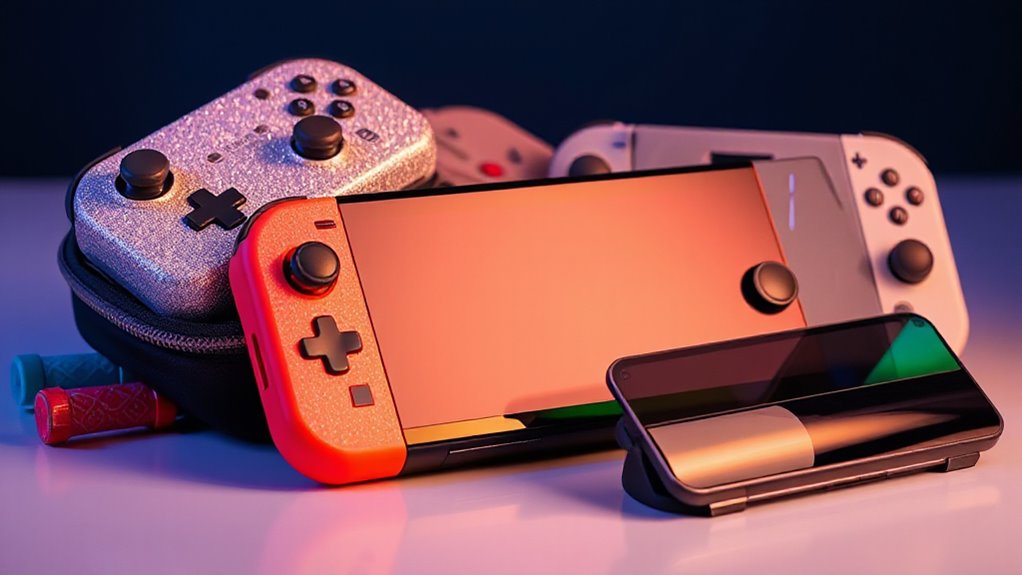
The best Nintendo Switch accessories depend on what you want to improve: comfort, storage, protection, or multiplayer play. I’d put the Nintendo Switch 2 Pro Controller at the top for players who want a dedicated gamepad, while the Samsung microSD Express Card is a standout for expanding Switch 2 storage and the daydayup screen protectors are a practical first add-on. The main tradeoffs are compatibility across Switch generations, portability versus a permanent setup, and whether a bundle’s extra pieces are useful to you. I’ve compared all 14 options by fit, function, and the type of player each serves. Read on for the full breakdown and help matching an accessory to your console and habits.

Get the latest gadgets delivered free with Prime
- Fast, free delivery on millions of items
- Prime Video, Amazon Music and more included
- Member-only deals all year
Complete the kit



Key Takeaways
Controller choice depends on how you play. The Switch 2 Pro Controller is the dedicated-gamepad pick, while Joy-Con pairs and two-controller bundles better suit local multiplayer or spare-controller needs.
Check console compatibility before buying. Some accessories target Switch 2, some fit the original Switch or OLED, and the eXtremeRate back cover explicitly does not fit Switch 2.
Storage is a generation-specific decision. The Samsung microSD Express Card is aimed at Switch 2; confirm your console’s supported card type rather than assuming older storage will serve the same purpose.
Bundles trade simplicity for choice. The 23-piece kit and 24-in-1 sports set gather several add-ons together, but a focused purchase may be a better fit if you only need one accessory.
Setup needs shape the best pick. Portable players may prefer a compact dock or screen protection, while a home setup can make better use of the organizer tower and Joy-Con charging dock.
| Nintendo Joy-Con (L)/(R) Controllers – Pastel Purple/Pastel Green |  | Best for Replacing or Adding Joy-Con | Brand: Nintendo | Compatible console: Nintendo Switch | Controller type: Gamepad | VIEW ON AMAZON | See Our Full Breakdown |
| PowerA Joy-Con Comfort Grip for Nintendo Switch, Black |  | Best for More Comfortable Joy-Con Play | Brand: PowerA | Compatible device: Nintendo Switch | Controller type: Joy-Con grip | VIEW ON AMAZON | See Our Full Breakdown |
| pdobq Portable Docking Station for Nintendo Switch, Switch 2, Switch OLED, and Steam Deck |  | Best Compact Travel Dock | Brand: pdobq | Compatible devices: Nintendo Switch, Nintendo Switch 2, Nintendo Switch OLED, Steam Deck | Nintendo Switch video output: 1080p at 60 Hz | VIEW ON AMAZON | See Our Full Breakdown |
| Nintendo Switch 2 Pro Controller |  | Best Premium Switch 2 Controller | Compatible device: Nintendo Switch 2 | Controller type: Gamepad | Connectivity: Wireless | VIEW ON AMAZON | See Our Full Breakdown |
| daydayup Tempered Glass Screen Protectors for Nintendo Switch, 3 Pack |  | Best Screen-Protection Value | Compatible device: Nintendo Switch (2017) | Material: Tempered glass | Thickness: 0.3 mm | VIEW ON AMAZON | See Our Full Breakdown |
| Nintendo Switch Accessories Bundle, 23-Piece Kit |  | Best All-in-One Starter Kit | Brand: RTop | Compatible device: Nintendo Switch | Included items: Carrying case, 2 tempered glass screen protectors, 2 racing wheels, 2 Joy-Con grips, 4-in-1 Joy-Con charging dock, compact playstand, game card holder, TPU cover, 8 joystick caps, 4 Joy-Con silicone cases | VIEW ON AMAZON | See Our Full Breakdown |
| Lyyes Wireless Controllers for Nintendo Switch, Switch Lite, Switch 2, and PC (2 Pack) |  | Best Two-Player Controller Set | Brand: Lyyes | Compatible devices: Nintendo Switch, Switch Lite, Switch OLED, Switch 2, Windows PC | Package quantity: 2 controllers | VIEW ON AMAZON | See Our Full Breakdown |
| 24-in-1 Sports Accessories Bundle for Nintendo Switch and Switch OLED |  | Best for Motion-Game Variety | Brand: DOBE FOMIS ELECTRONICS | Model: TNS-3153 | Compatibility: Nintendo Switch and Switch OLED Joy-Con controllers | VIEW ON AMAZON | See Our Full Breakdown |
| MOSAHOLL Wrist Straps for Nintendo Switch Joy-Con Controllers, 2-Pack |  | Best Simple Motion-Play Safety Pick | Brand: MOSAHOLL | Compatible devices: Nintendo Switch Joy-Con controllers | Quantity: 2 | VIEW ON AMAZON | See Our Full Breakdown |
| Samsung microSD Express Card, 256GB for Nintendo Switch 2 |  | Best Switch 2 Storage Upgrade | Brand: Samsung | Storage capacity: 256 GB | Compatible device: Nintendo Switch 2 | VIEW ON AMAZON | See Our Full Breakdown |
| eXtremeRate PlayVital Back Cover for Nintendo Switch – Matcha Green (Not for Switch 2) | 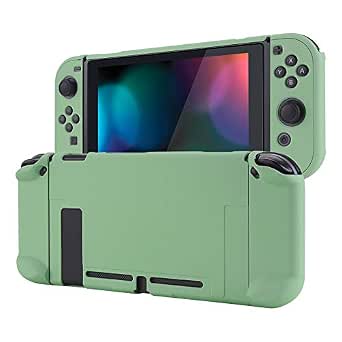 | Best Protective Grip Case | Compatibility: Original Nintendo Switch | Form factor: Back-cover case | Material: Polycarbonate hard shell | VIEW ON AMAZON | See Our Full Breakdown |
| Nintendo Joy-Con 2 Controllers (L/R), Light Purple and Light Green |  | Best Official Switch 2 Multiplayer Controllers | Compatibility: Nintendo Switch 2 | Included: Left and right Joy-Con 2 controllers and two straps | Color: Light Purple / Light Green | VIEW ON AMAZON | See Our Full Breakdown |
| Gammeefy Wireless Switch Controller with Hall Effect Joysticks, RGB Lighting, Turbo and Macro Functions | 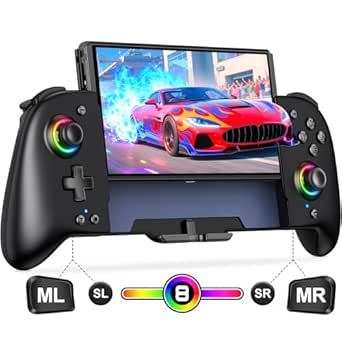 | Best Feature-Rich Third-Party Gamepad | Compatibility: Nintendo Switch and Nintendo Switch OLED | Connectivity: Wireless | Joystick type: Hall Effect | VIEW ON AMAZON | See Our Full Breakdown |
| Nintendo Switch and OLED Organizer Tower with Joy-Con Charging Dock |  | Best Desktop Storage and Charging Station | Compatibility: Nintendo Switch and Nintendo Switch OLED | Joy-Con charging capacity: Up to four | Charging time: About 2 hours | VIEW ON AMAZON | See Our Full Breakdown |
| nintendo switch accessorie | Brand | Weight |
|---|---|---|
| Nintendo Joy-Con | Nintendo | 5.92 ounces |
| PowerA Joy-Con Comfort Grip fo | PowerA | 3.2 ounces |
| pdobq Portable Docking Station | pdobq | — |
| Nintendo Switch 2 Pro Controll | — | 13.12 ounces |
| daydayup Tempered Glass Screen | — | — |
| Nintendo Switch Accessories Bu | RTop | — |
| Lyyes Wireless Controllers for | Lyyes | — |
| 24-in-1 Sports Accessories Bun | DOBE FOMIS ELECTRONICS | — |
| MOSAHOLL Wrist Straps for Nint | MOSAHOLL | 0.03 kg |
| Samsung microSD Express Card | Samsung | — |
| eXtremeRate PlayVital Back Cov | — | 18 g |
| Nintendo Joy-Con 2 Controllers | — | 7.04 ounces |
| Gammeefy Wireless Switch Contr | — | 0.39 kg |
| Nintendo Switch and OLED Organ | — | — |
More Details on Our Top Picks
Nintendo Joy-Con (L)/(R) Controllers – Pastel Purple/Pastel Green
This matching pair is the most direct choice here for players who need additional Nintendo Switch controllers or a replacement set. The pastel purple and green colors make the controllers easy to distinguish, while motion controls and HD rumble preserve the features used by compatible games. Play with both Joy-Con together or share them between two players; the included wrist straps add a more secure fit for motion-heavy play. Unlike the PowerA Joy-Con Comfort Grip, this set supplies the controllers themselves, but it does not add an ergonomic grip for longer sessions. Its compatibility is listed for Nintendo Switch, so buyers with another console model should verify fit before ordering.
Pros:- Includes one left and one right Joy-Con for a complete pair
- Motion controls and HD rumble support compatible games
- Can be used together or shared between players
- Two wrist straps are included
Cons:- No comfort grip is included, unlike the separate PowerA Joy-Con Comfort Grip
- Compatibility is listed for Nintendo Switch only
- Battery-powered controllers require charging between play sessions
Best for: Nintendo Switch owners who need a complete extra Joy-Con pair for multiplayer or replacement use.
Not ideal for: Players seeking a more ergonomic full-size controller, or owners of a console model whose compatibility is not specified.
- Brand:Nintendo
- Compatible console:Nintendo Switch
- Controller type:Gamepad
- Connectivity:Bluetooth
- Features:Motion controls, HD rumble
- Power source:Battery powered
- Included:Pastel purple left Joy-Con, pastel green right Joy-Con, two black wrist straps
- Weight:5.92 ounces
Our verdict“Choose this set when you need genuine Joy-Con for Nintendo Switch multiplayer or replacement, and skip it if ergonomic grip comfort is your main priority.”
PowerA Joy-Con Comfort Grip for Nintendo Switch, Black
The PowerA grip is a simple comfort upgrade for players who already own Joy-Con and prefer holding both as one controller. Its rubber grips give hands more to hold during longer sessions, while the slide-in rails keep the Joy-Con in place and leave player indicator lights visible. Compared with the pastel Nintendo Joy-Con set, this is a smaller purchase in purpose: it improves how existing controllers feel but does not add a second pair for multiplayer. The lightweight body is easy to handle, though it still relies on Joy-Con rather than offering a dedicated gamepad’s separate shape and controls. The main limitation is straightforward: Joy-Con are not included, and the grip is listed for Nintendo Switch Joy-Con only.
Pros:- Rubber grips add a more comfortable hold for longer sessions
- Slide-in rails secure the Joy-Con
- Player indicator lights remain visible
- Lightweight design weighs 3.2 ounces
Cons:- Joy-Con controllers are sold separately
- Compatible only with Nintendo Switch Joy-Con controllers
- Does not provide the separate shape or controls of a dedicated gamepad
Best for: Nintendo Switch owners who already have Joy-Con and want a lightweight, more secure grip for handheld-style controller play.
Not ideal for: Shoppers who need controllers included, want a standalone wireless gamepad, or use a console not listed as compatible.
- Brand:PowerA
- Compatible device:Nintendo Switch
- Controller type:Joy-Con grip
- Connectivity:USB
- Color:Black
- Weight:3.2 ounces
- Dimensions:6.75 x 2.25 x 5 inches
- Included components:Comfort Grip
- Warranty:Two-year limited warranty
Our verdict“Pick the PowerA grip if you already own Joy-Con and want a more comfortable combined hold; choose the Nintendo pastel set instead if you need controllers too.”
pdobq Portable Docking Station for Nintendo Switch, Switch 2, Switch OLED, and Steam Deck
This adapter suits Switch owners who want to connect a compatible console to a TV or monitor without carrying a full-size dock. Its three-port layout combines HDMI, USB 3.0, and USB-C PD charging, so display output and charging can run while the console is connected. For Nintendo Switch, output is 1080p at 60 Hz; the up-to-4K claim applies to a compatible Steam Deck setup, not Switch. That distinction makes this less of a resolution upgrade than the built-in Nintendo Switch 2 Pro Controller’s features are an upgrade to play, but it offers a different kind of convenience: travel display connectivity. It is not for Switch Lite, and buyers need to supply a suitable power adapter and HDMI cable.
Pros:- Compact adapter is suited to travel
- Supports charging while connected to a display
- Works with several listed Switch models and Steam Deck
- Provides HDMI 2.0, USB 3.0, and USB-C PD charging ports
Cons:- Not compatible with Nintendo Switch Lite
- Power adapter and HDMI cable are required but not included in the listed contents
- Nintendo Switch output is limited to 1080p at 60 Hz
Best for: Travelers with a compatible Nintendo Switch, Switch 2, Switch OLED, or Steam Deck who want a compact way to connect to an external display.
Not ideal for: Nintendo Switch Lite owners, or buyers who need a complete dock kit with power adapter and HDMI cable included.
- Brand:pdobq
- Compatible devices:Nintendo Switch, Nintendo Switch 2, Nintendo Switch OLED, Steam Deck
- Nintendo Switch video output:1080p at 60 Hz
- Steam Deck video output:Up to 4K at 60 Hz with compatible setup
- Ports:HDMI 2.0, USB 3.0, USB-C PD charging
- Total ports:3
- Input voltage:15 V DC
- Warranty:1 year
Our verdict“Choose this adapter for compact TV connectivity across compatible devices, but skip it if you need a Lite-compatible or ready-to-use dock package.”
Nintendo Switch 2 Pro Controller
This is the feature-rich controller in the group, built specifically for Nintendo Switch 2 rather than as an accessory for the original Switch. Alongside motion controls and HD Rumble 2, it adds amiibo functionality, a Capture Button, programmable GL/GR buttons, a C Button for GameChat, and a 3.5 mm audio jack. Those additions make it a better fit than the PowerA Joy-Con Comfort Grip for players who want a dedicated gamepad with extra controls, not just a more comfortable way to hold Joy-Con. The tradeoff is platform focus: compatibility is listed for Switch 2 only, and GameChat requires internet, a Nintendo Account, and Nintendo Switch Online membership. Amiibo figures are also separate.
Pros:- HD Rumble 2 and motion controls support compatible games
- Programmable GL/GR buttons add control options
- Built-in amiibo functionality
- 3.5 mm audio jack and Capture Button are included
Cons:- Compatible device is listed as Nintendo Switch 2 only
- Amiibo figures are not included
- GameChat requires internet, a Nintendo Account, and Nintendo Switch Online membership
Best for: Nintendo Switch 2 players who want a dedicated wireless gamepad with programmable buttons, amiibo functionality, and a headphone jack.
Not ideal for: Original Nintendo Switch owners or players who do not need the Switch 2-specific controls and features.
- Compatible device:Nintendo Switch 2
- Controller type:Gamepad
- Connectivity:Wireless
- Buttons:18
- Features:HD Rumble 2, motion controls, amiibo functionality, Capture Button, C Button, programmable GL/GR buttons, 3.5 mm audio jack
- Weight:13.12 ounces
- Dimensions:4.6 x 7 x 2.7 inches
- Warranty:1 year
Our verdict“Choose this controller if you own a Switch 2 and want its extra buttons and audio jack, but not if you need an accessory for the original Switch.”
daydayup Tempered Glass Screen Protectors for Nintendo Switch, 3 Pack
For owners of the 2017 Nintendo Switch, this three-pack offers backup coverage as well as a glass layer against scratches and fingerprints. The 0.3 mm thickness and stated 99.9% transparency are intended to preserve clear viewing and touchscreen response, while the oleophobic coating helps limit fingerprints. Compared with the pdobq docking adapter, this is a simpler everyday-protection accessory: it does not add display connectivity, but it addresses wear on the console screen directly. The pack includes cleaning supplies and an installation guide, which can help with setup, though glass still needs careful alignment during application. Compatibility is specified only for the 2017 model, and the glossy finish may reflect ambient light.
Pros:- Three protectors provide spares for later replacement
- 0.3 mm tempered glass is designed to preserve touchscreen sensitivity
- 99.9% transparency supports clear viewing
- Includes a microfiber cloth, wet wipes, and installation guide
Cons:- Compatibility is specified for the 2017 Nintendo Switch only
- Glossy finish may show reflections
- Glass application requires careful alignment
Best for: Owners of the 2017 Nintendo Switch who want multiple glass protectors and basic cleaning supplies in one pack.
Not ideal for: Switch 2, Switch OLED, or Switch Lite owners unless they confirm fit, and players who prefer a non-glossy screen finish.
- Compatible device:Nintendo Switch (2017)
- Material:Tempered glass
- Thickness:0.3 mm
- Hardness:9H
- Transparency:99.9%
- Screen size:6.2 inches
- Pack count:3
- Included accessories:Microfiber cleaning cloth, wet wipes, installation guide
Our verdict“Choose this pack for screen protection on the 2017 Switch, but verify model fit before buying for any other console.”
Nintendo Switch Accessories Bundle, 23-Piece Kit
This kit is the broadest starting point in this group: it pairs a carrying case and two screen protectors with play, storage, and controller accessories. That makes it more useful for a new Switch owner outfitting several needs at once than the MOSAHOLL Wrist Straps, which address only motion-game security. The foldable stand’s three viewing angles can help when playing away from a TV, while the charging dock, Joy-Con grips, and racing wheels add variety at home. The tradeoff is that a bundle spreads its value across many pieces, so buyers seeking one specific upgrade may prefer a dedicated accessory. It fits the original Nintendo Switch; the listed compatibility does not include Switch Lite or Switch 2, and the console, controllers, and games are sold separately.
Pros:- Combines a carrying case and two tempered glass screen protectors for everyday protection
- Foldable playstand adjusts to three viewing angles
- Includes Joy-Con grips, silicone cases, joystick caps, and racing wheels
- Charging dock and game card holder add storage and charging options
Cons:- Console, Joy-Con controllers, and games are not included
- The listed compatibility is for Nintendo Switch and does not specify Switch Lite or Switch 2
- A broad assortment may be less useful than a dedicated accessory for buyers with a specific need
Best for: New original Switch owners who want protection, tabletop play, and several controller accessories in one purchase
Not ideal for: Switch Lite or Switch 2 owners, or buyers who want one specialized accessory rather than a mixed kit
- Brand:RTop
- Compatible device:Nintendo Switch
- Included items:Carrying case, 2 tempered glass screen protectors, 2 racing wheels, 2 Joy-Con grips, 4-in-1 Joy-Con charging dock, compact playstand, game card holder, TPU cover, 8 joystick caps, 4 Joy-Con silicone cases
- Stand viewing angles:3
- Screen protectors:2 tempered glass protectors
- Charging accessory:4-in-1 Joy-Con charging dock
Our verdict“Choose this kit if you have the original Switch and want a wide mix of protection and play accessories rather than a single targeted upgrade.”
Lyyes Wireless Controllers for Nintendo Switch, Switch Lite, Switch 2, and PC (2 Pack)
For households that need two extra gamepads, this Lyyes set addresses a different need than the 23-Piece Accessories Bundle: it supplies two wireless controllers, not a spread of cases, grips, and storage pieces. The stated 8–10-hour battery life supports longer sessions between charges, and gyro controls and motion sensing broaden its use beyond standard button play. Adjustable turbo settings offer another play style, with three listed firing speeds. Compatibility covers several Switch models and Windows PC, though the supplied connection details distinguish wireless use from a USB cable connection with PC. The compromises are a 2–3-hour charging time and a short three-month warranty. Buyers who want Nintendo-branded Joy-Con or a single full-size controller, such as the Switch 2 Pro Controller, should compare those options instead.
Pros:- Two controllers support local multiplayer without buying a second gamepad separately
- Listed compatibility includes Switch, Switch Lite, Switch OLED, Switch 2, and Windows PC
- 8–10 hours of stated play time per charge
- Motion sensing, gyro controls, and adjustable turbo settings add control options
Cons:- A full charge takes 2–3 hours
- Warranty is limited to three months
- PC connection is listed as USB cable, unlike the wireless console connection
Best for: Switch households or PC players who need two wireless gamepads for local multiplayer
Not ideal for: Buyers who want Nintendo-branded controllers, a longer stated warranty, or a single premium controller
- Brand:Lyyes
- Compatible devices:Nintendo Switch, Switch Lite, Switch OLED, Switch 2, Windows PC
- Package quantity:2 controllers
- Connectivity:Wireless; USB cable connection with PC
- Battery capacity:500 mAh per controller
- Battery life:8–10 hours
- Charging time:2–3 hours
- Turbo speeds:5, 12, or 20 shots per second
- Warranty:3 months
Our verdict“Pick this pair when two compatible wireless gamepads matter more than a longer warranty or a first-party controller.”
24-in-1 Sports Accessories Bundle for Nintendo Switch and Switch OLED
This bundle is for players who want motion-game props for a group, not a general-purpose Switch upgrade. It supports two-player play and includes attachments for tennis, golf, ping-pong, baseball, fishing, basketball, boxing, and racing. Compared with the Lyyes two-controller set, it adds physical game-themed accessories rather than extra gamepads; compared with the RTop kit, its pieces focus much more heavily on sports play. Wrist and leg straps, non-slip pads, and a storage bag help keep the assortment together and controllers secured during active games. The tradeoff is narrow usefulness: these attachments only help with compatible games and can take up storage space. The light-up sword needs batteries that are not included, and its blade cannot be removed from the hilt once inserted.
Pros:- Includes themed attachments for a wide range of sports and motion games
- Supports two-player use with paired sports accessories
- Storage bag keeps the assortment together between sessions
- Wrist and leg straps and non-slip pads help secure controllers during movement
Cons:- Batteries for the light-up sword are not included
- The sword blade cannot be removed after insertion into the hilt
- Compatibility is listed for Nintendo Switch and Switch OLED Joy-Con controllers, not Switch Lite or Switch 2
Best for: Families and friends who regularly play compatible motion-based sports games together on Switch or Switch OLED
Not ideal for: Solo players, owners focused on standard controller games, or anyone seeking accessories for Switch Lite or Switch 2
- Brand:DOBE FOMIS ELECTRONICS
- Model:TNS-3153
- Compatibility:Nintendo Switch and Switch OLED Joy-Con controllers
- Player support:2 players
- Included attachments:2 steering wheels, 2 golf clubs, 2 tennis rackets, 2 ping-pong bats, 2 baseball bats, 1 fishing rod
- Additional items:2 basketball/boxing straps, 2 Joy-Con grips, 4 wrist/leg straps, 2 LS, 2 G, 1 storage bag
- Light-up sword battery:Batteries not included
Our verdict“Choose this bundle if motion-based sports games are a regular group activity; skip it if you mainly play with standard controllers.”
MOSAHOLL Wrist Straps for Nintendo Switch Joy-Con Controllers, 2-Pack
These straps make sense for a narrow, practical job: keeping Joy-Con secured to players’ wrists during motion games. Unlike the 24-in-1 Sports Accessories Bundle, they do not add game-specific props, so they are easier to store and more direct if wrist security is the only missing piece. The design also makes the SL and SR buttons easier to press, which can help when a game uses the Joy-Con sideways. The two-pack suits a pair of players, while the snap fastener and polyester, nylon, and polyurethane construction keep the design straightforward. That simplicity comes with limits: these straps fit Joy-Con controllers only, and they do not add charging, grip comfort, or protection for the console. They are a focused supplement, not a substitute for a controller or grip.
Pros:- Adds wrist security during motion-based play
- Designed to make SL and SR buttons easier to press
- Two straps accommodate two Joy-Con controllers
- Wear-resistant polyester, nylon, and polyurethane construction
Cons:- Compatible with Joy-Con controllers only
- Does not add grip support, charging, or console protection
- Offers fewer uses than the motion-game assortment in the 24-in-1 sports bundle
Best for: Joy-Con owners who play motion-controlled games and want a simple wrist-security accessory for one or two players
Not ideal for: Switch Lite owners or buyers looking for added grip, controller protection, charging, or accessories beyond wrist straps
- Brand:MOSAHOLL
- Compatible devices:Nintendo Switch Joy-Con controllers
- Quantity:2
- Materials:Polyester, nylon, polyurethane
- Fastener:Snap
- Weight:0.03 kg
- Color:Black
Our verdict“Get this two-pack if wrist security and easier SL/SR access are your only motion-play needs.”
Samsung microSD Express Card, 256GB for Nintendo Switch 2
This card is the most targeted pick in the group: it adds 256GB of storage for Nintendo Switch 2, rather than changing how the console is held or played. Its defining detail is the microSD Express standard, which Switch 2 requires; a standard microSD card used with the original Switch is not a suitable substitute. That makes this a better fit for Switch 2 owners than the RTop bundle, whose listed compatibility is limited to the original Switch, or the Lyyes controllers, which address play controls rather than storage. The main tradeoff is strict compatibility: it is designed for Switch 2 and does not serve as a storage upgrade for the original Switch. The card is also sold separately from the console, and buyers should confirm their device and card standard before purchase.
Pros:- Adds 256GB of storage for Nintendo Switch 2
- Uses the microSD Express standard required by Switch 2
- Clear, model-specific compatibility helps distinguish it from original Switch memory cards
- Includes a one-year manufacturer warranty
Cons:- Not compatible with the original Nintendo Switch
- Provides storage only and does not add controller, protection, or charging features
- Sold separately from the console
Best for: Nintendo Switch 2 owners who need additional game storage and have confirmed their console uses microSD Express
Not ideal for: Original Nintendo Switch owners or buyers seeking a general-purpose accessory compatible across Switch generations
- Brand:Samsung
- Storage capacity:256 GB
- Compatible device:Nintendo Switch 2
- Card standard:microSD Express
- Item weight:9.07 g
- Warranty:1 year manufacturer
- Color:Red
Our verdict“Choose this card for extra Switch 2 storage only after confirming your console requires and supports microSD Express.”
eXtremeRate PlayVital Back Cover for Nintendo Switch – Matcha Green (Not for Switch 2)
The PlayVital back cover is a practical pick for original Switch owners who want more grip and scratch protection without a bulky full-shell enclosure. Its lightweight polycarbonate construction and anti-slip finish can make handheld play feel steadier, while the precise cutouts keep ports and removable Joy-Cons accessible. Compared with the daydayup Tempered Glass Screen Protectors, this case protects the console’s back and sides rather than its display, so the two address different risks. The tradeoff is fit: although it works with many docks, tighter models or a thick screen protector may interfere with docking. It also fits neither the Switch OLED nor Switch 2, making this a targeted add-on rather than a case for mixed-console households.
Pros:- Cutouts leave ports and removable Joy-Cons accessible.
- Polycarbonate shell helps shield the back from scratches, dust, and impacts.
- Anti-slip texture and low weight suit extended handheld sessions.
- Compatible with most Switch docks.
Cons:- May fit poorly in tighter docks, particularly alongside a thick screen protector.
- Does not fit Nintendo Switch OLED or Switch 2.
Best for: Original Nintendo Switch owners who want a lightweight, grippy back shell for handheld play and everyday scratch protection.
Not ideal for: Switch OLED or Switch 2 owners, and players who rely on a tight-fitting dock or use a thick screen protector.
- Compatibility:Original Nintendo Switch
- Form factor:Back-cover case
- Material:Polycarbonate hard shell
- Color:Matcha Green
- Weight:18 g
- Dimensions:6.1 x 4.53 x 1.97 inches
- Features:Anti-slip finish, lightweight, scratch-resistant protection
Our verdict“Choose this for a grippier, protected original Switch in handheld mode, but check dock clearance before buying.”
Nintendo Joy-Con 2 Controllers (L/R), Light Purple and Light Green
This official Joy-Con 2 pair is the clear choice for Switch 2 owners who need an additional set for local multiplayer or replacement controllers. The package includes both controllers and straps, while HD rumble, motion controls, and compatible-game mouse controls give them more versatility than a basic spare pair. The C Button also provides access to GameChat features where supported. Unlike the Gammeefy Wireless Switch Controller, these attach as Joy-Cons and are built specifically for Switch 2 rather than offering a separate, full-size gamepad for original Switch and OLED owners. That generation lock is the main drawback: they will not serve as a cross-generation accessory. Some online features also require internet access, a Nintendo Account, and Nintendo Switch Online membership.
Pros:- Includes both left and right controllers plus two straps.
- Supports motion controls and HD rumble.
- Mouse controls work in compatible games.
- C Button offers access to GameChat features.
Cons:- Compatible only with Nintendo Switch 2.
- Some online features require internet, a Nintendo Account, and Nintendo Switch Online membership.
Best for: Switch 2 households that want a matching extra pair for local multiplayer, motion-controlled games, or compatible mouse-control titles.
Not ideal for: Original Switch or Switch OLED owners, and buyers seeking one controller that works across several console generations.
- Compatibility:Nintendo Switch 2
- Included:Left and right Joy-Con 2 controllers and two straps
- Color:Light Purple / Light Green
- Controls:Motion controls and mouse controls in compatible games
- Features:HD rumble and C Button for GameChat access
- Weight:7.04 ounces
- Batteries:Two lithium-ion batteries included
Our verdict“Pick this official pair for Switch 2 multiplayer and its supported control features, but skip it if you need controllers for an older Switch.”
Gammeefy Wireless Switch Controller with Hall Effect Joysticks, RGB Lighting, Turbo and Macro Functions
The Gammeefy wireless gamepad packs customization into a conventional controller for Switch and Switch OLED players who prefer a larger grip to Joy-Cons. Its Hall Effect joysticks use magnetic sensing, while programmable macros, turbo settings, adjustable vibration, and eight lighting colors let players tailor the controls and look. Compared with the Nintendo Joy-Con 2 Controllers, it offers a full-size gamepad shape and compatibility with older Switch models, but it does not replace their detachable Joy-Con format or Switch 2 support. The stated battery life is up to 10 hours with lighting on, so frequent players may need to charge it between longer sessions. Pairing also requires an initial button-press process, a small setup step before play.
Pros:- Hall Effect joysticks provide an alternative to conventional stick sensing.
- Macros and three turbo speeds allow control customization.
- Six-axis motion control and three vibration levels support varied play styles.
- Wireless design includes a console wake-up function.
Cons:- Compatible with Switch and Switch OLED, but not Switch 2.
- Battery life is specified as up to 10 hours with lighting on.
- Requires an initial button-press pairing process.
Best for: Switch and Switch OLED players who want a full-size wireless pad with customizable macros, turbo, and Hall Effect sticks.
Not ideal for: Switch 2 owners, players who need detachable Joy-Cons, or anyone who wants a controller with a simpler pairing process and longer stated battery life.
- Compatibility:Nintendo Switch and Nintendo Switch OLED
- Connectivity:Wireless
- Joystick type:Hall Effect
- Battery:1,000 mAh; up to 10 hours with lighting on
- Lighting:Eight colors
- Motion control:Six-axis gyro
- Turbo settings:5, 12, or 20 shots per second
- Vibration:Three adjustable levels
- Weight:0.39 kg
Our verdict“Choose this for customizable full-size controls on Switch or OLED, not for Switch 2 or detachable Joy-Con play.”
Nintendo Switch and OLED Organizer Tower with Joy-Con Charging Dock
This organizer tower suits players who want their charging and game storage in one place rather than a collection of loose accessories. It holds up to four Joy-Cons, two Pro controllers, and 28 game cards or cases, combining everyday organization with a charging dock that has status lights. Compared with the MOSAHOLL Wrist Straps, which add a small handheld-play accessory, this tower takes up a dedicated spot near the console but gives a household a more orderly home for controllers and games. The main limitation is what it does not include: the Switch dock must be supplied separately. Also, despite the title, its charging capacity is four Joy-Cons, not six, so buyers with larger controller collections will need another charging option.
Pros:- Charges up to four Joy-Cons with red and green status lights.
- Stores up to 28 game cards and cases.
- Provides storage for two Pro controllers.
- Can draw power from several sources, including a console, wall adapter, hub, or PC.
Cons:- The Switch dock is not included.
- Charges four Joy-Cons, despite the title mentioning six.
- Corded setup requires a dedicated spot near a power source.
Best for: Switch and Switch OLED households with several Joy-Cons and physical games who want a single desktop storage and charging station.
Not ideal for: Players with limited shelf space, Switch 2 owners, or anyone expecting the Switch dock or charging for six Joy-Cons to be included.
- Compatibility:Nintendo Switch and Nintendo Switch OLED
- Joy-Con charging capacity:Up to four
- Charging time:About 2 hours
- Game storage:28 slots: 12 game cards and 16 game cases
- Controller storage:Two Pro controllers
- Input:5 V, 1.5 A
- Power:18 W, corded electric
- Connector:Barrel connector
Our verdict“Buy this tower if you need organized storage and four Joy-Con charging positions, and already have a compatible Switch dock.”

How We Picked
I compared these 14 Nintendo Switch accessories by the problem each one solves: control, comfort, protection, storage, charging, portability, or group play. The main criteria were console compatibility, ease of use, practical value, build and maintenance demands, and whether an accessory serves a clear purpose beyond adding pieces to a bundle. I also distinguished products that can work across multiple devices from those designed for a specific Switch generation.
The ranking favors accessories with a clear role and a strong fit for a common need, rather than treating every item as equally useful. Dedicated controllers and useful essentials rank ahead of niche add-ons for most players, while bundles, decorative parts, and home-station gear make more sense for specific setups. Since needs differ, the roundup also calls out tradeoffs: a broad compatibility claim deserves checking, a multi-piece kit can include items you won’t use, and a stationary accessory may be inconvenient for travel.
Factors to Consider When Choosing Nintendo Switch Accessories
Before choosing among Nintendo Switch accessories, start with your console and the way you play. A small mismatch—such as buying a part for the wrong generation or choosing a home dock for a travel setup—can matter more than extra features. These checks help narrow the options without paying for pieces you won’t use.
Match the accessory to your Switch generation
Do not assume that an accessory labeled for Switch works with Switch 2, OLED, and Lite in the same way. Console dimensions, connection standards, and supported features can differ, so check the exact compatibility statement for your model before ordering. This matters especially for cases, back covers, docks, controllers, and memory cards, where a physical or technical mismatch can make the product unusable. The eXtremeRate back cover in this roundup specifically excludes Switch 2, while the Samsung card is identified for Switch 2. Multi-device claims can be useful, but they are not a substitute for checking your own console’s requirements. If you own more than one model, prioritize the accessory you will use most often rather than assuming one purchase will serve every device.
Choose controllers by game and player count
Think about whether you need a full-size controller for solo play, extra Joy-Con for shared play, or a pair of third-party controllers for guests. These options solve different problems, and buying a second controller may add less value if your games work well with the controllers you already own. For games that depend on motion or compact split controls, confirm that a replacement or alternative supports the functions you use. Features such as Hall Effect sticks, turbo, or macros can appeal to players with specific preferences, but they may add complexity that casual players do not need. Also check how the controller charges and connects before choosing it as your everyday option. A comfortable fit and dependable compatibility generally matter more than a long feature list.
Separate must-have protection from optional extras
Screen protection is a simple purchase, but its fit and installation method still matter. Dust trapped under a protector can spoil the result, so consider whether you have a clean workspace and whether the pack includes enough protectors for a replacement. A multi-piece accessory bundle may appear convenient, yet several included items can go unused if they do not match your games or routine. List the specific problems you want to solve before choosing a kit: protection, grip, storage, or sports-game attachments are not interchangeable needs. Compare the bundle’s useful pieces with buying one focused accessory. That small check helps avoid clutter and makes the value decision more personal.
Balance portability against a permanent home setup
Portable docks and compact accessories can be useful when you move between screens or travel, but the connection and power requirements still need to suit your setup. A dock that works with several devices can offer flexibility, though broad compatibility may come with more setup checks than a dedicated home station. By contrast, an organizer tower with a charging dock can keep controllers together in one place, but it takes up room and is less useful if you regularly pack your console away. Consider where the accessory will live and how often you will carry it. If you play in more than one room, fewer loose parts can matter as much as compact size. For a fixed TV setup, tidy storage and charging may be more valuable than travel convenience.
Spend on the feature you will use repeatedly
Premium features pay off when they solve a recurring annoyance, not simply because they sound advanced. A dedicated controller can make long sessions more comfortable, while expanded storage can reduce the need to manage what is installed. RGB lighting and programmable controls may be appealing to some players, but they are secondary if basic comfort or compatibility is still uncertain. For a first accessory, a protective or practical add-on may be a safer fit than a specialized controller or a large bundle. For regular play, prioritize durable construction, straightforward upkeep, and functions you will reach for often. Decide what you want to improve first, then compare options within that need.
Frequently Asked Questions
Can I use the same accessories with the original Switch and Switch 2?
Some accessories are marketed for multiple Switch generations, but compatibility is product-specific rather than automatic. Physical accessories such as back covers and grips need to match the console’s dimensions, while controllers and docks may depend on supported connections and functions. This roundup includes both cross-generation claims and clearly generation-specific products. Check the listing for your exact console model, including OLED or Lite where relevant. If you own two generations, do not assume a single accessory will serve both unless the manufacturer names both models.
Should I buy a Pro Controller or another pair of Joy-Con?
Choose a dedicated controller if you mostly play solo on a TV and want a traditional gamepad for longer sessions. Another Joy-Con pair is more useful when you often play local multiplayer or need replacements for the detachable controls. The two choices are not direct substitutes: Joy-Con support split play and portable use, while a Pro-style controller is intended for a more conventional grip. Check which games and control functions matter to you before deciding. If you rarely share the console, a second pair may sit unused; if guests play often, one dedicated controller may not solve the player-count problem.
Is a multi-piece accessory bundle a good first purchase?
A bundle can be a convenient start when it combines several things you already expect to use, but the number of pieces alone does not make it a better fit. Check whether the included items suit your console model, games, and storage habits. A sports attachment set, for example, serves a different purpose from a general kit with protection and carrying accessories. If you only need a screen protector or controller, a focused purchase may avoid extra pieces that take up space. For a first-time owner, identify the immediate need before buying a kit for possible future use.
Does a Switch 2 microSD Express card work the same way as older Switch storage cards?
Do not assume that a card intended for Switch 2 is interchangeable with older memory cards or that an older card will meet Switch 2 requirements. Storage support can differ by console generation, so confirm the card type and capacity your specific device accepts. The Samsung card in this roundup is identified as a microSD Express card for Switch 2. Before buying, check the console’s current storage guidance and how you plan to use the card. This avoids choosing based on capacity alone when the format may be the deciding factor.
What should I prioritize if I travel with my Switch often?
For regular travel, prioritize compact protection, secure storage, and accessories that are easy to pack without loose parts. A screen protector can help guard the display, while a portable dock may suit players who connect to different screens away from home. A large organizer tower is better suited to a fixed play area and adds little on a trip. Check that any dock or controller is compatible with your console and that you can carry its cables or charging pieces. Avoid packing a large bundle unless its specific accessories support the games you plan to play.
Conclusion
For most players seeking a dedicated gamepad, I’d choose the Nintendo Switch 2 Pro Controller as the best overall pick in this lineup, provided it matches their console and play setup. The daydayup screen protectors are the best value for a straightforward protection need, while the Samsung microSD Express Card is the premium-leaning choice for Switch 2 owners who need compatible storage expansion. Beginners can start with the screen protector or a focused accessory that solves an immediate problem rather than buying a large bundle. For multiplayer, compare the Joy-Con pairs and two-controller options; for a tidy home setup, look at the organizer tower, and for travel, favor portable gear. Match the purchase to your console generation first, then choose the accessory that addresses your most frequent frustration.