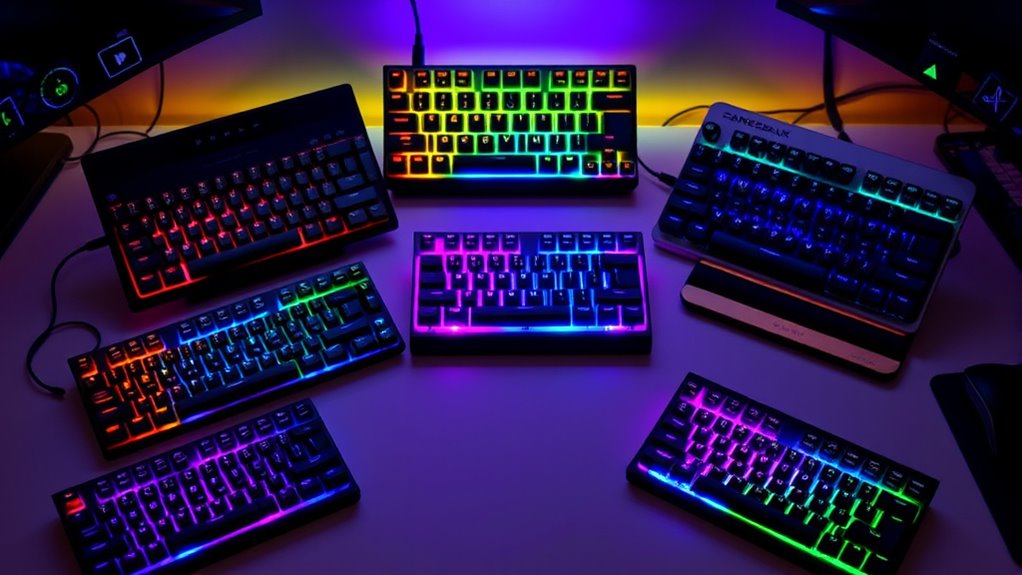

If you’re looking to boost your typing or gaming in 2025, I recommend checking out the top mechanical keyboards that combine durability, customization, and sleek designs. From the HyperX Alloy Origins with high-end switches to wireless models like the AU75 or Logitech MX, there’s something for everyone. These keyboards feature customizable RGB lighting, versatile connectivity, and sturdy builds. Keep exploring, and you’ll discover which models truly unlock your full keyboard potential.
Key Takeaways
- Top mechanical keyboards in 2025 feature premium materials like aluminum bodies and high-quality PBT keycaps for durability and sleek design.
- They offer a variety of switch types, including hot-swappable options, to customize responsiveness and typing feel.
- Advanced lighting and customization options, such as RGB backlighting and onboard profiles, enhance user experience and aesthetics.
- Wireless connectivity via Bluetooth and 2.4GHz ensures versatile, low-latency use across multiple devices.
- Additional features like sound absorption, macro support, and multimedia controls boost productivity and gaming performance.
HyperX Alloy Origins Mechanical Gaming Keyboard


If you’re looking for a compact, durable gaming keyboard that delivers top-tier performance, the HyperX Alloy Origins is an excellent choice. Its full aluminum body guarantees stability during intense gaming sessions, while the custom HyperX switches offer 80 million keystrokes for long-lasting reliability. The RGB backlit keys support dynamic lighting effects, enhancing your setup’s visual appeal. With onboard memory for three profiles, plus advanced customization via HyperX NGENUITY software, you can personalize lighting, macros, and layers. The detachable USB-C cable and adjustable tilt levels make it versatile and comfortable. Overall, it’s a high-performance keyboard built for gamers who demand durability and precision.
Best For: gamers and power users seeking a durable, high-performance mechanical keyboard with customizable lighting and profiles.
Pros:
- Sturdy full aluminum body for enhanced stability and durability
- Custom HyperX switches rated for 80 million keystrokes for long-lasting reliability
- Fully customizable RGB backlit keys and onboard memory for three profiles
Cons:
- Slightly heavier than some compact keyboards, which may reduce portability
- Limited to Windows OS, lacking native macOS compatibility
- Absence of dedicated media controls or wrist rest in the base model
AU75 Wireless Mechanical Keyboard with RGB Backlit

The AU75 Wireless Mechanical Keyboard with RGB Backlit stands out as an ideal choice for gamers, programmers, and content creators who demand versatility and customization. Its compact 75% layout and multi-device connectivity via Bluetooth 5.0, 2.4GHz, or USB-C make switching seamless across devices like Windows, Mac, tablets, or consoles. The long-lasting 4000mAh battery ensures extended use, whether working or gaming. With hot-swappable switches supporting 3/5-pin configs and pre-lubed linear switches, it offers smooth, personalized typing. The north-facing RGB LEDs with 16.8 million colors and adjustable effects add a vibrant, customizable touch. Built with durable PBT keycaps and an ergonomic design, it’s crafted for comfort and longevity.
Best For: gamers, programmers, and content creators seeking a versatile, customizable wireless mechanical keyboard with RGB lighting.
Pros:
- Supports multi-device connectivity via Bluetooth 5.0, 2.4GHz, and USB-C wired modes for seamless switching.
- Hot-swappable switches with pre-lubed linear options allow personalized typing feel without soldering.
- Durable PBT keycaps and ergonomic design ensure comfort and longevity during extended use.
Cons:
- Slightly larger footprint than smaller compact keyboards, which may not suit minimal desk setups.
- RGB lighting customization might require some familiarity with shortcuts or software.
- Battery life, while long-lasting, could be affected by extensive RGB lighting and frequent use.
Logitech G413 SE Mechanical Gaming Keyboard

For gamers seeking durability and reliable performance, the Logitech G413 SE Mechanical Gaming Keyboard stands out as an excellent choice. It features sturdy PBT keycaps that resist heat and wear, along with a sleek black-brushed aluminum top case that enhances its premium look. The tactile mechanical switches deliver precise feedback, and the 6-key rollover ensures accurate input during intense gameplay. With dedicated media controls and white LED backlighting, it offers both convenience and style. Its robust build, minimal flex, and wired connection guarantee consistent performance. Compatible with Windows and macOS, the G413 SE is perfect for gamers who demand durability and high-quality performance.
Best For: gamers and power users seeking a durable, high-performance mechanical keyboard with reliable response and premium build quality.
Pros:
- Durable PBT keycaps resistant to heat and wear
- Tactile mechanical switches for precise feedback
- Compact design with dedicated media controls and white LED backlighting
Cons:
- Wired connection limits portability compared to wireless options
- No dedicated wrist rest included for extended gaming sessions
- Limited customization options for key functions and lighting
RK Royal Kludge S98 Mechanical Keyboard with Smart Display and Knob

The RK Royal Kludge S98 Mechanical Keyboard stands out for its innovative smart display and versatile controls, making it an ideal choice for users who prioritize customization and real-time feedback. Its compact screen shows custom GIFs, date, connection mode, battery status, and layout, giving instant info at a glance. The built-in knob allows easy adjustments for volume, backlit brightness, RGB mode, and more with simple twists or clicks. Supporting Bluetooth 5.0, 2.4Ghz, and USB-C wired connections, it’s versatile and reliable. The top-mount design, sound-absorbing padding, and hot-swappable switches ensure a satisfying, quiet typing experience. Plus, the durable keycaps and software support boost its appeal for gamers and typists alike.
Best For: users seeking a customizable, feature-rich mechanical keyboard with real-time feedback and versatile connectivity options for gaming, typing, or professional use.
Pros:
- Innovative smart display with customizable GIFs and real-time info for enhanced user interaction
- Versatile connectivity supporting Bluetooth 5.0, 2.4Ghz, and wired USB-C for flexible setup options
- Sound-absorbing design and hot-swappable switches for a quiet, personalized typing experience
Cons:
- Compact 98-key layout may lack dedicated function or navigation keys for some users
- Advanced features like software customization might require additional setup time
- Premium build and features could lead to a higher price point compared to standard keyboards
Logitech MX Mechanical Wireless Keyboard

Looking for a wireless keyboard that combines the satisfying feel of mechanical switches with smart features? The Logitech MX Mechanical Wireless Keyboard delivers just that. It has a full-size layout with low-profile mechanical switches—Tactile Quiet, Clicky, or Linear—that provide precise feedback and a satisfying bump while keeping noise down. Its smart backlit keys illuminate as your hands approach and adjust automatically to ambient light. Supports multi-device, multi-OS connectivity via Bluetooth or Logi Bolt, letting you switch seamlessly between up to three devices. With a rechargeable battery lasting up to 15 days, it’s designed for comfort, efficiency, and sustainability.
Best For: professionals and tech enthusiasts seeking a full-size, ergonomic wireless mechanical keyboard with multi-device support and smart backlit features.
Pros:
- Combines the tactile feedback of mechanical switches with quiet operation for comfortable typing
- Supports multi-device and multi-OS connectivity with seamless switching
- Eco-friendly design includes recycled plastic and long battery life
Cons:
- Heavier than standard keyboards at 2.55 pounds, which may affect portability
- Premium pricing compared to basic wireless keyboards
- Requires Logi Options+ software for advanced customization, which may not be necessary for casual users
AULA F75 Pro Wireless Mechanical Keyboard

If you’re seeking a compact yet feature-rich wireless mechanical keyboard, the AULA F75 Pro stands out with its 75% layout that combines space-saving design with essential arrow keys. Its advanced construction includes an extended silicone pad, single-layer PCB, and five layers of silencer fill, which boost stability, resilience, and soften the typing feel while reducing noise. The double-injection PBT keycaps with backlit fonts add durability and style, while pre-lubed Reaper switches support hot-swapping for DIY customization. With 16.8 million RGB colors, multiple effects, and tri-mode connectivity—Bluetooth, 2.4GHz, USB-C—it’s perfect for gaming, work, and on-the-go use.
Best For: gamers, remote workers, and tech enthusiasts seeking a compact, customizable wireless mechanical keyboard with versatile connectivity and stylish design.
Pros:
- Supports tri-mode connectivity (Bluetooth, 2.4GHz, USB-C) for flexible device pairing
- Hot-swappable switches allow DIY customization without soldering
- Durable PBT keycaps with backlit fonts and adjustable RGB lighting effects
Cons:
- Slightly heavier weight at 2.24 pounds, may affect portability for some users
- Limited to 75% layout, which may not suit users needing full-sized keys
- Requires a compatible driver for macro programming and lighting customization
Mechanical Gaming Keyboard Wired, Red Switch USB Keyboard, 104 Key Full Size Light Up Computer Keyboard for PC Mac

Gamers and power users who need rapid responses and smooth keystrokes will find this wired mechanical gaming keyboard with red linear switches an ideal choice. Its fast, optimized response with a rapid-trigger mechanism guarantees precise feedback during intense gaming or typing. The full-size 104 keys include 26-key anti-ghosting, allowing multiple commands simultaneously without conflict. With 16 RGB lighting modes and adjustable brightness, it creates an immersive experience in low-light settings. The dedicated multimedia keys offer quick access to controls, while the ergonomic design minimizes fatigue during long sessions. Its USB-C connection and plug-and-play compatibility make setup simple for both PC and Mac users.
Best For: gamers, programmers, and power users seeking fast, reliable responses and customizable lighting in a full-size mechanical keyboard.
Pros:
- Fast, smooth keystrokes with red linear switches for responsive gaming and typing
- 16 RGB backlight modes and adjustable brightness for a personalized experience
- 104 keys with anti-ghosting and dedicated multimedia shortcuts for enhanced efficiency
Cons:
- Wired connection may limit portability compared to wireless options
- No software customization required, but limited control over advanced lighting effects
- Larger size may take up more desk space for users with limited setup area
AULA F99 Wireless Mechanical Keyboard with Tri-Mode Connectivity

The AULA F99 Wireless Mechanical Keyboard stands out for its versatile Tri-Mode connectivity, making it an ideal choice for users who need seamless switching between multiple devices. It supports BT5.0, 2.4GHz wireless, and USB-C wired modes, allowing connection to up to five devices simultaneously. Switching is straightforward with FN key combos, compatible with PCs, tablets, PS, and Xbox. Its hot-swappable PCB lets you customize switches and keycaps, while pre-lubed linear switches ensure smooth, responsive typing. The keyboard’s compact 96% layout, RGB lighting, macro support, and durable build make it perfect for gaming, work, or study—delivering flexibility and performance in one sleek package.
Best For: users seeking a versatile, high-performance wireless mechanical keyboard capable of seamless multi-device switching for gaming, work, and study.
Pros:
- Supports up to five devices simultaneously with easy switching via FN key combos
- Hot-swappable PCB allows for personalized switch and keycap customization
- Compact 96% layout with RGB lighting and macro support enhances gaming and productivity
Cons:
- Heavier weight of 3.31 pounds may reduce portability
- Requires driver installation for advanced features like music rhythm lighting
- Limited color options (Grey+White with Graywood switches) may not suit all aesthetic preferences
CORSAIR K70 RGB PRO Mechanical Gaming Keyboard
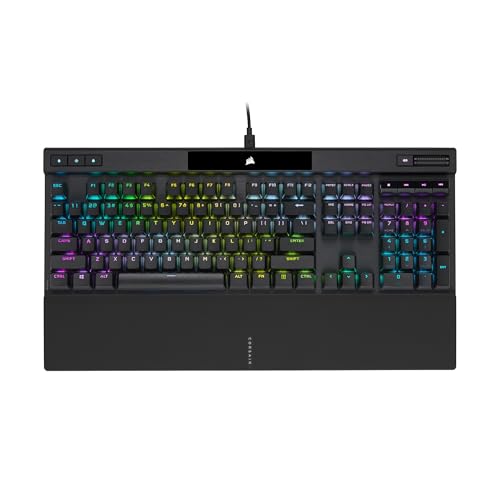
For performance gamers and competitive players seeking precision, the CORSAIR K70 RGB PRO Mechanical Gaming Keyboard stands out with its lightning-fast input processing powered by CORSAIR’s AXON Hyper-Processing Technology. This technology delivers up to 8 times faster input transmission and an 8000Hz hyper-polling rate, ensuring ultra-responsive gameplay. Its iconic K70 RGB design features a durable aluminum frame and polycarbonate keycaps compatible with custom sets. Equipped with 100% CHERRY MX RGB Red switches, it offers silky smooth, linear keystrokes with guaranteed longevity. Additional features like per-key RGB backlighting, anti-ghosting, NKRO, and a tournament mode make it an excellent choice for serious gamers aiming for maximum precision and performance.
Best For: performance gamers and competitive players seeking ultra-responsive, precise input with customizable lighting and durable build quality.
Pros:
- Ultra-fast input processing with 8000Hz hyper-polling rate and AXON Hyper-Processing Technology for responsive gameplay
- Durable aluminum frame with cherry MX RGB Red switches providing smooth, reliable keystrokes
- Customizable per-key RGB backlighting and tournament mode for personalized and distraction-free gaming
Cons:
- Wired connection limits portability and setup flexibility
- Polycarbonate keycaps may be less durable than full metal or PBT options
- Higher price point may be a consideration for budget-conscious users
Redragon Mechanical Gaming Keyboard with Backlit Modes
If you’re looking for a versatile mechanical keyboard that combines customization with reliable performance, the Redragon K671 stands out as an excellent choice. It features 11 programmable backlit modes, adjustable light speed and brightness, and bright RGB LED illumination with double-shot PBT keycaps for clear backlighting and durability. The hot-swappable linear red switches offer a smooth feel, and the anti-ghosting tech guarantees all keys register simultaneously. With 12 multimedia shortcut keys and macro support, it’s perfect for gaming and productivity. Compatible with PC and Mac, it’s backed by a 24-month warranty and positive reviews, making it a solid pick for any user.
Best For: gamers and productivity users seeking a customizable, durable mechanical keyboard with vibrant backlighting and smooth switches.
Pros:
- Multiple programmable backlit modes and adjustable brightness for personalized lighting effects
- Hot-swappable linear red switches for a smooth, less forceful keystroke and easy customization
- Full anti-ghosting technology and multimedia shortcuts support complex gaming and multitasking needs
Cons:
- Fixed RGB backlight color options limit full color customization
- Slightly higher weight and size may affect portability for some users
- Software for lighting adjustments may require additional setup and familiarity
Redragon K580 VATA RGB Mechanical Gaming Keyboard

Gamers and productivity enthusiasts seeking a versatile, customizable keyboard will appreciate the Redragon K580 VATA RGB Mechanical Gaming Keyboard. It features blue switches, a durable design with waterproof and dust-resistant double-shot keycaps, and 18 RGB modes that you can personalize without software. The keyboard includes five programmable macro keys for quick commands and dedicated multimedia controls, like a wheel for volume and backlight adjustments. Its hot-swappable switches make upgrading easy, compatible with most switch types. Built for reliability, it supports 50 million keystrokes, offering a perfect blend of style, durability, and functionality for both gaming and work.
Best For: gamers and productivity enthusiasts seeking a customizable, durable mechanical keyboard with vibrant RGB lighting and easy switch upgrades.
Pros:
- Features hot-swappable switches compatible with most switch types for easy upgrades and customization
- Durable double-shot keycaps that are waterproof and dust-resistant for long-lasting use
- Includes macro keys and dedicated multimedia controls for enhanced gaming and productivity efficiency
Cons:
- Blue switches may be too loud for shared or quiet environments
- No software required but limits advanced customization options for some users
- May be heavier or bulkier compared to more minimalist keyboard designs
Nuphy Air75 V3 Wireless Mechanical Keyboard

The Nuphy Air75 V3 Wireless Mechanical Keyboard stands out as an ideal choice for users seeking a sleek, portable setup without sacrificing performance. Its gasket mount design ensures smooth, quiet keystrokes by absorbing vibrations and reducing noise. At just 13.2mm thick, it’s incredibly slim and easy to carry. The 75% layout saves desk space, while the removable knob offers customization for volume, zoom, or tap actions via NuPhyIO software. With support for Bluetooth, 2.4GHz, and USB-C, it pairs with multiple devices effortlessly. Its long-lasting 4000mAh battery and low-latency performance make it perfect for both gaming and typing on the go.
Best For: users seeking a portable, versatile wireless mechanical keyboard with customizable features and a sleek design suitable for gaming, typing, and multi-device use.
Pros:
- Gasket mount design provides smooth, quiet keystrokes and reduces noise and vibration
- Supports multiple connectivity options (Bluetooth, 2.4GHz, USB-C) with multi-device pairing
- Compact 75% layout with removable knob for personalized control and space-saving setup
Cons:
- Limited to 13.2mm thickness, which may still feel slim but less robust compared to full-sized keyboards
- Customization relies on NuPhyIO software, which may require a learning curve for new users
- Backlight customization and effects may be limited compared to full RGB gaming keyboards
Redragon K556 RGB Mechanical Gaming Keyboard
For anyone seeking a durable and premium-feeling gaming keyboard, the Redragon K556 RGB Mechanical Gaming Keyboard stands out with its original brushed aluminum surface and tank-solid construction. Its sturdy aluminum base ensures stability and an elegant look, while the hot-swappable switches support almost all market options, making customization effortless. Equipped with soft tactile brown switches, it delivers satisfying feedback without excessive noise. The 104-key layout is optimized for gaming and typing, enhanced with noise-absorbing foam and a stable socket design. Vibrant RGB lighting with over 20 effects, adjustable brightness, and dedicated software allow for personalized setups, perfect for both gaming and productivity.
Best For: gamers and professionals seeking a durable, customizable, and premium-feeling mechanical keyboard with vibrant RGB lighting.
Pros:
- Robust all-metal construction with aluminum surface for durability and elegance
- True hot-swappable switches supporting nearly all market options for easy customization
- Vibrant RGB lighting with multiple preset effects and customizable options
Cons:
- Slightly heavier due to metal construction, which may affect portability
- Requires software for full customization, which may be an additional step for some users
- Noise level of switches, while soft tactile, might still be noticeable in quiet environments
RK ROYAL KLUDGE S98 Mechanical Keyboard with Smart Display and Knob

If you’re seeking a versatile and feature-rich mechanical keyboard, the RK ROYAL KLUDGE S98 stands out with its smart display and multifunctional knob. This 96% wireless keyboard offers Bluetooth 5.0, 2.4Ghz, and USB-C connections, making it highly adaptable. The built-in display shows GIFs, date, battery, and connection info, while the knob controls volume, lighting, and modes. Designed with sound absorption and durability in mind, it features dampeners, foam layers, and double-shot PBT keycaps. Its hot-swappable switches let you customize easily. Compact yet substantial at 16.14 inches, it combines tech, comfort, and style, earning a solid 4.5-star rating from over 2,000 users.
Best For: gamers and professionals seeking a customizable, feature-rich wireless mechanical keyboard with a smart display and versatile connectivity options.
Pros:
- Supports multiple connection methods including Bluetooth 5.0, 2.4Ghz, and USB-C wired, offering excellent flexibility.
- Equipped with a smart display that shows GIFs, date, battery status, and connection info for enhanced user interaction.
- Hot-swappable switches and sound-absorbing design provide customization and a quieter, more natural typing experience.
Cons:
- The compact 96% layout may require some adaptation for users accustomed to full-sized keyboards.
- The presence of multiple features and settings could be overwhelming for beginners.
- Battery life may vary depending on usage of the smart display and backlit features.
Redragon K668 RGB Gaming Keyboard with Hotkeys and Extra Keycaps

Gamers and productivity enthusiasts seeking a highly customizable keyboard will appreciate the Redragon K668 RGB Gaming Keyboard, which combines vibrant RGB lighting with hot-swappable switches and extensive shortcut options. It features 108 full-size keys, including 104 anti-ghosting keys for smooth multitasking, plus four dedicated shortcut keys. The hot-swappable red linear switches are compatible with 3-pin and 5-pin types, making switch customization easy. Sound-absorbing foam reduces noise for clearer typing and gaming. With mixed color keycaps, adjustable RGB lighting, and software for macro and lighting customization, this keyboard offers both style and functionality for versatile use.
Best For: gamers and productivity enthusiasts who want a highly customizable, vibrant RGB keyboard with easy switch modifications and extensive shortcut options.
Pros:
- Fully customizable with hot-swappable switches and advanced lighting effects via dedicated software.
- Includes noise-reducing sound-absorbing foam for clearer typing and gaming sounds.
- Features a full-size layout with 108 keys, including anti-ghosting keys and extra shortcut keys for multitasking.
Cons:
- The keyboard’s size and features may be overwhelming for users seeking a minimalistic setup.
- Some users may find the software setup complex or require time to fully customize.
- Limited color options for keycaps and lighting might not suit those seeking a broader aesthetic variety.
Factors to Consider When Choosing Mechanical Keyboards
When choosing a mechanical keyboard, I always consider the switch types and how they feel under my fingers. Compatibility, build quality, and customization options are also key to ensuring it fits my setup and preferences. Plus, I look at lighting and aesthetics to find a keyboard that not only performs well but also looks great on my desk.
Switch Types and Feel
Choosing the right mechanical switch is essential because it directly impacts your typing experience and overall comfort. Mechanical switches come in three main types: linear, tactile, and clicky, each offering a different feel and sound. Linear switches provide smooth keystrokes with minimal resistance, making them perfect for fast-paced gaming and quick typing. Tactile switches give a noticeable bump at actuation, offering feedback without extra noise, suitable for both gaming and typing. Clicky switches produce audible clicks and a tactile response, favored by those who enjoy a more responsive, satisfying typing experience. Actuation force varies between 45g and 60g, while travel distance ranges from 2mm to 4mm, affecting comfort and performance. Choosing the right switch depends on your preferred feel and use case.
Compatibility and Connectivity
Selecting a mechanical keyboard that seamlessly integrates with your devices hinges on its connectivity options. Make certain the keyboard’s options—like Bluetooth, USB-C, or 2.4GHz wireless—match your device requirements for smooth operation. If you switch between multiple systems, look for models that support multi-device pairing so you can toggle effortlessly. Compatibility with your operating system—whether Windows, macOS, Linux, or gaming consoles—is essential for full functionality. Also, consider whether you prefer a wired or wireless setup; wired offers lower latency, while wireless boosts portability. In conclusion, check if the keyboard supports software customization and firmware updates, which can enhance compatibility and allow for personalized adjustments. Prioritizing these factors ensures your keyboard fits seamlessly into your workflow.
Build Quality and Durability
A keyboard’s build quality and durability determine how well it withstands daily use, especially during intense gaming sessions or long typing hours. High-quality mechanical keyboards use durable materials like aluminum or reinforced plastics, which resist wear and flex. The lifespan of switches is vital; premium switches can endure over 50 million keystrokes, guaranteeing longevity. Double-shot PBT keycaps resist fading, shine, and wear better than standard ABS caps, maintaining a fresh look over time. A sturdy design with minimal wobble enhances stability during vigorous use. Additionally, hot-swappable switch sockets allow quick replacements or upgrades without soldering, extending the keyboard’s lifespan. Overall, a solid build not only boosts durability but also guarantees consistent performance, making your investment worthwhile.
Customization Options
When evaluating mechanical keyboards, customization options play a crucial role in tailoring the device to your preferences and workflow. Many models offer programmable macro keys and adjustable lighting effects, allowing you to optimize for gaming or productivity. Hot-swappable switches are a game-changer, letting you change switches easily without soldering, so you can experiment with different feels and sounds. Personalizing keycaps with various colors, materials, and printing methods like double-shot or dye-sublimation adds a unique touch. Advanced keyboards come with software to create custom lighting profiles, remap keys, and set macro sequences, enhancing efficiency. Some models even let you adjust sound profiles and noise reduction features, giving you control over your typing experience. These customization options ensure your keyboard matches your style and needs perfectly.
Lighting and Aesthetics
Lighting and aesthetics are key factors that can transform a mechanical keyboard from a basic device into a personalized statement piece. Customizable RGB or single-color backlighting allows you to match your setup and style, making your workspace visually appealing. Brightness and lighting effects are easily adjustable via shortcuts, software, or dedicated controls, letting you create dynamic environments for gaming or work. Many keyboards offer multiple lighting modes like breathing, wave, or static, adding mood and variety. The keycap material, such as double-shot PBT, influences how lighting shines through characters, impacting readability and style. Ultimately, the combination of lighting, keycap design, and layout shapes the overall aesthetic, helping you craft a unique and immersive setup that reflects your personality.
Frequently Asked Questions
What Are the Differences Between Mechanical Switch Types for Gaming?
The main differences between mechanical switch types for gaming are their actuation force, sound, and feel. Linear switches, like Cherry MX Reds, are smooth and quiet, perfect for fast-paced games. Tactile switches, such as Browns, offer feedback without loud clicks, helping with precision. Clicky switches, like Blues, provide audible feedback but can be noisy. I prefer linear for speed, but tactile and clicky are great for accuracy and satisfying feedback.
How Does Keyboard Build Quality Affect Long-Term Durability?
Think of your keyboard as a trusted steed—its build quality determines how far and fast you’ll go. When I pick a keyboard with sturdy materials and solid construction, I know it’ll withstand daily pounding and last years. Poor build quality feels like riding a rickety cart—fragile and unreliable. A well-made keyboard provides a firm, satisfying feel, ensuring my investment keeps giving, no matter how intense my gaming or work sessions get.
Are Wireless Mechanical Keyboards as Reliable as Wired Ones?
Wireless mechanical keyboards can be just as reliable as wired ones, but it depends on the build and technology. I’ve found that quality models with good Bluetooth or RF connections are stable and responsive, especially for everyday use. However, I still keep a wired option handy for gaming or tasks where lag could be an issue. Overall, modern wireless keyboards are quite dependable if you choose reputable brands.
What Customization Options Are Available for RGB Backlit Keyboards?
RGB backlit keyboards offer fantastic customization options. I love how I can personalize colors for specific keys, create dynamic lighting effects, and even sync lighting with my music or gameplay. Many keyboards have dedicated software that makes programming macros and customizing lighting seamless. Whether you want a subtle glow or vibrant patterns, these options let me tailor my keyboard to match my style or mood, making my setup uniquely mine.
How Important Is Keycap Material for Typing Comfort?
Keycap material is pretty important for typing comfort because it directly affects the feel and sound of each keystroke. I find that PBT keycaps, for example, offer a softer, more durable surface that’s comfortable for long typing sessions. ABS keycaps can feel cheaper and may develop shine over time. So, choosing the right material can make a big difference in how enjoyable and comfortable your typing experience is.
Conclusion
Choosing the perfect mechanical keyboard might seem tough, but once you find the right one, your typing game will skyrocket to legendary status. Whether you’re after lightning-fast responsiveness or epic RGB lighting, there’s a keyboard here to elevate your setup. Think of it as upgrading to a keyboard so powerful, it could probably launch rockets! Jump in, pick your champion, and get ready to unleash your true typing potential—because greatness starts with the right keystrokes.