For most homes, I’d start with the TP-Link Tapo C210: its 2K resolution and pan-and-tilt coverage make it a capable all-around indoor camera. The Kasa EC70 is a simpler 1080p alternative, while the Tapo C246D adds a dual-lens design for buyers who want a different approach to room coverage. The main tradeoffs are image detail, how much area one camera can monitor, and whether a single camera or a multi-camera pack better suits your rooms. More resolution and extra lenses can help, but they may add complexity or cost without helping every setup. Read on for my comparison of all six picks and guidance on choosing the right one.

Get the latest gadgets delivered free with Prime
- Fast, free delivery on millions of items
- Prime Video, Amazon Music and more included
- Member-only deals all year
Complete the kit



Key Takeaways
- The Tapo C210 is the strongest general-purpose pick in this group, pairing 2K resolution with pan-and-tilt coverage for everyday room monitoring.
- The Kasa EC70 and Tapo C201 prioritize 1080p simplicity; they suit buyers who value straightforward indoor coverage over higher image resolution.
- The Tapo C246D stands apart through its dual-lens design, which may suit rooms where one viewing angle leaves important areas out of frame.
- The Tapo C211 and Anona options come in two-camera packs, making them candidates for covering separate rooms without buying cameras one at a time.
- Resolution alone does not decide the best fit: room layout, camera placement, and whether you need one view or several matter just as much.
| TP-Link Tapo C210 2K Pan/Tilt Indoor Security Camera |  | Best Overall | Resolution: 2K | Pan range: 360° horizontal | Tilt range: 114° vertical | VIEW ON AMAZON | See Our Full Breakdown |
| Kasa EC70 1080p Indoor Pan/Tilt Security Camera |  | Best for Kasa Smart Homes | Resolution: 1080p Full HD | Camera movement: Pan and tilt | Wi-Fi: 2.4 GHz | VIEW ON AMAZON | See Our Full Breakdown |
| Tapo 2K Indoor/Outdoor Dual Lens Pan/Tilt Wired Security Camera, C246D |  | Best for Dual-View Coverage | Lens: Dual 2K lenses: fixed wide-angle and pan/tilt telephoto | Fixed lens field of view: 125° | Pan/tilt range: 340° pan, 105° tilt | VIEW ON AMAZON | See Our Full Breakdown |
| TP-Link Tapo C211 2K Pan/Tilt Indoor Security Camera, 2-Pack | 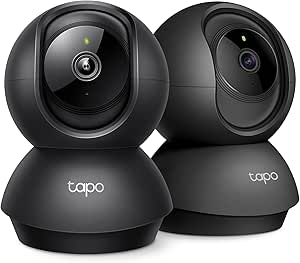 | Best for Monitoring Two Rooms | Quantity: 2 cameras | Resolution: 2K | Field of view: 360° horizontal, 114° vertical | VIEW ON AMAZON | See Our Full Breakdown |
| Tapo C201 1080p Pan/Tilt Indoor Security Camera |  | Best for Basic Everyday Monitoring | Resolution: 1080p Full HD | Pan range: 360° horizontal | Tilt range: 114° vertical | VIEW ON AMAZON | See Our Full Breakdown |
| Anona 4K UHD Indoor Security Camera, 2-Pack |  | Best for High-Detail Coverage | Resolution: 4K UHD, 8 MP | Digital zoom: 8× | Pan and tilt: 360° pan, 110° tilt | VIEW ON AMAZON | See Our Full Breakdown |
| indoor pan tilt security camera | Resolution | Detection | Wi-Fi | Night vision |
|---|---|---|---|---|
| TP-Link Tapo C210 2K Pan/Tilt | 2K | Motion, person, and baby crying | — | Up to 30 ft |
| Kasa EC70 1080p Indoor Pan/Til | 1080p Full HD | Motion and sound alerts | 2.4 GHz | — |
| Tapo 2K Indoor/Outdoor Dual Le | — | — | 2.4 GHz | Up to 30 ft |
| TP-Link Tapo C211 2K Pan/Tilt | 2K | Motion, person, and baby crying | 2.4 GHz | — |
| Tapo C201 1080p Pan/Tilt Indoo | 1080p Full HD | — | — | Up to 30 ft |
| Anona 4K UHD Indoor Security C | 4K UHD, 8 MP | Person, pet, and baby crying | 2.4 GHz and 5 GHz Wi-Fi 6 | — |
More Details on Our Top Picks
TP-Link Tapo C210 2K Pan/Tilt Indoor Security Camera
The Tapo C210 is a strong fit for buyers who want one indoor camera to cover a room without giving up detail. Its 2K video and 360° horizontal, 114° vertical movement let you check more of the space than a fixed camera, while person and baby-cry detection can make alerts more relevant than basic motion notices. Night vision reaches up to 30 feet, and two-way audio gives you a way to speak through the camera. Compared with the Kasa EC70, the C210 offers sharper video and baby-cry detection; the Kasa instead has sound detection and Kasa-device actions. The tradeoffs are its required 2.4 GHz Wi-Fi and limited Google streaming support, which works with Chromecast and Nest devices.
Pros:- 2K resolution provides more image detail than the 1080p Kasa EC70
- 360° horizontal and 114° vertical movement covers a broad area
- Detects motion, people, and baby crying with push notifications
- Two-way audio, a built-in siren, and night vision up to 30 feet
Cons:- Requires a 2.4 GHz Wi-Fi connection
- Google streaming is limited to Chromecast and Nest devices
Best for: Households that want detailed room coverage, person alerts, and baby-cry detection in a single camera
Not ideal for: Homes that rely on 5 GHz-only Wi-Fi or expect unrestricted Google streaming beyond Chromecast and Nest devices
- Resolution:2K
- Pan range:360° horizontal
- Tilt range:114° vertical
- Night vision:Up to 30 ft
- Connectivity:2.4 GHz Wi-Fi
- Detection:Motion, person, and baby crying
- Audio:Two-way audio with built-in siren
- Voice assistant compatibility:Amazon Alexa and Google Assistant
Our verdict“Choose the Tapo C210 if you want one 2K indoor camera with broad movement, baby-cry detection, and two-way audio.”
Kasa EC70 1080p Indoor Pan/Tilt Security Camera
The Kasa EC70 makes the most sense when an indoor camera needs to fit into a wider Kasa setup. Its motion and sound alerts can prompt actions with other Kasa devices, giving it a connected-home role the Tapo C210 does not emphasize. Pan and tilt controls help you check around a room, and local MicroSD recording up to 256 GB provides an option for keeping footage without cloud video history. The main compromise is resolution: 1080p Full HD offers less detail than the C210’s 2K image, which can matter when checking distant parts of a room. Night alerts are listed up to 30 feet. You will need to supply the card, and cloud history and advanced features require a subscription, so this is a better match for local recording and Kasa automations than for maximum image detail.
Pros:- Pan and tilt control helps cover more of a room than a fixed view
- Motion and sound alerts, including night alerts up to 30 feet
- MicroSD recording supports local video storage up to 256 GB
- Can trigger actions with other Kasa devices
Cons:- 1080p resolution provides less detail than the 2K Tapo C210
- MicroSD card is sold separately
- Cloud video history and advanced features require a subscription
Best for: Kasa device owners who want a pan-and-tilt camera that can trigger actions in their existing setup
Not ideal for: Buyers who prioritize 2K detail, need baby-cry detection, or want cloud video history without a subscription
- Resolution:1080p Full HD
- Camera movement:Pan and tilt
- Wi-Fi:2.4 GHz
- Detection:Motion and sound alerts
- Night alerts:Up to 30 ft
- Local storage:MicroSD card up to 256 GB; sold separately
- App support:Tapo or Kasa app
Our verdict“Pick the Kasa EC70 if Kasa device actions and local recording matter more to you than 2K video detail.”
Tapo 2K Indoor/Outdoor Dual Lens Pan/Tilt Wired Security Camera, C246D
The Tapo C246D takes a different approach to room coverage: its fixed wide-angle lens keeps a broad view while a separate pan-and-tilt lens provides a closer look. That pairing can help buyers who want an overview and movable detail in the same camera. It also has AI detection for people, pets, vehicles, and baby cries, plus IP65 weather resistance for use outside the home. The indoor-only Tapo C210 is simpler if you just need one movable 2K view; the C246D adds a second 2K lens and RTSP/ONVIF compatibility, but its movement range is listed as 340° pan and 105° tilt. It still depends on 2.4 GHz Wi-Fi, and local storage requires a separately purchased card; cloud storage is also available by subscription.
Pros:- Dual 2K lenses provide a fixed wide view and a movable telephoto view
- AI detection covers people, pets, vehicles, and baby cries
- IP65 weather resistance supports indoor or outdoor placement
- Supports microSD storage up to 512 GB and RTSP/ONVIF
Cons:- Pan range is 340° and tilt range is 105°, narrower than the Tapo C210’s listed movement
- Requires 2.4 GHz Wi-Fi
- MicroSD card is sold separately and some features may require a subscription
Best for: Buyers who want a fixed room overview alongside a movable close-up view, with the option to use the camera outdoors
Not ideal for: Shoppers seeking a straightforward indoor camera with minimal setup or full 360° mechanical pan coverage
- Lens:Dual 2K lenses: fixed wide-angle and pan/tilt telephoto
- Fixed lens field of view:125°
- Pan/tilt range:340° pan, 105° tilt
- Night vision:Up to 30 ft
- Wi-Fi:2.4 GHz
- Weather resistance:IP65-rated
- Storage:microSD up to 512 GB; cloud subscription available
- Compatibility:Amazon Alexa, Google Assistant, RTSP/ONVIF
Our verdict“Choose the C246D if two simultaneous viewpoints and indoor/outdoor flexibility matter more than a simpler single-lens setup.”
TP-Link Tapo C211 2K Pan/Tilt Indoor Security Camera, 2-Pack
The Tapo C211 two-pack is for households that need coverage in separate rooms, such as a nursery and living area. Each camera has 2K video, 360° horizontal and 114° vertical movement, night vision, two-way audio, and motion, person, and baby-cry detection. That makes the pair more useful for spreading coverage than buying a single Tapo C210, while the C246D offers two lenses aimed at two views from one location. Local microSD recording supports cards up to 512 GB, but neither card is included. The C211 also supports RTSP/ONVIF and Alexa and Google Assistant. Its main limits are the required 2.4 GHz Wi-Fi and subscription requirement for Tapo Care cloud history; buyers also need space and power for two corded cameras.
Pros:- Two cameras extend coverage to separate rooms
- Each camera records 2K video with 360° horizontal and 114° vertical movement
- Motion, person, and baby-cry detection with night vision
- Local microSD storage up to 512 GB per camera and RTSP/ONVIF support
Cons:- MicroSD cards are not included
- Tapo Care cloud history requires a subscription
- Both cameras require 2.4 GHz Wi-Fi and a nearby power source
Best for: Families who want to monitor two rooms with matching 2K pan-and-tilt cameras and baby-cry detection
Not ideal for: Buyers who only need one camera, lack nearby power outlets in both rooms, or want cloud history without a subscription
- Quantity:2 cameras
- Resolution:2K
- Field of view:360° horizontal, 114° vertical
- Wi-Fi:2.4 GHz
- Local storage:microSD up to 512 GB per camera; cards not included
- Cloud storage:Optional Tapo Care with 30-day video history
- Detection:Motion, person, and baby crying
- Compatibility:Amazon Alexa, Google Assistant, RTSP/ONVIF
Our verdict“Choose the C211 two-pack if you need matching 2K pan-and-tilt coverage in two rooms.”
Tapo C201 1080p Pan/Tilt Indoor Security Camera
The Tapo C201 covers the core indoor pan-and-tilt job with 1080p video, 360° horizontal and 114° vertical movement, and infrared night vision up to 30 feet. It also detects motion, people, and baby cries, so its alert options are closer to the Tapo C210 than its lower resolution might suggest. The difference is that the C210 records in 2K, giving buyers more image detail when they check a person or object across the room. The C201 supports local microSD storage up to 512 GB and two-way audio with a built-in siren, but the card is not included and cloud history requires a subscription. For a single room where broad movement and basic detection matter more than sharper video, it keeps the feature set focused.
Pros:- 360° horizontal and 114° vertical movement covers a broad room area
- Infrared night vision reaches up to 30 feet
- Motion, person, and baby-cry detection notifications
- Two-way audio with built-in siren and microSD support up to 512 GB
Cons:- 1080p video has less detail than the Tapo C210’s 2K resolution
- MicroSD card is not included
- Cloud storage with 30-day video history requires a subscription
Best for: Households seeking a single-room camera with broad movement, night vision, and person or baby-cry alerts
Not ideal for: Buyers who want 2K detail, included storage media, or cloud video history without a subscription
- Resolution:1080p Full HD
- Pan range:360° horizontal
- Tilt range:114° vertical
- Night vision:Up to 30 ft
- Storage:microSD up to 512 GB; card not included
- Connectivity:2.4 GHz Wi-Fi
- Audio:Two-way audio with built-in siren
- Smart home compatibility:Amazon Alexa and Google Assistant
Our verdict“Pick the Tapo C201 if you want broad pan-and-tilt coverage and useful alerts without needing the C210’s 2K detail.”
Anona 4K UHD Indoor Security Camera, 2-Pack
The Anona 4K 2-Pack is the detail-focused choice for buyers who want to cover two rooms and inspect distant activity more clearly. Its 8 MP video and 8× digital zoom offer finer image detail than the 2K TP-Link Tapo C210, while 360° pan, 110° tilt, and motion auto-tracking help follow movement across each room. Person, pet, and baby-cry detection add useful alert options, and two-way audio lets you respond through the app. Dual-band Wi-Fi 6 and a choice of microSD or encrypted cloud storage give it flexible connectivity and recording options. The tradeoffs are its 15 fps frame rate, which may make fast movement less fluid, and the need to supply your own microSD card. Choose it for resolution and two-camera coverage; choose the C210 if you prefer a more familiar 2K alternative.
Pros:- 4K UHD resolution with 8× digital zoom for closer inspection of room activity
- Two cameras provide coverage for separate rooms
- 360° pan, 110° tilt, and motion auto-tracking follow activity across a room
- Detects people, pets, and baby crying, with local or cloud storage options
Cons:- 15 fps video may look less fluid when recording fast movement
- MicroSD cards are not included
- Corded power limits placement to locations near an outlet
Best for: Households that want two indoor cameras with high-resolution detail, motion tracking, and alerts for people, pets, or baby crying
Not ideal for: Buyers who prioritize smoother footage of fast movement or want local recording ready without purchasing a microSD card
- Resolution:4K UHD, 8 MP
- Digital zoom:8×
- Pan and tilt:360° pan, 110° tilt
- Detection:Person, pet, and baby crying
- Wi-Fi:2.4 GHz and 5 GHz Wi-Fi 6
- Storage:MicroSD up to 512 GB (not included) or cloud storage
- Frame rate:15 fps
- Audio and power:Two-way audio; corded electric
- Quantity and color:2 cameras; cream
Our verdict“Pick the Anona two-pack if high-resolution detail and coverage across two rooms matter more to you than a higher frame rate or included local storage media.”

How We Picked
I compared these cameras around the decisions that shape indoor use: image resolution, pan-and-tilt coverage, single-camera versus multi-camera setups, and the practical fit for different rooms. I gave weight to features that can change what a buyer sees or how many cameras they may need, while treating higher resolution as useful only when the additional detail matters for the intended view.
The ranking favors balanced room monitoring first, then distinct needs such as lower-resolution simplicity, dual-lens coverage, and multi-room bundles. The C210 leads as the clearest general-purpose match on the listed specifications. The other models rank by how specifically their resolution, lens setup, or pack size addresses a buyer’s needs; buyers should check app, storage, and subscription details before choosing, since those can affect everyday ownership.
| indoor pan tilt security camera | Detection | Storage |
|---|---|---|
| TP-Link Tapo C210 2K Pan/Tilt | Motion, person, and baby crying | — |
| Kasa EC70 1080p Indoor Pan/Til | Motion and sound alerts | — |
| Tapo 2K Indoor/Outdoor Dual Le | — | microSD up to 512 GB; cloud subscription available |
| TP-Link Tapo C211 2K Pan/Tilt | Motion, person, and baby crying | — |
| Tapo C201 1080p Pan/Tilt Indoo | — | microSD up to 512 GB; card not included |
| Anona 4K UHD Indoor Security C | Person, pet, and baby crying | MicroSD up to 512 GB (not included) or cloud storage |
Factors to Consider When Choosing Indoor Pan Tilt Security Camera
I’d choose an indoor pan-tilt camera by starting with the room and the job it needs to do. These broader checks can prevent paying for features that do not improve your particular setup.
Match Resolution to the View
Higher resolution can make details easier to distinguish, but the benefit depends on distance, lighting, and where the camera sits. A camera watching a small room from a nearby shelf may not need the same detail as one covering a wide area. Think about what you expect to recognize in recorded footage, rather than choosing by the largest resolution number alone. Also check how footage is saved and what resolution is available in the recording mode you plan to use. A higher-resolution live view will not help much if your storage settings reduce recorded quality. Choose 2K when added detail is useful for your room; choose 1080p when broad awareness is enough.
Plan Coverage Around Furniture and Blind Spots
Pan-and-tilt movement helps a camera look across a room, but it cannot see through walls, furniture, or objects placed close to the lens. Sketch the camera’s likely position and identify the areas that need coverage before buying. A single movable camera can monitor different directions over time, while multiple cameras can watch separate areas at once. That distinction matters if you need continuous views of two entrances or adjoining rooms. A dual-lens layout may also suit some spaces, but check how each lens is intended to cover the room. Avoid assuming that a motorized camera can replace every fixed viewing angle.
Decide Between One Camera and a Pack
Multi-camera packs can simplify outfitting several rooms, but they make less sense when you need only one reliable view. Count the locations you want to monitor and consider whether each needs its own camera running at the same time. Separate cameras can give more consistent coverage than moving one camera between rooms or relying on its movement to revisit areas. Before choosing a bundle, confirm that each unit has the features and setup you need, and consider where power outlets are available. A spare camera is useful only if you have a practical place to install it. Buy for the number of active views you need, not just the number of devices in the box.
Check App, Storage, and Ongoing Costs
The camera hardware is only part of the ownership experience; app controls and recording options shape how useful alerts and footage will be. Check whether the model supports local storage, cloud recording, or both, and look for any subscription requirement attached to the features you care about. Confirm card compatibility and recording limits before relying on local storage. If more than one person needs access, verify how shared viewing and account permissions work. Also review motion alert controls so ordinary activity does not overwhelm you with notifications. These details can matter more over time than a modest difference in resolution.
Choose Placement and Privacy Controls Early
Indoor cameras work best when they have a stable view and a nearby power source, so decide on placement before settling on a model. Avoid aiming a camera at windows if glare or changing light will obscure the room. Consider whether the app offers a quick way to stop monitoring when people are home, and whether that control fits your household routine. Bedrooms and shared spaces call for particular care around who can access the feed and how recordings are retained. Check whether physical movement or a privacy mode changes what the camera records. A thoughtful placement plan can reduce both blind spots and unnecessary recording.
Frequently Asked Questions
Is 2K worth choosing over 1080p for an indoor camera?
Choose 2K if you expect added image detail to help you identify activity across the room or want more flexibility when viewing footage. For a small room with a nearby camera, 1080p may already provide the awareness you need. Lighting, placement, and recording settings affect useful detail too, so resolution by itself does not guarantee clearer evidence. Check whether the recording method you plan to use preserves the camera’s full resolution. If you are unsure, prioritize a good angle and reliable recording over the resolution label.
Can one pan-tilt camera cover two rooms?
A movable camera can look in different directions, but it cannot monitor two rooms at the same moment unless its view genuinely includes both. Walls, doorways, and furniture can also block the lens even when the camera turns. If you need simultaneous coverage, separate cameras are usually a better fit than relying on a single unit to rotate between areas. For a connected open-plan space, test likely mounting positions and sightlines before deciding. The right answer depends on whether you need general awareness or continuous views of each area.
Should I buy a two-camera pack if I only need one camera now?
A two-camera pack makes sense when you already have a second room or viewpoint in mind and both cameras can be put to use. If your needs are still uncertain, a single camera lets you learn what placement and coverage work in your home before expanding. Check whether the bundle’s models match the features you want, rather than assuming every pack contains the same camera as a single-unit option. You should also have enough outlets and a plan for managing each camera’s alerts. An unused second unit does not add coverage.
Does a dual-lens camera remove the need to position it carefully?
No. A dual-lens setup can offer another viewing angle, but both views remain limited by the camera’s location, obstructions, and room layout. Before buying, check what each lens is designed to show and whether those views address your actual blind spots. A poor position can leave important areas hidden regardless of the number of lenses. Measure sightlines from realistic mounting locations, including where power is available. If you need dependable coverage of separate rooms, dedicated cameras may be more suitable.
What should I check before relying on motion alerts and recordings?
Confirm which recording options are supported and whether useful features require local storage, a cloud plan, or a subscription. Review how the app lets you adjust motion sensitivity and notification zones, since a camera that alerts constantly may be hard to use. Check how long recordings remain available and whether you can retrieve clips when away from home. Test the camera’s placement during different lighting conditions, as windows and moving shadows may affect alerts. Also decide who can access the account and how you will manage household privacy.
Conclusion
I’d choose the Tapo C210 as the best overall for buyers who want 2K detail and movable indoor coverage in one camera. The Tapo C201 or Kasa EC70 makes more sense for a simpler 1080p setup, with the EC70 suited to buyers already interested in the Kasa option. For multi-room coverage, compare the two-camera Tapo C211 and Anona bundles against the views and app features you actually need. The Tapo C246D is my pick for buyers drawn to a dual-lens approach, provided its coverage design matches their room. Beginners can start with the C210’s balanced feature set, while buyers with a specific second room to monitor should favor a suitable two-camera pack.
Halloween Picks
halloween
As an affiliate, we earn on qualifying purchases.