
A hot-swap drive bay enclosure lets you replace compatible drives without opening the case, but the right choice depends on your available bays, drive sizes, and connection setup. My best overall pick is the Rosewill RSV-SATA-Cage-34, a practical fit for builders seeking a multi-drive 3.5-inch cage. The ICY DOCK ExpressCage MB326SP-1B stands out for packing six 2.5-inch drives into a compact bay arrangement, while the SilverStone FS304-12G is a stronger match for four 3.5-inch SAS or SATA drives. The main tradeoffs are drive density versus cooling and access, plus trayless convenience versus drive protection and handling. Read on for my full comparison of all 12 enclosures and guidance on matching one to your system.

Get the latest gadgets delivered free with Prime
- Fast, free delivery on millions of items
- Prime Video, Amazon Music and more included
- Member-only deals all year
Complete the kit



Key Takeaways
- Drive size and host-bay layout set the shortlist: the ICY DOCK ExpressCage MB326SP-1B targets six 2.5-inch drives, while the SilverStone FS304-12G and several StarTech options are built around 3.5-inch drives.
- Three 5.25-inch bays can serve different capacity goals: the five-bay enclosure emphasizes drive density, while the SilverStone FS304-V converts the same number of host bays into four 3.5-inch drive positions.
- Trayless designs reduce handling steps, not compatibility checks: the Kingwin and StarTech mobile racks simplify drive swaps, but drive dimensions, interface support, and bay clearance still matter.
- SAS support appears across several options but does not replace a compatible SAS controller: confirm the entire connection path, including backplane, cables, controller, and drive, before buying.
- The lineup separates compact multi-drive cages from simpler mobile racks: choose a multi-bay enclosure for drive density, or a smaller trayless unit when occasional access and straightforward installation matter more.
| Rosewill RSV-SATA-Cage-34 Hot-Swap Hard Drive Enclosure |  | Best Value for Four 3.5-Inch Drives | Drive capacity: 4 x 3.5-inch or 2.5-inch SATA or SAS drives | Bay conversion: 3 x 5.25-inch bays to 4 drive trays | SATA support: SATA I, SATA II, SATA III; hot-swap supported | VIEW ON AMAZON | See Our Full Breakdown |
| 5-Bay Hot-Swap HDD Enclosure for Three 5.25-Inch Drive Bays |  | Best for Five-Drive Capacity | Supported drive quantity: 5 | Supported drive sizes: 3.5-inch and 2.5-inch | Supported interfaces: SATA 1.5 Gb/s, SATA 3.0 Gb/s, SATA 6.0 Gb/s, SAS | VIEW ON AMAZON | See Our Full Breakdown |
| ICY DOCK ExpressCage MB326SP-1B 6-Bay 2.5-Inch SATA/SAS Hot-Swap Drive Enclosure |  | Best High-Density 2.5-Inch Enclosure | Model: MB326SP-1B | Drive bays: 6 | Drive form factor: 2.5 inches | VIEW ON AMAZON | See Our Full Breakdown |
| SilverStone FS304-12G 4-Bay 3.5-Inch SAS/SATA Hot-Swap Cage |  | Best for Secure, Tool-Free 3.5-Inch Swaps | Drive bays: Four 3.5-inch drives | Required device bays: Three 5.25-inch bays | Drive interface: SAS-12G, SATA 6 Gbit/s | VIEW ON AMAZON | See Our Full Breakdown |
| Kingwin Trayless Hot-Swap Mobile Rack for 2.5-Inch and 3.5-Inch SATA Drives |  | Best Single-Drive Hot-Swap Option | Drive compatibility: 2.5-inch SSDs and HDDs; 3.5-inch HDDs | Bay size: 5.25 inches | Interface: SATA I, SATA II, SATA III | VIEW ON AMAZON | See Our Full Breakdown |
| StarTech 4-Bay Trayless SATA/SAS Backplane for 3.5-Inch Drives |  | Best for High-Capacity 3.5-Inch Swapping | Drive bays: 4 | Compatible drives: 3.5-inch SATA I/II/III and SAS I/II | Host bay size: Three 5.25-inch bays | VIEW ON AMAZON | See Our Full Breakdown |
| ICY DOCK flexiDOCK MB830SP-B 3-Bay Hot-Swap HDD Enclosure |  | Best for Tool-Free 3.5-Inch Swaps | Model: MB830SP-B | Drive bays: 3 × 3.5-inch | Host bay size: 2 × 5.25-inch | VIEW ON AMAZON | See Our Full Breakdown |
| ICY DOCK flexiDOCK MB522SP-B Dual-Bay 2.5-Inch SATA/SAS Hot-Swap Enclosure |  | Best for Compact Bare-Drive Swapping | Drive bays: 2 | Supported drive type: 2.5-inch SATA/SAS HDDs and SSDs | Supported drive thickness: 5–9.5 mm | VIEW ON AMAZON | See Our Full Breakdown |
| StarTech.com Trayless SATA Hot-Swap Mobile Rack for 3.5-Inch Drives | 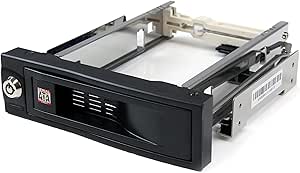 | Best Single-Drive Swap Rack | Model: HSB100SATBK | Drive capacity: 1 × 3.5-inch SATA drive | Bay size: 5.25 inches | VIEW ON AMAZON | See Our Full Breakdown |
| ICY DOCK ExpressCage MB324SP-1B 4-Bay 2.5-Inch SATA/SAS Hot-Swap Drive Enclosure |  | Best for Four 2.5-Inch Drives in One Bay | Drive bays: 4 | Supported drive size: 2.5 inches | Drive compatibility: SATA 6 Gb/s or single-channel SAS 12 Gb/s | VIEW ON AMAZON | See Our Full Breakdown |
| SilverStone FS304-V Hot-Swap Drive Cage, 3 × 5.25-Inch Bays to 4 × 3.5-Inch SAS/SATA Drives |  | Best for Four-Drive Density | Drive capacity: 4 × 3.5-inch drives | Bay requirement: 3 × 5.25-inch device bays | Drive interface: SAS 12G / SATA 6G | VIEW ON AMAZON | See Our Full Breakdown |
| StarTech.com 3-Bay Trayless Hot-Swap Backplane for 3.5-Inch SATA and SAS Drives |  | Best for Trayless Drive Changes | Drive bays: 3 | Supported drive size: 3.5 inches | Compatible interfaces: SATA I/II/III and SAS I/II | VIEW ON AMAZON | See Our Full Breakdown |
| hot swap drive bay enclosure | Warranty | Drive bays | Cooling |
|---|---|---|---|
| Rosewill RSV-SATA-Cage-34 Hot- | 1 year | — | 1 x 120 mm rear exhaust fan |
| 5-Bay Hot-Swap HDD Enclosure f | 90 days | — | Built-in fan |
| ICY DOCK ExpressCage MB326SP-1 | 5 years | 6 | — |
| SilverStone FS304-12G 4-Bay 3. | 1 year limited | Four 3.5-inch drives | Built-in fan with adjustable fan control |
| Kingwin Trayless Hot-Swap Mobi | — | — | — |
| StarTech 4-Bay Trayless SATA/S | — | 4 | Built-in fan with speed control |
| ICY DOCK flexiDOCK MB830SP-B 3 | 3 years | 3 × 3.5-inch | — |
| ICY DOCK flexiDOCK MB522SP-B D | 3 years | 2 | — |
| StarTech.com Trayless SATA Hot | — | — | — |
| ICY DOCK ExpressCage MB324SP-1 | 3 years | 4 | — |
| SilverStone FS304-V Hot-Swap D | 1 year limited | — | Built-in fan |
| StarTech.com 3-Bay Trayless Ho | 2 years | 3 | Built-in fan with speed control |
More Details on Our Top Picks
Rosewill RSV-SATA-Cage-34 Hot-Swap Hard Drive Enclosure
The Rosewill RSV-SATA-Cage-34 is a straightforward way to add four hot-swappable drives when a tower has three spare 5.25-inch bays. It accepts 3.5-inch and 2.5-inch SATA or SAS drives and includes a rear 120 mm exhaust fan, a useful advantage over the single-drive, open-air Kingwin Trayless Hot-Swap Mobile Rack if you need several drives in one enclosure. The tradeoff is space: unlike the six-drive ICY DOCK ExpressCage MB326SP-1B, Rosewill needs three front bays for four drives. Its SAS support is limited to 6 Gbps, and the supplied case compatibility list is focused on selected Rosewill towers. I’d shortlist it for a compatible, roomy build that values active cooling and capacity over compactness, but skip it if your case lacks three 5.25-inch bays or you need faster SAS support.
Pros:- Holds four 3.5-inch or 2.5-inch SATA or SAS drives
- Supports SATA hot-swapping
- Includes a rear 120 mm exhaust fan
- Listed as compatible with several Rosewill tower cases
Cons:- Uses three 5.25-inch bays for four drives
- SAS support is limited to 6 Gbps
- The listed compatible-case range is limited to selected Rosewill models
Best for: Owners of a compatible full-tower case with three unused 5.25-inch bays who want four cooled, hot-swappable drives.
Not ideal for: Small-case builders or users needing more than 6 Gbps SAS support; this cage requires substantial front-bay space and has a stated SAS speed limit.
- Drive capacity:4 x 3.5-inch or 2.5-inch SATA or SAS drives
- Bay conversion:3 x 5.25-inch bays to 4 drive trays
- SATA support:SATA I, SATA II, SATA III; hot-swap supported
- SAS support:Up to 6 Gbps
- Cooling:1 x 120 mm rear exhaust fan
- Materials:Steel and ABS; enclosure material listed as plastic
- Compatible cases:Rosewill L4000U, L4500U, R4000U
- Warranty:1 year
Our verdict“Choose the Rosewill for four cooled hot-swap drives in a compatible tower, but not when bay space or faster SAS support is a priority.”
5-Bay Hot-Swap HDD Enclosure for Three 5.25-Inch Drive Bays
This five-drive enclosure packs one more 3.5-inch drive into the same three 5.25-inch bays required by the four-drive Rosewill RSV-SATA-Cage-34. That extra slot can make a real difference in a storage-focused tower, and support for both SATA and SAS plus 2.5-inch drives gives it flexibility across mixed drive sizes. The built-in fan and tool-free installation also reduce setup friction, although the product data doesn’t specify adjustable fan control or individual drive locks and indicators as the SilverStone FS304-12G does. The clearest drawback is its 90-day warranty, shorter than the one-year coverage listed for Rosewill and SilverStone. I’d pick it when five-drive density matters more than long warranty coverage; builders with only one spare 5.25-inch bay should look instead at the six-drive ICY DOCK ExpressCage MB326SP-1B.
Pros:- Fits five drives in three 5.25-inch bays
- Supports 3.5-inch and 2.5-inch SATA or SAS drives
- Built-in cooling fan
- Tool-free drive installation
Cons:- Requires three 5.25-inch bays
- Warranty is limited to 90 days
- Product data does not specify adjustable fan control or individual drive monitoring
Best for: Storage-focused desktop builders with three spare 5.25-inch bays who want five hot-swap drive positions and mixed drive-size support.
Not ideal for: Buyers who value longer warranty coverage or need a compact one-bay installation; this model needs three 5.25-inch bays and has a 90-day warranty.
- Supported drive quantity:5
- Supported drive sizes:3.5-inch and 2.5-inch
- Supported interfaces:SATA 1.5 Gb/s, SATA 3.0 Gb/s, SATA 6.0 Gb/s, SAS
- Drive bay requirement:Three 5.25-inch bays
- Cooling:Built-in fan
- Power:Dual power connectors
- Enclosure material:Aluminum and plastic
- Warranty:90 days
Our verdict“Pick this enclosure when five-drive capacity in three front bays is the priority and its short warranty fits your needs.”
ICY DOCK ExpressCage MB326SP-1B 6-Bay 2.5-Inch SATA/SAS Hot-Swap Drive Enclosure
The ICY DOCK ExpressCage MB326SP-1B stands apart by fitting six 2.5-inch drives into one 5.25-inch bay. That density makes it a stronger fit for SSD arrays or compact multi-drive builds than the four-drive, three-bay Rosewill RSV-SATA-Cage-34, though it cannot take 3.5-inch disks. Tool-less removable trays support quick swaps, and its SAS 12 Gbps support exceeds the 6 Gbps limit listed for Rosewill. Two user-upgradeable 40 mm fans and high/low/off control let builders tune cooling and noise, but the six drives share two SATA power connectors, so check the system’s cabling plan. Its five-year warranty is the longest specified among these five picks. Choose it for dense 2.5-inch storage; skip it if your drive plan centers on full-size HDDs.
Pros:- Fits six 2.5-inch drives in one 5.25-inch bay
- Supports SATA 6 Gbps and SAS 12 Gbps
- Tool-less removable trays support convenient drive changes
- Adjustable fan control and a five-year warranty
Cons:- Does not accept 3.5-inch drives
- Uses two SATA power connectors for all six drives
- Requires an available 5.25-inch bay
Best for: Builders fitting multiple 2.5-inch SATA or SAS drives into a single 5.25-inch bay, especially those assembling SSD-heavy or compact storage systems.
Not ideal for: Users who need 3.5-inch drives or prefer one power connection per drive; this enclosure supports only 2.5-inch drives and uses two SATA power connectors for six bays.
- Model:MB326SP-1B
- Drive bays:6
- Drive form factor:2.5 inches
- Compatible drive heights:5 mm, 7 mm, and 9.5 mm
- Supported interfaces:SATA 6 Gbps, SAS 12 Gbps
- Bay form factor:5.25 inches
- Cooling and fan control:Two user-upgradeable 40 mm fans; High / Low / Off
- Power connectors:Two 15-pin SATA power connectors
- Warranty:5 years
Our verdict“Choose the ICY DOCK when six 2.5-inch hot-swap positions and faster SAS support matter more than 3.5-inch drive compatibility.”
SilverStone FS304-12G 4-Bay 3.5-Inch SAS/SATA Hot-Swap Cage
The SilverStone FS304-12G is aimed at users who want hands-on drive access without removable trays: its trayless, screwless design pairs with individual metal key locks and status LEDs for each 3.5-inch bay. Those per-drive controls give it a more security- and monitoring-focused feel than the Rosewill RSV-SATA-Cage-34, which also holds four drives but emphasizes a rear 120 mm fan and broad 2.5/3.5-inch compatibility. SilverStone adds adjustable fan control and supports SAS-12G and SATA drives, while its aluminum body provides a more substantial enclosure. Its main limitation is strict: it takes 3.5-inch drives only and consumes three 5.25-inch bays. Compared with the one-bay ICY DOCK ExpressCage MB326SP-1B, it sacrifices density for full-size HDD access, locking, and visible drive status.
Pros:- Trayless, screwless access for four 3.5-inch drives
- Individual drive status LEDs and metal key locks
- Built-in fan with adjustable fan control
- Aluminum enclosure supports SAS-12G and SATA drives
Cons:- Requires three 5.25-inch device bays
- Supports 3.5-inch drives only
- Weighs 1.51 kg and has a one-year limited warranty
Best for: Workstation and storage-tower owners who regularly swap 3.5-inch drives and want individual bay locks, status LEDs, and adjustable cooling.
Not ideal for: Builders using 2.5-inch SSDs or short on front-bay space; this cage accepts only 3.5-inch drives and occupies three 5.25-inch bays.
- Drive bays:Four 3.5-inch drives
- Required device bays:Three 5.25-inch bays
- Drive interface:SAS-12G, SATA 6 Gbit/s
- Design:Trayless and screwless
- Cooling:Built-in fan with adjustable fan control
- Drive monitoring:Individual status LEDs
- Security:Individual metal key locks
- Enclosure material:Aluminum
- Warranty:1 year limited
Our verdict“Choose the SilverStone for secure, trayless 3.5-inch drive swaps with per-bay status, not for compact builds or 2.5-inch drives.”
Kingwin Trayless Hot-Swap Mobile Rack for 2.5-Inch and 3.5-Inch SATA Drives
The Kingwin Trayless Hot-Swap Mobile Rack is the simple, single-drive choice in this group: it uses one 5.25-inch bay and accepts either a 2.5-inch SATA SSD or HDD or a 3.5-inch HDD. That flexibility suits a workstation that needs an occasional removable backup drive, without committing the three front bays used by the Rosewill RSV-SATA-Cage-34 or SilverStone FS304-12G. Its open-air construction supports ventilation without a listed fan, but it also means this is not a multi-drive cooling solution. Unlike the ICY DOCK ExpressCage MB326SP-1B, it supports 3.5-inch drives but offers just one drive position and SATA—not SAS—connectivity. I’d choose Kingwin for uncomplicated swaps and mixed drive sizes, not for a dense storage array.
Pros:- Fits one 2.5-inch or 3.5-inch SATA drive in a 5.25-inch bay
- Supports hot-swapping
- Supports SATA I, II, and III up to 6 Gbps
- Open-air design allows airflow around the drive
Cons:- Accepts only one drive at a time
- Supports SATA but not SAS
- No dedicated cooling fan is listed
Best for: Desktop users who need one accessible hot-swap bay for a 2.5-inch SATA drive or a 3.5-inch HDD, such as for rotating backups.
Not ideal for: NAS and workstation builders who need several drive bays, SAS support, or a dedicated cooling fan; Kingwin holds one SATA drive and has an open-air design.
- Drive compatibility:2.5-inch SSDs and HDDs; 3.5-inch HDDs
- Bay size:5.25 inches
- Interface:SATA I, SATA II, SATA III
- Maximum transfer rate:6 Gbps
- Design:Trayless, open-air
- Material:ABS
- Weight:6.4 ounces
Our verdict“Choose Kingwin for a single flexible SATA hot-swap bay, but pick a multi-bay enclosure for an array or SAS drives.”
StarTech 4-Bay Trayless SATA/SAS Backplane for 3.5-Inch Drives
I’d choose this StarTech backplane when the priority is fitting four full-size drives into a front-access enclosure with cooling and basic access control. Its individual ejection levers make drive changes more direct than with the removable trays on the ICY DOCK ExpressCage MB324SP-1B, while per-bay LEDs help distinguish drive activity at a glance. The vented aluminum housing and fan suit a multi-drive setup better than a simple single-drive rack, though the fan adds another component to manage. The main compromise is space: this unit consumes three 5.25-inch bays, where the ExpressCage fits four smaller 2.5-inch drives into one. It also supports only 3.5-inch drives, so buyers with SSDs or compact drives should look elsewhere.
Pros:- Supports hot-swapping four 3.5-inch SATA or SAS drives
- Individual ejection levers and per-bay power and status LEDs
- Vented aluminum enclosure with a fan and speed control
- Includes a key lock and two keys
Cons:- Uses three 5.25-inch bays, a substantial space commitment
- Accepts 3.5-inch drives only
Best for: Desktop and workstation builders who need front access to several 3.5-inch SATA or SAS drives and have three open 5.25-inch bays.
Not ideal for: Builders with limited 5.25-inch space or anyone needing to hot-swap 2.5-inch drives.
- Drive bays:4
- Compatible drives:3.5-inch SATA I/II/III and SAS I/II
- Host bay size:Three 5.25-inch bays
- Hardware interface:SATA 6.0 Gb/s
- Enclosure material:Aluminum
- Cooling:Built-in fan with speed control
- Security:Key lock; two keys included
Our verdict“Pick this StarTech when you want four cooled, front-access 3.5-inch bays and can spare three 5.25-inch slots.”
ICY DOCK flexiDOCK MB830SP-B 3-Bay Hot-Swap HDD Enclosure
The MB830SP-B makes sense for someone who wants three 3.5-inch drives without dealing with drive trays or screws during installation. It uses two 5.25-inch bays rather than the three required by the StarTech 4-Bay Trayless Backplane, leaving one more bay available while giving up one drive position. That trade is appealing in a tower with a limited number of front bays. The enclosure supports SATA III up to 6 Gb/s, and SAS drives can be used when connected to a SAS host; the included cables are SATA, so SAS users need compatible host hardware and cabling. Compared with the StarTech single-drive mobile rack, this ICY DOCK offers far more swap capacity, but it demands more chassis space and serves buyers who need a multi-drive setup.
Pros:- Fits three 3.5-inch drives in two 5.25-inch bays
- Tool-less, screw-less drive installation
- Supports SATA III transfer speeds up to 6 Gb/s
- Includes three SATA cables
Cons:- Requires two available 5.25-inch bays
- SAS operation depends on a SAS host and suitable cabling
Best for: PC builders who frequently replace or rotate up to three 3.5-inch drives and have two free 5.25-inch bays.
Not ideal for: Users with only one free 5.25-inch bay, or SAS owners without a SAS host and suitable cabling.
- Model:MB830SP-B
- Drive bays:3 × 3.5-inch
- Host bay size:2 × 5.25-inch
- Supported interfaces:SATA and single-channel SAS
- Maximum data transfer rate:6 Gb/s
- Installation:Tool-less and screw-less
- Included cables:3 SATA cables
- Warranty:3 years
Our verdict“Choose the MB830SP-B if tool-free swapping of three 3.5-inch drives matters more than conserving a 5.25-inch bay.”
ICY DOCK flexiDOCK MB522SP-B Dual-Bay 2.5-Inch SATA/SAS Hot-Swap Enclosure
This flexiDOCK is a space-conscious option for two 2.5-inch drives when a system has a 3.5-inch or floppy-size bay but no spare 5.25-inch slot. Its trayless, tool-less design lets buyers insert bare drives, while separate eject buttons and activity indicators make each position easier to manage. Compared with the ICY DOCK MB324SP-1B, it holds fewer drives, but it targets a different fit: a single 3.5-inch installation bay rather than a 5.25-inch bay. The stated SAS 12 Gb/s support applies to a compatible single-channel SAS host; SATA is limited to 6 Gb/s. Drive thickness is capped at 9.5 mm, so some taller 2.5-inch drives won’t fit. I’d shortlist it for compact systems, not for buyers prioritizing capacity or larger disks.
Pros:- Fits two hot-swappable drives in a 3.5-inch or floppy bay
- Tool-less, trayless access for bare drives
- Individual eject buttons and activity indicators
- Supports SATA and single-channel SAS interfaces
Cons:- Limited to 2.5-inch drives no thicker than 9.5 mm
- Holds only two drives
- SAS speeds require a compatible single-channel SAS host
Best for: Compact PC and workstation owners who need front-access hot swapping for two slim 2.5-inch SATA or SAS drives.
Not ideal for: Users with 3.5-inch drives, 2.5-inch drives thicker than 9.5 mm, or a need for more than two bays.
- Drive bays:2
- Supported drive type:2.5-inch SATA/SAS HDDs and SSDs
- Supported drive thickness:5–9.5 mm
- Interface:SATA 3.0 6 Gb/s or single-channel SAS 3.0 12 Gb/s
- Installation bay:3.5-inch drive bay or floppy bay
- Design:Tool-less, trayless, hot-swappable
- Material:Metal
- Warranty:3 years
Our verdict“Choose the MB522SP-B for two slim 2.5-inch drives when saving front-bay space matters more than maximizing capacity.”
StarTech.com Trayless SATA Hot-Swap Mobile Rack for 3.5-Inch Drives
For a system that needs one easily replaceable 3.5-inch SATA drive, this StarTech mobile rack avoids the footprint of multi-bay cages. It mounts in one 5.25-inch bay and brings the drive to the front, making routine swaps simpler than opening the case. The trayless, lockable design and internal rubber shock absorbers add practical protection, though this remains a one-drive SATA solution rather than a shared front panel for multiple disks. Compared with the ICY DOCK MB830SP-B, it gives up two drive positions but needs only half the 5.25-inch space. It also lacks the SATA/SAS flexibility of the StarTech 4-Bay Backplane. I’d favor it for occasional swaps or a removable backup drive, but not for a multi-drive hot-swap workflow.
Pros:- Front-access hot swapping for one 3.5-inch SATA drive
- Trayless design avoids handling a separate drive tray
- Lockable enclosure with internal rubber shock absorbers
- Supports SATA III speeds up to 6 Gb/s with a compatible controller
Cons:- Supports only one 3.5-inch SATA drive
- Requires an available 5.25-inch drive bay
- Does not support SAS drives
Best for: PC owners who rotate a single 3.5-inch SATA drive for backups, maintenance, or RAID-related service and have one open 5.25-inch bay.
Not ideal for: Users who need several hot-swap positions, 2.5-inch support, or SAS compatibility.
- Model:HSB100SATBK
- Drive capacity:1 × 3.5-inch SATA drive
- Bay size:5.25 inches
- Maximum transfer speed:6 Gb/s
- Design:Trayless, front-accessible, lockable
- Shock protection:Internal rubber shock absorbers
- Material:Aluminum
- Dimensions:7.2 × 5.9 × 1.7 inches
Our verdict“Choose this rack for simple, front-access swapping of one 3.5-inch SATA drive without committing space to a multi-bay enclosure.”
ICY DOCK ExpressCage MB324SP-1B 4-Bay 2.5-Inch SATA/SAS Hot-Swap Drive Enclosure
The ExpressCage MB324SP-1B earns its place for buyers who need four 2.5-inch hot-swap positions but can spare only one 5.25-inch bay. Removable tool-less trays make drive installation more controlled than the bare-drive approach of the ICY DOCK MB522SP-B, and the trays support a broader range of drive thicknesses, from 5 mm to 12.5 mm. Locking connectors and per-bay LEDs add reassurance when drives are handled often, while the adjustable fan lets users choose between active cooling and a quieter fan-off setting. Its main limit is the 2.5-inch format: unlike the StarTech 4-Bay Backplane, it cannot house 3.5-inch disks. SAS support is also single-channel, so a compatible host remains necessary.
Pros:- Fits four 2.5-inch drives in one 5.25-inch bay
- Tool-less removable trays support multiple drive heights
- Individual bay LEDs and locking connectors
- Three-speed fan control includes high, low, and off settings
Cons:- Supports 2.5-inch drives only
- SAS support is single-channel and requires a compatible host
- Requires an available 5.25-inch bay
Best for: Storage builders who need four 2.5-inch SATA or SAS drives, clear bay status, and a single 5.25-inch mounting position.
Not ideal for: Users with 3.5-inch drives or systems without a compatible SAS host when SAS connectivity is required.
- Drive bays:4
- Supported drive size:2.5 inches
- Drive compatibility:SATA 6 Gb/s or single-channel SAS 12 Gb/s
- Drive height support:5 mm, 7 mm, 9.5 mm, and 12.5 mm
- Installation bay:5.25 inches
- Drive trays:Tool-less, removable
- Fan control:High / Low / Off
- Warranty:3 years
Our verdict“Pick the MB324SP-1B when four removable 2.5-inch drives and a compact one-bay footprint outweigh the need for 3.5-inch compatibility.”
SilverStone FS304-V Hot-Swap Drive Cage, 3 × 5.25-Inch Bays to 4 × 3.5-Inch SAS/SATA Drives
The FS304-V is a practical choice when four 3.5-inch drives matter more than preserving 5.25-inch bays: it packs them into three bays and supports hot swapping. Its fan and individual drive-status LEDs add useful monitoring and cooling for a multi-drive setup. Compared with the StarTech.com 3-Bay Trayless Backplane, this SilverStone holds one more drive but needs an extra 5.25-inch bay, making it a better fit for systems with room to spare. It also supports a 9.5 mm slim optical drive, which may help builders retain optical functionality. The tradeoff is its plastic trays, which are less substantial than the StarTech’s aluminum enclosure, and a one-year limited warranty. I’d choose it for capacity, not premium tray construction.
Pros:- Fits four 3.5-inch drives into three 5.25-inch bays
- Supports hot swapping with SAS 12G and SATA 6G drives
- Built-in fan and independent drive-status LEDs
- Accommodates a 9.5 mm slim optical drive
Cons:- Requires three available 5.25-inch device bays
- Plastic trays feel less substantial than an all-metal tray design
- One-year limited warranty
Best for: Desktop and small-server builders with three open 5.25-inch bays who need front-access hot swapping for four 3.5-inch SAS or SATA drives.
Not ideal for: Builders with only one or two spare 5.25-inch bays, or buyers who prioritize metal trays and a longer warranty.
- Drive capacity:4 × 3.5-inch drives
- Bay requirement:3 × 5.25-inch device bays
- Drive interface:SAS 12G / SATA 6G
- Hot-swap support:Yes
- Cooling:Built-in fan
- Drive indicators:Independent status LEDs
- Materials:Alloy steel enclosure; plastic trays
- Dimensions:7.72 × 5.75 × 4.96 inches
- Warranty:1 year limited
Our verdict“Choose the FS304-V if you have three spare 5.25-inch bays and want four hot-swappable 3.5-inch drives in one cage.”
StarTech.com 3-Bay Trayless Hot-Swap Backplane for 3.5-Inch SATA and SAS Drives
For buyers who want to swap drives without managing removable trays, this StarTech backplane offers three front-access bays in a two-bay 5.25-inch footprint. Individual ejection levers simplify removal, while optional key locks can help prevent casual access. Its aluminum enclosure, venting, and fan with speed control provide a more adjustable cooling setup than the SilverStone FS304-V, though the SilverStone fits four drives rather than three. The StarTech’s stated transfer rate tops out at 6 Gbps, and its compatibility covers SATA I/II/III and SAS I/II; it is not the pick for newer SAS 12G drives. I’d favor this model when convenient trayless access and a smaller bay requirement outweigh maximum drive count.
Pros:- Provides front-access hot swapping for three 3.5-inch drives
- Trayless design with individual ejection levers
- Aluminum enclosure, venting, and fan with speed control
- Power and status LEDs plus optional key locks
Cons:- Requires two available 5.25-inch bays
- Limited to 3.5-inch drives and a maximum stated transfer rate of 6 Gbps
- Holds one fewer drive than the SilverStone FS304-V
Best for: PC and server owners with two open 5.25-inch bays who regularly replace or rotate 3.5-inch SATA or SAS I/II drives and prefer trayless access.
Not ideal for: Users needing four drives in the same enclosure, support for SAS 12G, or a solution for 2.5-inch drives.
- Drive bays:3
- Supported drive size:3.5 inches
- Compatible interfaces:SATA I/II/III and SAS I/II
- Installation bays required:2 × 5.25-inch bays
- Maximum data transfer rate:6 Gbps
- Cooling:Built-in fan with speed control
- Security:Key-lock design; two keys included
- Enclosure material:Aluminum
- Warranty:2 years
Our verdict“Pick this StarTech when trayless access and adjustable cooling matter more than fitting four drives or supporting SAS 12G.”

How We Picked
I compared the enclosures by the job a hot-swap bay must do well: accept the intended drive sizes, fit the stated host bays, provide practical access for drive changes, and support the listed SATA or SAS connection types. I also weighed drive density against installation complexity and the space needed for cables and airflow. A high bay count helps only when the case has room for the enclosure and the cooling plan can handle the drives.
The ranking favors broadly useful layouts and clear fit for common multi-drive setups, then gives distinct places to compact 2.5-inch cages, 3.5-inch SAS/SATA backplanes, and simpler trayless racks. A product is not ranked higher just for holding more drives: narrower compatibility or a more demanding bay layout can make it a poorer choice for many systems. I treat the listed interfaces and bay formats as selection criteria, not a promise that every enclosure works with every case, controller, or drive.
Factors to Consider When Choosing Hot Swap Drive Bay Enclosure
Before choosing a hot-swap enclosure, start with the system it must fit and the drives it must serve. These checks can prevent a common mistake: buying a cage that matches the drive but not the case, or a backplane that matches the bay count but not the controller.
Match the Enclosure to Your Case Bays
Count the actual external bays available, then check whether the enclosure expects one, two, or three 5.25-inch positions. Case specifications can be misleading if a bay is blocked by a front panel, radiator, or other hardware. Leave room behind the cage for connectors and cable bends, not just the enclosure body. A multi-bay cage can use front space efficiently, but it may constrain airflow or make neighboring components harder to reach. Measure before buying, especially in older or compact cases. If the case lacks the required bay format, a different enclosure style may be a better path than forcing a tight fit.
Choose Drive Size and Bay Density Together
Decide whether the system will use 2.5-inch drives, 3.5-inch drives, or a mix before comparing bay counts. Small-drive cages such as six-bay layouts suit many compact disks or SSDs, while larger-drive cages prioritize capacity per drive. A high number of 2.5-inch positions does not replace the storage capacity of fewer 3.5-inch drives. Also check whether the enclosure supports the exact thickness and connector position of your drives. For a planned array, leave room for future replacements rather than filling every position immediately. The right density is the one that fits the workload, cooling, and expected growth—not simply the largest number on the box.
Verify the Full SATA or SAS Connection Path
A SATA/SAS label on an enclosure describes its drive interface support; it does not guarantee that the rest of a computer can use SAS. SAS drives typically require a compatible SAS host controller and cabling, so confirm those parts as a set. Check whether the enclosure uses individual SATA data connections or a different backplane connection arrangement, and count the ports your controller needs. Avoid assuming that a SATA controller can operate SAS drives just because the connectors look similar. For mixed-drive plans, check the product’s supported combinations and your controller documentation. This compatibility check can matter more than the enclosure’s headline bay count.
Treat Hot-Swap as a Whole-System Feature
A hot-swap enclosure provides a physical way to remove and insert drives, but safe hot swapping also depends on the controller, operating system, and storage configuration. Confirm that the host connection supports hot-plug operation and that the system can safely take a drive offline before removal. A mirrored or parity array may need a rebuild after a replacement, so the enclosure alone does not make drive changes risk-free. Follow the storage software’s removal procedure and keep a current backup. For a desktop used only for occasional manual swaps, a simple trayless rack may be enough. For a server or frequently serviced array, controller behavior and clear drive identification deserve extra attention.
Balance Cooling, Noise, and Drive Protection
Several drives packed into a small front cage can create a concentrated heat source, especially during sustained transfers. Check whether the case airflow reaches the drive faces and whether the enclosure includes the cooling provisions needed for your workload. More drive density can mean more heat, cable clutter, and fan noise, so do not plan around a fully populated cage without considering ventilation. Trayless access is convenient, but repeated insertion can expose drives to knocks or connector strain if the workspace is cramped. Consider how often drives will be swapped and how valuable they are. A lower-density layout may be the better choice when quieter operation or easier physical access matters more than maximum capacity.
Pay for the Workflow You Actually Need
More bays and a more elaborate enclosure make sense when they solve a real storage or maintenance problem. If you swap one drive occasionally, a straightforward mobile rack may be easier to install and live with than a dense multi-drive cage. A home server with several active drives may benefit from a purpose-built backplane, provided the case and controller support it. Before paying for extra capacity, check whether you have enough ports, power connectors, and cooling to use it. Think about maintenance too: tool-free access can save time, while a more protective tray design may suit drives that travel between systems. Choose around the frequency of swaps and the cost of downtime, rather than treating every added bay as useful by default.
Frequently Asked Questions
Can I hot-swap a drive just because the enclosure has a removable bay?
Not by itself. The enclosure provides the physical interface, but the host controller, operating system, and storage software must also support safe hot removal. Before pulling a drive, use the system’s procedure to take it offline or eject it, particularly if it belongs to an array. Check the motherboard or controller documentation for hot-plug support on the relevant ports. If the system lacks that support, treat the bay as a convenient removable mount rather than assuming live swaps are safe.
Will a SATA/SAS enclosure let me connect SAS drives to any desktop?
No. SAS drives generally need a SAS-compatible host controller, even when the enclosure accepts both SATA and SAS drives. Check the controller, cables, and enclosure connections together; matching only the drive connector is not enough. SATA drives can often operate through SAS infrastructure, but the reverse should not be assumed. If you only have a standard SATA controller, choose SATA drives or add compatible SAS hardware before planning around SAS support.
How can I tell whether a multi-bay cage will fit my case?
Start with the case’s available external bay format and count how many adjacent bays are clear. Then compare the enclosure’s mounting dimensions with the case interior, including space for cables, power connectors, and any front fans or filters. A cage may occupy the listed number of 5.25-inch bays yet still conflict with a long graphics card or other internal hardware. Check the case and enclosure documentation rather than relying on a product photo. If measurements are unclear, choose a layout with fewer host-bay demands.
Should I choose a trayless rack or a cage with drive trays?
A trayless design cuts out the step of mounting a drive in a separate carrier, which can be useful for frequent swaps or occasional bare-drive access. Trays can add support and make drives easier to handle as a unit, though they take extra preparation and can be inconvenient if you own several drives but few carriers. Your swap frequency and work area matter: a crowded case or delicate drive calls for careful, steady handling either way. Also confirm which drive sizes and thicknesses the rack accepts. Choose for the way you manage drives, not just for the word “trayless.”
Is a six-bay 2.5-inch enclosure a better choice than a four-bay 3.5-inch model?
Neither layout is universally better; they suit different storage plans. Six 2.5-inch positions can pack more small drives into a compact front-bay arrangement, while four 3.5-inch positions accommodate larger-format drives and may suit capacity-focused builds. Compare the capacity and performance of the specific drives you intend to use, along with the case’s airflow and controller connections. If you already own 3.5-inch disks, a 2.5-inch cage may add unnecessary compatibility hurdles. Choose the enclosure around your drive inventory and future replacement plan.
Conclusion
For the broadest multi-drive 3.5-inch setup, I recommend the Rosewill RSV-SATA-Cage-34 as best overall, while the five-bay enclosure for three 5.25-inch bays is my best value-style pick for buyers prioritizing drive density in a case with that exact bay layout. For a more specialized build, the ICY DOCK ExpressCage MB326SP-1B is the premium-style choice for six 2.5-inch drives, and the SilverStone FS304-12G suits four 3.5-inch SAS/SATA drives. Beginners who want a straightforward trayless approach can start with the Kingwin mobile rack, provided its drive format and case fit match their setup. For compact 2.5-inch storage, compare the ICY DOCK MB522SP-B two-bay and MB324SP-1B four-bay models; for 3.5-inch trayless access, look at the StarTech options. My final advice: choose the drive format and host-bay layout first, then verify controller support and cooling before settling on a model.