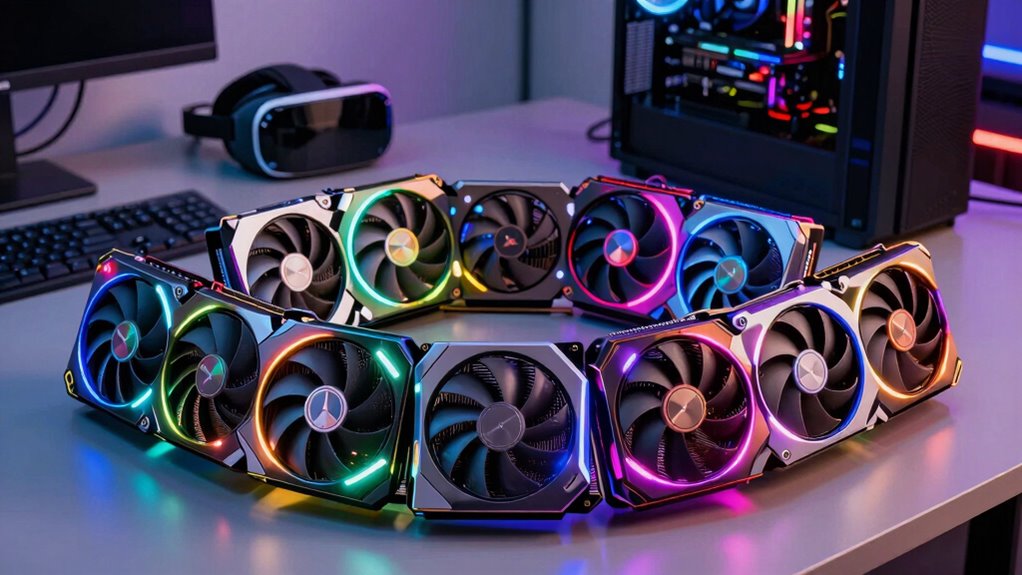

Choosing the right graphics card for VR is crucial for smooth, immersive experiences. The best options balance raw performance with stability, but you’ll need to consider factors like compatibility, power requirements, and future-proofing. The GIGABYTE Radeon RX 9070 XT Gaming OC 16G stands out as the overall best, offering top-tier performance for demanding VR titles. The ASUS Dual GeForce RTX 5060 Ti 16GB provides a great middle ground, while the ASUS Dual GeForce RTX 3050 is an excellent choice for budget-conscious users. Tradeoffs often involve balancing cost against performance and features. Continue reading for a detailed breakdown of these options and how to pick the right card for your VR setup.

Get the latest gadgets delivered free with Prime
- Fast, free delivery on millions of items
- Prime Video, Amazon Music and more included
- Member-only deals all year
Complete the kit



Key Takeaways
- High VR performance requires at least 12-16GB of VRAM to handle demanding textures and resolutions.
- The top picks balance raw power with thermal stability and quiet operation, avoiding overheating during extended VR sessions.
- More expensive cards tend to support newer technologies like DLSS 3.0 and higher bandwidth, offering better future-proofing.
- Compact form factors are available but may sacrifice some cooling efficiency or performance headroom.
- Budget options can work well for casual VR users but may struggle with the latest, graphically intensive titles.
| GIGABYTE Radeon RX 9070 XT Gaming OC 16G Graphics Card |  | Best Overall for High-Performance VR | GPU Model: Radeon RX 9070 XT | Memory: 16GB GDDR6 | Interface: PCIe 5.0 | VIEW ON AMAZON | See Our Full Breakdown |
| ASRock Radeon RX 9060 XT Challenger 16GB OC Graphics Card |  | Best Value for 1440p VR Gaming | GPU Architecture: RDNA 4 | Memory: 16GB GDDR6 | Boost Clock: 3290 MHz | VIEW ON AMAZON | See Our Full Breakdown |
| ASUS Dual GeForce RTX 5060 Ti 16GB GDDR7 OC Edition Gaming Graphics Card |  | Best for AI-Enhanced VR and Compact Builds | Memory: 16GB GDDR7 | Architecture: NVIDIA Blackwell | Fan Design: Axial-tech | VIEW ON AMAZON | See Our Full Breakdown |
| ASUS Dual GeForce RTX 3050 6GB GDDR6 OC Edition Gaming Graphics Card |  | Best Budget for Entry-Level VR | GPU: GeForce RTX 3050 | Memory: 6GB GDDR6 | Boost Clock: 1500 MHz (OC), 1470 MHz (Default) | VIEW ON AMAZON | See Our Full Breakdown |
| ASRock Radeon RX 7700 XT Challenger 12GB OC Graphics Card |  | Best for Content Creators and 1440p VR | Architecture: AMD RDNA 3 | Compute Units: 54 | RT+AI Accelerators: Yes | VIEW ON AMAZON | See Our Full Breakdown |
| XFX Swift AMD Radeon RX 9060 XT OC White Triple Fan Gaming Edition 16GB |  | Best for High-Performance Demanding VR and Gaming | Chipset: AMD RX 9060 XT | Memory: 16 GB GDDR6 | Cooling Solution: Triple Fan | VIEW ON AMAZON | See Our Full Breakdown |
| ASUS GeForce GTX 1660 Ti 6GB Phoenix Fan Overclocked Edition VR Ready Graphics Card |  | Best for Budget-Conscious VR Users and Entry-Level Gaming | GPU: NVIDIA GeForce GTX Ti | Memory: 6 GB GDDR6 | GPU Clock Speed: 1815 MHz | VIEW ON AMAZON | See Our Full Breakdown |
| ZOTAC Gaming GeForce RTX 5080 Solid CORE OC DLSS 4 16GB GDDR7 Graphics Card |  | Best for High-Resolution and Multi-Display VR Experiences | Architecture: NVIDIA Blackwell | Memory: 16 GB GDDR7 | Memory Speed: 30 Gbps | VIEW ON AMAZON | See Our Full Breakdown |
| GIGABYTE GeForce RTX 5060 WINDFORCE OC 8G Graphics Card |  | Best for Balanced Performance and Future-Proofing | Memory: 8 GB GDDR7 | Memory Interface: 128-bit | Architecture: NVIDIA Blackwell | VIEW ON AMAZON | See Our Full Breakdown |
| graphics card for vr | Memory |
|---|---|
| GIGABYTE Radeon RX 9070 XT Gam | 16GB GDDR6 |
| ASRock Radeon RX 9060 XT Chall | 16GB GDDR6 |
| ASUS Dual GeForce RTX 5060 Ti | 16GB GDDR7 |
| ASUS Dual GeForce RTX 3050 6GB | 6GB GDDR6 |
| ASRock Radeon RX 7700 XT Chall | 12GB GDDR6 |
| XFX Swift AMD Radeon RX 9060 X | 16 GB GDDR6 |
| ASUS GeForce GTX 1660 Ti 6GB P | 6 GB GDDR6 |
| ZOTAC Gaming GeForce RTX 5080 | 16 GB GDDR7 |
| GIGABYTE GeForce RTX 5060 WIND | 8 GB GDDR7 |
More Details on Our Top Picks
GIGABYTE Radeon RX 9070 XT Gaming OC 16G Graphics Card
The GIGABYTE Radeon RX 9070 XT Gaming OC 16G stands out for its combination of cutting-edge PCIe 5.0 support and a substantial 16GB GDDR6 memory, making it ideal for demanding VR experiences that require fast data transfer and ample VRAM. Unlike the ASRock RX 7700 XT Challenger, which emphasizes cooling and content creation, this card focuses on raw performance. The advanced WINDFORCE cooling and RGB lighting add both thermal stability and aesthetic appeal, but the need for a PCIe 5.0 slot and potential high power draw are notable tradeoffs. This pick makes the most sense for gamers with high-end systems seeking top-tier VR performance without compromise.
Pros:- Exceptional performance with PCIe 5.0 support
- Large 16GB GDDR6 VRAM ideal for intensive VR applications
- Advanced WINDFORCE cooling system ensures thermal stability
- RGB lighting for customizable aesthetics
Cons:- Requires compatible PCIe 5.0 slot, limiting upgrade options
- Potentially high power consumption, demanding a robust PSU
Best for: High-end PC builders wanting the fastest VR rendering with future-proof PCIe 5.0 support
Not ideal for: Casual users or those with older systems lacking PCIe 5.0 slots or high wattage power supplies
- GPU Model:Radeon RX 9070 XT
- Memory:16GB GDDR6
- Interface:PCIe 5.0
- Cooling System:WINDFORCE
- Lighting:RGB
Our verdict“This card is best suited for enthusiasts aiming for maximum VR performance and system future-proofing.”
ASRock Radeon RX 9060 XT Challenger 16GB OC Graphics Card
The ASRock Radeon RX 9060 XT Challenger offers a compelling balance of high performance and affordability, with a boost clock of up to 3290 MHz and 16GB GDDR6 VRAM, making it a strong choice for VR gamers who prioritize smooth 1440p experiences. Compared to the GIGABYTE RX 9070 XT, it may lack PCIe 5.0 support but compensates with a more accessible power requirement and a quieter operation thanks to dual fans with 0dB technology. However, its size (249mm length) and the 550W power supply recommendation could limit compatibility for smaller or less powerful systems. This card is ideal for gamers seeking high performance without the premium price tag.
Pros:- High boost clock for smooth VR gameplay
- Large 16GB GDDR6 VRAM suitable for modern VR titles
- Supports advanced ray tracing and AI features
- Quiet operation with dual fans and 0dB technology
Cons:- Length may be an issue in compact cases
- Power supply requirement of 550W may be high for some setups
Best for: Mid-range gamers upgrading to VR with a 550W power supply and sufficient chassis space
Not ideal for: Small form factor systems or users with limited PSU wattage below 550W
- GPU Architecture:RDNA 4
- Memory:16GB GDDR6
- Boost Clock:3290 MHz
- Memory Interface:128-bit
- Display Outputs:DP 2.1a, HDMI 2.1b
Our verdict“This card offers excellent VR performance at a reasonable price point for mainstream gaming systems.”
ASUS Dual GeForce RTX 5060 Ti 16GB GDDR7 OC Edition Gaming Graphics Card
The ASUS Dual GeForce RTX 5060 Ti OC leverages NVIDIA’s Blackwell architecture with DLSS 4, delivering significant AI performance benefits for VR, especially in demanding titles. Its compact 2.5-slot design with Axial-tech fans balances cooling efficiency and compatibility in smaller cases, unlike bulkier models like the GIGABYTE RX 9070 XT. The dual BIOS and OC mode provide customization options, but the limited detailed specs and high power consumption could pose issues for some users. This card makes sense for VR enthusiasts who want AI-enhanced visuals without sacrificing space or quiet operation.
Pros:- High AI TOPS with DLSS 4 for sharper VR visuals
- Efficient cooling with axial-tech fans
- Dual BIOS for performance tuning and quiet operation
- Compact 2.5-slot design improves compatibility
Cons:- Limited detailed technical specs in the description
- Potentially high power draw for a mid-tier card
Best for: VR gamers with small chassis seeking high AI performance and customizable settings
Not ideal for: Users requiring maximum VR VRAM or those with very high-end, large-case systems
- Memory:16GB GDDR7
- Architecture:NVIDIA Blackwell
- Fan Design:Axial-tech
- OC Mode Clock Speed:2632 MHz
- Default Mode Clock Speed:2602 MHz
Our verdict“This card excels for space-conscious VR users wanting AI-powered performance and customization.”
ASUS Dual GeForce RTX 3050 6GB GDDR6 OC Edition Gaming Graphics Card
The ASUS Dual RTX 3050 OC provides a solid foundation for VR with the Ampere architecture’s enhanced ray-tracing and AI features, making it suitable for less demanding VR titles or casual use. Its 6GB VRAM, however, limits performance in more intensive VR applications compared to higher-tier options like the ASRock RX 9060 XT Challenger. The dual-slot design with Axial-tech fans offers efficient cooling and durability, but the smaller VRAM and lower boost clock mean it’s less future-proof for high-end VR experiences. It’s a good choice for newcomers or users with budget constraints aiming for basic VR compatibility.
Pros:- Enhanced ray-tracing and AI capabilities for immersive VR
- Efficient cooling with Axial-tech fans
- Durable stainless steel bracket and dust resistance
Cons:- Limited to 6GB VRAM, which may bottleneck performance
- Lower boost clock compared to higher-end cards
Best for: Beginners or casual VR users with tight budgets and smaller cases
Not ideal for: Power users or those planning to run demanding VR environments in 4K or high settings
- GPU:GeForce RTX 3050
- Memory:6GB GDDR6
- Boost Clock:1500 MHz (OC), 1470 MHz (Default)
- Fan Design:Axial-tech
- Dust Resistance:IP5X
Our verdict“This card fits entry-level VR setups where budget and space are primary concerns.”
ASRock Radeon RX 7700 XT Challenger 12GB OC Graphics Card
The ASRock Radeon RX 7700 XT Challenger is tailored for users who want reliable 1440p VR and content creation performance, powered by AMD’s RDNA 3 architecture and 12GB GDDR6 VRAM. Its dual fans and heatpipe cooling system keep thermals in check during extended sessions, while its multiple display outputs support immersive multi-monitor setups. Compared with the GIGABYTE RX 9070 XT, it offers a more moderate price point and efficient cooling, but the dual 8-pin power connectors and compatibility considerations mean it’s best suited for more capable systems. This makes it ideal for gamers who also do content work or prefer AMD ecosystems.
Pros:- Strong performance with AMD RDNA 3
- Efficient dual-fan cooling with heatpipe design
- Supports high-resolution monitors with multiple outputs
- Metal backplate for durability and heat dissipation
Cons:- Requires dual 8-pin power connectors, may need a stronger PSU
- Compatibility verification needed for some pre-built systems
Best for: VR gamers and content creators with systems supporting dual 8-pin power and PCIe 4.0
Not ideal for: Pre-built systems with limited power supply capacity or small cases lacking space for dual fans
- Architecture:AMD RDNA 3
- Compute Units:54
- RT+AI Accelerators:Yes
- Boost Clock:2584 MHz
- Memory:12GB GDDR6
- Memory Bus:192-bit
Our verdict“This card is best for users seeking a balanced mix of gaming and content creation with AMD hardware.”
XFX Swift AMD Radeon RX 9060 XT OC White Triple Fan Gaming Edition 16GB
The XFX Swift AMD Radeon RX 9060 XT OC stands out for its substantial 16GB GDDR6 memory, making it well-suited for VR environments that demand large textures and complex scenes. Compared with the ZOTAC RTX 5080, it offers a more budget-friendly option without sacrificing significant VR performance, thanks to its high boost clock of 3320 MHz. However, its large size and high power consumption require a spacious case and robust power supply, which could be a drawback for smaller setups. The triple fan cooling system keeps temperatures in check during extended VR sessions, but this adds to its bulk. This card is ideal for users with spacious cases who prioritize raw VR performance over compactness or power efficiency.
Pros:- High 16GB memory capacity supports demanding VR textures
- Triple fan cooling provides effective temperature management
- High boost clock enhances VR rendering performance
Cons:- Large physical size may not fit in compact cases
- Potentially high power consumption increases operational costs
Best for: High-end VR gamers with spacious cases and robust power supplies
Not ideal for: Small form factor setups or users with limited power capacity
- Chipset:AMD RX 9060 XT
- Memory:16 GB GDDR6
- Cooling Solution:Triple Fan
- Boost Clock:up to 3320 MHz
- Power Consumption:High
- Size:Large
Our verdict“This card is best suited for enthusiasts with spacious builds seeking maximum VR performance without regard to size or power use.”
ASUS GeForce GTX 1660 Ti 6GB Phoenix Fan Overclocked Edition VR Ready Graphics Card
The ASUS GTX 1660 Ti Phoenix Edition brings NVIDIA’s Turing architecture to a more affordable level, supporting VR with 6GB GDDR6 memory and a boost clock of 1815 MHz. It’s a solid choice for those new to VR or with modest performance needs, especially when compared to the more powerful ZOTAC RTX 5080. Its single durable Phoenix fan offers reliable cooling, but it might generate more noise under load, and its performance ceiling is lower for demanding VR titles. This card’s compact size and lower power requirements make it a good fit for smaller or budget builds, though it limits VR performance for more intensive applications.
Pros:- Affordable price point for VR beginners
- Compact size fits smaller cases easily
- Supports up to 4 monitors for versatile setups
Cons:- Lower VR performance ceiling compared to higher-end cards
- Potentially noisier due to single fan design
Best for: Entry-level VR enthusiasts and users with compact or budget builds
Not ideal for: Power users seeking ultra-smooth VR experiences or high-end rendering
- GPU:NVIDIA GeForce GTX Ti
- Memory:6 GB GDDR6
- GPU Clock Speed:1815 MHz
- Video Output Interface:DVI, DisplayPort, HDMI
- Maximum Resolution:4K at 60Hz
- Cooling:Single Phoenix Fan
Our verdict“This pick makes the most sense for new VR users or those with space and budget constraints.”
ZOTAC Gaming GeForce RTX 5080 Solid CORE OC DLSS 4 16GB GDDR7 Graphics Card
The ZOTAC RTX 5080 exemplifies cutting-edge VR performance with NVIDIA Blackwell architecture, 16GB GDDR7 memory, and DLSS 4 support, making it ideal for 8K gaming and demanding VR scenarios. Its advanced cooling with IceStorm 3.0 technology ensures stable operation during extended sessions, similar to the XFX RX 9060 XT, but with a more refined feature set including VR readiness and RGB lighting for aesthetics. Its large size and power needs are tradeoffs for its top-tier performance, which may limit compatibility with smaller cases or less capable power supplies. This card is best suited for enthusiasts who want the ultimate VR experience at high resolutions.
Pros:- High performance with NVIDIA Blackwell architecture
- Supports 8K resolution and multiple high-res displays
- Effective cooling with IceStorm 3.0 technology
Cons:- Likely expensive and overkill for casual VR use
- Large physical size requires a spacious case
Best for: High-end VR gamers and content creators demanding maximum graphical fidelity
Not ideal for: Budget builders or compact case users due to size and cost
- Architecture:NVIDIA Blackwell
- Memory:16 GB GDDR7
- Memory Speed:30 Gbps
- Cooling:IceStorm 3.0
- Display Outputs:3 x DisplayPort 2.1b, 1 x HDMI 2.1b
- Resolution Support:8K Ready
Our verdict“This card is ideal for users seeking exceptional VR fidelity with top-tier specs and extensive display support.”
GIGABYTE GeForce RTX 5060 WINDFORCE OC 8G Graphics Card
The GIGABYTE RTX 5060 offers a compelling mix of performance and future-proofing with NVIDIA Blackwell architecture, 8GB GDDR7 memory, and PCIe 5.0 support. It’s a step down from the ZOTAC RTX 5080 but still provides solid VR capabilities for users who want reliable performance without the premium price or size. Its WINDFORCE cooling system ensures the card remains cool during extended VR use, but the limited detailed specs and potential high power draw mean it’s better suited for users with compatible PCIe 5.0 slots and decent power supplies. It strikes a balance between affordability and high-end features for mid-tier VR setups.
Pros:- Supports DLSS 4 for improved VR performance
- Effective WINDFORCE cooling system
- Supports PCIe 5.0 for faster data transfer
Cons:- Limited detailed specifications available
- Requires compatible PCIe 5.0 slot and high power capacity
Best for: VR users seeking a balanced upgrade with upcoming PCIe 5.0 support
Not ideal for: Users requiring top-tier 8K performance or building in small cases
- Memory:8 GB GDDR7
- Memory Interface:128-bit
- Architecture:NVIDIA Blackwell
- DLSS:Yes
- Cooling System:WINDFORCE
- PCIe Version:5.0
Our verdict“This card makes sense for users wanting a future-ready VR option with balanced performance and cooling.”
How We Picked
Our evaluation focused on performance benchmarks relevant to VR, including frame rates, latency, and stability. We prioritized cards with ample VRAM (12GB or more) to ensure smooth experiences with high-resolution headsets. Build quality, cooling solutions, and noise levels also influenced our rankings, as VR sessions can be lengthy. Power efficiency and compatibility with the latest PC components were considered to help future-proof these choices. The ranking reflects a balance between raw performance, value, and suitability for different user needs, from casual to enthusiast VR gamers.Factors to Consider When Choosing Graphics Card For Vr
When choosing a graphics card for VR, several key factors can influence your experience and long-term satisfaction. It’s essential to consider not only raw performance but also compatibility, future-proofing, and practical aspects like size and power requirements. Making the right choice involves understanding these broader considerations to avoid costly mistakes or bottlenecks in your VR setup.Performance and VRAM
VR performance heavily depends on the GPU’s ability to deliver high frame rates and low latency. Cards with at least 12GB of VRAM are recommended for modern VR headsets, especially if you plan to run high-resolution displays or use demanding textures. Investing in a card with more VRAM can extend its relevance, but beyond a certain point, additional VRAM offers diminishing returns for VR gaming. Balance your budget with the need for smooth, lag-free VR experiences.
Compatibility and Connectivity
Ensuring your new GPU fits within your existing setup is vital. Check the physical size, power supply requirements, and available connectors like HDMI 2.1 or DisplayPort 1.4/1.4a, which are crucial for high-refresh-rate VR headsets. Some cards may require additional power connectors or larger cases, so measure your space carefully. Compatibility issues can lead to costly upgrades or performance bottlenecks, so verify these details before purchasing.
Future-Proofing and Technologies
Investing in a newer generation GPU with features like DLSS 3.0 or HDMI 2.1 can extend the lifespan of your VR setup. These technologies improve rendering efficiency, boost frame rates, and reduce latency, which are critical for VR immersion. However, premium features often come with higher costs, so weigh whether the added benefits justify the extra expense based on your gaming or professional needs.
Cooling and Noise Levels
VR gaming sessions can be lengthy and demanding, making good cooling essential. Look for cards with robust cooling solutions, such as triple-fan setups or high-quality heatsinks, to prevent thermal throttling. Quieter operation also enhances immersion, especially in quiet environments. Conversely, some high-performance cards may generate more noise, so consider your tolerance and whether aftermarket cooling solutions are needed.
Price and Value
While high-end cards deliver superior performance, they also come at a premium. For most users, mid-range cards offer a practical balance, providing excellent VR experiences without breaking the bank. Beware of overpaying for features you won’t use; instead, focus on core specs like VRAM, bandwidth, and compatibility. Also consider the long-term value—spending more upfront can sometimes save money later by extending the upgrade cycle.
Frequently Asked Questions
Can I use a gaming graphics card for VR, or do I need a special VR-specific GPU?
Most modern gaming GPUs are fully capable of powering VR headsets, as they are designed to handle high frame rates and low latency required by VR. No special VR-specific card exists; instead, VR compatibility depends on having a powerful enough GPU, the right ports, and supporting technologies like HDMI 2.1 or DisplayPort 1.4. Ensuring your GPU meets or exceeds the recommended specifications for your VR headset will deliver smooth, immersive experiences without artifacts or lag.
How much VRAM do I need for the best VR experience in 2026?
For current high-end VR headsets, 12GB of VRAM is a good baseline, with 16GB offering additional headroom for future titles and higher resolutions. VRAM helps manage large textures and complex scenes, reducing stuttering and frame drops. Lower VRAM cards may struggle with demanding VR games, especially at higher resolutions or with enhanced graphics features. Investing in a GPU with ample VRAM offers better longevity and smoother experiences.
Is it worth paying extra for features like DLSS or ray tracing in a VR card?
Features like DLSS 3.0 and ray tracing can significantly improve visual quality and performance in VR, particularly for graphically intensive titles. DLSS, in particular, boosts frame rates by rendering at a lower resolution and upscaling, reducing latency and motion sickness. While these features add to the cost, they can be worth it if you want the best visuals and smoothest gameplay in demanding VR environments. Consider your budget and whether your headset and games support these advanced features.
How important is cooling and noise level when choosing a VR graphics card?
Cooling is vital because VR gaming can push GPUs to their thermal limits, leading to potential throttling or hardware issues. A well-cooled card maintains higher performance levels over extended sessions. Noise levels also matter: quieter cards improve immersion, especially in quiet or professional environments. If your current setup is loud or prone to overheating, investing in a card with a robust cooling system can make a noticeable difference in your VR experience.
Should I prioritize a more powerful GPU or save money with a mid-range card for VR?
If your primary goal is smooth, high-quality VR experiences with future-proofing in mind, investing in a more powerful GPU is advisable. Mid-range cards can suffice for casual use or less demanding titles but may struggle with the latest or most graphically intensive VR games. Carefully consider your budget, headset resolution, and how often you plan to upgrade. Spending more now can reduce frustrations later, but a well-chosen mid-range card can still deliver excellent VR performance for most users.
Conclusion
For users seeking the best overall VR performance, the GIGABYTE Radeon RX 9070 XT Gaming OC 16G offers unmatched power and future-proofing. Those on a tighter budget should consider the ASUS Dual GeForce RTX 3050, which provides solid performance without breaking the bank. If you want premium features and maximum longevity, the ZOTAC GeForce RTX 5080 is worth the investment. Beginners or casual users may find the ASUS GeForce GTX 1660 Ti a practical entry point. Ultimately, your choice depends on your performance needs, budget, and whether you prioritize raw power, features, or affordability.
As an affiliate, we earn on qualifying purchases.Halloween Picks
halloween