For most Windows users, I’d start with the Kensington VeriMark Gen2: it pairs a familiar USB-A connection with Windows Hello support from an established security brand. The Kensington VeriMark IT 2.0 USB-C is a stronger fit for buyers who need a USB-C security key and business features, while the DigitalPersona URU4500 serves readers seeking a distinct, dedicated scanner design. The main tradeoffs are connector compatibility, Windows Hello support, device size, and whether you need a basic sign-in reader or a security key built for business workflows. Generic compact readers may suit a simple laptop setup, but product listings do not always make compatibility and setup requirements equally clear. Read on for the full comparison and recommendations by buyer type.

Get the latest gadgets delivered free with Prime
- Fast, free delivery on millions of items
- Prime Video, Amazon Music and more included
- Member-only deals all year
Complete the kit



Key Takeaways
- Kensington’s two VeriMark models fill different roles: Gen2 is the USB-A choice, while the IT 2.0 is a USB-C security key aimed at business use.
- Windows Hello compatibility is the key dividing line among the compact readers; check supported Windows versions and setup details before choosing by size alone.
- The DigitalPersona URU4500 stands apart from the tiny plug-in designs as a dedicated reader, which may suit a stationary workstation better than a travel kit.
- The TEC TE-FPA2 Mini and the portable USB-C model prioritize compactness, while the RGB reader with a five-foot cable favors a flexible desktop placement.
- Several listings describe nearly identical Windows 10/11 readers, so connector type, stated compatibility, and support information are more useful differentiators than generic claims of fast matching.
| ineо USB Fingerprint Reader for Windows 10/11 |  | Best for Simple Windows Hello Setup | Compatibility: Windows 10/11; not for Mac | Authentication: Windows Hello fingerprint recognition | Sensor: Optical | VIEW ON AMAZON | See Our Full Breakdown |
| USB Fingerprint Reader for PC and Laptop |  | Best for FIDO2 and U2F Flexibility | Connection: USB | Supported operating systems: Windows 10 and 11 | Scanner type: Fingerprint | VIEW ON AMAZON | See Our Full Breakdown |
| TEC USB Fingerprint Reader for Windows 10/11 Hello |  | Best Compact Pick | Compatibility: Windows 10/11 Hello | Authentication time: 0.05 seconds | Fingerprint capacity: Up to 10 IDs | VIEW ON AMAZON | See Our Full Breakdown |
| ARCANITE USB Fingerprint Reader for Windows Hello, AKFSD-07 |  | Best for Multi-User Windows Sign-In | Brand: ARCANITE | Model: AKFSD-07 | Compatibility: Windows 10/11 Hello; not Windows 7/8, macOS, or Linux | VIEW ON AMAZON | See Our Full Breakdown |
| USB Fingerprint Reader for Windows 10/11/12 with RGB Light and 5FT Cable |  | Best for a Flexible, Illuminated Desk Setup | Compatibility: Windows 10/11/12 | Connection: USB 2.0/3.0 | Cable length: 5 ft (1.5 m) | VIEW ON AMAZON | See Our Full Breakdown |
| ineo USB Fingerprint Reader for Windows Hello |  | Best for Simple Windows Hello Setup | Connection: USB | Compatibility: Windows 10 and 11; not for Mac | Stored fingerprints: Up to 10 | VIEW ON AMAZON | See Our Full Breakdown |
| DigitalPersona URU4500 USB Fingerprint Reader |  | Best for Authentication Software Setups | Scanner type: Optical | Connection: USB 2.0 | Resolution: 512 dpi | VIEW ON AMAZON | See Our Full Breakdown |
| TEC TE-FPA2 Mini USB Fingerprint Reader | 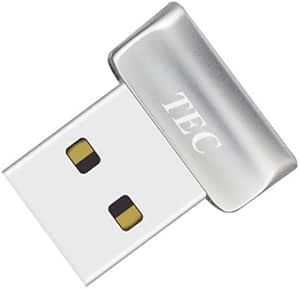 | Best for File and Folder Encryption | Connection: USB | Minimum system requirement: Windows 10 | Resolution: 600 dpi | VIEW ON AMAZON | See Our Full Breakdown |
| Kensington VeriMark Gen2 USB-A Fingerprint Key Reader |  | Best for Passkeys and Password Managers | Model: K64704WW | Connection: USB-A | Compatibility: Windows 10 and 11; not compatible with macOS or ChromeOS | VIEW ON AMAZON | See Our Full Breakdown |
| Kensington VeriMark Desktop 2.0 USB Fingerprint Reader |  | Best for Flexible Desktop Connections | Model: K64741WW | Connection: Wired USB-C and USB-A | Compatibility: Windows Hello, Windows 11 | VIEW ON AMAZON | See Our Full Breakdown |
| VeriMark IT 2.0 USB‑C Fingerprint Security Key – Windows Hello & Business, 360° Reader, Password‑Free Login (K64705WW) |  | Best for Windows Hello for Business | Connection: USB-C | Authentication: Windows Hello and Windows Hello for Business | Compatibility: Compatible Windows PCs; Enhanced Sign-in Security requires updated Windows 11 | VIEW ON AMAZON | See Our Full Breakdown |
| USB Fingerprint Reader for Windows 10 and 11 |  | Best for Flexible Placement | Compatibility: Windows 10 and 11 only | Authentication: Windows Hello | Connection: USB | VIEW ON AMAZON | See Our Full Breakdown |
| USB Fingerprint Reader for PC Windows 10/11, Biometric Scanner with 360° Touch, Fast Matching, No Password Needed |  | Best for Multi-User Windows PCs | Connection: USB | Compatibility: Windows 10 and 11 | Resolution: 508 dpi | VIEW ON AMAZON | See Our Full Breakdown |
| Portable USB-C Fingerprint Reader for Windows 10/11 |  | Best for USB-C Desk Setups | Compatibility: Windows 10/11 PCs and laptops with USB-C | Authentication: Windows Hello | Connection: USB-C with detachable cable | VIEW ON AMAZON | See Our Full Breakdown |
| USB-A Fingerprint Reader for Windows 10/11 |  | Best for Long-Reach USB-A Desktops | Interface: USB-A | Compatibility: Windows 10/11 | Fingerprint response time: 0.05 seconds | VIEW ON AMAZON | See Our Full Breakdown |
| fingerprint scanners usb | Compatibility | Connection | Weight |
|---|---|---|---|
| ineо USB Fingerprint Reader fo | Windows 10/11; not for Mac | — | — |
| USB Fingerprint Reader for PC | — | USB | — |
| TEC USB Fingerprint Reader for | Windows 10/11 Hello | — | — |
| ARCANITE USB Fingerprint Reade | Windows 10/11 Hello; not Windows 7/8, macOS, or Linux | — | 0.317 ounces |
| USB Fingerprint Reader for Win | Windows 10/11/12 | USB 2.0/3.0 | — |
| ineo USB Fingerprint Reader fo | Windows 10 and 11; not for Mac | USB | 0.317 ounces |
| DigitalPersona URU4500 USB Fin | — | USB 2.0 | 0.12 kg |
| TEC TE-FPA2 Mini USB Fingerpri | — | USB | 5 g |
| Kensington VeriMark Gen2 USB-A | Windows 10 and 11; not compatible with macOS or ChromeOS | USB-A | 0.8 ounces |
| Kensington VeriMark Desktop 2. | Windows Hello, Windows 11 | Wired USB-C and USB-A | 2.11 ounces |
| VeriMark IT 2.0 USB‑C Fingerpr | Compatible Windows PCs; Enhanced Sign-in Security requires updated Windows 11 | USB-C | 0.176 ounces |
| USB Fingerprint Reader for Win | Windows 10 and 11 only | USB | 2.08 ounces |
| USB Fingerprint Reader for PC | Windows 10 and 11 | USB | — |
| Portable USB-C Fingerprint Rea | Windows 10/11 PCs and laptops with USB-C | USB-C with detachable cable | — |
| USB-A Fingerprint Reader for W | Windows 10/11 | — | 2.29 ounces |
More Details on Our Top Picks
ineо USB Fingerprint Reader for Windows 10/11
The ineо USB Fingerprint Reader is a straightforward pick for someone who wants Windows Hello login and a quick way to lock a PC without adding extra authentication features to manage. Its plug-and-play USB connection and five-foot cable offer more placement flexibility than the tiny TEC USB Fingerprint Reader, which is better suited to a port-side setup. The optical sensor is described as fast, but the product data gives no recognition time or fingerprint capacity, so I would not choose it over the TEC or ARCANITE if those specifics matter to you. Its main limitation is clear: it works with Windows 10 and 11 and is not compatible with Mac. This makes it a practical, simple fit for a Windows desk, rather than a cross-platform security key.
Pros:- Supports Windows Hello fingerprint login
- One-touch computer locking
- Five-foot cable allows flexible placement
- Compact reader design
Cons:- Does not work with Mac
- No fingerprint capacity or recognition-time figure is provided
Best for: Windows 10 or 11 users who want fingerprint sign-in, one-touch locking, and flexible placement from a five-foot cable
Not ideal for: Mac users or buyers who need stated fingerprint capacity, FIDO2 support, or a measured authentication time
- Compatibility:Windows 10/11; not for Mac
- Authentication:Windows Hello fingerprint recognition
- Sensor:Optical
- Cable length:5 ft
- Package dimensions:4.45 x 3.62 x 1.22 in
- Item weight:3.2 oz
Our verdict“Choose this for simple Windows Hello access and one-touch locking if you do not need Mac support or detailed performance specifications.”
USB Fingerprint Reader for PC and Laptop
This reader earns a distinct place for combining Windows Hello login with FIDO2 and U2F support for compatible websites and apps. That gives it a broader stated security role than the ineо USB Fingerprint Reader, which focuses on Windows sign-in and computer locking. The 360-degree recognition and stated sub-second matching are useful for quick enrollment and daily taps, while the 1.5-meter cable gives room to position it near a laptop or desktop. The tradeoff is that its broader authentication use depends on each site’s or app’s compatibility; it does not make every account fingerprint-ready. It is limited to Windows 10 and 11, and buyers seeking a particularly tiny device may prefer the TEC USB Fingerprint Reader instead.
Pros:- Supports Windows Hello and FIDO2/U2F
- 360-degree fingerprint recognition
- Matching is specified at under one second
- 1.5-meter cable supports flexible placement
Cons:- Requires Windows 10 or 11
- Website and app authentication depends on compatibility
Best for: Windows 10/11 users who want one USB reader for Windows Hello and compatible FIDO2/U2F sign-ins
Not ideal for: Mac or Linux users, and buyers who expect FIDO2/U2F to work with every website or app
- Connection:USB
- Supported operating systems:Windows 10 and 11
- Scanner type:Fingerprint
- Resolution:300 dpi
- Recognition:360°; matches in under 1 second
- Security standards:FIDO2 and U2F
- Cable length:1.5 m (approx. 4.9 ft)
Our verdict“Pick this if you want Windows Hello plus compatible FIDO2/U2F authentication from one reader.”
TEC USB Fingerprint Reader for Windows 10/11 Hello
The TEC reader stands out for a tiny stated 0.39-inch cube and support for up to 10 fingerprint IDs, making it suited to a laptop or shared Windows PC where a small reader matters. Its listed 0.05-second authentication and 360-degree detection are more specific than the ineо reader’s claim of fast recognition, though those figures alone do not establish how it will perform on every finger or system. Compared with the larger ARCANITE AKFSD-07, TEC’s listed form is more compact; ARCANITE also gives a similarly quick authentication figure and 10-fingerprint capacity. TEC’s data has a caveat: it says dimensions vary between source sections, and the product is limited to Windows 10/11 Hello. Skip it if you need Mac compatibility or FIDO2 website authentication.
Pros:- Compact listed dimensions of 0.39 x 0.39 x 0.39 inches
- Supports up to 10 fingerprint IDs
- 360-degree detection
- Lists authentication time of 0.05 seconds
Cons:- Limited to Windows 10/11 Hello
- Source data gives varying dimensions
- No FIDO2/U2F support is specified
Best for: Windows 10/11 laptop owners and small-workspace users who want a compact reader that can store several users
Not ideal for: Mac users or buyers who need FIDO2/U2F support, a cable-length specification, or more consistent size data
- Compatibility:Windows 10/11 Hello
- Authentication time:0.05 seconds
- Fingerprint capacity:Up to 10 IDs
- Detection angle:360 degrees
- Material:Plastic and metal
- Color:Black
- Dimensions:0.39 x 0.39 x 0.39 inches (source sections vary)
- Item weight:0.88 ounces
Our verdict“Choose TEC for a compact Windows Hello reader with multi-fingerprint storage, provided its Windows-only fit and size-data caveat work for you.”
ARCANITE USB Fingerprint Reader for Windows Hello, AKFSD-07
The ARCANITE AKFSD-07 is a compact Windows Hello option with a stated capacity of up to 10 fingerprints, which makes it a sensible fit for a shared home or office PC. Like the TEC USB Fingerprint Reader, it specifies 360-degree detection and authentication as fast as 0.05 seconds; ARCANITE provides a slightly larger listed body, while TEC’s dimensions are unusually tiny and carry a source-data discrepancy. Its stated 0.317-ounce weight keeps the ARCANITE easy to leave connected, and setup runs through Windows Hello. The cost of that focused design is strict platform coverage: it does not support Windows 7 or 8, macOS, or Linux. Compared with the USB Fingerprint Reader for PC and Laptop, it also lacks stated FIDO2/U2F support.
Pros:- Stores up to 10 fingerprints
- 360-degree fingerprint detection
- Authentication specified as fast as 0.05 seconds
- Lightweight design with Windows Hello setup
Cons:- Does not support Windows 7 or 8, macOS, or Linux
- No FIDO2/U2F support is listed
Best for: Households or small teams sharing a Windows 10/11 PC and enrolling multiple fingerprints
Not ideal for: Mac, Linux, or older Windows users, and buyers who need FIDO2/U2F account authentication
- Brand:ARCANITE
- Model:AKFSD-07
- Compatibility:Windows 10/11 Hello; not Windows 7/8, macOS, or Linux
- Authentication speed:As little as 0.05 seconds
- Fingerprint capacity:Up to 10 fingerprints
- Detection:360-degree
- Weight:0.317 ounces
- Dimensions:0.83 x 0.67 x 0.47 inches
Our verdict“Choose the ARCANITE for quick Windows Hello sign-in across several enrolled users, as long as all users are on Windows 10 or 11.”
USB Fingerprint Reader for Windows 10/11/12 with RGB Light and 5FT Cable
This reader is the lineup’s desk-focused choice: it pairs a five-foot cable with RGB lighting, so it can sit where a user can reach it rather than occupying a nearby USB port directly. It also lists storage for up to 10 fingerprints and FIDO U2F/FIDO2 certification, giving it more stated scope than the compact TEC reader. The tradeoff is that the listing centers on Windows Hello and security applications, and it says the device is not compatible with Mac or Linux. Its Windows 10/11/12 compatibility claim is broader than the other Windows 10/11-only entries, but buyers should match that claim to their own system. I would choose the USB Fingerprint Reader for PC and Laptop instead if RGB is unnecessary and its stated 360-degree, sub-second matching matters more.
Pros:- Five-foot cable offers flexible placement
- RGB lighting provides visual feedback and desktop styling
- Stores up to 10 fingerprints
- Lists FIDO U2F/FIDO2 certification
Cons:- Not compatible with Mac or Linux
- Recognition speed and detection angle are not specified
- Listed use is limited to biometric login and security applications
Best for: Windows users who want a cable-positioned fingerprint reader with RGB lighting and capacity for multiple fingerprints
Not ideal for: Mac or Linux users, or buyers who want a plain compact reader without lighting or who need stated recognition speed
- Compatibility:Windows 10/11/12
- Connection:USB 2.0/3.0
- Cable length:5 ft (1.5 m)
- Lighting:RGB
- Fingerprint storage:Up to 10 fingerprints
- Encryption:AES256
- Certification:FIDO U2F/FIDO2
- Dimensions and weight:0.39 x 0.39 x 0.39 inches; 0.705 ounces
Our verdict“Pick this for a Windows desk where cable reach, RGB lighting, and multi-user fingerprint storage are useful.”
ineo USB Fingerprint Reader for Windows Hello
The ineo USB Fingerprint Reader is a straightforward pick for someone who wants a small reader dedicated to Windows Hello. It stores up to 10 fingerprints and lists authentication under half a second, so several people can register while keeping sign-in quick. Its metal body is a practical step up from a tiny exposed plug when the reader will travel between computers. Compared with the TEC TE-FPA2 Mini, ineo lists broader Windows 10 and 11 support, while TEC adds file and folder encryption. The tradeoff is setup: some PCs may need a manual driver update, and this model does not work with Mac. I’d choose it for Windows login simplicity, not for cross-platform use or extra security workflows.
Pros:- Windows Hello sign-in with authentication listed under 0.5 seconds
- Stores up to 10 fingerprints
- Compact metal construction for portability
- Supports Windows Biometric Framework
Cons:- Some systems may require a manual driver update
- Not compatible with Mac
Best for: Windows 10 or 11 users who want a portable, metal-cased reader for quick Windows Hello sign-in
Not ideal for: Mac users or people who need file encryption features alongside biometric login
- Connection:USB
- Compatibility:Windows 10 and 11; not for Mac
- Stored fingerprints:Up to 10
- Authentication speed:Under 0.5 seconds
- False acceptance rate:0.001%
- False rejection rate:0.1%
- Material:Metal
- Weight:0.317 ounces
Our verdict“Choose ineo for a compact Windows Hello reader with room for multiple fingerprints, provided your PC is supported.”
DigitalPersona URU4500 USB Fingerprint Reader
The DigitalPersona URU4500 suits buyers building around compatible fingerprint authentication software rather than seeking a ready-to-use Windows Hello accessory. Its 512 dpi optical sensor is designed to read dry, moist, or rough fingerprints, and the reader rejects latent prints while encrypting captured data. That focus makes it more specialized than the ineo USB Fingerprint Reader, which is presented as a direct Windows Hello login device with fingerprint capacity and speed details. The URU4500’s compact metal casing and USB 2.0 connection fit a fixed workstation, but the key tradeoff is software dependence: the reader alone does not provide the authentication workflow. Compatibility details also vary in the supplied data, so buyers should confirm their operating system and software support before choosing it.
Pros:- 512 dpi optical sensor with CMOS technology
- Designed for dry, moist, and rough fingerprints
- Encrypts fingerprint data and rejects latent prints
- Compact metal casing
Cons:- Requires compatible fingerprint authentication software
- Supplied compatibility information is not fully consistent across operating systems
- USB 2.0 connection may be less convenient than newer USB options
Best for: IT teams and users who already have compatible fingerprint authentication software and need an optical USB reader
Not ideal for: People seeking a plug-and-play Windows Hello reader without separate authentication software
- Scanner type:Optical
- Connection:USB 2.0
- Resolution:512 dpi
- Sensor technology:CMOS
- Color depth:8 bpp
- Light source:LED
- Dimensions:2.55 x 1.42 x 0.65 inches
- Weight:0.12 kg
Our verdict“Pick the URU4500 when your authentication software already supports it and fingerprint capture conditions may vary.”
TEC TE-FPA2 Mini USB Fingerprint Reader
The TEC TE-FPA2 Mini is the most task-specific pick here: it combines Windows Hello login with the option to encrypt files and folders on Windows 10. Its 360° recognition lets users present a registered finger at different angles, while support for up to 10 fingerprints per account can accommodate several fingers or users. Against the ineo USB Fingerprint Reader, TEC offers those encryption features and a much smaller 5 g body, but its listed authentication time is about 1–2 seconds rather than under half a second. There are compatibility limits too: it does not support ARM-based chipsets, and a driver install or update may be needed if setup is not automatic. It makes sense for a compact Windows 10 setup where file protection matters as much as login.
Pros:- Supports Windows Hello and file or folder encryption
- 360° fingerprint recognition
- Stores up to 10 fingerprints per account
- Very light at 5 g
Cons:- Not compatible with ARM-based chipsets
- May need driver installation or an update
- Listed for Windows 10, with no Windows 11 support specified
Best for: Windows 10 laptop users on supported chipsets who want both biometric login and file or folder encryption
Not ideal for: ARM-based PC owners or buyers who need Windows 11 support listed for this specific model
- Connection:USB
- Minimum system requirement:Windows 10
- Resolution:600 dpi
- Fingerprint capacity:Up to 10 per account
- Authentication time:About 1–2 seconds
- False rejection rate:1.92% or less
- False acceptance rate:Less than 0.0002%
- Weight:5 g
Our verdict“Choose the TE-FPA2 if you want a tiny Windows 10 reader that can handle both sign-in and file encryption.”
Kensington VeriMark Gen2 USB-A Fingerprint Key Reader
The Kensington VeriMark Gen2 stands apart from basic Windows Hello readers by adding CTAP2 support for passkeys and compatible password managers. That gives Windows 10 and 11 users more than a faster desktop sign-in: one reader can serve as part of a broader account-authentication setup. Its 360° recognition and anti-spoofing are useful when positioning a finger quickly, and fingerprint data stays secured in the sensor. Compared with the Kensington VeriMark Desktop 2.0, Gen2 is the more direct USB-A key-style choice; Desktop 2.0 adds USB-C support and listed FIDO2 and Enhanced Sign-in Security features. Gen2’s drawback is platform reach: it excludes macOS and ChromeOS, and the supplied specs list a 2% false rejection rate. Check host compatibility before buying.
Pros:- Supports Windows Hello and Windows Hello for Business
- CTAP2 support for passkeys and compatible password managers
- 360° recognition with anti-spoofing
- Keeps fingerprint data secured in the sensor
Cons:- Not compatible with macOS or ChromeOS
- USB-A connection may require an adapter on USB-C-only devices
- Listed false rejection rate is 2%
Best for: Windows 10 or 11 users who want one USB-A reader for Windows Hello and CTAP2-compatible passkeys or password managers
Not ideal for: Mac or ChromeOS users, and buyers whose devices rely on USB-C without an adapter
- Model:K64704WW
- Connection:USB-A
- Compatibility:Windows 10 and 11; not compatible with macOS or ChromeOS
- Fingerprint capacity:Up to 10 fingerprints
- Passkey protocol:CTAP2
- False rejection rate:2%
- False acceptance rate:0.001%
- Weight:0.8 ounces
Our verdict“Pick the VeriMark Gen2 if CTAP2 passkeys matter and your Windows device has a USB-A port.”
Kensington VeriMark Desktop 2.0 USB Fingerprint Reader
The VeriMark Desktop 2.0 is the lineup’s desktop-oriented choice for buyers who need both USB-C and USB-A connectivity. Its wired connection suits a reader that can stay beside a workstation, while native Windows Hello integration keeps everyday sign-in simple. The useful distinction is where fingerprint handling happens: Match-in-Sensor processes and stores data on the device, and the listed security support includes Enhanced Sign-in Security, SDCP, FIDO U2F, and FIDO2. Compared with the USB-A-only VeriMark Gen2, this model adapts to more port types and names broader security standards, though Gen2 specifically lists CTAP2 support for passkeys and compatible password managers. The tradeoff is a wired desktop setup, plus compatibility details are limited to Windows Hello and Windows 11 in the supplied specs.
Pros:- Supports both USB-C and USB-A
- Processes and stores fingerprint data on the device
- Integrates with Windows Hello
- Lists ESS, SDCP, FIDO U2F, and FIDO2 support
Cons:- Requires a wired USB connection
- Supplied compatibility details specify Windows Hello and Windows 11 only
- Does not list fingerprint capacity or authentication speed
Best for: Windows 11 desktop users who want an on-device fingerprint reader that can connect through either USB-C or USB-A
Not ideal for: Travelers seeking a tiny reader to leave in a laptop port or users who need clearly listed support beyond Windows
- Model:K64741WW
- Connection:Wired USB-C and USB-A
- Compatibility:Windows Hello, Windows 11
- Authentication:Fingerprint
- Security:ESS, SDCP, FIDO U2F, FIDO2
- Fingerprint storage:On-device
- Dimensions:0.59 x 1.14 x 1.14 inches
- Weight:2.11 ounces
Our verdict“Choose Desktop 2.0 for a stationary Windows 11 setup where flexible ports and on-device processing are priorities.”
VeriMark IT 2.0 USB‑C Fingerprint Security Key – Windows Hello & Business, 360° Reader, Password‑Free Login (K64705WW)
The VeriMark IT 2.0 is the clearest fit here for organizations that want a compact USB-C reader tied to Windows Hello and Windows Hello for Business. Its Match-in-Sensor processing keeps fingerprint data on the device, while 360° recognition is meant to make placement less fussy. Compared with the USB-A Rocketek reader, this model is better suited to newer USB-C setups and business sign-in workflows, though it cannot serve Mac or Linux users either. Its very small body is easy to carry but also easy to misplace, and Enhanced Sign-in Security requires Windows 11 with current updates. I’d choose it for managed Windows environments where native integration and on-device processing matter more than broad operating-system support.
Pros:- Native Windows Hello and Windows Hello for Business integration
- Match-in-Sensor processing keeps fingerprint data on the device
- USB-C connection suits newer PCs without an adapter
- 360° sensor recognition
Cons:- Limited to Windows systems
- Enhanced Sign-in Security requires an updated Windows 11 PC
- Tiny form factor can be easy to lose
Best for: Windows 11 users and IT teams adopting Windows Hello for Business on USB-C PCs
Not ideal for: Mac or Linux users, or people who want a larger reader that is harder to misplace
- Connection:USB-C
- Authentication:Windows Hello and Windows Hello for Business
- Compatibility:Compatible Windows PCs; Enhanced Sign-in Security requires updated Windows 11
- Sensor:AI-enhanced 360° fingerprint reader
- False rejection rate:2.2%
- False acceptance rate:0.0001%
- Dimensions:0.28 x 0.71 x 0.63 inches
- Weight:0.176 ounces
- Model:K64705WW
Our verdict“Choose the VeriMark IT 2.0 for business-oriented Windows sign-in on USB-C, provided its small size and Windows-only support fit your setup.”
USB Fingerprint Reader for Windows 10 and 11
This reader’s four-foot extension cable gives it a practical advantage when a desktop tower or laptop port is awkward to reach. The angled sensor also gives users a defined touch surface, while support for up to 10 fingerprints can accommodate a household or small team sharing a Windows PC. Unlike the compact USB-C Portable Reader, this model connects over USB and does not include a pass-through port; its appeal is straightforward placement rather than desk integration. Matching happens inside the sensor and data stays local, but Windows Hello must be available and enabled. I’d put it ahead of the tiny VeriMark IT 2.0 for a shared Windows 10/11 computer where cable reach matters more than business-specific features.
Pros:- Four-foot extension cable allows flexible placement
- Supports up to 10 fingerprints
- Fingerprint matching occurs inside the sensor
- Data is stored locally
Cons:- Works only with Windows 10 and 11
- Requires Windows Hello to be available and enabled
- Does not offer the USB-C pass-through feature of the Portable USB-C Fingerprint Reader
Best for: Families or small teams sharing a Windows 10/11 PC whose USB port is hard to reach
Not ideal for: Mac and Linux users, or buyers who need a USB-C pass-through port
- Compatibility:Windows 10 and 11 only
- Authentication:Windows Hello
- Connection:USB
- Included cable:4-foot USB extension cable
- Fingerprint capacity:Up to 10 fingerprints
- Processing:Match-in-Sensor
- Data storage:Stored locally
- Weight:2.08 ounces
Our verdict“Pick this reader for a shared Windows PC when cable reach and multiple enrolled fingerprints are priorities.”
USB Fingerprint Reader for PC Windows 10/11, Biometric Scanner with 360° Touch, Fast Matching, No Password Needed
With support for up to 10 individual user profiles, this scanner is aimed at shared Windows computers where each person needs a separate sign-in. Its 360° touch recognition and stated 0.5-second response time focus on quick placement and login, while plug-and-play setup avoids a separate software installation. The USB-A Rocketek reader also supports multiple IDs and includes an extension cable, so it may suit desks where reach is the bigger concern; this model instead highlights its 508 dpi resolution and matching-rate figures. It still requires fingerprint enrollment before use and is limited to Windows 10 and 11. I’d shortlist it for a small office or household that values multi-user support and a simple setup, but not for mixed operating systems.
Pros:- Supports up to 10 individual user profiles
- 360° touch recognition
- Plug-and-play setup with no additional software required
- 508 dpi resolution
Cons:- Limited to Windows 10 and 11
- Fingerprints must be enrolled before use
- No extension cable is listed in the provided product details
Best for: Households or small offices with several users sharing a Windows 10/11 computer
Not ideal for: Mac or Linux users, and buyers who want a specified extension cable included
- Connection:USB
- Compatibility:Windows 10 and 11
- Resolution:508 dpi
- Recognition:360° touch
- Response time:0.5 seconds
- User profiles:Up to 10
- False rejection rate:0.1%
- False acceptance rate:0.001%
Our verdict“Choose this scanner for a shared Windows PC when multi-user profiles and quick setup matter more than cross-platform use.”
Portable USB-C Fingerprint Reader for Windows 10/11
This is the most desk-oriented USB-C pick in the group. The pass-through port can preserve access to charging or data connections, which matters on laptops with few ports, and its detachable cable gives more placement options than a fixed plug. The aluminum casing and adhesive backing suit buyers who want to attach the reader in a regular spot; that same mounting choice may be inconvenient if the device moves between computers. Compared with the VeriMark IT 2.0, this reader offers more connection flexibility at the desk, while the VeriMark emphasizes business authentication and on-device biometric processing. Windows Hello login is stated to take under a second, but compatibility is limited to Windows 10/11 PCs with USB-C. I’d choose this for a fixed USB-C workstation, not a mixed-device household.
Pros:- USB-C pass-through supports charging and data
- Detachable cable allows flexible placement
- 360-degree touch recognition
- Aluminum alloy casing with adhesive mounting
Cons:- Requires a Windows 10/11 PC with USB-C
- Adhesive backing may not suit movable setups
- No fingerprint capacity or on-sensor data handling details are provided
Best for: Windows laptop owners with limited USB-C ports who want a fixed, reachable sign-in sensor
Not ideal for: People using USB-A-only computers or frequently moving the reader between devices
- Compatibility:Windows 10/11 PCs and laptops with USB-C
- Authentication:Windows Hello
- Connection:USB-C with detachable cable
- Pass-through port:USB-C charging and data
- Fingerprint recognition:360-degree capacitive touch
- Login speed:Under 1 second
- Material:Aluminum alloy
- Mounting:3M adhesive backing
Our verdict“Pick this model for a port-limited Windows USB-C laptop setup where pass-through connectivity and a mounted reader are useful.”
USB-A Fingerprint Reader for Windows 10/11
For a desktop with USB-A ports, the Rocketek combines Windows Hello sign-in with a 1.5-meter extension cable, making it easier to position the sensor within reach instead of directly at the computer. It supports up to 10 user IDs and requires no third-party software, which gives it a useful role for shared Windows PCs. Its stated 0.05-second response time is notably faster on paper than the 0.5-second figure for the 360° Touch USB reader, though the latter lists a lower false rejection rate. That tradeoff makes the Rocketek more compelling for cable reach and multi-user access than for buyers comparing matching figures alone. It needs USB-A and only supports Windows 10/11, so it is a poor fit for newer USB-C-only laptops.
Pros:- Includes a 1.5-meter extension cable
- Supports up to 10 user IDs
- Plug-and-play setup without third-party software
- 360-degree recognition and anti-spoofing technology
Cons:- Requires a USB-A port
- Compatible only with Windows 10 and 11
- Its listed false rejection rate is higher than the 360° Touch USB reader’s stated rate
Best for: Shared Windows desktops with USB-A ports where users need the sensor positioned away from the computer
Not ideal for: USB-C-only laptop owners or people who need Mac or Linux compatibility
- Interface:USB-A
- Compatibility:Windows 10/11
- Fingerprint response time:0.05 seconds
- False rejection rate:1.92%
- False acceptance rate:0.002%
- Supported user IDs:Up to 10
- Extension cable:1.5 m (4.9 ft)
- Weight:2.29 ounces
- Manufacturer support:24 months
Our verdict“Choose the Rocketek for a shared USB-A Windows desktop when cable reach and multiple user IDs are more useful than USB-C connectivity.”

How We Picked
I ranked these readers around the decisions that matter for USB fingerprint sign-in: stated Windows Hello compatibility, connector fit, intended use, physical format, and how clearly the product is positioned. A reader with a named security-key role or a clear USB-C option can be a better match for a specific setup than a generic compact scanner, even if the latter sounds similar on paper.
The ranking gives the lead to products with the clearest fit for common buyer needs, then separates dedicated, mini, cable-based, and broadly described alternatives by use case. Product names and listing details do not establish real-world speed, reliability, or security performance, so I do not treat those claims as proven test results. I give less weight to repeated generic claims and more weight to a concrete distinction a buyer can use, such as a USB-A versus USB-C connector or a business-focused security-key design.
Factors to Consider When Choosing Fingerprint Scanners Usb
Before choosing a USB fingerprint scanner, I’d check how it will connect and how Windows will recognize it. The right reader depends as much on your PC, sign-in setup, and work environment as on the sensor itself.
Check Windows Hello Support Before Anything Else
A USB fingerprint reader needs the right driver and Windows integration to work for sign-in, so a listing that says “fingerprint scanner” alone may not answer the question you care about. Look for explicit Windows Hello support and the Windows versions covered by the seller. Check whether the reader is intended for local Windows login or for a separate business authentication workflow. A device that works with one operating system version may not suit a managed computer with stricter IT policies. If the listing leaves setup requirements vague, treat that as a real buying uncertainty and look for clearer documentation before ordering.
Match the Connector to Your Computer
USB-A and USB-C are not interchangeable in every setup, even when an adapter can bridge the gap. A direct connector avoids an extra adapter that could block neighboring ports or be easy to misplace. For a laptop with only USB-C ports, a USB-C model such as the VeriMark IT 2.0 or a portable USB-C reader may simplify daily use. Desktop owners with USB-A ports have more options, including the VeriMark Gen2. Check port placement too: a reader sticking out of the side of a travel laptop is more exposed to bumps than one mounted at a convenient workstation port.
Choose a Form Factor for Where You Sign In
Mini readers keep a laptop bag light and take up little space, but their small size can make them less convenient to reach when the computer sits under a desk or behind a monitor. A desktop reader or a model with a longer cable gives you more freedom to place the sensor where your hand naturally rests. That convenience can matter if you sign in many times a day. A protruding dongle can also be a poor fit for a laptop that travels in a crowded bag. Think about the reader’s location during actual use, not just how small it looks in a product photo.
Separate a Sign-In Reader From a Security Key
Many buyers want a faster way to unlock their own Windows PC; others need a device that fits an organization’s security process. Those are different jobs, and a business-oriented security key may offer a better fit for managed accounts while adding setup steps that a home user does not need. Confirm that the product supports the authentication method your organization requires before purchasing it for work. Ask IT whether biometric sign-in is permitted on the computer and whether enrollment is handled locally or centrally. A basic Windows Hello reader is usually the simpler direction for a personal device.
Look for Setup and Support Details, Not Speed Claims
Words such as “fast” and “360°” do not tell you how well a reader will work with your fingers, computer, or operating system. Clear driver instructions, supported Windows versions, and a way to get product help are more useful signals when comparing similar listings. If you have dry skin, frequently wash your hands, or use the reader in a dusty workspace, consider how easy it is to clean and whether the sensor is exposed. Keep a PIN or another sign-in method available, since fingerprint recognition can be unavailable after a restart or a change in conditions. Favor a product whose setup and fallback instructions are easy to find over one whose listing relies mainly on performance slogans.
Frequently Asked Questions
Will any USB fingerprint scanner work with Windows Hello?
No. The reader needs compatible drivers and support for Windows Hello, so confirm both in the product details before buying. Also check the Windows versions named by the seller and whether your computer is managed by an organization. A reader that fits the USB port can still fail to provide the Windows sign-in feature you want. If the listing is unclear, look for setup documentation or choose a model with explicit Hello support.
Should I choose USB-A or USB-C for a laptop?
Choose the connector that matches a port you can leave available during everyday sign-in. USB-C can be convenient on newer laptops with few ports, while USB-A remains a practical fit for many desktops and older computers. An adapter can work, but it adds another small part and may interfere with nearby ports. Also consider whether the reader will protrude where it could be hit while carrying the laptop. The Kensington VeriMark Gen2 and VeriMark IT 2.0 make the connector distinction especially clear in this roundup.
Can a fingerprint reader replace my Windows password or PIN?
A compatible reader can make sign-in more convenient, but you should keep a fallback sign-in method configured. Windows may request your PIN or another credential after a restart, after certain security changes, or when fingerprint recognition is unavailable. Fingerprint sign-in also depends on enrolling a finger and setting up the reader correctly. For a shared or managed computer, your organization may set additional rules. Treat biometrics as a convenient sign-in method within your account setup, not as a reason to remove every recovery option.
Is a business security key worth choosing for a personal PC?
It can be a fit if your personal setup needs the key’s specific authentication or USB-C features, but business-oriented functions may add complexity without helping a basic Windows Hello login. First check which sign-in methods the device supports and whether your accounts or software can use them. If you only want to unlock a home PC with a fingerprint, a straightforward Hello reader may involve fewer setup questions. If you work under an IT-managed account, ask your administrator which devices and methods are approved. The right choice follows your authentication needs, not the product’s business label alone.
What should I do if the reader stops recognizing my finger?
Start with the basics: clean the sensor, reconnect the reader, and check whether Windows still lists it as an available sign-in option. If recognition remains unreliable, follow the manufacturer’s enrollment instructions and register the finger again if Windows allows it. Keep your PIN available so you can get into the computer while troubleshooting. On a work device, check with IT before changing drivers or security settings. Frequent recognition problems can point to a fit issue with the sensor or setup, so review the return and support terms before purchasing.
What are the best fingerprint scanner?
The best fingerprint scanner depends on how you plan to use it, which devices it needs to work with, and how easily it fits into your routine. For USB models, compare the picks above for compatibility with your operating system, connection type, setup process, and intended use, such as logging in to a personal computer or managing access in a workplace. Also consider the scanner’s size and placement, especially if you travel or have limited desk space. Check that the product details match your requirements before choosing, since support and features can vary by model. The right choice is the one that works with your devices and security needs.
Conclusion
For most people, I’d choose the Kensington VeriMark Gen2 as the best overall because it presents a clear USB-A Windows Hello use case. The best premium and business-focused pick is the Kensington VeriMark IT 2.0 USB-C for buyers who need its connector and security-key role. For a compact setup, I’d compare the TEC TE-FPA2 Mini with the portable USB-C reader and choose based on the computer’s ports. The best beginner choice is the clearly described Windows Hello reader that matches your PC, with setup instructions you can confirm before buying. For a stationary workstation, the DigitalPersona URU4500 or the cable-equipped RGB model offers a different placement style; buyers seeking the best value should compare the generic USB-A and Windows 10/11 listings by compatibility and support details, since their names alone reveal few meaningful differences.
Halloween Picks
halloween
As an affiliate, we earn on qualifying purchases.