Finding the right desktop laser engraver depends on your specific needs, whether you’re crafting detailed art, personalized gifts, or small-scale production. The Creality Falcon 10W stands out as the best overall choice for its power and feature set, while the LaserPecker LP2 offers portability for on-the-go projects. For those seeking advanced features like AI integration, the Carverall A1 Pro makes an excellent pick. However, tradeoffs between power, size, ease of use, and price mean you need to weigh what matters most for your projects. Continue reading to see how these options compare and which might suit your workflow best.

Get the latest gadgets delivered free — and shop member deals
- Fast, free delivery on millions of items
- Access to Prime Big Deal Days deals on October 6–7
- Prime Video, Amazon Music and more included
Complete the kit



Key Takeaways
- Power output and engraving detail vary significantly, influencing suitability for different materials.
- Portability and size are key considerations—compact models excel for mobile use, larger ones for heavier projects.
- Advanced features like AI, cameras, and app control add ease but often come at a higher cost.
- Budget-friendly options can handle basic engraving, but may lack durability or precision for complex work.
- Safety features, such as enclosed designs and air assist, are crucial for safe operation in home environments.
| Creality Falcon 10W Laser Engraver with Air Assist and Rotary Roller | 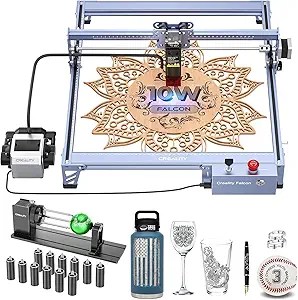 | Best Overall for Versatile High-Precision Engraving | Laser Output Power: 10000mW | Laser Class: 4 | Engraving Speed: 10000mm/min | VIEW ON AMAZON | See Our Full Breakdown |
| LaserPecker LP2 Laser Engraver with Roller, Portable Handheld Laser Engraving Machine for Wood, Metal, Leather, Acrylic |  | Best for Portability and Speed in Small-Scale Projects | Max engraving speed: 1417 inches/min | Resolution options: 1K, 1.3K, 2K | Engraving area: up to 196 inches in length | VIEW ON AMAZON | See Our Full Breakdown |
| Carverall A1 Pro 5W Desktop Laser Engraver with Camera, AI, App Control |  | Best for Beginners and Small-Scale Crafting | Power: 5W | Work Area: 3.94×3.94 inches | Max Height: 10.63 inches | VIEW ON AMAZON | See Our Full Breakdown |
| Creality Falcon A1 Pro 20W Laser Engraver with Touch Screen and APP Control |  | Best for Professional-Grade, Enclosed Metal and Wood Engraving | Laser Power: 20W | Engraving Area: 460 × 346mm | Dimensions: 32 x 27 x 15 inches | VIEW ON AMAZON | See Our Full Breakdown |
| xTool F2 5W IR & 15W Diode Dual Laser Engraver with 50MP Camera |  | Best for High-Speed, Multi-Material Versatility | Laser Power (Diode): 15W | Laser Power (IR): 5W | Camera Resolution: 50MP | VIEW ON AMAZON | See Our Full Breakdown |
| Twotrees TTS-10 Pro Laser Engraver, 10W High Power, 300x300mm Work Area |  | Best Overall for Versatile High-Power Projects | Laser Power: 10W | Work Area: 300x300mm | Laser Spot Size: 0.069mm | VIEW ON AMAZON | See Our Full Breakdown |
| ACMER S1 Laser Engraver 3500mW with 130x130mm Working Area |  | Best for Beginners and Compact Precision Work | Laser Power: 3500mW | Wavelength: 455±5nm | Focal Length: 2mm | VIEW ON AMAZON | See Our Full Breakdown |
| ATOMSTACK Swift Mini 2.5W Laser Engraver, 135x145mm Work Area |  | Best for Small, Detailed Personal Projects | Work Area: 135x145mm | Laser Power: 2.5W | Dimensions: 297×319×128 mm | VIEW ON AMAZON | See Our Full Breakdown |
| LaserPecker LP1 Plus Mini Laser Engraver for Beginners |  | Best Portable Solution for On-the-Go Engraving | Laser Type: Mini laser | Material Compatibility: Non-metal materials | Engraving Angles: 360° | VIEW ON AMAZON | See Our Full Breakdown |
| xTool M2 10W Laser Engraver with Dual Cameras, Enclosed Safe Design |  | Best for Home Crafters and Advanced Hobbyists | Laser Power: 10W | Safety Class: Class 1 | Built-in Cameras: Dual | VIEW ON AMAZON | See Our Full Breakdown |
| Twotrees TTS-55 Pro Laser Engraver 5500mW |  | Best Overall Power and Versatility | Laser Power: 5500mW (5.5W) | Working Area: 300x300mm | Material Compatibility: Wood, leather, acrylic, paper, stainless steel, and more | VIEW ON AMAZON | See Our Full Breakdown |
| AlgoLaser Pixi 10W Laser Engraver Machine with 3.5″ Smart Touchscreen |  | Best for Beginners and Small-Scale Projects | Power: 10W | Touchscreen: 3.5 inches | Material Compatibility: wood, leather, metal, glass, acrylic, paper, fabric, bamboo, cork, slate, stone | VIEW ON AMAZON | See Our Full Breakdown |
| ACMER S1 Laser Engraver Machine, 6000mW Laser Cutter for Wood and Acrylic | 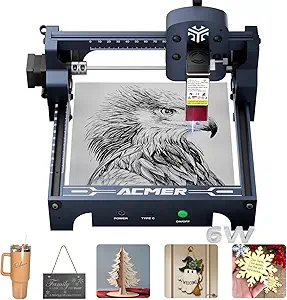 | Best High-Precision for Hobbyists and Professionals | Laser Power: 6000mW | Wavelength: 455±5nm | Focal Length: 2mm | VIEW ON AMAZON | See Our Full Breakdown |
| ACMER S1 Laser Engraver Machine, 2500mW Laser Cutter for Wood and Acrylic |  | Best Compact Entry-Level Option | Laser Power: 2500mW | Wavelength: 455±5nm | Focal Length: 2mm | VIEW ON AMAZON | See Our Full Breakdown |
| Twotrees TTS-10 Pro Laser Engraver, 10W High Power, 300x300mm Work Area |  | Best for Deep Engraving and Large Projects | Laser Power: 10W | Work Area: 300x300mm | Material Compatibility: Wood, acrylic, leather, coated metals | VIEW ON AMAZON | See Our Full Breakdown |
| desktop laser engraver | Material Compatibility | Laser Power |
|---|---|---|
| Creality Falcon 10W Laser Engr | Wood, Metal, Acrylic, Plastic, Glass, Urethane Foam | — |
| LaserPecker LP2 Laser Engraver | — | — |
| Carverall A1 Pro 5W Desktop La | Wood, leather, acrylic, glass, fabric, coated metals, food | — |
| Creality Falcon A1 Pro 20W Las | — | 20W |
| xTool F2 5W IR & 15W Diode Dua | 300+ materials | — |
| Twotrees TTS-10 Pro Laser Engr | Wood, Acrylic, Leather, Coated Metal, Glass | 10W |
| ACMER S1 Laser Engraver 3500mW | — | 3500mW |
| ATOMSTACK Swift Mini 2.5W Lase | — | 2.5W |
| LaserPecker LP1 Plus Mini Lase | Non-metal materials | — |
| xTool M2 10W Laser Engraver wi | Wood, leather, fabric, paper | 10W |
| Twotrees TTS-55 Pro Laser Engr | Wood, leather, acrylic, paper, stainless steel, and more | 5500mW (5.5W) |
| AlgoLaser Pixi 10W Laser Engra | wood, leather, metal, glass, acrylic, paper, fabric, bamboo, cork, slate, stone | — |
| ACMER S1 Laser Engraver Machin | — | 6000mW |
| ACMER S1 Laser Engraver Machin | — | 2500mW |
| Twotrees TTS-10 Pro Laser Engr | Wood, acrylic, leather, coated metals | 10W |
More Details on Our Top Picks
Creality Falcon 10W Laser Engraver with Air Assist and Rotary Roller
The Creality Falcon 10W stands out for its combination of power and precision, capable of detailed engraving on a broad range of materials including metals and glass. Its integrated rotary roller enables seamless cylindrical and spherical object engraving, surpassing smaller or less versatile models like the Carverall A1 Pro in size and material scope. The adjustable air assist system ensures cleaner cuts and prolongs laser lifespan, making it suitable for professional-grade projects. However, its setup demands careful reading of manuals, and material compatibility is limited to laser-engraveable substances, which could be a hurdle for some users. Compared to the more compact Carverall A1 Pro, this model offers higher accuracy and material versatility but requires more space and a learning curve for optimal operation. The safety features, including protective filters and emergency stop, add confidence during use.Pros:- High-precision laser with detailed engraving capabilities
- Versatile rotary roller for cylindrical and spherical objects
- Effective air assist system for cleaner cuts and longer laser life
- Easy assembly with integrated safety features
Cons:- Requires careful reading of manuals before setup
- Limited to materials compatible with laser engraving
- Potential difficulty in locating connection cables in packaging
Best for: Hobbyists and small business owners seeking a versatile, high-precision laser engraver for a variety of materials and cylindrical objects.
Not ideal for: Beginners with limited space or those focusing solely on small, simple projects due to its size and complexity.
- Laser Output Power:10000mW
- Laser Class:4
- Engraving Speed:10000mm/min
- Material Compatibility:Wood, Metal, Acrylic, Plastic, Glass, Urethane Foam
- Engraving Accuracy:0.004 inches
- Compatibility:LaserGRBL, LightBurn, Windows, macOS
Our verdict“This engraver is best suited for users needing high accuracy and versatility across multiple materials, willing to handle a more involved setup.”
LaserPecker LP2 Laser Engraver with Roller, Portable Handheld Laser Engraving Machine for Wood, Metal, Leather, Acrylic
The LaserPecker LP2 excels in portability, offering fast, detailed engraving thanks to upgraded galvo technology, making it ideal for on-the-go crafts and small projects. Its compact design and smartphone connectivity set it apart from larger, desktop-only models like the Creality Falcon 10W, especially for users who prioritize mobility. The multiple modes, including cylindrical and trolley, expand creative possibilities, but it falls short on metal work, especially for shiny or reflective surfaces, requiring users to apply black paint or spray. Its high engraving speeds—up to 1417 inches per minute—make it suitable for quick tasks, yet it’s limited in working on thick or pure metals. While it’s a perfect choice for hobbyists or small business owners needing a portable solution, it’s less suitable for detailed metal engraving or large-scale projects.Pros:- Fast and detailed engraving with upgraded galvo technology
- Portable design with easy smartphone or PC connectivity
- Versatile modes for cylindrical, slab, and trolley engraving
- Includes safety glasses and comprehensive package
Cons:- Limited capability for engraving on pure or shiny metals
- Cannot handle very thick materials or deep engraving
- Reflective surfaces require pre-treatment (black paint or spray)
Best for: Crafters and professionals who need a portable, fast engraver for small projects on a variety of materials, especially on non-metal surfaces.
Not ideal for: Users wanting to engrave on shiny, reflective metals or large, complex pieces, as its metal capabilities are limited and it’s designed mainly for smaller tasks.
- Max engraving speed:1417 inches/min
- Resolution options:1K, 1.3K, 2K
- Engraving area:up to 196 inches in length
- Laser spot size:0.05 mm
- Supported file formats:JPG, PNG, G-code
Our verdict“This model is best for users seeking a portable, quick engraving tool for small, non-metal projects with flexibility in material handling.”
Carverall A1 Pro 5W Desktop Laser Engraver with Camera, AI, App Control
The Carverall A1 Pro 5W offers a user-friendly experience with high-precision engraving, making it ideal for beginners or small-scale projects. Its built-in 4K camera and AI prompts simplify material placement and design creation, outperforming more complex models like the Falcon 10W for ease of use. While its limited work area of roughly 4×4 inches restricts larger projects, it compensates with automatic safety features and app control, allowing for straightforward operation. However, the small workspace and the learning curve for setup could be hurdles for newcomers, and the price remains unclear, which might influence purchasing decisions. This machine is perfect for hobbyists focusing on small, detailed crafts rather than bulk or large-area engraving.Pros:- High-precision engraving with 0.01mm accuracy and 4K detail
- Intuitive camera positioning, AI prompts, and app control
- Safe Class 1 enclosure with automatic shutoff
- Supports a range of materials and small batch projects
Cons:- Limited work area makes large projects impractical
- Requires setup and learning curve for optimal use
- Price details are not specified, potentially affecting value assessment
Best for: Beginners or small business owners needing precise, easy-to-use engraving on small items like pet tags or jewelry.
Not ideal for: Users requiring larger work areas or high-volume production, as the limited size constrains project scope and scale.
- Power:5W
- Work Area:3.94×3.94 inches
- Max Height:10.63 inches
- Material Compatibility:Wood, leather, acrylic, glass, fabric, coated metals, food
- Dimensions:12.76 x 10.98 x 10.91 inches
Our verdict“Ideal for beginners or hobbyists prioritizing ease of use and precision on small projects over large-area capacity.”
Creality Falcon A1 Pro 20W Laser Engraver with Touch Screen and APP Control
The Creality Falcon A1 Pro 20W combines high power with safety, making it suitable for professional or serious hobbyist projects requiring metal and wood engraving. Its enclosed design, touchscreen, and auto-focus system elevate user experience over open-frame models like the Carverall A1 Pro, especially in terms of safety and convenience. The high-speed operation and robust construction make it appealing for production environments, although its size and weight—over 37 pounds—may limit portability. The 2W IR laser module for metal engraving is sold separately, which adds complexity and cost for those focusing heavily on metal work. Compared to the smaller 5W Carverall, it offers more power but at the expense of size and weight, making it less ideal for tight spaces or portable needs.Pros:- High-speed engraving up to 600 mm/s with safety shields
- Touchscreen and app control for intuitive operation
- Automatic autofocus with high-precision camera system
- Enclosed design with smoke and noise filtration
Cons:- 2W IR laser module for metal engraving is sold separately
- Limited to specific engraving area size
- Relatively heavy and bulky at over 37 pounds
Best for: Serious hobbyists or small businesses needing a powerful, enclosed laser engraver for detailed metal and wood projects with safety features.
Not ideal for: Users with limited space or those seeking a lightweight, portable option for casual or infrequent use, due to its weight and size.
- Laser Power:20W
- Engraving Area:460 × 346mm
- Dimensions:32 x 27 x 15 inches
- Item Weight:37.4 pounds
- Safety Features:Dual protective covers, emergency stop
Our verdict“This engraver is best suited for dedicated hobbyists or small shops needing high power and safety features for detailed metal and wood engraving.”
xTool F2 5W IR & 15W Diode Dual Laser Engraver with 50MP Camera
The xTool F2 offers a unique dual-laser setup, combining a 15W diode and 5W IR laser, enabling it to work on over 300 materials, including metals and thick substrates, which surpasses the capabilities of most single-laser units like the Falcon A1 Pro. Its 50MP high-resolution camera ensures precise alignment and detailed results, making it suitable for both complex personal projects and small-scale commercial tasks. Its impressive speed—up to 6000mm/s—cuts down working time dramatically, but the Class 4 laser requires strict safety precautions, which might be daunting for novices. The machine arrives pre-assembled, a plus for immediate use, but detailed software compatibility info remains limited. This pick makes the most sense for users needing speed and broad material compatibility without sacrificing precision.Pros:- High-speed engraving up to 6000mm/s for quick turnarounds
- Dual-laser system capable of working on 300+ materials
- Built-in 50MP camera for precise positioning and high-res detail
- Fully enclosed, compact, and ready to use out of the box
Cons:- Class 4 laser requires rigorous safety precautions
- Limited detailed info on software compatibility
- Price and availability may vary, potentially limiting access
Best for: Small business owners or experienced hobbyists needing rapid, versatile engraving on a wide array of materials with high accuracy.
Not ideal for: Beginners or those primarily working with simple or small projects, due to safety requirements and the complexity of dual lasers.
- Laser Power (Diode):15W
- Laser Power (IR):5W
- Camera Resolution:50MP
- Max Speed:6000mm/s
- Material Compatibility:300+ materials
Our verdict“This model is best suited for advanced users demanding rapid, versatile, and precise engraving across a broad material range with safety awareness.”
Twotrees TTS-10 Pro Laser Engraver, 10W High Power, 300x300mm Work Area
The Twotrees TTS-10 Pro stands out for its high-powered 10W laser and large 300x300mm work area, making it ideal for deep engraving and faster processing compared to smaller or lower-powered options like the ACMER S1 3500mW. Its durable aluminum alloy frame and dual operation modes—offline via TF card or online through mobile/web interfaces—offer flexible workflows. However, its laser spot size and material limitations mean it isn’t suitable for bare metals or extremely detailed small-scale work. Compared to the xTool M2, the TTS-10 Pro is less integrated but more powerful for bulk projects. This model is best suited for hobbyists or small businesses needing depth and speed, but not for those working primarily on uncoated metals or requiring ultra-fine detail.Pros:- High-power 10W laser enables deep, fast engraving
- Generous 300x300mm work area supports larger projects
- Supports offline and online operation for flexible workflows
- Durable metal frame with reliable motion system
Cons:- Limited to certain materials; cannot engrave bare stainless steel without surface treatment
- Laser spot size may be too small for some detailed applications
- Requires careful measurement for projects exceeding 12 inches
Best for: Small businesses and hobbyists who need a versatile, high-power laser with a large work area
Not ideal for: Metal artists seeking to engrave uncoated or bare metals, due to surface prep requirements
- Laser Power:10W
- Work Area:300x300mm
- Laser Spot Size:0.069mm
- Max Speed:30000mm/min
- Material Compatibility:Wood, Acrylic, Leather, Coated Metal, Glass
- Main Board:32-bit dual-core MCU
Our verdict“This engraver suits experienced hobbyists or small businesses needing power and size, but requires attention to material compatibility.”
ACMER S1 Laser Engraver 3500mW with 130x130mm Working Area
The ACMER S1’s 3500mW diode laser offers impressive precision suitable for detailed engraving on wood, leather, and acrylic, making it a compelling choice for newcomers and professionals who don’t need a large workspace. Its compact size and preassembled design mean it’s ready to use right out of the box, unlike larger, more complex engravers like the Twotrees TTS-10 Pro. Its limited 130x130mm work area constrains larger projects, but this makes it highly portable and ideal for desktop setups. Compared to the xTool M2, the ACMER S1 is less versatile with materials but excels in detailed, small-scale tasks. It’s best for hobbyists or small-scale artisans focused on precision and ease of use, not volume production or large pieces.Pros:- High-precision engraving with 0.01mm accuracy
- Compact and lightweight for portability and small workspace
- Preassembled design simplifies setup for beginners
- Supports a variety of materials including ceramics and leather
Cons:- Limited work area restricts larger projects
- Insufficient laser power for cutting thick materials
- Requires software setup for optimal operation
Best for: Beginners or hobbyists seeking a compact, precise engraver for small projects and detailed work
Not ideal for: Users needing a large work area or to cut thicker materials, as its size and laser power are limited
- Laser Power:3500mW
- Wavelength:455±5nm
- Focal Length:2mm
- Working Area:130x130mm
- Machine Output:36W
- Dimensions:9.84 x 9.84 x 6.38 inches
Our verdict“This compact laser engraver is perfect for beginners and small-scale artisans prioritizing precision and ease of use.”
ATOMSTACK Swift Mini 2.5W Laser Engraver, 135x145mm Work Area
The ATOMSTACK Swift Mini offers industry-leading detail with a 2.5W diode laser and a compact 135x145mm workspace. Its pre-assembled design makes it a straightforward choice for beginners or those wanting quick results on small items like gifts or crafts. While its power limits cutting thicker or metal materials, it excels in engraving wood, leather, and fabric with fine detail. Compared to the ACMER S1, the Swift Mini is less suited for very precise small-scale work but supports a broader range of materials and device compatibility. It’s ideal for personal projects and creative crafts, especially for users who value portability and simple operation over large-scale capacity.Pros:- Fully pre-assembled for immediate use
- High detail capability with precise engraving
- Supports multiple materials and device compatibility
- Compact and lightweight for portability
Cons:- Limited to small projects due to 135x145mm area
- Laser power insufficient for cutting or engraving metals
- Requires careful setup for consistent results
Best for: Crafters and hobbyists seeking detailed engravings on small items and quick setup
Not ideal for: Professionals needing larger work areas or to engrave on metals, due to power and size constraints
- Work Area:135x145mm
- Laser Power:2.5W
- Dimensions:297×319×128 mm
- Supported Software:LightBurn, LaserGRBL, AcmerTool
Our verdict“This engraver is tailored for hobbyists and crafters focusing on small, detailed projects with ease of use.”
LaserPecker LP1 Plus Mini Laser Engraver for Beginners
The LaserPecker LP1 Plus stands out for its ultra-portable design, weighing just enough to carry in a backpack, and its quick setup—ready to engrave in under 2 minutes. Its small footprint and magnetic base support multi-angle engraving, making it highly flexible for DIY projects outside the traditional workspace. While its 360° capabilities are impressive, it’s limited to non-metal materials, and its 2.5W laser cannot handle metals or thicker surfaces. Compared with larger desktop engravers like the xTool M2, it sacrifices size for mobility, making it ideal for travel, events, or casual craft use. This pick makes the most sense for hobbyists seeking a portable, easy-to-use device for small projects on the go.Pros:- Lightweight, easy to carry and store
- Quick setup, ready in minutes
- Supports engraving on a variety of non-metal materials
- Flexible multi-angle work with adjustable stand
Cons:- Cannot engrave on metals or thick surfaces
- Limited work area and power for larger or complex projects
- Requires careful distance control for consistent results
Best for: Creative hobbyists and DIYers needing a portable engraver for small, non-metal projects
Not ideal for: Artists or businesses requiring large-scale or metal engraving, due to power and size limitations
- Laser Type:Mini laser
- Material Compatibility:Non-metal materials
- Engraving Angles:360°
- Power Source:Power bank
- Included Accessories:Adjustable stand, magnetic base
Our verdict“Perfect for hobbyists seeking a portable engraving tool for small, non-metal projects and creative experimentation.”
xTool M2 10W Laser Engraver with Dual Cameras, Enclosed Safe Design
The xTool M2 offers a compelling blend of safety and precision with its fully enclosed design and dual cameras for real-time workspace monitoring. Its 10W laser provides enough power for engraving and light cutting on various materials, including wood, leather, and fabric, surpassing models like the ACMER S1 in safety features. Its ability to support optional add-ons, like the CMYK inkjet module, expands creative possibilities, although these come at an extra cost. Compared to the Twotrees TTS-10 Pro, the M2 prioritizes safety and user-friendliness over raw power or size, making it ideal for home environments. It’s best for hobbyists and crafters who want a safe, feature-rich machine that can handle diverse projects with minimal setup.Pros:- Enclosed safety design suitable for family environments
- Dual cameras enable precise real-time workspace preview
- Supports various materials and optional upgrades
- User-friendly with templates and AI image generator
Cons:- Additional modules like CMYK inkjet are sold separately
- Limited to 10W laser power without upgrades
- Relatively higher cost for feature-rich setup
Best for: Home crafters and hobbyists wanting safety-focused, versatile engraving with room to expand
Not ideal for: Users needing to engrave uncoated metals or work on large projects, due to size and power limits
- Laser Power:10W
- Safety Class:Class 1
- Built-in Cameras:Dual
- Material Compatibility:Wood, leather, fabric, paper
- Enclosure:Fully enclosed
- Add-ons Available:CMYK Inkjet, Rotary, IR laser
Our verdict“This engraver suits home users seeking a safe, flexible, and expandable device for diverse creative projects.”
Twotrees TTS-55 Pro Laser Engraver 5500mW
The Twotrees TTS-55 Pro stands out for its high-powered 5500mW laser, enabling both intricate engraving and deeper cutting on a wide range of materials. Compared with the smaller ACMER S1 models, its larger 300x300mm workspace and wireless connectivity make it ideal for more ambitious projects and frequent use. However, the powerful laser demands careful handling and a steeper learning curve for newcomers, and its noise level can be distracting. This model is best suited for experienced hobbyists or small business owners seeking a versatile, large-area engraver with strong cutting capacity. The tradeoff is that it may require more safety precautions and setup time than lower-power options.Pros:- High-power laser capable of cutting thicker materials like 5mm plywood
- Large 300x300mm working area for bigger projects
- Wireless control via Wi-Fi supports flexible operation
- Supports multiple popular software platforms
Cons:- Requires careful handling due to powerful laser, posing safety risks
- Steeper learning curve for new users
- Potentially noisy during operation
Best for: Small businesses or advanced hobbyists who need a high-power, large-area engraver with flexible control options.
Not ideal for: Beginners or casual users who prefer simple, quiet, and low-maintenance devices with minimal safety concerns.
- Laser Power:5500mW (5.5W)
- Working Area:300x300mm
- Material Compatibility:Wood, leather, acrylic, paper, stainless steel, and more
- Cutting Thickness:5mm plywood, 3mm acrylic, 0.7mm leather
- Focus Spot:0.08*0.46mm
- Control Board:32-bit dual-core MCU
Our verdict“This engraver is ideal for experienced users needing power, size, and versatility in their projects, accepting the safety and complexity tradeoffs.”
AlgoLaser Pixi 10W Laser Engraver Machine with 3.5″ Smart Touchscreen
The AlgoLaser Pixi 10W offers a user-friendly experience with its intuitive 3.5-inch touchscreen and enclosed safety system, making it accessible for newcomers. Unlike the larger Twotrees models, its smaller workspace of 130x130mm limits larger projects but simplifies operation and setup, perfect for hobbyists or educational settings. It supports a broad variety of materials, including metal, glass, and fabric, with safety features like auto-pause and alerts providing peace of mind. The main tradeoff is its limited size and slower engraving speed compared to higher-powered models like the TTS-10 Pro, making it less suitable for production work. This device makes the most sense for those new to laser engraving or with small project needs, prioritizing ease of use over scale.Pros:- Intuitive touchscreen interface for easy operation
- Enclosed safety design with auto-pause and alerts
- Supports engraving on a wide variety of materials
- Wireless connectivity for flexible control
Cons:- Limited working area restricts larger projects
- Requires external ventilation for some materials
- Potentially slower engraving speeds
Best for: Beginners, DIYers, and educators seeking a safe, compact, and easy-to-operate laser engraver for small projects.
Not ideal for: Users aiming to handle larger items or needing deep, fast cutting on thick materials, who should look at more powerful or larger models like the TTS-10 Pro.
- Power:10W
- Touchscreen:3.5 inches
- Material Compatibility:wood, leather, metal, glass, acrylic, paper, fabric, bamboo, cork, slate, stone
- Connectivity:USB-C, WiFi, phones, tablets, Windows, Mac
- Safety Features:auto-pause safety lid, password lock, real-time alerts
- Working Area:130x130mm
Our verdict“This engraver is perfect for beginners or small-scale users who prioritize safety and ease of use over project size or deep cutting capacity.”
ACMER S1 Laser Engraver Machine, 6000mW Laser Cutter for Wood and Acrylic
The ACMER S1 with a 6000mW diode laser offers impressive precision, enabling detailed engraving and accurate cutting on materials like wood, acrylic, and leather. Its compact, preassembled design makes it accessible for hobbyists and small-scale professionals alike. In comparison to the ACMER S1 2500mW model, the increased laser power allows deeper cuts and finer detail, but it also requires more safety precautions due to its Class 4 certification. The limited working area of 130x130mm means larger projects must be segmented, which can be inconvenient. This model is suited for those who need high accuracy and are comfortable with safety requirements, especially when working on intricate designs or small items.Pros:- High-precision engraving with fine detail
- Fast engraving and cutting speeds
- User-friendly, preassembled setup
- Supports multiple operating systems
Cons:- Limited work area of 130x130mm
- Requires safety precautions due to Class 4 laser
- Potentially higher cost for power and safety features
Best for: Hobbyists and professionals who need high-precision engraving on small objects or detailed work on a variety of materials.
Not ideal for: Users requiring larger working areas or handling bigger projects, who might find the limited size restrictive and prefer models like the TTS-55 Pro.
- Laser Power:6000mW
- Wavelength:455±5nm
- Focal Length:2mm
- Engraving Speed:10,000mm/min
- Repeatable Positioning:0.01mm
- Working Area:130x130mm
Our verdict“This engraver fits users needing detailed, small-scale work with high precision, willing to manage safety and size limitations.”
ACMER S1 Laser Engraver Machine, 2500mW Laser Cutter for Wood and Acrylic
The ACMER S1 with 2500mW laser provides a reliable entry point for hobbyists and small projects, offering decent precision within a compact 130x130mm workspace. Its lightweight, preassembled design means setup is straightforward, especially compared to larger models like the TTS-10 Pro. While its lower laser power limits deep cutting and thick material processing, it excels at fine engraving on small items. The device’s versatility across multiple operating systems enhances its appeal for casual users. Nonetheless, the limited size and Class 4 laser safety considerations mean it’s best suited for small, detailed projects rather than production or large-scale work. It offers a good balance of performance and simplicity for newcomers or those with limited space.Pros:- Preassembled, easy to set up for beginners
- Supports multiple materials including wood, acrylic, and leather
- Lightweight and compact for limited space
- Compatible with various operating systems
Cons:- Limited to 130x130mm work area
- Lower laser power restricts deep cutting
- Requires safety precautions due to Class 4 laser
Best for: Hobbyists, students, or small project enthusiasts seeking an affordable, compact laser engraver for detailed work on small objects.
Not ideal for: Users needing larger working areas or more powerful cutting capabilities, who should consider bigger models like the TTS-55 Pro.
- Laser Power:2500mW
- Wavelength:455±5nm
- Focal Length:2mm
- Engraving Speed:10,000mm/min
- Repeatable Positioning:0.01mm
- Working Area:130x130mm
Our verdict“Ideal for beginners or hobbyists focused on small, detailed projects, accepting size and power constraints.”
Twotrees TTS-10 Pro Laser Engraver, 10W High Power, 300x300mm Work Area
The Twotrees TTS-10 Pro combines high laser power with a large 300x300mm workspace, making it ideal for deep engraving and substantial projects. Its 10W laser outperforms many smaller models like the ACMER 2500mW, allowing for faster, more aggressive cutting on coated or softer metals and thicker wood. The full metal frame enhances durability, and offline operation via TF card simplifies workflow. Unlike the smaller ACMER S1 models, this machine is better suited for small businesses or serious hobbyists who need to process larger items or require deeper cuts. The setup and software complexity can be a hurdle for newcomers, and surface preparation is often necessary for uncoated metals. Overall, this model offers power and size for those ready to handle the safety and technical requirements.Pros:- Powerful 10W laser ideal for deep cuts and fast engraving
- Large 300x300mm working area supports bigger projects
- Full metal frame for durability and stability
- Offline operation with TF card
Cons:- Setup and software can be complex for beginners
- Not suitable for uncoated or bare metal without surface prep
- Requires careful measurement for larger projects
Best for: Small business owners or experienced hobbyists who need high power and a large working area for deeper, faster engraving and cutting.
Not ideal for: Beginners or users with limited space or safety experience, who might prefer smaller, simpler models like the ACMER S1.
- Laser Power:10W
- Work Area:300x300mm
- Material Compatibility:Wood, acrylic, leather, coated metals
- Main Board:32-bit dual-core MCU
- Frame Material:Aluminum alloy
- Connectivity:Offline via TF card, online via app and web
Our verdict“This laser engraver is best for users needing high power and size for demanding projects, with a willingness to manage safety and setup complexities.”

How We Picked
This selection process focused on performance, usability, build quality, safety, and value. I evaluated each device based on its laser power, engraving area, ease of setup, and control options. Durability and user safety features, such as enclosure and air assist, also played key roles. Cost-to-benefit ratio was essential, ensuring each model offers a fair balance of features for its price point. The ranking reflects a mix of professional capability and beginner friendliness, aiming to guide a wide range of users toward the best fit for their needs.Factors to Consider When Choosing Desktop Laser Engraver
Choosing the right desktop laser engraver involves considering several factors beyond just power and size. Understanding these key aspects helps prevent common pitfalls like overspending on features you don’t need or selecting a device incompatible with your materials. The most suitable engraver balances performance, safety, ease of use, and budget, ensuring it enhances your workflow without unnecessary complexity.Laser Power and Engraving Capability
Laser power directly affects the types of materials you can work with and the level of detail achievable. Higher wattage lasers, such as 20W or above, excel at cutting thicker materials and providing faster engraving, making them ideal for heavier-duty projects. Conversely, lower-powered models, like 2-5W, are better suited for delicate work on small items or light engraving tasks. It’s important to match your project requirements with the laser’s power to avoid overpaying for unnecessary strength or facing limitations with insufficient power.
Safety Features and Ease of Use
Safety should be a top priority, especially in home or small workshop environments. Enclosed designs, automatic shut-off, and air assist systems help manage fumes and prevent accidents. Ease of setup and operation also vary widely; some models offer simple controls, smartphone app integration, or AI-assisted features that minimize learning curves. Investing in a device with comprehensive safety features reduces hazards, while user-friendly interfaces ensure you can start projects quickly without extensive technical knowledge.
Work Area Size and Portability
The engraving area determines the maximum size of your projects. Larger workspaces, like 300x300mm, enable bigger designs but often increase the device’s footprint and cost. Smaller, portable models are perfect for on-the-go engraving or small crafts, but may limit project size. Consider your typical project dimensions and storage space to find a balance that supports your workflow without sacrificing convenience or capacity.
Control Options and Software Compatibility
Compatibility with various control interfaces influences how easily you can operate your engraver. Many models offer touchscreen controls, app connectivity, or camera-assisted design tools that streamline workflows. Compatibility with popular design software like LightBurn or proprietary apps can also affect your creative freedom and ease of use. Check that the device supports your preferred software and control methods before making a purchase to avoid frustration and ensure seamless integration into your process.
Cost, Upgrades, and Long-Term Value
Pricing varies widely, with more powerful, feature-rich models costing more. However, a higher initial investment can translate into better durability, faster operation, and expanded capabilities. Consider future upgrade options, such as add-on modules or software updates, to extend your device’s usefulness. Avoid models that seem cheap but lack essential safety or performance features, as these can lead to higher replacement or repair costs down the line.
Frequently Asked Questions
Can I engrave on any material with a desktop laser engraver?
Most desktop laser engravers can handle a variety of materials, including wood, acrylic, leather, and some metals. However, each machine has specific limitations based on laser power and design. For example, lower-powered models may struggle with metals or thicker materials, while higher-powered ones can cut or engrave more diverse surfaces. Always check the specifications for compatible materials and consider doing test engravings to ensure your chosen device meets your project needs.
How safe is it to operate a laser engraver at home?
Safety depends heavily on the features built into the machine and your adherence to safety protocols. Enclosed models with air assist and automatic shut-off significantly reduce the risk of fumes, fire, or accidental exposure. Proper eye protection, ventilation, and adherence to manufacturer instructions are essential regardless of the device. Investing in a model with safety features makes it easier to operate confidently and minimizes hazards in a home environment.
Is it worth paying more for advanced features like AI or cameras?
Advanced features like AI integration and cameras can boost productivity and precision, especially for complex or repetitive tasks. These tools help with alignment, design setup, and quality control, saving time and reducing errors. However, they also add to the cost, and for casual or beginner users, simpler models may suffice. Evaluate whether these features align with your project complexity and whether the extra investment translates into tangible workflow benefits for you.
What maintenance does a desktop laser engraver require?
Regular maintenance includes cleaning the lens and mirrors, checking for dust accumulation, and ensuring the air assist system functions properly. Some models require software updates or calibration to maintain accuracy. Proper ventilation and occasional component checks prolong the device’s lifespan. Following the manufacturer’s maintenance recommendations is vital to keep the engraver operating safely and efficiently over the long term.
How do I choose the right size for my projects?
Assess the maximum size of the items you plan to engrave regularly. If you mainly work on small tokens, jewelry, or personalized gifts, a compact model with a smaller work area may be sufficient. For larger projects like signs or panels, prioritize models with bigger engraving beds. Balancing your typical project size against available space and budget will ensure you select a device that fits your workflow without unnecessary expense or limitations.
Conclusion
Overall, the Creality Falcon 10W makes the most sense for users seeking a reliable, powerful machine with versatile features—ideal for hobbyists and small business owners. The LaserPecker LP2 stands out as the best portable choice for on-the-go projects, perfect for crafters who need mobility. For those who want advanced automation and AI features, the Carverall A1 Pro is a strong contender, though it comes at a higher price. Beginners or casual users might prefer more straightforward, budget-friendly options like the ATOMSTACK Swift Mini. Ultimately, your choice should align with your project scale, safety needs, and budget constraints, ensuring you get the most value from your investment.
Halloween Picks
halloween
As an affiliate, we earn on qualifying purchases.