
A dedicated router for VR streaming can reduce competition from phones, TVs, and downloads, but a newer Wi-Fi generation alone does not promise a smoother headset connection. My best overall pick is the TP-Link Archer BE550, whose tri-band Wi-Fi 7 design gives a VR setup room to separate headset traffic from other devices. The PRISMXR Puppis S1 Lite stands out for a purpose-built VR setup, while the NETGEAR Nighthawk RS280S is a stronger fit for buyers seeking a higher-end tri-band router. The main tradeoffs are dedicated VR features versus general network flexibility, and paying for more bands or coverage than a single play space needs. Read on for the full comparison, ranking logic, and advice on matching a router to your headset and room.

Get the latest gadgets delivered free with Prime
- Fast, free delivery on millions of items
- Prime Video, Amazon Music and more included
- Member-only deals all year
Complete the kit



Key Takeaways
- Tri-band designs suit shared networks: The TP-Link Archer BE550 and NETGEAR Nighthawk RS280S offer more ways to separate headset traffic from other household connections than dual-band picks.
- A VR-specific setup may matter more than a broad feature list: The PRISMXR Puppis S1 Lite targets wireless VR use directly, making it a focused alternative to general-purpose routers.
- Wi-Fi 7 is not an automatic VR fix: Its benefits depend on headset support, placement, and local network congestion; a clean, nearby Wi-Fi 6 connection can still be a sensible choice.
- Premium hardware makes more sense for complex homes: The quad-band TP-Link Archer BE900 is aimed at demanding, multi-device networks, not every single-room VR setup.
- Match coverage to the play area: Compact or entry-level choices such as the NETGEAR Nighthawk R6700AX may suit a modest setup, while large homes and busy networks call for more headroom.
| NETGEAR Nighthawk RS90 Dual-Band WiFi 7 Router |  | Best Straightforward WiFi 7 Upgrade | WiFi generation: WiFi 7 | Frequency bands: Dual-band: 2.4 GHz and 5 GHz | Maximum data transfer rate: Up to 3.6 Gbps | VIEW ON AMAZON | See Our Full Breakdown |
| NETGEAR Nighthawk WiFi 7 Router RS140 |  | Best for Busy Shared Networks | WiFi generation: WiFi 7 | Frequency bands: Dual-band: 2.4 GHz and 5 GHz | Maximum speed: Up to 5 Gbps | VIEW ON AMAZON | See Our Full Breakdown |
| PRISMXR Puppis S1 Lite Wi-Fi 6 VR Streaming Router |  | Best Dedicated PC-to-Headset Link | Wireless standard: WiFi 6 (802.11ax) | Maximum data transfer rate: Up to 1,500 Mbps | 5 GHz band speed: Up to 1,200 Mbps | VIEW ON AMAZON | See Our Full Breakdown |
| TP-Link Archer BE550 Tri-Band Wi-Fi 7 Router |  | Best Multi-Gig Tri-Band Pick | WiFi generation: WiFi 7 | Frequency bands: Tri-band: 2.4 GHz, 5 GHz, and 6 GHz | Maximum data rate: Up to 9,300 Mbps | VIEW ON AMAZON | See Our Full Breakdown |
| TP-Link Archer BE900 Quad-Band Wi-Fi 7 Router |  | Best Premium Network Hub | WiFi generation: WiFi 7 | Frequency bands: Quad-band, including dual 5 GHz bands | Maximum WiFi speed: Up to 24.4 Gbps | VIEW ON AMAZON | See Our Full Breakdown |
| GL.iNet Flint 3e Wi-Fi 7 Router with VPN |  | Best for VPN and Network Controls | Wi-Fi standard: Wi-Fi 7 (802.11be) | Frequency bands: Dual-band | Maximum Wi-Fi speed: Up to 6.5 Gbps | VIEW ON AMAZON | See Our Full Breakdown |
| NETGEAR Nighthawk RS280S WiFi 7 Tri-Band Router |  | Best for a Dedicated 6 GHz VR Link | Wi-Fi generation: Wi-Fi 7 (802.11be) | Frequency bands: Tri-band, including 6 GHz | Maximum data transfer rate: Up to 9.2 Gbps | VIEW ON AMAZON | See Our Full Breakdown |
| TP-Link Archer GXE75 Tri-Band Wi-Fi 6E Gaming Router | 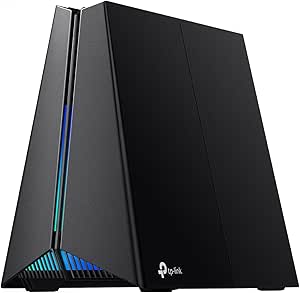 | Best for Gaming Traffic Prioritization | Wi-Fi standard: Wi-Fi 6E | Wireless bands: 2.4 GHz, 5 GHz, and 6 GHz | Maximum wireless speed: Up to 5.4 Gbps | VIEW ON AMAZON | See Our Full Breakdown |
| NETGEAR Nighthawk R6700AX WiFi 6 Router |  | Best for a Basic, Wired-First VR Setup | Wi-Fi generation: Wi-Fi 6 (802.11ax) | Frequency bands: Dual-band, 2.4 GHz and 5 GHz | Maximum speed: Up to 1.8 Gbps | VIEW ON AMAZON | See Our Full Breakdown |
| dedicated router for vr streaming | Frequency bands | Coverage | Security | Ethernet ports |
|---|---|---|---|---|
| NETGEAR Nighthawk RS90 Dual-Ba | Dual-band: 2.4 GHz and 5 GHz | Up to 2,000 sq. ft. | — | — |
| NETGEAR Nighthawk WiFi 7 Route | Dual-band: 2.4 GHz and 5 GHz | Up to 2,250 sq. ft. | WPA3; NETGEAR Armor includes a 30-day trial | — |
| PRISMXR Puppis S1 Lite Wi-Fi 6 | — | — | — | — |
| TP-Link Archer BE550 Tri-Band | Tri-band: 2.4 GHz, 5 GHz, and 6 GHz | — | WPA2, WPA3, HomeShield | 1 × 2.5 Gbps WAN and 4 × 2.5 Gbps LAN |
| TP-Link Archer BE900 Quad-Band | Quad-band, including dual 5 GHz bands | — | — | 1 × 10 Gbps combo WAN/LAN, 1 × 10 Gbps WAN/LAN, 4 × 2.5 Gbps, 1 × 1 Gbps |
| GL.iNet Flint 3e Wi-Fi 7 Route | Dual-band | Up to 2,500 square feet | — | 5 ports; individual port types not specified |
| NETGEAR Nighthawk RS280S WiFi | Tri-band, including 6 GHz | Up to 2,500 square feet | WPA2-PSK or WPA3 | — |
| TP-Link Archer GXE75 Tri-Band | — | — | WPA3, DoS protection, SPI firewall, IP/MAC filters | 1 x 2.5 Gbps WAN/LAN, 1 x 1 Gbps WAN/LAN, 3 x 1 Gbps LAN |
| NETGEAR Nighthawk R6700AX WiFi | Dual-band, 2.4 GHz and 5 GHz | Up to 1,500 square feet | WPA2, WPA3, automatic firmware updates, guest network | 4 Gigabit LAN ports and 1 Gigabit WAN port |
More Details on Our Top Picks
NETGEAR Nighthawk RS90 Dual-Band WiFi 7 Router
I’d choose the Nighthawk RS90 for a VR room that needs a capable general-purpose router without paying for a more elaborate multi-band setup. Its dual-band WiFi 7 design and 2.5 Gigabit WAN suit homes that want newer wireless hardware, while four Gigabit LAN ports make it practical to wire the PC running VR games. Compared with the RS140, the RS90 supports fewer connected devices and has lower stated maximum speeds and coverage, so it makes more sense for a smaller setup than a busier household. Neither model is a dedicated PC-to-headset link like the PRISMXR Puppis S1 Lite; headset performance still depends on placement, interference, and how the network is configured. I’d also factor in the separate modem requirement and the paid Armor subscription after its trial.
Pros:- WiFi 7 with stated speeds up to 3.6 Gbps
- 2.5 Gigabit WAN plus four Gigabit LAN ports for wired devices
- App-based setup and automatic security updates
- Stated coverage up to 2,000 sq. ft. and support for up to 50 devices
Cons:- Requires a separate modem or gateway with an Ethernet port
- Dual-band design lacks the dedicated 6 GHz band offered by the Archer BE550
- NETGEAR Armor requires a subscription after its 30-day trial
Best for: VR players who want one WiFi 7 router for a modest home network and can connect their gaming PC by Ethernet
Not ideal for: Buyers seeking a purpose-built, single-PC-to-headset VR link or stronger stated capacity for a crowded household
- WiFi generation:WiFi 7
- Frequency bands:Dual-band: 2.4 GHz and 5 GHz
- Maximum data transfer rate:Up to 3.6 Gbps
- Coverage:Up to 2,000 sq. ft.
- Maximum connected devices:Up to 50
- WAN port:1 × 2.5 Gigabit
- LAN ports:4 × 1 Gigabit Ethernet
- Processor:Quad-core 2.0 GHz
Our verdict“Pick the RS90 for a straightforward WiFi 7 home-router upgrade, but choose the Puppis S1 Lite for a dedicated PC-to-headset connection.”
NETGEAR Nighthawk WiFi 7 Router RS140
The Nighthawk RS140 is the stronger fit than the RS90 when a VR headset shares the home network with consoles, phones, cameras, and streaming devices. Its listed capacity of up to 80 devices, 5 Gbps headline speed, and 2,250-square-foot coverage give it more headroom on paper than the RS90, though they do not guarantee a particular headset bitrate or latency. For VR streaming, I’d still connect the gaming PC to one of its LAN ports and keep the headset close to the router; this remains a general-purpose dual-band design, not the focused headset link provided by the Puppis S1 Lite. The port mix is less generous than the Archer BE550, which has four 2.5 Gbps LAN ports. It also needs a separate modem or gateway, and some modem-router combinations may require bridge mode.
Pros:- Dual-band WiFi 7 with stated maximum speed up to 5 Gbps
- Listed support for up to 80 connected devices
- Coverage stated up to 2,250 sq. ft.
- Nighthawk app provides setup and network management
Cons:- Only three Gigabit LAN ports are listed, alongside a 2.5G WAN port
- Requires a separate modem or gateway and may need bridge mode with combo equipment
- NETGEAR Armor requires a subscription after its 30-day trial
Best for: VR households with many connected devices that want a general-purpose WiFi 7 router and app-based management
Not ideal for: Buyers who need several multi-gig wired connections or a dedicated headset network with a simplified PC-to-VR setup
- WiFi generation:WiFi 7
- Frequency bands:Dual-band: 2.4 GHz and 5 GHz
- Maximum speed:Up to 5 Gbps
- Coverage:Up to 2,250 sq. ft.
- Connected-device capacity:Up to 80 devices
- Ports:1 × 2.5G WAN and 3 × 1G LAN
- Security:WPA3; NETGEAR Armor includes a 30-day trial
- Power:12V DC
Our verdict“Choose the RS140 over the RS90 when device capacity matters more than extra wired ports, but look to the Archer BE550 for multi-gig LAN connections.”
PRISMXR Puppis S1 Lite Wi-Fi 6 VR Streaming Router
For PC-to-headset streaming, the Puppis S1 Lite is the most purpose-built option in this group. It creates a dedicated wireless connection for compatible Meta Quest and Pico headsets, while the gaming PC connects to the router over Ethernet. That focused setup can be simpler to manage than sharing VR traffic across a household network, and the PrismXR app adds connection checks and game-optimization guidance. The tradeoff is scope: unlike the NETGEAR RS140 or TP-Link Archer BE550, this is not the pick for broad home coverage, multiple wired devices, or a whole-home WiFi upgrade. Its one Ethernet port and stated WiFi 6 speeds are modest beside those general-purpose WiFi 7 routers. I’d choose it when the priority is a direct VR streaming setup, not when one router must serve every device and room.
Pros:- Designed to create a dedicated wireless PC-to-VR headset connection
- Compatible with listed Meta Quest and Pico headsets
- PrismXR app includes connection checks and troubleshooting recommendations
- WiFi 6 dual-band operation with WPA2 and WPA3 support
Cons:- The PC requires a wired Ethernet connection
- One LAN port limits wired-device flexibility
- Limited to a dedicated link rather than broad home-network coverage
Best for: PC VR players using a compatible Meta Quest or Pico headset who can wire their Windows PC to a dedicated router
Not ideal for: Households needing whole-home WiFi, several Ethernet connections, or compatibility beyond the listed headsets and devices
- Wireless standard:WiFi 6 (802.11ax)
- Maximum data transfer rate:Up to 1,500 Mbps
- 5 GHz band speed:Up to 1,200 Mbps
- 2.4 GHz band speed:Up to 300 Mbps
- LAN port:1 × 1,000 Mbps
- Compatible devices:Meta Quest 3S/3/2, Pico 4, Switch, Steam Deck
- Operating system:Windows 10/11
- Security protocols:WPA2, WPA3
- Warranty:18 months
Our verdict“Choose the Puppis S1 Lite for a focused, wired-PC-to-wireless-headset setup; choose a general-purpose router if you also need whole-home networking.”
TP-Link Archer BE550 Tri-Band Wi-Fi 7 Router
The Archer BE550 earns its place for buyers who want a high-capacity home network around a VR setup, rather than a router dedicated only to the headset. Its tri-band WiFi 7 includes 6 GHz, and four 2.5 Gbps LAN ports make it more flexible for wiring a gaming PC and other fast-network devices than either NETGEAR model here. The 6 GHz band can offer a less crowded wireless path where the headset supports it and conditions allow, but range and obstacles still matter; it is not a guarantee of better VR performance in every room. Compared with the Puppis S1 Lite, the BE550 serves a broader network and offers more ports, but takes more setup and does not provide that product’s focused PC-to-headset workflow. A modem is typically needed for internet service, and advertised speeds depend on the environment and client devices.
Pros:- Tri-band WiFi 7 includes 2.4 GHz, 5 GHz, and 6 GHz
- Four 2.5 Gbps LAN ports offer more wired flexibility than the NETGEAR picks
- Supports 320 MHz channels, Multi-Link Operation, and 4K-QAM
- EasyMesh support and Tether app-based management
Cons:- A modem is required for most internet providers
- Actual wireless speed and coverage vary with conditions and connected devices
- More network features and setup options than needed for a single dedicated VR link
Best for: VR players building a multi-gig home network who want tri-band WiFi 7, a 6 GHz band, and several wired devices
Not ideal for: Buyers who only need a simple dedicated VR link or whose headset and play space cannot make practical use of 6 GHz
- WiFi generation:WiFi 7
- Frequency bands:Tri-band: 2.4 GHz, 5 GHz, and 6 GHz
- Maximum data rate:Up to 9,300 Mbps
- Band speeds:6 GHz: 5,760 Mbps; 5 GHz: 2,880 Mbps; 2.4 GHz: 574 Mbps
- Ethernet ports:1 × 2.5 Gbps WAN and 4 × 2.5 Gbps LAN
- Antennas:6
- Mesh compatibility:EasyMesh
- Security:WPA2, WPA3, HomeShield
Our verdict“Pick the Archer BE550 when your VR setup is part of a wider multi-gig network, not when you want the simplest dedicated headset connection.”
TP-Link Archer BE900 Quad-Band Wi-Fi 7 Router
The Archer BE900 is the most expansive network hub in this set, with quad-band WiFi 7, dual 5 GHz bands, a 6 GHz band, and an extensive mix of high-speed ports. That flexibility can suit a demanding home where a VR PC, storage, and other wired gear share the network, while EasyMesh offers a route to expanded coverage. Its headline 24.4 Gbps is aggregate WiFi capacity, not a promise that a headset will stream at that rate. For a VR-only connection, the Puppis S1 Lite is more focused and simpler; the Archer BE550 is a less elaborate alternative with tri-band WiFi 7 and four 2.5 Gbps LAN ports. The BE900’s broad feature set brings complexity and may be unnecessary if the headset is the only demanding client. Most providers also require a separate modem.
Pros:- Quad-band WiFi 7 with dual 5 GHz bands and a 6 GHz band
- Two 10 Gbps ports and four 2.5 Gbps ports support fast wired equipment
- EasyMesh compatibility can support network expansion
- Setup and management available through the Tether app or web interface
Cons:- Requires a separate modem for most internet providers
- Not compatible with Deco mesh systems
- Large aggregate speed and port capacity may be unnecessary for a VR-only setup
Best for: Enthusiasts with a multi-device home network who need multiple fast wired connections alongside a VR streaming setup
Not ideal for: VR players seeking a low-complexity dedicated headset link or a router whose capabilities will go largely unused
- WiFi generation:WiFi 7
- Frequency bands:Quad-band, including dual 5 GHz bands
- Maximum WiFi speed:Up to 24.4 Gbps
- Ethernet ports:1 × 10 Gbps combo WAN/LAN, 1 × 10 Gbps WAN/LAN, 4 × 2.5 Gbps, 1 × 1 Gbps
- USB ports:2
- Antennas:12 internal
- Mesh compatibility:EasyMesh; not compatible with Deco mesh systems
- Security protocols:WPA/WPA2-Enterprise, WPA2, WPA3
- Setup and management:TP-Link Tether app or web interface
Our verdict“Choose the BE900 when VR is one part of a demanding, wired-heavy home network; otherwise, the BE550 or Puppis S1 Lite is a more focused fit.”
GL.iNet Flint 3e Wi-Fi 7 Router with VPN
I’d choose the Flint 3e when VPN support and network controls matter alongside a dedicated wireless link for VR. Its dual-band Wi-Fi 7 and MLO offer a modern connection, while WireGuard and OpenVPN can reach up to 1,100 Mbps according to the supplied specs. That VPN capacity is useful for privacy-focused households, though a VPN is not itself a fix for wireless latency: for VR streaming, a clear, uncongested link between headset and PC still matters. Compared with the NETGEAR Nighthawk RS280S, the Flint 3e has fewer bands and a lower stated maximum speed, but adds Linux-based flexibility, AdGuard Home support, and parental controls. The tradeoff is less detail about its individual port types, so buyers planning a wired PC connection should confirm the layout before choosing it.
Pros:- Wi-Fi 7 with MLO and a stated maximum speed of up to 6.5 Gbps
- WireGuard and OpenVPN support, with stated VPN speeds up to 1,100 Mbps
- AdGuard Home support and parental controls add network-management options
- Coverage rated for up to 2,500 square feet
Cons:- Dual-band design lacks the RS280S’s additional 6 GHz band
- Supplied product details do not identify individual port types
- Actual wireless and VPN throughput varies with network conditions and VPN servers
Best for: VR streamers who want Wi-Fi 7 plus configurable VPN, ad-blocking, or parental-control features for the wider home network.
Not ideal for: Buyers prioritizing a tri-band 6 GHz setup or clearly specified multi-gig LAN connections; the RS280S offers more band capacity and listed port speeds.
- Wi-Fi standard:Wi-Fi 7 (802.11be)
- Frequency bands:Dual-band
- Maximum Wi-Fi speed:Up to 6.5 Gbps
- VPN:WireGuard and OpenVPN; up to 1,100 Mbps
- Coverage:Up to 2,500 square feet
- Ethernet ports:5 ports; individual port types not specified
- Memory:1 GB DDR4 RAM
- Features:MLO, 4K-QAM, AdGuard Home support, parental controls
Our verdict“Choose the Flint 3e if you want a Wi-Fi 7 router with VPN and network-control features, rather than the greater band capacity of the RS280S.”
NETGEAR Nighthawk RS280S WiFi 7 Tri-Band Router
For a headset and PC that can use 6 GHz, the RS280S is my strongest fit here for creating a separate, less crowded wireless path for VR streaming. Its tri-band Wi-Fi 7 design gives it more band flexibility than the dual-band GL.iNet Flint 3e, and the listed maximum speed reaches 9.2 Gbps. Those figures describe the router’s overall wireless capability, not a guaranteed headset bitrate or lower latency; placement, interference, and device support still shape the link. Two 2.5 Gig LAN ports also make it easier to wire a PC or other high-bandwidth device than on the NETGEAR R6700AX, which has gigabit ports and Wi-Fi 6. The tradeoff is that it’s a general home router, not a VR-specific appliance, and a cable modem is not included.
Pros:- Tri-band Wi-Fi 7 includes 6 GHz for compatible devices
- Stated maximum data transfer rate of up to 9.2 Gbps
- Two 2.5 Gig LAN ports support faster wired connections
- Listed coverage reaches up to 2,500 square feet and supports up to 100 devices
Cons:- Separate modem required for cable internet service
- 6 GHz benefits depend on headset support, placement, and local wireless conditions
- The product data does not describe VR-specific traffic controls
Best for: VR PC owners with a 6 GHz-capable headset who want a tri-band Wi-Fi 7 router and multi-gig wired connections.
Not ideal for: Buyers seeking a compact VR-only access point, or cable internet users who expect a modem to come in the box.
- Wi-Fi generation:Wi-Fi 7 (802.11be)
- Frequency bands:Tri-band, including 6 GHz
- Maximum data transfer rate:Up to 9.2 Gbps
- Coverage:Up to 2,500 square feet
- Device capacity:Up to 100 devices
- LAN ports:Two 2.5 Gig and two 1 Gig
- Security:WPA2-PSK or WPA3
- Modem:Not included
Our verdict“Pick the RS280S if your headset supports 6 GHz and you want tri-band Wi-Fi 7 headroom, but budget for a separate modem if needed.”
TP-Link Archer GXE75 Tri-Band Wi-Fi 6E Gaming Router
The Archer GXE75 is a sensible choice for VR streamers who value gaming traffic acceleration and a dedicated 6 GHz band more than having the latest Wi-Fi generation. Its Wi-Fi 6E tri-band setup can separate compatible headset traffic from other household devices, while the 2.5 Gbps WAN/LAN port gives a wired PC or fast internet connection more headroom than the NETGEAR R6700AX and its gigabit ports. The GXE75 is not as future-facing as the Wi-Fi 7 Nighthawk RS280S, and its stated 5.4 Gbps maximum is lower, but its gaming-focused traffic features make its role clearer than raw speed figures alone. The supplied details don’t give a coverage range, so I’d favor it for a room-based VR setup rather than assuming it will serve a large home evenly.
Pros:- Tri-band Wi-Fi 6E includes a 6 GHz band for compatible headsets
- Dedicated gaming acceleration and traffic prioritization
- One 2.5 Gbps WAN/LAN port supports a multi-gig wired connection
- EasyMesh support can help expand a compatible network
Cons:- Wi-Fi 6E is an older generation than the Wi-Fi 7 RS280S
- Product data does not specify wireless coverage range
- Some HomeShield protection features may depend on service or subscription terms
Best for: VR gamers with a Wi-Fi 6E headset who want 6 GHz, gaming traffic prioritization, and a multi-gig Ethernet connection.
Not ideal for: Buyers who need a stated whole-home coverage range or prefer a Wi-Fi 7 router for newer wireless capabilities.
- Wi-Fi standard:Wi-Fi 6E
- Wireless bands:2.4 GHz, 5 GHz, and 6 GHz
- Maximum wireless speed:Up to 5.4 Gbps
- 6 GHz band speed:Up to 2,402 Mbps
- Ethernet ports:1 x 2.5 Gbps WAN/LAN, 1 x 1 Gbps WAN/LAN, 3 x 1 Gbps LAN
- USB ports:1
- Maximum connected devices:100
- Security:WPA3, DoS protection, SPI firewall, IP/MAC filters
Our verdict“Choose the GXE75 for a 6 GHz-capable VR setup that benefits from gaming traffic controls, not for the newest Wi-Fi generation or a known coverage footprint.”
NETGEAR Nighthawk R6700AX WiFi 6 Router
The R6700AX is the straightforward pick for a small VR setup on a tight network footprint, especially when the PC can connect by Ethernet and the router’s wireless job is limited to the headset. Wi-Fi 6 and up to 1.8 Gbps are a clear step below the TP-Link Archer GXE75, which adds tri-band 6 GHz and gaming traffic acceleration. That makes the R6700AX less suited to a crowded home or a setup that depends on a dedicated 6 GHz wireless band. Its four Gigabit LAN ports are useful for wiring a PC and other devices, while app-guided setup, WPA3, and automatic firmware updates keep management simple. Coverage is rated for up to 1,500 square feet and 20 devices, so I’d skip it for larger homes or high device counts.
Pros:- Four Gigabit LAN ports allow a wired PC connection
- Wi-Fi 6 provides a capable baseline for a modest VR network
- WPA3 security and automatic firmware updates are listed
- App-guided setup and guest network support simplify household management
Cons:- Dual-band Wi-Fi 6 lacks the 6 GHz band available on the Archer GXE75
- Coverage and device capacity are limited to stated figures of 1,500 square feet and 20 devices
- Requires a separate modem or gateway; optional Armor service requires a subscription after its trial
Best for: VR PC owners in a small home who can wire the computer to the router and want a simple Wi-Fi 6 option for the headset.
Not ideal for: VR streamers with a Wi-Fi 6E headset seeking 6 GHz, a busy multi-device network, or coverage beyond the stated 1,500 square feet.
- Wi-Fi generation:Wi-Fi 6 (802.11ax)
- Frequency bands:Dual-band, 2.4 GHz and 5 GHz
- Maximum speed:Up to 1.8 Gbps
- Coverage:Up to 1,500 square feet
- Maximum connected devices:Up to 20
- Ethernet ports:4 Gigabit LAN ports and 1 Gigabit WAN port
- Security:WPA2, WPA3, automatic firmware updates, guest network
- Modem requirement:Separate modem or gateway with an RJ45 Ethernet port required
Our verdict“Pick the R6700AX for a small, wired-first VR setup, but choose a 6 GHz model if the headset will rely on a dedicated wireless band.”
How We Picked
I ranked these routers around the job they need to do for wireless VR: provide a stable, low-congestion link between a headset and the PC or network source, ideally in or near the play space. I compared wireless generation and band layout, whether a product is explicitly aimed at VR, coverage claims where supplied, and the practical fit for a dedicated setup. A separate nearby access point can be more useful than raw peak speed when the headset is the priority.
The ranking favors useful VR-specific design and a workable balance of connectivity, flexibility, and complexity over the most elaborate specification sheet. Tri-band models rank well for households where other devices share the network; premium quad-band hardware earns a place for demanding homes but sits behind more balanced options for a typical VR room. Older or simpler Wi-Fi 6 choices remain relevant when the goal is a straightforward dedicated connection, though their lower headroom makes them less compelling for busy or expanding networks. Actual results still depend on headset compatibility, router placement, interference, and the PC or streaming setup.
| dedicated router for vr streaming | Frequency bands | Coverage | Security |
|---|---|---|---|
| NETGEAR Nighthawk RS90 Dual-Ba | Dual-band: 2.4 GHz and 5 GHz | Up to 2,000 sq. ft. | — |
| NETGEAR Nighthawk WiFi 7 Route | Dual-band: 2.4 GHz and 5 GHz | Up to 2,250 sq. ft. | WPA3; NETGEAR Armor includes a 30-day trial |
| PRISMXR Puppis S1 Lite Wi-Fi 6 | — | — | — |
| TP-Link Archer BE550 Tri-Band | Tri-band: 2.4 GHz, 5 GHz, and 6 GHz | — | WPA2, WPA3, HomeShield |
| TP-Link Archer BE900 Quad-Band | Quad-band, including dual 5 GHz bands | — | — |
| GL.iNet Flint 3e Wi-Fi 7 Route | Dual-band | Up to 2,500 square feet | — |
| NETGEAR Nighthawk RS280S WiFi | Tri-band, including 6 GHz | Up to 2,500 square feet | WPA2-PSK or WPA3 |
| TP-Link Archer GXE75 Tri-Band | — | — | WPA3, DoS protection, SPI firewall, IP/MAC filters |
| NETGEAR Nighthawk R6700AX WiFi | Dual-band, 2.4 GHz and 5 GHz | Up to 1,500 square feet | WPA2, WPA3, automatic firmware updates, guest network |
Factors to Consider When Choosing Dedicated Router For Vr Streaming
Choosing a router for VR is less about chasing the biggest advertised number and more about creating a reliable path from the headset to its streaming source. I would start with the layout of the play space and the devices that will share the network, then check whether the headset can use the router’s newer features. These factors help avoid paying for capacity that will not improve the connection you care about.
Put the router where the headset plays
For wireless VR, distance and obstacles between headset and router can matter more than the router’s maximum coverage claim. A router in a distant utility closet may deliver a weaker headset link than a less powerful model placed in the same room. Thick walls, floors, mirrors, and nearby electronics can all affect the signal, so plan placement around the play area rather than the home’s center. A wired connection from the router to the PC can also keep one leg of the streaming path off Wi-Fi. Before buying a more elaborate router, check whether you can give the headset a clear, nearby signal. Avoid assuming a larger coverage figure means better performance at the headset.
Match Wi-Fi features to your headset
A router can only use a wireless feature when the headset supports it, and compatibility differs across headset generations. Wi-Fi 7 may offer more capacity and newer connection options, but it will not turn a Wi-Fi 6 headset into a Wi-Fi 7 client. Check the headset’s supported bands and Wi-Fi generation before paying extra for an upgrade. A compatible router can still be useful for other household devices, but that is a separate benefit from VR streaming. Buyers focused on one headset should prioritize a strong, stable connection on a supported band. Treat the router’s headline speed as a ceiling, not a forecast of headset performance.
Decide whether the router is truly dedicated
“Dedicated” can mean a separate router reserved for VR, or simply a router with a separate band or network for the headset. A separate unit can reduce competition from household traffic, but it adds setup, cabling, and another device to manage. A shared tri-band router may be enough when it can keep headset traffic apart from busy devices and sits near the play space. Do not assume a guest network creates a separate radio channel; network separation and wireless capacity are different things. Think through how the PC, modem, and headset will connect before choosing a second router. The right arrangement is the one that reduces contention without making the network harder to maintain.
Choose bands for congestion, not just headline speed
More bands can give a busy home additional capacity and options for separating devices, but they do not guarantee that the headset will use the clearest path automatically. Nearby Wi-Fi networks and household devices can crowd the same wireless spectrum. A tri-band or quad-band router is most useful when several demanding devices are active at once or when you want flexibility to assign traffic. In a quiet, single-room setup, a well-placed dual-band router may be enough. Check which bands the headset supports and how the router lets you select or manage them. Buying more bands without a plan for using them can add cost and complexity without a clear VR benefit.
Spend on the weak link, not the biggest specification
A router upgrade cannot fix every source of stutter or latency. The PC’s encoding performance, the streaming software, headset settings, and wired links can all affect what the headset receives. If the existing router is already close to the play space and the network is quiet, changing router placement or using Ethernet for the PC may be a better first step. Pay more for stronger coverage, additional bands, or advanced management only when your home has a matching need. Large, busy households are more likely to benefit from premium capacity than a single-user VR room. Keep the full connection path in view before treating router replacement as the only solution.
Frequently Asked Questions
Do I need a separate router just for wireless VR?
Not always. A separate router can reduce competition from other household devices, especially if your existing network is busy, but it adds setup and cabling. A well-placed router with a band or network reserved for the headset may be enough for a quieter home. Check whether your PC and headset can connect in the arrangement you want before buying another unit. If you cannot place the router close to the play area, a second router in the right location may help more than a premium model left elsewhere.
Will a Wi-Fi 7 router make my current VR headset stream better?
Only if the headset can use the relevant Wi-Fi features, and even then the improvement depends on the rest of your setup. A Wi-Fi 7 router can still serve older clients, but those clients will connect using their supported capabilities. If your headset is limited to Wi-Fi 6, placement and congestion may have more impact than upgrading the router generation. Wi-Fi 7 can be a reasonable choice for future devices or a busy household, but it is not a guaranteed fix for a weak signal or PC performance issue. Check the headset specifications before paying for features it cannot use.
Should I connect my VR PC to the router with Ethernet?
When practical, a wired PC connection can make the streaming path more predictable by keeping the PC’s network traffic off Wi-Fi. The headset still uses a wireless connection, so this does not remove the need for good router placement or a suitable wireless band. It can be especially helpful when a PC and headset otherwise compete for airtime on the same router. If wiring is difficult, first look at whether the current router can sit near the play area and whether other devices are creating congestion. Treat Ethernet as one way to simplify the link, not a substitute for checking the headset’s wireless connection.
Is a tri-band router worth choosing over a dual-band model for VR?
It can be worthwhile when several devices share the network or you want more flexibility to separate headset traffic. A third band provides additional capacity, but its benefit depends on whether the headset and router can use the band you intend to assign. In a quiet room with one headset and few active devices, a nearby dual-band router may already meet the need. Compare band support, placement, and network controls rather than treating the band count as a performance guarantee. The Archer BE550 and RS280S are more fitting for shared-network headroom than a simple single-room setup necessarily requires.
Should I choose a VR-specific router or a general gaming router?
A VR-focused router may offer a more direct setup for a headset, while a general gaming router can serve a wider mix of devices and networking needs. The better choice depends on whether you want a simple headset-centered connection or one router for a busy household. Check what the VR-specific product actually provides, including compatibility and connection layout, rather than relying on its label alone. A gaming model’s extra controls do not automatically improve headset streaming if the router is poorly placed or the network is congested. Compare setup fit and supported wireless features against your headset before deciding.
Conclusion
For most buyers, I would start with the TP-Link Archer BE550 as the best overall balance of tri-band flexibility and newer Wi-Fi capability. The NETGEAR Nighthawk R6700AX is my best value-style pick for a simpler Wi-Fi 6 setup, while the TP-Link Archer BE900 is the best premium choice for a large, demanding network that can use its extra capacity. Beginners who want a VR-directed option should look at the PRISMXR Puppis S1 Lite; buyers prioritizing broader household connectivity may prefer the NETGEAR Nighthawk RS280S. For a single play area, choose the model you can place nearby and connect cleanly, rather than paying for features your headset and home will not use.