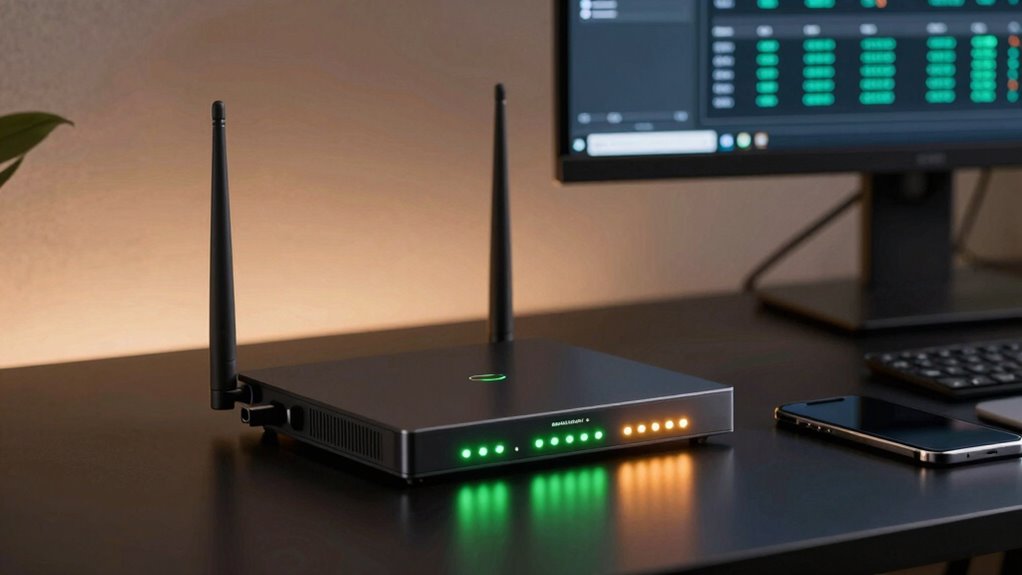

A cellular failover router can keep a home office, business, or remote site online when its wired connection drops, but the right choice depends on how quickly it switches and how much control your setup needs. My best overall pick is the Hitron D60 5G, which pairs 5G, Wi-Fi 6, and dual-failover support in a home- and small-office-friendly design. The GL.iNet GL-X3000 Spitz AX stands out for buyers who want more network control, while the Teltonika RUTM50 better suits industrial deployments. The main tradeoffs are 4G versus 5G, simple setup versus advanced management, and built-in Wi-Fi versus rugged or specialized connectivity. Read on for the full breakdown and guidance on matching a router to your carrier, site, and backup needs.

Get the latest gadgets delivered free with Prime
- Fast, free delivery on millions of items
- Prime Video, Amazon Music and more included
- Member-only deals all year
Complete the kit



Key Takeaways
- The Hitron D60 5G leads for general-purpose failover: its 5G, Wi-Fi 6, and SIM/eSIM options distinguish it from simpler 4G routers, though buyers should confirm carrier and failover behavior for their plan.
- The GL.iNet GL-X3000 and GL-XE3000 serve control-focused buyers: they pair 5G and Wi-Fi 6 with dual-SIM capability, while the XE3000 adds battery-powered portability.
- Industrial models solve a different problem than home routers: Teltonika, InHand, and LINOVISION focus on site and equipment connectivity rather than a straightforward home Wi-Fi replacement.
- 4G models can be a sensible backup when availability matters more than peak speed: the TUOSHI LT15F and Cudy LT500 options trade newer cellular capability for a simpler class of connection.
- Outdoor placement and backup power need separate planning: the Cudy LT500 Outdoor and GL-XE3000 address distinct deployment constraints, but neither removes the need to check signal, power, and carrier coverage at the site.
| TUOSHI LT15F N300 4G LTE Wi-Fi Router with SIM Card Slot |  | Best Basic 4G Backup | Cellular technology: 4G LTE Cat4 | Maximum cellular download: Up to 150 Mbps | Wi-Fi: N300, Wi-Fi 4; up to 300 Mbps | VIEW ON AMAZON | See Our Full Breakdown |
| Hitron D60 5G Cellular Router with SIM Card Slot |  | Best for Straightforward 5G Failover | Cellular technology: 5G SA/NSA and 4G LTE | Maximum 5G download: Up to 3.4 Gbps on 5G NSA | Wi-Fi: Wi-Fi 6, AX3000 | VIEW ON AMAZON | See Our Full Breakdown |
| Cudy P5 5G AX3000 Wi-Fi 6 Router with Dual SIM and 4 Gigabit Ports |  | Best for Configurable Failover | Cellular connectivity: 5G NR SA/NSA, Qualcomm X62 | Maximum cellular speed: Up to 3.4 Gbps | SIM slots: 2 Nano SIM | VIEW ON AMAZON | See Our Full Breakdown |
| LINOVISION Industrial 4G LTE WiFi Cellular Router with Dual SIM and RS485 |  | Best Industrial 4G Failover | Cellular technology: 4G LTE Cat4 | Maximum cellular speeds: 150 Mbps download; 50 Mbps uplink | SIM slots: 2 | VIEW ON AMAZON | See Our Full Breakdown |
| GL.iNet GL-X3000 Spitz AX 5G Cellular Wi-Fi 6 Router |  | Best for Flexible Multi-WAN and VPN | Cellular connectivity: 5G NR, LTE, UMTS, WCDMA | Wi-Fi: Dual-band Wi-Fi 6; up to 574 Mbps (2.4 GHz) + 2402 Mbps (5 GHz) | SIM: Dual SIM with single standby; physical eSIM card supported | VIEW ON AMAZON | See Our Full Breakdown |
| GL.iNet GL-XE3000 Puli AX 5G Wi-Fi 6 Router with Dual SIM and 6400mAh Battery | 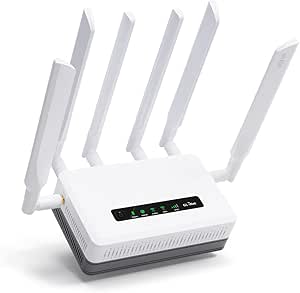 | Best for Mobile Failover | Cellular: 5G NSA/SA and 4G LTE | SIM: Dual SIM, single standby; separately purchased physical eSIM card supported | Wi-Fi: Dual-band Wi-Fi 6; up to 574 Mbps at 2.4 GHz and 2402 Mbps at 5 GHz | VIEW ON AMAZON | See Our Full Breakdown |
| Teltonika RUTM50 5G Industrial Router |  | Best for Industrial 5G Failover | Cellular: 5G and 4G LTE | SIM: Dual SIM with failover | Wi-Fi: Wi-Fi 5 (802.11ac) | VIEW ON AMAZON | See Our Full Breakdown |
| Cudy LT500 4G LTE Cat 4 AC1200 Dual-Band Wi-Fi 5 Router with SIM Slot | 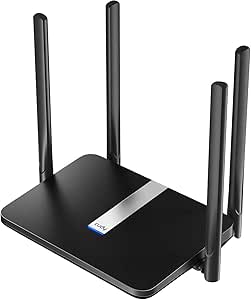 | Best Value for Basic LTE Backup | Cellular: 4G LTE Cat 4; up to 150 Mbps download and 50 Mbps upload | SIM: Nano SIM slot | Wi-Fi: Dual-band Wi-Fi 5 AC1200; 867 Mbps at 5 GHz plus 300 Mbps at 2.4 GHz | VIEW ON AMAZON | See Our Full Breakdown |
| InHand Networks IR302 Industrial IoT 4G LTE VPN Cellular Router |  | Best for Remote IoT Sites | Cellular: 4G LTE Cat 4 | Carrier compatibility: Verizon, AT&T, and T-Mobile | SIM: Dual SIM | VIEW ON AMAZON | See Our Full Breakdown |
| Cudy LT500 Outdoor 4G LTE AC1200 Wi-Fi Router with SIM Slot |  | Best for Outdoor LTE Coverage | Cellular: 4G LTE Cat 4; up to 150 Mbps download | Wi-Fi: Wi-Fi 5 AC1200; 867 Mbps plus 300 Mbps | Weather protection: IP65 | VIEW ON AMAZON | See Our Full Breakdown |
| MOFINETWORK MOFI6500-5GXeLTE-RM520-HP 4G LTE 5G Dual SIM Cellular Router with Wi-Fi 6 |  | Best for Rugged Business Failover | Cellular connectivity: 5G and 4G LTE | SIM support: Dual SIM with auto failover | Wi-Fi: Wi-Fi 6, dual-band | VIEW ON AMAZON | See Our Full Breakdown |
| cellular failover router | Wi-Fi | Antennas | SIM |
|---|---|---|---|
| TUOSHI LT15F N300 4G LTE Wi-Fi | N300, Wi-Fi 4; up to 300 Mbps | 4 | — |
| Hitron D60 5G Cellular Router | Wi-Fi 6, AX3000 | 5 internal antennas | Nano SIM and eSIM support |
| Cudy P5 5G AX3000 Wi-Fi 6 Rout | Wi-Fi 6 AX3000; 2402 Mbps (5 GHz) + 574 Mbps (2.4 GHz) | — | — |
| LINOVISION Industrial 4G LTE W | IEEE 802.11b/g/n, 2.4 GHz | — | — |
| GL.iNet GL-X3000 Spitz AX 5G C | Dual-band Wi-Fi 6; up to 574 Mbps (2.4 GHz) + 2402 Mbps (5 GHz) | 6 detachable antennas | Dual SIM with single standby; physical eSIM card supported |
| GL.iNet GL-XE3000 Puli AX 5G W | Dual-band Wi-Fi 6; up to 574 Mbps at 2.4 GHz and 2402 Mbps at 5 GHz | — | Dual SIM, single standby; separately purchased physical eSIM card supported |
| Teltonika RUTM50 5G Industrial | Wi-Fi 5 (802.11ac) | 7 fixed antennas | Dual SIM with failover |
| Cudy LT500 4G LTE Cat 4 AC1200 | Dual-band Wi-Fi 5 AC1200; 867 Mbps at 5 GHz plus 300 Mbps at 2.4 GHz | 4 external fixed antennas | Nano SIM slot |
| InHand Networks IR302 Industri | 802.11 b/g/n, 2.4 GHz; up to 150 Mbps | — | Dual SIM |
| Cudy LT500 Outdoor 4G LTE AC12 | Wi-Fi 5 AC1200; 867 Mbps plus 300 Mbps | 4 detachable SMA antennas | — |
| MOFINETWORK MOFI6500-5GXeLTE-R | Wi-Fi 6, dual-band | 9 retractable antennas | — |
More Details on Our Top Picks
TUOSHI LT15F N300 4G LTE Wi-Fi Router with SIM Card Slot
I’d choose the TUOSHI LT15F for a straightforward LTE backup connection where modest home or small-office demands matter more than 5G speed. Its SIM-based setup and four Ethernet ports make it more flexible for wired devices than the Hitron D60, which is the stronger pick for a faster 5G connection and newer Wi-Fi. The LT15F’s listed LTE bands cover a range of networks, but buyers still need to check their carrier and plan before relying on it as a backup.
The tradeoff is speed beyond the cellular link: its 10/100 Mbps Ethernet ports can bottleneck a faster connection, and N300 Wi-Fi 4 is basic by current standards. Four antennas and mesh capability may help with coverage, while WPA3 and VPN protocol support add useful safeguards. I’d skip it if your failover plan depends on high throughput, modern Wi-Fi, or automatic multi-carrier switching.
Pros:- SIM-based LTE connectivity provides an alternative to fixed broadband
- Four Ethernet ports allow several wired devices to connect
- Four antennas and mesh capability can support broader home coverage
- WPA3 and listed VPN protocols provide security options
Cons:- 10/100 Mbps Ethernet can limit throughput on wired connections
- N300 Wi-Fi 4 is less capable than the Wi-Fi 6 on the Hitron D60 and Cudy P5
- Carrier band and plan compatibility must be confirmed before purchase
Best for: Households or small offices seeking an uncomplicated 4G SIM-based backup for basic browsing, messaging, and a few wired devices.
Not ideal for: People who need 5G speeds, gigabit wired networking, or dual-SIM carrier switching; its Wi-Fi and Ethernet are comparatively modest.
- Cellular technology:4G LTE Cat4
- Maximum cellular download:Up to 150 Mbps
- Wi-Fi:N300, Wi-Fi 4; up to 300 Mbps
- SIM slot:Standard SIM
- Antennas:4
- Ethernet ports:4, 10/100 Mbps
- LTE bands:B2/B3/B4/B5/B7/B8/B12/B13/B17/B25/B26/B66/B41
- Security:WPA3, L2TP, PPTP, OpenVPN
Our verdict“Choose the LT15F for basic 4G backup and multiple wired connections, but pick a 5G or gigabit model if speed and newer networking matter more.”
Hitron D60 5G Cellular Router with SIM Card Slot
The Hitron D60 is the clearest fit here for buyers who want a 5G-capable failover router without making dual-SIM management the centerpiece. It supports both 5G SA and NSA, falls back to 4G LTE, and is listed as certified for T-Mobile, AT&T, and US Cellular. Compared with the TUOSHI LT15F, it offers a much newer cellular and Wi-Fi platform; compared with the Cudy P5, it has less emphasis on multiple SIM paths and configurable failover options.
Its listed 5G download capability reaches 3.4 Gbps, with Wi-Fi 6 and mesh support for distributing that connection. The stated 5.4 Gbps Wi-Fi figure is a wireless capacity claim, not a promise of cellular throughput. The main compromises are a single listed port, required compatible carrier service, and a short three-month limited warranty. I’d check the exact SIM and failover behavior before treating it as a business-critical backup.
Pros:- Supports 5G SA and NSA as well as 4G LTE
- Wi-Fi 6 and mesh support help distribute cellular connectivity around a home or small office
- Nano SIM and eSIM are listed for dual failover capability
- Carrier certification is listed for T-Mobile, AT&T, and US Cellular
Cons:- Only one port is listed, limiting direct wired-device connections
- A compatible SIM and carrier plan are required, and coverage still depends on the carrier
- The listed three-month limited warranty is shorter than the Cudy P5’s stated two-year warranty
Best for: Home and small-office users who want a Wi-Fi 6 router with 5G cellular backup on a supported carrier and do not need extensive WAN configuration.
Not ideal for: Organizations needing multiple Ethernet connections, dual physical-SIM redundancy, or a longer stated warranty.
- Cellular technology:5G SA/NSA and 4G LTE
- Maximum 5G download:Up to 3.4 Gbps on 5G NSA
- Wi-Fi:Wi-Fi 6, AX3000
- SIM:Nano SIM and eSIM support
- Ethernet:1 port, 1000 Mbps LAN bandwidth listed
- Maximum upstream transfer rate:550 Mbps
- Antennas:5 internal antennas
- Security:WPA3
Our verdict“Pick the D60 for accessible 5G and Wi-Fi 6 failover on a listed carrier, but choose the Cudy P5 for more explicit multi-WAN and dual-SIM control.”
Cudy P5 5G AX3000 Wi-Fi 6 Router with Dual SIM and 4 Gigabit Ports
I’d put the Cudy P5 near the top for buyers who want failover choices spelled out rather than a simple cellular connection. It supports three paths—WAN, Cellular 1, and Cellular 2—and its two Nano SIM slots can help keep a second carrier available if the primary network falters. That makes it more configurable for continuity than the Hitron D60, while four Gigabit Ethernet ports give it a more practical wired setup than the D60’s single listed port.
Wi-Fi 6 AX3000 and 5G NR SA/NSA give the P5 room for faster service, and its VPN selection includes WireGuard, OpenVPN, and IPsec. That flexibility brings setup work: advanced failover and VPN settings may take more attention than a simple home router. Buyers also need compatible SIMs and active data plans, and the 256 MB of RAM is a modest platform for demanding network services. I’d choose it for control, not plug-and-forget simplicity.
Pros:- Three-way failover supports WAN and two cellular paths
- Dual Nano SIM slots allow provider switching and a second cellular option
- Four Gigabit ports suit wired devices better than the Hitron D60’s single listed port
- Broad VPN support includes WireGuard, OpenVPN, IPsec, and ZeroTier
Cons:- Advanced failover and VPN features may require manual configuration
- Cellular service requires compatible SIMs and carrier plans
- 256 MB of RAM may constrain demanding concurrent network tasks
Best for: Small businesses, remote offices, and technically confident households that want 5G backup, two SIM options, and several wired devices on one router.
Not ideal for: Buyers who want the simplest possible setup or need substantial local compute capacity for heavy network services.
- Cellular connectivity:5G NR SA/NSA, Qualcomm X62
- Maximum cellular speed:Up to 3.4 Gbps
- SIM slots:2 Nano SIM
- Wi-Fi:Wi-Fi 6 AX3000; 2402 Mbps (5 GHz) + 574 Mbps (2.4 GHz)
- Ethernet ports:4 Gigabit ports: 1 configurable WAN/LAN and 3 LAN
- Failover paths:WAN, Cellular 1, Cellular 2
- VPN protocols:WireGuard, OpenVPN, IPsec, ZeroTier, PPTP, L2TP
- RAM:256 MB
Our verdict“Choose the P5 when dual-SIM and multi-WAN control matter more than an especially simple setup.”
LINOVISION Industrial 4G LTE WiFi Cellular Router with Dual SIM and RS485
The LINOVISION industrial router is built for unattended equipment and challenging installations, not for maximizing household Wi-Fi speed. Dual SIM slots and automatic failover among LAN, cellular, and Wi-Fi give it more explicit connection continuity than the consumer-focused TUOSHI LT15F. Its RS485 data transmission, digital input/output, cloud monitoring, and broad 9–48 V DC input make it a better match for vehicle systems, remote monitoring, and industrial devices than either home router.
Its Cat4 cellular connection is limited to up to 150 Mbps down and 50 Mbps up, and the listed Wi-Fi is older 802.11b/g/n at 2.4 GHz. That’s a meaningful tradeoff if several people need fast wireless access. The diecast enclosure and stated operating range suit harsher sites, but configuration and integration features can be more involved than a household setup. I’d favor the Cudy P5 for faster Wi-Fi and 5G; choose LINOVISION for industrial interfaces and deployment flexibility.
Pros:- Dual SIM and automatic failover across LAN, cellular, and Wi-Fi support connection continuity
- RS485, digital input/output, and DTU functions suit industrial and IoT equipment
- 9–48 V DC input and a stated wide operating-temperature range support varied installations
- Extended listed LTE bands include B14, B66, and B71
Cons:- 4G LTE Cat4 is limited to a stated maximum of 150 Mbps down
- 2.4 GHz 802.11b/g/n Wi-Fi is much older than the Wi-Fi 6 on the Cudy P5
- Industrial configuration and integrations may be more involved than home-router setup
Best for: Operators of remote sites, vehicles, solar CCTV, vending equipment, or RS485-based systems who need industrial connectivity and configurable failover.
Not ideal for: Households seeking fast Wi-Fi 6, high cellular throughput, or a simple consumer-router setup.
- Cellular technology:4G LTE Cat4
- Maximum cellular speeds:150 Mbps download; 50 Mbps uplink
- SIM slots:2
- LTE bands:B2/B4/B5/B12/B13/B14/B66/B71
- Wi-Fi:IEEE 802.11b/g/n, 2.4 GHz
- Failover:Automatic failover among LAN, cellular, and Wi-Fi
- Industrial interfaces:RS485, digital input, digital output
- Power input:9–48 V DC
Our verdict“Choose LINOVISION for industrial devices and remote-site failover, not for a fast household Wi-Fi network.”
GL.iNet GL-X3000 Spitz AX 5G Cellular Wi-Fi 6 Router
The GL.iNet GL-X3000 Spitz AX suits buyers who want cellular failover to sit alongside several other ways of getting online. It accepts Ethernet, repeater, cellular, and tethered WAN connections, with load balancing and failover across them. That range gives it a different emphasis from the Cudy P5: the P5 spells out a three-way WAN-and-cellular failover arrangement and offers four Gigabit ports, while the GL-X3000 leans into flexible WAN sources and an OpenWrt-based firmware platform.
Its Wi-Fi 6, dual SIM, six detachable antennas, and OpenVPN and WireGuard support make it adaptable for a home office or remote workspace. VPN throughput is listed at up to 150 Mbps for OpenVPN and 300 Mbps for WireGuard, so encrypted traffic may not match the full cellular link rate. The dual SIM is single standby, and physical eSIM support requires a separately purchased card. I’d check regional cellular restrictions and port needs before choosing it over the P5.
Pros:- Multiple WAN sources include Ethernet, repeater, cellular, and tethering
- Load balancing and failover can use more than one connection type
- OpenVPN and WireGuard support provide built-in VPN options
- Six detachable antennas and Wi-Fi 6 offer flexibility for placement and wireless coverage
Cons:- Dual SIM operates in single-standby mode rather than using both cellular connections simultaneously
- Physical eSIM card is supported but sold separately
- Listed VPN speeds are lower than the router’s potential cellular throughput
Best for: Remote workers and technically inclined users who need cellular failover plus tethered, repeater, or wired WAN options and built-in VPN tools.
Not ideal for: Buyers needing dual cellular links active at once, more than two listed ports, or a ready-to-use physical eSIM card.
- Cellular connectivity:5G NR, LTE, UMTS, WCDMA
- Wi-Fi:Dual-band Wi-Fi 6; up to 574 Mbps (2.4 GHz) + 2402 Mbps (5 GHz)
- SIM:Dual SIM with single standby; physical eSIM card supported
- Antennas:6 detachable antennas
- WAN options:Ethernet, repeater, cellular, tethering
- Multi-WAN:Load balancing and failover
- VPN:OpenVPN up to 150 Mbps; WireGuard up to 300 Mbps
- Firmware:OpenWrt-based
Our verdict“Pick the GL-X3000 for varied WAN sources and VPN flexibility, while the Cudy P5 is a better fit for buyers prioritizing four Gigabit ports and explicitly defined three-path failover.”
GL.iNet GL-XE3000 Puli AX 5G Wi-Fi 6 Router with Dual SIM and 6400mAh Battery
The Puli AX is the most adaptable choice here for buyers who need failover while away from a fixed installation. Its 5G, dual-SIM automatic failover can switch between cellular providers, while Ethernet, repeater, and tethering WAN options let it use more than one kind of backup connection. Unlike the Teltonika RUTM50, it adds a 6400mAh battery for up to eight hours of operation without a separate power source. Wi-Fi 6 and OpenWrt-based firmware suit users who want newer wireless support and room to customize VPN or network settings. The tradeoff is that its SIM arrangement is single standby, and a physical eSIM card is sold separately. It also has only one Ethernet port, so it is less suited to wired installations that need several direct connections.
Pros:- Dual SIM with automatic cellular failover
- Built-in battery provides up to eight hours of connectivity
- Accepts Ethernet, repeater, cellular, and tethering WAN connections
- OpenVPN, WireGuard, and OpenWrt-based customization
Cons:- Only one Ethernet port
- Physical eSIM card must be purchased separately
- Cellular feature availability varies by country and region
Best for: Mobile professionals, field teams, and small operations that need battery-backed 5G failover plus flexible WAN options.
Not ideal for: Fixed sites needing multiple wired ports or buyers who want a simple setup without handling configurable firmware and SIM details.
- Cellular:5G NSA/SA and 4G LTE
- SIM:Dual SIM, single standby; separately purchased physical eSIM card supported
- Wi-Fi:Dual-band Wi-Fi 6; up to 574 Mbps at 2.4 GHz and 2402 Mbps at 5 GHz
- Battery:6400mAh; up to 8 hours
- WAN options:Ethernet, repeater, cellular, and tethering
- VPN:OpenVPN up to 150 Mbps; WireGuard up to 300 Mbps
- Ports:1 port; LAN bandwidth up to 1000 Mbps
- Firmware and security:OpenWrt-based firmware; WPA2 and WPA3
Our verdict“Choose the Puli AX if portable, battery-backed 5G failover matters more than having several wired ports.”
Teltonika RUTM50 5G Industrial Router
The RUTM50 is aimed at sites where dependable remote administration and industrial deployment matter more than portable convenience. Its 5G connectivity and dual-SIM failover suit retail, transport, and industrial networks that need a cellular fallback, while five Gigabit Ethernet ports give it a stronger wired foundation than the GL.iNet GL-XE3000 Puli AX, which has just one port. Teltonika’s RMS remote-management platform is another advantage for teams overseeing routers at multiple locations. Security options include OpenVPN, IPsec, and WireGuard, and RutOS is based on OpenWrt. The tradeoffs are real: it uses Wi-Fi 5 rather than the Puli AX’s Wi-Fi 6, has no listed built-in battery, and its industrial-oriented configuration may demand more networking expertise than a consumer router. It is a better fit for managed installations than casual home backup.
Pros:- 5G connectivity with dual-SIM failover
- Five Gigabit Ethernet ports for wired devices
- Remote management through the Teltonika RMS platform
- OpenVPN, IPsec, and WireGuard support
Cons:- Wi-Fi 5 is an older wireless generation than the Wi-Fi 6 GL.iNet Puli AX
- Industrial configuration may require technical expertise
- No built-in battery is listed for operation during power loss
Best for: IT teams and operators of industrial, retail, or transportation sites that need managed 5G connectivity, dual-SIM failover, and multiple wired links.
Not ideal for: Home users seeking battery-backed portability, Wi-Fi 6, or a low-complexity router they can configure with minimal networking knowledge.
- Cellular:5G and 4G LTE
- SIM:Dual SIM with failover
- Wi-Fi:Wi-Fi 5 (802.11ac)
- Ethernet:5 ports; 10/100/1000 Mbps
- Maximum upstream rate:550 Mbps
- VPN and security:OpenVPN, IPsec, WireGuard, WPA2/WPA3
- Operating system:RutOS, based on OpenWrt
- Antennas:7 fixed antennas
Our verdict“Pick the RUTM50 for centrally managed industrial 5G failover with several wired connections, not portable or beginner-friendly use.”
Cudy LT500 4G LTE Cat 4 AC1200 Dual-Band Wi-Fi 5 Router with SIM Slot
The standard LT500 makes sense when the job is straightforward: keep a small home or office online over LTE if its primary WAN fails. Its automatic WAN failover and Nano SIM slot offer a simple cellular backup path, while dual-band Wi-Fi 5 is more flexible for local devices than the 2.4 GHz-only Wi-Fi on the InHand Networks IR302. VPN client and server support adds useful remote-access options for a compact setup. This is a 4G Cat 4 router, though, with a stated cellular download ceiling of 150 Mbps, so it cannot match the 5G capability of the GL.iNet Puli AX or Teltonika RUTM50. Its four Ethernet ports are also limited to 10/100 Mbps, which can constrain wired transfers even when the local network or WAN could otherwise go faster. I’d choose it for modest backup needs, not speed-sensitive deployments.
Pros:- Automatic WAN failover for cellular backup
- Dual-band Wi-Fi 5 rather than single-band 2.4 GHz
- WireGuard, OpenVPN, and IPsec client and server support
- Four Ethernet ports for connecting several local devices
Cons:- 4G LTE Cat 4 download speed is capped at 150 Mbps
- All four Ethernet ports are limited to 10/100 Mbps
- Basic firewall features may not meet advanced enterprise requirements
Best for: Small offices and households that want automatic LTE backup, dual-band Wi-Fi, and built-in VPN options without needing 5G.
Not ideal for: Users with high-speed wired networks, heavy cellular data demands, or a need for industrial-grade remote-site features.
- Cellular:4G LTE Cat 4; up to 150 Mbps download and 50 Mbps upload
- SIM:Nano SIM slot
- Wi-Fi:Dual-band Wi-Fi 5 AC1200; 867 Mbps at 5 GHz plus 300 Mbps at 2.4 GHz
- Ethernet:4 Fast Ethernet ports, 10/100 Mbps
- Antennas:4 external fixed antennas
- VPN:WireGuard, OpenVPN, and IPsec; server and client support
- Control:App control and web interface
- Security:WPA/WPA2/WPA3
Our verdict“Choose the LT500 for basic, lower-speed LTE failover in a small home or office where 5G and Gigabit Ethernet are not priorities.”
InHand Networks IR302 Industrial IoT 4G LTE VPN Cellular Router
The IR302 is less of a general-purpose office router than a connectivity tool for unattended equipment. Its dual SIM, DIN-rail mounting, wide operating-temperature range, and digital I/O ports make it a distinctive fit for installations such as ATMs, vending machines, or EV chargers. The I/O can connect the router to sensor or relay workflows, a capability that separates it from the consumer-focused Cudy LT500. Cloud management through InHand Device Manager also suits operators maintaining equipment at several remote locations. The compromises are focused on speed and local networking: LTE Cat 4 tops out at 150 Mbps download, Wi-Fi is single-band 2.4 GHz, and both Ethernet ports are 10/100 Mbps. Compared with the 5G Teltonika RUTM50, it is a more specialized, slower option, but its industrial I/O and DIN-rail format may matter more than raw throughput at a remote site.
Pros:- Dual SIM supports cellular carrier failover
- Two digital I/O ports support sensor and relay applications
- DIN-rail mounting and a -20°C to 70°C operating range suit remote installations
- Cloud-based device management supports remote monitoring and configuration
Cons:- LTE Cat 4 and 10/100 Mbps Ethernet limit throughput
- Single-band 2.4 GHz Wi-Fi can be less suitable in congested areas
- SIM cards and data plans are not included
Best for: Operators connecting unattended IoT equipment who need dual-carrier LTE failover, digital I/O, DIN-rail mounting, and remote fleet management.
Not ideal for: Homes or offices needing fast Wi-Fi, Gigabit wired links, 5G throughput, or a router primarily for everyday consumer devices.
- Cellular:4G LTE Cat 4
- Carrier compatibility:Verizon, AT&T, and T-Mobile
- SIM:Dual SIM
- Wi-Fi:802.11 b/g/n, 2.4 GHz; up to 150 Mbps
- Ethernet:2 switchable WAN/LAN ports, 10/100 Mbps
- Digital I/O:2 DIO ports
- VPN:OpenVPN, IPsec, WireGuard, and ZeroTier
- Operating environment and mounting:-20°C to 70°C; DIN-rail mounting
Our verdict“Choose the IR302 for managed industrial IoT sites where I/O and rugged installation matter more than fast Wi-Fi or 5G.”
Cudy LT500 Outdoor 4G LTE AC1200 Wi-Fi Router with SIM Slot
The LT500 Outdoor is the pick for locations where the router itself needs to sit outside, closer to a cellular signal or the area needing Wi-Fi. Its IP65 weatherproof enclosure, operating range from -40°C to 65°C, and 24V passive PoE power make it better suited to exposed installations than the indoor Cudy LT500. That can simplify placement at a worksite, campground, or surveillance location, while detachable antennas and Mesh expansion give buyers options for coverage. Its cellular side remains 4G LTE Cat 4, with a maximum download speed of 150 Mbps, so the outdoor design does not make it a faster failover choice than the 5G GL.iNet Puli AX. It also has just one 100 Mbps PoE-in port, leaving little room for wired devices and limiting Ethernet throughput. This is a placement-and-weather choice, not a high-capacity wired router.
Pros:- IP65 weatherproofing for outdoor placement
- Operating range from -40°C to 65°C
- 24V passive PoE simplifies power delivery over Ethernet
- Detachable antennas and Cudy Mesh expansion support coverage planning
Cons:- 4G LTE download speed is limited to 150 Mbps
- Single 100 Mbps PoE-in port limits wired capacity
- WPA-PSK and WPA2-PSK are listed, without WPA3
Best for: Campground operators, remote worksite managers, and surveillance installers who need an outdoor-mounted LTE router powered over Ethernet.
Not ideal for: Buyers who need multiple wired connections, Gigabit Ethernet, 5G failover, or a router to place indoors near their equipment.
- Cellular:4G LTE Cat 4; up to 150 Mbps download
- Wi-Fi:Wi-Fi 5 AC1200; 867 Mbps plus 300 Mbps
- Weather protection:IP65
- Operating temperature:-40°C to 65°C
- Power:24V passive PoE
- Port:1x 100M PoE-in
- Antennas:4 detachable SMA antennas
- Security:WPA-PSK and WPA2-PSK
Our verdict“Choose the LT500 Outdoor when weatherproof placement and PoE matter more than 5G speeds or multiple wired ports.”
MOFINETWORK MOFI6500-5GXeLTE-RM520-HP 4G LTE 5G Dual SIM Cellular Router with Wi-Fi 6
The MOFI6500 pairs 5G and 4G LTE with dual SIM auto failover, making it a fit for offices or work sites where a cellular backup should take over without manual intervention. Its all-metal construction and Wi-Fi 6 coverage give it a more business-oriented profile than the simpler Cudy LT500, which is a 4G LTE, Wi-Fi 5 option. Compared with the Cudy P5, the MOFI emphasizes rugged build and a nine-antenna configuration rather than a listed four-port Gigabit LAN setup. The tradeoff is setup: the product description flags a potentially technical configuration, and it offers little detail about its control interface. I’d favor it for installations where network redundancy and a durable enclosure matter more than plug-and-play simplicity.
Pros:- Dual SIM support with auto failover can keep a connection available when one cellular network drops.
- Supports both 5G and 4G LTE for cellular connectivity.
- Wi-Fi 6 and extended coverage suit offices with multiple wireless devices.
- All-metal construction and nine antennas support a durable, connectivity-focused installation.
Cons:- Setup may call for networking knowledge, with limited interface details provided.
- Its advanced cellular and failover features may be more than a basic home backup connection needs.
- The listed security protocols do not include WPA3-Enterprise.
Best for: Small businesses and remote work sites that need dual-network cellular failover, Wi-Fi 6, and a more rugged router enclosure.
Not ideal for: First-time router buyers seeking a clearly documented, straightforward setup, or users who only need basic 4G backup.
- Cellular connectivity:5G and 4G LTE
- SIM support:Dual SIM with auto failover
- Wi-Fi:Wi-Fi 6, dual-band
- Antennas:9 retractable antennas
- Maximum data transfer rate:3.4 Gbps
- LAN ports:5 ports; 10/100/1000 Mbps bandwidth
- Security:WPA2-Enterprise, WPA2-PSK, WPA3
- Operating system:Linux
Our verdict“Choose the MOFI6500 if you need rugged dual-SIM 5G/LTE failover for a business or work site and can handle a more technical setup.”

How We Picked
I ranked these routers by how well they can serve as a real backup connection, not simply by headline cellular generation or Wi-Fi speed. The key factors were cellular capability and SIM flexibility, the clarity of the failover setup, network and VPN features, built-in Wi-Fi, deployment fit, and the likely effort required to configure and maintain each device. I also weighed whether a model is designed for a home or office, a mobile setup, or an industrial installation, since these use cases call for different hardware and management features.
The order favors versatile choices for common home and small-business needs, then more specialized or simpler alternatives. The Hitron D60 ranks first for its mix of 5G, Wi-Fi 6, and dual-failover options; GL.iNet and Teltonika models follow where network control or industrial use matters more. Lower-ranked products are not poor fits: they fall lower because they offer a narrower use case, older cellular capability, or a more specialized deployment. Carrier certification alone does not guarantee service at a particular address, so I treat local coverage and plan compatibility as purchase checks rather than assumptions.
| cellular failover router | SIM |
|---|---|
| TUOSHI LT15F N300 4G LTE Wi-Fi | — |
| Hitron D60 5G Cellular Router | Nano SIM and eSIM support |
| Cudy P5 5G AX3000 Wi-Fi 6 Rout | — |
| LINOVISION Industrial 4G LTE W | — |
| GL.iNet GL-X3000 Spitz AX 5G C | Dual SIM with single standby; physical eSIM card supported |
| GL.iNet GL-XE3000 Puli AX 5G W | Dual SIM, single standby; separately purchased physical eSIM card supported |
| Teltonika RUTM50 5G Industrial | Dual SIM with failover |
| Cudy LT500 4G LTE Cat 4 AC1200 | Nano SIM slot |
| InHand Networks IR302 Industri | Dual SIM |
| Cudy LT500 Outdoor 4G LTE AC12 | — |
| MOFINETWORK MOFI6500-5GXeLTE-R | — |
Factors to Consider When Choosing Cellular Failover Router
Choosing a cellular failover router starts with the failure you need to cover: a brief wired outage, a site with no wired service, or a remote installation where uptime affects equipment. The product list shows how widely these devices differ, so I would settle the network and deployment requirements before comparing labels or speeds.
Decide Whether You Need Automatic Failover or Cellular-First Internet
Some buyers want cellular only when a cable or fiber connection fails; others need cellular as the primary WAN. Those jobs can call for different routing behavior, monitoring, and configuration. Before buying, check whether the router can detect loss of usable internet rather than only a physical link, since a modem can remain connected while the upstream service is down. Ask how it returns to the primary connection and whether sessions such as video calls or VPNs may drop during a switch. For a small office, test the intended failover path with the services that matter instead of assuming “dual failover” describes every outage scenario.
Verify Carrier, Bands, SIM Format, and Data-Plan Rules
A router’s carrier certification is a useful starting point, but local signal and the specific cellular bands available at your site still shape performance. Confirm that the exact model supports your carrier, SIM type, and plan, including any restrictions on router or hotspot use. eSIM support can simplify carrier setup, while physical SIM slots may be preferable when you want to move an existing SIM or compare providers. Dual SIM does not automatically mean two active data connections or seamless carrier switching; check what the device actually does when service weakens or a plan runs out. If business continuity matters, ask your carrier about data limits, roaming, and backup-line terms before relying on the connection.
Match 4G or 5G to the Site, Not Just the Speed Label
5G can offer more capacity where coverage is strong, but it does not guarantee better service inside a building or at a remote site. A dependable 4G connection can be a better backup than a 5G router that struggles to hold a signal. Check coverage at the router’s planned location and think about the number of people and applications that will share the connection during an outage. Video calls, point-of-sale systems, and cloud backups have different bandwidth and latency needs, and backups can quickly consume limited data. Choose 5G when local coverage and the workload justify it; otherwise, prioritize reliable reception and a data plan that can handle the outage.
Plan Antenna Placement, Cabling, and Weather Exposure
Cellular reception depends heavily on placement, so a router hidden beside a modem or inside a metal cabinet may not perform like one positioned near a window or outdoors. External antenna connections, cable length, and the antenna’s intended bands can affect the signal you can achieve. Outdoor hardware can help with difficult locations, but it adds installation tasks around mounting, weather protection, cable routing, and access for maintenance. Avoid choosing an outdoor unit solely because the signal is weak: first identify whether the cause is building materials, distance from a tower, or congestion. Plan the full route from antenna to router and confirm that the equipment can be serviced safely.
Choose the Right Management and Security Complexity
A home user may want a clear setup process and basic network settings, while a business or industrial operator may need VPNs, remote management, monitoring, or links to control equipment. More advanced controls can make a router fit demanding deployments, but they can also add configuration and maintenance work. Decide who will manage updates, credentials, alerts, and troubleshooting before selecting a feature-rich industrial model. Check whether its VPN and management functions suit your existing network rather than assuming they work with every service or policy. A simpler router can be the better choice when ease of recovery matters more than fine-grained control.
Account for Power, Battery Runtime, and Outage Duration
Cellular failover only helps while the router and cellular network remain available. If power cuts are part of the risk, consider whether the router needs an uninterruptible power supply, a battery-equipped design, or a separate backup source. A built-in battery can aid mobile use or short interruptions, but runtime depends on signal strength, traffic, and connected devices. For a fixed office, estimate the time needed to ride through a typical outage and include the modem and other network equipment in that power plan. Buyers often focus on internet redundancy and overlook the power supply that makes the backup connection usable.
Frequently Asked Questions
Will a cellular failover router switch automatically when my internet goes down?
That depends on the router’s WAN monitoring and failover settings, not just the presence of a SIM slot. Some devices can switch when their health checks detect an unusable connection, while a basic setup may only react to a disconnected cable or require manual changes. Confirm that the router supports automatic switching from your primary WAN to cellular and find out how it tests the primary connection. Also check whether it switches back automatically when the wired service returns. If uninterrupted sessions matter, expect some applications to reconnect even when the router changes links automatically.
Can I use one of these routers with any cellular carrier?
No single compatibility claim covers every carrier, region, band, and plan. Check the exact model and hardware version against the carrier you intend to use, then verify whether your plan permits router or fixed wireless use. A certification listed for a few providers does not promise coverage at your address or guarantee support for every network feature. For dual-SIM devices, confirm whether both SIMs can be used with your chosen providers and how switching is configured. If you rely on the router for work, ask the carrier how it handles data limits and service during an extended outage.
Is a dual-SIM router enough to protect me from a cellular outage?
Dual SIM can provide another carrier or plan to fall back on, but the feature only helps if the device can switch as needed and the second network has usable coverage. Two SIMs on the same carrier may share the same local network weakness, so they are not always meaningful redundancy. Review whether the router uses standby SIM failover, what conditions trigger a switch, and whether you can set data or signal thresholds. Consider using providers with different network footprints if a carrier outage is part of your threat model. You should also check whether both plans remain active and properly provisioned.
Should I choose 5G or 4G for backup internet?
Choose based on verified reception and the amount of traffic you need to carry during an outage. A 5G router can provide more capacity in a well-covered area, but a strong 4G signal may be more dependable at a particular site. For email, point-of-sale traffic, and basic remote access, 4G may be sufficient if the connection is stable and the plan has enough data. For multiple users or bandwidth-heavy work, 5G may be worth the added capability when local service supports it. Check coverage at the intended installation point before treating a network-generation label as a performance promise.
Do I need an outdoor router or an external antenna for a weak indoor signal?
Not automatically: first try a better indoor position and check whether walls, metal structures, or the router’s location are blocking reception. If the signal remains poor, an external antenna or an outdoor-capable router may help by placing the cellular radio or antenna in a better location. Compare supported bands, antenna connections, cable requirements, and weather protection before choosing hardware. Long cable runs can complicate installation, and outdoor equipment needs a safe mounting and maintenance plan. If the site is remote or industrial, a professional signal survey can prevent buying equipment that does not address the actual coverage problem.
Conclusion
For most homes and small offices, I would start with the Hitron D60 5G as the best overall pick because it combines 5G, Wi-Fi 6, and SIM/eSIM failover options in one general-purpose router. The Cudy LT500 is the best value-style choice for buyers whose needs fit 4G and straightforward Wi-Fi, while the GL.iNet GL-X3000 Spitz AX is my best premium pick for people who want 5G and more network control. Beginners should favor the Hitron D60 if its carrier and setup match their needs; the industrial models are better left to buyers who need their specific management or equipment connections. For mobile backup, choose the GL.iNet GL-XE3000 Puli AX; for outdoor placement, consider the Cudy LT500 Outdoor; and for industrial sites, compare the Teltonika RUTM50, InHand IR302, and LINOVISION against your installation requirements. Before ordering, confirm local coverage, plan rules, and the exact failover behavior you need.
Evergreen bestsellers Picks
bestsellers
As an affiliate, we earn on qualifying purchases.