A ceiling-mount access point can spread Wi-Fi across a room more evenly than a router tucked on a shelf, but the right choice depends on your network, wiring, and coverage demands. I name the TP-Link Omada EAP653 my best overall pick for its Wi-Fi 6 capabilities and managed-access-point design; the Cudy AP3000 is a more straightforward Wi-Fi 6 alternative, while the TP-Link Omada EAP772 stands out for buyers planning a Wi-Fi 7 network. The main tradeoffs are Wi-Fi generation and capacity versus cost and setup complexity, plus PoE convenience versus the need for a separate power source. Some options are standalone access points, while the Deco X50-PoE is a three-unit mesh system, so they do not suit the same network plans. Read on for the full breakdown and help matching an access point to your space.

Get the latest gadgets delivered free with Prime
- Fast, free delivery on millions of items
- Prime Video, Amazon Music and more included
- Member-only deals all year
Complete the kit



Key Takeaways
- The EAP653 is my best overall balance: it pairs Wi-Fi 6 with Omada management, making it a stronger fit for a managed network than simpler standalone picks.
- Wi-Fi 7 models serve different upgrade plans: the EAP772 and EAP770 offer tri-band BE11000 positioning, while the EAP720 and Tavora U7-Lite represent other Wi-Fi 7 paths in this lineup.
- Wi-Fi 6 spans the most practical choices: the EAP650, EAP653, Cudy AP3000, and Deco X50-PoE cover different needs, from managed installs to mesh coverage.
- Mounting style does not make every product equivalent: the Deco X50-PoE is a three-unit mesh system, not a like-for-like single ceiling access point.
- Older Wi-Fi 5 models still have a narrow role: the EAP225 and Cudy AP1300 may suit basic networks, but they are less compelling for buyers building for newer client devices.
| Cudy BE11000 Wi-Fi 7 Mesh Access Point |  | Best for High-Capacity Wi-Fi 7 | Model: AP11000 | Wi-Fi generation: Wi-Fi 7 (802.11be) | Frequency bands: Tri-band: 6 GHz, 5 GHz, and 2.4 GHz | VIEW ON AMAZON | See Our Full Breakdown |
| TP-Link Omada EAP653 AX3000 Wi-Fi 6 Ceiling-Mount Access Point |  | Best Overall for Managed Wi-Fi 6 | Model: EAP653 | Wi-Fi generation: Wi-Fi 6 (802.11ax) | Frequency bands: Dual-band | VIEW ON AMAZON | See Our Full Breakdown |
| TP-Link Omada EAP610 AX1800 Wi-Fi 6 Access Point |  | Best for Smaller Omada Networks | Model: EAP610 V2 | Wi-Fi standard: Wi-Fi 6 (802.11ax) | Frequency bands: Dual-band | VIEW ON AMAZON | See Our Full Breakdown |
| Cudy AP1300 AC1200 Dual-Band Wi-Fi 5 Access Point |  | Best for Feature-Rich Legacy Networks | Model: AP1300 | Wi-Fi generation: Wi-Fi 5 (802.11ac) | Wireless speed: 1,200 Mbps: 867 Mbps at 5 GHz and 300 Mbps at 2.4 GHz | VIEW ON AMAZON | See Our Full Breakdown |
| Tavora U7-Lite WiFi 7 Dual-Band Ceiling-Mount Access Point |  | Best Compact Wi-Fi 7 Ceiling Pick | Model: U7-LITE | Wi-Fi generation: Wi-Fi 7 | Frequency bands: 2.4 GHz and 5 GHz | VIEW ON AMAZON | See Our Full Breakdown |
| TP-Link Omada EAP650 AX3000 Wi-Fi 6 Ceiling-Mount Access Point with DC Adapter |  | Best Overall Wi-Fi 6 Omada Pick | Wi-Fi standard: Wi-Fi 6 (802.11ax) | Maximum data rate: 2976 Mbps | Frequency bands: Dual-band | VIEW ON AMAZON | See Our Full Breakdown |
| TP-Link Omada EAP225 AC1350 Dual-Band Wireless Access Point |  | Best Value for Basic Managed Wi-Fi | Wireless standard: Wi-Fi 5 (802.11ac) | Wireless speed class: AC1350 | Frequency bands: 2.4 GHz and 5 GHz | VIEW ON AMAZON | See Our Full Breakdown |
| TP-Link Omada EAP770 BE11000 Tri-Band Wi-Fi 7 Access Point |  | Best Premium Tri-Band Upgrade | Wi-Fi generation: Wi-Fi 7 | Wireless bands: Tri-band: 6 GHz, 5 GHz, and 2.4 GHz | Maximum combined wireless speed: 11 Gbps | VIEW ON AMAZON | See Our Full Breakdown |
| TP-Link Omada EAP720 Wi-Fi 7 Ceiling-Mount Access Point |  | Best Balanced Wi-Fi 7 Upgrade | Wi-Fi generation: Wi-Fi 7 | Frequency bands: Dual-band, 2.4 GHz and 5 GHz | Maximum wireless speed: Up to 5.0 Gbps | VIEW ON AMAZON | See Our Full Breakdown |
| TP-Link Deco X50-PoE AX3000 Wi-Fi 6 Mesh System, 3-Pack | 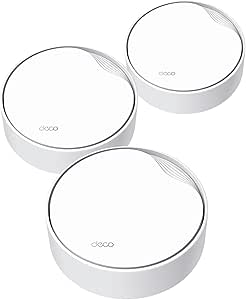 | Best Multi-Point Ceiling Mesh Kit | Pack size: 3-pack | Wi-Fi standard: Wi-Fi 6 (802.11ax) | Frequency bands: Dual-band, 2.4 GHz and 5 GHz | VIEW ON AMAZON | See Our Full Breakdown |
| Cudy AP3000 AX3000 Dual-Band Wi-Fi 6 Ceiling-Mount Access Point | | Best Flexible Wi-Fi 6 Upgrade | Wi-Fi generation: Wi-Fi 6 (802.11ax) | Bands: Dual-band | Maximum listed data rate: 3,000 Mbps (2,402 + 574 Mbps) | VIEW ON AMAZON | See Our Full Breakdown |
| TP-Link Omada EAP772 BE11000 Tri-Band Wi-Fi 7 Ceiling-Mount Access Point |  | Best Premium Wi-Fi 7 Ceiling Access Point | Wi-Fi standard: Wi-Fi 7 | Bands: Tri-band: 2.4 GHz, 5 GHz, and 6 GHz | Maximum listed speeds: 574 Mbps (2.4 GHz), 4,320 Mbps (5 GHz), 5,760 Mbps (6 GHz) | VIEW ON AMAZON | See Our Full Breakdown |
| ceiling mount access point | Power options | Frequency bands | Wi-Fi generation | Security |
|---|---|---|---|---|
| Cudy BE11000 Wi-Fi 7 Mesh Acce | — | Tri-band: 6 GHz, 5 GHz, and 2.4 GHz | Wi-Fi 7 (802.11be) | WPA/WPA2/WPA3; WPA3 Enterprise with RADIUS |
| TP-Link Omada EAP653 AX3000 Wi | 802.3at PoE+, 48 V passive PoE, or 12 V DC | Dual-band | Wi-Fi 6 (802.11ax) | — |
| TP-Link Omada EAP610 AX1800 Wi | 802.3at PoE+, 48 V passive PoE, or 12 V/1.5 A DC | Dual-band | — | WPA3 |
| Cudy AP1300 AC1200 Dual-Band W | 802.3at/af PoE, 24–57 V passive PoE, or 12 V DC | — | Wi-Fi 5 (802.11ac) | — |
| Tavora U7-Lite WiFi 7 Dual-Ban | — | 2.4 GHz and 5 GHz | Wi-Fi 7 | — |
| TP-Link Omada EAP650 AX3000 Wi | 802.3at PoE+, 48V passive PoE, 12V DC | Dual-band | — | WPA3, WPA2 |
| TP-Link Omada EAP225 AC1350 Du | 802.3af PoE, passive PoE, or included PoE adapter | 2.4 GHz and 5 GHz | — | WPA2-Enterprise, WPA-Enterprise |
| TP-Link Omada EAP770 BE11000 T | 802.3at PoE+ or 12V DC adapter | — | Wi-Fi 7 | WPA3, WPA2-PSK |
| TP-Link Omada EAP720 Wi-Fi 7 C | 802.3at PoE or 12V DC adapter | Dual-band, 2.4 GHz and 5 GHz | Wi-Fi 7 | WPA-PSK, WPA2-PSK, WPA3 |
| TP-Link Deco X50-PoE AX3000 Wi | PoE+ or standard power plug | Dual-band, 2.4 GHz and 5 GHz | — | — |
| Cudy AP3000 AX3000 Dual-Band W | 802.3at/af PoE, passive PoE, or 12–48V DC | — | Wi-Fi 6 (802.11ax) | — |
| TP-Link Omada EAP772 BE11000 T | PoE+ or DC | — | — | WPA3 |
More Details on Our Top Picks
Cudy BE11000 Wi-Fi 7 Mesh Access Point
For a ceiling-mounted network serving many devices, the Cudy BE11000 pairs tri-band Wi-Fi 7 with a stated capacity of more than 300 clients. Its 6 GHz band and support for 320 MHz channels give compatible devices room for high-throughput connections, while the 10G SFP+ slot and 2.5G Ethernet offer more uplink flexibility than the TP-Link Omada EAP653. Centralized provisioning and WPA3 Enterprise with RADIUS also suit managed business deployments. The tradeoff is that its 1,500-square-foot coverage figure is indoor-only, and the box does not include a power adapter; buyers need a compatible PoE setup or separate 12 V supply. Compared with the simpler, dual-band EAP653, this Cudy is aimed at dense networks that can use its advanced capacity and connections, not modest home installs.
Pros:- Tri-band Wi-Fi 7 includes a 6 GHz band and support for 320 MHz channels
- 10G SFP+ and 2.5G RJ45 provide flexible, high-speed wired uplinks
- Supports more than 300 clients and centralized provisioning
- WPA3 Enterprise with RADIUS suits managed network security
Cons:- Power adapter is not included
- Specified coverage is limited to indoor use
- Its advanced capacity and uplinks may be unnecessary for smaller networks
Best for: Small businesses, offices, or venues with many Wi-Fi 7-capable clients, a PoE network, and a need for managed security and faster wired uplinks.
Not ideal for: Home users with a small number of devices or no PoE gear who want a simple access point with an included power supply.
- Model:AP11000
- Wi-Fi generation:Wi-Fi 7 (802.11be)
- Frequency bands:Tri-band: 6 GHz, 5 GHz, and 2.4 GHz
- Maximum data rate:Up to 11,000 Mbps
- Ports:10G SFP+ slot and 2.5G RJ45
- Power:12 V DC or PoE; power adapter not included
- Maximum clients:300+
- Coverage:Up to 1,500 sq ft indoors
- Security:WPA/WPA2/WPA3; WPA3 Enterprise with RADIUS
Our verdict“Choose the Cudy BE11000 for a high-density ceiling deployment that can make use of Wi-Fi 7, enterprise security, and faster-than-gigabit uplinks.”
TP-Link Omada EAP653 AX3000 Wi-Fi 6 Ceiling-Mount Access Point
The EAP653 is my balanced pick for a ceiling-mounted Wi-Fi 6 network: it offers up to 2,976 Mbps, WPA3, and Omada management without moving into the costlier hardware class represented by the Cudy BE11000. Mesh and seamless roaming can help keep devices connected as users move between compatible access points, while ceiling or wall mounting offers more placement choice than a ceiling-only setup. Its dual-band Wi-Fi 6 design is less advanced than the Cudy’s tri-band Wi-Fi 7 and does not provide the same stated client capacity or 10G SFP+ connection. Power is another practical tradeoff: PoE+ is supported, but a DC adapter is not included. This makes the EAP653 a strong fit for an Omada network, but less compelling for buyers who want a standalone, plug-in setup.
Pros:- Wi-Fi 6 dual-band operation with a stated maximum speed of 2,976 Mbps
- Omada cloud management and standalone mode offer deployment flexibility
- Mesh and seamless roaming support multi-access-point coverage
- Can mount on a ceiling or wall and supports PoE+
Cons:- DC power adapter is not included
- Dual-band Wi-Fi 6 lacks the 6 GHz band offered by the Cudy BE11000
- Does not list a 2.5G or 10G uplink
Best for: Home offices and small businesses building an Omada-managed Wi-Fi 6 network with roaming across multiple access points.
Not ideal for: Buyers seeking Wi-Fi 7, a 10G uplink, or an included DC adapter for a simple standalone installation.
- Model:EAP653
- Wi-Fi generation:Wi-Fi 6 (802.11ax)
- Frequency bands:Dual-band
- Maximum wireless speed:2,976 Mbps
- Power options:802.3at PoE+, 48 V passive PoE, or 12 V DC
- DC adapter:Not included
- Antennas:4 internal
- Mounting:Ceiling or wall
- Warranty:5 years
Our verdict“Choose the EAP653 for a well-rounded, managed Wi-Fi 6 ceiling access point rather than paying for the Cudy BE11000’s more advanced Wi-Fi 7 and uplinks.”
TP-Link Omada EAP610 AX1800 Wi-Fi 6 Access Point
The EAP610 keeps the ceiling access-point basics—Wi-Fi 6, WPA3, and Omada management—while using a lower maximum data rate than the EAP653. That makes it a sensible choice for smaller offices or homes where managed roaming matters more than the EAP653’s extra speed or the Cudy BE11000’s Wi-Fi 7 capacity. It supports PoE+ and passive PoE as well as 12 V DC, so an installer can choose power to match the site. The important catch is that mesh and seamless roaming require an Omada SDN controller; those features are not a given in every setup. The listed data does not specify mounting hardware or an included adapter, so buyers should check installation needs before ordering. Pick it for a modest Omada deployment, not a controller-free mesh build.
Pros:- Wi-Fi 6 and WPA3 provide current-generation wireless and security features
- Omada cloud, hardware or software controller, and standalone management options
- Supports 802.3at PoE+, 48 V passive PoE, and 12 V DC
- Mesh and seamless roaming are available within an Omada SDN setup
Cons:- Mesh and seamless roaming require an Omada SDN controller
- Maximum data rate of 1,800 Mbps is below the EAP653’s stated 2,976 Mbps
- The supplied product data does not confirm included mounting hardware or a power adapter
Best for: Home-office owners and small teams who want a lower-capacity Omada Wi-Fi 6 access point and already have, or plan to use, an SDN controller.
Not ideal for: Buyers needing the EAP653’s higher stated speed, controller-free mesh and roaming, or a Wi-Fi 7 ceiling upgrade.
- Model:EAP610 V2
- Wi-Fi standard:Wi-Fi 6 (802.11ax)
- Frequency bands:Dual-band
- Maximum data rate:1,800 Mbps
- Security:WPA3
- Power options:802.3at PoE+, 48 V passive PoE, or 12 V/1.5 A DC
- Management:Omada cloud, hardware or software controller, or standalone mode
- Warranty:5 years
Our verdict“Choose the EAP610 for a smaller Omada-managed Wi-Fi 6 network when its 1,800 Mbps ceiling is sufficient and you can provide the controller.”
Cudy AP1300 AC1200 Dual-Band Wi-Fi 5 Access Point
The AP1300 is the most basic wireless generation in this group, but it offers network controls that can matter more than peak speed in a small, specialized installation. Its Gigabit Ethernet port, PoE choices, VLAN tagging, captive portal, and VPN server/client features suit guest access or a segmented legacy network. MU-MIMO and beamforming help it serve multiple devices, although its Wi-Fi 5 ceiling of 1,200 Mbps puts it behind both TP-Link Omada Wi-Fi 6 models for newer client networks. Its listed coverage is also the smallest here at up to 1,100 square feet. The adapter is not included, and the product data is inconsistent on WPA3, so I would verify the required security mode before deployment. Choose this over the EAP610 only when its specific management and VPN features matter more than newer Wi-Fi.
Pros:- Captive portal, VPN server/client, and up to 8 SSIDs with VLAN tagging
- MU-MIMO and beamforming support multi-client wireless use
- Offers 802.3at/af PoE, passive PoE, and 12 V DC power options
- OpenWRT operating system provides a platform for network configuration
Cons:- Wi-Fi 5 and a 1,200 Mbps stated wireless speed lag the Wi-Fi 6 alternatives
- Power adapter is not included
- Product data is inconsistent about WPA3 support
Best for: Small shops, guest areas, or network hobbyists who need VLANs, captive portal access, or VPN functions on an existing Wi-Fi 5 network.
Not ideal for: Buyers planning a new high-throughput ceiling network, needing broad coverage, or requiring clearly specified WPA3 support.
- Model:AP1300
- Wi-Fi generation:Wi-Fi 5 (802.11ac)
- Wireless speed:1,200 Mbps: 867 Mbps at 5 GHz and 300 Mbps at 2.4 GHz
- LAN port:1 Gigabit Ethernet
- Power options:802.3at/af PoE, 24–57 V passive PoE, or 12 V DC
- Coverage:Up to 1,100 sq ft
- Features:MU-MIMO, beamforming, VPN server/client, captive portal, and VLAN tagging
- Operating system:OpenWRT
- Warranty:2 years
Our verdict“Choose the AP1300 for a feature-focused, lower-speed ceiling deployment where VLAN, guest portal, or VPN tools outweigh Wi-Fi 6 performance.”
Tavora U7-Lite WiFi 7 Dual-Band Ceiling-Mount Access Point
The Tavora U7-Lite brings Wi-Fi 7 and a 2.5 GbE uplink to a dual-band ceiling access point, making it a middle ground between the Wi-Fi 6 TP-Link Omada EAP653 and the tri-band Cudy BE11000. Its four spatial streams, stated support for 200-plus clients, and coverage up to 1,250 square feet fit a busy home or smaller business, while the included ceiling mount simplifies placement. It does not have a 6 GHz band, so it cannot match the Cudy’s tri-band design for separating compatible high-speed traffic. The one-year warranty is shorter than the five years listed for the Omada models, and the supplied information does not specify power requirements. Buyers should confirm power compatibility and network management needs before choosing it for a permanent installation.
Pros:- Wi-Fi 7 with four spatial streams
- 2.5 GbE uplink exceeds the listed Gigabit port on the Cudy AP1300
- Supports more than 200 clients and coverage up to 1,250 sq ft
- Ceiling mount is included
Cons:- Dual-band design lacks the 6 GHz band available on the Cudy BE11000
- One-year warranty is shorter than the five-year terms listed for the Omada EAP653 and EAP610
- Provided specifications do not state power requirements or management options
Best for: Home offices and small businesses seeking Wi-Fi 7, a 2.5 GbE uplink, and an included ceiling mount without moving to a tri-band access point.
Not ideal for: Buyers who need 6 GHz Wi-Fi, a longer listed warranty, or clearly documented power and centralized management details.
- Model:U7-LITE
- Wi-Fi generation:Wi-Fi 7
- Frequency bands:2.4 GHz and 5 GHz
- Spatial streams:4
- Maximum data rate:4.3 Gbps at 5 GHz; 688 Mbps at 2.4 GHz
- Coverage:Up to 1,250 sq ft
- Client capacity:200+ devices
- Uplink:2.5 GbE
- Warranty:1 year
Our verdict“Choose the Tavora U7-Lite for a ceiling-mounted Wi-Fi 7 upgrade with a 2.5 GbE uplink when dual-band coverage is enough.”
TP-Link Omada EAP650 AX3000 Wi-Fi 6 Ceiling-Mount Access Point with DC Adapter
The EAP650 is a strong fit for buyers who want a purpose-built ceiling access point with current Wi-Fi 6 features but do not need to step up to Wi-Fi 7. Its 2976 Mbps dual-band capacity and WPA3 support make it a more capable choice than the older Wi-Fi 5 EAP225, while the included DC adapter gives installers an alternative when PoE is unavailable. Omada offers cloud, controller-based, and standalone management, so it can serve a single access point or join a broader managed network. The tradeoff is that Mesh and seamless roaming require an Omada SDN controller, adding setup complexity for buyers who want those functions. The EAP720 offers Wi-Fi 7 and a 2.5G port, but the EAP650 is the more straightforward match for Gigabit networks.
Pros:- Wi-Fi 6 with a combined maximum data rate of 2976 Mbps
- Includes a 12V DC adapter and also supports PoE+ and 48V passive PoE
- Offers Omada cloud, controller-based, and standalone management
- WPA3 support and a five-year warranty
Cons:- Mesh and seamless roaming require an Omada SDN controller
- Its single Ethernet port is Gigabit rather than multi-gig
- Dual-band Wi-Fi 6 lacks the extra 6 GHz band offered by Wi-Fi 7 models
Best for: Homes and small offices upgrading to Wi-Fi 6 that want ceiling installation, flexible power, and Omada management without a Wi-Fi 7 network.
Not ideal for: Buyers who need mesh or roaming without an Omada SDN controller, or who want a 2.5G uplink and Wi-Fi 7 capability.
- Wi-Fi standard:Wi-Fi 6 (802.11ax)
- Maximum data rate:2976 Mbps
- Frequency bands:Dual-band
- Security:WPA3, WPA2
- Power options:802.3at PoE+, 48V passive PoE, 12V DC
- Ethernet port:1 Gigabit Ethernet
- Management:Omada cloud, hardware or software controller, standalone mode
- Warranty:5 years
Our verdict“Choose the EAP650 for a versatile, managed Wi-Fi 6 ceiling access point when Gigabit networking is sufficient.”
TP-Link Omada EAP225 AC1350 Dual-Band Wireless Access Point
The EAP225 suits buyers who need a managed ceiling access point for routine browsing, office tasks, and older client devices, rather than the higher throughput of newer models. Its Wi-Fi 5 AC1350 design and Gigabit Ethernet are a step down from the Wi-Fi 6 EAP650, but Omada SDN management, MU-MIMO, and several power options give it useful business-network flexibility. The included PoE adapter can simplify installation where a PoE switch is not already in place. Mesh and roaming support are available only with compatible equipment and clients; roaming depends on 802.11k/v support. Compared with the EAP650, this is the more basic choice: it may fit a modest existing network, but it has less wireless headroom for newer devices and busy environments.
Pros:- Includes a PoE adapter and supports 802.3af PoE or passive PoE
- Omada SDN app and cloud management support centralized administration
- MU-MIMO and mesh support suit compatible network setups
- Gigabit Ethernet connection and five-year warranty
Cons:- Wi-Fi 5 offers less capacity and newer-device support than the EAP650
- Mesh and roaming benefits depend on compatible Omada equipment and client devices
- Real coverage and performance vary with the building and network conditions
Best for: Small offices or home businesses with mostly Wi-Fi 5 devices that want Omada management and a ceiling-mounted access point with an included PoE adapter.
Not ideal for: Buyers building a high-throughput network, planning to support many demanding Wi-Fi 6 devices, or expecting roaming benefits from incompatible clients.
- Wireless standard:Wi-Fi 5 (802.11ac)
- Wireless speed class:AC1350
- Frequency bands:2.4 GHz and 5 GHz
- Maximum upstream data rate:867 Mbps
- Ethernet:Gigabit
- Power options:802.3af PoE, passive PoE, or included PoE adapter
- Security:WPA2-Enterprise, WPA-Enterprise
- Management:Omada SDN app and cloud
- Warranty:5 years
Our verdict“Pick the EAP225 for a modest, centrally managed network where Wi-Fi 5 performance is enough and an included PoE adapter is useful.”
TP-Link Omada EAP770 BE11000 Tri-Band Wi-Fi 7 Access Point
For a ceiling-mounted network designed around high throughput and a large client load, the EAP770 brings the most ambitious wireless specification in this group: tri-band Wi-Fi 7 with 6 GHz and combined speeds up to 11 Gbps. Its 2.5 Gbps Ethernet port can carry more traffic than the Gigabit connection on the EAP650, though a compatible multi-gig network is needed to make use of that headroom. The listed capacity of 380+ concurrent devices and coverage up to 1,500 square feet can help with dense deployments, but actual results depend on layout and conditions. Compared with the dual-band EAP720, the EAP770 adds a 6 GHz band and higher combined speed; the tradeoff is that clients and network infrastructure must be ready to benefit from Wi-Fi 7 and multi-gig connectivity.
Pros:- Tri-band Wi-Fi 7 includes 6 GHz, 5 GHz, and 2.4 GHz
- Combined wireless speed listed up to 11 Gbps
- 2.5 Gbps Ethernet supports a faster wired uplink than Gigabit models
- Omada management, WPA3, and rogue access point detection
Cons:- Wi-Fi 7 and 6 GHz benefits require compatible client devices
- The 2.5 Gbps uplink requires compatible multi-gig network equipment
- Coverage and concurrent-device capacity vary with installation and network conditions
Best for: Businesses and advanced home-network builders with Wi-Fi 7 clients, multi-gig wired networking, and many concurrent devices in a defined coverage area.
Not ideal for: Buyers with mostly older Wi-Fi clients, Gigabit-only infrastructure, or a small network that will not use tri-band capacity.
- Wi-Fi generation:Wi-Fi 7
- Wireless bands:Tri-band: 6 GHz, 5 GHz, and 2.4 GHz
- Maximum combined wireless speed:11 Gbps
- Band speeds:6 GHz: 5,765 Mbps; 5 GHz: 4,324 Mbps; 2.4 GHz: 688 Mbps
- Ethernet port:1 × 2.5 Gbps
- Power options:802.3at PoE+ or 12V DC adapter
- Maximum concurrent devices:380+
- Coverage:Up to 1,500 sq. ft.
- Security:WPA3, WPA2-PSK
Our verdict“Choose the EAP770 when a Wi-Fi 7 deployment can use its 6 GHz band and 2.5 Gbps uplink, not simply for a larger speed figure.”
TP-Link Omada EAP720 Wi-Fi 7 Ceiling-Mount Access Point
The EAP720 is the middle path for buyers moving to Wi-Fi 7 who do not need the EAP770’s tri-band design. It pairs dual-band wireless with speeds up to 5.0 Gbps and a 2.5G Ethernet port, giving a newer wired connection than the Gigabit EAP650 without adding a 6 GHz band. The listed capacity of 250+ clients and 1,500-square-foot coverage make it a fit for busy homes or small offices, though those figures are not guarantees for every layout. Omada adds centralized management and mesh functions, but some features depend on the platform. Compared with the Deco X50-PoE, this is a single Omada access point rather than a three-unit consumer mesh kit, so it better suits managed network builds than buyers seeking broad app-guided whole-home coverage.
Pros:- Wi-Fi 7 with maximum wireless speed listed up to 5.0 Gbps
- 2.5G Ethernet port supports multi-gig wired networking
- Supports more than 250 concurrent clients and lists 1,500 sq. ft. coverage
- PoE or included 12V DC power and a five-year warranty
Cons:- Dual-band design does not include a 6 GHz band
- Some advanced management and mesh functions depend on the Omada platform
- Installation needs compatible PoE equipment or a nearby power outlet
Best for: Small businesses and advanced home users who want a single managed Wi-Fi 7 ceiling access point with a 2.5G uplink.
Not ideal for: Buyers needing tri-band 6 GHz, a multi-unit whole-home kit, or a setup that avoids Omada platform dependencies.
- Wi-Fi generation:Wi-Fi 7
- Frequency bands:Dual-band, 2.4 GHz and 5 GHz
- Maximum wireless speed:Up to 5.0 Gbps
- Band speeds:5 GHz: 4,324 Mbps; 2.4 GHz: 688 Mbps
- Ethernet port:2.5G
- Power options:802.3at PoE or 12V DC adapter
- Concurrent clients:250+
- Coverage:1,500 sq. ft.
- Security:WPA-PSK, WPA2-PSK, WPA3
Our verdict“Choose the EAP720 for a managed Wi-Fi 7 ceiling installation with a 2.5G uplink when dual-band capacity is sufficient.”
TP-Link Deco X50-PoE AX3000 Wi-Fi 6 Mesh System, 3-Pack
The Deco X50-PoE 3-pack takes a different route from the single-unit Omada access points: it pairs ceiling-friendly PoE+ placement with three nodes and mesh coverage listed up to 6,500 square feet. That makes it the better fit for spreading Wi-Fi across several rooms or floors without building an Omada controller-based network. Each unit has two 2.5 Gbps Ethernet ports, a useful advantage over the Gigabit EAP225, and it can also run from standard power. Setup and management go through the Deco app, with Alexa compatibility and HomeShield features. The compromise is that this is a consumer mesh system, not an Omada-managed business access point; the PoE+ switch is not included, and most internet providers require a separate modem.
Pros:- Three-unit mesh kit lists coverage up to 6,500 square feet
- PoE+ or standard power supports flexible node placement, including ceiling installation
- Each unit has two 2.5 Gbps Ethernet ports
- Deco app management, Alexa compatibility, and HomeShield security features
Cons:- PoE+ switch is not included
- Most internet providers require a separate modem
- Deco app management does not provide the Omada SDN controller approach of the EAP650
Best for: Households covering multiple rooms or floors that want a three-node mesh system with flexible PoE+ or standard-power placement.
Not ideal for: Businesses committed to Omada SDN management, buyers needing a standalone enterprise-style access point, or installers without a PoE+ switch or suitable power outlets.
- Pack size:3-pack
- Wi-Fi standard:Wi-Fi 6 (802.11ax)
- Frequency bands:Dual-band, 2.4 GHz and 5 GHz
- Maximum data rate:3,000 Mbps
- Ethernet ports:Two 2.5 Gbps ports per unit
- Power options:PoE+ or standard power plug
- Coverage:Up to 6,500 sq. ft.
- Maximum connected devices:Up to 150
- Management:Deco app
Our verdict“Choose the Deco X50-PoE when broad, app-managed mesh coverage matters more than Omada-style access-point management.”
Cudy AP3000 AX3000 Dual-Band Wi-Fi 6 Ceiling-Mount Access Point
The Cudy AP3000 fits buyers who want a ceiling-mounted Wi-Fi 6 access point with more wired headroom than a standard gigabit uplink provides. Its 2.5GbE PoE input can ease a wired bottleneck on a suitably equipped network, while support for 150+ clients and claimed coverage up to 1,400 square feet suit busy homes or small offices. Compared with the TP-Link Omada EAP653, this model adds flexible passive PoE and 12–48V DC power options, along with compatibility with downloadable OpenWRT firmware. That flexibility comes with extra setup work: OpenWRT requires a manual firmware download and flash, and no power adapter is included. It also lacks the tri-band Wi-Fi 7 capacity of the Omada EAP772, making the AP3000 a better fit for practical Wi-Fi 6 deployments than for buyers chasing the newest wireless generation.
Pros:- 2.5GbE PoE uplink offers more wired capacity than a gigabit port.
- Supports 150+ clients and lists coverage up to 1,400 sq ft.
- Can use 802.3at/af PoE, passive PoE, or 12–48V DC power.
- Cudy Controller supports centralized management of up to 200 units.
Cons:- Power adapter is not included.
- OpenWRT support requires downloading and flashing firmware.
- Dual-band Wi-Fi 6 lacks the additional 6 GHz band available on Wi-Fi 7 alternatives.
Best for: Small-office and home-network owners who need a Wi-Fi 6 ceiling access point, a 2.5GbE uplink, and flexible PoE or DC power.
Not ideal for: Buyers who want plug-and-play OpenWRT, an included DC adapter, or tri-band Wi-Fi 7 performance.
- Wi-Fi generation:Wi-Fi 6 (802.11ax)
- Bands:Dual-band
- Maximum listed data rate:3,000 Mbps (2,402 + 574 Mbps)
- Ethernet:1 × 2.5GbE PoE IN
- Power options:802.3at/af PoE, passive PoE, or 12–48V DC
- Antennas:5 internal antennas
- Listed coverage:Up to 1,400 sq ft
- Client capacity:150+ clients
- Management:App and Cudy Controller; controller supports up to 200 units
Our verdict“Choose the AP3000 for a flexible, 2.5GbE-equipped Wi-Fi 6 ceiling installation, but skip it if you want Wi-Fi 7 or firmware changes without manual setup.”
TP-Link Omada EAP772 BE11000 Tri-Band Wi-Fi 7 Ceiling-Mount Access Point
The Omada EAP772 is the forward-looking ceiling option for networks with Wi-Fi 7 clients and demand across several wireless bands. Its tri-band design adds 6 GHz alongside 2.4 and 5 GHz, and Multi-Link Operation can help compatible devices use multiple bands more effectively. That makes it a more advanced choice than the dual-band Cudy AP3000, which is better suited to Wi-Fi 6 networks and offers a 2.5GbE uplink as well. The EAP772 also has a 2.5G Ethernet port, so its wired connection remains a potential limit when aggregate wireless traffic exceeds that link’s capacity. PoE+ or DC power gives installers a choice, but the DC adapter is not included. I’d favor this model for a planned Wi-Fi 7 deployment; buyers with mostly older devices may get more practical value from a Wi-Fi 6 option such as the Omada EAP653.
Pros:- Tri-band Wi-Fi 7 adds a 6 GHz band for compatible devices.
- Multi-Link Operation and roaming features support newer wireless deployments.
- 2.5G Ethernet connection pairs with a multi-gig wired network.
- Offers PoE+ or DC power options.
Cons:- DC adapter is not included.
- The 2.5G Ethernet port can limit total wired throughput under heavy combined wireless use.
- Its Wi-Fi 7 features bring less benefit to networks with few compatible client devices.
Best for: Homes and small businesses building a Wi-Fi 7 network with compatible devices that can use the 6 GHz band and Multi-Link Operation.
Not ideal for: Buyers with mostly Wi-Fi 5 or Wi-Fi 6 devices, or installers who need a DC power adapter included in the box.
- Wi-Fi standard:Wi-Fi 7
- Bands:Tri-band: 2.4 GHz, 5 GHz, and 6 GHz
- Maximum listed speeds:574 Mbps (2.4 GHz), 4,320 Mbps (5 GHz), 5,760 Mbps (6 GHz)
- Ethernet:2.5G port
- Power options:PoE+ or DC
- Security:WPA3
- Mounting:Ceiling mount
- Weight:4 pounds
- Warranty:5 years, as stated in the product title
Our verdict“Pick the EAP772 for a ceiling-mounted Wi-Fi 7 network with compatible clients; choose the EAP653 instead if Wi-Fi 6 meets your needs.”

How We Picked
I ranked these models around the job a ceiling access point needs to do: provide useful wireless capacity from a practical mounting position and fit the buyer’s network plan. I weighed Wi-Fi generation and stated class, single-unit versus multi-unit format, management approach, and the likely installation requirements. A newer wireless standard is not an automatic win if it adds setup demands or leaves existing equipment as the bottleneck.
The order favors broad usefulness first, then clearer specialist cases. The EAP653 leads as a balanced managed Wi-Fi 6 option; higher-tier Wi-Fi 7 models rank for buyers who can use their capabilities, not as default recommendations for every home. Simpler and older-generation picks sit lower because their appeal depends on a specific budget, network, or coverage plan. The Deco system is judged as a mesh alternative rather than a direct substitute for one ceiling-mounted access point.
| ceiling mount access point | Wi-Fi generation | Security |
|---|---|---|
| Cudy BE11000 Wi-Fi 7 Mesh Acce | Wi-Fi 7 (802.11be) | WPA/WPA2/WPA3; WPA3 Enterprise with RADIUS |
| TP-Link Omada EAP653 AX3000 Wi | Wi-Fi 6 (802.11ax) | — |
| TP-Link Omada EAP610 AX1800 Wi | — | WPA3 |
| Cudy AP1300 AC1200 Dual-Band W | Wi-Fi 5 (802.11ac) | — |
| Tavora U7-Lite WiFi 7 Dual-Ban | Wi-Fi 7 | — |
| TP-Link Omada EAP650 AX3000 Wi | — | WPA3, WPA2 |
| TP-Link Omada EAP225 AC1350 Du | — | WPA2-Enterprise, WPA-Enterprise |
| TP-Link Omada EAP770 BE11000 T | Wi-Fi 7 | WPA3, WPA2-PSK |
| TP-Link Omada EAP720 Wi-Fi 7 C | Wi-Fi 7 | WPA-PSK, WPA2-PSK, WPA3 |
| TP-Link Deco X50-PoE AX3000 Wi | — | — |
| Cudy AP3000 AX3000 Dual-Band W | Wi-Fi 6 (802.11ax) | — |
| TP-Link Omada EAP772 BE11000 T | — | WPA3 |
Factors to Consider When Choosing Ceiling Mount Access Point
Before choosing a model, I would match the access point to the network it will join and the way it can be powered and managed. These decisions often matter more than a headline wireless class: a fast access point cannot fix weak cabling, a limited router, or poor placement.
Match the Wi-Fi generation to your clients and internet plan
Wi-Fi 7 can make sense when you already have compatible devices or are planning a network that will add them soon. Otherwise, a Wi-Fi 6 model may be the more sensible center of a network, especially when most clients are older. The advertised wireless class describes a product’s capability, not the speed every device will receive. Check the access point, router or controller, Ethernet link, and client device as one chain; the slowest part limits results. Avoid paying for a higher class if your internet service and local file transfers rarely approach what your current network can deliver. For mixed client fleets, dependable coverage and placement may matter more than choosing the newest standard.
Check PoE, cabling, and power before choosing a mount location
Ceiling placement is easiest when Ethernet and suitable power are already available at the mounting point. Power over Ethernet can reduce visible wiring, but the access point needs a compatible PoE switch or injector, and the power source must support the device’s requirements. A model supplied with a DC adapter may give you another power route, though it can complicate a tidy ceiling installation if there is no nearby outlet. Confirm what is included and what your network equipment can provide before ordering. Do not assume every access point in this roundup uses the same power arrangement. If the cable run or power budget is uncertain, resolve that first rather than choosing by wireless class alone.
Decide whether you want managed access points or a mesh system
A managed access point can fit a setup with several wired APs, central configuration, or network controls shared across a site. That approach adds a management layer and may take more setup than a home mesh system. Mesh is aimed at coordinated coverage across multiple units, often with a simpler household setup, but it is not the same installation choice as a single ceiling AP connected by Ethernet. The Deco X50-PoE belongs in this comparison as a three-unit mesh option, not as a direct substitute for each Omada or Cudy access point. Before buying, decide whether you need one access point, multiple centrally managed APs, or a mesh kit. Mixing product ecosystems without checking compatibility can leave management split across separate apps or systems.
Plan coverage from building layout, not just the floor area
Room count alone does not predict how many access points a building needs. Dense walls, multiple floors, metal obstructions, and busy neighboring networks can all change coverage and capacity. A ceiling mount can improve the access point’s position, but it cannot make a radio signal pass freely through concrete or foil-backed insulation. Think about where users connect, including hallways, offices, and outdoor-adjacent rooms, then plan wired access points near those demand areas. One powerful AP may be less useful than several well-placed units if the layout is divided by thick walls. Avoid placing APs too close together without a coverage plan, since extra radios do not automatically produce a better experience.
Choose capacity for busy periods, not only device count
The number of connected devices is only part of the load: video calls, streaming, large downloads, and smart-home traffic place different demands on a network. Consider the busiest times and the activities that need stable service, rather than counting every device as an equal connection. Higher-capacity models can be useful in busy homes or small workplaces, but they cannot increase the capacity of a slow wired uplink or an overloaded internet connection. For a small household with modest use, a less advanced model may be a better fit than a premium Wi-Fi 7 AP. For shared spaces, prioritize wired backhaul and the ability to manage multiple APs as well as wireless specifications. This prevents paying for radio capacity that the rest of the network cannot use.
Pay more for capabilities you can support and use
A premium access point is easier to justify when you have compatible clients, a capable wired network, and a clear need for added wireless capacity. If those pieces are missing, an upgrade may bring little visible improvement over a well-placed Wi-Fi 6 model. Look at total setup needs as well as the AP itself: controller requirements, PoE hardware, cabling, and future expansion can affect the real effort of ownership. A beginner may prefer a simpler system even if a managed AP offers more control. Conversely, a network administrator may value consistent central management more than a one-box setup. Buy for the network you plan to operate, not only the most advanced specification in a product name.
Frequently Asked Questions
Can I connect a ceiling access point to my existing router?
Usually, an access point can connect to a router or switch over Ethernet, but the exact setup depends on the model and network configuration. Check whether the router can provide DHCP and whether the AP should run in access point mode rather than router mode. If you are adding an Omada model, decide whether you want its management features or only basic wireless service. Also verify power: an Ethernet cable does not always supply power unless the switch or injector supports PoE. For a simple extension, a wired connection is generally easier to plan than relying on a wireless link between devices.
Do I need a PoE switch for a ceiling-mounted access point?
Only if the model’s chosen power method requires PoE and you do not already have a compatible injector or switch. Read the product’s power requirements and check the equipment at the other end of the cable; PoE standards and available power budgets can differ. Some models may offer a DC power option, but an adapter can be awkward to use at a ceiling location without a nearby outlet. Include the power source in your installation plan before deciding where to mount the unit. If you are adding multiple APs, check that the switch has enough PoE capacity for all of them at once.
Should I choose Wi-Fi 7 if most of my devices use Wi-Fi 6?
Not automatically. A Wi-Fi 7 AP can serve older Wi-Fi clients, but those clients will not use Wi-Fi 7 features, so the upgrade may offer limited benefit today. It is more compelling when you are adding compatible devices, want room for future expansion, or need a higher-capacity AP and have a capable wired network. Compare the Wi-Fi 7 models with the Wi-Fi 6 choices in this roundup against your actual client mix and Ethernet setup. If your current bottleneck is coverage, router performance, or internet service, fixing that may help more than upgrading the wireless generation.
Is the Deco X50-PoE a replacement for a single ceiling access point?
It can be an alternative for buyers who want a coordinated three-unit mesh system, but it is not a like-for-like single-AP purchase. Its value depends on whether you need multiple nodes and want the mesh approach for whole-home coverage. A single wired access point may be simpler when one area needs better service or when you already operate a managed AP network. Before choosing the Deco kit, consider where each unit will sit and whether its backhaul can be wired. Compare the setup and management approach with the rest of your network, since mixing mesh and managed AP systems can add complexity.
Will one ceiling access point cover a two-story home?
It may, but the result depends on floor construction, wall materials, AP placement, and where devices are used. A ceiling position can help distribute a signal across one floor, yet floors made with concrete, foil-backed materials, or dense construction can block coverage below. Map the rooms where you need reliable connections and test the existing wired options before assuming one unit will reach everywhere. If the signal needs to pass through several obstacles, a second wired AP or a mesh node may be a better plan. A stronger model does not guarantee better coverage in every building layout.
Conclusion
I recommend the TP-Link Omada EAP653 as best overall for buyers who want a balanced Wi-Fi 6 ceiling AP with managed-network potential. For best value, I would look at the Cudy AP3000 if its feature set and installation requirements fit your network, while the TP-Link Omada EAP610 is another Wi-Fi 6 option for a more modest setup. The best premium choices are the Omada EAP772 and EAP770 for buyers building around higher-tier Wi-Fi 7; select between them based on your network plan and device needs. For beginners who want multiple coordinated units, the Deco X50-PoE mesh kit is easier to compare against a home coverage problem than a managed single AP, though it is a different product format. For specific needs, choose the EAP225 or Cudy AP1300 for basic older-generation networks, and consider the EAP650, EAP720, or Tavora U7-Lite when their particular Wi-Fi generation and installation fit your setup. My final filter is simple: confirm coverage needs, management style, and power before buying, then select the highest capability your network can actually use.