For a reliable video-first pick, I’d start with the HelloBaby 4.3-Inch Video Baby Monitor, which pairs a dedicated parent unit with remote pan, tilt, and zoom. The HelloBaby HB6560 is a stronger fit if you want a larger screen without Wi-Fi, while the VTech VM901 adds app access for families who want to check in away from home. The main tradeoffs are privacy and simplicity versus remote access, and camera coverage versus the cost and setup of extra cameras. Audio-only models can be easier to carry and operate, but they cannot show you what is happening in the crib. Read on for how the 15 options compare and which type of monitor fits your household.

Get the latest gadgets delivered free with Prime
- Fast, free delivery on millions of items
- Prime Video, Amazon Music and more included
- Member-only deals all year
Complete the kit



Key Takeaways
- Dedicated-screen monitors lead this roundup for straightforward nursery checks: the HelloBaby 4.3-Inch offers remote camera movement, while the larger HelloBaby HB6560 prioritizes screen space without Wi-Fi.
- Wi-Fi is a choice about access, not automatically an upgrade: the VTech VM901 suits caregivers who want app viewing, while non-Wi-Fi models avoid dependence on a home network for monitoring.
- Two-camera split-screen models address a specific coverage problem: the GoodBaby and iFamily options can show separate spaces at once, which matters more for multiple sleep areas than for a single crib.
- Audio monitors remain useful when video would add little: the VTech DM221-2 includes two parent units, while the DM111 keeps the setup more basic.
- Feature names do not tell the whole story: screen size, camera movement, connection type, parent-unit count, and the layout of your home all affect whether a monitor is practical day to day.
| HelloBaby 4.3-Inch Video Baby Monitor with Remote Pan-Tilt-Zoom |  | Best for Battery-Conscious Room Coverage | Screen: 4.3-inch IPS | Wireless technology: 2.4 GHz FHSS | Approximate range: 1,000 feet | VIEW ON AMAZON | See Our Full Breakdown |
| VTimes Baby Monitor with Camera and Audio |  | Best for Simple Plug-and-Play Monitoring | Screen: 2.4-inch LCD | Connection: 2.4 GHz FHSS; no Wi-Fi required | Range: Up to 1,000 feet | VIEW ON AMAZON | See Our Full Breakdown |
| HelloBaby HB6560 6-Inch No-WiFi Video Baby Monitor | 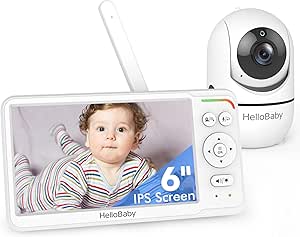 | Best Large-Screen No-Wi-Fi Pick | Screen: 6-inch IPS | Connectivity: Encrypted 2.4 GHz FHSS; no Wi-Fi required | Battery life: 16–30 hours | VIEW ON AMAZON | See Our Full Breakdown |
| VTech DM221-2 Baby Monitor with 2 Parent Units, DECT 6.0, 1000 ft Range, Talk-Back Intercom, Vibrating Alert, Night Light, Rechargeable (White) |  | Best Audio Monitor for Two Caregivers | Monitor type: Digital audio baby monitor | Connectivity: DECT 6.0 | Frequency range: 1.88–1.90 GHz | VIEW ON AMAZON | See Our Full Breakdown |
| VTech VM901 Smart Wi-Fi Baby Monitor with 1080p Camera and 5-Inch Screen |  | Best for Remote App Viewing | Model: VM901 | Camera resolution: 1080p | Parent unit screen: 5-inch HD | VIEW ON AMAZON | See Our Full Breakdown |
| VTech VM819 Video Baby Monitor |  | Best for Long Battery Life | Connection: Encrypted 2.4 GHz FHSS; no Wi-Fi required | Display: 2.8-inch LCD | Zoom: 2x digital | VIEW ON AMAZON | See Our Full Breakdown |
| ANMEATE Video Baby Monitor with Digital Camera |  | Best for a Compact Setup | Screen: 2.4-inch color display | Display resolution: 1080p; 2 MP effective still resolution | Zoom: 2x digital with pan/tilt | VIEW ON AMAZON | See Our Full Breakdown |
| GoodBaby 5-Inch Split-Screen Baby Monitor with 2 Cameras |  | Best for Two Babies | Display: 5-inch LCD | Cameras: Two included; supports up to four | Camera movement: 355° pan and 120° tilt | VIEW ON AMAZON | See Our Full Breakdown |
| HelloBaby HB6550 No WiFi Baby Monitor with Camera and Audio, 5-Inch Screen |  | Best for Remote Camera Control | Screen: 5-inch color display | Connectivity: 2.4 GHz FHSS; no Wi-Fi required | Camera movement: 355° horizontal pan and 120° vertical tilt | VIEW ON AMAZON | See Our Full Breakdown |
| iFamily Split-Screen Baby Monitor with 2 Cameras |  | Best for Simple Two-Room Viewing | Display: 4.3-inch split-screen | Cameras: Two included | Camera movement: 355° pan and 120° tilt | VIEW ON AMAZON | See Our Full Breakdown |
| VTech DM111 DECT 6.0 Audio Baby Monitor |  | Best Simple Audio-Only Pick | Model: DM111 | Technology: DECT 6.0 digital transmission | Range: Up to 1,000 ft | VIEW ON AMAZON | See Our Full Breakdown |
| VTech DM221 Audio Baby Monitor with 1,000-Foot Range |  | Best Audio Monitor for Talk-Back | Technology: DECT 6.0 | Range: Up to 1,000 feet | Sound indicator: 5-level LED | VIEW ON AMAZON | See Our Full Breakdown |
| Motorola AM21 Audio Baby Monitor with DECT, Cry Detection, and 1,000 ft Range |  | Best for No-App Audio Monitoring | Model: AM21 | Monitor type: Audio baby monitor | Wireless technology: DECT | VIEW ON AMAZON | See Our Full Breakdown |
| GoodBaby 5-Inch No-WiFi Video Baby Monitor |  | Best Feature-Rich Compact-Display Video Pick | Display: 5-inch LCD | Video resolution: 480p | Camera movement: 355° pan, 120° tilt, 2x zoom | VIEW ON AMAZON | See Our Full Breakdown |
| HelloBaby HB6550Plus 6-Inch No-WiFi Video Baby Monitor |  | Best for a Larger Screen | Display: 6-inch IPS screen | Battery life: 18–33 hours | Connection: 2.4 GHz FHSS with digital encryption; no Wi-Fi required | VIEW ON AMAZON | See Our Full Breakdown |
| baby monitor | Camera movement | Night vision |
|---|---|---|
| HelloBaby 4.3-Inch Video Baby | 350° pan, 120° tilt | Automatic infrared |
| VTimes Baby Monitor with Camer | — | Automatic |
| HelloBaby HB6560 6-Inch No-WiF | 355° pan, 120° tilt | Infrared |
| VTech DM221-2 Baby Monitor wit | — | — |
| VTech VM901 Smart Wi-Fi Baby M | Pan, tilt, and zoom | Automatic |
| VTech VM819 Video Baby Monitor | — | Infrared |
| ANMEATE Video Baby Monitor wit | — | Infrared, up to 15 feet |
| GoodBaby 5-Inch Split-Screen B | 355° pan and 120° tilt | — |
| HelloBaby HB6550 No WiFi Baby | 355° horizontal pan and 120° vertical tilt | Infrared |
| iFamily Split-Screen Baby Moni | 355° pan and 120° tilt | — |
| VTech DM111 DECT 6.0 Audio Bab | — | — |
| VTech DM221 Audio Baby Monitor | — | — |
| Motorola AM21 Audio Baby Monit | — | — |
| GoodBaby 5-Inch No-WiFi Video | 355° pan, 120° tilt, 2x zoom | — |
| HelloBaby HB6550Plus 6-Inch No | 355° pan, 120° tilt | Infrared |
More Details on Our Top Picks
HelloBaby 4.3-Inch Video Baby Monitor with Remote Pan-Tilt-Zoom
The HelloBaby 4.3-inch monitor suits parents who want to scan a nursery remotely without relying on Wi-Fi or an app. Its 350° pan and 120° tilt make it easier to check different parts of the room from the parent unit, while infrared night vision and two-way audio cover basic day-and-night monitoring. The sound-activated ECO mode can stretch battery life to a stated 30 hours when the screen is not needed continuously. Compared with the larger-screen HelloBaby HB6560, this model is easier to choose if a more compact display is enough, but the HB6560 offers a more expansive viewing area and split-screen support. The tradeoff is that this 4.3-inch screen gives less room to see detail, and battery life falls to a stated 16 hours outside ECO mode. Its range is approximate and may vary by home layout.
Pros:- Remote pan and tilt help cover more of the nursery from the parent unit.
- No Wi-Fi or app pairing is required.
- Sound-activated ECO mode can extend battery life to a stated 30 hours.
- Includes infrared night vision, two-way audio, and room temperature monitoring.
Cons:- The 4.3-inch screen is smaller than the HelloBaby HB6560’s 6-inch display.
- Battery life is stated at 16 hours in non-ECO mode.
- The approximately 1,000-foot range can vary with the home environment.
Best for: Parents who want remote camera movement, a private no-Wi-Fi connection, and longer standby between charges in ECO mode.
Not ideal for: Caregivers who want a large display, frequent continuous viewing, or a guaranteed range across walls and multiple floors.
- Screen:4.3-inch IPS
- Wireless technology:2.4 GHz FHSS
- Approximate range:1,000 feet
- Camera movement:350° pan, 120° tilt
- Battery:3,500 mAh; up to 30 hours in ECO mode or 16 hours in non-ECO mode
- Audio:Two-way audio
- Night vision:Automatic infrared
- Video channels:2
Our verdict“Choose this HelloBaby if you want movable camera coverage and a private connection, but prefer a smaller screen to the HB6560’s larger display.”
VTimes Baby Monitor with Camera and Audio
VTimes keeps setup straightforward: its 2.4 GHz FHSS connection works without Wi-Fi or app pairing, so parents can use it as a dedicated monitor rather than adding another device to a home network. Automatic night vision, two-way talk, and sound-activated ECO mode cover the core needs, while the temperature sensor, alarm, and lullaby add useful nursery functions. Its defining compromise is the 2.4-inch LCD, which is noticeably smaller than the HelloBaby 4.3-inch and HB6560 6-inch screens. That makes VTimes a better fit for audio-led monitoring with occasional video checks than for watching the screen from across a room. The stated range reaches up to 1,000 feet, but battery life depends on charging and use, and the product details do not specify a battery-life figure.
Pros:- Uses a private 2.4 GHz FHSS connection without Wi-Fi or an app.
- Plug-and-play setup avoids network configuration.
- Automatic night vision and two-way talk support day-and-night checks.
- Sound-activated ECO mode, temperature sensing, alarms, and lullabies add practical functions.
Cons:- The 2.4-inch screen is much smaller than the displays on both HelloBaby video monitors in this group.
- No camera pan or tilt is listed, limiting the ability to adjust the view remotely.
- Battery runtime is not specified and depends on charging and usage.
Best for: Parents who want a simple, private video-and-audio monitor with plug-and-play setup and a compact parent unit.
Not ideal for: Caregivers who expect a large, detailed video view, remote camera movement, or a clearly stated battery runtime.
- Screen:2.4-inch LCD
- Connection:2.4 GHz FHSS; no Wi-Fi required
- Range:Up to 1,000 feet
- Setup:Plug and play
- Audio:Two-way talk
- Night vision:Automatic
- Additional features:Temperature sensor, alarm, lullaby, ECO mode
Our verdict“Pick VTimes for basic, app-free monitoring and easy setup; choose a HelloBaby model instead if screen size or remote camera movement matters more.”
HelloBaby HB6560 6-Inch No-WiFi Video Baby Monitor
The HelloBaby HB6560 prioritizes a generous viewing area without requiring Wi-Fi: its 6-inch IPS screen pairs with remote 355° pan and 120° tilt, giving parents a broad view they can reposition from the parent unit. It also includes infrared night vision, two-way audio, temperature alerts, eight lullabies, a feeding timer, and VOX/ECO mode. Compared with the 4.3-inch HelloBaby model, the HB6560 is easier to view at a glance and adds split-screen support, but it is a larger-screen choice rather than the more compact option. Its two-camera limit matters for households planning to monitor several rooms, and the stated 16–30-hour battery range is broad rather than a single runtime. For families who want app-free video and room to expand to a second camera, its feature set is well matched.
Pros:- Large 6-inch IPS screen makes the video view easier to see at a glance.
- Encrypted 2.4 GHz FHSS connection works without Wi-Fi or an app.
- Remote pan and tilt, infrared night vision, and two-way audio support flexible monitoring.
- Includes temperature alerts, feeding timer, eight lullabies, VOX/ECO mode, and split screen.
Cons:- Supports up to two cameras, fewer than some multi-camera monitoring setups may require.
- Battery life is given as a wide 16–30-hour range.
- The larger display may be less convenient for caregivers who prioritize a compact parent unit.
Best for: Parents who want a large dedicated screen, remote camera control, and the option to monitor a second camera without Wi-Fi.
Not ideal for: Families needing more than two cameras, a compact parent display, or a precise battery-life expectation.
- Screen:6-inch IPS
- Connectivity:Encrypted 2.4 GHz FHSS; no Wi-Fi required
- Battery life:16–30 hours
- Camera movement:355° pan, 120° tilt
- Camera capacity:Up to 2 cameras
- Night vision:Infrared
- Additional features:Temperature alerts, 8 lullabies, feeding timer, VOX/ECO mode, split screen
- Mounting:Ceiling or wall mount; tabletop use
Our verdict“Choose the HB6560 if a large screen and app-free camera control matter more than compact size or support for more than two cameras.”
VTech DM221-2 Baby Monitor with 2 Parent Units, DECT 6.0, 1000 ft Range, Talk-Back Intercom, Vibrating Alert, Night Light, Rechargeable (White)
The VTech DM221-2 is the audio-only choice for families who do not need a camera and want two parent units included. DECT 6.0 transmission, adjustable microphone sensitivity, LED sound indicators, and vibrating alerts give caregivers several ways to notice nursery sounds without keeping audio loud. That makes it more suited to sharing coverage between two people than the video-focused HelloBaby monitors, which add a visual check but do not fill this specific two-parent-unit role. The talk-back intercom lets a caregiver speak to the nursery, and the baby unit’s night light adds a gentle point of illumination. The tradeoff is direct: there is no video or night-vision view, so caregivers must rely on sound and indicators. Parent units also use rechargeable AAA batteries, with a stated average battery life of seven hours.
Pros:- Includes two rechargeable parent units, allowing two caregivers to carry a receiver.
- DECT 6.0 connection and adjustable microphone sensitivity support focused audio monitoring.
- Vibrating alerts and LED sound indicators offer alternatives to audible alerts.
- Talk-back intercom and a baby-unit night light add useful audio-monitor features.
Cons:- Audio only; unlike the HelloBaby video monitors, it cannot show the nursery or provide night vision.
- Parent units rely on AAA batteries and have a stated average battery life of seven hours.
- The units are not water resistant and should be kept away from moisture.
Best for: Two caregivers who want a dedicated audio monitor with separate portable parent units, vibrating alerts, and no Wi-Fi.
Not ideal for: Parents who need to see the baby, check sleeping position, or monitor the nursery visually in low light.
- Monitor type:Digital audio baby monitor
- Connectivity:DECT 6.0
- Frequency range:1.88–1.90 GHz
- Maximum talking range:1,000 feet
- Parent units:2 rechargeable units with belt clips
- Alerts:Vibrating alerts and LED sound indicators
- Battery:6 AAA batteries included; stated average life of 7 hours
- Additional features:Two-way talk, adjustable microphone sensitivity, night light
Our verdict“Choose the DM221-2 if two caregivers need portable sound monitoring; choose a video model if seeing the baby is part of your routine.”
VTech VM901 Smart Wi-Fi Baby Monitor with 1080p Camera and 5-Inch Screen
The VTech VM901 is the clearest fit for parents who want to check the nursery both from a dedicated parent unit and remotely through an app. Its 1080p camera, 5-inch HD screen, automatic night vision, and pan-tilt-zoom give it a more connected, flexible approach than the no-Wi-Fi HelloBaby HB6560 or the simpler VTimes monitor. Motion and temperature alerts can flag changes without requiring constant screen watching, while two-way talk lets a caregiver respond remotely. That app access is also the main tradeoff: remote viewing requires an internet connection, unlike the local connections used by the HelloBaby models. Buyers should choose this for app-based access rather than assume it is a fully offline monitor. The supplied details do not state range or battery life, so those points are less defined than on some dedicated parent-unit options.
Pros:- 1080p camera and 5-inch HD parent screen provide a high-resolution viewing setup.
- Parent unit and MyVTech Baby app offer both local and remote viewing options.
- Remote pan, tilt, and zoom help adjust the nursery view.
- Automatic night vision, motion and temperature alerts, and two-way talk add monitoring and response tools.
Cons:- Remote app viewing requires an internet connection.
- Unlike the HelloBaby HB6560, it depends on Wi-Fi for connected app access.
- The supplied product details do not specify range or battery life.
Best for: Parents who want high-resolution video on a parent unit and the ability to check the nursery through an app when away from home.
Not ideal for: Families who want a monitor that works without Wi-Fi, or who need stated range and battery-life figures before choosing.
- Model:VM901
- Camera resolution:1080p
- Parent unit screen:5-inch HD
- Connectivity:Wi-Fi with MyVTech Baby app
- Camera movement:Pan, tilt, and zoom
- Night vision:Automatic
- Alerts:Motion and temperature
- Two-way talk:Yes
Our verdict“Pick the VM901 if app-based remote access is a priority; choose a no-Wi-Fi monitor if you prefer local viewing without an internet connection.”
VTech VM819 Video Baby Monitor
The VTech VM819 suits parents who want a private, self-contained monitor and need fewer overnight charging interruptions. Its camera links directly to the included parent unit over encrypted 2.4 GHz FHSS, so there is no Wi-Fi, app, or cloud account to set up. The up to 19-hour video battery life is a stronger fit for extended monitoring than the ANMEATE, which lists about eight hours in eco mode. Sound-activated viewing can keep the screen dark until noise is detected, helping stretch that runtime. The tradeoff is a small 2.8-inch screen and fixed camera view: unlike the GoodBaby split-screen system, it is not built for watching multiple rooms. Its stated range can also vary with walls and layout.
Pros:- Encrypted direct connection works without Wi-Fi, an app, or a cloud account.
- Up to 19 hours of video monitoring, with longer runtime in audio-only mode.
- Sound-activated viewing with adjustable sensitivity can reduce unnecessary screen use.
- Includes infrared night vision, two-way talk, soothing sounds, and a temperature sensor.
Cons:- The 2.8-inch parent-unit display is smaller than the screens on the GoodBaby and HelloBaby HB6550.
- No remote pan or tilt is listed, limiting coverage to the camera’s placement.
- The stated 1,000-foot range may be reduced by walls and other obstacles.
Best for: Parents who want a no-Wi-Fi video monitor with long battery life and a simple, single-room setup.
Not ideal for: Caregivers who want a large screen, remote camera movement, or simultaneous views of multiple rooms.
- Connection:Encrypted 2.4 GHz FHSS; no Wi-Fi required
- Display:2.8-inch LCD
- Zoom:2x digital
- Night vision:Infrared
- Battery life:Up to 19 hours video; up to 29 hours audio-only
- Range:Up to 1,000 feet
- Audio features:Two-way talk, two lullabies, white noise, and trickling stream
- Additional features:Sound-activated screen with adjustable VOX sensitivity, three-level sound indicator, and temperature sensor
Our verdict“Choose the VM819 for private, single-room monitoring and longer battery runtime, but skip it if you want a large display or multi-camera viewing.”
ANMEATE Video Baby Monitor with Digital Camera
The ANMEATE is a compact choice for parents who want core video-monitor features without moving up to the larger displays in this group. Its 2.4-inch color screen, 2x zoom, night vision, and temperature monitoring cover common nursery checks, while two-way audio lets a caregiver respond from the parent unit. Compared with the VTech VM819, it offers support for up to four cameras, which may suit a household planning to add rooms; the VM819 instead lists longer battery life. ANMEATE’s eco-mode runtime is about eight hours, so overnight use may call for regular charging. Its touch-screen-only controls may also be less convenient for quick adjustments than a unit with dedicated controls, and the listed range is a maximum that can vary by home layout.
Pros:- Compact 2.4-inch color display includes 2x digital zoom.
- Can expand to monitor up to four cameras.
- Provides night vision, temperature monitoring, and two-way audio.
- Includes four built-in lullabies and eco mode.
Cons:- About eight hours of battery life in eco mode may require daily or overnight recharging.
- The smaller screen offers less viewing area than the 5-inch GoodBaby and HelloBaby HB6550 displays.
- No dedicated smartphone app is listed, and control is through the built-in touch screen.
Best for: Parents seeking a compact, expandable video monitor for a small nursery or a household that may add cameras later.
Not ideal for: Caregivers who need a parent unit to last through long overnight stretches without charging or prefer a smartphone app.
- Screen:2.4-inch color display
- Display resolution:1080p; 2 MP effective still resolution
- Zoom:2x digital with pan/tilt
- Transmission range:Up to 960 feet
- Battery:950 mAh Li-ion; about 8 hours in eco mode
- Night vision:Infrared, up to 15 feet
- Camera expansion:Up to four cameras
- Audio and comfort features:Two-way audio and four built-in lullabies
Our verdict“Pick the ANMEATE for a compact monitor with camera expansion, not for long battery runtime or a larger viewing screen.”
GoodBaby 5-Inch Split-Screen Baby Monitor with 2 Cameras
For parents monitoring siblings or two rooms, the GoodBaby puts two included cameras on one 5-inch split-screen, making it easier to check both views without cycling through feeds. Its remote pan, tilt, and zoom give it more room coverage than the fixed-camera VTech VM819, and the system can grow to four cameras. The 15-second audio scan alternates between cameras, but it does not provide simultaneous audio; caregivers still need to watch for which feed is making noise. Battery claims also depend on use: up to 30 hours applies in VOX mode, while keeping the screen on cuts that to up to 10 hours. That gives it more multi-child flexibility than the single-camera VM819, but the screen-on runtime is more limited.
Pros:- Includes two cameras and shows both views simultaneously on a 5-inch display.
- Supports expansion to as many as four cameras.
- Remote pan, tilt, and 2x zoom help cover a wider area than a fixed camera.
- VOX mode offers up to 30 hours of battery life.
Cons:- Audio focuses on one camera at a time, scanning between feeds every 15 seconds.
- Battery life falls to up to 10 hours with the screen on.
- The stated 1,000-foot range may vary with walls and other obstructions.
Best for: Parents of twins, siblings, or children sleeping in separate rooms who want two camera views on one parent unit.
Not ideal for: Caregivers who need continuous audio from two rooms at once or expect the longest runtime with the screen continuously on.
- Display:5-inch LCD
- Cameras:Two included; supports up to four
- Camera movement:355° pan and 120° tilt
- Zoom:2x
- Range:Up to 1,000 feet
- Battery life:Up to 30 hours in VOX mode; up to 10 hours with screen on
- Audio scan:Alternates between cameras every 15 seconds
- Additional features:Automatic infrared night vision, two-way audio, eight lullabies, and temperature alerts
Our verdict“Choose the GoodBaby when seeing two rooms at once matters more than continuous audio from both or extended screen-on battery life.”
HelloBaby HB6550 No WiFi Baby Monitor with Camera and Audio, 5-Inch Screen
The HelloBaby HB6550 is a strong fit for parents who want to adjust a camera from the parent unit rather than reposition it by hand. Its 355° pan and 120° tilt can help follow movement or check more of a room, while the 5-inch screen gives a larger view than the VTech VM819’s 2.8-inch display. The monitor uses a 2.4 GHz FHSS connection without Wi-Fi, keeping monitoring on the included units rather than relying on an app. It also supports up to four cameras, though the product details do not specify split-screen viewing like the GoodBaby does. The camera needs corded power, so placement depends on access to an outlet; the claimed battery life applies to the parent monitor, not a cordless camera.
Pros:- No-Wi-Fi 2.4 GHz FHSS connection keeps monitoring on the dedicated parent unit.
- Remote 355° pan and 120° tilt provide flexible room coverage.
- Five-inch screen, 2x zoom, and infrared night vision support day and night viewing.
- Supports up to four cameras and includes two-way audio.
Cons:- The camera needs corded electric power, limiting placement near an outlet.
- Multi-camera support is listed, but simultaneous split-screen viewing is not specified.
- The monitor is not water resistant.
Best for: Parents who want a large-screen, no-Wi-Fi monitor with remote camera movement for one or more rooms.
Not ideal for: Caregivers who need a cordless camera or specifically want simultaneous split-screen views of multiple rooms.
- Screen:5-inch color display
- Connectivity:2.4 GHz FHSS; no Wi-Fi required
- Camera movement:355° horizontal pan and 120° vertical tilt
- Zoom:2x digital
- Night vision:Infrared
- Battery life:Up to 30 hours
- Camera expansion:Supports up to four cameras
- Power:Battery-powered monitor; camera uses corded electric power
Our verdict“Choose the HB6550 for remote room coverage on a large, Wi-Fi-free screen, but look elsewhere if you need a cordless camera or confirmed split-screen viewing.”
iFamily Split-Screen Baby Monitor with 2 Cameras
The iFamily makes sense for households that want two camera views at once without relying on Wi-Fi or a phone. Its 4.3-inch split-screen is smaller than the GoodBaby’s 5-inch display, but still lets parents check both included cameras from one parent unit. Both systems offer remote pan and tilt; iFamily lists 355° pan and 120° tilt, along with two-way audio, night vision, and temperature monitoring. A feeding alarm and lullabies add useful nursery functions, though its feature list is less specific about battery life than the GoodBaby’s. Range is another point to weigh: iFamily lists up to 150 feet indoors, compared with the GoodBaby’s stated 1,000-foot maximum. The private FHSS link avoids Wi-Fi setup, but does not remove the need to place cameras near power.
Pros:- Two included cameras can be viewed simultaneously on the split-screen.
- Private 2.4 GHz FHSS connection does not require Wi-Fi or a phone.
- Remote pan and tilt help adjust room coverage from the parent unit.
- Includes two-way audio, temperature monitoring, feeding alarm, and lullabies.
Cons:- The 4.3-inch screen is smaller than the GoodBaby’s 5-inch display.
- Listed indoor range is up to 150 feet, which may not suit larger homes.
- Battery life is not specified in the supplied product details.
Best for: Parents who need to view two children or rooms together on a dedicated, no-Wi-Fi monitor and value feeding alarms.
Not ideal for: Caregivers who need a larger split-screen or strong stated indoor range across a large home.
- Display:4.3-inch split-screen
- Cameras:Two included
- Camera movement:355° pan and 120° tilt
- Range:Up to 1,000 feet outdoors and 150 feet indoors
- Connection:2.4 GHz FHSS
- Monitoring features:Two-way audio, night vision, and temperature monitoring
- Alerts and sounds:Feeding alarm and lullabies
- Mounting:Tabletop or wall
Our verdict“Pick the iFamily for straightforward two-camera viewing and feeding reminders, but favor the GoodBaby for a larger screen and a longer stated range.”
VTech DM111 DECT 6.0 Audio Baby Monitor
I’d choose the VTech DM111 when sound is all I need and I want to avoid Wi-Fi, apps, and camera setup. Its DECT 6.0 connection is designed to reduce background static, while the five-level light indicator lets me check for nursery sounds with the speaker muted. The parent unit’s belt clip and stated range of up to 1,000 feet suit moving around the home better than a monitor that depends on keeping a phone nearby.
Compared with the VTech DM221, the DM111 gives up talk-back, adjustable microphone sensitivity, and a baby-unit night light in favor of a more basic setup. That simplicity also means audio only—there’s no video check—and the parent unit’s battery life is listed at up to eight hours, so overnight use may call for charging or backup batteries.
Pros:- DECT 6.0 digital transmission designed to reduce background static
- Five-level visual sound indicator remains useful with the speaker muted
- Parent unit has a belt clip for carrying around the home
- Works without Wi-Fi, internet, or app setup
Cons:- Audio-only monitoring does not show the baby or nursery
- Parent unit battery life is listed at up to eight hours
- Lacks the DM221’s talk-back intercom, night light, and adjustable microphone sensitivity
Best for: Caregivers who want a straightforward, no-Wi-Fi audio monitor with a portable parent unit and visual sound alerts.
Not ideal for: Parents who want to see the crib, soothe their baby through two-way talk, or rely on a parent unit for a full night without charging.
- Model:DM111
- Technology:DECT 6.0 digital transmission
- Range:Up to 1,000 ft
- Parent unit battery life:Up to 8 hours
- Sound indicator:5-level LED
- Connectivity:No Wi-Fi or internet required
- Power backup:AAA batteries included
Our verdict“Pick the DM111 if you want uncomplicated DECT audio monitoring, but choose the DM221 for talk-back and added nursery controls.”
VTech DM221 Audio Baby Monitor with 1,000-Foot Range
The VTech DM221 adds practical ways to respond without turning an audio monitor into a more involved video system. Its two-way talk-back lets me speak through the baby unit, and adjustable microphone sensitivity gives more control over which sounds trigger monitoring. A five-level LED indicator provides a visual check, while the baby-unit night light can be useful during quiet nursery visits.
Compared with the simpler VTech DM111, the DM221 offers more interaction and control, making it the stronger choice for caregivers who want audio-only monitoring with a few extra comforts. It still cannot show what is happening in the room, unlike the GoodBaby 5-Inch No-WiFi Video Baby Monitor. The main practical drawback is parent-unit runtime: the provided information describes battery operation as short, so I’d plan to keep AC power available rather than count on long stretches away from an outlet.
Pros:- Two-way talk-back allows a caregiver to speak through the baby unit
- Adjustable microphone sensitivity offers more control over sound pickup
- Five-level LED sound indicator supports quiet visual monitoring
- Baby unit includes a night light
Cons:- Battery-only operating time is described as short
- Audio-only design cannot show the baby or room
- Offers fewer visual monitoring features than the GoodBaby 5-Inch video monitor
Best for: Caregivers who prefer a non-Wi-Fi audio monitor but want talk-back, adjustable sound sensitivity, and a nursery night light.
Not ideal for: Parents who need video or want a rechargeable parent unit to last for extended periods away from AC power.
- Technology:DECT 6.0
- Range:Up to 1,000 feet
- Sound indicator:5-level LED
- Talk-back intercom:Two-way
- Night light:On baby unit
- Microphone sensitivity:Adjustable
- Parent unit power:Rechargeable Ni-MH battery or AC power
Our verdict“Choose the DM221 over the DM111 if talk-back and adjustable sensitivity matter more than video or extended battery operation.”
Motorola AM21 Audio Baby Monitor with DECT, Cry Detection, and 1,000 ft Range
I’d shortlist the Motorola AM21 for families who want a private, direct audio connection without Wi-Fi or an app. Its DECT link and listed range of up to 1,000 feet fit caregivers who move between rooms or step into the yard, while sound-detection and out-of-range LEDs offer a quick glance at monitor status. Cry detection also makes it a more focused alert option than a basic audio unit such as the VTech DM111.
The tradeoff is that the AM21 stays firmly in the audio-monitor category: it cannot show whether a noise came from the baby or the room. Compared with the VTech DM221, it also lacks the listed two-way talk-back, night light, and adjustable microphone sensitivity. Its parent unit uses two AAA batteries, which are not included, so I’d factor in sourcing batteries before relying on it. This suits buyers prioritizing a simple connection over interactive features.
Pros:- Private DECT connection works without Wi-Fi or an app
- Cry detection and sound alerts help flag nursery noise
- LED indicators show power, sound detection, and out-of-range status
- Listed range reaches up to 1,000 feet
Cons:- Audio-only monitoring provides no view of the nursery
- Two AAA parent-unit batteries are not included
- Lacks the DM221’s two-way talk-back feature
Best for: Caregivers seeking a no-app DECT audio monitor with cry detection, visual status alerts, and a portable battery-powered parent unit.
Not ideal for: Parents who want video, two-way soothing, or a complete setup with the required parent-unit batteries included.
- Model:AM21
- Monitor type:Audio baby monitor
- Wireless technology:DECT
- Maximum range:Up to 1,000 ft
- Wi-Fi required:No
- App required:No
- Cry detection:Yes
- Parent unit power:2 AAA batteries, not included
- Alerts:LED indicators for power, sound detection, and out-of-range
Our verdict“The AM21 suits buyers who want straightforward DECT audio and cry alerts, but the DM221 is a better fit if talk-back is a priority.”
GoodBaby 5-Inch No-WiFi Video Baby Monitor
The GoodBaby 5-Inch No-WiFi Video Baby Monitor is the step-up choice for parents who want a camera view and remote control without a network connection. Its remote pan, tilt, and zoom can help reposition the view from the parent unit as the baby moves, while infrared night vision supports checking the room in darkness. Two-way audio, lullabies, a feeding timer, and a temperature sensor add useful nursery functions beyond the basic audio alerts offered by the Motorola AM21.
The private 2.4 GHz FHSS connection avoids app dependence, but the 480p resolution is modest beside the larger-screen HelloBaby HB6550Plus. Battery life is listed at up to 30 hours in VOX mode, when the screen can remain off until sound is detected; with the screen on, that falls to up to 10 hours. I’d choose it for feature range, not for high-resolution video or uninterrupted screen viewing.
Pros:- Remote pan, tilt, and 2x zoom help adjust the camera view from the parent unit
- Private 2.4 GHz FHSS connection requires no Wi-Fi or app
- Includes two-way audio, eight lullabies, and a feeding timer
- VOX mode battery life is listed at up to 30 hours
Cons:- 480p video resolution is limited compared with higher-resolution viewing needs
- Battery life is listed at up to 10 hours with the screen on
- Five-inch display is smaller than the HelloBaby HB6550Plus’s 6-inch screen
Best for: Parents who want remote camera controls, night vision, and helpful nursery extras in a no-Wi-Fi system with a 5-inch display.
Not ideal for: Buyers who prioritize sharper video, keep the display on for long stretches, or want the larger screen of the HelloBaby HB6550Plus.
- Display:5-inch LCD
- Video resolution:480p
- Camera movement:355° pan, 120° tilt, 2x zoom
- Range:Up to 1,000 ft
- Battery capacity:3500 mAh
- Battery life:Up to 30 hours in VOX mode; up to 10 hours with screen on
- Connectivity:2.4 GHz FHSS; no Wi-Fi
- Additional features:Infrared night vision, room temperature sensor, 8 lullabies, feeding timer alarm
- Mounting options:Ceiling, wall, crib, desk, or freestanding
Our verdict“Choose the GoodBaby if remote camera control and nursery extras matter more than resolution or a larger display.”
HelloBaby HB6550Plus 6-Inch No-WiFi Video Baby Monitor
The HelloBaby HB6550Plus is the clearest fit here for caregivers who want a larger dedicated display without connecting a phone or home network. Its 6-inch IPS screen gives the live view more room than the 5-inch display on the GoodBaby 5-Inch No-WiFi Video Baby Monitor, and the listed 355° pan and 120° tilt help keep the camera pointed where it is needed. Infrared night vision, two-way audio, temperature alerts, and audio-only mode cover both visual checks and quieter monitoring.
The encrypted 2.4 GHz FHSS connection works without Wi-Fi, while lullabies and a feeding timer add extras beyond the more basic audio-only VTech DM111. The stated battery-life range of 18–33 hours leaves some uncertainty about runtime under different use conditions, so I wouldn’t assume the upper figure applies with the screen continuously active. It supports up to two cameras, which may limit households planning to monitor several rooms.
Pros:- 6-inch IPS display provides a larger viewing area than the GoodBaby’s 5-inch screen
- Encrypted 2.4 GHz FHSS connection does not require Wi-Fi or an app
- Remote pan and tilt pair with infrared night vision
- Includes two-way audio, temperature alerts, lullabies, and a feeding timer
Cons:- Battery life is given as a broad 18–33 hour range
- Camera expansion is limited to up to two cameras
- Lacks the GoodBaby’s listed 2x zoom
Best for: Parents who want a large dedicated monitor screen, no-Wi-Fi operation, remote camera movement, and both video and audio-only modes.
Not ideal for: Families planning to monitor more than two cameras or buyers who need a clearly stated runtime for continuous screen use.
- Display:6-inch IPS screen
- Battery life:18–33 hours
- Connection:2.4 GHz FHSS with digital encryption; no Wi-Fi required
- Camera movement:355° pan, 120° tilt
- Night vision:Infrared
- Audio:Two-way audio
- Additional features:Room temperature monitor and alert, 8 lullabies, sound level LED indicator, audio-only mode, feeding timer
- Camera expandability:Up to 2 cameras
- Warranty:1 year
Our verdict“Choose the HB6550Plus if a larger screen and no-Wi-Fi video matter most, but look elsewhere for multi-camera expansion beyond two units.”

How We Picked
I compared these 15 baby monitors by the job they do for caregivers: showing a clear view, relaying sound reliably, and making routine check-ins manageable. I weighed connection type, included parent-unit or app access, screen size, camera movement, multi-camera support, alerts, and features such as talk-back. I also looked at setup and everyday usability, since a monitor that depends on a phone or a complex camera arrangement may not suit every household.
The ranking gives the most weight to useful monitoring features balanced with simple operation, then places specialized options according to who benefits from them. Video models rank ahead for families who want visual checks, while audio-only picks remain strong for caregivers who value a lighter, simpler setup. No single format suits everyone: a two-camera system is more useful for separate sleep spaces, and Wi-Fi makes sense only when remote app viewing matters. Product details in the lineup vary, so I distinguish options by their stated features rather than treating every model as interchangeable.
| baby monitor | Night vision |
|---|---|
| HelloBaby 4.3-Inch Video Baby | Automatic infrared |
| VTimes Baby Monitor with Camer | Automatic |
| HelloBaby HB6560 6-Inch No-WiF | Infrared |
| VTech DM221-2 Baby Monitor wit | — |
| VTech VM901 Smart Wi-Fi Baby M | Automatic |
| VTech VM819 Video Baby Monitor | Infrared |
| ANMEATE Video Baby Monitor wit | Infrared, up to 15 feet |
| GoodBaby 5-Inch Split-Screen B | — |
| HelloBaby HB6550 No WiFi Baby | Infrared |
| iFamily Split-Screen Baby Moni | — |
| VTech DM111 DECT 6.0 Audio Bab | — |
| VTech DM221 Audio Baby Monitor | — |
| Motorola AM21 Audio Baby Monit | — |
| GoodBaby 5-Inch No-WiFi Video | — |
| HelloBaby HB6550Plus 6-Inch No | Infrared |
Factors to Consider When Choosing Baby Monitors
Choosing among baby monitors is easier when you start with your household’s routine rather than the longest feature list. These factors can help you decide what is worth adding and what may only complicate check-ins.
Choose Wi-Fi or a Dedicated Connection Based on Where You’ll Check In
A Wi-Fi monitor can let caregivers view the nursery through an app, which is useful when the person checking in is not near the parent unit. A dedicated-screen model keeps monitoring separate from phone notifications and does not make routine viewing depend on a home internet connection. These formats solve different problems, so neither is automatically more secure or reliable in every home. Before choosing, check how the monitor connects, what happens if the network drops, and whether app access requires an account. A common mistake is paying for remote access when the monitor will stay beside one caregiver all night. If you value a simple, separate screen, prioritize a non-Wi-Fi model; if caregivers need app viewing, investigate the app and connection requirements first.
Match Camera Coverage to the Sleep Space
Remote pan, tilt, and zoom can help you adjust a camera view from the parent unit rather than entering the room to reposition it. A fixed camera may be enough when the crib stays in one place and the camera can be mounted with a clear view. Split-screen systems are aimed at families monitoring two spaces or children, not at every nursery. Before buying extra cameras, think about whether you need to watch both feeds at the same time or can switch between them. Also check how many cameras are included and whether additional cameras are compatible; similar product names do not guarantee the same bundle. Avoid choosing a multi-camera setup just because it sounds future-proof if you only need one stable view today.
Decide Whether Video Adds Enough to Justify the Setup
Video can help a caregiver check a sleeping position or see whether a sound calls for a visit, but it adds a camera, a screen or app, and another device to manage. Audio-only monitors are often a better match when the main goal is hearing a cry or movement from another room. They can also suit caregivers who want a simpler unit to carry around the home. Do not assume video will replace normal checks or that a monitor can identify every situation from the display. Consider who will use it at night, how often they need a visual check, and whether a dedicated parent unit matters. If sound alerts are enough for your routine, a video feed may be an unnecessary layer.
Prioritize the Parent Unit You’ll Actually Use
A larger screen can make it easier to see the nursery at a glance, while a compact parent unit may be simpler to carry or keep nearby. More screen area does not help if the monitor is awkward to position, difficult to operate, or rarely charged when needed. Families sharing nighttime care may value having two parent units, while a single caregiver may prefer one straightforward device. Look at the controls and alert types, including whether sound, vibration, or talk-back fits your routine. Check the product’s stated battery and charging details rather than assuming all units last through the same stretch of use. Choosing for the person who will handle nighttime checks can prevent features from becoming unused extras.
Treat Range and Home Layout as a Pair
A stated range is not a promise that the monitor will work equally well in every house. Walls, floors, appliances, and the distance between the nursery and caregiver can affect a wireless connection. A caregiver in a small apartment has different needs from someone moving between floors or spending time outdoors. Think about the farthest place you expect to carry the parent unit, then check whether the manufacturer’s range claim and connection type fit that use. If possible, keep the receipt and test the monitor in the actual rooms where it will be used, following the maker’s setup guidance. A longer advertised range may be less useful than a stable signal through your home’s particular layout.
Compare Alert Needs Before Adding More Features
Sound, vibration, and talk-back features can serve different caregiving routines: one person may need a quiet alert while another wants a way to speak to the nursery. More alerts do not always make monitoring easier, especially if they create interruptions that are not useful to your household. Decide which caregiver needs to receive alerts, how they prefer to receive them, and whether a second parent unit would help. Also separate convenience features from safety equipment: a consumer monitor is not a substitute for safe-sleep practices or direct supervision. Check what the device actually detects and how its alerts behave instead of inferring capability from a feature label. Paying for an alert only makes sense when it solves a real problem in your routine.
Frequently Asked Questions
Should I choose a Wi-Fi baby monitor or a non-Wi-Fi model?
Choose Wi-Fi if caregivers need to view the nursery through an app while away from the dedicated parent unit. A non-Wi-Fi model is a simpler fit when monitoring will happen at home and you want a separate screen or audio receiver. Check what the app requires, including internet access and account setup, and decide whether those dependencies suit your household. Do not assume that one connection type is inherently right for every family. The better choice is the one that matches where and how you will check in.
Is an audio-only monitor enough if I mainly want to hear when my baby wakes?
It may be enough if your main need is hearing cries or other nursery sounds and you do not expect to check a live image regularly. Audio models can reduce the number of devices and controls in your routine. Video is more useful when seeing the crib helps you decide whether to go in, but it also means managing a camera and screen or app. Consider who is monitoring and what they need to know before responding. If sound alone answers that question, an audio-only monitor is a reasonable choice.
When is a split-screen monitor with two cameras worth choosing?
A split-screen setup makes the most sense when you need to keep an eye on two children or separate sleep areas at the same time. It can save you from switching feeds when both spaces matter during the same monitoring period. For a single crib, a second camera may add cost and setup without improving the view you use most. Check that the model supports the number of cameras you need and confirm which cameras are included. Also consider whether both images will be large enough on the screen for your intended use.
Does a larger baby monitor screen make a meaningful difference?
A larger display can make quick visual checks more comfortable, especially if the parent unit sits at a distance or the caregiver prefers a more prominent image. It does not automatically mean a clearer picture, so compare the stated display and camera details rather than screen size alone. A bigger unit may also take up more space and be less convenient to carry around. If you mostly rely on sound or keep the screen close, a smaller display may be perfectly workable. Prioritize screen size only when it improves a task you expect to do often.
What should I check before relying on a monitor’s advertised range?
Compare the stated range with the farthest rooms and floors where you plan to use the parent unit, but treat that number as a guide rather than a guarantee. Walls, building materials, and household electronics can affect the connection. Set up the monitor in the nursery and test it in the places where caregivers actually spend time. Follow the manufacturer’s instructions for pairing, placement, and any range alerts. If the signal is unreliable in your home, a larger advertised number will not fix the layout mismatch.
Conclusion
For the strongest all-around balance among the listed video options, I’d start with the HelloBaby 4.3-Inch Video Baby Monitor for its dedicated parent unit and remote camera movement. For best value in a straightforward setup, compare the VTech VM819 and the GoodBaby 5-Inch No-WiFi model against the screen size and camera needs you actually have. The VTech VM901 is my premium-style choice for caregivers who want Wi-Fi and app viewing, while the VTech DM111 is a sensible starting point for beginners who only need audio. For two sleep spaces, look at the GoodBaby or iFamily split-screen monitors; for a bigger non-Wi-Fi display, consider the HelloBaby HB6560 or HB6550Plus. Match the format to your routine, then check the exact included cameras, parent units, and connection requirements before deciding.