The VSD N4 Pro is a compact control deck for streamers, creators, and gamers who want macros and frequently used commands close at hand. Its mix of 10 LCD keys, four RGB knobs, and a touch bar offers more kinds of control than a basic macro pad, while the built-in USB dock adds practical convenience. The tradeoff is that its full plugin ecosystem depends on installed software, and its ten labeled LCD keys leave less room for directly visible commands than larger decks. It is worth considering for a customizable, desk-friendly setup if those varied controls suit your workflow; buyers who need many dedicated keys should look at a larger model instead.

Get the latest gadgets delivered free with Prime
- Fast, free delivery on millions of items
- Prime Video, Amazon Music and more included
- Member-only deals all year
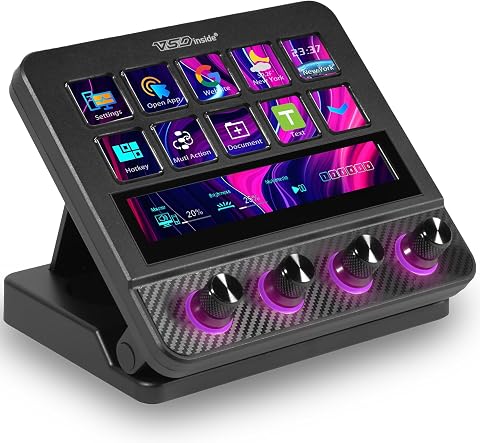
VSD N4 Pro Stream Controller with 10 LCD Keys
- ✔ Brand: VSDINSIDE
- ✔ Model Number: 717813964008
- ✔ Connectivity: USB-C
Why This Product Stands Out
The N4 Pro stands out through variety of input. Many stream controllers are judged mainly by how many programmable keys they provide. This one adds four RGB knobs and a touch bar to ten LCD keys, which can suit workflows where launching a scene, adjusting a level, and triggering a macro are all routine. Its compact emphasis makes sense for a creator who wants a versatile control surface without dedicating as much desk space to a bank of keys.
That blend also defines its limit. The LCD keys can display labels for the current setup, but ten dedicated key positions are not a substitute for a 32-key or 32-button layout when a user wants a broad set of commands available at once. Unlimited scene presets offer flexibility on paper; changing scenes still means managing more than one layout. The Elgato Stream Deck XL or VSDinside XL is the more natural comparison when command capacity matters more than knobs and touch input. The VSD M18 may suit buyers who want a programmable macro pad and do not need this particular mix of controls.
For its segment, the N4 Pro looks like a feature-rich compact option, rather than a pure key-count choice. The carbon-fiber panels, mechanical key specification, stand, and haptic feedback add to its desk-focused design, but the more consequential distinction is how its controls match the user’s tasks. Those who will assign useful functions to the knobs and touch bar can get a more varied setup; those who mainly need many shortcuts may be paying attention to features that do little for them.
Key Features and What They Mean
LCD keys and scene presets make frequently used commands easier to identify and group. The labels show what each key will do in the active layout, reducing mistakes when switching scenes or triggering actions during a live stream. Presets let users keep different command sets for streaming, editing, or gaming, which helps a compact deck serve several routines. This is most useful for people willing to switch layouts; with only ten physical keys, not every command can stay visible at once.
The four RGB knobs provide a direct way to adjust assigned settings through rotation. For a streamer who regularly changes audio levels or lighting, turning a knob can be faster and more intuitive than opening menus or pressing a sequence of buttons, helping them stay focused on the broadcast. Creators who mostly launch apps or trigger fixed commands may get less value from this input. The payoff also depends on whether the companion software and plugins expose the adjustments they want.
The touch bar and haptic feedback add another way to interact without using one of the ten LCD key positions. The bar can give supported touch controls a place on the device, while tactile feedback helps users register an interaction. That may benefit someone who wants different kinds of commands close together in a compact workspace. The listed details do not specify the bar’s exact actions or customization limits, so its practical value depends on confirming support for the user’s intended tasks.
One-tap multi-step macros turn a repeated sequence into a single trigger without requiring code. During a stream, this can reduce clicks when carrying out a familiar routine; in editing, it can save time on steps repeated throughout the day. People with consistent workflows are most likely to notice the benefit. Macros need to be configured in companion software, and the apps involved must respond as expected, so occasional users with only a few simple shortcuts may not need this feature.
The USB-C connection and passive USB dock make the N4 Pro a wired desk controller that may also provide a nearby connection point for peripherals. For a user with a compatible setup, that can make frequently used devices easier to connect and help organize cables. The specifications do not list the dock’s ports or power limits, so buyers should check compatibility before relying on it for peripherals. The foldable stand’s specified 60-degree angle supports an upright desktop position, while its ambidextrous orientation gives left- and right-handed users more choice in placement. These design details matter most to people who want the controller positioned within easy reach during regular desk use.
Performance and Real-World Use
Day-to-day convenience will depend on software setup and profile design. Once commands, labels, and macros are assigned, the LCD keys can make common actions easier to spot, and the knobs can bring assigned adjustments within reach. The initial setup takes more effort than plugging in an ordinary keyboard shortcut pad: users need compatible software, and access to the full plugin ecosystem requires installation. People who enjoy tailoring their workstation are more likely to see that effort pay off.
The N4 Pro is a wired USB-C device intended for Mac and PC, with Windows 10+ and macOS 11.0+ listed as operating system requirements. Those details give buyers a useful starting point, but they do not establish compatibility with every app, plugin, USB hub, or particular computer configuration. Checking the software’s current compatibility and the device’s dock specifications is sensible before building a workflow around it.
Its foldable stand, mechanical keys, and haptic feedback suggest attention to desktop interaction, while the carbon-fiber panels add a distinctive material choice. The provided details do not establish long-term durability, noise level, or how comfortable every user will find the controls, so those should not be assumed. Nor should the soundboard feature be mistaken for audio playback from the device: it sends audio control commands and has no built-in speakers.
Who Should Buy This
Buyers most likely to benefit are streamers and video creators with repeatable routines who want scene or app commands on labeled keys, a few adjustable controls on knobs, and macros for multi-step actions. It also suits a gamer or productivity-focused desk user who prefers a compact, customizable wired controller and is willing to install and configure companion software. The strongest case is for someone who will actively use more than one control type, rather than treating the knobs and touch bar as decorative extras.
Who Should Skip This
Skip the N4 Pro if your main requirement is a large number of dedicated, visible shortcuts; a 32-key option such as the Elgato Stream Deck XL or VSDinside XL is a better starting point. It is also a poor match for anyone who wants a plug-and-play device without software setup, expects soundboard clips to play from the controller itself, or cannot confirm compatibility with their OS and apps. If you mainly want a straightforward macro pad, the VSD M18 may be a closer fit.
Value for Money
The N4 Pro is worth its mid-range price for buyers who will use its mixed controls regularly. If the LCD keys, knobs, and touch bar simplify streaming or creator tasks, and the USB dock suits the desk setup, those features can make the extra cost over a basic macro pad worthwhile. For someone who mainly needs shortcuts, the value is weaker: ten keys may mean frequent profile changes, while the additional controls and software setup add little. No verified selling price is provided here, so compare its current price with larger key-focused decks and simpler macro pads. Choose it when its varied controls replace separate tools or save time in a routine you perform often; otherwise, a simpler or larger controller is likely a better buy.
VSD N4 Pro Stream Controller with 10 LCD Keys
The N4 Pro stands out through variety of input . Many stream controllers are judged mainly by how many programmable keys they provide.
Pros:
- Several control types in one device: LCD keys, RGB knobs, and a touch bar can handle different tasks without adding separate controls to the desk.
- Personalized labels: LCD keys can display their assigned functions, helping users recognize commands and scene choices at a glance.
- Macros without coding: One-tap multi-step actions can reduce repeated clicking during streams, editing sessions, or gaming.
- Built-in passive USB dock: Extra peripheral connectivity can make a crowded desk easier to manage, subject to the dock’s supported connections.
- Adjustable, ambidextrous design: A foldable stand and haptic feedback offer practical flexibility for different desk positions and control habits.
Cons:
- Ten LCD keys limit visible commands: Buyers with many frequently used actions may have to switch scenes or profiles, or select a larger controller.
- Software is part of the deal: Full plugin access requires installation, adding setup and software dependence to a device that otherwise sits on the desk.
- No built-in speakers: Its USB soundboard function sends audio control commands; the product is not a self-contained speaker for playing clips.
- USB-C and OS support need checking: It is specified for Mac and PC running Windows 10+ or macOS 11.0+, so buyers should confirm their exact setup and connection needs.
Best for: Streamers and creators who want a compact mix of programmable keys, audio or lighting adjustments, and touch controls.
Not ideal for: Users who need many simultaneously visible shortcut keys, want a hardware-only setup, or expect a controller to play audio through built-in speakers.
Bottom line: The VSD N4 Pro is worth buying for a compact, varied control setup when you expect to use its LCD keys, knobs, touch bar, and macro software regularly.
Frequently Asked Questions
Can the VSD N4 Pro play soundboard audio by itself?
No. Its USB soundboard function sends audio control commands, and the device has no built-in speakers. Plan to use your computer’s audio setup or another connected playback device.
Does using the N4 Pro require coding?
The product is described as supporting multi-step macros without coding. You will still need to install software for full plugin access and configure the commands and profiles you want to use.
Is the N4 Pro a good choice for someone with many shortcuts?
It can help organize shortcuts with scene presets, but it has 10 LCD keys. If you want a large number of dedicated commands visible at once, compare it with a 32-key controller such as the Elgato Stream Deck XL or VSDinside XL.
Will it work with my computer?
The listed compatibility is Mac and PC, with Windows 10+ and macOS 11.0+ specified, over USB-C. Check your computer, apps, and the current companion software requirements for compatibility before buying.
When is a simpler macro pad a better buy?
A simpler programmable pad may be the better fit if you mainly need one-tap shortcuts and have little use for knobs, a touch bar, or the USB dock. The N4 Pro earns its place when those extra controls support tasks you perform regularly.
Final Thoughts
The VSD N4 Pro is worth buying for a compact, varied control setup when you expect to use its LCD keys, knobs, touch bar, and macro software regularly. Its best case is a streamer or creator who wants labeled commands and direct adjustments in one wired device. The ten-key limit and software requirement are meaningful tradeoffs, though. If you need many commands visible at once, choose a larger deck; if you want audio playback or a minimal setup, look elsewhere. For buyers who value its particular mix of inputs, the N4 Pro makes a persuasive mid-range choice.
Halloween Picks

JOYIN 5-Foot Halloween Animatronic Drinking Skeleton

Pumpkin Halloween Fog Machine with 12-Color LED Lights, Bluetooth Speaker, and Remote

Star Wars Yoda and R2-D2 Inflatable Halloween Decor, 6 ft with LEDs, Indoor/Outdoor
As an affiliate, we earn on qualifying purchases.