
TL;DR
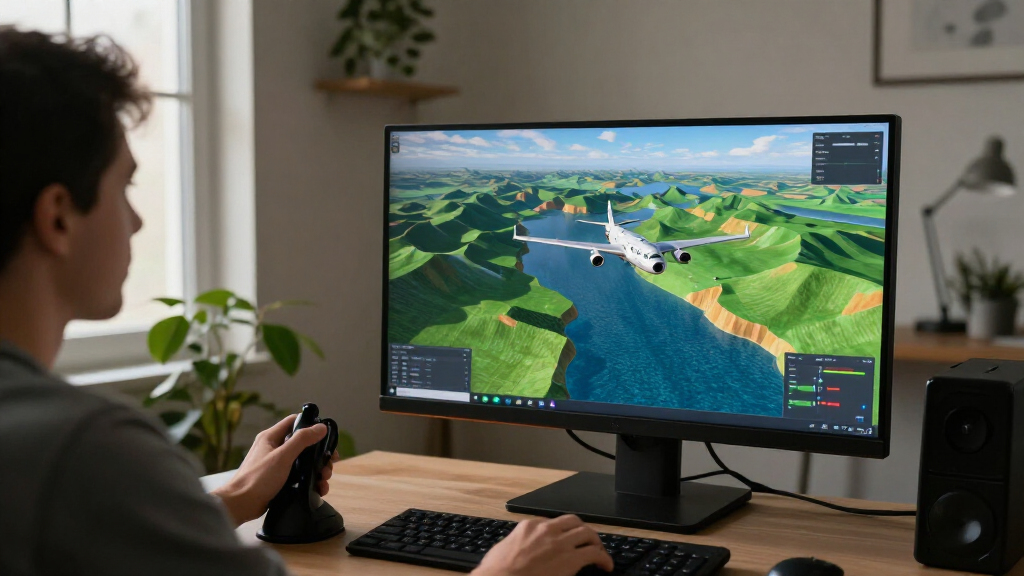
Baron is a WebGL flight simulator that generates its flying world from a seed, letting players take off, explore and land in a browser. Its published controls include touch, keyboard, mouse and gamepad options; the game requires WebGL 2. The source provides no launch date, developer statement or technical details about how terrain generation works.
Baron, a browser-based flight simulator, lets players fly across a seed-generated world, using touch, keyboard, mouse or gamepad controls to take off, explore and attempt a landing. The experience is hosted on the Baron website and requires WebGL 2, making browser and graphics support a practical requirement for anyone trying it.

Get the latest gadgets delivered free with Prime
- Fast, free delivery on millions of items
- Prime Video, Amazon Music and more included
- Member-only deals all year
The game’s introductory prompt sets out a straightforward objective: “Take off. Explore. Land it in one piece.” Players can choose a destination from the menu for a cross-country flight. A hangar section lets them browse aircraft categories and select a plane; the listed interface also allows players to drag an aircraft to inspect it. The source labels the world as seed-generated but does not explain whether players can enter or share specific seeds.
Controls are adapted for several input methods. On touchscreens, players drag on the left half of the screen to steer, with a note that dragging down makes the aircraft climb; a lever at the right edge controls throttle. Separate buttons adjust flaps and apply brakes. On a keyboard, W/S or the arrow keys control pitch, A/D steer roll, and Q/E control the rudder. The page also lists mouse-stick and gamepad support, including a left-stick flight control scheme.
Players can switch between chase and cockpit camera views, pause or restart a flight, adjust volume and camera shake, and change pitch inversion or tilt-steering settings. The page warns that Baron needs WebGL 2. If a browser or graphics driver does not support it, the game advises trying a current version of Chrome, Edge, Firefox or Safari and checking that hardware acceleration is enabled. It also describes a graphics hiccup in which the browser resets the graphics context and the game attempts to restore it.
A Flight Game Built for Browsers
Baron’s main appeal is that its flight experience runs in a web browser, rather than being presented as a conventional downloadable simulator. That lowers the barrier to trying it for players whose devices meet the graphics requirement, while the multiple input options give it routes to play on both touchscreens and computers. The source does not identify supported platforms beyond the browser-based interface, so compatibility with particular devices should not be assumed.
Seed-generated terrain points to a world that can be produced from a seed rather than relying only on a single fixed landscape. That can make terrain generation a defining part of the experience, but the available description does not establish how much variation players will see, whether a seed changes on each flight, or whether the same seed can be revisited. Those details matter to players interested in repeatable routes, exploration or sharing a particular world.
The simulator also pairs exploration with hands-on flight controls: players must manage pitch, roll, throttle, flaps and braking, then land safely. The source does not make claims about realism, flight modeling or educational value. For readers, the confirmed draw is narrower and clear: a browser flight game with several control schemes, aircraft selection and terrain described as seed-generated.
Products Worth Considering
DJI Mini 5 Pro Fly More Combo Plus with DJI RC 2

Bose QuietComfort Headphones (2nd Gen), Wireless Over-Ear Noise-Cancelling Headphones, Black

Samsung Odyssey G7 G75F 40-Inch WUHD Curved Gaming Monitor
As an affiliate, we earn on qualifying purchases.
Controls, Terrain and Browser Support
The source is the Baron game page at baron.by.dai.studio, which presents the simulator’s mission, control instructions and browser-support notice. It credits the project as built with DAI Studio. The material supplied for this report does not include a publication date, development history, named creator or announcement describing when the game became available.
The controls indicate that the experience is designed around more than one style of play. A player can use touch controls, keyboard keys, a mouse-stick toggle or a gamepad; settings include tilt steering and inverted pitch. The plane can be viewed from a chase camera or cockpit perspective, and the hangar offers a separate aircraft-selection interface. The page’s description establishes these features as available options, but does not give a full aircraft list or explain how destinations and missions differ.
WebGL 2 support is the stated technical prerequisite. The page’s warning ties access to the browser or graphics driver and suggests updated browsers and hardware acceleration as troubleshooting steps. It also notes that the browser may reset the graphics context and that Baron will attempt recovery. No independent testing or performance figures are provided in the source material.
““Take off. Explore. Land it in one piece.””
— Baron game page
How the Seeds Shape Each Flight
The supplied page description does not explain how terrain seeds are chosen or used, whether players can enter a seed, or whether terrain remains consistent between sessions. It also does not say how large the world is, how many aircraft or destinations are available, or whether the simulator has a defined release date or update schedule.
Performance, supported device types and the quality of the flight model are not documented in the source material. The WebGL 2 notice and graphics-reset message describe requirements and possible behavior, but they do not establish how often players will encounter technical problems. No developer comments, independent review or user figures were provided, so broader claims about reception or reliability cannot be confirmed.
What Players Can Check Next
Players interested in trying Baron can visit its website and check that their browser and graphics setup support WebGL 2. The game page advises using a current Chrome, Edge, Firefox or Safari browser and enabling hardware acceleration if the graphics requirement is not met. Its interface also provides controls and settings to explore, including camera choice, input method and aircraft selection.
No upcoming update, development milestone or further announcement is listed in the source. More information would be needed to establish how seeds affect the terrain, whether worlds can be saved or shared, and what changes the creators plan to make. Until then, the confirmed description is of a browser flight simulator with seeded terrain, several control schemes and a stated WebGL 2 requirement.
Key Questions
What is Baron?
Baron is a browser-based flight simulator hosted at baron.by.dai.studio. Its page invites players to take off, explore a seed-generated world and land safely.
What does seed-generated terrain mean in this game?
The page describes the terrain as seed-generated, meaning a seed is involved in producing the world. It does not explain how seeds are selected, whether players can set them or how much the terrain changes.
What controls can players use?
The listed options include touchscreen, keyboard, mouse-stick and gamepad controls. The page also lists settings for tilt steering, pitch inversion, camera shake and camera view.
What does Baron require to run?
The game says it needs WebGL 2. Its page recommends trying an up-to-date Chrome, Edge, Firefox or Safari browser and checking that hardware acceleration is enabled if support is missing.
Has a release date or future update been announced?
The supplied source does not give a release date, update schedule or next milestone. It presents the game and its controls but does not describe future plans.
Source: baron.by.dai.studio