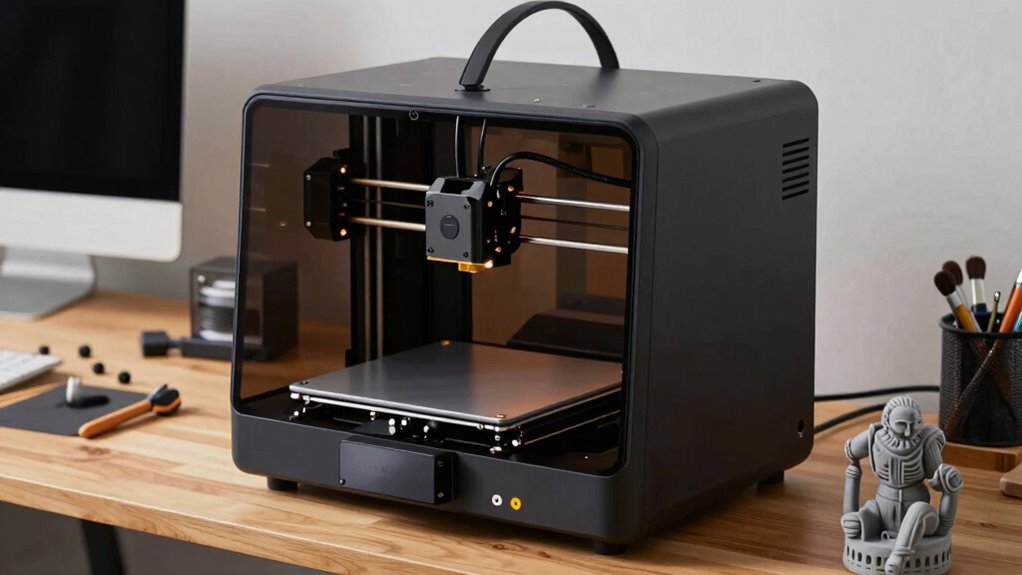
Today’s 3D printers are much more beginner-friendly thanks to advances in design, software, and affordability. You can choose from models that automatically level the bed, use easy-to-understand slicing tools, and work well with durable filaments like PLA. As a beginner, you’ll find that selecting the right filament, calibrating your printer, and adjusting settings become simpler over time. Keep exploring, and you’ll discover how to turn your ideas into reality with confidence.
Key Takeaways
- User-friendly interfaces and auto-calibration features simplify setup for beginners.
- Improved filament compatibility and quality reduce common printing issues.
- Beginner-focused software with default profiles make slicing accessible.
- Affordable, reliable entry-level models have increased accessibility.
- Educational resources and community support help new users gain confidence quickly.

Getting started with 3D printers might seem intimidating at first, but understanding the basics can make the process much easier. One of the first things you’ll want to focus on is filament selection. There are many types of filaments available, such as PLA, ABS, PETG, and TPU, each with its own strengths and ideal uses. As a beginner, sticking with PLA is often the best choice because it’s easy to work with, widely available, and produces minimal odors. When choosing filament, consider factors like color, diameter, and quality. Higher-quality filaments tend to produce smoother prints and reduce issues like warping or clogging, making your learning curve much gentler.
Another critical step is printer calibration. Proper calibration guarantees your printer operates accurately, which directly impacts the quality of your prints. You’ll want to start by leveling the print bed, which involves adjusting the distance between the nozzle and the bed to achieve a consistent gap across the entire surface. An uneven bed can lead to poor adhesion or uneven layers, ruining your project. Many printers come with auto-leveling features, but manual calibration is often necessary for precision. Once the bed is level, you should check and set the correct nozzle height and ensure that the filament feeds smoothly without slipping or skipping. Regular calibration helps prevent common issues like stringing, blobs, or layer shifting, saving you frustration in the long run. Additionally, familiarizing yourself with your filament’s compatibility with your printer can help prevent printing failures. Understanding the material properties of different filaments can also guide you in selecting the best type for your specific project needs. Knowing about the different types of filament and their characteristics can significantly improve your success rate.
As a beginner, it’s also wise to familiarize yourself with your printer’s software and slicing tools. These programs convert your 3D models into instructions your printer can understand. When you’re just starting out, keep your slicing settings simple—use default profiles and only tweak them if needed. This approach helps you learn how different settings influence print quality. Over time, as you gain confidence, you can experiment with settings like print speed, temperature, and layer height to improve results. Incorporating system efficiency into your setup, such as optimizing print paths or reducing unnecessary movements, can also boost your success rate.
Don’t rush the process. Take your time with filament selection and printer calibration, because these foundational steps set the stage for successful printing. With patience and practice, you’ll find that 3D printing becomes less intimidating and more rewarding. As you grow more comfortable, you’ll start to troubleshoot issues independently, and your prints will improve steadily. The key is to stay curious, keep experimenting, and enjoy the process of turning digital designs into physical objects.
beginner 3D printer with auto-leveling
As an affiliate, we earn on qualifying purchases.
As an affiliate, we earn on qualifying purchases.
Frequently Asked Questions
What Is the Average Cost of a Beginner 3D Printer?
You can expect to spend around $200 to $500 on a beginner 3D printer. These models typically offer good material compatibility and decent print resolution, making them ideal for newcomers. As a beginner, you’ll want a printer that’s easy to use, reliable, and versatile enough to handle different filaments. Investing in a mid-range model guarantees you get a balance of quality and affordability, helping you learn without breaking the bank.
How Much Space Is Needed for a Beginner 3D Printer?
You’ll need about 1 to 2 square feet of space for a beginner 3D printer. Make sure your area can handle material compatibility, like PLA or ABS, and allows for easy printer maintenance. Keep it on a sturdy, flat surface away from dust and direct sunlight. This setup helps you operate smoothly and maintain quality prints, making your 3D printing experience enjoyable and efficient without taking up too much room.
Are There Safety Concerns With 3D Printing at Home?
Yes, there are safety concerns when 3D printing at home. You should be aware of filament fumes, which can be harmful if inhaled in large amounts, so good ventilation is vital. Always wear printer safety gear, like masks and gloves, especially when handling heated parts or filaments. Keep your workspace well-ventilated, and follow manufacturer safety instructions to minimize health risks and guarantee safe 3D printing at home.
How Long Does It Take to Learn 3D Printing Basics?
Learning 3D printing basics takes about a week to grasp the fundamentals, but mastering it is a journey. You’ll explore material compatibility and tweak print resolution to improve your results. Like tuning a musical instrument, patience and practice are key. In this time, you’ll gain confidence, troubleshoot issues, and start creating. The more you experiment, the more your skills will blossom, turning you into a confident maker.
Can I Use My Own Designs With Beginner 3D Printers?
Yes, you can definitely use your own designs with beginner 3D printers. Most models support customization options through user-friendly design software, making it easy to create or modify your projects. You just need to export your designs in compatible formats like STL or OBJ, then upload them to your printer. This flexibility allows you to personalize your prints and experiment with different ideas without hassle.
Conclusion
Now that 3D printers are more approachable, you’re like a captain ready to set sail on a new creative sea. With a little patience and curiosity, you’ll navigate through the waves of setups and prints, turning raw ideas into tangible treasures. Each successful print is your island of achievement, proof that you’re mastering the craft. So, immerse yourself and enjoy the journey—your 3D printing adventure awaits just beyond the horizon!