Portable SSD drives vary most in transfer speed, capacity, and how easily they connect to your devices. My best overall pick is the SanDisk 2TB Extreme Portable SSD, a balanced choice for buyers who want substantial storage in a portable format. For higher-capacity, faster workflows, the Samsung T9 2TB stands out, while the SSK 1TB USB-C and USB-A model offers broader plug compatibility. The main tradeoff is paying for speed and rugged features you may not need, versus choosing a simpler drive that may better suit routine backups. Read on for the full breakdown and guidance on matching a drive to your devices and workload.

Get the latest gadgets delivered free with Prime
- Fast, free delivery on millions of items
- Prime Video, Amazon Music and more included
- Member-only deals all year
Complete the kit



Key Takeaways
- The SanDisk 2TB Extreme Portable SSD is the balanced pick: it pairs a practical capacity with a portable, rugged-oriented design, while the Samsung T9 models better suit buyers prioritizing high-speed workflows.
- Advertised speed depends on the connection: the T9 and 2,000MB/s-class SanDisk models need compatible host ports to reach their performance potential; a slower USB port can limit transfers.
- Capacity choices reflect different jobs: 4TB options suit large media libraries and active project files, while the 128GB OSCOO and 250GB Netac are better treated as compact transfers or modest storage.
- Connectivity can outweigh peak speed: SSK‘s USB-C and USB-A model can be convenient across mixed-device setups, while USB-C-only options may require an adapter for older computers.
- This lineup includes very different performance tiers: 1,000–1,050MB/s-class drives make sense for everyday backups, while headline speeds up to 2,000MB/s are most useful when the computer and workload can take advantage of them.
| SanDisk 2TB Extreme Portable SSD |  | Best Overall Performance | Capacity: 2 TB | Interface: USB 3.0 (USB Type-C) | Read Speed: Up to 2000 MB/s | VIEW LATEST PRICE | See Our Full Breakdown |
| SSK 1TB Portable External SSD |  | Best Value for Budget-Conscious Users | Storage Capacity: 1 TB | Interface: USB 3.2 Gen 2 | Read Speed: Up to 1050 MB/s | VIEW LATEST PRICE | See Our Full Breakdown |
| OSCOO 128GB Dual USB-A and USB-C SSD Flash Drive |  | Best for Basic File Transfer | Storage Capacity: 128 GB | Connectors: USB-A and USB-C | Max Read Speed: Up to 550 MB/s | VIEW LATEST PRICE | See Our Full Breakdown |
| SanDisk 1TB Portable Drive |  | Best Entry-Level SSD | Storage Capacity: 1 TB | Read Speed: Up to 600 MB/s | Connectivity: USB Type-C | VIEW LATEST PRICE | See Our Full Breakdown |
| SanDisk Extreme Portable SSD 4TB | | Best Premium Capacity | Storage Capacity: 4 TB | Interface: USB-C | Max Read Speed: 2000 MB/s | VIEW LATEST PRICE | See Our Full Breakdown |
| SanDisk 1TB Portable SSD, Up to 1000 MB/s Read Speed, Black |  | Best Lightweight Everyday Pick | Storage capacity: 1 TB | Interface: USB 3.0 | Connector: USB Type-C | VIEW LATEST PRICE | See Our Full Breakdown |
| Samsung T9 Portable SSD 2TB, USB 3.2 Gen 2×2 External Solid State Drive | 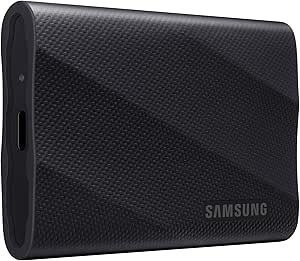 | Best for Fast, Protected Workflows | Storage capacity: 2 TB | Interface: USB 3.2 Gen 2×2 | Maximum read speed: Up to 2,000 MB/s | VIEW LATEST PRICE | See Our Full Breakdown |
| SanDisk Extreme Portable SSD, 1TB, Up to 2000MB/s | | Best for Outdoor Carry | Storage capacity: 1 TB | Interface: USB 3.0 | Connector: USB Type-C | VIEW LATEST PRICE | See Our Full Breakdown |
| Samsung T9 Portable SSD 4TB, USB 3.2 Gen 2×2, Up to 2,000 MB/s | | Best High-Capacity Performance Pick | Storage capacity: 4 TB | Interface: USB 3.2 Gen 2×2 | Read/write speed: Up to 2,000 MB/s | VIEW LATEST PRICE | See Our Full Breakdown |
| Samsung T7 Portable SSD, 1TB, Titan Gray | 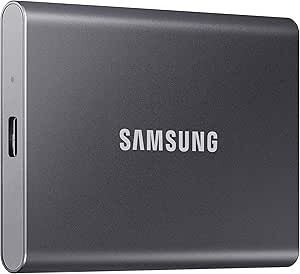 | Best Balanced 1TB Upgrade | Storage capacity: 1 TB | Interface: USB 3.0 | Read speed: Up to 1,050 MB/s | VIEW LATEST PRICE | See Our Full Breakdown |
| Netac ZSlim 250GB Portable SSD |  | Best Compact Pick | Storage capacity: 250GB | Read speed: Up to 500MB/s | Write speed: Up to 450MB/s | VIEW LATEST PRICE | See Our Full Breakdown |
| SanDisk 2TB Portable SSD, up to 1000 MB/s Read Speed, Black | | Best for High-Capacity Everyday Storage | Storage capacity: 2TB | Read speed: Up to 1000MB/s | Interface: USB 3.0 | VIEW LATEST PRICE | See Our Full Breakdown |
| SSK 500GB Portable External SSD, USB-C, Up to 1050MB/s |  | Best for Fast, Flexible Transfers | Storage capacity: 500GB | Read speed: Up to 1050MB/s | Write speed: Up to 1000MB/s | VIEW LATEST PRICE | See Our Full Breakdown |
| portable SSD drife | Storage Capacity | Interface | Read Speed | Weight |
|---|---|---|---|---|
| SanDisk 2TB Extreme Portable S | — | USB 3.0 (USB Type-C) | Up to 2000 MB/s | — |
| SSK 1TB Portable External SSD | 1 TB | USB 3.2 Gen 2 | Up to 1050 MB/s | 36.6 g |
| OSCOO 128GB Dual USB-A and USB | 128 GB | — | — | — |
| SanDisk 1TB Portable Drive | 1 TB | — | Up to 600 MB/s | 1.12 ounces |
| SanDisk Extreme Portable SSD 4 | 4 TB | USB-C | — | — |
| SanDisk 1TB Portable SSD | 1 TB | USB 3.0 | — | 1.12 ounces |
| Samsung T9 Portable SSD 2TB | 2 TB | USB 3.2 Gen 2×2 | — | — |
| SanDisk Extreme Portable SSD | 1 TB | USB 3.0 | — | 1.6 ounces |
| Samsung T9 Portable SSD 4TB | 4 TB | USB 3.2 Gen 2×2 | — | — |
| Samsung T7 Portable SSD | 1 TB | USB 3.0 | Up to 1,050 MB/s | — |
| Netac ZSlim 250GB Portable SSD | 250GB | USB 3.2 Gen 2 | Up to 500MB/s | Approximately 30g |
| SanDisk 2TB Portable SSD | 2TB | USB 3.0 | Up to 1000MB/s | 1.12 ounces |
| SSK 500GB Portable External SS | 500GB | USB 3.2 Gen 2 | Up to 1050MB/s | 36.6g |
More Details on Our Top Picks
SanDisk 2TB Extreme Portable SSD
This drive strikes a compelling balance between raw speed and rugged durability, making it the Best Overall choice for most serious users. With read speeds hitting 2000 MB/s, it significantly outperforms the SanDisk 1TB Portable Drive, which tops out at 600 MB/s. The IP65 rating and 3-meter drop protection offer peace of mind that lighter, less robust models cannot match. While the 256-bit AES encryption is a strong security feature, it does require specific software installation, which might annoy users who prefer plug-and-play simplicity. Compared to the SSK 1TB, this SanDisk model offers double the capacity and higher sustained speeds, though at a higher entry price point.
Pros:- Extremely fast read speeds of up to 2000 MB/s reduce wait times for large files.
- Rugged IP65 rating and drop protection withstand harsh environments.
- Built-in hardware encryption secures sensitive data without complex setups.
Cons:- Write speeds are noticeably slower than the peak read speeds.
- Encryption features require specific OS versions and software downloads.
Best for: Photographers and video editors who need fast transfer speeds and robust protection for fieldwork.
Not ideal for: Users on a strict budget or those who only need to store small documents and photos.
- Capacity:2 TB
- Interface:USB 3.0 (USB Type-C)
- Read Speed:Up to 2000 MB/s
- Drop Protection:Up to 3 meters
- Security:256-bit AES Encryption
- Compatibility:Windows, macOS, Android, iOS, PS5, Xbox
Our verdict“If you need a reliable, high-speed drive that can survive drops and spills, this is the smartest middle-ground pick.”
SSK 1TB Portable External SSD
The SSK 1TB stands out as the Best Value option by offering solid USB 3.2 Gen 2 speeds at a lower price point than premium competitors. Its 1050 MB/s read speed is sufficient for most daily tasks, though it trails behind the SanDisk 2TB Extreme’s 2000 MB/s ceiling. The inclusion of both USB-C and USB-A cables in the box is a thoughtful touch that saves users from buying adapters separately. However, the aluminum case, while lightweight, may get warm during sustained transfers compared to plastic-bodied alternatives. For those who find the SanDisk 1TB Portable Drive too slow, this SSK model provides a noticeable speed upgrade without breaking the bank.
Pros:- Includes both USB-C and USB-A cables for broad compatibility.
- Lightweight aluminum enclosure aids in heat dissipation.
- Supports iPhone ProRes video capture for mobile creators.
Cons:- SLC cache limits can cause speed drops during large, sustained writes.
- Windows may display less usable capacity than advertised.
Best for: Students and general users who want reliable USB-C connectivity and decent speeds without paying for ruggedness.
Not ideal for: Professionals handling 4K video projects or those who need extreme durability for outdoor use.
- Storage Capacity:1 TB
- Interface:USB 3.2 Gen 2
- Read Speed:Up to 1050 MB/s
- Write Speed:Up to 1000 MB/s
- Weight:36.6 g
- Enclosure Material:Aluminum alloy
- Connectors:USB-C and USB-A
Our verdict“This drive delivers excellent speed-to-price value, making it ideal for everyday backups and mobile workflows.”
OSCOO 128GB Dual USB-A and USB-C SSD Flash Drive
This OSCOO 128GB drive is less of a traditional SSD and more of a high-speed flash drive, serving as the Best for Basic File Transfer option. It is significantly smaller and more portable than the SanDisk 1TB Portable Drive, fitting easily into a pocket or keychain. The dual-connector design eliminates the need for adapters when moving files between older laptops and modern phones. However, the 128GB capacity is a severe limitation for anyone working with media files, unlike the terabyte-scale options in this roundup. It is best viewed as a digital USB stick on steroids rather than a primary storage solution for large datasets.
Pros:- Ultra-compact form factor with no cables required.
- Dual connectors work with both USB-A and USB-C ports.
- Fast transfer speeds for its small size and category.
Cons:- 128GB capacity is too small for modern media workflows.
- Protective cap is loose and easily lost.
Best for: Travelers and office workers who need to quickly move documents between computers and smartphones.
Not ideal for: Anyone needing to store photos, videos, or large software installations due to low capacity.
- Storage Capacity:128 GB
- Connectors:USB-A and USB-C
- Max Read Speed:Up to 550 MB/s
- Max Write Speed:Up to 520 MB/s
- Material:Zinc alloy
- Dimensions:2.74 × 0.68 × 0.37 in
Our verdict“Choose this only if you prioritize size and convenience over storage space and sustained performance.”
SanDisk 1TB Portable Drive
The SanDisk 1TB Portable Drive serves as a solid Entry-Level SSD for users upgrading from traditional hard drives. Its 600 MB/s read speed is faster than any mechanical drive but falls short of the SSK 1TB’s 1050 MB/s performance. The no moving parts design ensures quiet operation and basic durability, though it lacks the IP-rated water resistance of the SanDisk Extreme series. This drive is best for simple backups and file storage where extreme speed is not a priority. It offers the reliability of the SanDisk brand at a lower cost, making it a sensible first step into solid-state portable storage.
Pros:- Simple, no-nonsense design with no software installation needed.
- Lightweight and compact for easy portability.
- Drop protection up to 2 meters adds basic durability.
Cons:- Transfer speeds are significantly slower than high-end competitors.
- Write speeds lag behind the advertised read rates.
Best for: Casual users who need a reliable, plug-and-play drive for documents and basic media backups.
Not ideal for: Video editors or gamers who require high sustained write speeds for large files.
- Storage Capacity:1 TB
- Read Speed:Up to 600 MB/s
- Connectivity:USB Type-C
- Weight:1.12 ounces
- Drop Protection:Up to 2 meters
- Dimensions:2.95 × 1.77 × 0.39 inches
Our verdict“A dependable, no-frills option for basic storage needs, but too slow for creative professionals.”
SanDisk Extreme Portable SSD 4TB
For those who need massive storage without compromising on speed, the SanDisk Extreme 4TB is the Best Premium Capacity choice. It matches the 2000 MB/s read speeds of its 2TB sibling but doubles the available space, reducing the need for frequent file management. The IP65 rating and 3-meter drop protection are identical to the 2TB model, ensuring the same level of ruggedness. However, the premium price tag and physical bulk make it less pocketable than the OSCOO 128GB or even the SanDisk 1TB. This drive is overkill for casual users but essential for professionals managing vast libraries of high-resolution content.
Pros:- Massive 4TB capacity minimizes the need for multiple drives.
- Top-tier read speeds handle large video files with ease.
- High-end durability features protect expensive data.
Cons:- Premium pricing makes it a significant investment.
- Encryption setup requires software and specific OS support.
Best for: Professional videographers and data-heavy users who need terabytes of fast, secure, and rugged storage.
Not ideal for: Users with limited budgets or those who only need to carry small files on the go.
- Storage Capacity:4 TB
- Interface:USB-C
- Max Read Speed:2000 MB/s
- Protection:IP65; Drop up to 3m
- Encryption:256-bit AES
- Form Factor:2.5-inch
- Thickness:0.4 inches
Our verdict“The definitive choice for professionals who refuse to compromise on speed, capacity, or durability.”
SanDisk 1TB Portable SSD, Up to 1000 MB/s Read Speed, Black
The SanDisk 1TB Portable SSD suits everyday transfers when pocketable size matters more than maximum throughput. At 1.12 ounces, it is the lightest of these five listed models, and its 2-meter drop protection adds reassurance for a drive carried between home, school, or work. Read speeds reach 1,000 MB/s, enough for routine backups and moving large folders, though the description gives no matching write-speed figure. Compared with the Samsung T7, it offers a similar practical speed tier and a lighter listed weight, while the T7 specifies faster writes, hardware encryption, and included USB-A and USB-C cables. The SanDisk is the simpler carry-around choice, but buyers needing encryption or clearer write performance should look at the T7 instead.
Pros:- Very light at 1.12 ounces and compact enough for a pocket or small bag
- Read speeds up to 1,000 MB/s suit routine large-file transfers
- Drop protection rated up to 2 meters
- USB-C connection and compatibility with computers, phones, and tablets
Cons:- Write speed is not specified, so sustained file-transfer performance is less clear
- No encryption feature is listed
- Only 1TB of capacity, less than the 2TB and 4TB Samsung T9 options
Best for: Students and mobile workers who want a lightweight 1TB drive for everyday file transfers and backups.
Not ideal for: People who need stated high write speeds, hardware encryption, or included cable options for older USB-A devices.
- Storage capacity:1 TB
- Interface:USB 3.0
- Connector:USB Type-C
- Maximum read speed:Up to 1,000 MB/s
- Drop protection:Up to 2 meters
- Weight:1.12 ounces
- Dimensions:1.77 × 3.35 × 0.39 inches
- Compatible devices:Desktop, laptop, smartphone, tablet
Our verdict“Choose this SanDisk for a lightweight 1TB everyday drive, but pick the Samsung T7 if stated write speeds and hardware encryption matter more.”
Samsung T9 Portable SSD 2TB, USB 3.2 Gen 2×2 External Solid State Drive
The Samsung T9 2TB is the speed-focused middle ground here: it doubles the capacity of the 1TB options while offering read and write speeds up to 2,000 MB/s with compatible equipment. That combination is useful for creators moving large project files, and its thermal management is aimed at keeping demanding transfers manageable. AES hardware encryption and Magician Software’s drive-health tools add protections missing from the SanDisk 1TB Portable SSD. The catch is that the headline speed depends on a USB 3.2 Gen 2×2 host, a compatible cable, and UASP mode; a slower connection can limit results. Compared with the 4TB Samsung T9, this version is easier to justify when 2TB is enough, but it gives up half the storage while retaining the same compatibility caveat.
Pros:- Up to 2,000 MB/s read and write speeds with compatible equipment
- 2TB capacity balances substantial project storage with a portable format
- Hardware encryption and Magician Software drive-health tools
- Thermal management supports heavy transfer workloads
Cons:- Maximum speeds require a compatible USB 3.2 Gen 2×2 host, cable, and UASP mode
- Actual host-device compatibility and performance can vary
- The 4TB Samsung T9 provides twice the storage for buyers with larger libraries
Best for: Video editors and other creators who need 2TB of portable workspace, hardware encryption, and fast transfers on a compatible computer.
Not ideal for: Buyers whose computers lack USB 3.2 Gen 2×2 or who need maximum capacity for large media libraries.
- Storage capacity:2 TB
- Interface:USB 3.2 Gen 2×2
- Maximum read speed:Up to 2,000 MB/s
- Maximum write speed:Up to 2,000 MB/s
- Form factor:Portable, 2.5 inches
- Additional features:Hardware encryption, thermal management
- Compatible devices:Gaming consoles, Mac, PC, tablet, iPhone 15/16
- Included accessory:SSD cable
Our verdict“Pick the 2TB T9 for fast, encrypted project storage if your host supports its interface; otherwise, a more broadly practical USB 3.0 option may suit you better.”
SanDisk Extreme Portable SSD, 1TB, Up to 2000MB/s
For a 1TB drive that may travel beyond a desk, the SanDisk Extreme Portable SSD pairs pocket-sized dimensions with IP65 dust and water resistance and drop protection up to 3 meters. Those protections make it a stronger fit for field work and travel than the Samsung T7, whose listed drop rating is lower and whose specs do not claim an IP rating. Its stated read speed reaches 2,000 MB/s, but the description does not give a comparable write-speed figure, so buyers shifting large folders should not treat that read maximum as a promise of equally fast writes. Password protection uses 256-bit AES encryption, though it requires software and has stated Windows and macOS version limits. Compared with the 2TB Samsung T9, this SanDisk trades capacity and specified high write speeds for a more travel-oriented protection package.
Pros:- IP65-rated dust and water resistance
- Drop protection up to 3 meters
- Pocket-sized 1TB design with read speeds up to 2,000 MB/s
- 256-bit AES password protection is available
Cons:- Write speed is not specified and may be lower than the maximum read speed
- Password protection requires software and supports only stated recent Windows and macOS versions
- Less capacity than either Samsung T9 model
Best for: Photographers, field workers, and frequent travelers who need a 1TB drive with dust, water, and drop protection.
Not ideal for: People who regularly write large project files, need 2TB or more, or want encryption without installing software.
- Storage capacity:1 TB
- Interface:USB 3.0
- Connector:USB Type-C
- Maximum read speed:Up to 2,000 MB/s
- Water and dust resistance:IP65
- Drop protection:Up to 3 meters
- Encryption:256-bit AES password protection
- Weight:1.6 ounces
- Dimensions:3.35 × 2 × 0.39 inches
Our verdict“Choose the Extreme for protected 1TB storage on the move, but choose a Samsung T9 if capacity and stated high write speeds take priority.”
Samsung T9 Portable SSD 4TB, USB 3.2 Gen 2×2, Up to 2,000 MB/s
The Samsung T9 4TB combines the lineup’s largest listed capacity with read and write speeds up to 2,000 MB/s, making it the strongest fit for extensive video, game, or design libraries that need to travel. Its AES 256-bit hardware encryption, thermal management, and drop resistance add useful safeguards for a drive carrying valuable files. The tradeoff is the same interface limitation as the 2TB T9: reaching the advertised speeds calls for a USB 3.2 Gen 2×2 host, cable, and UASP mode, so the number is not universal across devices. Compared with the 2TB Samsung T9, this model is for buyers who will use the extra space, not those seeking a smaller-capacity match. Compared with the rugged SanDisk Extreme, it has more capacity and stated write speed, but no IP65 dust-and-water rating is listed.
Pros:- 4TB capacity for large project libraries, game collections, and backups
- Read and write speeds up to 2,000 MB/s with compatible equipment
- AES 256-bit hardware encryption
- Thermal management and drop resistance up to 9.8 feet
Cons:- Maximum speeds require a compatible USB 3.2 Gen 2×2 host, cable, and UASP mode
- Host compatibility and actual performance can vary
- No IP-rated dust or water resistance is specified
Best for: Video professionals, console owners, and media collectors who need 4TB of portable storage with encryption and fast transfers on compatible hosts.
Not ideal for: People with USB hosts that cannot use Gen 2×2 speeds, or travelers who need a stated dust-and-water resistance rating.
- Storage capacity:4 TB
- Interface:USB 3.2 Gen 2×2
- Read/write speed:Up to 2,000 MB/s
- Encryption:AES 256-bit hardware encryption
- Durability:Drop resistance up to 9.8 feet
- Form factor:Portable, 2.4 inches
- Compatible devices:Gaming consoles, Mac, PC, tablets, iPhone 15/16
- Compatible consoles:Xbox Series S, Xbox Series X, PlayStation 5
Our verdict“Choose the 4TB T9 when you need maximum portable capacity and your devices support its fast interface; the 2TB T9 is the better fit if you do not need the extra space.”
Samsung T7 Portable SSD, 1TB, Titan Gray
The Samsung T7 1TB is a balanced choice for buyers who want more than a basic portable drive without the T9’s demanding connection requirements. It lists read speeds up to 1,050 MB/s and write speeds up to 1,000 MB/s over USB 3.2 Gen 2, plus 256-bit AES hardware encryption and an aluminum body rated for drops up to 6 feet. Its included USB-C-to-C and USB-C-to-A cables also make it easier to connect across newer and older computers. Compared with the lighter SanDisk 1TB Portable SSD, the T7 specifies write performance and encryption, though its listed drop rating is shorter than that SanDisk’s 2-meter rating. Unlike the T9 models, it does not claim 2,000 MB/s speeds, but its requirements are less demanding for many setups.
Pros:- Specified read speeds up to 1,050 MB/s and write speeds up to 1,000 MB/s
- 256-bit AES hardware encryption
- Aluminum unibody with drop protection up to 6 feet
- Includes USB-C-to-C and USB-C-to-A cables
Cons:- Maximum speeds require a compatible USB 3.2 Gen 2 host and UASP support
- Some operating systems may require reformatting
- Only 1TB, compared with the larger Samsung T9 capacities
Best for: Everyday creators and professionals who want a 1TB drive with stated read and write speeds, hardware encryption, and cables for USB-C and USB-A devices.
Not ideal for: Buyers who need 2TB or more, IP-rated water resistance, or the T9’s higher speed ceiling on a compatible host.
- Storage capacity:1 TB
- Interface:USB 3.0
- Read speed:Up to 1,050 MB/s
- Write speed:Up to 1,000 MB/s
- Encryption:256-bit AES hardware encryption
- Construction:Aluminum unibody
- Drop protection:Up to 6 feet
- Included cables:USB Type-C to Type-C and USB Type-C to Type-A
Our verdict“Pick the T7 for well-rounded 1TB transfers, encryption, and broad cable convenience; choose a T9 for more capacity or higher peak speeds.”
Netac ZSlim 250GB Portable SSD
The Netac ZSlim is the lightest, smallest-capacity choice in this group, aimed at carrying everyday files rather than holding a large media library. At approximately 30g and 9mm thick, it slips easily into a pocket, while its aluminum enclosure gives it a sturdier feel than a basic plastic thumb drive. The included cable and adapter support both USB-A and USB-C connections, a practical advantage over the SanDisk 2TB Portable SSD, which connects via USB-C. Its up-to-500MB/s read speed is adequate for routine transfers, but far below the SSK drive’s stated 1050MB/s ceiling, and reaching its maximum requires a compatible USB 3.2 Gen 2 connection. The bigger compromise is 250GB of capacity: it suits documents and selected photos, but fills quickly with video projects or broad backups.
Pros:- Approximately 30g and slim enough for pocket or bag carry
- Aluminum alloy enclosure
- Includes a cable and adapter for USB-A and USB-C connections
- Compatible with Windows, macOS, Linux, and Android
Cons:- 250GB can be restrictive for large projects and media collections
- Maximum speeds depend on a compatible USB 3.2 Gen 2 connection
- Read and write speeds are lower than the SSK 500GB Portable External SSD’s stated speeds
Best for: Travelers and students who want a very light drive for documents, coursework, and a curated set of photos.
Not ideal for: Video editors and anyone backing up a large photo or media library; 250GB offers much less room than the SanDisk 2TB Portable SSD.
- Storage capacity:250GB
- Read speed:Up to 500MB/s
- Write speed:Up to 450MB/s
- Interface:USB 3.2 Gen 2
- Dimensions:100 × 29.4 × 9mm
- Weight:Approximately 30g
- Enclosure:Aluminum alloy
- Included accessories:USB Type-C-to-A cable and USB-A-to-C adapter
- Compatibility:Windows, macOS, Linux, and Android
Our verdict“Choose the Netac ZSlim if low carry weight and flexible connections matter more than capacity or high transfer speeds.”
SanDisk 2TB Portable SSD, up to 1000 MB/s Read Speed, Black
The SanDisk 2TB Portable SSD is the practical pick for carrying a substantial collection of photos, videos, and work files without moving up to a bulkier storage setup. Its 2TB capacity is four times the SSK 500GB drive’s, making it a better fit for broad backups and larger libraries, while the SSK lists higher peak read and write speeds. SanDisk specifies read speeds up to 1000MB/s, but does not provide a write-speed figure here, so I would not choose it on the assumption that large writes will match reads. The pocket-sized body weighs 1.12 ounces and has drop protection up to 2 meters, useful for commuting and travel. It connects over USB-C and works with Mac and PC, though buyers who need USB-A should check their cable setup before choosing it over the SSK or Netac.
Pros:- 2TB capacity provides substantially more room than the Netac ZSlim and SSK 500GB
- Read speeds specified up to 1000MB/s
- Drop protection up to 2 meters and a design with no moving parts
- Compact, lightweight body with USB-C connectivity
Cons:- No write-speed figure is provided in the supplied product data
- USB-C connection may require a separate adapter or cable for USB-A devices
- Actual usable space is lower than the stated 2TB capacity
Best for: Photographers, students, and mobile workers who need a pocketable drive with room for a large library and routine Mac or PC transfers.
Not ideal for: Buyers who need included USB-A connectivity, documented write speeds, or faster stated transfers than the SSK 500GB Portable External SSD.
- Storage capacity:2TB
- Read speed:Up to 1000MB/s
- Interface:USB 3.0
- Connector:USB Type-C
- Drop protection:Up to 2 meters
- Weight:1.12 ounces
- Dimensions:1.77 × 3.35 × 0.39 inches
- Compatibility:Desktop, laptop, smartphone, and tablet; Mac and PC
- Features:Dust resistant, shock resistant, and water resistant
Our verdict“Pick this SanDisk for pocketable, high-capacity storage and drop protection, but choose the SSK if faster stated writes or included USB-A connectivity matter more.”
SSK 500GB Portable External SSD, USB-C, Up to 1050MB/s
The SSK 500GB Portable External SSD prioritizes transfer capability and connection flexibility over sheer storage space. Its stated speeds—up to 1050MB/s read and 1000MB/s write—outpace the Netac ZSlim’s 500MB/s read ceiling and give frequent file movers a stronger spec sheet. Included USB-C and USB-A cables also make it easier to connect across newer and older devices than the USB-C-only SanDisk 2TB Portable SSD. At 500GB, though, it holds only a quarter of that SanDisk’s capacity, so large video archives may call for a bigger drive. The aluminum enclosure keeps the unit light at 36.6g, and SMART diagnostics, TRIM support, and SLC caching add useful drive-management features. Its SLC cache uses 25% of available capacity, a tradeoff buyers should factor in if they expect to fill the drive.
Pros:- Stated read and write speeds reach up to 1050MB/s and 1000MB/s
- USB-C and USB-A cables included
- Lightweight aluminum alloy enclosure
- SMART diagnostics, TRIM support, SLC caching, and an activity LED
Cons:- 500GB is limited for large video libraries compared with the SanDisk 2TB Portable SSD
- SLC cache uses 25% of currently available capacity
- Maximum transfer speeds depend on compatible host hardware and connection
Best for: Content creators and mobile professionals who transfer files often, need both USB-A and USB-C connections, and can work within 500GB.
Not ideal for: People storing large archives or wanting the greatest capacity in one drive; the SanDisk 2TB Portable SSD offers four times the space.
- Storage capacity:500GB
- Read speed:Up to 1050MB/s
- Write speed:Up to 1000MB/s
- Interface:USB 3.2 Gen 2
- Cables included:USB-C and USB-A
- Enclosure:Aluminum alloy
- Dimensions:2.6 × 1.5 × 0.5 inches
- Weight:36.6g
- Features:Activity LED, SMART diagnostics, TRIM support, and SLC caching
Our verdict“Choose the SSK for fast stated transfers and ready-to-use USB-A/USB-C connections, provided 500GB is enough for your files.”
How We Picked
I ranked these portable SSD drives by how well their stated capacity, speed tier, portability, and connection options fit common buyer needs. I gave more weight to practical balance than to a single headline number: a drive should offer enough space for its intended role, work with a buyer’s devices, and make sense to carry. I also separated everyday storage from higher-throughput options and small transfer drives, since those categories solve different problems.
The order reflects versatility and likely usefulness across a range of tasks, followed by specialized strengths. Models with higher stated speeds rank well for demanding transfers, but only when compatible ports can support them. I also considered capacity choices and device compatibility, while recognizing that specifications alone do not establish sustained performance, durability, or included software. Readers should check the exact model and host-device requirements before buying.
| portable SSD drife | Interface |
|---|---|
| SanDisk 2TB Extreme Portable S | USB 3.0 (USB Type-C) |
| SSK 1TB Portable External SSD | USB 3.2 Gen 2 |
| OSCOO 128GB Dual USB-A and USB | — |
| SanDisk 1TB Portable Drive | — |
| SanDisk Extreme Portable SSD 4 | USB-C |
| SanDisk 1TB Portable SSD | USB 3.0 |
| Samsung T9 Portable SSD 2TB | USB 3.2 Gen 2×2 |
| SanDisk Extreme Portable SSD | USB 3.0 |
| Samsung T9 Portable SSD 4TB | USB 3.2 Gen 2×2 |
| Samsung T7 Portable SSD | USB 3.0 |
| Netac ZSlim 250GB Portable SSD | USB 3.2 Gen 2 |
| SanDisk 2TB Portable SSD | USB 3.0 |
| SSK 500GB Portable External SS | USB 3.2 Gen 2 |
Factors to Consider When Choosing Portable SSD Drives
Choosing among portable SSD drives is less about picking the biggest speed figure and more about matching storage to your devices and habits. These factors can help you avoid paying for performance your computer cannot use or buying too little room for the files you need to carry.
Match the advertised speed to your actual ports
A drive’s stated maximum speed is only part of the picture; the computer, cable, and port all affect transfer rates. USB-C describes a connector shape, not a guaranteed speed standard, so a USB-C port may still limit a fast SSD. Before paying for a 2,000MB/s-class model, check the port specifications on the device where you will use it most. If you move large video files often and have a compatible high-bandwidth connection, that higher tier may save time. For occasional documents and backups, a 1,000MB/s-class drive may be a more sensible match. Avoid buying based on the connector alone.
Choose capacity for both current files and growth
Estimate the space your files occupy now, then leave room for new projects and backups. A 128GB or 250GB drive can be handy for moving selected files, but it can fill quickly when storing photos, video, or multiple computer backups. A 1TB or 2TB model gives many people a more flexible working library, while 4TB can suit large media collections or several active projects. Capacity is not a substitute for a backup plan: a single portable drive can be lost or damaged. Keep a separate copy of irreplaceable files on another drive or in a trusted backup service. Buying far more capacity than your workflow needs can leave money tied up in unused space.
Check how the drive connects to every device
Make a list of the computers, tablets, phones, or cameras you expect to connect before choosing a drive. USB-C and USB-A support on one model can reduce adapter juggling in households or workplaces with older and newer machines. A USB-C-only drive may still work with USB-A hardware through an appropriate adapter, but that adds another item to carry and can affect convenience. Also check whether your device supports external storage and whether it needs a particular file system. If you switch regularly between operating systems, confirm that the chosen format works across them or plan to reformat the drive. Reformatting can erase stored data, so do it before loading files.
Decide whether rugged design fits your routine
A compact drive is easy to carry, but portability also means it may face drops, dust, moisture, and pressure in a bag. Rugged-oriented models can make sense for field work, travel, and frequent transport, though design claims do not make a drive indestructible. For a drive that stays on a desk, a smaller or simpler model may be easier to justify than paying extra for protection you rarely use. Consider where the drive will be stored and how often it will be plugged in and unplugged. A protective case can add another layer, but it also adds bulk. Do not treat a rugged housing as a replacement for keeping a second copy of important data.
Pay for speed only when your workflow benefits
Large video projects, frequent transfers, and direct work from external storage can benefit from faster SSDs when the host connection keeps pace. Backing up documents or moving a modest photo folder usually places less value on maximum throughput. A fast drive may also be limited by the source device, destination drive, cable, or file sizes, so peak figures do not describe every transfer. Think about how long your typical task takes and how often you repeat it. If transfers are occasional, spending more for a higher speed tier may not change your day much. If you move large files daily, even a modest reduction in wait time can matter.
Treat portable SSDs as working storage, not your only archive
Portable SSDs are convenient for carrying active files, but any single storage device can fail, go missing, or be damaged. For important work, keep an additional copy in a different place rather than relying on one drive. Frequent disconnects during file transfers can also lead to incomplete copies, so eject the drive safely and verify important transfers. If you plan to use an SSD for ongoing backups, check that your backup software supports the device and that its capacity can hold the versions you want to retain. A smaller drive may work well for a handoff or temporary project, but it is less suited to a growing archive. Separate storage roles can make a modest-capacity portable drive more useful without making it your sole safeguard.
Frequently Asked Questions
Will a portable SSD advertised at 2,000MB/s reach that speed on my laptop?
Not necessarily. The laptop’s USB standard, the drive’s cable, and the connection used all affect transfer speed. USB-C is a connector type, so it does not by itself confirm support for the bandwidth a fast SSD needs. Check your laptop’s port specifications and compare them with the drive’s requirements before choosing a premium speed tier. If the port is slower, the drive can still work, but you may not gain the advertised peak performance.
Should I choose a 4TB drive or keep two smaller drives?
A 4TB drive is convenient when you want a large project library or media collection in one place. Two smaller drives can separate work from personal files or provide a second copy, though they take more room and need more handling. Neither arrangement replaces an off-device backup for files you cannot afford to lose. Consider how often you travel with the full library and whether you want one drive failure to affect all your stored files. Pick the setup that fits both your capacity needs and your backup habits.
Is a USB-C and USB-A SSD a better choice for a mix of old and new computers?
It can be more convenient if you regularly move files between computers with different ports. The SSK 1TB model in this roundup includes both USB-C and USB-A connection options, which may reduce the need to pack adapters. Check the exact included connectors and supported speeds, since broad compatibility does not mean every connection delivers the same performance. A drive with one connector can also work through an adapter, but that adds a part that can be misplaced. Choose the dual-connection option for convenience, not as a guarantee of faster transfers.
Can I use a small-capacity portable SSD for photo and video backups?
Yes, if the amount of material you need to store is modest and you regularly move older files elsewhere. The 128GB OSCOO and 250GB Netac options are more suitable for selected files or transfers than for a large, growing media archive. Video files can consume space quickly, so estimate the size of a typical shoot or project before choosing. Leave free capacity for new material rather than filling the drive immediately. For an ongoing backup collection, a larger drive and a separate second copy are safer choices.
Do I still need another backup if I buy a rugged portable SSD?
Yes. Rugged-oriented construction can help with everyday handling risks, but it cannot prevent every failure, loss, theft, or accident. A portable drive may also be exposed to the same event as the computer it is meant to protect, such as a bag being lost. Keep another copy of important files in a separate location or use a separate backup system. For active projects, a portable SSD can be the working copy while another drive or service holds the backup. Protection features reduce some risks; they do not remove the need for redundancy.
Conclusion
For most buyers, I would start with the SanDisk 2TB Extreme Portable SSD as the best overall balance of capacity and portable design. The SSK 1TB USB-C and USB-A model is my value-minded choice for people who prioritize broad connection options, while the Samsung T9 4TB is the premium fit for large libraries and compatible high-speed workflows. Beginners who mainly need everyday file storage can look to a straightforward 1TB option such as the Samsung T7 or a 1,000MB/s-class SanDisk, after checking device compatibility. For compact transfers, the OSCOO 128GB dual-connector drive serves a more specific role than a full project archive. My final rule: choose capacity and connection compatibility first, then pay for higher speed only if your workload and ports can use it.