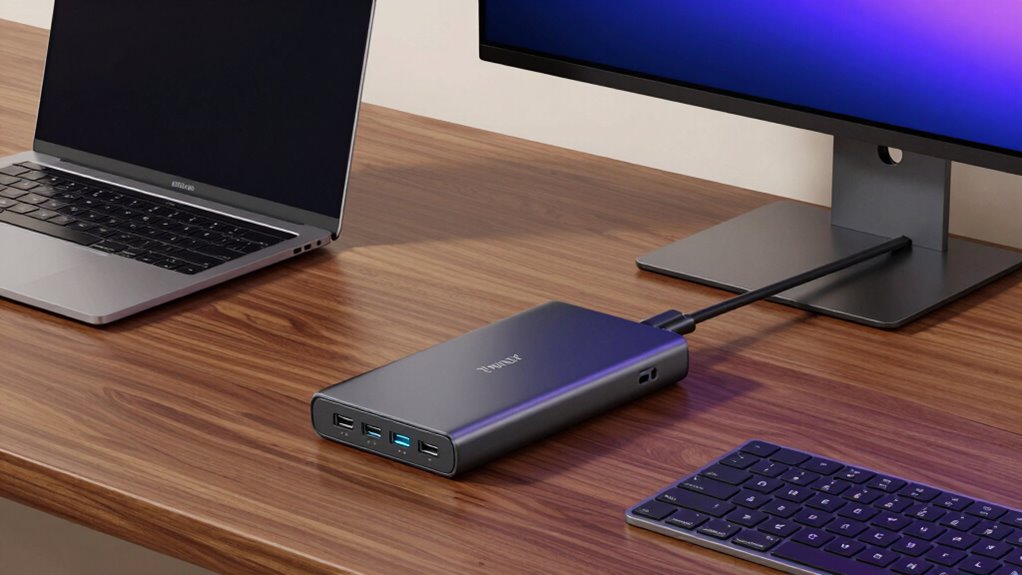

If you’re searching for a Thunderbolt 4 hub, you’re likely looking to expand your laptop’s connectivity with fast data transfer, multiple displays, and charging capabilities. The Satechi Thunderbolt 4 Slim Hub Pro stands out as the best overall thanks to its sleek design and reliable performance. For those needing extensive port options, the Plugable Thunderbolt 4 Dock offers a robust 13 ports, including dual HDMI. However, choosing the right hub involves balancing factors like port variety, power delivery, and size—tradeoffs that can make the decision complex. Keep reading for a detailed breakdown to help you find the perfect match for your setup.

Get the latest gadgets delivered free with Prime
- Fast, free delivery on millions of items
- Prime Video, Amazon Music and more included
- Member-only deals all year
Complete the kit



Key Takeaways
- Top picks are distinguished by their port versatility and power delivery capabilities.
- Size and design vary significantly, affecting portability and desk setup options.
- High-end models often include additional features like 8K support or multi-port configurations.
- Budget options tend to offer fewer ports or lower power output but still support dual 4K displays.
- Compatibility and future-proofing are key, with amazon.com/dp/B0DRGKBV93?tag=digitechbytes.com-20&ascsubtag=dc-620484″ target=”_blank” rel=”nofollow sponsored noopener”>Thunderbolt 4 offering broad device support and high transfer speeds.
| Satechi Thunderbolt 4 Slim Hub Pro, Docking Station, 100W USB-C Charging |  | Best Overall for Compact Power and Flexibility | Ports: 3 Thunderbolt 4 ports | Display Support: Dual 4K/60Hz or single 8K/30Hz | Charging Power: Up to 100W | VIEW ON AMAZON | See Our Full Breakdown |
| Plugable Thunderbolt 4 Dock, 100W Charging, Dual HDMI, 13 Ports |  | Best for Versatile Connectivity and Multiple Displays | Power Delivery: 100W (96W certified) | Display Support: Dual 4K 60Hz or single 8K | Ports: 13 including HDMI, USB, Ethernet, SD | VIEW ON AMAZON | See Our Full Breakdown |
| Plugable 5-in-1 Thunderbolt 4 Hub with Dual 4K Support and HDMI Adapter |  | Best for Compact Expansion and Dual 4K Displays | Ports: 3x Thunderbolt 4, 1x USB-A, 1x HDMI | Display Support: Up to 2x 4K screens at 60Hz, 8K or 6K on compatible Macs | Data Bandwidth: 40Gbps | VIEW ON AMAZON | See Our Full Breakdown |
| Amazon Basics Thunderbolt 4 Pro Docking Station, Dual 4K & 8K Support, 2xTBT4, HDMI 2.1, USB A 3.1, Ethernet, Black |  | Best Budget-Friendly Dual Display Dock with 8K Support | Display Support: Dual 4K@60Hz, 8K@30Hz | Ports: 2x Thunderbolt 4, HDMI 2.1, USB A 3.1, Ethernet | Power Delivery: Up to 96W | VIEW ON AMAZON | See Our Full Breakdown |
| UGREEN 8-in-1 Thunderbolt 4 Docking Station, Dual 4K@60Hz, 3xTBT4, 40Gbps |  | Best for High-Speed Expansion and Multiple Displays | Number of ports: 8 | Thunderbolt 4 ports: 3 | USB-A ports: 3 | VIEW ON AMAZON | See Our Full Breakdown |
| Thunderbolt 4 Dock – 21-Ports Laptop Docking Station Dual Monitor 90W USB-C |  | Best for Extensive Connectivity and High Power Delivery | Compatibility: Most laptops with 8th Gen Intel processors or newer | Power Delivery: Up to 90W | Display Support: Dual 4K@60Hz or 8K@60Hz | VIEW ON AMAZON | See Our Full Breakdown |
| Belkin Connect Thunderbolt 4 Docking Station, 5-in-1 USB-C Multiport Core Hub with 96W Power Delivery |  | Best for Compact, High-Resolution Dual or 8K Display Support | Ports: 3x Thunderbolt 4 USB-C upstream, 1x Thunderbolt 4 downstream, 1x USB-C | Power Delivery: 96W | Display Support: Dual 4K at 60Hz or 8K at 30Hz | VIEW ON AMAZON | See Our Full Breakdown |
| Surface Thunderbolt 4 Dock Triple 4K HDMI+VGA 12-in-1 Surface Pro Docking Station with Power Adapter |  | Best for Surface Device Owners Needing Triple Display Support | Display Outputs: 2x 4K@60Hz HDMI, VGA | Power Supply: 96W DC | Ports: 2x USB C Data, 2x USB 3.0, SD/Micro SD, Ethernet, Audio | VIEW ON AMAZON | See Our Full Breakdown |
| Amazon Basics Thunderbolt 4 Docking Station, Dual 4K@60Hz Support, 85W Power Delivery, 3 Downstream TBT4, USB A 3.1, Mac/Windows Compatible, Black |  | Best Budget-Friendly Dual 4K Dock with Reliable Performance | Display Support: Dual 4K@60Hz | Power Delivery: 85W | Downstream Ports: 3x Thunderbolt 4 | VIEW ON AMAZON | See Our Full Breakdown |
| OWC Thunderbolt Hub 5-Port Connectivity Solution |  | Best for High-Speed Expansion and Legacy USB Devices | Ports: 4x Thunderbolt 4, 1x USB-A | VIEW ON AMAZON | See Our Full Breakdown | ||
| WAVLINK Thunderbolt 4 Dock with 4K HDMI Dual Monitor Support |  | Best for High-Resolution Dual Monitor Setups with Charging Capabilities | Thunderbolt 4 certification: Yes | Video output: Dual 4K@60Hz HDMI or 8K@60Hz via Thunderbolt 4 | Power delivery: Up to 96W | VIEW ON AMAZON | See Our Full Breakdown |
| thunderbolt 4 hub | Ports | Display Support | Power Delivery |
|---|---|---|---|
| Satechi Thunderbolt 4 Slim Hub | 3 Thunderbolt 4 ports | Dual 4K/60Hz or single 8K/30Hz | — |
| Plugable Thunderbolt 4 Dock | 13 including HDMI, USB, Ethernet, SD | Dual 4K 60Hz or single 8K | 100W (96W certified) |
| Plugable 5-in-1 Thunderbolt 4 | 3x Thunderbolt 4, 1x USB-A, 1x HDMI | Up to 2x 4K screens at 60Hz, 8K or 6K on compatible Macs | Up to 15W |
| Amazon Basics Thunderbolt 4 Pr | 2x Thunderbolt 4, HDMI 2.1, USB A 3.1, Ethernet | Dual 4K@60Hz, 8K@30Hz | Up to 96W |
| UGREEN 8-in-1 Thunderbolt 4 Do | — | Dual 4K@60Hz, 8K | — |
| Thunderbolt 4 Dock | 21 including USB-C, DisplayPort, and others | Dual 4K@60Hz or 8K@60Hz | Up to 90W |
| Belkin Connect Thunderbolt 4 D | 3x Thunderbolt 4 USB-C upstream, 1x Thunderbolt 4 downstream, 1x USB-C | Dual 4K at 60Hz or 8K at 30Hz | 96W |
| Surface Thunderbolt 4 Dock Tri | 2x USB C Data, 2x USB 3.0, SD/Micro SD, Ethernet, Audio | — | — |
| Amazon Basics Thunderbolt 4 Do | — | Dual 4K@60Hz | 85W |
| OWC Thunderbolt Hub 5-Port Con | 4x Thunderbolt 4, 1x USB-A | — | — |
| WAVLINK Thunderbolt 4 Dock wit | — | — | Up to 96W |
More Details on Our Top Picks
Satechi Thunderbolt 4 Slim Hub Pro, Docking Station, 100W USB-C Charging
The Satechi Thunderbolt 4 Slim Hub Pro stands out for its sleek, aluminum design that complements modern workspaces while delivering high performance. Its support for dual 4K displays or an 8K output makes it ideal for creatives and professionals requiring crisp visuals, especially compared to the more port-rich Plugable Dock, which offers more expansion but less portability. The 100W charging capacity ensures your laptop stays powered during intensive tasks. However, it’s limited to Thunderbolt 4 and USB4 devices, and the external power supply adds clutter, making it less suited for those seeking a fully bus-powered setup or budget-conscious buyers.
Pros:- Sleek, compact aluminum design with excellent heat management
- Supports dual 4K or 8K display output for high-res workflows
- Provides up to 100W charging, minimizing power adapters
Cons:- Limited to Thunderbolt 4 and USB4-compatible devices
- Requires an external 150W power supply, reducing portability
Best for: Professionals who need a compact, stylish hub that supports high-resolution displays and fast charging without excess ports.
Not ideal for: Users with older laptops or systems that don’t support Thunderbolt 4/USB4, as they won’t benefit from its features.
- Ports:3 Thunderbolt 4 ports
- Display Support:Dual 4K/60Hz or single 8K/30Hz
- Charging Power:Up to 100W
- Data Transfer:40Gbps
- SD Card Reader:UHS-II, up to 312MB/s
- USB-A Ports:Up to 10Gbps
- Ethernet:Gigabit Ethernet
- Material:Aluminum
- Cable Included:Thunderbolt 4 cable (0.8M)
Our verdict“This hub suits users wanting a stylish, high-performance solution for dual 4K/8K displays with fast charging, but it’s less ideal for those with older or non-compatible laptops.”
Plugable Thunderbolt 4 Dock, 100W Charging, Dual HDMI, 13 Ports
The Plugable Thunderbolt 4 Dock offers a comprehensive array of ports, making it a strong choice for those needing extensive connectivity options. Its 13 ports include dual HDMI outputs supporting 4K 60Hz or an 8K display, along with Ethernet, SD card reader, and multiple USB-A ports, surpassing the more minimal Satechi in port variety. The 40Gbps transfer speed and 100W charging make it suitable for demanding workflows. That said, display support can vary depending on the device and mode, especially on certain Mac models, which means some users might encounter limitations with dual displays. Compatibility requires a Thunderbolt 4, Thunderbolt 5, or USB4 system, which could exclude older laptops.
Pros:- Extensive port selection including dual HDMI, Ethernet, SD card reader
- Supports high-speed 40Gbps data transfer
- Provides 100W power delivery for charging laptops
Cons:- Display support varies depending on the host system and mode
- Some Mac models may not support dual displays effectively
Best for: Power users who need multiple ports, dual high-res displays, and robust data transfer for a desktop workstation setup.
Not ideal for: Users with older or non-Thunderbolt 4 systems, as they may not fully utilize its capabilities.
- Power Delivery:100W (96W certified)
- Display Support:Dual 4K 60Hz or single 8K
- Ports:13 including HDMI, USB, Ethernet, SD
- Connectivity:Thunderbolt 4, Thunderbolt 5, USB4
- Performance:40Gbps transfer speed
Our verdict“This dock offers impressive port versatility for demanding users, but potential display compatibility issues mean it’s best for systems with proven dual display support.”
Plugable 5-in-1 Thunderbolt 4 Hub with Dual 4K Support and HDMI Adapter
The Plugable 5-in-1 Thunderbolt 4 Hub provides a balanced mix of ports in a small footprint, supporting dual 4K displays at 60Hz and offering high-speed data transfer. Its support for up to 15W power delivery is suitable for portable devices but may fall short for charging larger laptops or multiple peripherals simultaneously. Compared to the more port-rich Plugable Dock, this hub is more portable but sacrifices some charging power and port variety. Its driverless setup appeals to users who prioritize simplicity, yet it isn’t optimal for Thunderbolt 3 Windows systems or MacBook Neo, which may lack full compatibility.
Pros:- Supports dual 4K displays and 8K/6K on compatible Macs
- High-speed 40Gbps data transfer with driverless setup
- Multiple Thunderbolt 4 ports for expandability
Cons:- Limited power delivery at 15W, insufficient for charging larger laptops
- Requires compatible Thunderbolt 4 or USB4 systems for full features
Best for: Creative professionals or remote workers needing dual 4K display support in a compact, easy-to-use hub.
Not ideal for: Owners of Thunderbolt 3 or older Macs and Windows systems needing more power or port options.
- Ports:3x Thunderbolt 4, 1x USB-A, 1x HDMI
- Display Support:Up to 2x 4K screens at 60Hz, 8K or 6K on compatible Macs
- Data Bandwidth:40Gbps
- Power Delivery:Up to 15W
- Coverage:2-year warranty, lifetime support
Our verdict“This compact hub excels for users needing dual 4K displays with high-speed data on portable or compatible systems, but it’s less suited for charging demanding devices.”
Amazon Basics Thunderbolt 4 Pro Docking Station, Dual 4K & 8K Support, 2xTBT4, HDMI 2.1, USB A 3.1, Ethernet, Black
The Amazon Basics Thunderbolt 4 Pro Docking Station offers solid performance at a more affordable price point, supporting dual 4K displays at 60Hz and an 8K display at 30Hz. It includes two Thunderbolt 4 ports, an HDMI 2.1 port, USB-A 3.1, and Ethernet, making it suitable for basic high-resolution workflows. Compared with the UGREEN dock, it provides similar display options but may lack the build quality or advanced features, such as higher Ethernet speeds or more USB ports. Its high compatibility with Windows and macOS makes it appealing for mixed environments, though users should note that high-bandwidth connections can reduce LAN or display performance.
Pros:- Supports dual 4K displays and 8K output for high-res tasks
- Multiple ports including Ethernet, USB-A, and HDMI
- Affordable price for Thunderbolt 4 capabilities
Cons:- Requires high-quality cables for optimal performance (not included)
- Display resolution and LAN speed may decrease with multiple high-bandwidth connections
Best for: Budget-conscious users who need reliable dual 4K support and basic connectivity for home or small office use.
Not ideal for: Power users requiring more charging capacity or extensive port options beyond basic needs.
- Display Support:Dual 4K@60Hz, 8K@30Hz
- Ports:2x Thunderbolt 4, HDMI 2.1, USB A 3.1, Ethernet
- Power Delivery:Up to 96W
- Dimensions:7.86 x 2.95 x 1.23 inches
Our verdict“This dock offers excellent value for users needing dual 4K displays and basic expandability on a budget, but it’s less suitable for demanding charging or extensive peripherals.”
UGREEN 8-in-1 Thunderbolt 4 Docking Station, Dual 4K@60Hz, 3xTBT4, 40Gbps
The UGREEN 8-in-1 Thunderbolt 4 Dock is designed to deliver high-speed data and multiple display options in a compact package. Its 3 Thunderbolt 4 ports support dual 4K displays at 60Hz, along with USB-A ports, Ethernet, and 85W charging, making it a versatile choice for those who want to expand without clutter. Compared to the Plugable 13-port model, it offers fewer ports but focuses on a streamlined, high-performance setup. Its 85W charging supports most laptops, yet full display support might vary depending on the host laptop’s capabilities. It’s less suitable for users needing extensive ports or maximum charging power.
Pros:- Supports dual 4K displays at 60Hz with multiple Thunderbolt 4 ports
- High data transfer speed of 40Gbps
- Includes 85W charging for compatible laptops
Cons:- Full display support depends on laptop compatibility
- Requires connection to charger for full functionality
Best for: Power users seeking a balanced mix of multiple Thunderbolt 4 ports with high-speed data for professional workflows.
Not ideal for: Users who need a large number of ports or require full charging power for larger laptops.
- Number of ports:8
- Thunderbolt 4 ports:3
- USB-A ports:3
- Ethernet:Yes
- Display support:Dual 4K@60Hz, 8K
Our verdict“This dock is well-suited for professionals needing high-speed data and dual 4K support with moderate charging, though it’s less ideal for extensive port needs or demanding power requirements.”
Thunderbolt 4 Dock – 21-Ports Laptop Docking Station Dual Monitor 90W USB-C
This Thunderbolt 4 dock stands out for its impressive 21 ports, making it ideal for users who need a comprehensive array of connections in a single station. Compared to the Belkin Connect, it offers more ports but falls short in portability and simplicity. Its support for dual 4K displays at 60Hz and up to 90W charging makes it suitable for professional multitasking setups, yet it is limited to newer laptops with 8th Gen Intel processors and above, excluding older systems and some M1 Macs. The sheer number of ports can be overwhelming for a casual user, and stability might be compromised if devices draw more than 90W. This model makes the most sense for professionals with complex workflows requiring a broad range of connections and high power needs, but not for those with older or less compatible laptops.
Pros:- Supports dual 4K displays at 60Hz for high-quality visuals
- Provides up to 90W charging for laptops
- Offers an extensive 21-port array for versatile connectivity
Cons:- Limited functionality with 7th Gen or older Intel laptops
- May experience unstable charging with devices over 90W
- Excludes M1 Macs from dual 4K support
Best for: Power users who need maximum port variety and high charging capacity for professional setups
Not ideal for: Users with older laptops or M1 Macs seeking a simpler, more portable solution
- Compatibility:Most laptops with 8th Gen Intel processors or newer
- Power Delivery:Up to 90W
- Display Support:Dual 4K@60Hz or 8K@60Hz
- Ports:21 including USB-C, DisplayPort, and others
- Warranty:12 months
Our verdict“This dock is best suited for professionals with high connectivity demands and compatible laptops needing maximum expandability.”
Belkin Connect Thunderbolt 4 Docking Station, 5-in-1 USB-C Multiport Core Hub with 96W Power Delivery
The Belkin Connect offers a streamlined 5-in-1 design that balances portability with high-end features. Unlike the larger Thunderbolt 4 Dock with 21 ports, this hub emphasizes a more manageable size without sacrificing dual 4K display support or the ability to handle an 8K monitor, making it ideal for users who need high resolution but prefer a smaller footprint. Its 96W power delivery surpasses many competitors, providing ample charging power for most laptops. The tradeoff comes in the form of fewer ports—only five—and reliance on Thunderbolt 4 compatibility, which could increase the cost. Compared with the Amazon Basics dock, it offers higher transfer speeds and more powerful charging, but at a premium price. This makes it suitable for professionals who need a compact, high-performance hub with versatile display options.
Pros:- Supports dual 4K@60Hz and 8K at 30Hz for high-resolution displays
- Powerful 96W charging for laptops
- Compact size with versatile connectivity including multiple Thunderbolt 4 ports
Cons:- Premium price may be prohibitive for some users
- Limited to only five ports, fewer than larger docks
- Requires Thunderbolt 4 compatible devices for full functionality
Best for: Creative professionals and power users requiring dual 4K or 8K displays in a compact form
Not ideal for: Casual users or those needing extensive ports for multiple peripherals, due to its limited port count
- Ports:3x Thunderbolt 4 USB-C upstream, 1x Thunderbolt 4 downstream, 1x USB-C
- Power Delivery:96W
- Display Support:Dual 4K at 60Hz or 8K at 30Hz
- Transfer Rate:up to 40G
- Compatibility:Mac, Windows, USB-C devices
- Daisy-Chaining:Supports up to 6 devices
Our verdict“This hub is ideal for users prioritizing high-resolution display support and portability over extensive port options.”
Surface Thunderbolt 4 Dock Triple 4K HDMI+VGA 12-in-1 Surface Pro Docking Station with Power Adapter
This Surface-specific Thunderbolt 4 dock excels at providing triple display support with dual HDMI ports and a VGA port, making it ideal for Surface device owners who need extensive video outputs. Unlike the Belkin or Amazon Basics docks, it includes dedicated ports for Surface models, ensuring compatibility and stability. Its 96W power supply supports quick charging, and the addition of Ethernet, audio, and multiple USB ports broadens its utility for productivity and entertainment. However, the requirement to disable the Surface screen when connecting three monitors on Windows 10 or earlier can complicate setup, and it needs to be connected to power during use—limiting portability. Compared with other docks, this is best for Surface users who prioritize multiple displays and device-specific features over ultra-compact design.
Pros:- Supports triple 4K@60Hz displays for multitasking
- Fast data transfer with multiple USB ports and SD card reader
- Powerful 96W charging for Surface devices
Cons:- Requires connection to power during operation
- May need to disable Surface screen when using three monitors on Windows 10 or earlier
- Compatibility limited to specific Surface models
Best for: Surface tablet and laptop users needing triple monitor support with reliable connectivity
Not ideal for: Users with non-Surface laptops or those seeking a lightweight, portable hub
- Display Outputs:2x 4K@60Hz HDMI, VGA
- Power Supply:96W DC
- Ports:2x USB C Data, 2x USB 3.0, SD/Micro SD, Ethernet, Audio
- Transfer Speed:Up to 5Gbps
- Compatibility:Surface Pro, Surface Laptop, Surface Book
- Dimensions:12-in-1
Our verdict“Ideal for Surface owners who need multiple high-resolution displays and reliable connectivity in a dedicated dock.”
Amazon Basics Thunderbolt 4 Docking Station, Dual 4K@60Hz Support, 85W Power Delivery, 3 Downstream TBT4, USB A 3.1, Mac/Windows Compatible, Black
The Amazon Basics Thunderbolt 4 Dock provides a straightforward solution for users needing dual 4K@60Hz support and decent charging capacity at a lower price point. While it doesn’t match the extensive port options of the 21-port dock or the high resolution support of the Belkin, it offers a compact, travel-friendly design with three downstream Thunderbolt 4 ports and a single USB A 3.1 port. Compared with the UGREEN dock, it offers similar display support but may lack some advanced features like high transfer speeds or daisy chaining. Its 85W power delivery meets the needs of most laptops, but high-power-demand devices might require more. This dock is best for budget-conscious users who want reliable dual 4K support without fussing over extra ports or advanced features.
Pros:- Supports dual 4K@60Hz displays for crisp visuals
- Provides up to 85W charging for laptops
- Compact, travel-friendly size with solid build quality
Cons:- Requires high-quality Thunderbolt 4 or USB4 cables (not included)
- Limited compatibility with older MacBooks or Linux systems
- Power delivery may be insufficient for very high-power laptops
Best for: Budget-conscious professionals or students needing reliable dual 4K support and moderate charging
Not ideal for: Power users requiring many ports, high transfer speeds, or extensive device chaining
- Display Support:Dual 4K@60Hz
- Power Delivery:85W
- Downstream Ports:3x Thunderbolt 4
- USB Ports:1x USB A 3.1
- Compatibility:Windows 10 or later, macOS 11 or later
- Dimensions:4.76 x 2.84 x 0.86 inches
Our verdict“This affordable dock is a solid choice for users seeking dual 4K support and reliable charging without extra bells and whistles.”
OWC Thunderbolt Hub 5-Port Connectivity Solution
The OWC Thunderbolt Hub offers four Thunderbolt 4 ports and one USB-A, making it a flexible option for expanding connectivity. Unlike larger docks that emphasize display support, this hub focuses on high-speed expansion for multiple Thunderbolt devices and legacy USB peripherals. Its straightforward design makes it easy to integrate into existing setups, but the lack of specified power delivery limits its use for charging multiple laptops simultaneously. Compared to the Surface dock, it provides more Thunderbolt ports but fewer multimedia outputs. This hub is best suited for users who need to connect several Thunderbolt peripherals or incorporate legacy devices without requiring extensive video outputs or charging features.
Pros:- Multiple high-speed Thunderbolt 4 ports for device expansion
- Includes USB-A port for legacy device compatibility
- Simple design with high-speed connectivity
Cons:- No mention of power delivery capabilities for charging laptops
- Limited to Thunderbolt and USB-A devices only
- Not suitable for users needing multiple display outputs
Best for: Professionals with multiple Thunderbolt devices and legacy USB peripherals needing high-speed expansion
Not ideal for: Users seeking a dock with multiple display support or high power delivery for charging laptops
- Ports:4x Thunderbolt 4, 1x USB-A
Our verdict“This hub is ideal for users who need to expand Thunderbolt connectivity and connect legacy USB devices without needing video output support.”
WAVLINK Thunderbolt 4 Dock with 4K HDMI Dual Monitor Support
This WAVLINK Thunderbolt 4 dock stands out for its impressive support for dual 4K@60Hz displays or a single 8K@60Hz output, making it ideal for creative professionals who need crisp visuals. Compared with the Plugable Thunderbolt 4 Dock, it offers similar video output options but includes a dedicated SD/MicroSD V4.0 card reader, boosting data transfer speeds and workflow efficiency. Its 96W power delivery ensures laptops stay charged during intensive use, which is a step up from some competitors with lower wattage. However, dual monitor support on Mac can be limited to mirroring depending on the model, and setup complexity can be a barrier for less tech-savvy users. While it excels in high-res output and fast data transfer, its compatibility quirks and complex configuration make it less suitable for casual users or those with simpler needs.
Pros:- Supports dual 4K@60Hz monitors or an 8K display for high-res workflows
- Fast data transfer with SD/MicroSD V4.0 and 2.5G Ethernet
- Power delivery up to 96W enables continuous laptop charging during use
Cons:- Dual monitor support on Mac can be limited to mirroring, reducing productivity options
- Setup instructions can be complex, especially for multi-monitor configurations
Best for: Creative professionals or power users who rely on dual high-resolution monitors and need robust data and charging capabilities
Not ideal for: Casual users or those with MacBooks that might experience limited extended display support due to compatibility issues
- Thunderbolt 4 certification:Yes
- Video output:Dual 4K@60Hz HDMI or 8K@60Hz via Thunderbolt 4
- Power delivery:Up to 96W
- Ethernet:2.5G Ethernet port
- Card reader:SD/MicroSD V4.0, 312MB/s
- Power adapter:160W
Our verdict“This dock is best suited for professionals needing high-res visual output and fast data transfer, willing to handle some setup complexity.”

How We Picked
I evaluated each Thunderbolt 4 hub based on performance, build quality, port variety, power delivery, and overall value. I looked for hubs that reliably support dual 4K displays, provide sufficient charging power, and maintain a compact, durable design. The ranking reflects a balance between features and cost, emphasizing how well each model meets real-world needs for professionals and power users alike. Products with added versatility or premium features are rated higher, but I also considered affordability and ease of use, ensuring options for different budgets and tech levels.Factors to Consider When Choosing Thunderbolt 4 Hub
Choosing the right Thunderbolt 4 hub requires understanding several key factors that influence compatibility, performance, and usability. While many hubs look similar on paper, subtle differences can impact your experience—whether you’re connecting multiple displays, transferring large files, or powering your device. Here’s what to consider to make an informed decision beyond just port count.Port Selection and Versatility
Consider what types of connections you need daily—USB-C, USB-A, HDMI, Ethernet, or SD card slots. Some hubs prioritize a wide array of ports, while others focus on a few high-quality outputs. Think about future device compatibility and whether you need features like dual 4K or 8K support, especially for professional creative work or high-resolution displays.
Power Delivery and Charging
Ensure the hub provides enough wattage to charge your laptop while in use—typically 85W or higher for most ultrabooks. A hub with insufficient power delivery can impact device performance or slow down charging. Also, check if the hub supports pass-through charging, allowing you to keep your device powered without sacrificing port functionality.
Build Quality and Portability
The design should match your workspace needs. Compact, lightweight hubs are ideal for travel, but may sacrifice some ports or features. Conversely, larger, more robust docks often offer better heat dissipation and durability but are less portable. Consider where you’ll use the hub most often to find the right balance between size and capability.
Compatibility and Future-Proofing
While Thunderbolt 4 offers broad device support, verify that the hub is compatible with your specific laptop model and operating system. Also, look for features like 8K support or daisy-chaining options if you plan to upgrade or expand your setup later. Future-proofing can extend the useful life of your investment, especially with high-end models.
Pricing and Value
Higher-priced hubs often include advanced features like multiple Thunderbolt ports and high wattage power delivery, but for many users, a mid-range option provides excellent value. Beware of models that offer many ports but skimp on build quality or power output. Matching your budget with your actual needs ensures you get the best long-term value without paying for unnecessary extras.
Frequently Asked Questions
Can I connect multiple 4K monitors with a Thunderbolt 4 hub?
Yes, most Thunderbolt 4 hubs support dual 4K displays, and some even support 8K resolution. However, the number of supported monitors depends on the specific hub’s capabilities and the graphics output of your laptop. Always check the maximum display support specifications before purchasing, especially if you plan to run demanding multi-monitor setups.
Will a Thunderbolt 4 hub charge my laptop while in use?
Most Thunderbolt 4 hubs with Power Delivery (PD) support will charge your device while connected. The key is to verify the wattage—ideally 85W or higher—to ensure your laptop charges at a normal rate. Lower wattage hubs may only provide minimal charging, which can be insufficient for heavier workloads, so pick a hub that matches your device’s power requirements.
Are cheaper Thunderbolt 4 hubs reliable for professional use?
While budget-friendly options can handle basic tasks, they may lack durability, sufficient power delivery, or support for high-resolution displays. For professional workflows involving large file transfers or multiple high-res screens, investing in a more robust, well-built hub is advisable. Reliability and build quality tend to improve with higher-priced models, offering peace of mind during intensive use.
Can I daisy-chain multiple Thunderbolt 4 hubs?
Thunderbolt 4 supports daisy-chaining, allowing multiple hubs or devices to connect sequentially. However, this depends on the hub’s specifications and your device’s capabilities. Not all hubs are designed for daisy-chaining, and doing so can introduce complexity or reduce performance if not supported properly. Check each hub’s documentation to confirm compatibility if this feature is important for your setup.
What should I do if my hub doesn’t support my required resolution or refresh rate?
If your hub doesn’t support your desired resolution or refresh rate, it might be due to bandwidth limitations or hardware constraints. In such cases, consider a hub with higher data transfer capabilities, or prioritize models that explicitly mention support for your target resolution—like 8K or high-refresh-rate gaming monitors. Compatibility with your GPU and display specifications is essential to avoid performance issues.
Conclusion
For most users seeking an all-around reliable solution, the Satechi Thunderbolt 4 Slim Hub Pro offers a sleek, balanced package. Those needing maximum port variety and high power delivery should consider the Plugable Thunderbolt 4 Dock. If you’re new to Thunderbolt hubs, the Belkin Connect Thunderbolt 4 Docking Station provides an accessible, easy-to-use option. Power users working with demanding displays or professional setups should look at premium models like the Amazon Basics Thunderbolt 4 Pro Docking Station or OWC Thunderbolt Hub. Your ideal choice depends on your specific needs, budget, and setup priorities—each category has a clear standout to match your workflow.