Home monitoring systems for elderly care range from video monitors and two-way intercoms to bed alarms and wearable call buttons. The Elderly Monitor with Camera, Two-Way Audio, and SOS Call Button is my best overall pick for households seeking both visual check-ins and a way to call for help, while the Lunderg Wireless Early Alert Bed Alarm suits fall-prevention routines and JubileeTV stands out for remote family connection. The main tradeoff is between richer communication features and simple alerts that are easier to set up and maintain. Connectivity, privacy, range, and whether the older adult will use a wearable can matter as much as the device itself. Read on for how all 15 options compare and which setup fits different care needs.

Get the latest gadgets delivered free with Prime
- Fast, free delivery on millions of items
- Prime Video, Amazon Music and more included
- Member-only deals all year
Complete the kit



Key Takeaways
- Video and alert functions solve different problems: the Elderly Monitor combines camera access with an SOS button, while bed and floor alarms focus on notifying a caregiver when movement occurs.
- The Lunderg bed alarm and Smart Caregiver floor mat target specific fall-risk moments: they can alert a caregiver near a bed or doorway, but they do not replace direct supervision or emergency response.
- Call buttons and pagers are the simplest communication pattern in this lineup: models from CallToU, Daytech, FullHouse, SYNLETT, and STECHRO center on summoning help rather than watching a room.
- Remote connection adds convenience but can bring setup dependencies: JubileeTV and Wi-Fi pager options are better matched to households comfortable with connected devices and network setup.
- There is no single best device for every home: the strongest choice depends on whether the main concern is falls, quick caregiver contact, visual check-ins, or staying connected from afar.
| Elderly Monitor with Camera, Two-Way Audio, and SOS Call Button |  | Best for Private, Wi-Fi-Free Monitoring | Display: 2.8-inch | Video resolution: 720p | Digital zoom: 4x | VIEW ON AMAZON | See Our Full Breakdown |
| KEENLUK Home Security Camera with 4.3-Inch Screen and Two-Way Video Calling |  | Best for Video Check-Ins | Screen size: 4.3 inches | Resolution: 1080p | Connectivity: Wireless; 2.4 GHz Wi-Fi | VIEW ON AMAZON | See Our Full Breakdown |
| Lunderg Wireless Early Alert Bed Alarm System |  | Best for Bed-Exit Alerts | Sensor pad size: 10 × 33 inches | Wireless range: Up to 400 feet | Alert volume: 120 dB | VIEW ON AMAZON | See Our Full Breakdown |
| CallToU Caregiver Pager and Wireless Intercom System | 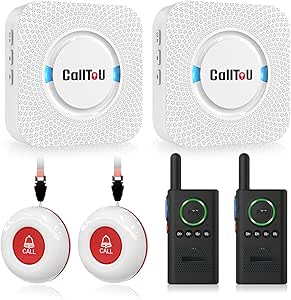 | Best for Two-Way Household Communication | Included components: 2 receivers, 2 call buttons, 2 walkie-talkies | Maximum stated range: 500 feet in open areas | Recommended indoor range: Less than 300 feet | VIEW ON AMAZON | See Our Full Breakdown |
| JubileeTV Remote Care System for Seniors |  | Best for TV-Based Family Check-Ins | Connectivity: Bluetooth, infrared, Wi-Fi | Requirements: TV with HDMI, Wi-Fi, and an existing cable, satellite, or streaming device | Maximum supported devices: 4 | VIEW ON AMAZON | See Our Full Breakdown |
| CallToU Wi-Fi Caregiver Pager with Call Button, Watch Button, and Receiver |  | Best for Shared App Alerts | Wireless technology: 433 MHz | Wi-Fi compatibility: 2.4 GHz only | Maximum range: 328 feet (100 m) | VIEW ON AMAZON | See Our Full Breakdown |
| SYNLETT Caregiver Pager with 2 Wireless Call Buttons |  | Best Offline Two-Button Pager | Included components: 2 call buttons, 1 receiver | Maximum range: 500 feet in open areas | Audible noise: 90 dB | VIEW ON AMAZON | See Our Full Breakdown |
| Smart Caregiver Wireless Floor Mat Alarm and Pager System, 24 x 48 Inches | 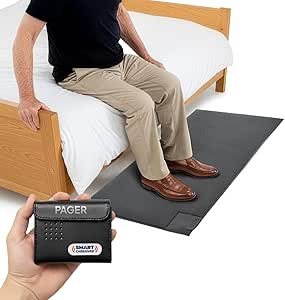 | Best for Bedside or Exit Monitoring | Mat dimensions: 24 × 48 × 0.5 inches | Pager range: Up to 300 feet | Alert options: Audible or vibration | VIEW ON AMAZON | See Our Full Breakdown |
| FullHouse Caregiver Pager with Wireless Call Button and Wristband |  | Best Long-Range No-Fee Pager | Range: Up to 1,000 feet in open air; 500 feet through walls | Melodies: 52 | Volume levels: 5, from 0 dB to 110 dB | VIEW ON AMAZON | See Our Full Breakdown |
| WiFi Caregiver Pager System with Waterproof Call Button, Watch Button, and Receiver |  | Best for Waterproof Wearable Calling | Included components: 1 waterproof call button, 1 watch button, 1 receiver | Wi-Fi compatibility: 2.4 GHz only | Control range: Up to 656 feet (200 m) | VIEW ON AMAZON | See Our Full Breakdown |
| Smart Caregiver Video Monitor with Call Button |  | Best for Wi-Fi-Free Video Monitoring | Screen size: 2.8 inches | Video resolution: 720p | Night vision: Infrared | VIEW ON AMAZON | See Our Full Breakdown |
| Daytech Wireless Caregiver Pager and Call Button |  | Best for Wearable, Simple Alerts | Power source: Battery powered | Batteries: Four included 12V alkaline batteries | Maximum range: 30 meters (100 feet) | VIEW ON AMAZON | See Our Full Breakdown |
| CallToU Wireless Two-Way Intercom System for Home and Caregiving |  | Best for Hands-Free Room-to-Room Conversation | Units: 2 | Channels: 16 | Maximum range: Up to 3,300 feet | VIEW ON AMAZON | See Our Full Breakdown |
| CallToU Caregiver Pager with Call Button for Elderly Care |  | Best for Two Call Buttons and a Plug-In Receiver | Included components: One receiver and two call buttons | Open-area range: 500+ feet | Ringtones: 55 | VIEW ON AMAZON | See Our Full Breakdown |
| STECHRO Wireless Caregiver Pager with Call Button and Receiver |  | Best for Expandable, Portable Alert Coverage | Included components: One call button and one receiver | Power source: Battery powered | Battery type: Lithium | VIEW ON AMAZON | See Our Full Breakdown |
More Details on Our Top Picks
Elderly Monitor with Camera, Two-Way Audio, and SOS Call Button
For families who want a camera check-in without connecting it to home Wi-Fi, this monitor pairs a portable 2.8-inch receiver with two-way audio, night vision, and an SOS button. Its separate receiver lets a caregiver check the room without opening a phone app, while the 355-degree pan and tilt helps cover more of the room from one camera position. Medication and daily reminders add a routine-support feature that the Lunderg bed alarm does not provide; Lunderg is the more focused choice if the main concern is noticing someone getting out of bed. The tradeoff is the small screen, which offers less viewing space than KEENLUK’s 4.3-inch display. Its stated range also varies between indoor and outdoor settings, so home layout matters.
Pros:- Operates without Wi-Fi, avoiding dependence on a home internet connection for monitoring.
- SOS button and customizable reminders support both urgent calls and daily routines.
- Pan-and-tilt camera, infrared night vision, and 4x digital zoom help caregivers check different parts of a room.
- Portable receiver has a built-in 2000mAh battery.
Cons:- The 2.8-inch display is small compared with the KEENLUK camera’s 4.3-inch screen.
- This is not a smartphone-connected system for remote app alerts.
- The product data does not specify how long the portable receiver runs per charge.
Best for: Caregivers who want a local, no-Wi-Fi camera with reminders and a physical SOS button for routine check-ins at home or in a care facility.
Not ideal for: Families who need a large, detailed screen for extended video viewing or prefer a camera that sends alerts to a smartphone over Wi-Fi.
- Display:2.8-inch
- Video resolution:720p
- Digital zoom:4x
- Camera rotation:355° horizontal, 90° vertical
- Wireless technology:2.4GHz FHSS
- Wi-Fi required:No
- Stated range:Up to 1000 ft outdoors and 500 ft indoors
- Battery capacity:2000mAh
Our verdict“Choose this monitor if you want camera check-ins, reminders, and an SOS button without Wi-Fi, and can work with its compact screen.”
KEENLUK Home Security Camera with 4.3-Inch Screen and Two-Way Video Calling
KEENLUK suits caregivers who want a larger built-in screen and two-way video calling, rather than a separate portable receiver like the Elderly Monitor with Camera. Its 1080p video and night vision can make faces and room activity easier to see during a check-in, while the one-button calling gives a senior a simple way to reach family. Motion notifications add another route to awareness, although they depend on a 2.4 GHz Wi-Fi connection and mobile alerts. That makes this a more connected option than the no-Wi-Fi Elderly Monitor, but less suitable where internet access is unreliable or a family wants monitoring to stay off the network. Local SD card storage is available, but the card is not included.
Pros:- 4.3-inch screen is larger than the 2.8-inch receiver on the Elderly Monitor with Camera.
- 1080p video and night vision support clearer visual check-ins.
- Two-way video calling and a one-button call feature provide direct communication.
- Motion detection can send notifications to a mobile device.
Cons:- Requires a 2.4 GHz Wi-Fi network, unlike the no-Wi-Fi Elderly Monitor.
- SD card for local storage is not included.
- The product data does not list a dedicated SOS pendant or caregiver pager.
Best for: Families with reliable 2.4 GHz Wi-Fi who want a visible screen, video calls, and motion notifications for regular remote check-ins.
Not ideal for: Caregivers who need a system that works without Wi-Fi, or buyers who want local recording ready to use without purchasing a separate SD card.
- Screen size:4.3 inches
- Resolution:1080p
- Connectivity:Wireless; 2.4 GHz Wi-Fi
- Storage:Local SD card; card not included
- Lens:350-degree wide-angle
- Features:Two-way video calling, two-way audio, motion detection, night vision
- Usage:Indoor
- Dimensions:4.72 x 4.72 x 7.08 inches
Our verdict“Pick KEENLUK for Wi-Fi-based video calls and a larger screen, but choose a no-Wi-Fi monitor if network independence matters more.”
Lunderg Wireless Early Alert Bed Alarm System
Lunderg is the most targeted option here: its pressure-sensing bed pad alerts a caregiver through a portable pager before the person gets out of bed. That makes it a better fit for overnight fall-prevention routines than the CallToU Caregiver Pager and Wireless Intercom System, which relies on the resident pressing a call button. The pad is wipe-clean and incontinence-resistant, and the pager’s adjustable volume and vibration offer a less disruptive alternative to a loud alarm in the bedroom. It does not provide camera viewing, two-way conversation, or general room monitoring, so it cannot replace the broader check-in features of the Elderly Monitor with Camera. Families should also plan for battery changes and replacement of the pad after its stated 15-month lifespan.
Pros:- Sends a caregiver alert before the person gets out of bed.
- Portable pager with adjustable volume and vibration avoids requiring a loud in-room alarm.
- Wipe-clean, incontinence-resistant pad is suited to regular bedside use.
- Works without Wi-Fi or an app.
Cons:- The sensor pad needs replacement after about 15 months.
- Pager uses two AA batteries, so caregivers must maintain the battery supply.
- Covers bed-exit events rather than providing room-wide monitoring or direct communication.
Best for: Caregivers monitoring someone who may attempt to leave bed without calling, especially during overnight or limited-supervision periods.
Not ideal for: Families seeking video check-ins, two-way conversation, or alerts for activity beyond the bed area.
- Sensor pad size:10 × 33 inches
- Wireless range:Up to 400 feet
- Alert volume:120 dB
- Pager settings:Adjustable volume and vibration
- Power source:Battery powered
- Batteries:2 AA batteries included
- Pad lifespan:15 months
- Sensor technology:Lunderg Pre-Alert Smart Sensor Technology
Our verdict“Choose Lunderg when bed-exit awareness is the priority; choose a camera or call-button system for broader check-ins.”
CallToU Caregiver Pager and Wireless Intercom System
CallToU brings together two call buttons, two plug-in receivers, and two walkie-talkies, making it useful when a household needs both a simple call-for-help route and caregiver-to-resident conversation. Unlike Lunderg’s bed sensor, the call buttons require the senior to press them; unlike the KEENLUK camera, this system does not depend on Wi-Fi or video. The buttons can be worn as pendants or mounted where help is often needed, and waterproof, dustproof construction suits everyday placement around the home. Its stated 500-foot range is for open areas, with the recommended indoor range under 300 feet, so walls and layout can limit coverage. One key separation: the pager and intercom do not pair, so buyers should not expect one integrated communication network.
Pros:- Includes two call buttons, two receivers, and two two-way radios.
- Buttons can be worn as pendants or mounted in accessible locations.
- Waterproof and dustproof call buttons and receivers support varied home placement.
- Adjustable volume and 55 ringtone options allow caregivers to tailor alerts.
Cons:- Receivers need access to electrical outlets.
- Indoor obstacles can reduce range; the recommended indoor range is less than 300 feet.
- Pager and intercom operate separately and cannot pair with each other.
Best for: Households that want multiple call points and separate two-way radios for communication between a resident and caregivers.
Not ideal for: Caregivers who need automatic bed-exit detection, camera monitoring, or a unified system in which the pager and intercom work together.
- Included components:2 receivers, 2 call buttons, 2 walkie-talkies
- Maximum stated range:500 feet in open areas
- Recommended indoor range:Less than 300 feet
- Ringtones:55
- Volume:5 adjustable levels, 0–110 dB
- Call button and receiver protection:Waterproof and dustproof
- Mounting:Wall mount or door mount
- Power:Battery powered; 2 lithium polymer batteries required and included
Our verdict“Choose CallToU for a multi-part, non-Wi-Fi call-and-talk setup, but skip it if you need automatic alerts or one integrated system.”
JubileeTV Remote Care System for Seniors
JubileeTV turns a familiar television into a channel for video calls, reminders, notes, photos, and videos, which may feel more approachable to a senior who already uses the TV every day. Caregivers can also control the TV remotely and receive room activity alerts, giving it a broader family-connection role than CallToU’s call-button-and-radio kit. The backlit voice remote is designed to support easier use, while compatibility with up to four devices can help keep an existing TV setup in place. The tradeoff is setup dependence: it needs an HDMI-equipped TV, Wi-Fi, and an existing cable, satellite, or streaming device. Unlike the no-Wi-Fi Elderly Monitor with Camera, JubileeTV relies on connectivity and an active membership after setup; it is also limited to the U.S.
Pros:- Brings video calls, reminders, notes, photos, and videos to the senior’s TV.
- Remote TV control can help caregivers assist without being in the room.
- Room activity alerts add a check-in feature beyond the CallToU call-button system.
- Includes a backlit voice remote with voice search and a remote finder.
Cons:- Requires an active membership after setup.
- Needs Wi-Fi, an HDMI-equipped TV, and an existing cable, satellite, or streaming device.
- Available only in the U.S.
Best for: U.S. families with a compatible TV setup who want remote calls, caregiver messages, and activity check-ins on a screen the senior already uses.
Not ideal for: Households without reliable Wi-Fi or a compatible HDMI TV setup, and families who want a no-membership or portable bedside monitor.
- Connectivity:Bluetooth, infrared, Wi-Fi
- Requirements:TV with HDMI, Wi-Fi, and an existing cable, satellite, or streaming device
- Maximum supported devices:4
- Remote range:10 meters
- Remote features:Backlit, voice search, remote finder, universal, no programming required
- Remote buttons:34
- Batteries:2 AAA alkaline batteries required
- Availability:U.S. only
Our verdict“Choose JubileeTV for connected family communication through a compatible television, not for standalone or Wi-Fi-free monitoring.”
CallToU Wi-Fi Caregiver Pager with Call Button, Watch Button, and Receiver
The CallToU combines a local receiver with app alerts that can be shared with family, giving it an advantage over the offline SYNLETT pager when relatives want updates beyond the home. Its call and watch buttons offer two ways to request help, while the receiver’s 20 ringtones and five volume levels let caregivers tailor alerts to the room and hearing needs. The button-to-receiver range is stated as up to 328 feet, though walls and layout may reduce it. Free app notifications are included, but phone and text alerts require a subscription, and the system only connects to 2.4 GHz Wi-Fi. I’d choose it for families who value shared app notifications, not for anyone who needs paid-channel-free phone alerts or a fully offline setup.
Pros:- App notifications can be shared with family members
- Includes both a call button and a wearable watch button
- Receiver has 20 ringtones and five volume levels
- Wireless button range is stated up to 328 feet
Cons:- Phone and text alerts require a subscription
- Wi-Fi connection supports 2.4 GHz only
- The stated wireless range may be reduced by walls and home layout
Best for: Families who want multiple relatives to receive app notifications when an older adult presses a call or watch button.
Not ideal for: Households that need SMS or phone-call alerts without an ongoing subscription, or use only 5 GHz Wi-Fi.
- Wireless technology:433 MHz
- Wi-Fi compatibility:2.4 GHz only
- Maximum range:328 feet (100 m)
- Included components:1 call button, 1 watch button, 1 receiver
- Receiver alerts:20 ringtones; five volume levels; flashing lights
- Receiver battery:2 AAA batteries, included
- Receiver dimensions:2.3 × 0.5 × 2.36 inches
- Warranty:1 year
Our verdict“Choose this CallToU if shared app alerts matter more than subscription-free phone or text notifications.”
SYNLETT Caregiver Pager with 2 Wireless Call Buttons
For a household that wants a straightforward alert without Wi-Fi or an app, the SYNLETT pairs two wireless call buttons with a portable receiver. Buttons can be wall-mounted or worn on their included lanyards, so one can stay by the bed while another travels with the person. Its stated 500-foot range in open areas exceeds the CallToU Wi-Fi pager’s 328-foot figure, but that comparison is only useful where walls and interference do not sharply limit signal. The receiver offers either a chime or a continuous alarm, with sound listed at 90 dB. Unlike app-connected systems, it does not provide remote family notifications; in return, it avoids Wi-Fi setup and subscription-dependent alert channels. I’d favor it for local caregiver coverage, not for monitoring from elsewhere.
Pros:- Includes two wireless call buttons and a portable receiver
- Buttons can be wall-mounted or worn with lanyards
- Offers chime and continuous alarm modes
- Stated open-area range reaches up to 500 feet
Cons:- The maximum range is specified for open areas and may be shorter indoors
- Uses multiple battery types, including 12V button batteries
- Does not provide app, phone, or text alerts
Best for: Caregivers who need two physical call points and a portable in-home receiver without app or Wi-Fi setup.
Not ideal for: Families who need remote notifications, or homes where the receiver must reliably reach through several walls or floors.
- Included components:2 call buttons, 1 receiver
- Maximum range:500 feet in open areas
- Audible noise:90 dB
- Alert modes:Chime or continuous alarm
- Power:Battery powered
- Batteries:4 AA batteries for receiver, included; call buttons use 12V batteries
- Receiver dimensions:3.24 × 1.3 × 2.53 inches
- Warranty:1 year
Our verdict“Pick the SYNLETT for simple, local coverage from two call points rather than remote family updates.”
Smart Caregiver Wireless Floor Mat Alarm and Pager System, 24 x 48 Inches
Unlike button-based systems such as the SYNLETT pager, this Smart Caregiver set alerts when someone steps onto a floor mat. That makes it a more targeted option for caregivers watching for movement beside a bed or near an exit, particularly when the person may not remember or be able to press a call button. The included pager can use audible or vibration alerts and is rated for up to 300 feet, allowing a caregiver to carry it around the home. The 24 × 48-inch contact mat focuses monitoring on one chosen spot; it does not show where the person goes afterward or replace direct supervision. Expansion is possible with compatible Smart Caregiver devices, but those are sold separately. I’d select it for a specific movement-monitoring need, not general room-to-room communication.
Pros:- Triggers an alert when someone steps on the mat
- Pager offers audible and vibration alert options
- Pager range is stated up to 300 feet
- Can pair with compatible Smart Caregiver devices
Cons:- Two AA pager batteries are required and not included
- Additional compatible call buttons or bed pads are sold separately
- Monitoring is limited to the mat’s placement
Best for: Caregivers who want an alert when an older adult gets out of bed or steps into a monitored doorway.
Not ideal for: Families seeking a wearable call button, two-way communication, or alerts that follow a person throughout the home.
- Mat dimensions:24 × 48 × 0.5 inches
- Pager range:Up to 300 feet
- Alert options:Audible or vibration
- Sensor technology:Contact sensor
- Maximum audible noise:70 dB
- Pager batteries:2 AA batteries required; not included
- Included:Wireless floor mat and caregiver pager
- Warranty:1 year
Our verdict“Choose this system when the main concern is detecting movement at a bed or exit, rather than receiving a help request.”
FullHouse Caregiver Pager with Wireless Call Button and Wristband
The FullHouse stands out for its long stated open-air range and lack of a monthly fee, making it a strong fit for caregivers who want a local call system without connecting it to an app. Its call button can be worn or placed in different locations, while the receiver provides 52 melodies, five volume levels, and LED-only silent mode. That gives it more alert customization than the SYNLETT’s chime-or-continuous-alarm setup. The range is listed as up to 1,000 feet in open air but 500 feet through walls, so the larger figure should not be treated as a promise for a typical home. The button is splash-proof, not suitable for immersion. I’d pick it for a larger property or flexible alert preferences, but not when remote family notifications or waterproof bathing use are priorities.
Pros:- No monthly fee is required
- Stated range is up to 1,000 feet in open air
- Offers 52 melodies and five volume levels
- LED-only silent alert mode is available
Cons:- Range is listed as 500 feet through walls, below the open-air maximum
- Call button is splash-proof but should not be immersed
- Does not provide app, phone, or text notifications
Best for: Caregivers who want a no-monthly-fee local pager with flexible alert styles and coverage across a large open area.
Not ideal for: Families who need app-based remote alerts, or a call button that can be submerged during bathing.
- Range:Up to 1,000 feet in open air; 500 feet through walls
- Melodies:52
- Volume levels:5, from 0 dB to 110 dB
- Alerts:Audible tones and LED flash
- Call button water resistance:Splash-proof; do not immerse
- Batteries:2 C batteries, included
- Item weight:8.1 ounces
- Package dimensions:6.06 × 4.57 × 2.91 inches
Our verdict“Choose FullHouse for flexible, subscription-free local alerts when its through-wall range suits the home layout.”
WiFi Caregiver Pager System with Waterproof Call Button, Watch Button, and Receiver
This Wi-Fi pager suits households that want both a local alarm and app notifications without a fee for app alerts. Its call button is waterproof, a practical distinction from the splash-proof FullHouse button for people who may wear it around water; the watch button adds another way to call for help. The system’s stated 656-foot range is longer than the CallToU Wi-Fi pager’s 328 feet, though real indoor coverage depends on walls and layout. The receiver combines sound and flashing light, with four volume levels, and the call button supports screw mounting, adhesive, or a lanyard. Wi-Fi is limited to 2.4 GHz, while SMS and phone-call alerts require a subscription. I’d choose this over CallToU when waterproof calling and the longer stated range matter most, not when paid alert channels are unacceptable.
Pros:- App notifications can be shared with family and do not require a monthly fee
- Call button is listed as waterproof
- Call button supports screw mount, adhesive patch, or lanyard
- Stated control range reaches up to 656 feet
Cons:- Wi-Fi compatibility is limited to 2.4 GHz
- SMS and phone-call notifications require a subscription
- Indoor range may be shorter than the stated maximum
Best for: Families seeking app-connected alerts and a waterproof call button for an older adult who may wear it around water.
Not ideal for: Households using only 5 GHz Wi-Fi or requiring subscription-free phone-call and SMS alerts.
- Included components:1 waterproof call button, 1 watch button, 1 receiver
- Wi-Fi compatibility:2.4 GHz only
- Control range:Up to 656 feet (200 m)
- Alarm:Flashing light and loud sound
- Volume levels:4
- Call button:Waterproof
- Mounting options:Screw mount, adhesive patch, or lanyard
- Item weight:7.4 oz
Our verdict“Choose this system over the CallToU Wi-Fi pager if a waterproof call button and longer stated range are your priorities.”
Smart Caregiver Video Monitor with Call Button
This is the strongest fit here for families who need to see and speak with an older adult, rather than rely on an audio alert alone. Its 2.8-inch screen, infrared night vision, and two-way audio support quick check-ins without setting up Wi-Fi or an app. The included wireless call button adds a direct way to request help, with five assistance options. Compared with the Daytech Wireless Caregiver Pager, this adds video context but is less focused on a wearable alert-and-receiver setup. The small screen limits how much detail you can see, and the call button needs to stay near the camera for reliable connection. Automatic alerts for getting up also require separate Smart Caregiver products, so this is not a standalone fall-detection system.
Pros:- Works wirelessly without Wi-Fi or an app
- Infrared night vision supports low-light check-ins
- Two-way audio allows direct conversation
- Call button provides five assistance options
Cons:- The call button needs to remain near the camera for reliable connection
- Getting-up alerts require other Smart Caregiver products sold separately
Best for: Families who want a simple, private video check-in system with a call button and no Wi-Fi or app setup.
Not ideal for: Caregivers who need automatic bed-exit alerts, broad-area button coverage, or a larger display.
- Screen size:2.8 inches
- Video resolution:720p
- Night vision:Infrared
- Connectivity:Wireless; no Wi-Fi required
- Audio:Two-way
- Power:Rechargeable camera and monitor; USB-C charging
- Call button:Wireless, with five assistance options
- Mount type:Surface mount
Our verdict“Choose this for straightforward video and two-way communication without Wi-Fi, but not for automatic movement alerts.”
Daytech Wireless Caregiver Pager and Call Button
Daytech keeps the interaction uncomplicated: the person needing help presses a call button or watch pager, and the caregiver receives an alert. That makes it a better match for households that want a wearable call option than the Smart Caregiver Video Monitor, which prioritizes visual check-ins. Its stated 100-foot range, adjustable volume, and 20 ringtone choices give caregivers room to tune alerts to the home and their hearing needs. The tradeoff is that this is an alert system, not a way to see or speak with the person; the video monitor offers that added context. The watch pager and button should not be immersed in water, and the listed setup connects each receiver to one call button individually, which may limit multi-room arrangements.
Pros:- Simple press-to-call operation
- Includes both a watch pager and a call button
- Stated wireless range reaches up to 100 feet
- Adjustable volume and 20 ringtone options
Cons:- The pager and call button cannot be immersed in water
- Listed setup pairs one receiver with one call button individually
Best for: Older adults who can press a button or wear a pager, and caregivers who want an uncomplicated alert across a modest-sized home.
Not ideal for: Households needing video check-ins, water-immersible alert devices, or a flexible multi-button receiver configuration.
- Power source:Battery powered
- Batteries:Four included 12V alkaline batteries
- Maximum range:30 meters (100 feet)
- Volume:Adjustable
- Ringtones:20
- Call button:Splash-proof and wall-mountable
- Unit count:7
Our verdict“Pick Daytech when a wearable alert and straightforward operation matter more than video or two-way conversation.”
CallToU Wireless Two-Way Intercom System for Home and Caregiving
Unlike the call-button systems in this group, the CallToU WT42 is built around two-way intercom communication. Its VOX mode can activate hands-free audio monitoring, which may suit a caregiver who needs to listen in or speak across rooms without relying on the older adult to press a button. It also works without Wi-Fi, cellular service, or a subscription, while 16 channels offer options for avoiding interference. Compared with the Smart Caregiver Video Monitor, it trades visual reassurance for voice communication and a stated range of up to 3,300 feet. That range can vary with walls and other surroundings, and the listed up to 36-hour figure is standby time, not active-use battery life. Buyers should also note the product data lists included D batteries alongside rechargeable Type-C batteries.
Pros:- VOX mode supports hands-free audio monitoring
- Works without Wi-Fi, cellular service, or subscriptions
- Sixteen channels help provide channel choices
- Water-resistant design supports indoor and outdoor use
Cons:- The stated 3,300-foot range can vary with surroundings
- Active-use battery life is not specified
- Product details list both rechargeable Type-C batteries and included D batteries
Best for: Caregivers who want hands-free audio between two locations and do not need video or a press-to-call alert.
Not ideal for: People who need a visual monitor, a wearable SOS button, or clear active-use battery-life guidance before buying.
- Units:2
- Channels:16
- Maximum range:Up to 3,300 feet
- Battery capacity:1,000 mAh
- Battery life:Up to 36 hours standby
- Charging:Type-C
- Features:Audio monitor, VOX voice activation, keypad lock
- Connectivity:UHF
- Water resistance:Water resistant
Our verdict“Choose the WT42 for hands-free voice contact between two locations, not for video or a dedicated emergency call button.”
CallToU Caregiver Pager with Call Button for Elderly Care
This set is a practical choice when one person needs a way to call from more than one spot: it includes two call buttons and one receiver. Buttons can be worn with the neck strap or mounted nearby, so a caregiver can place them where help is most likely to be needed. Compared with the Daytech Wireless Caregiver Pager, CallToU offers two buttons in the included set and a louder receiver, with five volume levels up to 110 dB. Its 500+ foot range is stated for open areas, though walls can reduce coverage inside a home. The main compromise is the receiver’s dependence on a wall outlet; unlike the battery-powered STECHRO pager, it is less convenient to move or use where outlets are scarce.
Pros:- Includes two call buttons with one receiver
- Buttons are waterproof and dustproof
- Offers 55 ringtone choices and five volume levels
- Receiver sound reaches up to 110 dB
Cons:- Receiver must remain plugged into an outlet
- Indoor range may be shorter than the open-area figure
Best for: Households that want two waterproof call buttons for separate locations and can place the receiver near an outlet.
Not ideal for: Caregivers who need a portable, battery-powered receiver or expect the open-area range indoors.
- Included components:One receiver and two call buttons
- Open-area range:500+ feet
- Ringtones:55
- Volume levels:5
- Maximum sound level:110 dB
- Receiver power:Plug-in
- Button batteries:Two included 12V batteries
- Waterproof and dustproof:Yes
Our verdict“Choose this set for two weather-resistant call points and a loud plug-in receiver, provided outlet placement works for your home.”
STECHRO Wireless Caregiver Pager with Call Button and Receiver
STECHRO stands out for households that may need to add alert points over time: the system supports up to 30 call buttons and multiple receivers. Its battery-powered design also avoids the fixed outlet requirement of the CallToU Caregiver Pager, making placement more flexible. The call button provides a simple way to request help, while five volume levels, 58 ringtones, and a stated maximum of 120 dB let caregivers tailor the alert. Its IP55 rating adds water and dust resistance. The stated range reaches up to 1,500 feet, but real coverage depends on the home and obstacles. This is an alert-only setup, unlike the Smart Caregiver Video Monitor, and it requires batteries. Product details also give conflicting warranty terms, so buyers should confirm coverage with the seller.
Pros:- Expandable to up to 30 call buttons and multiple receivers
- Battery-powered receiver allows flexible placement
- IP55-rated water and dust resistance
- Offers 58 ringtones and five volume levels up to 120 dB
Cons:- Battery-powered operation requires battery maintenance
- The stated range may vary with obstacles and surroundings
- Warranty information conflicts between the product description and item details
Best for: Families who want a portable alert receiver now, with room to add call buttons or receivers as care needs change.
Not ideal for: Buyers who prefer a plug-in receiver, need video monitoring, or want clear warranty terms before purchase.
- Included components:One call button and one receiver
- Power source:Battery powered
- Battery type:Lithium
- Wireless range:Up to 1,500 feet
- Ringtones:58
- Volume:Five levels; maximum 120 dB
- Water and dust resistance:IP55
- Expandable capacity:Up to 30 call buttons and multiple receivers
- Mounting type:Tabletop
Our verdict“Choose STECHRO for a portable caregiver alert system that can expand, but verify battery and warranty details before relying on it.”

How We Picked
I compared these 15 systems by the care task they address: checking in visually, contacting a caregiver, or alerting someone to movement near a bed or floor mat. I gave more weight to a clear, direct alert path, accessible controls, and a setup that makes sense for the person receiving care than to feature count alone. I also considered whether a system depends on Wi-Fi, a wearable, a receiver, or a caregiver staying within range, since those details can affect daily reliability.
The ranking reflects how broadly useful each option is for home care, then how well it serves a narrower need. The camera-and-SOS combination leads for its mix of check-ins and direct help requests; the bed alarm and pager systems rank strongly when their specific alert style matches the household routine. Products with more specialized use cases, added connectivity needs, or fewer ways to communicate sit lower—not because they cannot help, but because they fit fewer care situations. I did not treat any monitor as a substitute for emergency services, clinical advice, or hands-on care.
Factors to Consider When Choosing Home Monitoring Systems For Elderly
Before choosing a system, identify the moment when help is most likely to be needed. A device that works well for a caregiver in the next room may not suit a family member checking in from elsewhere, and a sensor that alerts on movement cannot confirm why someone moved. These factors can help you match the device to your care routine rather than buying around a long feature list.
Start With the Event You Need to Know About
Separate the problem into a specific event: a request for help, an unplanned exit from bed, or a need for a visual check-in. A call button is built around the older adult choosing to ask for help, while a bed or floor alarm can alert a caregiver to movement without a button press. A camera helps a caregiver check what is happening, but it may not notify them about every event unless the system includes relevant alerts. Buying one device to cover all three jobs can create false confidence. Write down the scenario, who needs to receive the alert, and how quickly they can respond before comparing models.
Match the Alert to the Person’s Abilities
A wearable button is only useful if the person can reach it, recognizes its purpose, and is willing to keep it on. For someone with limited dexterity or memory changes, a large, fixed call button may be easier than a watch-style control. Sensors can reduce reliance on remembering to press a button, but they may trigger when someone moves safely or fail to cover activity outside their placement area. Ask the person receiving care to try the control during a calm moment and explain what happens after they press it. A setup that feels simple and respectful is more likely to become part of the daily routine.
Check Range, Network, and Power Before Installation
Wireless does not always mean the signal will reach every room, and Wi-Fi-dependent functions add a separate point of failure. Measure the distance between the alert device and the caregiver receiver, including walls and floors, then test the actual route in the home. Check what the system does during a power cut or internet outage, and whether batteries need periodic replacement or charging. A local pager may be a better fit when a caregiver is usually at home, while connected features can help when family members are away. Confirm these practical limits before relying on an alert for a safety routine.
Treat Cameras as a Privacy Choice, Not Just a Feature
A camera can reduce unnecessary trips to another room and help a caregiver check whether assistance is needed, but it also changes the privacy balance at home. Agree on where cameras may be placed, when they may be viewed, and who can access the feed. Avoid placing a camera in private spaces unless there is a clear care reason and the person receiving care agrees where possible. Two-way audio can support a quick conversation, though it is not the same as being physically present. If visual monitoring feels intrusive, an intercom or call-button system may provide contact with less continuous observation.
Plan for False Alerts and Missed Alerts
Every alert system depends on correct placement, a working power source, and a caregiver who notices the notification. A floor mat may be triggered by ordinary movement, while a call button cannot help if it is out of reach; each has a different failure pattern. Decide who responds at different times of day and what happens if the first person does not answer. Test the device after installation and repeat the test after moving furniture, changing a bed, or adjusting the household network. For higher-risk situations, use a monitoring system as one part of a broader safety plan rather than its only safeguard.
Compare Ownership Effort, Not Just Setup Day
Some systems are simple to install but require regular battery checks, charging, cleaning, or repositioning. Others may need app access, network troubleshooting, or help from a family member whenever settings change. Ask who will maintain the system and whether that person will be available when an alert or connection problem occurs. A less feature-rich device may be a stronger long-term choice if the older adult and caregiver can operate it without outside help. Choose the least complicated arrangement that covers the care need, then add equipment only when a clear gap remains.
Frequently Asked Questions
Can a home monitoring system replace a medical alert service?
Usually not. The systems in this roundup mainly provide room monitoring, caregiver paging, movement alerts, or two-way communication within a household. A home pager may not contact emergency services, and a camera does not guarantee that someone is watching when help is needed. Check whether a product has an emergency response service before treating it as one. If the person may need help while alone, ask their clinician or care team what response plan fits their risks.
Should I choose a camera monitor or a call-button pager?
Choose based on whether the main need is seeing what is happening or giving the older adult a simple way to summon someone. A camera can support visual check-ins and conversation, but raises privacy questions and may depend on power or network access. A pager and call button are more focused on direct requests and can be easier to understand, though they depend on the person pressing or wearing the control. Some households use separate devices for separate needs rather than asking one product to do both jobs. Discuss the arrangement with the person receiving care before placing cameras or assigning wearables.
Are bed and floor alarms suitable for preventing falls?
They can alert a caregiver to movement associated with a fall risk, but they do not prevent a fall or guarantee that someone will reach the person in time. A bed alarm may fit a routine where unassisted exits from bed are a concern, while a floor mat can cover a defined area near a bed or doorway. Placement, alert timing, and the caregiver’s ability to respond all affect usefulness. Repeated alerts from ordinary movement can lead to alarm fatigue, so observe how the device behaves in the home. Discuss recurring falls or sudden mobility changes with a health professional.
Do Wi-Fi caregiver systems work if the internet goes down?
It depends on the specific model and which functions rely on the network. Some systems may still support local communication between a button and receiver, while app notifications or remote access may stop without internet. Check the product instructions for offline behavior, power requirements, and whether alerts reach anyone outside the home. Test the system by temporarily disconnecting the network, rather than assuming the local receiver will continue to work. If an internet outage would leave the person without a workable way to call for help, add a backup plan.
How can I tell whether the alert will reach the caregiver’s room?
Do not rely on a stated wireless range alone; walls, floors, appliances, and the receiver’s location can affect signal strength. Test the call button or sensor from the actual locations where it will be used, including the caregiver’s bedroom and common areas. Repeat the test with doors closed and after installation, then check the alert at different times if the home has variable network conditions. If the signal is unreliable, reposition the receiver or choose a system designed for the layout. A successful test confirms that the alert arrives, but the household still needs a plan for who responds.
Conclusion
For the broadest mix of visual check-ins and direct requests for help, I recommend the Elderly Monitor with Camera, Two-Way Audio, and SOS Call Button as best overall. The Daytech Wireless Caregiver Pager is my best value-style choice for households that need a straightforward call-button alert, while JubileeTV is the premium-style pick for families prioritizing remote connection and willing to handle connected-device setup. Beginners should start with a simple local pager such as the CallToU Caregiver Pager and Wireless Intercom System, rather than adding cameras or network features they may not use. For specific needs, choose the Lunderg Wireless Early Alert Bed Alarm for bed-exit alerts or the Smart Caregiver Wireless Floor Mat Alarm for movement in a defined floor area. Match the system to the event you need to respond to, then test it in the home before relying on it as part of a safety routine.