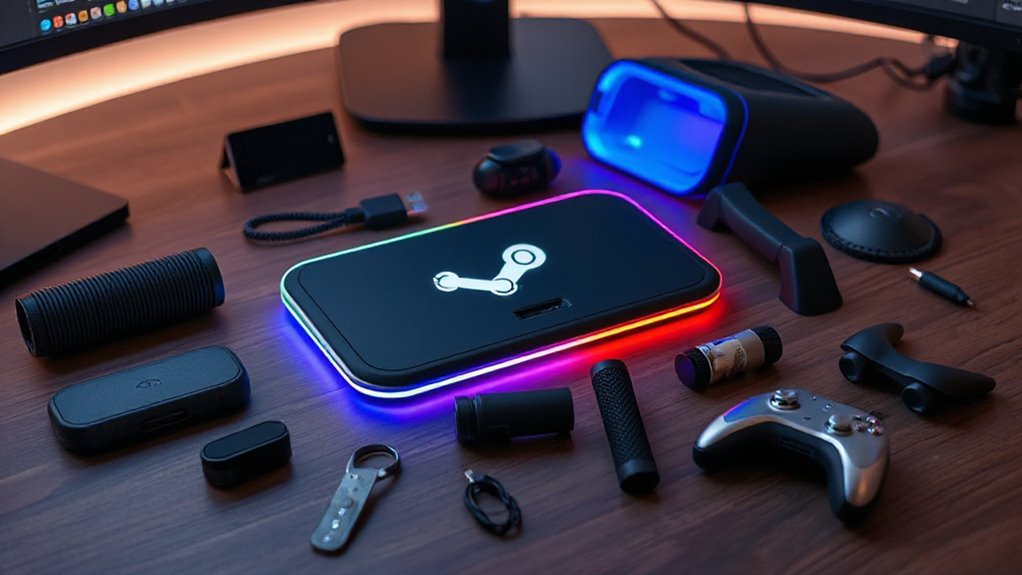

Finding the right accessories for your Steam Deck can significantly enhance your gaming experience, whether you’re upgrading power, protection, or connectivity. The best overall pick, the JSAUX 6-in-1 Docking Station, offers versatile connectivity, making it ideal for those who want a one-stop solution. For added durability, the Syntech Silicone Case provides excellent protection, while budget-conscious gamers might prefer the JSAUX 45W USB-C Charger for fast power on the go. Each accessory category involves tradeoffs between features, price, and portability. Keep reading to see which options best suit your needs and how they compare across key criteria.

Get the latest gadgets delivered free with Prime
- Fast, free delivery on millions of items
- Prime Video, Amazon Music and more included
- Member-only deals all year
Complete the kit



Key Takeaways
- Versatile docking stations like the JSAUX 6-in-1 excel for users needing multiple ports and 4K output.
- Protection accessories such as silicone cases are vital for durability but may add bulk or reduce access to ports.
- Power accessories like the JSAUX 45W charger are essential for fast charging, especially during travel, but come with compatibility considerations.
- Carrying cases vary greatly in size and protection level, so choose based on portability versus storage capacity.
- Not all accessories are compatible with OLED and LCD models; verify fit before purchasing.
| JSAUX 45W USB-C Charger for Steam Deck and More with 5FT Cable |  | Best Overall Charger for Versatile Fast Charging | Power Output: 45W | Cable Length: 5 feet | Compatibility: Steam Deck, Nintendo Switch, Galaxy S series, iPhone, Pixel, LG G series, iPad Pro, MacBook, and more | VIEW ON AMAZON | See Our Full Breakdown |
| JSAUX 2-Pack Ultra HD Screen Protector for Steam Deck OLED/LCD |  | Best Screen Protection for Clarity and Fingerprint Resistance | Compatibility: Steam Deck LCD & OLED | Size: 7-inch | Material: Tempered glass | VIEW ON AMAZON | See Our Full Breakdown |
| JSAUX PC0104 ModCase Compatible with Steam Deck |  | Best Modular Protection with Impact Resistance | Compatibility: Steam Deck OLED (2023/2024+) and LCD | Material: Eco-friendly PC-ABS and TPU | Includes: Detachable front cover, metal kickstand, silicone strap | VIEW ON AMAZON | See Our Full Breakdown |
| JSAUX 6-in-1 Docking Station for Steam Deck, ROG Ally X, Legion Go |  | Best Multi-Function Dock for Connectivity and Performance | HDMI Output: 4K@120Hz | Power Delivery: 100W | USB Ports: 3 x USB 3.0 | VIEW ON AMAZON | See Our Full Breakdown |
| Syntech Protective Silicone Case for Steam Deck OLED & LCD – Gray |  | Best Protective Silicone Case for Grip and Dust Resistance | Compatibility: Steam Deck OLED & LCD | Material: Recycled silicone | Color: Gray | VIEW ON AMAZON | See Our Full Breakdown |
| Anker Steam Deck Dock, 6-in-1 4K@60Hz HDMI Docking Station for Steam Deck |  | Best Overall Dock for Versatile Connectivity and High-Resolution Output | Number of ports: 6 | HDMI resolution: 4K@60Hz | Power Delivery: 100W | VIEW ON AMAZON | See Our Full Breakdown |
| JSAUX Cooling Fan for Steam Deck and Steam Deck OLED with Stand |  | Best Cooling Solution for Overheating Prevention During Intense Gaming | Compatibility: Steam Deck and Steam Deck OLED | Cooling Capacity: Reduces temperature by 8-15°C in 4-8 minutes | Operation Time: Up to 5 hours at lower speed | VIEW ON AMAZON | See Our Full Breakdown |
| JSAUX Carrying Case for Steam Deck and ROG Ally |  | Best Protective Case for Portable Storage and Transport | Compatible Devices: Steam Deck (OLED), ROG Ally, PlayStation Portal Remote Player | Material: EVA shell | Features: Large capacity, double zipper, fleece compartment, reinforced handle, Velcro straps | VIEW ON AMAZON | See Our Full Breakdown |
| JSAUX Carrying Case for Steam Deck and Steam Deck OLED | 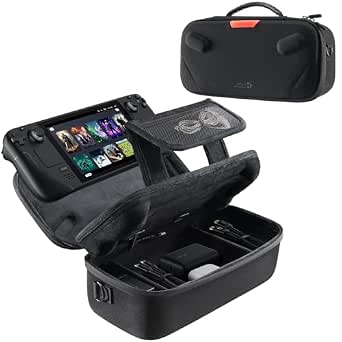 | Best Dual-Layer Storage for Organized Travel | Compatibility: Steam Deck and Steam Deck OLED | Storage Layers: Dual layer | Cable Port: Built-in | VIEW ON AMAZON | See Our Full Breakdown |
| JSAUX ModCase for Steam Deck and Steam Deck OLED |  | Best Modular Protection with Customization Options | Material: Eco-friendly PC-ABS and silicone | Compatibility: Steam Deck (2022) and Steam Deck OLED | Included Accessories: Cooling fan, metal stand, strap, face cover | VIEW ON AMAZON | See Our Full Breakdown |
| JSAUX 5-in-1 Docking Station for Steam Deck, ROG Ally X, Legion Go |  | Best Versatile Dock for High-Performance Connectivity | HDMI Output: 4K@120Hz | Power Delivery: 100W | USB Ports: 2x USB A 2.0 | VIEW ON AMAZON | See Our Full Breakdown |
| steam deck accessorie | Compatibility |
|---|---|
| JSAUX 45W USB-C Charger for St | Steam Deck, Nintendo Switch, Galaxy S series, iPhone, Pixel, LG G series, iPad Pro, MacBook, and more |
| JSAUX 2-Pack Ultra HD Screen P | Steam Deck LCD & OLED |
| JSAUX PC0104 ModCase Compatibl | Steam Deck OLED (2023/2024+) and LCD |
| JSAUX 6-in-1 Docking Station f | Steam Deck, ROG Ally X, Legion Go, MSI Claw |
| Syntech Protective Silicone Ca | Steam Deck OLED & LCD |
| Anker Steam Deck Dock | — |
| JSAUX Cooling Fan for Steam De | Steam Deck and Steam Deck OLED |
| JSAUX Carrying Case for Steam | — |
| JSAUX Carrying Case for Steam | Steam Deck and Steam Deck OLED |
| JSAUX ModCase for Steam Deck a | Steam Deck (2022) and Steam Deck OLED |
| JSAUX 5-in-1 Docking Station f | Steam Deck LCD/OLED, ROG Ally / Ally X, Legion Go / Go S, MSI Claw |
More Details on Our Top Picks
JSAUX 45W USB-C Charger for Steam Deck and More with 5FT Cable
This charger stands out for its ability to power multiple devices, including the Steam Deck, Switch, and laptops like MacBooks, making it a flexible choice for users with varied gadgets. Compared with dedicated chargers like the JSAUX 2-Pack Screen Protector, it offers broader utility, though it’s limited to 45W, so it won’t handle the highest-power devices. The long, durable cable enhances convenience, especially in setups where space is tight. Its intelligent output adjustment and safety protections make it reliable for daily use, but it doesn’t support full-speed charging for newer consoles like Switch 2, which could be a drawback for gamers seeking maximum performance.
Pros:- Supports fast charging for multiple devices including Steam Deck and Switch
- Long, durable 5-foot cable with high flexibility
- Intelligent power adjustment with multiple safety protections
Cons:- Does not support full-speed charging for Switch 2
- Limited to 45W maximum output, not suitable for high-power devices
Best for: Steam Deck owners who want a versatile, reliable charger for multiple devices and long cable reach.
Not ideal for: Users needing a high-power charger for demanding devices or full-speed charging for the latest consoles.
- Power Output:45W
- Cable Length:5 feet
- Compatibility:Steam Deck, Nintendo Switch, Galaxy S series, iPhone, Pixel, LG G series, iPad Pro, MacBook, and more
- Protection Features:Over-current, over-voltage, overheating, short-circuit protection
- Certification:UL 62368-1
Our verdict“This charger makes the most sense for Steam Deck users who value compatibility and safety over the highest wattage output.”
JSAUX 2-Pack Ultra HD Screen Protector for Steam Deck OLED/LCD
This tempered glass protector excels with its edge-to-edge coverage and high transparency, ensuring that visuals stay crisp and clear, unlike plastic alternatives that may dull image quality. Compared with the Silicone Case, it offers better visual clarity but is more fragile if not installed carefully. Its easy application with a guiding frame minimizes bubbles, and the oleophobic coating helps resist fingerprints—ideal for frequent gamers. However, it’s only compatible with Steam Deck models, so owners of other devices will need different options, and improper installation could lead to cracks or chips.
Pros:- High transparency for clear display
- Easy to install with guiding frame
- Edge-to-edge full coverage and fingerprint resistance
Cons:- Only compatible with Steam Deck models
- May be more fragile than plastic protectors if not reinforced properly
Best for: Steam Deck owners who prioritize screen clarity and fingerprint resistance without sacrificing full coverage.
Not ideal for: Users seeking a more durable, impact-resistant screen solution or those with non-Steam Deck models.
- Compatibility:Steam Deck LCD & OLED
- Size:7-inch
- Material:Tempered glass
- Features:Edge-to-edge, easy to install, 99.99% transparency, oleophobic coating
- Reinforced:At 500℃
Our verdict“This screen protector is perfect for gamers who want unobstructed visuals and fingerprint resistance on their Steam Deck.”
JSAUX PC0104 ModCase Compatible with Steam Deck
The ModCase offers a comprehensive protective solution with its impact-resistant body, detachable front shell, and modular accessories, making it ideal for those who want a customizable, rugged case. Compared with the Silicone Case, the ModCase provides more impact protection but adds some bulk, which might hinder portability. Its modular design includes a metal kickstand for stable tabletop gaming and a silicone strap for attaching accessories or extending battery life. The need for assembly and limited color options are minor tradeoffs for its versatility. This case is ideal for users who prioritize durability and customizability over sleekness.
Pros:- Full access to buttons and controls with sleek design
- Includes a detachable front cover for screen protection
- Modular metal kickstand for stable tabletop use
- Versatile silicone strap for accessories and extended battery
Cons:- May add bulk compared to standard cases
- Requires assembly of modular components
Best for: Steam Deck users seeking a rugged, customizable case with impact protection and modular features.
Not ideal for: Players wanting a slim, lightweight case or those who prefer a simple, non-assemble protective cover.
- Compatibility:Steam Deck OLED (2023/2024+) and LCD
- Material:Eco-friendly PC-ABS and TPU
- Includes:Detachable front cover, metal kickstand, silicone strap
- Warranty:12 months
- Support:24/7 customer support
Our verdict“This case is best for gamers who need robust, customizable protection and are comfortable with some setup effort.”
JSAUX 6-in-1 Docking Station for Steam Deck, ROG Ally X, Legion Go
This docking station shines with its ability to deliver 4K@120Hz visuals via HDMI, fast 100W charging, and multiple USB ports, making it a versatile hub for gaming and media. Compared with the simpler Anker 6-in-1 dock, it offers higher refresh rate support and more power, ideal for users who want the best performance from their devices. However, its limited compatibility—excluding ROG Xbox Ally or Xbox Ally X—means it’s not suited for all handhelds. The necessity of a 100W charger for full Turbo support and its specific device focus are tradeoffs that might limit flexibility for some users.
Pros:- Supports 4K@120Hz for smooth visuals
- Provides 100W fast charging to keep devices powered
- Multiple USB 3.0 ports and Gigabit Ethernet for versatile connectivity
Cons:- Not compatible with ROG Xbox Ally or Xbox Ally X
- Requires a dedicated 100W charger for full Turbo Mode
Best for: Power users who want high-quality video output and fast charging in a single compact hub for Steam Deck or similar handhelds.
Not ideal for: Owners of non-compatible devices like the ROG Xbox Ally or those requiring more universal dock options.
- HDMI Output:4K@120Hz
- Power Delivery:100W
- USB Ports:3 x USB 3.0
- Ethernet:Gigabit Ethernet
- Compatibility:Steam Deck, ROG Ally X, Legion Go, MSI Claw
Our verdict“This dock is ideal for gamers who prioritize high-refresh-rate video output and fast charging in one hub for compatible handhelds.”
Syntech Protective Silicone Case for Steam Deck OLED & LCD – Gray
This silicone case offers all-around protection with its eco-friendly, recycled material, guarding against scratches, dust, and scuffs while enhancing grip through ergonomic design. Compared with the modular JSAUX ModCase, it’s more lightweight and simple, prioritizing everyday protection over modularity or impact resistance. Its non-slip thumb grips improve control during extended sessions, and the precise cutouts allow easy access to all ports. However, it may not fit perfectly if the screen protector is too thick, and it’s limited in color options, which could be a concern for style-conscious users. This pick is best for casual gamers seeking a durable, comfortable grip.
Pros:- Provides comprehensive protection against scratches and dust
- Enhanced grip and ergonomic design for extended use
- Includes non-slip thumb grips for better control
- Made from durable, eco-friendly recycled silicone
Cons:- Not compatible with the official Steam Deck dock
- May not fit perfectly if the screen protector is too thick
Best for: Steam Deck owners who need reliable protection and improved handling during long gaming sessions.
Not ideal for: Players wanting a rugged, impact-resistant case with modular features or multiple colors.
- Compatibility:Steam Deck OLED & LCD
- Material:Recycled silicone
- Color:Gray
- Design Features:Enhanced alignment, all-around protection, grip convex domes, ergonomic design, enlarged Type-C cutout, non-slip thumb grips
Our verdict“This silicone case is best for casual gamers prioritizing grip, protection, and eco-friendly materials for everyday use.”
Anker Steam Deck Dock, 6-in-1 4K@60Hz HDMI Docking Station for Steam Deck
This dock stands out for its comprehensive set of features that enhance both gaming and streaming. Unlike the JSAUX 6-in-1 Docking Station, which offers similar port options, the Anker dock adds the advantage of 4K@60Hz high-resolution visuals and 100W Power Delivery for fast charging, making it ideal for extended sessions. The inclusion of Gigabit Ethernet supports stable online gaming, a benefit over some USB-C hubs with limited networking. The tradeoff is its USB-C data port doesn’t support screen mirroring, which could be a drawback for users wanting full display control. Its compact design and built-in cable make it a tidy addition to your setup, but it’s limited specifically to Steam Deck compatibility, so it may not suit other devices.
Pros:- Supports 4K@60Hz high-resolution output for crisp visuals
- Fast 100W Power Delivery for quick charging
- Multiple USB ports and Gigabit Ethernet for versatile connectivity
- Compact design with integrated cable
Cons:- USB-C data port doesn’t support screen mirroring
- Limited to Steam Deck compatibility
Best for: Power users who prioritize high-resolution output, fast charging, and multiple connectivity options for Steam Deck.
Not ideal for: Users seeking a universal dock compatible with multiple devices beyond Steam Deck or needing SD card slots.
- Number of ports:6
- HDMI resolution:4K@60Hz
- Power Delivery:100W
- Ethernet:1Gbps
- USB-A ports:2 at 5Gbps
- USB-C port:1 at 5Gbps
- Cable length:8.66 inches (220 mm)
Our verdict“This dock is best suited for gamers and streamers who want high-quality visuals and reliable, multi-port connectivity for Steam Deck.”
JSAUX Cooling Fan for Steam Deck and Steam Deck OLED with Stand
This cooling fan excels at quick, effective temperature reduction, outperforming passive solutions like the Syntech Silicone Case. Its ability to lower device temperature by 8-15°C in just minutes makes it a strong choice for gamers who push their Steam Deck hard. The integrated stand adds convenience, allowing for hands-free play, similar to the stand feature on the JSAUX Carrying Case for Steam Deck but with a focus on cooling. The adjustable speed offers a customizable balance between cooling power and noise, yet at higher wind speeds, the fan can become noticeably louder, which might be distracting for some users. Manual adjustments are necessary to optimize cooling, making it less automatic than some competitors.
Pros:- Effectively reduces device temperature quickly
- Integrated stand allows hands-free gaming
- Adjustable speed for personalized cooling and noise control
- Operation time up to 5 hours at lower speed
Cons:- Louder noise at higher wind speeds
- Requires manual adjustment for best performance
Best for: Gamers who frequently play demanding titles and need to prevent overheating without sacrificing comfort or convenience.
Not ideal for: Casual players or those sensitive to noise, as higher speeds can produce loud fan noise.
- Compatibility:Steam Deck and Steam Deck OLED
- Cooling Capacity:Reduces temperature by 8-15°C in 4-8 minutes
- Operation Time:Up to 5 hours at lower speed
- Adjustable Speed:0-100%
Our verdict“This cooling fan makes the most sense for serious gamers seeking efficient thermal management during extended play.”
JSAUX Carrying Case for Steam Deck and ROG Ally
This case offers robust protection and ample storage, making it ideal for users who need to carry multiple accessories along with their Steam Deck or ROG Ally. Compared to the JSAUX ModCase, which emphasizes modular customization, this model focuses on impact resistance with its EVA shell and reinforced handle. Its large capacity and secure zipper ensure that accessories stay safe during travel, but it’s not compatible with ASUS ROG Xbox Ally or Legion GO Series, limiting its versatility. It doesn’t include accessories, so buyers need to purchase those separately, which could be a downside for some.
Pros:- Provides comprehensive impact and scratch protection
- Large capacity for multiple accessories
- Reinforced handle for easy portability
- Secure zipper prevents accidental spills
Cons:- Not compatible with some newer or different models like ASUS ROG Xbox Ally
- Accessories not included
Best for: Travelers and gamers who need a durable, impact-resistant case with plenty of room for accessories.
Not ideal for: Minimalists or those who prefer a lightweight, compact case without extra capacity or rigid protection.
- Compatible Devices:Steam Deck (OLED), ROG Ally, PlayStation Portal Remote Player
- Material:EVA shell
- Features:Large capacity, double zipper, fleece compartment, reinforced handle, Velcro straps
- Color:Black
Our verdict“Best suited for users who prioritize rugged protection and ample storage for traveling with their Steam Deck or ROG Ally.”
JSAUX Carrying Case for Steam Deck and Steam Deck OLED
This upgraded case emphasizes organization with dual-layer storage, similar to the JSAUX Carrying Case but with added features like a built-in cable port for charging on the go. Its durable, padded exterior offers solid protection, though it can feel bulky for users seeking ultra-lightweight solutions. The inclusion of a foldable stand enhances usability, especially for tabletop gaming, comparable to the stand on the Cooling Fan but with added convenience for portable use. The case’s size may be a drawback for those who prefer minimal packing, and accessories are not included, requiring separate purchase.
Pros:- Organized dual-layer storage for console and accessories
- Built-in cable port for charging during travel
- Durable exterior with soft padding for protection
- Foldable stand for convenient tabletop gaming
Cons:- Can be bulky for some portable needs
- Accessories not included
Best for: Travelers who want organized, dual-layer storage with convenient charging options and a foldable stand.
Not ideal for: Minimalists or lightweight travelers who prioritize portability over extensive organization.
- Compatibility:Steam Deck and Steam Deck OLED
- Storage Layers:Dual layer
- Cable Port:Built-in
- Includes:Right angle USB C to USB C cable
- Materials:Hard shell exterior, padded interior
- Additional Features:Foldable stand, secure straps, carry handle
Our verdict“Ideal for gamers seeking structured, protected, and organized storage with on-the-go charging capabilities.”
JSAUX ModCase for Steam Deck and Steam Deck OLED
This ModCase offers extensive protection and customization, making it ideal for tech-savvy users who want to tailor their setup. Its modular design allows adding or removing components such as the cooling fan, metal bracket, or strap, which sets it apart from simpler cases like the JSAUX Carrying Case. The inclusion of a cooling fan helps prevent overheating during intense gaming, but the case may feel bulky because of its modular parts, and assembly is required, which might not appeal to all. It’s a solid choice for those who value flexibility and enhanced airflow but at the expense of convenience.
Pros:- Provides durable, comprehensive protection
- Modular design allows customization and upgrades
- Includes cooling fan to reduce overheating
- Precise cut-outs and airflow enhancements
Cons:- May be bulky due to modular components
- Requires assembly and some technical know-how
Best for: Enthusiasts wanting full protection with the ability to customize and upgrade their case components.
Not ideal for: Casual users or those seeking a simple, lightweight case without assembly or customization.
- Material:Eco-friendly PC-ABS and silicone
- Compatibility:Steam Deck (2022) and Steam Deck OLED
- Included Accessories:Cooling fan, metal stand, strap, face cover
- Features:Modular design, customizable components, precise port cut-outs
Our verdict“Best suited for experienced users who want a highly customizable and protective case with added cooling for their Steam Deck.”
JSAUX 5-in-1 Docking Station for Steam Deck, ROG Ally X, Legion Go
The JSAUX 5-in-1 Docking Station stands out for its ability to deliver ultra-smooth visuals with 4K@120Hz output, making it ideal for gamers who prioritize high refresh rates and crisp graphics during streaming or gaming sessions. Compared with the Anker 6-in-1 Dock, this model offers a more streamlined selection of ports, focusing on quality over quantity, but sacrifices some expandability. Its 100W Power Delivery ensures your device remains charged during intense use, though it requires a robust 100W charger to function at full Turbo Mode, which could be a hassle for some users. The inclusion of a reliable Ethernet port guarantees stable online play, a feature often missing or less robust in other docks like the JSAUX 6-in-1. However, it’s not compatible with ROG XBOX Ally / XBOX Ally X, limiting its versatility for certain users. Overall, this dock makes the most sense for gamers who demand high-quality video output and stable network connections, willing to invest in a powerful charger.
Pros:- Supports ultra-smooth 4K@120Hz visuals, ideal for high-quality streaming and gaming
- Provides fast 100W charging to sustain extended use without interruption
- Includes a dedicated Ethernet port for reliable online connectivity
- Compatible with multiple handheld gaming consoles, offering versatility
Cons:- Not compatible with ROG XBOX Ally / XBOX Ally X, limiting device support
- Requires a 100W charger for optimal Turbo Mode performance, which may not be included
Best for: Power users seeking a high-performance, all-in-one docking station for extended gaming or streaming sessions on multiple handheld devices.
Not ideal for: Casual gamers or users with ROG XBOX Ally / XBOX Ally X who need broader compatibility or a more budget-friendly option.
- HDMI Output:4K@120Hz
- Power Delivery:100W
- USB Ports:2x USB A 2.0
- Ethernet:RJ45 port
- Compatibility:Steam Deck LCD/OLED, ROG Ally / Ally X, Legion Go / Go S, MSI Claw
Our verdict“This dock is perfect for gamers who prioritize high-resolution visuals and stable network connections, provided they can meet the power requirements.”

How We Picked
Products were selected based on their functionality, build quality, and compatibility with the Steam Deck. We prioritized accessories that enhance usability, whether through improved power delivery, protection, or connectivity options. Price-to-value ratio was also a key consideration, ensuring options cater to different budgets without sacrificing reliability. To rank these products, we evaluated user reviews, feature sets, and the breadth of compatibility, aiming to highlight both versatile and specialized accessories that genuinely improve the Steam Deck experience.Factors to Consider When Choosing Steam Deck Accessories
When choosing accessories for your Steam Deck, it’s important to consider how each item complements your gaming habits. Factors like compatibility, build quality, and additional features can make or break your experience. Understanding these elements helps you avoid common pitfalls such as overpaying for unnecessary features or buying accessories that don’t fit your model. Balancing cost with functionality ensures you get the best value and longevity from your purchases.Compatibility and Fit
Ensuring an accessory is compatible with your specific Steam Deck model is fundamental. OLED and LCD versions can differ slightly in dimensions or port placement, affecting cases, docks, and screen protectors. Buying incompatible accessories can lead to frustration, such as misaligned ports or inadequate protection. Always double-check product specifications and reviews for compatibility details before purchase, especially if you own a newer or limited edition model.
Build Quality and Durability
Because accessories are subject to frequent handling, investing in well-made, durable options pays off. A high-quality case or dock not only lasts longer but also provides better protection against drops and scratches. Cheaper or poorly manufactured accessories might seem tempting initially, but they often fail quickly, leading to additional expenses. Prioritize brands with good reputations and positive user feedback on durability and fit.
Functionality and Features
Decide what features matter most to you—whether it’s fast charging, multiple ports, or enhanced cooling. Docking stations with 4K output and multiple USB ports are ideal for connecting peripherals or external displays, but they tend to be more expensive and bulkier. Conversely, simple screen protectors or silicone cases focus on protection with minimal added features. Clarifying your priorities helps avoid unnecessary spending on features you won’t use.
Portability and Size
If you frequently travel or commute with your Steam Deck, portability becomes a crucial factor. Compact, lightweight accessories like slim cases or small chargers are preferable, but they may offer fewer features or less protection. Larger docks and cases provide more functionality and protection but can be cumbersome to carry. Balance your need for convenience against the level of protection and features you require for your lifestyle.
Price and Value
While premium accessories often come with advanced features or superior build quality, they are not always necessary for every user. Conversely, budget options may save money upfront but could compromise durability or functionality. Aim for a balanced approach—spend enough to get reliable, durable accessories that meet your needs without overpaying for extras you won’t use. Reading user reviews can help identify the best value options within your budget.
Frequently Asked Questions
Do I need a docking station for my Steam Deck?
A docking station can significantly expand your Steam Deck’s connectivity, allowing you to connect external displays, keyboards, mice, and other peripherals easily. If you often use your Steam Deck as a portable gaming device but want a desktop-like experience at home, a docking station makes this transition seamless. However, if you mainly use your Steam Deck for on-the-go gaming and minimal connections, a simple hub or no dock at all might suffice, helping you save space and cost.
Are screen protectors necessary for Steam Deck OLED models?
Screen protectors can prevent scratches, smudges, and minor impacts, especially if you carry your Steam Deck in a bag or backpack. OLED screens are more susceptible to burn-in and visible damage, making protection even more important. However, some users prefer to skip protectors to avoid potential glare or reduced screen clarity. Choosing a high-quality, compatible screen protector generally provides the best balance between protection and maintaining display quality.
What should I look for in a carrying case?
A good carrying case should balance protection, size, and accessibility. Look for cases with shock-absorbing materials and secure closures to safeguard against drops and bumps. Consider the internal layout—padded compartments for the Steam Deck and space for accessories like chargers and cables. Portability is also key; a compact, lightweight case suits travelers, while larger cases are better for those who want to carry extra gear or protect the device during storage.
Is it worth paying more for a premium dock or charger?
Premium docks and chargers often offer higher build quality, faster charging capabilities, and more versatile connectivity options. If you frequently connect your Steam Deck to external displays or peripherals, investing in a high-end dock can improve your overall experience and reliability. However, for casual use, a mid-range or budget dock may suffice, providing essential features without the premium price tag. Evaluate your usage patterns and compatibility needs before committing.
How do I choose accessories for different Steam Deck models?
Always verify the specific model of your Steam Deck—OLED or LCD—as some accessories are designed exclusively for certain versions. Dimensions, port placement, and screen size can vary, affecting fit and compatibility. Reading product descriptions and reviews can clarify whether an accessory is suitable for your model. When in doubt, choose accessories explicitly labeled for your version to avoid issues with fit or functionality, especially for cases, screen protectors, and docks.