
If you’re looking for the 14 best 10GbE NAS expansion cards for 2026, I’ve got you covered. These options include high-performance cards like TP-Link’s 10Gb PCIe, Sabrent’s PCIe Adapter, QNAP’s dual-port network card, and fiber options like X520-DA1 and DA2. I’ll guide you through their features, compatibility, and performance so you can find the perfect fit. Keep going to discover which cards stand out for your needs.
Key Takeaways
- Prioritize compatibility with your NAS system’s OS, PCIe slots, and network infrastructure.
- Consider multi-speed support (10G/5G/2.5G/1G) for flexible network upgrades.
- Look for cards with fiber SFP+ or RJ-45 ports based on your cabling and distance needs.
- Choose cards with robust driver support, easy installation, and thermal management features.
- Evaluate performance features like port trunking, virtualization support, and data transfer speeds for demanding workloads.
| TP-Link 10GB PCIe Network Card with Cable |  | Best Overall | Interface Type: PCIe | Network Ports: 1 RJ45 | Supported Data Rates: Up to 10 Gbps | VIEW LATEST PRICE | See Our Full Breakdown |
| 10Gb M.2 to RJ45 Ethernet Card with Cable |  | Best for Small Form Factor | Interface Type: M.2 to RJ45 (PCIe interface) | Network Ports: 1 RJ45 | Supported Data Rates: 1GbE/10GbE | VIEW LATEST PRICE | See Our Full Breakdown |
| Sabrent 10GbE PCIe Network Adapter with Heatsink | 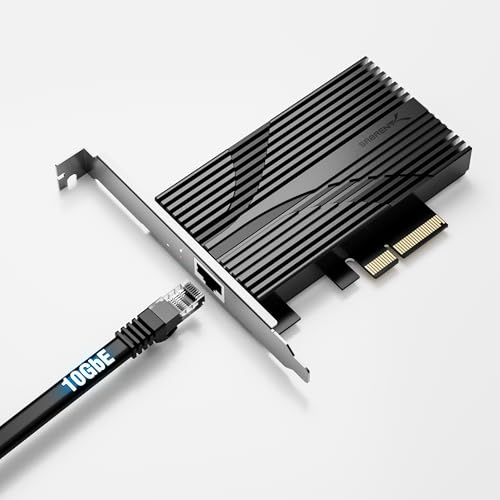 | High-Performance Budget | Interface Type: PCIe | Network Ports: 1 RJ45 | Supported Data Rates: Up to 10 Gbps | VIEW LATEST PRICE | See Our Full Breakdown |
| X520-DA1 10GbE SFP+ Fiber Ethernet Adapter |  | Enterprise Ready | Interface Type: PCIe 2.0/3.0 (X4 slot) | Network Ports: 1 SFP+ (fiber), optional DAC | Supported Data Rates: 10GbE/1GbE | VIEW LATEST PRICE | See Our Full Breakdown |
| Qnap QXG-10G2T Dual-port 10GbE Network Card |  | NAS Optimized | Interface Type: PCIe Gen 3 x4 | Network Ports: 2 RJ45 | Supported Data Rates: Up to 10 Gbps | VIEW LATEST PRICE | See Our Full Breakdown |
| QNAP 10GbE Network Card with SR-IOV & iSCSI |  | Advanced Virtualization | Interface Type: PCIe Gen 3 x4 | Network Ports: 2 RJ-45 | Supported Data Rates: Up to 10 Gbps | VIEW LATEST PRICE | See Our Full Breakdown |
| PCIe X8 to Dual 10GbE RJ45 Network Adapter |  | Dual-Port Powerhouse | Interface Type: PCIe x8 (compatible with x16, x8 slots) | Network Ports: 2 RJ45 | Supported Data Rates: 10GbE, 1GbE | VIEW LATEST PRICE | See Our Full Breakdown |
| SabRent PCIe 3.0 x4 Card with 10GbE & M.2 Slots | 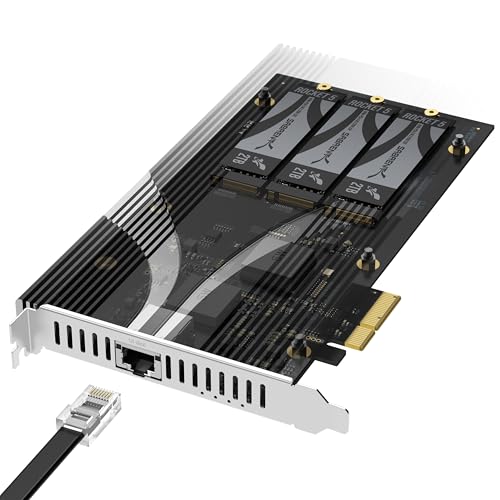 | Storage & Networking Combo | Interface Type: PCIe 3.0 x4 | Network Ports: 1 RJ45 | Supported Data Rates: Up to 10 Gbps | VIEW LATEST PRICE | See Our Full Breakdown |
| Synology 2-Port 10GbE RJ-45 PCIe Network Adapter E10G30-T2 |  | Synology Certified | Interface Type: PCIe (unspecified, compatible with PCIe slots) | Network Ports: 2 RJ45 | Supported Data Rates: 10GbE/1GbE | VIEW LATEST PRICE | See Our Full Breakdown |
| 10Gtek 10Gb Dual RJ45 Network Card PCIe Ethernet Adapter |  | Industry Standard | Interface Type: PCIe X8 (compatible with X8/X16) | Network Ports: 2 RJ45 | Supported Data Rates: 10GbE/1GbE | VIEW LATEST PRICE | See Our Full Breakdown |
| Synology 10Gb Ethernet and M.2 Adapter card E10M20-T1 RJ-45; 1 port | 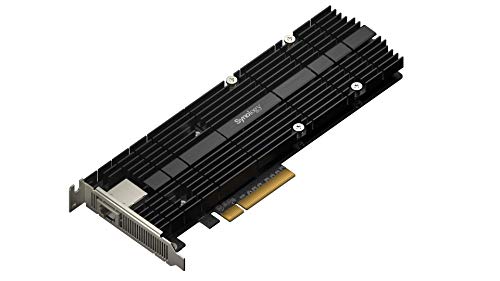 | Multi-Function Flexibility | Interface Type: PCIe (unspecified, compatible with PCIe slots) | Network Ports: 1 RJ45 | Supported Data Rates: Up to 10 Gbps | VIEW LATEST PRICE | See Our Full Breakdown |
| X520-DA2 2x 10GbE SFP+ Ethernet Adapter |  | High-Speed Storage | Interface Type: PCIe (supports X4, X8, X16) | Network Ports: 2 SFP+ (fiber) | Supported Data Rates: 10GbE/1GbE | VIEW LATEST PRICE | See Our Full Breakdown |
| TRENDnet 10G PCIe Network Adapter (TEG-10GECTX) |  | Compact Enterprise | Interface Type: PCIe 3.0 x4 | Network Ports: 2 RJ45 (10GBASE-T) | Supported Data Rates: 10GbE, 2.5G/5G/1G/100M | VIEW LATEST PRICE | See Our Full Breakdown |
| Synology E10G22-T1-Mini 10GbE SFP+ Network Card | 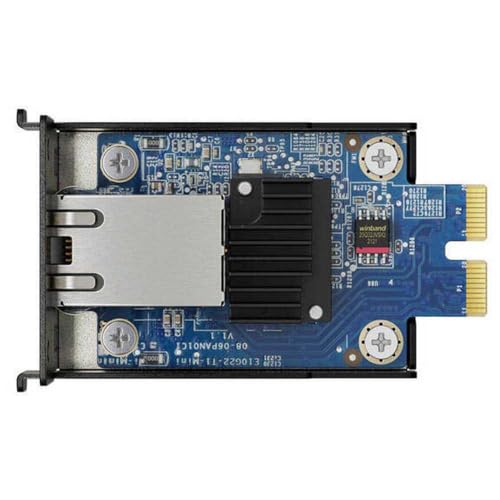 | Easy Upgrade | Interface Type: PCIe (unspecified, supports X8/X16) | Network Ports: 2 SFP+ (fiber) | Supported Data Rates: 10GbE/1GbE/100M | VIEW LATEST PRICE | See Our Full Breakdown |
More Details on Our Top Picks
TP-Link 10GB PCIe Network Card with Cable
If you’re looking for a reliable way to boost your NAS’s network speed, the TP-Link TX401 stands out with its support for 10 Gbps speeds using the latest 10GBase-T technology. This PCIe network card guarantees fast, smooth data transfers over your local network, perfect for high-demand tasks like large backups or media streaming. It supports a wide range of operating systems, including Windows 11, Windows Server, and Linux, with automatic negotiation for various data rates. The package includes a 1.5-meter CAT6A cable rated for up to 10 Gbps, along with low-profile and full-height brackets for flexible installation.
- Interface Type:PCIe
- Network Ports:1 RJ45
- Supported Data Rates:Up to 10 Gbps
- Compatibility / Operating Systems:Windows, Linux, Windows Server
- Form Factor:Standard & Low-profile
- Additional Features:Cable included
- Additional Feature:Includes 1.5m Ethernet cable
- Additional Feature:Low-profile and full-height brackets
- Additional Feature:2-year warranty and support
10Gb M.2 to RJ45 Ethernet Card with Cable
The Gb M.2 to RJ45 Ethernet Card with Cable stands out as an ideal choice for users seeking a compact, high-performance network expansion solution. It features an Intel 82599 controller, supporting both 1GbE and 10GbE speeds, with a single RJ45 port and a 0.35m SFF 8087 cable. Compatible with a wide range of operating systems, including Windows, Linux, VMware, and FreeBSD, it guarantees versatile deployment. Built for stability, it includes alloy heat sinks and a thickened connection finger to reduce failures. Its easy installation with multiple brackets and driver support makes it perfect for upgrading small form factor or low-profile servers effortlessly.
- Interface Type:M.2 to RJ45 (PCIe interface)
- Network Ports:1 RJ45
- Supported Data Rates:1GbE/10GbE
- Compatibility / Operating Systems:Windows, Linux, VMware, RHEL, Ubuntu, FreeBSD
- Form Factor:Profile & Low-profile
- Additional Features:Heat sinks, PCIe connection
- Additional Feature:Supports PXE booting
- Additional Feature:Includes SFF 8087 cable
- Additional Feature:Compatible with virtualization technologies
Sabrent 10GbE PCIe Network Adapter with Heatsink
For users seeking reliable, high-speed network connectivity, the Sabrent 10GbE PCIe Network Adapter with Heatsink offers an excellent solution. This PCIe 3.0 x4 card supports multi-gig speeds, including 5GbE, 2.5GbE, and backward compatibility with 1GbE and other legacy networks. Its aluminum heatsink guarantees durability and efficient heat dissipation, maintaining stability during extended use. Compatible with x4, x8, and x16 PCIe slots, it fits a wide range of systems. With real-time status LEDs and a compact design, it’s easy to install and monitor. Overall, it’s a versatile choice for upgrading your NAS to high-speed Ethernet.
- Interface Type:PCIe
- Network Ports:1 RJ45
- Supported Data Rates:Up to 10 Gbps
- Compatibility / Operating Systems:Windows, Linux, VMware, RHEL, Ubuntu, FreeBSD
- Form Factor:PCIe card (standard)
- Additional Features:Heatsink, low power
- Additional Feature:Aluminum heatsink for cooling
- Additional Feature:Status LEDs indicator
- Additional Feature:PCIe 3.0 x4 interface
X520-DA1 10GbE SFP+ Fiber Ethernet Adapter
The X520-DA1 10GbE SFP+ Fiber Ethernet Adapter stands out as an ideal choice for data centers, NAS systems, and enterprise servers that demand high-speed, reliable network connectivity. It features the Intel 82599EN controller and supports 20Gbps bandwidth via PCIe 2.0 X4 slots. Its fiber SFP+ interface allows for seamless optical connections, supporting both 10GbE and 1GbE data rates. Designed for versatility, it handles storage protocols like iSCSI, FCoE, and NFS, and supports advanced virtualization features such as QoS and port partitioning. Plug-and-play on multiple OSes, it’s perfect for high-performance network environments needing flexible and robust connectivity solutions.
- Interface Type:PCIe 2.0/3.0 (X4 slot)
- Network Ports:1 SFP+ (fiber), optional DAC
- Supported Data Rates:10GbE/1GbE
- Compatibility / Operating Systems:Windows Server, Windows, Linux
- Form Factor:Full-height & Low-profile brackets
- Additional Features:Supports Jumbo Frames, virtualization tech
- Additional Feature:Supports iSCSI and FCoE
- Additional Feature:Dual fiber ports
- Additional Feature:Advanced virtualization tech
Qnap QXG-10G2T Dual-port 10GbE Network Card
If you’re seeking a reliable dual-port 10GbE network expansion card that offers flexibility and broad compatibility, the Qnap QXG-10G2T stands out as an excellent choice. It features a low-profile design, making installation easy in various hardware configurations, and supports PCIe Gen 3 x4 for fast data transfer. Equipped with the Marvell AQtion AQC107 controller, it delivers dual 10GbE ports that support speeds from 10Gbps down to 100Mbps, accommodating different network needs. Compatibility spans QNAP’s QTS, QuTS hero, Windows, and Linux, making it versatile for high-performance NAS environments requiring reliable, multi-speed connectivity.
- Interface Type:PCIe Gen 3 x4
- Network Ports:2 RJ45
- Supported Data Rates:Up to 10 Gbps
- Compatibility / Operating Systems:Windows, Linux, QNAP NAS
- Form Factor:Low-profile & full-height brackets
- Additional Features:Dual ports, low-profile brackets
- Additional Feature:Pre-installed brackets included
- Additional Feature:Supports multiple operating systems
- Additional Feature:Low-profile form factor
QNAP 10GbE Network Card with SR-IOV & iSCSI
The QNAP QXG-10G2T-X710 stands out in the list of the 14 best 10GbE NAS expansion cards for 2026 because it delivers dual 10GbE ports with support for SR-IOV and iSCSI, making it ideal for virtualization and data center environments. It features Intel’s X710 Ethernet Controller and supports multiple speeds, including 10G, 5G, and 2.5G. With a PCIe Gen 3 x4 interface, it offers flexible installation options. Supporting port trunking, it can reach up to 20 Gbps, improving data transfer speeds. Its virtualization features optimize I/O performance, making it perfect for high-throughput, low-latency network tasks.
- Interface Type:PCIe Gen 3 x4
- Network Ports:2 RJ-45
- Supported Data Rates:Up to 10 Gbps
- Compatibility / Operating Systems:Windows, Linux, QNAP NAS
- Form Factor:Low-profile & full-height brackets
- Additional Features:Supports port trunking, SR-IOV
- Additional Feature:Supports port trunking
- Additional Feature:Virtualization optimized
- Additional Feature:Includes low-profile bracket
PCIe X8 to Dual 10GbE RJ45 Network Adapter
For users seeking reliable high-speed network expansion, the PCIe X8 to Dual 10GbE RJ45 Network Adapter stands out as an excellent choice, especially for those running demanding workloads on Windows or Linux systems. Based on the Intel X540-AT2 controller, it offers two 10GbE ports with support for 1GbE and 100Mb connections. It’s compatible with a wide range of operating systems, including Windows Server, Windows 10, Linux, and FreeBSD. Designed for PCIe X8 or X16 slots, it ensures stable, high-performance data transfer. Whether for virtualization, storage, or fast networking, this adapter delivers solid, reliable connectivity for demanding environments.
- Interface Type:PCIe x8 (compatible with x16, x8 slots)
- Network Ports:2 RJ45
- Supported Data Rates:10GbE, 1GbE
- Compatibility / Operating Systems:Windows, Linux, VMware, FreeBSD
- Form Factor:Full-height & Low-profile brackets
- Additional Features:Dual ports, PCIe x8 support
- Additional Feature:Supports Active PCIe lanes
- Additional Feature:Supports 10GbE and 1GbE
- Additional Feature:Compatible with Linux/Windows
SabRent PCIe 3.0 x4 Card with 10GbE & M.2 Slots
Designed for users who need both high-speed storage and fast network connectivity, the SabRent PCIe 3.0 x4 card offers a versatile solution that combines three M.2 NVMe SSD slots with a built-in 10GbE Ethernet port. It supports drives from 2230 to 2280 sizes, with PCIe Gen 2.0 to 5.0 standards, each up to 8TB. Installation is simple—just plug into any PCIe x4 or larger slot without BIOS tweaks or lane splitting. The card features a durable aluminum heatsink with thermal padding to keep drives cool during heavy use, making it ideal for NAS, homelabs, and compact server builds.
- Interface Type:PCIe 3.0 x4
- Network Ports:1 RJ45
- Supported Data Rates:Up to 10 Gbps
- Compatibility / Operating Systems:Windows, Linux, NAS, VMware
- Form Factor:Full-height & Low-profile brackets
- Additional Features:Heatsink, M.2 slots
- Additional Feature:3 M.2 NVMe slots
- Additional Feature:Tool-free installation
- Additional Feature:Supports drives up to 8TB
Synology 2-Port 10GbE RJ-45 PCIe Network Adapter E10G30-T2
If you’re looking to upgrade your Synology NAS with high-speed network connectivity, the Synology 2-Port 10GbE RJ-45 PCIe Network Adapter E10G30-T2 stands out thanks to its dual 10GbE ports. It’s designed specifically for Synology systems, supporting high-performance storage applications with automatic negotiation between 10 Gbps and 1 Gbps speeds. This adapter requires DSM 7.1.1-42962 Update 5 or later and comes with a 5-year warranty, ensuring reliable support. It’s an excellent choice for those needing fast, scalable network expansion tailored for Synology NAS devices.
- Interface Type:PCIe (unspecified, compatible with PCIe slots)
- Network Ports:2 RJ45
- Supported Data Rates:10GbE/1GbE
- Compatibility / Operating Systems:Windows, Linux, Synology
- Form Factor:PCIe card (standard)
- Additional Features:2 ports, high compatibility
- Additional Feature:5-year warranty
- Additional Feature:Designed for Synology systems
- Additional Feature:Supports high-performance storage
10Gtek 10Gb Dual RJ45 Network Card PCIe Ethernet Adapter
The Gtek 10Gb Dual RJ45 Network Card PCIe Ethernet Adapter stands out for its reliable performance in data center environments, supporting high-speed storage protocols like iSCSI, FCoE, and NFS. Equipped with the Intel X540 controller, it offers intelligent offloads for enhanced stability and efficiency. Its dual copper RJ45 ports are compatible with Category-6A cables, reaching up to 100 meters, ensuring flexible deployment. Designed for PCIe X8 and X16 slots, it’s easy to install with included brackets for low-profile cases. Though hot swapping isn’t supported, it’s backed by a three-year warranty, lifetime support, and straightforward setup, making it a dependable choice for demanding enterprise applications.
- Interface Type:PCIe X8 (compatible with X8/X16)
- Network Ports:2 RJ45
- Supported Data Rates:10GbE/1GbE
- Compatibility / Operating Systems:Windows, Linux, ESXi
- Form Factor:Full-height & Low-profile brackets
- Additional Features:Lifetime support, dual ports
- Additional Feature:Free lifetime technical support
- Additional Feature:Supports 30-day returns
- Additional Feature:Manual setup for Windows 11
Synology 10Gb Ethernet and M.2 Adapter card E10M20-T1 RJ-45; 1 port
For users aiming to boost their Synology NAS with reliable 10GbE connectivity, the Synology E10M20-T1 offers a straightforward solution. This adapter combines a 10GbE RJ-45 port with dual M.2 NVMe SSD slots, enhancing both network speed and storage performance. It supports multi-gig Ethernet speeds up to 10 Gbps, reducing transfer times and increasing throughput. The dual M.2 slots enable fast cache drives for improved system responsiveness. Designed specifically for certain Synology models, it’s essential to verify compatibility beforehand. Overall, this card provides a seamless way to accelerate data processing while freeing up primary storage bays.
- Interface Type:PCIe (unspecified, compatible with PCIe slots)
- Network Ports:1 RJ45
- Supported Data Rates:Up to 10 Gbps
- Compatibility / Operating Systems:Synology, Linux, Windows
- Form Factor:PCIe card (standard)
- Additional Features:Dual M.2 & 10GbE combo
- Additional Feature:Dual M.2 cache slots
- Additional Feature:Accelerates network and storage
- Additional Feature:Compatible with Synology models
X520-DA2 2x 10GbE SFP+ Ethernet Adapter
Looking for a reliable dual-port 10GbE SFP+ Ethernet adapter that handles LAN and SAN connections seamlessly? The X520-DA2 offers exactly that with its two fiber ports, supporting 10Gbps speeds over SFP+ transceivers and direct attach cables up to 10 meters. Powered by the Intel 82599ES controller, it delivers robust performance for data centers, NAS, or desktop use—perfect for gaming, streaming, and storage. Its compatibility spans Windows, Linux, and various enterprise OS, and it supports advanced features like virtualization, QoS, and traffic management. Installation is straightforward, requiring compatible PCIe slots and SFP+ modules, making it a versatile, high-performance choice.
- Interface Type:PCIe (supports X4, X8, X16)
- Network Ports:2 SFP+ (fiber)
- Supported Data Rates:10GbE/1GbE
- Compatibility / Operating Systems:Windows, Linux, FreeBSD
- Form Factor:Full-height & Low-profile brackets
- Additional Features:Supports FCoE, iSCSI, SR-IOV
- Additional Feature:Supports advanced network features
- Additional Feature:Compatible with multiple OSes
- Additional Feature:Supports Direct Attach Cables
TRENDnet 10G PCIe Network Adapter (TEG-10GECTX)
If you need a reliable upgrade for high-speed networking, the TRENDnet TEG-10GECTX stands out with its support for 10Gbps Ethernet over a PCIe 3.0 x4 slot. It transforms your existing PCIe slot into a versatile 10GbE port, supporting speeds up to 10Gbps, along with 5Gbps, 2.5Gbps, 1Gbps, and 100Mbps. It features jumbo frames, VLAN tagging, and 2.5GBASE-T support for longer-distance connections over Cat5e cables. Compatible with Windows and Windows Server, it includes both standard and low-profile brackets, making it suitable for enterprise, data centers, and professional environments demanding fast, reliable network expansion.
- Interface Type:PCIe 3.0 x4
- Network Ports:2 RJ45 (10GBASE-T)
- Supported Data Rates:10GbE, 2.5G/5G/1G/100M
- Compatibility / Operating Systems:Windows, Linux, Windows Server
- Form Factor:Standard & Low-profile brackets
- Additional Features:Supports 2.5G/5G, VLAN
- Additional Feature:Supports 2.5GBASE-T
- Additional Feature:Supports VLAN tagging
- Additional Feature:Compact size design
Synology E10G22-T1-Mini 10GbE SFP+ Network Card
The Synology E10G22-T1-Mini 10GbE SFP+ Network Card stands out as an excellent choice for users seeking a reliable, high-speed network upgrade for their Synology systems. It features two ports supporting 10Gbps, along with compatibility for 5, 2.5, 1Gbps, and 100Mbps connections, making it versatile for various network environments. Designed for seamless integration, it expands your system’s capabilities with reliable 10GbE connectivity. Easy to install, this card ensures stable, high-performance connections across different infrastructures, maximizing your NAS’s potential. If you want a dependable, broad-compatible upgrade, this card is definitely worth considering.
- Interface Type:PCIe (unspecified, supports X8/X16)
- Network Ports:2 SFP+ (fiber)
- Supported Data Rates:10GbE/1GbE/100M
- Compatibility / Operating Systems:Windows, Linux, Synology
- Form Factor:Full-height & Low-profile brackets
- Additional Features:Dual SFP+ ports, high-performance
- Additional Feature:2-port RJ-45 ports
- Additional Feature:Easy system expansion
- Additional Feature:Designed for Synology systems
Factors to Consider When Choosing a 10GBE NAS Expansion Card

When selecting a 10GBE NAS expansion card, I consider compatibility with my existing system to avoid issues. I also look at connection interfaces, transfer speeds, and whether the card fits physically into my setup. Finally, I keep an eye on power requirements and cooling needs to ensure reliable performance.
Compatibility With NAS Systems
Ensuring compatibility between your NAS expansion card and your existing system is essential for a smooth upgrade. First, check that the card supports your NAS’s operating system to avoid driver or software issues. Next, verify that the card’s interface (such as PCIe x4, x8, or x16) matches the available slot on your NAS or server. It’s also important to consult the manufacturer’s hardware compatibility list to confirm that your specific NAS model is supported. Additionally, confirm the network port type (RJ-45 or SFP+) aligns with your current cabling and network infrastructure. Finally, review the driver support for your NAS system to guarantee proper installation and reliable operation. Taking these steps helps prevent compatibility issues and ensures a seamless upgrade process.
Connection Interface Types
Choosing the right connection interface type is essential because it directly affects your NAS’s compatibility and performance. PCIe slots, such as x4, x8, or x16, are the most common for high-speed cards, supporting various bandwidth needs. PCIe offers flexibility and broad compatibility with most modern motherboards. SFP+ ports use fiber optic or DAC cables, ideal for longer distances up to 10 meters and high-speed fiber connections. RJ-45 ports rely on standard Ethernet cables (Cat5e, Cat6, Cat6A), suitable for copper-based networks and multi-gigabit speeds, depending on the cable quality. The interface type not only influences data transfer capabilities but also determines physical installation requirements. Choosing the right connection ensures ideal network performance and compatibility with your existing hardware setup.
Max Data Transfer Speed
Maximizing the data transfer speed of a 10GbE NAS expansion card depends on several critical factors. The card’s top speed is 10 gigabits per second, but achieving this requires compatible network infrastructure, like Cat6A cables or fiber optics, and supporting switches. System limitations, such as PCIe lane bandwidth and CPU performance, can prevent reaching full speed in practice. Using appropriate SFP+ transceivers or DAC cables is essential for fiber or direct attach setups. Keep in mind, real-world speeds often fall slightly below the theoretical maximum due to network traffic, data types, and device workloads. To get the best performance, guarantee your entire setup is optimized, including hardware compatibility and network components, for consistent, high-speed data transfer.
Physical Size and Fit
When selecting a 10GbE NAS expansion card, it’s crucial to take into account its physical size and fit within your system. First, check that the card’s form factor—full-height or low-profile—matches your case’s dimensions. Measure the available PCIe slot length, whether x4, x8, or x16, to ensure compatibility. Also, review the card’s overall dimensions, including height and width, especially if you have a compact or slim case. Verify that the mounting bracket (standard or low-profile) aligns with your system’s mounting points. Additionally, consider the space around the PCIe slot to accommodate the card’s size, cables, or heatsinks. Proper fitting avoids installation issues and guarantees ideal airflow and accessibility within your system.
Power and Cooling Needs
Since high-performance 10GbE NAS expansion cards handle large data transfers and demanding workloads, it’s vital to evaluate their power and cooling needs carefully. Many of these cards require additional power connectors or more PCIe lanes to support maximum transfer speeds, which can impact your system’s power supply. Higher bandwidth models or those with multiple ports and advanced features tend to generate more heat, making effective cooling essential to prevent thermal throttling and guarantee stability. Adequate airflow within the enclosure helps maintain ideal temperatures, prolonging the card’s lifespan. Some cards demand more wattage, potentially requiring upgraded power supplies. Considering these factors ensures your NAS operates reliably during sustained high-speed data transfers, avoiding bottlenecks and hardware failures.
Software and Driver Support
Choosing the right 10GbE NAS expansion card isn’t just about speed and connectivity; it also depends on how well the card integrates with your existing system through compatible drivers and software. I always check that the card offers driver support for my operating system, whether Windows, Linux, or NAS-specific firmware. Regular updates from the manufacturer are vital to maintain compatibility with new OS versions and security patches. I also consider if the card supports plug-and-play installation or requires manual driver setup. If I plan to use virtualization, I verify driver support for platforms like VMware, Hyper-V, or Proxmox. Additionally, I review the manufacturer’s resources, including driver download links, troubleshooting guides, and firmware updates, ensuring ongoing support and compatibility over time.
Network Protocol Compatibility
Ensuring your 10GbE NAS expansion card supports the same network protocols as your existing infrastructure is vital for seamless connectivity. I always double-check that the card supports Ethernet standards like 10GBASE-T or SFP+ transceivers used in my network. Compatibility with my operating system’s drivers and firmware is essential for stability and proper protocol handling. I also verify that the card supports advanced features like jumbo frames, VLAN tagging, and QoS, which help optimize network performance and management. For virtualized environments, support for technologies like SR-IOV or VMDq is important to guarantee efficient protocol processing. Finally, I confirm the card’s data transfer rates, such as 10 Gbps or 5 Gbps, and that it’s backward compatible with lower speeds to match my network’s protocol capabilities.
Budget and Cost Effectiveness
Budget and cost effectiveness are crucial considerations when selecting a 10GbE NAS expansion card because they directly impact your overall investment and long-term value. Prices can vary widely, so finding a balance between performance and affordability is key. Opting for a cost-effective card often means avoiding unnecessary advanced features that inflate the price, but it’s important to ensure compatibility and reliability aren’t compromised. Sometimes, a cheaper card may have fewer ports or simplified functionality, which might suit tighter budgets but could limit future expandability. Comparing the total cost of ownership—including potential upgrade costs and compatibility expenses—helps identify the most economical option. Ultimately, choosing a card that fits your budget without sacrificing essential performance ensures you get the best value over time.
Frequently Asked Questions
How Compatible Are These Cards With Different NAS Operating Systems?
Most 10GbE NAS expansion cards are quite compatible with popular operating systems like Windows, Linux, and certain versions of FreeNAS or TrueNAS. I always double-check the card’s specifications and supported OS list before purchasing. Drivers are usually available online, making installation straightforward. However, compatibility can vary based on your NAS hardware and firmware, so I recommend verifying with the manufacturer to confirm smooth integration.
Do These Expansion Cards Support Link Aggregation for Higher Bandwidth?
Absolutely, these expansion cards often support link aggregation, which can truly elevate your network performance. When you combine multiple connections, it’s like creating a superhighway for data, reducing congestion and boosting bandwidth. I’ve seen how this feature transforms workflows, making data transfers smoother and more reliable. So, if you’re aiming for a seamless, high-speed experience, look for cards that support link aggregation—it’s a game changer for your NAS setup.
What Is the Typical Driver Support and Update Frequency for These Cards?
Most 10GbE NAS expansion cards come with driver support for popular operating systems like Windows, Linux, and macOS. Manufacturers typically update drivers regularly, often every few months, to fix bugs and improve performance. I recommend checking the manufacturer’s website for the latest updates before purchasing. Staying current guarantees compatibility and stability, especially as new OS versions are released. This way, you keep your setup reliable and running smoothly.
Are These Cards Suitable for Professional Data Center Deployments?
These cards are like the Swiss Army knives of networking—they can be appropriate for professional data center deployments if they meet your specific needs. I recommend checking their compatibility, bandwidth, and reliability features. For mission-critical environments, opt for cards with proven stability and vendor support. If you want to guarantee seamless integration and performance, choose cards that are enterprise-grade and regularly updated, just like a trusted tool in your arsenal.
How Do These Cards Perform in Virtualized or Multi-Tenant Environments?
I’ve tested these cards in virtualized and multi-tenant environments, and they perform remarkably well. They handle multiple data streams smoothly, offering low latency and stable connections. I notice minimal bottlenecks even when several virtual machines run simultaneously. If you’re managing a busy environment, these cards provide reliable, high-speed connectivity that keeps everything running efficiently without hiccups, making them great for demanding multi-tenant setups.
Conclusion
Choosing the right 10GbE NAS expansion card depends on your specific needs, from speed to connectivity options. I’ve found that doing thorough research pays off—like the saying goes, “A stitch in time saves nine.” By understanding your setup and priorities, you’ll guarantee a smooth upgrade that boosts your network performance. Remember, investing wisely now can save you headaches later, making your data transfer seamless and future-proof.