To protect your identity online, use strong, unique passwords for each account, avoiding common or easy-to-guess options. Be cautious of phishing scams by verifying email sender details and not clicking suspicious links or attachments. Enable two-factor authentication whenever possible and regularly update your passwords, especially after breaches. Keep an eye on your accounts for any unusual activity. Staying vigilant and practicing these habits will help keep your digital identity safe—there’s more you can do below.
Key Takeaways
- Use complex, unique passwords for each account and consider a password manager for secure storage.
- Enable two-factor authentication to add an extra layer of security to your accounts.
- Be cautious of phishing emails and verify website URLs before entering personal information.
- Regularly update passwords and monitor accounts for suspicious activity.
- Educate yourself on common scams and stay informed about evolving online threats.
In today’s digital world, protecting your identity online is more important than ever. Every day, you face countless opportunities for cybercriminals to steal your personal information, whether through weak passwords or deceptive tactics like phishing. To stay safe, you need to develop strong habits around securing your online accounts and recognizing threats. Two essential components of online security are creating secure passwords and maintaining phishing awareness. These simple yet effective measures can considerably reduce your risk of falling victim to identity theft.
Start by understanding what makes a password secure. Avoid common or easily guessed passwords like “password123” or your birthdate. Instead, craft complex passwords that combine uppercase and lowercase letters, numbers, and special characters. Length matters, so aim for at least 12 characters. Consider using a passphrase—a sequence of words that’s easy for you to remember but hard for others to guess. Using a password manager can help you generate and store unique passwords for each of your accounts, so you don’t have to remember every single one. This way, even if one site gets compromised, your other accounts remain protected.
Phishing awareness is equally essential. Cybercriminals often trick you into revealing sensitive information through emails, texts, or fake websites that look legitimate. Always scrutinize the sender’s email address and look for signs of suspicious activity, such as misspellings, generic greetings, or urgent language that pressures you into acting quickly. Never click on links or download attachments from unknown sources. Instead, go directly to the website by typing its URL into your browser. Be wary of requests for personal data like passwords, social security numbers, or banking details—legitimate organizations typically don’t ask for this information via email.
Additionally, understanding the importance of high-quality projectors can help you create a secure and engaging digital environment for your home entertainment or work presentations. Combining secure passwords with phishing awareness creates a robust defense against online threats. Regularly update your passwords, especially if you hear about a data breach involving a site you use. Keep an eye on your accounts for unusual activity, and enable two-factor authentication where available. Educate yourself about common phishing tactics—such as fake login pages or emails that create a false sense of urgency—and always verify before sharing sensitive information. Maintaining a cautious attitude online, coupled with strong password practices and vigilance against phishing scams, helps you protect your identity and keeps your digital life secure. Remember, your proactive efforts are your best defense against cybercriminals trying to exploit vulnerabilities and steal your personal information.
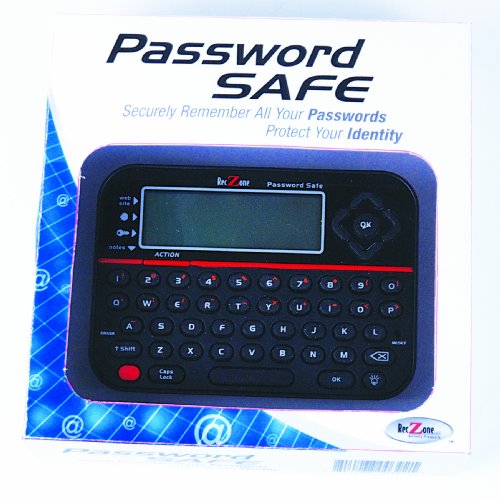
Password Safe
Deluxe Password Safe
As an affiliate, we earn on qualifying purchases.
As an affiliate, we earn on qualifying purchases.
Frequently Asked Questions
How Can I Recover My Online Accounts After a Breach?
If your accounts get breached, start by using password recovery options on the affected sites. Follow the prompts to reset your passwords securely. You’ll likely need to verify your identity through email or phone. Make sure to update your passwords to strong, unique ones afterward. Enable two-factor authentication if available to prevent future breaches. Regularly monitor your accounts for suspicious activity, and notify the service providers if needed.
What Are the Signs of Identity Theft?
You might notice signs of identity theft, like unfamiliar charges, unexpected bills, or emails about phishing scams. Keep an eye on your credit reports through credit monitoring services for suspicious activity. If you see anything strange, act quickly—change passwords, contact your bank, and report the issue. Staying vigilant helps catch theft early and minimizes damage, so regularly monitor your accounts to stay protected.
How Do I Remove Personal Info From Data Brokers?
Think of your personal info as delicate leaves drifting in the wind. To remove it from data brokers, you must act as the vigilant gardener. Use data removal methods like opting out through privacy legislation, submitting formal requests, and utilizing online tools. Staying proactive is key; regularly review your privacy settings and request data removal to keep your info from floating freely in the digital breeze.
Are Public Wi-Fi Networks Safe for Online Activities?
Public Wi-Fi networks pose significant risks for your online activities because hackers can intercept your data. To stay safe, avoid transmitting sensitive information or logging into critical accounts on these networks. Use encryption techniques like a Virtual Private Network (VPN) to protect your connection. Always verify the Wi-Fi network’s authenticity, and consider using your mobile data instead for added security, especially when handling private or financial information.
How Often Should I Change My Online Passwords?
You should change your online passwords regularly, ideally every three to six months. Good password management involves updating passwords often to reduce risks, especially if a breach occurs. Make sure your passwords are complex, combining uppercase and lowercase letters, numbers, and symbols. Avoid reusing passwords across sites. Regular updates, along with strong, unique passwords, help keep your online accounts secure and protect your identity from potential threats.

Thetis Pro FIDO2 Security Key, Two Factor Authentication NFC Security Key FIDO 2.0, Dual USB A Ports & Type C for Multi layered Protection (HOTP) in Windows/MacOS/Linux, Gmail, Facebook,Dropbox,Github
Check FIDO2 compatibility before purchase – Known limitations: ID Austria is not supported (requires FIDO2 Level 2). Windows…
As an affiliate, we earn on qualifying purchases.
As an affiliate, we earn on qualifying purchases.
Conclusion
By staying vigilant and following these simple tips, you can substantially reduce the risk of identity theft online. Remember, your personal information is valuable—so why leave it unprotected? Take control of your digital life today and make security a priority. After all, isn’t safeguarding your identity worth the small effort it takes? Stay alert, stay safe, and protect what’s yours in the digital world.

McAfee Total Protection Unlimited-Devices | AntiVirus Software 2026 for Windows PC & Mac, AI Scam Detection, VPN, Password Manager, ID Monitoring | 1-Year Subscription with Auto-Renewal | Download
DEVICE SECURITY – Award-winning McAfee antivirus, real-time threat protection, protects your data, phones, laptops, and tablets
As an affiliate, we earn on qualifying purchases.
As an affiliate, we earn on qualifying purchases.
Password Strength Checker by use of Machine Learning Strategies
As an affiliate, we earn on qualifying purchases.
As an affiliate, we earn on qualifying purchases.