

You can thoroughly declutter your digital space in a weekend by organizing your email inbox with clear folders, filters, and regular deletions. Review and clean up your cloud storage by removing duplicates and setting up a consistent folder structure. Consolidate files into one main location to make management easier. Establish habits like weekly reviews to keep everything tidy. Ready to transform your digital environment? Keep going to discover simple tips for long-term organization and efficiency.
Key Takeaways
- Schedule dedicated blocks of time over the weekend to focus solely on digital decluttering tasks.
- Start by organizing your email inbox with filters, folders, and deleting unnecessary messages.
- Review and clean up all cloud storage accounts, removing duplicates and outdated files.
- Consolidate files into a primary location for easier management and quick access.
- Establish a routine for weekly digital maintenance to maintain an organized digital environment.

Have you ever felt overwhelmed by the endless clutter in your digital life? If so, you’re not alone. Our inboxes overflow, files pile up, and it can feel like an impossible task to regain control. But with a focused effort over a weekend, you can transform chaos into order. The first step is tackling your email organization. You need to create a system that works for you—whether that’s sorting messages into clearly labeled folders, setting up filters to automatically direct incoming emails, or unsubscribing from newsletters you no longer read. Dedicate a chunk of time to delete unnecessary emails and archive important ones. This clears your inbox and makes future management easier. As you do this, try to keep a routine: check and organize your emails daily or weekly to prevent clutter from building up again.
Alongside email organization, it’s *vital* to optimize your cloud storage tips. Many people hoard files across multiple platforms, which leads to confusion and wasted space. During your decluttering session, review all your cloud storage accounts—like Google Drive, Dropbox, or OneDrive. Delete duplicates and outdated files, and establish a consistent folder structure for easy retrieval. Use descriptive names for your files so you can find them quickly later. Consider consolidating storage by moving files into one primary location if possible, which simplifies management. Don’t forget to empty your trash or recycle bin in these services so that deleted files don’t still occupy space. Implementing these cloud storage tips ensures your digital data is tidy and accessible, saving you time searching for files later. Additionally, understanding industry trends can help you stay updated on best practices and new tools for managing your digital environment effectively.
As you work through your digital declutter, keep in mind that organization isn’t a one-and-done task. Set aside a specific time each week to review and tidy up your digital spaces. This ongoing maintenance prevents clutter from creeping back in and helps you stay productive. Remember, the goal isn’t perfection but creating a system that reduces stress and saves time. With a little discipline, you’ll find that your inbox is manageable, your files are easy to find, and your overall digital environment feels much calmer. By dedicating a weekend to these steps—focusing on email organization and cloud storage tips—you’ll set yourself up for long-term success in maintaining a clutter-free digital life. Once you start, you’ll wonder why you waited so long to get things under control.

WEP 882D Soldering Iron Station 2-IN-1 SMD Hot Air Rework Station with 2 Spools of Solder Wire, 5 Soldering Tips, 3 Hot Air Nozzles, Brass Wool Tip Cleaner, Tweezers, Desoldering pump
2-IN-1: This 2-IN-1 rework station combines a soldering station with a hot air rework station in a super...
As an affiliate, we earn on qualifying purchases.
Frequently Asked Questions
How Often Should I Schedule Digital Decluttering Sessions?
You should schedule digital decluttering sessions every few months to keep your email management and social media cleanup under control. Regularly setting aside time helps prevent clutter from building up and makes it easier to stay organized. During these sessions, delete unnecessary emails, unfollow or mute unnecessary accounts, and clear out old files. Consistency keeps your digital space tidy, reduces stress, and improves your overall productivity.
What Tools Can Help Automate Digital Decluttering?
Ironically, automation tools actually make digital decluttering easier. You can use file management apps like Hazel or CleanMyMac to automatically sort, delete, or organize files. Cloud storage services like Google Drive and Dropbox also offer auto-sync features that keep your files tidy. By leveraging these automation tools, you save time, reduce clutter, and effortlessly maintain a clean digital space without the hassle of manual cleanup.
How Do I Organize Digital Files for Easier Access?
You should start by adopting consistent file naming conventions, like descriptive names and dates, to make locating files easier. Organize your files into clearly labeled folders based on categories or projects. Use cloud storage strategies, such as syncing folders across devices and leveraging services like Google Drive or Dropbox, to guarantee quick access and backup. Regularly review and tidy your files to maintain an organized system that’s simple to navigate.
What Privacy Concerns Should I Consider During Decluttering?
Did you know that 60% of data breaches are caused by human error? During decluttering, prioritize cybersecurity risks by ensuring your files are protected with data encryption. Be cautious about sharing personal info or unsecure links, and review app permissions. Keep your sensitive data private by regularly updating passwords and avoiding public Wi-Fi. These steps help you safeguard your information while decluttering efficiently.
Can Digital Decluttering Improve Productivity Long-Term?
Yes, digital decluttering can boost your long-term productivity. When you manage your email efficiently and do a social media detox, you reduce distractions and free up mental space. Regularly organizing your digital tools helps you stay focused and prioritize tasks better. Over time, this habits build a more streamlined workflow, making it easier to stay productive, motivated, and less overwhelmed in your daily routines.

8586D 2 In 1 Soldering Station, SMD Hot Air Rework Station LED Dual Digital Display with Heat Gun and Solder Iron Kit, Electric Soldering Iron Station with Temperature Control, Auto Sleep Functions
2-In-1 Soldering Stations Kit: The 2-in-1 soldering station contains soldering iron station and hot air rework station. They...
As an affiliate, we earn on qualifying purchases.
Conclusion
By the end of your digital declutter weekend, you’ll have cleared the clutter like a gust of fresh air sweeping through a dusty room. Think of it as hitting the reset button for your mind and devices, making everything feel lighter and more manageable. As you finish, you’ll realize that a tidy digital space isn’t just about organization—it’s about reclaiming your time and peace of mind. Embrace the clarity, and let your digital life flourish anew.
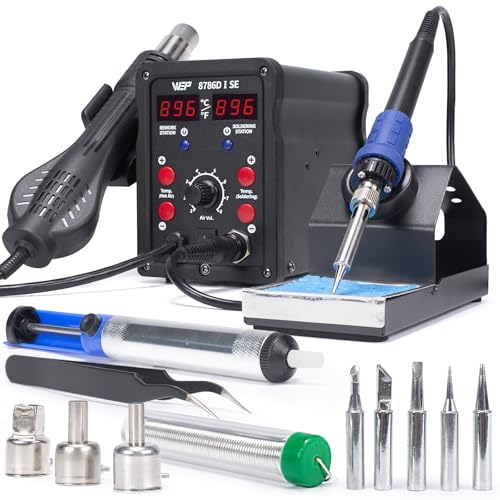
WEP 8786D-I SE Hot Air Soldering Iron Station Kit 2-IN-1 for Rework, Desoldering with Lead-Free Solder Wire, 5 Soldering Tips, 3 Hot Air Nozzles,Tweezers, Desoldering Pump
2-IN-1: With this soldering iron station you get both the soldering station with hot air rework station in...
As an affiliate, we earn on qualifying purchases.

YIHUA 8786D I 2 in 1 Hot Air Rework and Soldering Iron Station with °F /°C, Cool/Hot Air Conversion, Digital Temperature Correction and Sleep Function
A Dual System with Advanced Designs - This station combines soldering station and hot air rework station for...
As an affiliate, we earn on qualifying purchases.