
In 2026, I recommend top gaming routers like the ASUS ROG Rapture GT-BE98 PRO with speeds up to 30 Gbps and advanced game optimization, and the TP-Link BE6500 offering 6.5 Gbps with MU-MIMO for smooth multitasking. The GL.iNet WiFi 7 Router and TP-Link Tri-Band options also shine in multi-device homes with robust coverage and security. If you want an in-depth exploration of the best choices and features, keep exploring—there’s plenty more to discover.
Key Takeaways
- Prioritize routers with Wi-Fi 7 technology supporting speeds up to 6.5 Gbps for seamless gaming and streaming across multiple devices.
- Look for models with MU-MIMO, OFDMA, and Multi-Link Operation for efficient multi-device connectivity and reduced latency.
- Choose routers with high-gain antennas, beamforming, and mesh support for strong, reliable coverage in large multi-floor homes.
- Opt for devices with dedicated gaming ports, QoS, and game optimization features to minimize lag and ensure stable gameplay.
- Ensure robust security features like TP-Link HomeShield and VPN support for safe and protected gaming environments.
GL.iNet WiFi 7 Router with 5 Gigabit Ethernet Ports
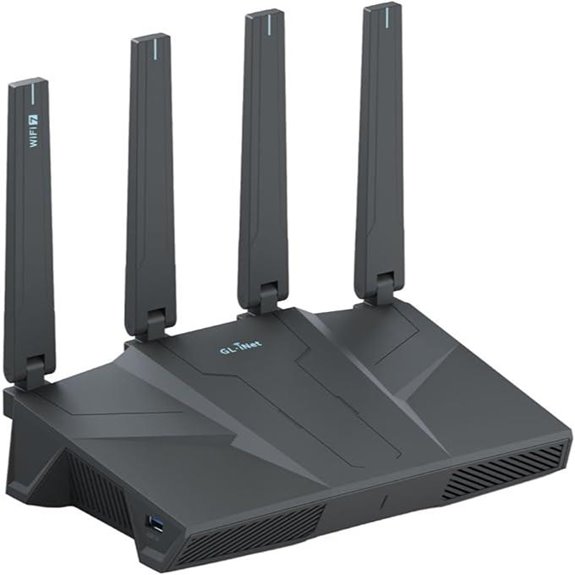
If you have a large home with multiple devices demanding fast, reliable internet, the GL.iNet WiFi 7 Router with 5 Gigabit Ethernet Ports is an excellent choice. It supports Wi-Fi 7 speeds up to 6.5 Gbps, perfect for 4K/8K streaming, gaming, and video calls. Advanced features like Multi-Link Operation and enhanced OFDMA improve speed and reduce latency, even in crowded environments. With coverage up to 2,500 square feet and support for over 100 devices, it’s built for high-demand homes. Plus, with five 2.5G Ethernet ports, setup is straightforward, ensuring reliable wired and wireless performance for your entire household.
ASUS ROG Rapture GT-BE98 PRO Gaming Router
https://m.media-amazon.com/images/I/71mCbhfOTJL._AC_SX679_.jpg
The ASUS ROG Rapture GT-BE98 PRO Gaming Router stands out as an excellent choice for serious gamers and households with multiple devices demanding high-speed, stable connections. It supports WiFi 7 with 320MHz channels in the 6 GHz band and 4096-QAM, delivering speeds up to 30 Gbps. Its multi-link operation ensures seamless data transfer across bands, while advanced external dual-feeding antennas boost coverage and signal strength. Wired connectivity is versatile, featuring dual 10G ports and quad 2.5G ports for high-speed wired devices. With game-optimized features like Triple-Level Game Acceleration and Mobile Game Mode, plus robust security and mesh support, it’s a powerhouse for any multi-device home.
TP-Link Wi-Fi 7 Router Archer BE230 (BE3600)
https://m.media-amazon.com/images/I/51lkapOm9kL._AC_SX679_.jpg
The TP-Link Wi-Fi 7 Router Archer BE230 (BE3600) stands out as an ideal choice for gamers and busy households needing robust performance for multiple devices. Powered by Wi-Fi 7, it offers faster speeds with Multi-Link Operation and increased reliability through Multi-RUs. Dual-band speeds reach up to 3.6 Gbps, perfect for 4K/8K streaming, AR/VR gaming, and heavy multitasking. Its 2.0 GHz quad-core processor handles traffic efficiently, minimizing lag. With four high-gain antennas, beamforming, and support for up to 60 devices over 2,000 sq. ft., it guarantees seamless, high-speed connectivity across your entire home.
TP-Link WiFi 7 Gaming Router (BE6500)
https://m.media-amazon.com/images/I/61d731U4QVL._AC_SX679_.jpg
Designed for serious gamers and high-demand households, the TP-Link WiFi 7 Gaming Router (BE6500) delivers blazing-fast speeds of up to 6.5 Gbps, making it an ideal choice for multi-device homes that stream, game, and work simultaneously. Equipped with a quad-core 2.0 GHz CPU and advanced Wi-Fi chipset, it supports multi-gig connections via 2.5 Gbps WAN and LAN ports. Its six antennas with Beamforming technology ensure coverage up to 2,600 sq. ft. and support for around 90 devices. Features like MU-MIMO, OFDMA, and game prioritization optimize network efficiency, providing low latency, seamless streaming, and an enhanced gaming experience across all your devices.
White Tea Eau de Parfum 3.4oz
https://m.media-amazon.com/images/I/51U3s4A6yZL._AC_SX679_.jpg
If you’re searching for a sophisticated scent that captures elegance and freshness, White Tea Eau de Parfum 3.4oz offers a refined choice. This fragrance combines light, crisp notes of white tea with subtle floral and citrus hints, creating a clean yet luxurious aroma. Its 3.4oz size makes it perfect for everyday wear or special occasions. The scent is both calming and invigorating, making it versatile for any setting. Whether you want to feel refreshed during the day or leave a lasting impression at an evening event, White Tea Eau de Parfum balances sophistication with simplicity effortlessly.
TP-Link AXE5400 WiFi 6E Router with Tri-Band
https://m.media-amazon.com/images/I/61H4eNHnzcL._AC_SX679_.jpg
For gamers or households with multiple devices demanding fast, reliable internet, the TP-Link AXE5400 WiFi 6E Router with Tri-Band stands out thanks to its impressive speeds and advanced technology. It offers up to 5400 Mbps across three bands—6 GHz, 5 GHz, and 2.4 GHz—giving you the bandwidth needed for smooth gaming, streaming, and video calls. Its WiFi 6E introduces the new 6 GHz band, reducing latency and boosting responsiveness. With a powerful 1.7 GHz quad-core CPU and 512 MB memory, it handles many devices simultaneously. Plus, features like OneMesh and TP-Link HomeShield enhance coverage and security, making it a top choice for modern homes.
GL.iNet Flint 2 WiFi 6 Gaming Router with Ethernet
https://m.media-amazon.com/images/I/51CImYagh1L._AC_SX679_.jpg
The GL.iNet Flint 2 WiFi 6 Gaming Router with Ethernet stands out for its ability to support over a hundred devices simultaneously, making it an ideal choice for multi-device homes that demand reliable, high-speed connectivity. It offers dual 2.5G Ethernet ports compatible with fiber optic modems, ensuring stable wired connections. Supporting WiFi 6 with speeds up to 6 Gbps, it handles 4K streaming, gaming, and video calls effortlessly. With 8-stream Wi-Fi 6, DDR4 1GB RAM, and 8GB storage, it delivers rapid data processing. Plus, its VPN support and low latency optimize gaming and streaming, making it a versatile, high-performance router.
TP-Link AX1800 WiFi 6 Router with Mesh and Alexa
https://m.media-amazon.com/images/I/51NPaIorJiL._AC_SX679_.jpg
The TP-Link AX1800 WiFi 6 Router with Mesh and Alexa stands out as an excellent choice for multi-device homes that prioritize seamless connectivity and smart home integration. It uses Wi-Fi 6 technology, delivering up to 1.8 Gbps speeds, with 1200 Mbps on the 5 GHz band and 574 Mbps on the 2.4 GHz band. Its advanced OFDMA technology supports many devices simultaneously, while Beamforming and four antennas ensure strong coverage. Compatible with major ISPs and supporting secure VPN options, it’s easy to set up with the Tether app. Plus, it works effortlessly with Alexa, making smart home control simple and reliable.
TP-Link Tri-Band WiFi 7 Router with 10G Port
https://m.media-amazon.com/images/I/71YPQSmFH8L._AC_SX679_.jpg
A standout choice for multi-device households seeking cutting-edge speed and reliable coverage is the TP-Link Tri-Band WiFi 7 Router with a 10G port. It leverages WiFi 7’s advanced technology, supporting speeds up to 5,765 Mbps on the 6 GHz band, perfect for 4K/8K streaming and gaming. With coverage up to 2,600 sq. ft. and six antennas with Beamforming, it guarantees strong signals throughout large homes. The router includes multi-gigabit ports, including a 10 Gbps WAN/LAN, for high-speed wired connections. Plus, its security features, like TP-Link HomeShield, make setup easy and keep your network protected.
TP-Link Tri-Band Wi-Fi 7 Gaming Router (BE11000)
https://m.media-amazon.com/images/I/61IkXyJtWUL._AC_SX679_.jpg
For gamers seeking ultra-fast, stable connections across multiple devices, the TP-Link Tri-Band Wi-Fi 7 Gaming Router (BE11000) stands out with its advanced tri-band technology. It supports Wi-Fi 7 with speeds up to 5764 Mbps on 6 GHz, 4320 Mbps on 5 GHz, and 574 Mbps on 2.4 GHz, thanks to Multi-Link Operation (MLO). Its multi-gig ports—including 5 Gbps WAN and LAN—enable reliable wired connections. Designed for gaming, it features WTFast optimization, a dedicated gaming port, and customizable RGB lighting. Plus, HomeShield security and EasyMesh support make managing and expanding your network simple, ensuring seamless, high-performance gaming across your entire home.
Factors to Consider When Choosing a Gaming Router for Multi-Device Homes
When choosing a gaming router for a multi-device home, I focus on speed and bandwidth capacity to keep everything running smoothly. I also consider device compatibility and coverage area to guarantee everyone stays connected without dead zones. Finally, I look at network security features and how easy it is to set up, so I can protect my network without hassle.
Speed and Bandwidth Capacity
In multi-device homes, speed and bandwidth capacity are crucial for ensuring smooth gaming experiences without lag or interruptions. High-speed routers supporting Wi-Fi 7 can deliver combined speeds of 6.5 Gbps or more, which is essential for fast data transfer across multiple devices. Bandwidth is measured in Mbps or Gbps, and higher values mean better support for demanding activities like gaming and streaming simultaneously. Technologies like Multi-Link Operation (MLO) let devices use multiple frequency bands at once, boosting overall throughput. A router’s ability to handle many devices without lag depends on its maximum concurrent support, often between 60 and over 100 devices. Features like OFDMA and MU-MIMO further improve bandwidth efficiency, reducing congestion and enhancing overall network performance.
Device Compatibility
Choosing a gaming router for a busy household requires more than just fast speeds; it’s about making sure it can handle all your devices smoothly. First, verify the router supports the latest Wi-Fi standards like Wi-Fi 6 or Wi-Fi 7, which are vital for efficient multi-device management. Check that it can support over 60 or even 90 devices simultaneously, especially in large homes. Compatibility with various devices—gaming consoles, smartphones, tablets, and smart home gadgets—is essential for seamless integration. Also, confirm security protocols like WPA3 or VPN support to keep all connections safe. Finally, consider if the router supports mesh or extender compatibility, making it easier to expand your network without sacrificing performance. This way, every device stays connected and performs at its best.
Coverage Area
Ensuring your gaming router covers the entire home is essential for a smooth, lag-free experience across all devices. You want a router with enough range to reliably serve every room, especially in larger homes. Look for models with high-gain antennas and beamforming technology to boost signal strength and focus coverage where needed. If your home spans over 2,000 to 3,000 square feet, choose a router that explicitly states it can handle that area. For multi-story or complex layouts, consider mesh networking options to extend coverage seamlessly across floors or distant rooms. Keep in mind that thick walls and obstacles can reduce signal strength, so opt for routers with higher range capabilities to guarantee consistent performance throughout your entire home.
Network Security Features
Ever wonder how to keep your gaming network secure amid multiple devices? Modern gaming routers come equipped with advanced security features that help protect your network from cyber threats. WPA3 encryption is essential, offering stronger protection against unauthorized access. Built-in VPN support allows you to securely access your home network remotely, safeguarding your data over the internet. Parental controls and content filtering give you control over online activity, creating a safer environment for kids. Security suites like TP-Link HomeShield provide real-time threat detection, malware protection, and IoT device security, giving you peace of mind. Remember, regular firmware updates are vital—they patch vulnerabilities and keep your network secure against emerging threats.
Ease of Setup
Setting up a gaming router in a busy, multi-device home doesn’t have to be a complicated task. Look for models that offer quick, straightforward setup processes, like mobile apps or web interfaces with step-by-step guidance. Clear tutorials and support resources can make initial configuration smoother, especially if you’re new to networking. Choose routers that easily integrate with your existing network, whether it’s a mesh system or multiple devices, to save time and frustration. User-friendly features like touchscreen controls, LED indicators, or simple dashboards also help with ongoing management. Additionally, routers supporting automatic firmware updates and requiring minimal configuration steps reduce setup complexity. With the right features, you’ll have your gaming network up and running in no time, even in a busy, multi-device household.
Gaming Optimization Tools
When choosing a gaming router for a busy, multi-device household, focusing on optimization tools that prioritize smooth, lag-free gameplay is essential. Look for routers with dedicated QoS or game traffic prioritization features, which guarantee your gaming packets get top priority, minimizing lag. Some models include game server acceleration tools like WTFast or GPN, reducing ping and improving connection stability. Advanced routers support bandwidth management technologies such as MU-MIMO and OFDMA, allowing multiple devices to connect simultaneously without slowing down your gaming experience. Features like port forwarding and dedicated gaming ports help optimize data flow directly to your gaming devices, boosting performance. Many gaming routers also offer customizable RGB lighting and real-time network monitoring, letting you personalize and optimize your gaming setup easily.
Multiple Connectivity Ports
Optimizing your gaming setup goes beyond software features; having the right number and type of ports on your router makes a significant difference. Multiple connectivity ports, like Ethernet and USB, allow direct wired connections to consoles, PCs, and other devices, reducing latency and boosting stability. High-speed ports, such as 2.5 Gbps or 10 Gbps, ensure your router can handle large data transfers and support several bandwidth-heavy devices simultaneously. A router with multiple ports also makes network expansion easier, whether through switches or extenders, creating a more adaptable gaming environment. Dedicated gaming or prioritized ports can optimize traffic flow, ensuring low latency for multiple devices. Plus, a variety of ports supports diverse home devices like smart TVs, NAS units, and VR headsets, making your setup more holistic and future-proof.
Mesh Network Support
If you have a large or multi-story home, mesh network support becomes essential for maintaining a strong, consistent Wi-Fi signal across every corner. Mesh systems let multiple routers or extenders work together seamlessly, ensuring reliable coverage and reducing dead zones. A mesh-enabled gaming router can automatically switch devices between nodes, keeping your connection stable and lag-free during gameplay. Support for Wi-Fi 6E or Wi-Fi 7 means higher device density and faster speeds over the entire area, perfect for busy households. Plus, mesh compatibility makes expanding your network simple—just add more nodes without complicated setup. Features like synchronized management, a unified SSID, and seamless roaming enhance your gaming experience, especially when multiple devices are connected and competing for bandwidth.
Frequently Asked Questions
How Do Gaming Routers Prioritize Traffic for Multiple Devices Simultaneously?
Gaming routers prioritize traffic for multiple devices by using Quality of Service (QoS) settings, which assign higher bandwidth to gaming and streaming devices. I configure these settings to guarantee my gaming packets get priority, reducing lag. The router automatically manages traffic based on the activity type and device importance, so I can enjoy smooth gameplay even when other devices are streaming or downloading.
What Security Features Are Essential for Multi-Device Gaming Households?
In a multi-device gaming household, security isn’t optional—it’s essential. I look for routers with robust firewalls, WPA3 encryption, and automatic firmware updates to keep threats at bay. Parental controls also give me peace of mind, letting me manage access and monitor activity. These features create a secure environment where my gaming and connected devices are protected from cyber threats, letting me focus on winning without worry.
How Does Wi-Fi 7 Improve Gaming Performance Over Wi-Fi 6?
Wi-Fi 7 markedly boosts gaming performance over Wi-Fi 6 by offering faster speeds, lower latency, and better reliability. It uses wider channels and advanced modulation to handle more data simultaneously, reducing lag and stutter during gameplay. I’ve noticed smoother experiences and quicker downloads with Wi-Fi 7, especially in busy households. If you’re serious about gaming, upgrading to Wi-Fi 7 means a more seamless, responsive connection that keeps you ahead in the game.
Can Gaming Routers Support Smart Home Device Integration?
Yes, gaming routers can support smart home device integration. I’ve found that many modern gaming routers come with built-in smart home hubs or compatibility features, making it easy to connect devices like smart lights, locks, and thermostats. This integration helps streamline your network, reducing clutter and ensuring all your devices work seamlessly together. Plus, it simplifies setup and management, giving you a more connected and efficient smart home experience.
What Is the Average Lifespan of a High-End Gaming Router?
Think of a high-end gaming router like a fine sports car—built for performance and durability. On average, I’d say these routers last about 3 to 5 years with proper care. Their advanced hardware and frequent updates help extend their lifespan, but eventually, technology outpaces even the best. Regular firmware updates and careful handling can keep your router running smoothly for most of that time.
Conclusion
Choosing the right gaming router can transform your multi-device home experience, ensuring smooth gameplay and seamless streaming. With options like WiFi 7, multi-gig ports, and advanced mesh technology, there’s a router for every need. But aren’t we all just searching for that perfect connection that keeps us ahead of lag and buffering? Investing in the right gear means never missing out on the fun—so why settle for less when the best is within reach?