
If you’re looking to optimize your remote work setup in 2025, I recommend considering a mesh WiFi system that offers extensive coverage, fast speeds, and reliable device support. Systems like the TP-Link Deco X55 with Wi-Fi 6, the Tenda BE3600 with Wi-Fi 7, or the Netgear Orbi WiFi 6E deliver seamless connectivity across large areas. Choosing the right one depends on your space, device needs, and budget. Keep exploring to find the perfect setup for your home office.
Key Takeaways
- Choose Wi-Fi 6 or Wi-Fi 7 systems like Deco X55 or Tenda BE3600 for faster, more reliable remote work connections.
- Opt for mesh systems with ample coverage, such as Deco X55 or Netgear Orbi, to eliminate dead zones in large home offices.
- Prioritize models with wired backhaul options, like Deco X55, for stable, high-speed internet essential for remote work tasks.
- Select user-friendly systems with app management and security features, such as Deco M5 or Linksys Atlas, for easy setup and data protection.
- Consider future-proof systems supporting multiple devices and smart home integration to accommodate evolving remote work needs.
TP-Link Deco X55 AX3000 WiFi 6 Mesh System (3-Pack)


If you’re looking to eliminate dead zones and enjoy seamless Wi-Fi coverage across a large home, the TP-Link Deco X55 AX3000 Mesh System is an excellent choice. It offers next-generation Wi-Fi 6 technology, covering up to 6,500 square feet with a 3-pack. This system supports internet speeds up to 1 Gbps and connects over 150 devices simultaneously, ensuring reliable performance for busy households. With Ethernet backhaul options and three Gigabit ports per unit, it can handle wired connections effortlessly. Easy to set up and manage via the Deco app, it also prioritizes security with TP-Link’s HomeShield. It’s a solid upgrade for any connected home.
Best For: households seeking seamless, large-area Wi-Fi coverage with fast speeds and reliable device connections.
Pros:
- Covers up to 6,500 square feet with a 3-pack, eliminating dead zones.
- Supports Wi-Fi 6 technology, connecting over 150 devices simultaneously with fast speeds.
- Easy setup and management via the Deco app, plus robust security features with HomeShield.
Cons:
- Requires a compatible modem for internet service; not a standalone internet solution.
- Slightly larger and heavier than some competing mesh units, which may impact placement options.
- The system’s advanced features may be more than necessary for small or simple home networks.
TP-Link Deco M5 Mesh WiFi System (3-Pack)
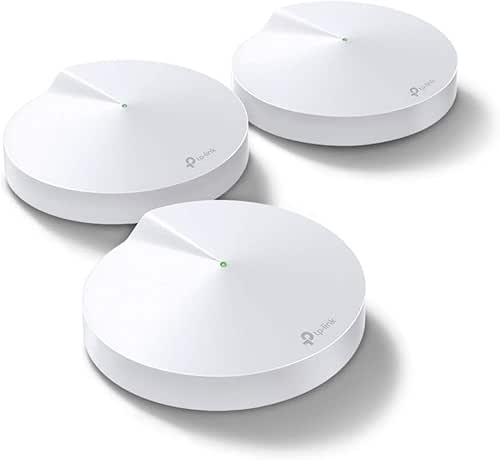
The TP-Link Deco M5 Mesh WiFi System (3-Pack) is an excellent choice for homeowners who need reliable, seamless Wi-Fi coverage across a large area. It covers up to 5,500 square feet and supports over 100 devices, eliminating dead zones. Each unit features dual Gigabit Ethernet ports for wired backhaul, boosting speed and stability. The system uses TP-Link’s Adaptive Routing technology to automatically select the fastest data path, ensuring smooth roaming with a single network name. Easy to set up via the Deco app, it’s compatible with major ISPs and smart home devices. With positive reviews and strong performance, it’s a solid solution for a modern, connected home.
Best For: homeowners needing extensive, reliable Wi-Fi coverage across large areas with support for multiple devices.
Pros:
- Covers up to 5,500 sq. ft. and supports 100+ devices for seamless connectivity.
- Supports wired Ethernet backhaul with dual Gigabit Ethernet ports on each unit for enhanced speed and stability.
- Easy setup via the Deco app, compatible with major ISPs and smart home devices, plus includes lifetime security with TP-Link HomeCare.
Cons:
- Discontinued by the manufacturer, which may affect ongoing support or firmware updates.
- Requires a modem for most ISPs, adding to initial setup costs if not already owned.
- Limited to a 3-pack, which might not be sufficient for very large or complex home layouts needing more units.
TP-Link Deco S4 Whole Home Mesh WiFi System (2-Pack)

For anyone seeking reliable, seamless WiFi coverage across a large home, the TP-Link Deco S4 Whole Home Mesh WiFi System (2-Pack) is an excellent choice. It uses Deco Mesh technology to deliver faster speeds and strong signals, covering up to 3,800 sq. ft. with two units. The system supports up to 75 devices with 3×3 6Stream AC1900 speeds, and all units work together under a single network name, switching devices seamlessly for prime performance. Setup is quick via the Deco app, and the system offers robust parental controls, security features, and support for wired Ethernet backhaul, making it a flexible, reliable solution for any home.
Best For: households seeking seamless, reliable WiFi coverage across large areas with support for multiple devices and easy setup.
Pros:
- Covers up to 3,800 sq. ft. with just 2 units, ideal for large homes
- Supports up to 75 devices with fast AC1900 speeds for smooth connectivity
- Easy setup via the Deco app and flexible deployment options, including wired Ethernet backhaul
Cons:
- May require a modem from your internet provider, adding to initial setup complexity
- Limited to 2 units in the pack, which might not suffice for extremely large or multi-story homes
- No built-in WiFi 6 support; uses WiFi 5, which may be less future-proof
TP-Link Deco WiFi 6 Mesh System (Deco X20)

The TP-Link Deco WiFi 6 Mesh System (Deco X20) is an excellent choice for households seeking reliable, high-speed internet coverage across large spaces. It replaces traditional routers and extenders with next-gen Wi-Fi 6 AX1800 technology, delivering seamless coverage up to 5,800 square feet and eliminating dead zones. Supporting up to 150 devices simultaneously, it ensures strong, stable connections for multiple users and smart devices. The system includes Gigabit Ethernet ports on each unit, allowing wired backhaul for extra speed and stability. Setup is straightforward via the Deco app, and it’s compatible with major ISPs and voice control through Alexa, making it perfect for busy, connected homes.
Best For: households and small businesses needing reliable, high-speed Wi-Fi coverage across large areas with multiple devices.
Pros:
- Seamless whole-home coverage up to 5,800 sq ft eliminating dead zones
- Supports up to 150 devices simultaneously ensuring stable connections for all
- Easy setup via the Deco app with flexible wired Ethernet backhaul options
Cons:
- Requires a modem for most ISPs, which may add to initial setup costs
- The 3-pack may be overkill for smaller spaces or fewer devices
- Limited advanced customization options compared to high-end enterprise networks
TP-Link AC1200 WiFi Extender

If you’re looking to expand your WiFi coverage without sacrificing speed, the TP-Link AC1200 WiFi Extender is an excellent choice. It offers dual-band performance with a combined bandwidth of 1.2 Gbps, delivering 867 Mbps on the 5 GHz band and 300 Mbps on 2.4 GHz. Covering up to 1,600 sq.ft and supporting up to 32 devices, it eliminates dead zones effectively. Its two adjustable antennas optimize signal reach, while smart adaptive roaming guarantees seamless movement around your home. Easy to set up via the TP-Link Tether app, it also supports Ethernet connections and mesh expansion, making it versatile for any remote work setup.
Best For: those seeking to expand their WiFi coverage across a large home or office while maintaining reliable speeds and seamless device connectivity.
Pros:
- Dual-band performance with a total bandwidth of 1.2 Gbps ensures fast, stable connections for multiple devices.
- Easy setup via the TP-Link Tether app simplifies installation and management.
- Compatible with most WiFi-enabled devices and supports mesh expansion for flexible network growth.
Cons:
- Extends coverage but may not increase overall internet speed, potentially affecting throughput in some cases.
- The device’s performance relies on the existing router’s capabilities and placement.
- External antennas require manual adjustment for optimal signal coverage.
TP-Link Deco X15 Dual-Band WiFi 6 Mesh System (2-Pack)

Anyone seeking seamless, high-speed Wi-Fi coverage across a large home will find the TP-Link Deco X15 Dual-Band WiFi 6 Mesh System (2-Pack) to be an excellent choice. It delivers up to 1,201 Mbps on the 5 GHz band and 300 Mbps on 2.4 GHz, covering up to 3,900 square feet. With support for up to 120 devices and flexible wired Ethernet backhaul, it outperforms traditional extenders. Setup is quick via the Deco app, and security features like TP-Link HomeShield protect your network. Plus, it works with Alexa and Google Assistant for voice commands, making managing your Wi-Fi effortless and reliable for remote work needs.
Best For: individuals or families needing extensive, high-speed Wi-Fi coverage across a large home with multiple devices and smart home integration.
Pros:
- Provides fast dual-band Wi-Fi 6 speeds up to 1,201 Mbps on 5 GHz and 300 Mbps on 2.4 GHz, ideal for streaming and gaming.
- Covers up to 3,900 sq. ft. with seamless mesh connectivity, reducing dead zones.
- Supports up to 120 devices simultaneously and offers flexible wired Ethernet backhaul for enhanced stability.
Cons:
- Requires a separate modem, which may add to initial setup costs.
- Might be more expensive than traditional extenders or single routers.
- Advanced features like TP-Link HomeShield may require a subscription for full functionality.
Amazon eero 6 Mesh Wi-Fi Extender

For those seeking to expand their existing Wi-Fi network seamlessly, the Amazon eero 6 Mesh Wi-Fi Extender offers an excellent solution. It adds up to 1,500 sq. ft. of Wi-Fi 6 coverage, improving overall network performance. Designed to work with your current eero setup, you can easily add multiple extenders to eliminate dead spots. Setup takes minutes via the eero app, and you can manage your network remotely. The extender uses TrueMesh technology for intelligent traffic routing, ensuring smooth streaming, gaming, and video calls. Plus, automatic updates keep your network secure and optimized, delivering a reliable, high-performance Wi-Fi experience.
Best For: homeowners and renters seeking to seamlessly expand their existing Wi-Fi network for improved coverage and performance.
Pros:
- Easy setup within minutes via the eero app.
- Reliable TrueMesh technology for intelligent traffic routing.
- Supports multiple extenders to eliminate dead spots and enhance coverage.
Cons:
- Requires an existing eero network to function.
- Limited to adding up to 1,500 sq. ft. of coverage per extender.
- May need multiple units for large or complex homes, increasing cost.
TP-Link Deco S4 Mesh WiFi System (3-Pack)

The TP-Link Deco S4 Mesh WiFi System (3-Pack) is an excellent choice for those who need reliable, whole-home coverage without dead zones. It replaces traditional routers and extenders, offering seamless coverage up to 5,500 sq.ft. with three units. Deco Mesh technology ensures faster speeds, stronger signals, and improved WiFi experience across your entire home. It supports up to 100 devices with AC1900 speeds and works as a single network, enabling smooth roaming. Setup is straightforward via the Deco app, and the system is compatible with major ISPs. Plus, it offers smart features like voice control and parental controls for a safer, more manageable online environment.
Best For: households or small offices seeking reliable, seamless whole-home WiFi coverage with easy setup and smart management features.
Pros:
- Covers up to 5,500 sq.ft. with three units, eliminating dead zones
- Supports up to 100 devices with fast AC1900 speeds and mesh technology for seamless roaming
- Easy setup via the user-friendly Deco app and compatibility with major ISPs
Cons:
- Modem required for most internet service providers, which may add to initial setup costs
- Limited to AC1900 speeds, which may not suffice for ultra-high bandwidth needs
- No built-in WiFi 6 support, so it may be less future-proof compared to newer models
Smart Mesh WiFi Extender with Ethernet Ports

Looking to eliminate Wi-Fi dead zones in your home while maintaining a secure and reliable connection? The Frontier Secure Air 4920 Smart Mesh Wi-Fi Extender is a great option. It boosts coverage across areas like garages, basements, and upstairs rooms, supporting dual-band WiFi 5 for fast, stable speeds. Its intelligent Smart Mesh Technology ensures seamless connectivity, automatically switching devices to the strongest signal. Plus, with two Ethernet ports, you can connect devices directly for added stability. Setup is quick via WPS without needing an app, and WPA2 encryption keeps your network secure. It’s a compact, reliable solution for whole-home Wi-Fi coverage.
Best For: Homeowners seeking to eliminate Wi-Fi dead zones and maintain a secure, reliable connection across multiple devices, including smart home gadgets and gaming consoles.
Pros:
- Supports dual-band WiFi 5 (802.11ac) for fast, stable speeds across multiple devices
- Seamless Smart Mesh Technology ensures automatic switching to the strongest signal for uninterrupted connectivity
- Includes 2 Ethernet ports for wired connections, enhancing stability for devices requiring a wired setup
Cons:
- Limited to WiFi 5 (802.11ac), not WiFi 6 or newer standards
- Slightly larger size may be less discreet in some home setups
- Customer reviews indicate it may have occasional connectivity or setup issues for some users
Google WiFi Mesh Router System (2 Pack) for Whole Home Coverage

If you’re seeking reliable, whole-home WiFi coverage without dead zones, the Google WiFi Mesh Router System (2 Pack) is a smart choice. It covers up to 3,800 sq ft seamlessly, and you can easily expand by adding more points for larger spaces or more devices. Using Wi-Fi 5 technology, it delivers speeds up to 2.2 Gbps, supporting smooth streaming, gaming, and browsing simultaneously. Setup is straightforward, and its sleek design blends into any environment. With dual-band performance and built-in parental controls, this system offers both efficiency and security, making it ideal for a consistent, high-performance remote work setup at home.
Best For: households or small offices seeking reliable, high-speed whole-home WiFi coverage with easy expansion and user-friendly setup.
Pros:
- Seamless coverage up to 3,800 sq ft eliminates dead zones
- Supports Wi-Fi 5 (802.11ac) with speeds up to 2.2 Gbps for smooth multiple device use
- Simple setup with a sleek design that blends into any environment
Cons:
- Limited to Wi-Fi 5, not the latest Wi-Fi 6 or 6E technology
- May require additional points for very large or complex spaces
- Parental controls are basic and may not satisfy advanced network management needs
Google WiFi Mesh WiFi System (2 Pack)

A Google WiFi Mesh WiFi System (2 Pack) is ideal for large homes or offices that need extensive, reliable coverage. Each unit covers up to 1,500 sq ft, giving you a total of 3,000 sq ft of seamless Wi-Fi. It easily connects to your modem, creating a strong, stable network that supports multiple devices. You can add more Google Mesh units for even broader coverage. Designed for maximum range, it ensures consistent performance across large spaces. Its compatibility with other Google Mesh devices makes it flexible to expand as your needs grow, making it a smart choice for remote work setups in bigger environments.
Best For: those who need extensive, reliable Wi-Fi coverage for large homes or offices with multiple devices and seamless connectivity.
Pros:
- Provides up to 3,000 sq ft of combined coverage with just two units
- Easy to set up and expand by adding more Google Mesh devices
- Supports multiple devices simultaneously for stable, uninterrupted internet
Cons:
- Limited coverage per unit may require additional units for very large spaces
- Requires a compatible modem and internet plan for optimal performance
- May be less suitable for users seeking advanced customization options
DBIT AX1500 WiFi 6 Mesh System (3-Pack)

The DBIT AX1500 WiFi 6 Mesh System (3-Pack) is ideal for those seeking reliable, high-speed internet coverage across large homes or offices. With up to 5,600 sq ft of coverage, it seamlessly replaces traditional routers and extenders. Its combined speeds of 1500Mbps support over 120 devices simultaneously, perfect for smart homes, gaming, and video conferencing. Each node features four Gigabit Ethernet ports for wired connections. The system offers smart roaming to eliminate dead zones, easy setup via mobile app, and WPA3 security. Plus, you can expand coverage wirelessly, making it a flexible, secure, and powerful solution for demanding remote work environments.
Best For: households or offices requiring extensive, reliable Wi-Fi coverage for multiple devices with high-speed internet and seamless connectivity.
Pros:
- Covers up to 5,600 sq ft with a 3-pack for comprehensive home or office coverage
- Supports over 120 devices simultaneously, ideal for smart homes or busy environments
- Easy to set up and manage via mobile app, with support for expanding coverage wirelessly
Cons:
- Slightly higher price point compared to basic routers or extenders
- Limited to a combined speed of 1500Mbps, which may not suffice for ultra-high-speed needs
- May require additional nodes for very large or complex layouts beyond 5,600 sq ft
Tenda BE3600 Dual Band WiFi 7 Mesh System (3-Pack)
For large households or busy environments with many devices, the Tenda BE3600 Dual Band WiFi 7 Mesh System (3-Pack) delivers exceptional performance thanks to its support for over 160 devices simultaneously. Its Wi-Fi 7 technology offers speeds up to 3.6 Gbps, ensuring fast, lag-free connections for streaming, gaming, and remote work. With mesh technology, coverage easily expands across 4-7 rooms, eliminating dead zones. Each node features high-gain antennas and high-power FEMs for stable signals. Advanced algorithms enable seamless device switching, maintaining reliable performance throughout your home or office. Setup is straightforward, and security options ensure your network stays private and protected.
Best For: households or offices with large spaces and many devices requiring fast, reliable Wi-Fi coverage and seamless connectivity.
Pros:
- Supports over 160 devices simultaneously for busy households or work environments
- Wi-Fi 7 technology delivers ultra-fast speeds up to 3.6 Gbps for smooth streaming, gaming, and remote work
- Mesh system provides expansive coverage across 4-7 rooms, eliminating dead zones and ensuring consistent performance
Cons:
- First available date is listed as July 19, 2025, which may be a future release date or a typographical error
- Limited detailed information on advanced security features beyond basic VPN support
- Product rating of 4.2/5 stars based on 102 reviews suggests some users may experience issues or have concerns
Linksys Atlas WiFi 6 Mesh Router (2-Pack)

If you’re looking to eliminate dead zones and guarantee seamless WiFi coverage across a large home or multiple structures, the Linksys Atlas WiFi 6 Mesh Router (2-Pack) is an excellent choice. It supports WiFi 6, delivering gigabit speeds up to 3.0 Gbps and covering up to 4,000 sq ft. With advanced Qualcomm chipset technology, it provides wire-like stability, four times the capacity of traditional routers, and access to 160 MHz channels for reliable connections. The system supports over 50 devices, making it perfect for streaming, gaming, and video calls. Easy to set up via the Linksys app, it offers robust security features and effortless management.
Best For: households or multi-structure homes needing reliable, high-speed WiFi coverage for streaming, gaming, and multiple devices.
Pros:
- Supports WiFi 6 (AX3000) with gigabit speeds up to 3.0 Gbps
- Covers up to 4,000 sq ft and supports over 50 devices
- Easy setup and management via the Linksys app with robust security features
Cons:
- Requires app-based setup, which may be less straightforward for some users
- Price may be higher compared to traditional routers without mesh capabilities
- Limited to specific models and configurations, potentially less flexible for advanced customizations
DBIT AC1200 Mesh WiFi System (3-Pack)
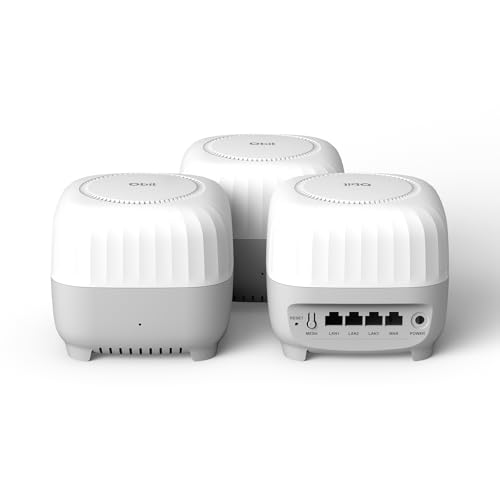
Large homes or multi-story buildings often struggle with dead zones and inconsistent WiFi signals, making a mesh system like the DBIT AC1200 a smart choice. This 3-pack covers up to 6,000 square feet, seamlessly replacing traditional routers and extenders. It supports over 90 devices at once with dual-band speeds up to 1200Mbps, ensuring smooth streaming and work calls. Equipped with four Gigabit Ethernet ports per node, it offers fast wired connections. The system features smart roaming, WPA3 security, guest networks, and parental controls. Setup is quick via a mobile app or web GUI, and expanding coverage is simple with wireless node addition.
Best For: homeowners or office users with large, multi-story spaces needing reliable, seamless WiFi coverage and support for many devices.
Pros:
- Covers up to 6,000 sq ft, ideal for large homes and multi-story buildings
- Supports over 90 devices simultaneously with dual-band speeds up to 1200Mbps
- Easy to set up and expand with a user-friendly mobile app and wireless node addition
Cons:
- Customer ratings are moderate at 3.7 out of 5 stars, indicating some user dissatisfaction
- Limited to 3 nodes, which may not be enough for extremely large areas or complex layouts
- Requires compatible ISP and may need manual configuration for optimal performance
Factors to Consider When Choosing Mesh Wifi for Remote Working Setup
When choosing a mesh WiFi system for remote work, I consider factors like coverage area and device compatibility to guarantee I stay connected everywhere. Speed requirements and security features are also key to keeping my work smooth and safe. Plus, I look for systems that are easy to set up so I can get online quickly without hassle.
Coverage Area Needs
Determining the right coverage area for your mesh WiFi system is crucial to guarantee reliable connectivity throughout your remote workspace. I recommend measuring your total square footage carefully to understand your needs. Think about the number of rooms, floors, and any dead zones that could disrupt your signal. Pay attention to areas with thick walls, metal structures, or long distances, as these may require additional mesh nodes to maintain strong signals. Also, evaluate your current internet usage and connected devices to ensure the system can handle your bandwidth demands. It’s wise to choose a mesh WiFi system that covers a bit more than your current space, giving you room to grow or add devices later. Proper planning helps prevent connection issues and keeps your remote work seamless.
Device Compatibility
Choosing a mesh WiFi system that supports your devices is vital for a smooth remote work experience. You want a system that works seamlessly with your laptops, smartphones, and smart home gadgets without constant drops or compatibility issues. It’s also imperative to verify if it’s compatible with your current internet provider and modem, so you avoid connection hiccups. Look for support of the latest Wi-Fi standards like Wi-Fi 6 or Wi-Fi 6E, which ensure your network is ready for future devices and offers better performance. Make sure the system can handle the number of devices you plan to connect simultaneously without slowing down. Additionally, check if it supports voice assistants and smart home platforms, enabling smoother integration into your remote workspace.
Speed Requirements
Ever wonder how much speed you really need for a smooth remote work setup? Generally, a minimum of 100 Mbps is recommended to handle HD video calls and large file uploads or downloads without buffering. If you work with multiple devices streaming, video conferencing, or transferring data simultaneously, speeds of 300 Mbps or higher are ideal. Mesh systems supporting Wi-Fi 6 can deliver faster speeds and lower latency, which are vital for data-heavy tasks. Additionally, wired Ethernet backhaul options ensure consistent speeds, reducing lag during intensive activities. It’s also wise to match your mesh system’s capabilities with your internet plan’s maximum speed to prevent bottlenecks. Choosing the right speed ensures a seamless remote work experience, free of interruptions and delays.
Security Features
Are security features really indispensable when selecting a mesh WiFi system for remote work? Absolutely. In today’s digital world, protecting sensitive work data is vital. Advanced security protocols like WPA3 encryption safeguard your entire network from unauthorized access and cyber threats. Parental controls aren’t just for families—they help filter content and set online limits to keep your workspace safe. Regular firmware updates patch vulnerabilities and strengthen defenses. Built-in firewalls and network segmentation allow you to isolate devices, reducing malware risks. Plus, secure remote management and password protections ensure only authorized users can access or change network settings. Prioritizing these features means you’re better protected against cyberattacks, giving you peace of mind and a safer remote work environment.
Ease of Setup
When selecting a mesh WiFi system for remote work, prioritizing ease of setup can save you time and frustration. Look for systems with a simple, guided setup process, preferably through a user-friendly mobile app that walks you through each step. Features like WPS or one-click networking help minimize configuration time, making setup quick and hassle-free. It’s important to guarantee the system is compatible with your existing modem and internet provider to prevent unnecessary complications. Choose a mesh network that offers clear, straightforward instructions and requires minimal technical knowledge. Additionally, opt for systems that allow easy addition of nodes or units without complex reconfiguration, so your network can grow seamlessly as your needs evolve. This approach ensures a smooth, stress-free setup.
Wired Backhaul Options
Wired backhaul options play a essential role in optimizing your mesh WiFi system for remote work, especially in larger or multi-story homes. Using Ethernet cables to connect mesh nodes creates a dedicated, high-speed data path that reduces wireless interference and congestion. This setup markedly boosts network stability and throughput, which is critical when handling bandwidth-heavy tasks like video conferencing or large file transfers. Ethernet backhaul supports speeds of 1 Gbps or higher, ensuring fast, reliable connections across your entire network. Many mesh systems come with multiple Gigabit Ethernet ports per node, making wired backhaul setup straightforward and flexible. By minimizing latency and packet loss, wired backhaul delivers a more consistent, responsive internet experience—key for maintaining productivity in a remote work environment.
Budget Considerations
Choosing the right mesh WiFi system involves balancing features with your budget. Mesh systems range from about $50 to over $300, so setting a clear budget helps narrow options. Keep in mind the total cost, including extra nodes or extenders needed to cover your space, which can add up. Cheaper systems might lack advanced features like WPA3 encryption, multiple Ethernet ports, or high device capacity, affecting long-term value. Investing in a higher-priced system often means better performance, future-proofing, and longer warranty coverage, saving you money in the long run. Be sure to take into account your remote work needs—covering a large area or supporting many devices might require a bigger investment. Balancing these factors ensures you get a system that meets your needs without overspending.
Frequently Asked Questions
How Do Mesh Wifi Systems Handle Multiple Simultaneous Device Connections?
Mesh WiFi systems handle multiple devices well by using smart routing technology that directs each device’s data to the least congested node. I’ve noticed my system manages several devices seamlessly, often prioritizing bandwidth for critical work tasks. It automatically balances the load, preventing lag or slowdowns, which keeps my remote work smooth and reliable. This way, I stay connected without interruptions, even with many devices online at once.
Can Mesh Systems Prioritize Bandwidth for Remote Work Applications?
Yes, mesh systems can prioritize bandwidth for remote work applications. I set mine to give priority to my video conferencing and work-related apps, ensuring smooth performance even with multiple devices connected. Most mesh routers have Quality of Service (QoS) settings, so you can assign higher bandwidth to your essential tasks. This way, I never experience lag during important meetings, making my remote work more efficient and stress-free.
What Security Features Are Included in Top Mesh Wifi Systems?
They say security is only as strong as its weakest link, and top mesh WiFi systems get that. I find they include features like WPA3 encryption, automatic firmware updates, and integrated firewalls to keep your network safe. Plus, many offer parental controls and device management, giving you peace of mind. These tools help protect your work and personal data, so you can focus on what matters without worry.
Do Mesh Wifi Units Support Seamless Roaming Across Different Rooms?
Yes, most mesh WiFi units support seamless roaming across different rooms. I’ve experienced it firsthand, and it means my device automatically switches to the strongest signal without dropping my connection. This feature is especially helpful when moving around my home or working from different areas. Mesh systems use intelligent algorithms to guarantee a smooth transition, so I don’t have to manually reconnect or lose productivity.
How Easy Is It to Upgrade or Expand an Existing Mesh Wifi Network?
Upgrading or expanding my mesh WiFi network feels like adding new chapters to a well-loved book—smooth and effortless. Most systems let me easily add nodes or replace existing ones without rewiring, thanks to plug-and-play setups. I just follow simple instructions, and my network grows stronger and broader, like a tree reaching for the sky. It’s a seamless process that keeps my remote work flowing without missing a beat.
Conclusion
Choosing the right mesh WiFi system is like fine-tuning a musical instrument—every component needs to work in harmony for perfect performance. With options tailored for different spaces and budgets, you can find the ideal setup to keep your remote work seamless and reliable. Prioritize your needs, consider coverage, and don’t be afraid to invest in quality. After all, a strong connection is the backbone of productivity in today’s digital world.